✓ Everything You need to know about charitable
Frequently Asked Questions
Simple answers to your most important questions about Charitable so that you can fundraise with confidence.
10,000+
Nonprofits worldwide
1M+
Plugin downloads
5★
Support rating
Zero
Platform fees
About Charitable
What is Charitable?
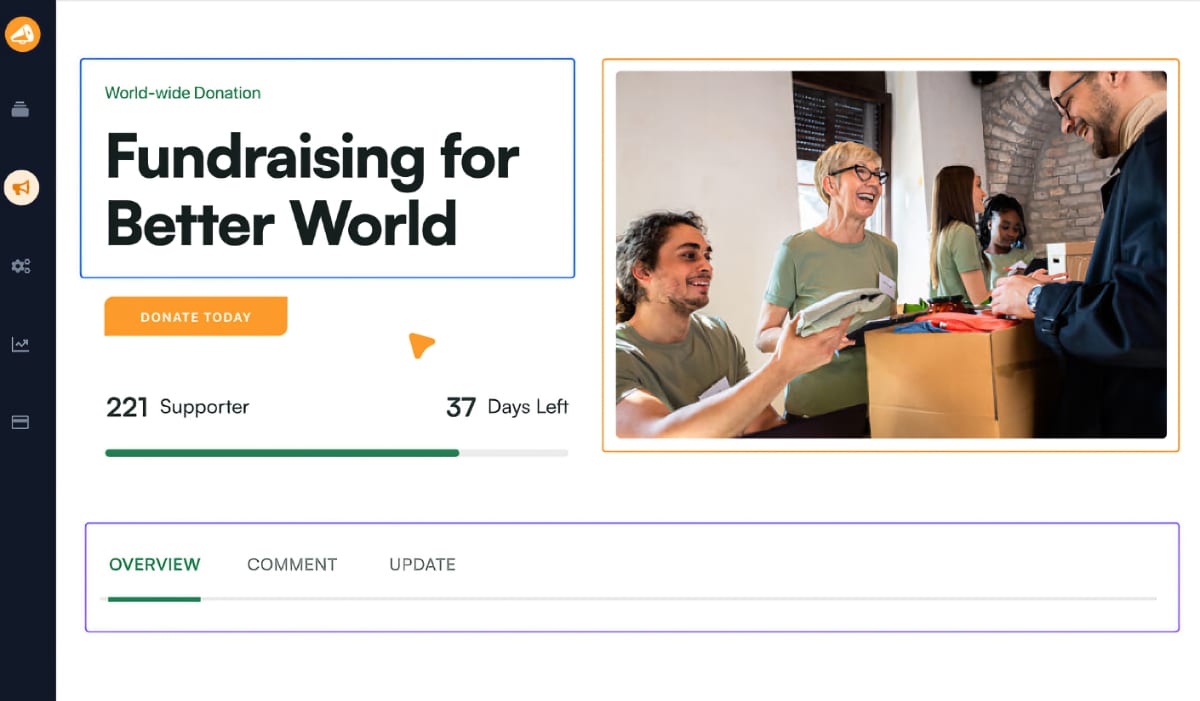
Charitable is an all-in-one solution for non-profits to raise money online. It’s designed to be easy for any one to set up and use to accept donations directly on your website.
You can launch full-fledged fundraising campaigns without coding, without a developer.
It lets you manage your donations all under one roof, and comes with powerful fundraising features such as recurring donations, peer-to-peer fundraising, automated receipts, donor dashboard, and more.
Who owns and maintains Charitable?
The team behind Charitable brings years of deep experience in the nonprofit sector. They truly understand the ins and outs of fundraising and managing nonprofits. Charitable was designed, and continues to be improved, with a full understanding of what nonprofits really need to succeed.
Charitable is proudly part of the Awesome Motive family of WordPress products, which is known for building and maintaining robust, reliable plugins for the WordPress ecosystem.
How many non-profits use Charitable?
Charitable is used and trusted by 10,000+ non-profits around the world.
How many times has Charitable been downloaded?
The Charitable plugin has been downloaded 1+ million times!
Charitable Cost & Pricing
Does Charitable really have zero platform fees?
Yes. Charitable Pro does not carry any platform fees. You pay a single annual charge (starting at $69 per year). After that, all the funds you raise are yours. Charitable Pro never takes a cut or percentage. Note: You might still incur any transaction fee charged by your payment provider such as Stripe or PayPal. That fee is collected directly by the payment provider.
How much does Charitable cost?
Charitable offers a lite version and a pro plugin. Here are is the cost you will incur depending on which plugin you choose.
Charitable Pro – Starting at $69 per year. There is only one annual fee and there are no transaction fees charged by Charitable. The only other fees you’ll encounter are the standard payment processing fees from your chosen payment gateway – those go directly to the gateway and are completely outside of our hands.
Charitable Lite – Our free plugin, available on WordPress.org, is free to get started with and charges a nominal 3% fee per transaction. This allows you to launch your fundraising efforts with no upfront investment or budget required. The small percentage helps us continue to maintain and improve the plugin for everyone.
What are the pricing plans available with Charitable Pro?
| Plan Tier | Year 1 | Year 2 onwards |
| Basic | $69 | $149 |
| Plus | $99 | $199 |
| Pro | $199 | $399 |
| Elite | $299 | $599 |
What is Charitable Lite? Is it really free to use?
Yes! Charitable offers a free version called Charitable Lite, available on WordPress.org. Download it here »
What’s the difference between Charitable Lite and Charitable Pro?
Lite gives you all the essential tools you need to start fundraising right away, including:
- Unlimited fundraising campaigns
- Visual campaign builder
- Donation forms
- Templates
- Automated emails
- Automated donation records
- Offline donations
- Payment gateway integrations with Stripe, PayPal, and Square
Charitable Pro starts at just $69 per year with no transaction fees, and unlocks advanced fundraising features. Here are a few highlights:
- Donor management
- Donor dashboard
- Recurring donations
- PDF receipts
- Peer-to-peer fundraising
- Fee relief
- Ready-made reports
- Anonymous donations
- Import/Export
- Email marketing integrations
- More payment integrations
See the full comparison: Charitable Lite vs Pro »
Can I start with Charitable Lite and upgrade to Pro later?
Yes, you can! You can upgrade to Charitable Pro any time. The process is seamless. Even on Charitable Pro, all plans are scalable. So you can start on the Basic plan and upgrade to the Pro plan when you’re ready.
See our guide: How to Upgrade to Charitable Pro »
Can donors choose to cover the transaction fees?
Yes! Charitable offers a “Fee Relief” extension that allows donors to voluntarily cover the payment gateway processing fees. This ensures your organization receives the full intended donation amount.
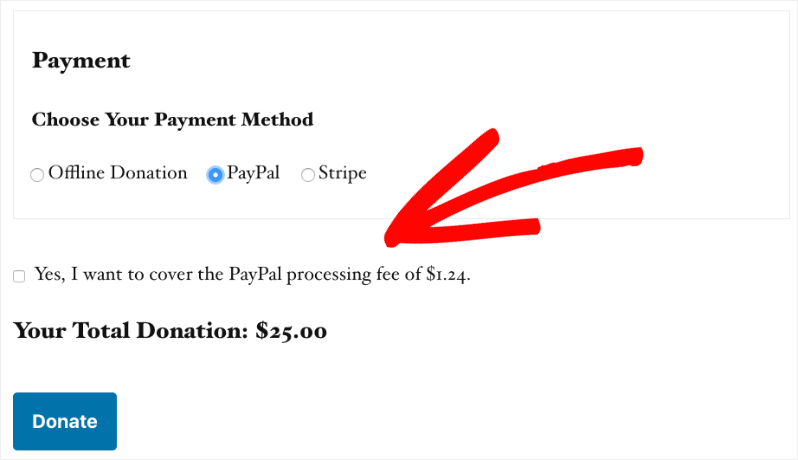
For example, if a donor gives $100 and wants to cover the 2.9% + $0.30 processing fee, the equation for their total charge would be: $103.20. You’ll receive $100 and your payment processor will receive their $3.20 fee.
How do I handle refunded donations?
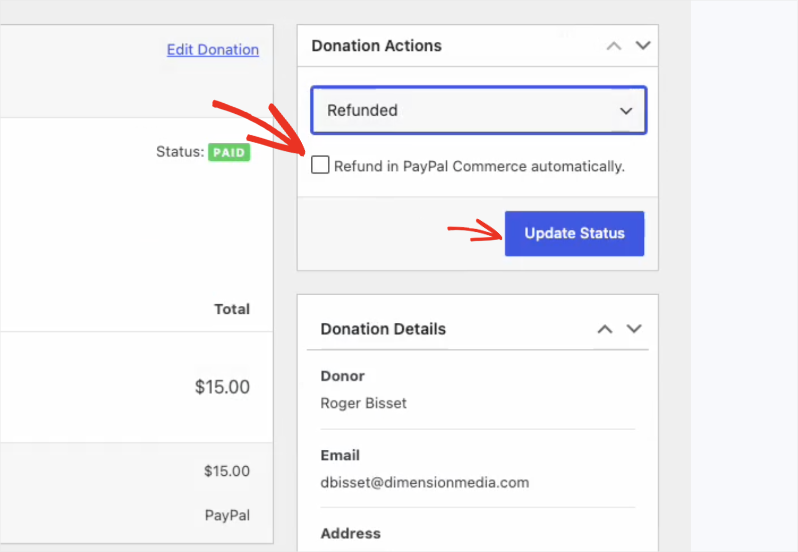
While the actual financial transfer of a refund must be initiated through your specific payment processor (like Stripe or PayPal), you can easily update the donation status to “Refunded” within the Charitable dashboard. This ensures your campaign totals and analytics automatically adjust to reflect the refund.
For certain gateways that include PayPal, Windcave, and Square, you can check a box that lets you initiate the refund directly through your payment gateway.
What happens if my premium Charitable license expires?
If you choose not to renew your premium license, your active donation campaigns and the plugin itself will continue to function normally. However, you will lose access to premium email support, and you will no longer receive new feature updates or critical security patches.
Does Charitable offer non-profit discounts?
No, because at Charitable, we’ve thoughtfully crafted our pricing with non-profit organizations in mind. Our approach is simple: provide powerful fundraising tools at reasonable prices that work for charitable organizations.
We understand non-profits need to be careful with every dollar. Every pricing decision we make starts with this understanding.
We’ve created a pricing structure that’s reasonable and affordable for non-profit budgets, so you can get professional fundraising tools without straining your resources. There are no hidden costs or surprise fees – what you see is what you get. Our transparent pricing means you can plan and budget with confidence.
Does Charitable offer a money-back guarantee?
Yes! Charitable is backed by a standard 14-day, 100% money-back guarantee. If you purchase a premium plan and find it doesn’t fit your organization’s needs within the first 14 days, you can request a full refund.
Can I use one premium license on multiple websites?
This depends on the pricing plan you choose. Charitable offers various tiers (such as Basic, Plus, Pro, and Elite). The Elite plan allows you to activate your license on multiple domains, which is great if you manage several non-profits or microsites.
Getting Started with Charitable
What do I need to use Charitable?
To use Charitable on your website, you’ll need the following:
- A WordPress Site: Charitable is a WordPress plugin, so you need an installed and functioning WordPress website to use it.
- Charitable Plugin: Download and install the free version of the Charitable plugin from the WordPress Plugin Directory. Or if you opt for Charitable Pro, you can subscribe to a plan on the official website. Then, you can download the premium plugin and upload it to your WordPress site. Here’s a guide on How to Install Charitable »
- Payment Gateway: To process donations, you’ll need a payment gateway. Charitable supports multiple payment gateways, including PayPal, Stripe, and others. You’ll need to set up an account with the payment gateway of your choice.
After installing and activating the plugin, you can begin creating campaigns and customizing them to suit your needs.
Will Charitable work with any WordPress site?
Yes, Charitable is designed to work with any self-hosted WordPress site. As long as your website is running WordPress version 4.8 or higher, you should be able to install and use the Charitable plugin without any issues. Ensure that your site meets the basic WordPress hosting requirements for optimal performance.
What other platforms can I use Charitable with?
Charitable is specifically developed as a WordPress plugin, so it is not compatible with other website platforms. It is designed to integrate seamlessly with WordPress sites, leveraging the platform’s flexibility and functionality.
Will Charitable work on Shopify?
No, Charitable is not compatible with Shopify. Charitable is strictly a WordPress plugin and cannot be installed or used on Shopify sites. If you’re looking for donation solutions on Shopify, you may need to explore specific apps designed for that platform.
Will Charitable work on Wix?
No, Charitable cannot be used with Wix as it is exclusive to WordPress. Wix has its own ecosystem and does not support third-party WordPress plugins. For donation functionalities on Wix, you would need to look at Wix’s available apps or built-in features.
How do I set up Charitable on my WordPress site?
Charitable is designed to be easy for anyone to setup. When you install the plugin on your WordPress site, there is a setup wizard that will guide you through the basics. You can also follow this Getting Started with Charitable guide for step by step instructions.
Do I need to know how to code to use Charitable?
Not at all. Charitable is designed to be plug-and-play. It works seamlessly with your existing WordPress theme and provides a visual campaign builder that doesn’t require any HTML or PHP knowledge.
How many fundraising campaigns can I create with Charitable?
You can create as many campaigns as you need to raise funds online. Charitable lets you create unlimited fundraising campaigns.
Charitable Integrations
What payment gateways does Charitable support?
The free version of Charitable supports PayPal, Stripe, and Square. It also supports offline payments (like checks or bank transfers).
By upgrading to a premium plan, you unlock integrations with top payment processors, including:
Does Charitable integrate with email marketing services?
Yes, Charitable integrates seamlessly with many popular email marketing and newsletter platforms. You can automatically add donors to your mailing lists using add-ons for:
Does Charitable integrate with apps outside of WordPress?
Yes, Charitable integrates beautifully with Zapier. This allows you to connect your donation forms to 7000+ external applications, like Google Sheets, Salesforce, Slack, or dedicated CRM platforms, automating your workflow without writing any code.
Charitable also integrates with Uncanny Automator. With this connection, you can automatically add donors to your CRM, email lists, or membership sites the moment they give. Send custom thank you messages, certificates, or updates based on donation amount or campaign. You can also build multi-step automations that would normally take hours of manual work.
Will Charitable work with my current WordPress theme and page builders?
Charitable is built to inherit your theme’s styling, so it looks great out of the box with virtually any well-coded WordPress theme. It also works seamlessly with popular page builders, including:
Can I use Charitable alongside WooCommerce?
Yes, you can easily have both Charitable and WooCommerce installed on the same WordPress website. However, they operate independently. Charitable has its own optimized, high-converting checkout process, meaning a Charitable donation and a WooCommerce product cannot currently be purchased at the same time in a single, mixed shopping cart.
Can donors use Apple Pay or Google Pay?
Yes! If you use the Stripe payment gateway extension, your donors will have the option to check out using digital wallets like Apple Pay, Google Pay, and Microsoft Pay. This provides a frictionless, one-click checkout experience on mobile devices.
You can also enable Venmo, Apple Pay and Google Pay with PayPal Commerce.
See: How to Enable Apple Pay And Google Pay In Donation Forms With Stripe
Can I accept recurring donations?
Yes, you can accept recurring donations by using Charitable Pro. It’s easy to set up and manage recurring donations on your fundraising campaigns.
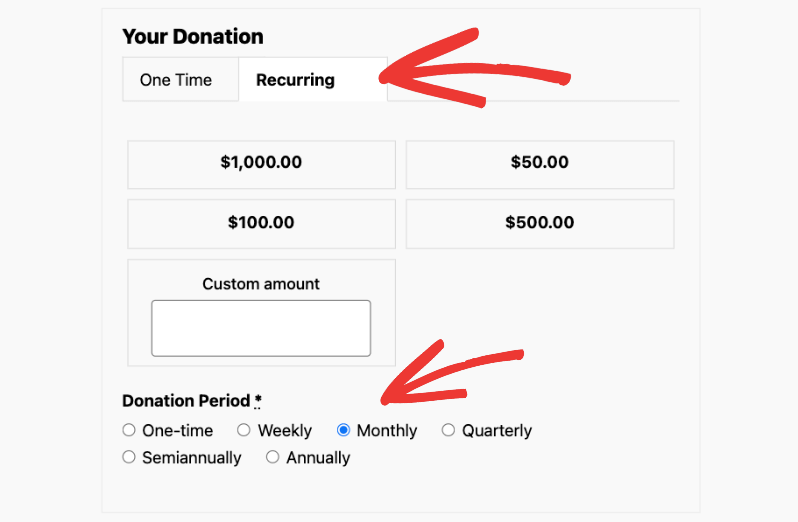
Once enabled, donors have the option to pledge ongoing support by selecting a recurring donation frequency that suits them, such as monthly or annually. This feature is perfect for helping build sustained, long-term funding for your causes.
Can my supporters raise money on my behalf?
Yes! Charitable offers a peer-to-peer fundraising feature through its “Ambassadors” extension. This allows your supporters to create and manage their own personal fundraising campaigns to raise money for your organization.
Charitable Receipts & Compliance
Does Charitable send tax receipts to donors?
Yes, Charitable automatically sends customizable email receipts to donors upon completing a donation. You can enable/disable and customize the email content under Charitable » Settings » Email.
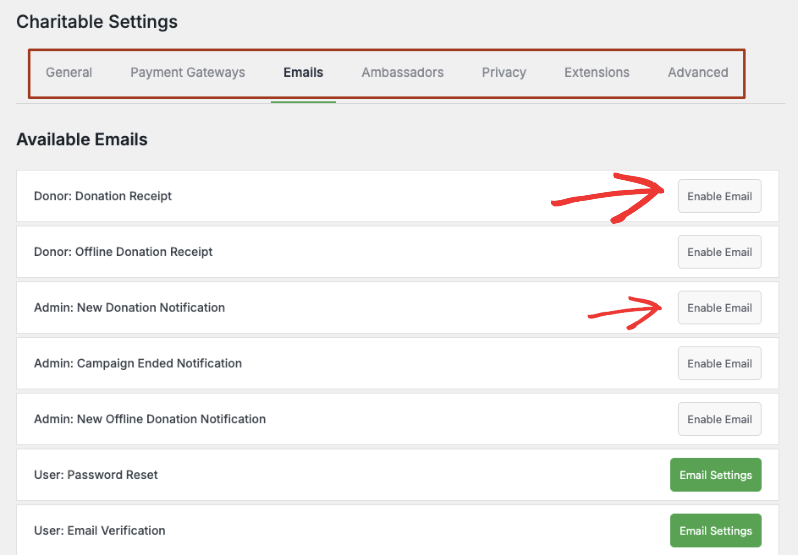
If you need downloadable, tax-compliant receipts, the premium PDF Receipts allows you to generate and attach PDF receipts automatically.
What are PDF Receipts?
PDF Receipts are digital donation acknowledgments that can be sent to donors via Charitable. They serve as proof of donation and include details such as the donation amount, date, and any other relevant information, making them useful for donor records and tax purposes.
What are Annual Receipts?
Annual Receipts are summary statements provided to donors at the end of the year. These compile all donations made throughout the year into a single document, which can be useful for tax reporting and personal record-keeping. Learn more »
Is Charitable GDPR compliant?
Yes, Charitable includes privacy features designed to help you stay compliant with GDPR and other international privacy laws. You can easily add mandatory Terms & Conditions or Privacy Policy checkboxes to your donation forms and manage donor data securely.
Are Charitable donation forms protected from spam?
Yes, Charitable includes tools to help protect your donation forms from spam. By integrating with popular WordPress spam protection plugins like Akismet or setting up CAPTCHA verification, you can add an extra layer of security to your forms. These measures help ensure that the contributions and interactions on your site are legitimate and keep automated spam at bay.
Does Charitable protect against spam and fraudulent donations?
Yes, security is a top priority. Charitable integrates seamlessly with Google reCAPTCHA. By enabling this feature, you can block spam bots and card-testing fraud from cluttering your database and costing you unnecessary gateway fees.
Do I need an SSL certificate to accept donations?
Yes. While Charitable itself does not require an SSL certificate to function, industry standards and payment processors (like Stripe and PayPal) require your website to have an active SSL certificate to process credit cards securely. This ensures your URL starts with https and protects your donors’ sensitive data.
Charitable Fundraising Optimization
Can I set a fundraising goal and display a progress bar?
Yes, Charitable allows you to set fundraising goals and display a progress bar on your campaign pages. This feature helps you communicate the goals of your fundraising efforts clearly to your supporters and motivates donations by showing how much has been raised toward your target.
To set up a fundraising goal, simply enter your desired goal amount when creating or editing a campaign. Once the goal is set, a progress bar will automatically appear on your campaign page to visually track the amount raised in relation to your target.
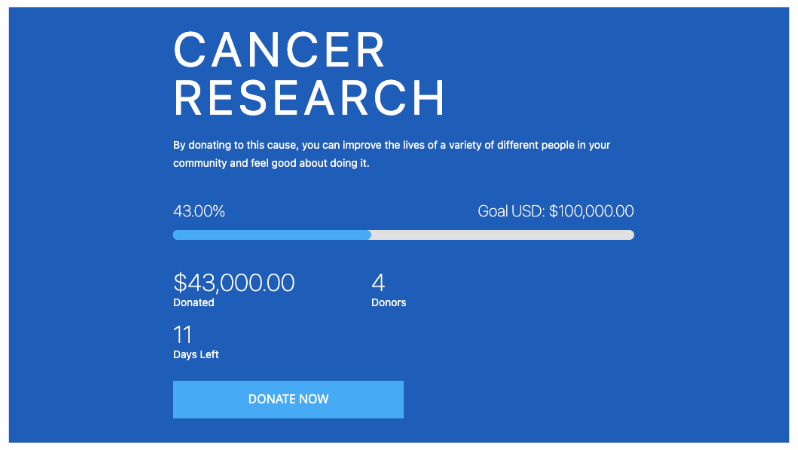
For detailed guidance on setting this up, please refer to our post: How to Add a Progress Bar or Fundraising Thermometer »
Is it possible to set an end date for my campaign?
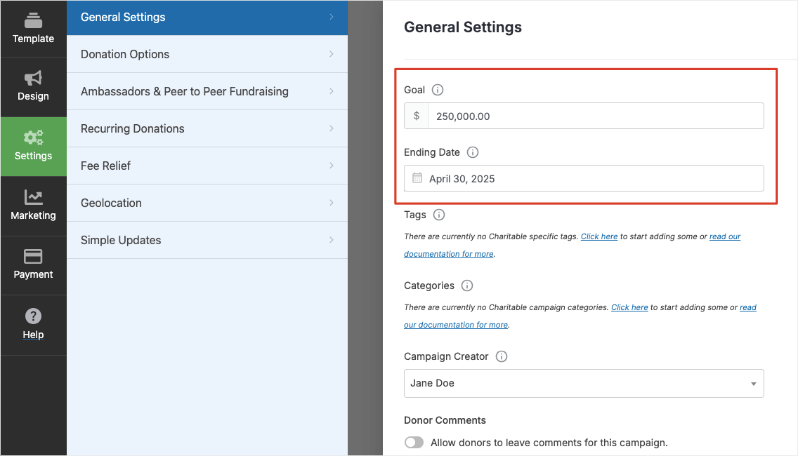
Absolutely. If you are running a time-sensitive fundraiser, you can set a specific expiration date and time. Once that date passes, Charitable will automatically close the campaign and stop accepting new donations.
Can I customize the fields on my donation form?
Yes. Charitable includes a drag-and-drop donation form builder. You can easily add, remove, or rearrange fields to collect the exact information you need from your donors, such as their phone number, mailing address, or custom text fields for special instructions.
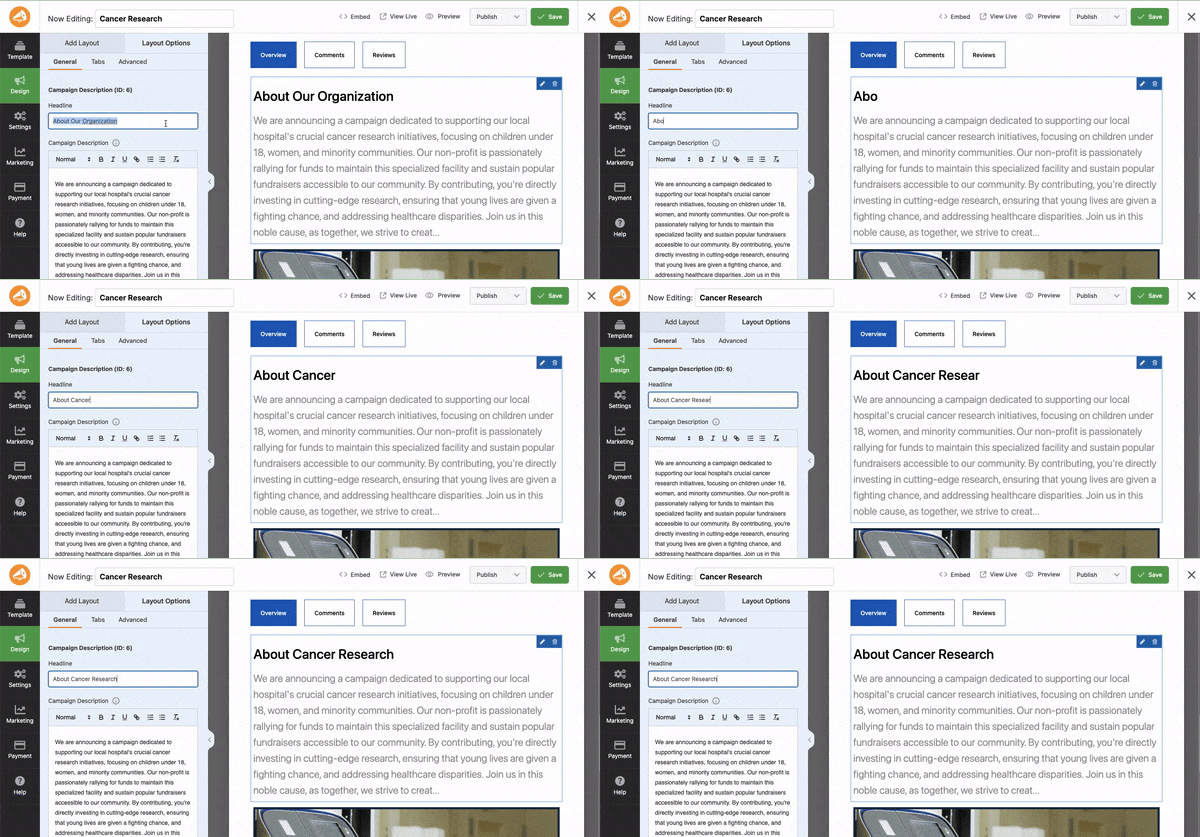
This is a visual builder, so you can simply click on the preview and change text, images, colors, and more.
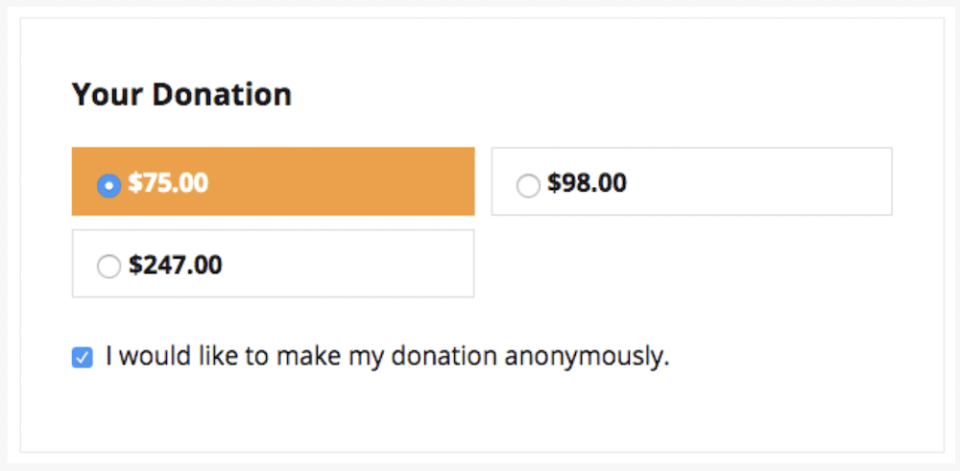
Can donors make anonymous donations?
Yes. Charitable includes an easy-to-use setting that allows donors to check a box to remain anonymous. If selected, their donation will still process normally, but their name will be hidden from any public donor lists or recent donation widgets on your site.
Can I set suggested donation amounts?
Absolutely. You can easily set up predefined donation tiers to give donors a baseline.
So for instance, a donor can see your suggested donation amounts like this:
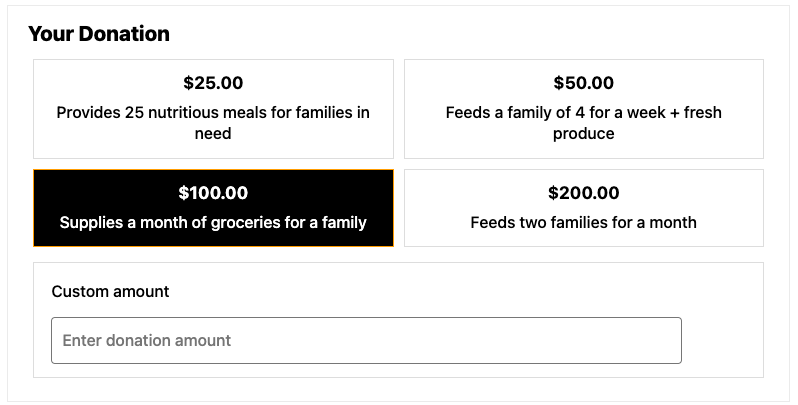
You can also enable a “Custom Amount” field so donors can give an exact amount of their choosing.
Can I accept donations in different currencies?
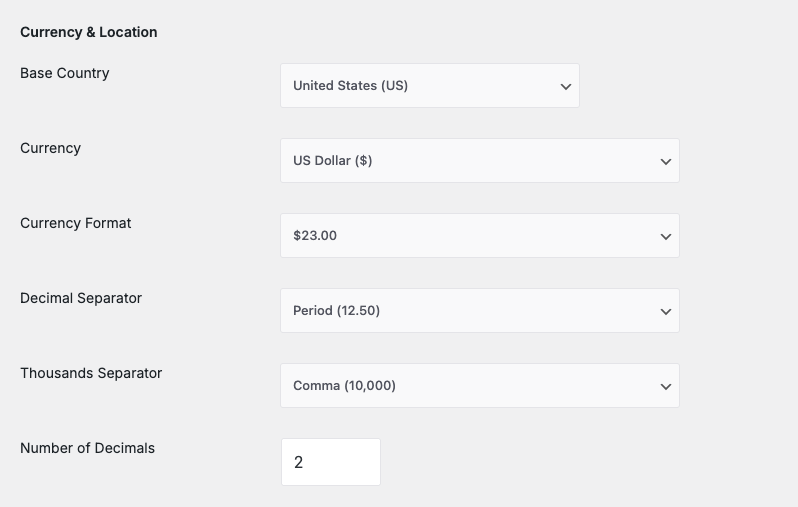
Yes, Charitable supports a wide variety of global currencies. You can set your preferred base currency within the plugin settings to match the primary location of your non-profit or your target donor base.
To configure the currency settings, you can navigate to the Charitable settings within your WordPress dashboard and select your preferred currency.
If you require more advanced currency options or conversions, consider using payment gateways that support multi-currency transactions, as these may provide the flexibility you need for international fundraising.
Can I add videos and images to my campaign pages?
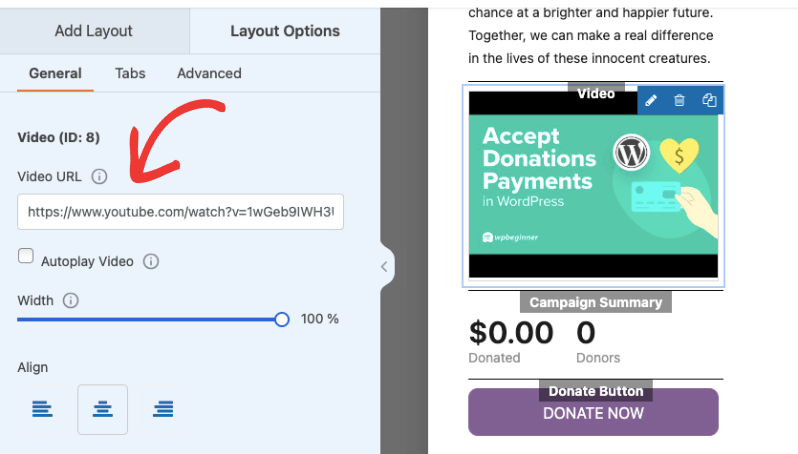
Definitely. Since Charitable integrates with the native WordPress editor, you can easily embed YouTube or Vimeo videos, add image galleries, and format your campaign description just as you would a standard blog post or webpage. Rich media is a great way to tell your non-profit’s story!
Can supporters make a donation in honor or memory of someone?
Yes. Charitable allows donors to leave comments with their donation. When enabled, donors can write messages, testimonies, and encouraging messages for others to read.
Charitable also allows you to add custom fields to your form so you can create fields such as “in honor or memory of”. Donors can then fill in the details.
This data will be captured in their donation record too.
Is Charitable available in languages other than English?
Yes, Charitable is fully translation-ready. It works perfectly with popular WordPress multilingual plugins like Universally, WPML and Loco Translate, allowing you to translate your campaigns, forms, and donor emails into any language your audience speaks.
Does Charitable support UK Gift Aid?
Yes! For charities registered in the United Kingdom, Charitable offers a premium Gift Aid extension. This allows you to add a Gift Aid declaration checkbox to your donation forms, making it easy to claim the tax back from HMRC.
Do donors have to create an account to give?
No, donors are not forced to register. Charitable fully supports guest checkout. This reduces friction and often leads to higher conversion rates, as donors can quickly complete their transaction without having to remember a new password.
Can I customize the email messages sent to my donors?
Yes, Charitable features a built-in email editor. You can easily customize the subject lines and body text of the automated emails sent by the system, including donation receipts, offline payment instructions, and notifications to your staff.
Are the donation forms mobile-friendly?
Absolutely. Charitable is built to be fully responsive. This means your donation forms, progress bars, and campaign pages will automatically adapt to look great and function perfectly on smartphones, tablets, and desktop computers.
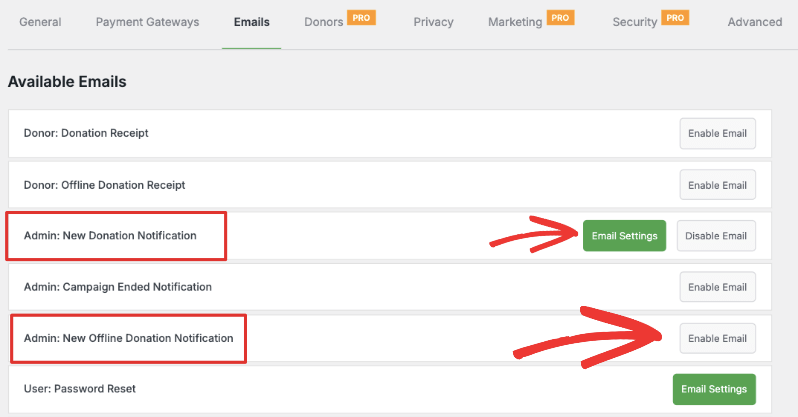
Will my team be notified when a new donation is made?
Yes, Charitable automatically sends an email notification to the site administrator (or any specific email addresses you configure) the moment a donation is successfully processed, so your team is always in the loop.
Can I put a donation form on a regular page or blog post?
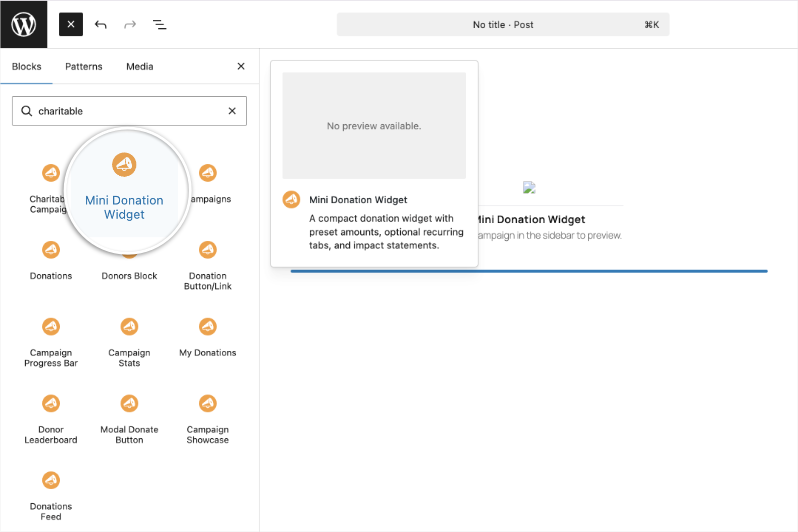
Absolutely. Charitable provides easy-to-use WordPress blocks and shortcodes. This allows you to embed a donation form, a specific campaign, or a “Donate Now” button anywhere on your website, not just on dedicated campaign pages.
Simply search for “Charitable” inside the block editor and you’ll see a list of readymade widgets available that you can simply add to any page or post.
Can I run multiple fundraising campaigns at the same time?
Yes, there is no limit to the number of campaigns you can create and run simultaneously. You can even categorize and tag them, making it easy for donors to browse your site and support the specific causes, projects, or funds they care about most.
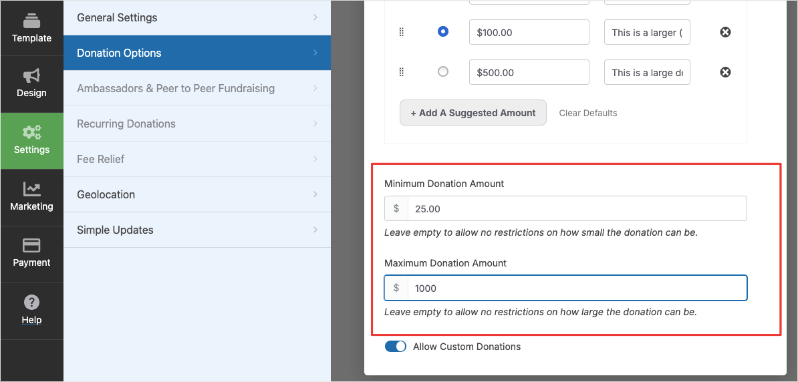
Can I set a minimum donation amount?
Yes, you can establish a minimum donation limit. This is especially helpful to ensure that the contributions you receive are large enough to cover the base payment processing fees.
Is Charitable friendly for web developers?
Yes, developers love Charitable! It is built using strict WordPress coding standards and includes extensive hooks, actions, and filters. This allows developers to easily customize, modify, and extend the plugin’s core functionality to fit highly complex organizational needs.
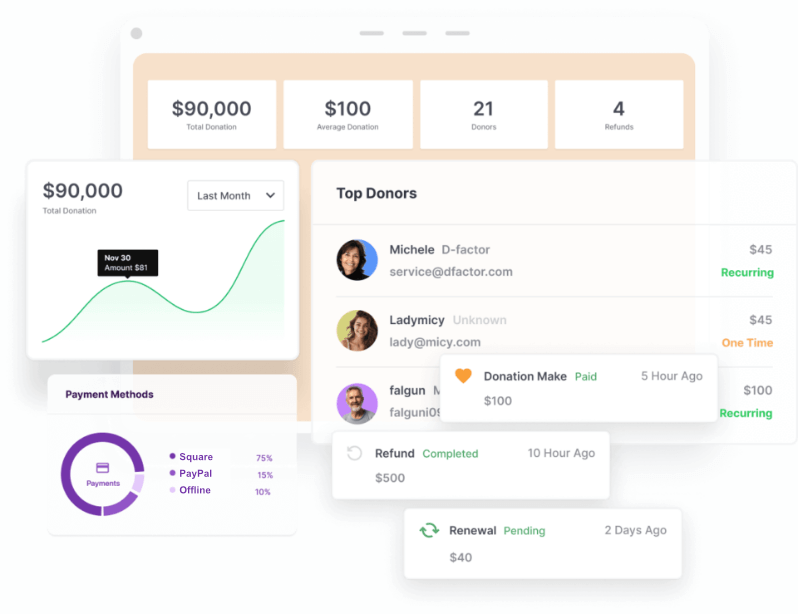
How do I track my overall fundraising performance?
Charitable includes built-in reporting features directly within your WordPress dashboard. You can view charts and data summarizing your total donations, number of donors, and campaign performance over specific time periods.
Can I track my campaign conversions using Google Analytics?
Yes, you can track your donation conversions to understand where your donors are coming from. You can integrate this with Google Analytics or seamlessly use a WordPress analytics tool like MonsterInsights.
Charitable Features
What is Donor Trust?
Donor Trust in Charitable refers to the social proof tool that captures recent donation activity and displays neat popups. This sends trust signals to potential donors browsing your site, wondering whether they can trust your cause. These popups showing others have contributed confidently give them the nudge they need to support your organization.
What is Donation Recovery?
Donation Recovery is a feature that helps recover failed or incomplete donation transactions. Charitable will automatically detect abandoned forms and send out an email to the donor to encourage them to complete their donation.
What is Fee Relief?
Fee Relief is a feature that allows you to manage transaction fees associated with donations. This can include options for donors to cover payment processing fees in addition to their donation, ensuring that more of the donation goes directly to your causes.
What are Donor Profiles?
Donor Profiles are detailed records within Charitable that store and display information about individual donors. It include donation history, contact information, and engagement preferences, helping organizations maintain meaningful relationships with their supporters.
What are Fundraising Reports?
Fundraising Reports are automatically created for you inside the Charitable dashboard. They show you important information like how much money you’ve raised, how your donors are engaging with your campaigns, and other useful stats. This can help you figure out what’s working well and what might need improvement in your fundraising efforts.
What is the Donor Dashboard?
The Donor Dashboard is a feature that lets donors log in and see a personalized view of their donation history and interactions with your organization. Donors can easily access their dashboard by logging into their account on your website, where they can track their donations, update their preferences, and manage their engagement. This keeps everything organized and handy, giving donors more control and visibility over their contributions.
What are Donor Comments?
Donor Comments allow donors to leave a message or note with their donation. When someone makes a donation, they can add a comment expressing their support, sharing a personal story, or explaining why they’re contributing to your cause. These comments can be shared publicly on your campaign pages, helping to create a sense of community and engagement among your supporters.
What is Sequential Ordering?
Sequential Ordering refers to the numbering system used for donations processed through Charitable. It ensures that each transaction is uniquely identified and tracked in the order they occur, aiding in better organization and recordkeeping.
What is the Donor Leaderboard?
The Donor Leaderboard is a feature that highlights top donors based on their contributions. It shows a list of donors who have given the most or donated the most frequently, right on your campaign page. This adds a fun, competitive element, encouraging donors to support more and recognize their generosity. It’s a great way to build community spirit and motivate others to join in.
What is the Visual Campaign Builder?
The Visual Campaign Builder offers an intuitive, user-friendly way to create and customize fundraising campaigns within Charitable. It allows you to easily set up campaigns by dragging and dropping elements, adjusting settings, and previewing the final look before launching. This makes creating campaigns more accessible, even for those without technical expertise.
What is the Visual Donation Form Builder?
The Visual Donation Form Builder in Charitable enables you to design and customize donation forms with ease. You can tailor the form’s appearance and fields to suit your campaign needs, arranging elements simply by dragging and dropping. This feature ensures that your donation forms align with your branding and campaign goals without needing any coding skills.
What is CSV Import?
CSV Import allows you to upload donor and donation data directly into Charitable using a CSV file. This feature is particularly useful when migrating data from another platform or consolidating information from multiple sources. It helps maintain the integrity of your records and streamlines data management.
What is the Reply-To Feature?
The Reply-To feature in Charitable email settings allows you to specify a specific email address that recipients can reply to when they receive automated emails from your campaigns. This ensures that replies are directed to the appropriate inbox, making it easier to manage donor communications and follow up on inquiries.
Charitable Donation Management
What kind of Donation Management does Charitable offer?
Charitable provides robust donation management features that allow you to track, manage, and analyze your donations efficiently. You can view detailed donation histories, monitor the flow of funds, and export data for further analysis. These tools help streamline your fundraising efforts and ensure transparent financial oversight.
What kind of Donor Management does Charitable have?
Charitable offers comprehensive donor management, helping you keep track of individual donor interactions and histories. This includes maintaining detailed records of donor contributions, preferences, and communications. These features support relationship-building and strategic engagement efforts for your organization.
What is in the Donor Database?
The Donor Database in Charitable stores all the information related to your donors, including contact details, donation history, and engagement preferences. This centralized repository helps you organize and access all necessary donor information easily, facilitating smoother operations and communications.
Can I manually log donations that I receive offline?
Yes! If you host an in-person fundraising event and receive physical checks or cash, you can manually enter those offline donations into your WordPress dashboard. This ensures your campaign’s progress bar and your internal reporting stay 100% accurate.

Can donors view their past donation history?
Yes, Charitable provides a frontend donor dashboard. If enabled, once a donor creates an account on your site, they can log in to:
- View their complete donation history
- Download past donation receipts
- Update their profile information
- Manage or cancel their recurring donation subscriptions
Can donors update their credit card information for recurring donations?
Yes. If you have the donor dashboard enabled, donors can log into their frontend donor dashboard on your site to securely update their credit card details or cancel their active subscriptions.
Can I export my donor data?
Yes, you maintain full ownership of your data. It’s one of the best parts about Charitable.
Charitable allows you to easily export your donors and donation records into a CSV file.
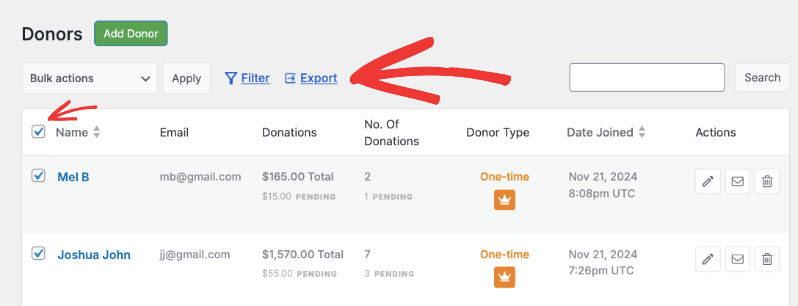
This makes it simple to import your data into accounting software or share reports with your board of directors.
Can I import existing donor data from another platform?
Yes. If you are migrating to Charitable from another system or have a historical database of offline donors, you can use CSV import tools to bring your existing campaigns, donors, and donation records directly into WordPress.
How many donation records can I keep in Charitable?
You can store unlimited donation records in Charitable.
Comparing Charitable to Other Fundraising Platforms
How does Charitable compare to GiveWP?
Charitable and GiveWP are both powerful WordPress plugins designed for fundraising. Both offer features like recurring donations, multiple payment integrations, and customizable forms. Charitable is known for its simplicity and ease of use, particularly for smaller organizations. GiveWP, on the other hand, offers a broader range of add-ons and integrations, which might be beneficial for more complex fundraising needs.
Note: On May 12th, 2026 GiveWP.com was no more and has been absorbed into Liquid Web Software.
Learn more: Why thousands are switching from GiveWP to Charitable »
What happened to GiveWP? Should I switch to Charitable?
GiveWP.com no longer exists. The plugin still exists, though. It is now part of the Liquid Web Software.
Our team at Charitable has been helping nonprofits navigate exactly this kind of transition for over 15 years. Whether you have a simple setup or a complex one with years of donor records and recurring donations, we’re here to answer your questions honestly – no pressure, no sales pitch.
Here’s what we suggest as your next steps:
📖 Read our full breakdown of what happened and what it means for you: What Happened to GiveWP?
💬 Reach out to our support team with any questions about your specific situation. We’ll give you a straight answer about whether switching makes sense for you and what that process would look like
🆓 Try Charitable Lite for free. No commitment, no credit card, and your GiveWP data can be imported automatically in just a few clicks
We genuinely care about your cause. Whatever you decide, we want to make sure you have the information you need to make the right choice for your organization and the donors who trust you.
How does Charitable compare to Zeffy?
Zeffy, formerly known as Simplyk, focuses on zero-fee fundraising and offers an intuitive web-based platform. Unlike Charitable, Zeffy is not exclusively designed for WordPress, which makes Charitable a better choice if you are looking for seamless integration within the WordPress ecosystem. Charitable might offer more customization and control over fundraising campaigns compared to Zeffy’s straightforward approach.
See Zeffy vs Charitable and why free fundraising platforms aren’t really free.
How does Charitable compare to Donorbox?
Donorbox is one of the most expensive fundraising platforms out there. They provide a streamlined donation process with features such as recurring donations and goal meters, easily integrated into WordPress. It costs around $1800 per year.
However, Charitable offers more features, deeper customization and is solely focused on the WordPress environment, providing more extensive tools for managing and creating campaigns directly on your site. Charitable starts at just $69 per year.
Will I lose my data when I switch to Charitable?
Switching to Charitable does not automatically transfer your data. You may need to manually export data in CSV format from your platform (such as Donorbox) and import it into Charitable. This includes donor information, donation history, and campaign details. Make sure to back up your site and data before making any changes to prevent data loss.
Charitable Support & Documentation
Charitable Support & Documentation
What kind of customer support is available if I need help?
Users of the free version of Charitable can access the community support forums on WordPress.org.
If you upgrade to a premium plan, you gain access to direct support from us. You can reach us through our Dedicated Support Channel »
Charitable has a 5-star support team. See 200+ 5-star reviews from real users »
What is included in the support for Charitable Pro users?
Charitable Pro users typically receive priority support, including quicker response times and direct assistance from the support team. This might encompass help with troubleshooting, setup assistance, and guidance on using advanced features included in the Pro version.
Where can I find the documentation for Charitable?
You can find detailed documentation for Charitable in our Documentation Hub. The documentation includes guides and tutorials to help you set up and manage your fundraising campaigns effectively, covering a range of topics from basic installation to advanced feature usage.
Does Charitable offer tutorials or user guides?
Yes, we regularly publish a variety of tutorials and user guides in our documentation and blog. These resources are designed to help users understand how to make the most of Charitable’s features and optimize their fundraising strategies. We also put together a Fundraising Kit for you with all the information you need for successful fundraising. Get the Fundraising Kit »
Get the best WordPress fundraising plugin today
Join over 10,000+ smart website owners who trust Charitable for their donation websites.