
A good number of the nonprofits we work with in New Zealand and Australia take their donations through Windcave, and several of you asked us for the same thing. You wanted a monthly giving program, but running on the gateway your organization already has.
Until now, Windcave donations in Charitable were one-off gifts only. Every appeal started from zero, and every month meant asking the same supporters to give again.
We’ve shipped recurring donations for Windcave. A donor sets their gift up once on Windcave’s secure payment page, and Charitable bills every renewal after that on schedule.
No re-billing by hand, and no reminder emails asking someone who already said yes to say it again. 🔁
What Is Windcave?
If you haven’t run into it, Windcave (formerly Payment Express) is a payment gateway that started in New Zealand and now operates there along with Australia, North America, Asia, the UK, and Europe.
It processes more than 20 currencies and supports over 300 payment methods, including Visa, Mastercard, American Express, Apple Pay, Google Pay, and EFTPOS in Australia and New Zealand.
For a lot of organizations in the region, Windcave is simply the processor their bank set them up with. So the question was never which gateway to choose. It was whether monthly giving could run on the one they already had.
Here’s What It Looks Like
Before we get into setup, here’s what this looks like once it’s running. Your Windcave subscriptions sit in the same Recurring Donations list as everything else, with the payment method shown under each amount.
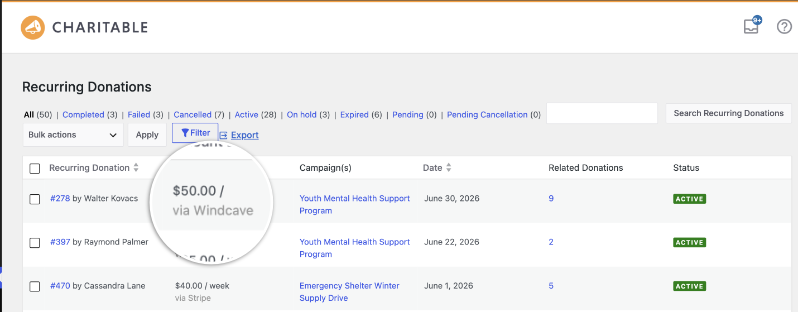
Donation #278 – there has been renewing since June and has 9 related donations recorded against it.
That count is the point of this feature. One conversation with one donor, 9 gifts so far, and nobody on the team touched it after the first one.
Why Recurring Giving Is Different From Another Appeal
A one-off gift is a decision a donor makes once. A recurring gift is a decision they make once and then stop having to make.
On your side, that turns fundraising from a series of separate pushes into income you can plan a budget around. You know roughly what next month looks like before it arrives.
Charitable’s Recurring Donations feature is available on Plus plans and higher, and Windcave now sits alongside Stripe and PayPal as a gateway that can bill renewals automatically.
When You’ll Feel the Difference
A few situations where this pays off right away:
🏦 Organizations banked in New Zealand or Australia: monthly giving on the gateway your bank already set you up with, with no second processor to onboard.
⛪ Churches taking regular tithes and offerings: congregants set their own schedule once, which is the simplest way to launch recurring church giving without a separate platform.
🌏 Groups with donors in several currencies: Windcave handles more than 20, so a supporter can give in the currency they actually hold.
📅 Operating funds rather than one-time campaigns: switch on Recurring Only mode and the one-off option disappears, so every gift to that campaign is a subscription.
🧾 Teams with no developer on staff: 3 sets of credentials pasted into a settings page, and no code anywhere.
How the Recurring Charge Actually Works
The first gift and every renewal after it take different paths through Windcave, and it helps to know which is which before you set anything up.
When a donor picks a recurring amount and checks out, Charitable hands them to Windcave’s hosted payment page using your PxPay 2.0 credentials. They enter their card there, on Windcave’s page, not on yours.
Windcave stores that card and returns a token to Charitable. Card numbers never reach your website or your database, so the sensitive part of this stays on Windcave’s side.
From then on, Charitable bills each renewal through Windcave’s Restful API using that token. Your donor isn’t sent anywhere and doesn’t need to do anything.
The integration was built against Windcave’s Ecom API and passed their certification for it, including 3D Secure and tokenized rebilling. Each renewal is charged the way Windcave expects it to be charged.
Set Up Recurring Windcave Donations in About 10 Minutes
Most of this is pasting credentials. The slow part sits on Windcave’s side, because you have to request the API credentials from them before you can start.
Step 1: Install the Windcave Addon
Go to Charitable » Addons, find Windcave, and install it.
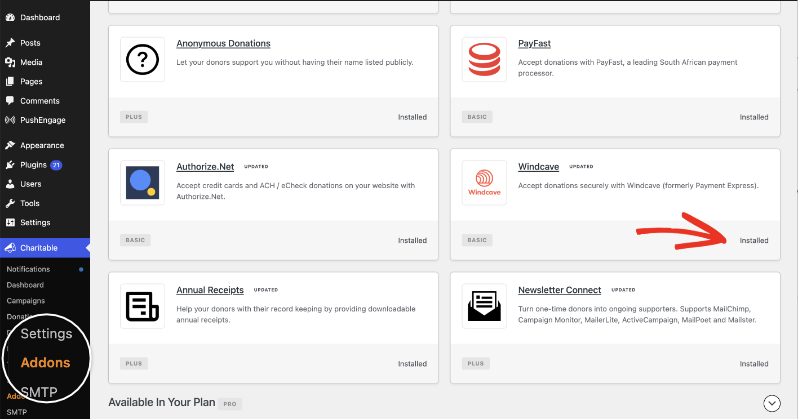
Windcave is available in all plans of the Charitable Pro plugin. You’ll need a Plus plan or higher for Recurring Donations.
Step 2: Turn On the Gateway
Open Charitable » Settings » Payment Gateways and switch Windcave on in the Status column.
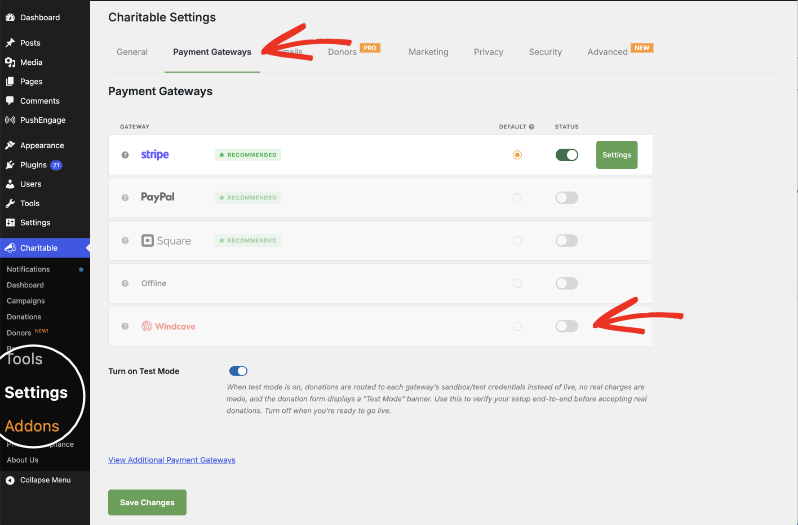
Step 3: Add Your PxPay Credentials
Now you can click on Settings next to Windcave, then paste your PxPay User ID and PxPay Key. The User ID lives in Windcave Payline under User Accounts, and Windcave support can send it to you if you can’t find it.
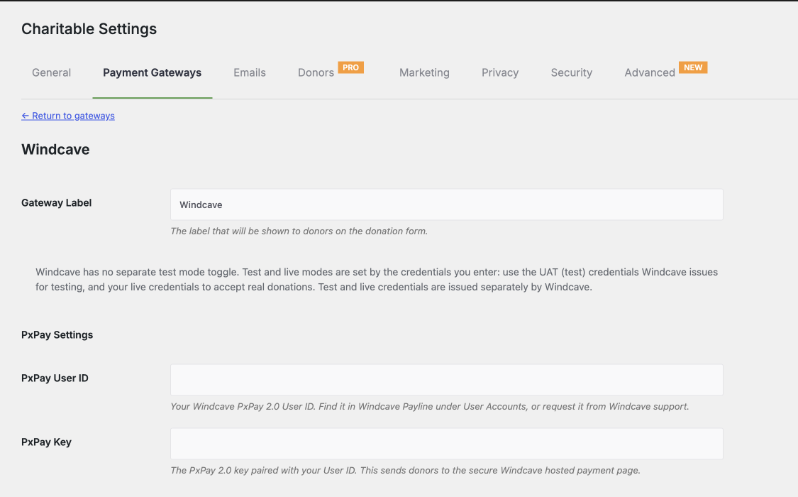
Charitable has no separate test mode toggle for Windcave. Your credentials decide which mode you’re in, so use the UAT credentials Windcave issues for testing, and your live ones when you’re ready to accept real donations.
You can also rename the gateway here. Whatever you type in Gateway Label is what donors read on the donation form.
Step 4: Add PxPost for Refunds
Paste your PxPost User ID and PxPost Password in the next section. These handle server-to-server transactions, and they’re what let you refund a Windcave donation from inside Charitable instead of logging into Payline.
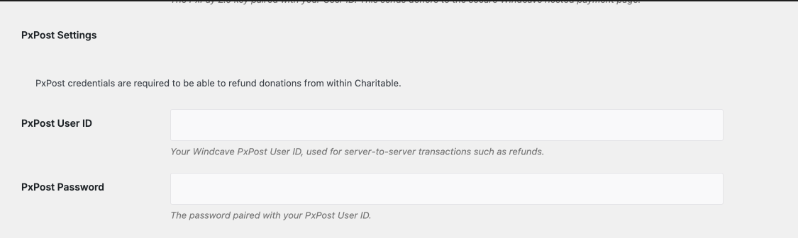
Recurring billing doesn’t depend on these, so you can skip them. Refunds do, which is why most teams fill them in anyway.
Step 5: Add Your REST Credentials for Recurring
This is the section that makes recurring donations work. Under REST API Settings, choose your REST Environment, then paste the REST Username and Restful API Key.
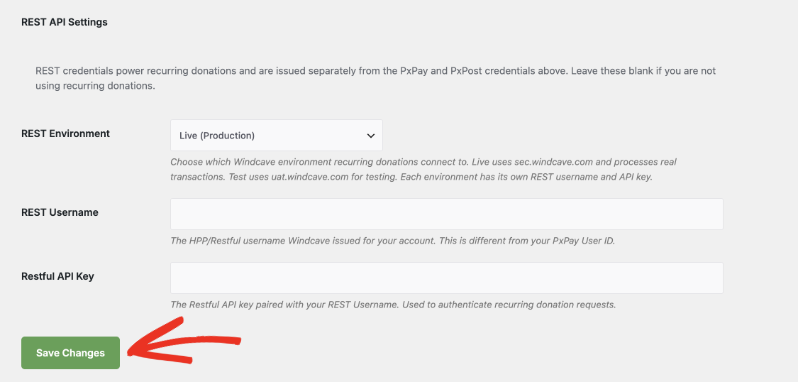
These are issued separately from your PxPay and PxPost credentials, and the REST Username is not the same as your PxPay User ID. If you don’t have a pair, ask Windcave for your HPP/Restful details.
Each environment has its own username and key. Live runs against sec.windcave.com and processes real transactions, and Test runs against uat.windcave.com. Leave the whole section blank if you’re not using recurring donations, then click Save Changes.
Step 6: Turn On Recurring Giving for a Campaign
Open a campaign in the Campaign Builder, go to Settings » Recurring Donations, and pick a mode. Simple adds a checkbox to the donation form.
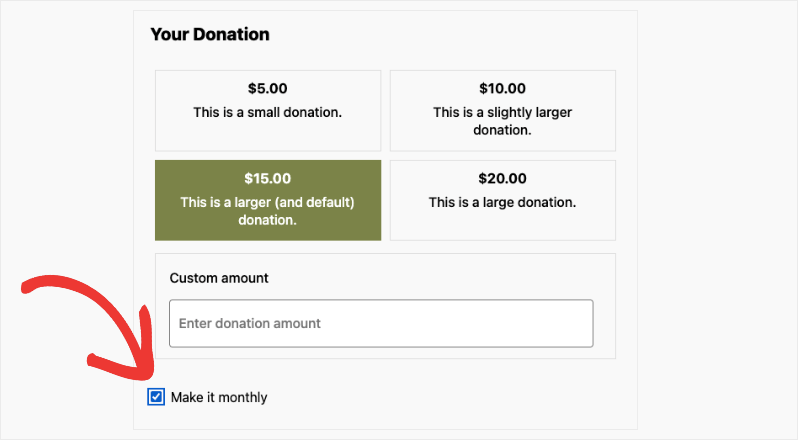
Advanced lets the donor choose their amount and a schedule, and Recurring Only hides one-off giving completely.
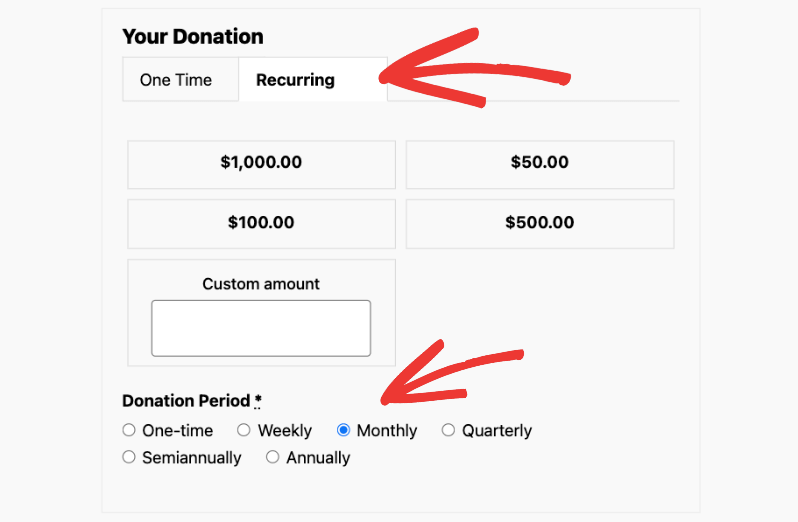
Set the period and amount options you want to offer, save the campaign, and your next Windcave donor can start a subscription.
Read the Full Recurring Donations Documentation →
Read the Full Windcave Setup Documentation →
Beyond the Basics
Every Subscription in One List
Open a subscription and the Recurring Donation Details screen shows the donor, the campaign, the amount, and Windcave as the payment method, the same way a Stripe subscription would.

You can filter by status, so you can pull up only the Active subscriptions, or only the Failed ones after a card expires. Export it to send the whole list to CSV.
When a Renewal Fails
Cards expire, and Windcave will decline a renewal when one does. Charitable’s Payment Failed email goes out to the donor automatically, which only helps if your site’s email deliverability is in order.
The subscription also moves into the Failed filter, so you can see it without going looking.
You can edit that email’s wording at Charitable » Settings » Emails » Payment Failed.
Donors Can Cancel Without Emailing You
A supporter can view and cancel their own Windcave subscription from the Donor Dashboard. They get a confirmation prompt first, the status updates to Cancelled, and your inbox stays out of it.
For Agencies and Developers
Testing Against Windcave’s UAT Environment
Because there’s no test mode toggle for Windcave, testing is a credentials swap. Set REST Environment to Test, use the uat.windcave.com username and key, and run a full recurring donation end to end before you touch live credentials.
Moving a client site to live then means changing that dropdown and pasting the live pair. You aren’t reconfiguring the integration, so keep both sets of credentials somewhere you can find them again.
What You Need on the Windcave Side
A Windcave account with PxPay 2.0 for the hosted payment page, and HPP/Restful API access for the recurring charges. They’re requested separately, so ask for both when you open the account.
On the Charitable side, recurring Windcave donations need the Windcave gateway and Recurring Donations 2.2.0 or later.
Not yet a Charitable Pro user? Sign up today and get up to 50% off on your plan. We’re confident you’ll love raising funds with Charitable. If, for any reason, Charitable is not the right fit for you, we’ll refund your purchase with our 14-day money-back guarantee. Get Charitable Pro Now »
FAQs on Recurring Donations for Windcave
Which plan do I need for this?
Charitable Pro plugin’s Plus plans and higher. The Windcave gateway is included from Basic, but recurring billing needs Charitable’s Recurring Donations feature, which starts on Plus.
Do my existing Windcave credentials cover this?
No. Recurring donations run on a separate REST username and Restful API key that Windcave issues for your account, on top of the PxPay credentials you already use.
Does card data touch my website?
No. The donor enters their card on Windcave’s hosted payment page, Windcave stores it, and Charitable only ever holds a token.
Can donors cancel a recurring gift themselves?
Yes, from the Donor Dashboard. They confirm the cancellation, and the subscription status updates without anyone on your team getting involved.
What happens when a renewal is declined?
Charitable emails the donor automatically and moves the subscription into the Failed filter on the Recurring Donations screen, so you can follow up.
Does this work with Fee Relief?
Yes. Fee Relief lets donors cover the transaction fee Windcave charges, and it applies to Windcave donations the same as any other gateway.
Get Started With Recurring Donations for Windcave
Recurring donations for Windcave are available now on Plus plans and higher. If Windcave is already running on your site, ask Windcave for your REST credentials, paste them into Charitable » Settings » Payment Gateways » Windcave, and switch recurring giving on for a campaign.
Read the Recurring Donations Documentation →
Charitable Has 1.2+ Million Downloads!
Trusted by millions to power successful fundraising campaigns. Try Charitable risk-free today.
✅ 14-day money-back guarantee
✅ Transparent pricing
✅ Code-free setup
What’s New in Charitable
We also launched several new features and improvements recently:
⚡
A full-screen canvas that lays out each automation as a flow you can see.
💳
Donors fix an expired card themselves, so a subscription doesn’t quietly end.
🧱
Native campaign widgets for Elementor, WPBakery and Divi, with no shortcodes to remember.
🧾
Decide which thank-you page each campaign’s donors land on after they give.
🎨
Full-width campaign templates with a Hero block, built to hold attention.
We’ve been adding to Charitable constantly, features and improvements designed to help you raise more and serve your donors better. See everything we’ve shipped at the Charitable Changelog.
Not yet a Charitable Pro user? Sign up today and get up to 50% off on your plan. We’re confident you’ll love raising funds with Charitable. If, for any reason, Charitable is not the right fit for you, we’ll refund your purchase with our 14-day money-back guarantee. Get Charitable Pro Now »
Stay Connected for More Nonprofit Resources
For more tutorials and videos tailored to nonprofits, subscribe to our YouTube channel. We regularly publish expert tips, step-by-step guides on online donations, fundraising strategies, and practical resources to help your organization succeed.
🗞️ Get weekly tips and exclusive guides in your inbox
Join our newsletter →
🎥 Watch step-by-step tutorials and success stories
Subscribe to our YouTube channel →
👩🏽💻 Connect with our community and get daily nonprofit insights
Follow us on LinkedIn →
🥳 Fun reels and non-profit insights
Follow us on Instagram →
👀 Insightful & fun videos to help you grow your cause
Follow us on TikTok→
🌎 Subscribe and follow for general fundraiser tips
Get Fundraiser Tips on TikTok →
Powerful Fundraising Resources
🤖 Use Charitable with Your AI Assistant
⬇️ Download proven strategies, campaign ideas, and expert tools
Get the Fundraising Kit →
💸 Get Free Fundraising Resources
Head to the Charitable Fundraising Hub →
🤔 Got questions about Charitable?
Charitable FAQs →
🏎️ Take Charitable for a spin
Create your Charitable Demo →
Understand non-profit terms and jargon
Non-Profit Glossary →
% Looking for non-profit deals and discounts?
Best Non-Profit Deals and Discounts →







Leave a Reply