
Somewhere in your donor list, there’s a supporter who appears twice.
Maybe they gave from a work email one year and a personal email the next. Maybe they switched email providers between gifts. Or maybe you moved your donors over from another plugin, and the old list already had them in it twice.
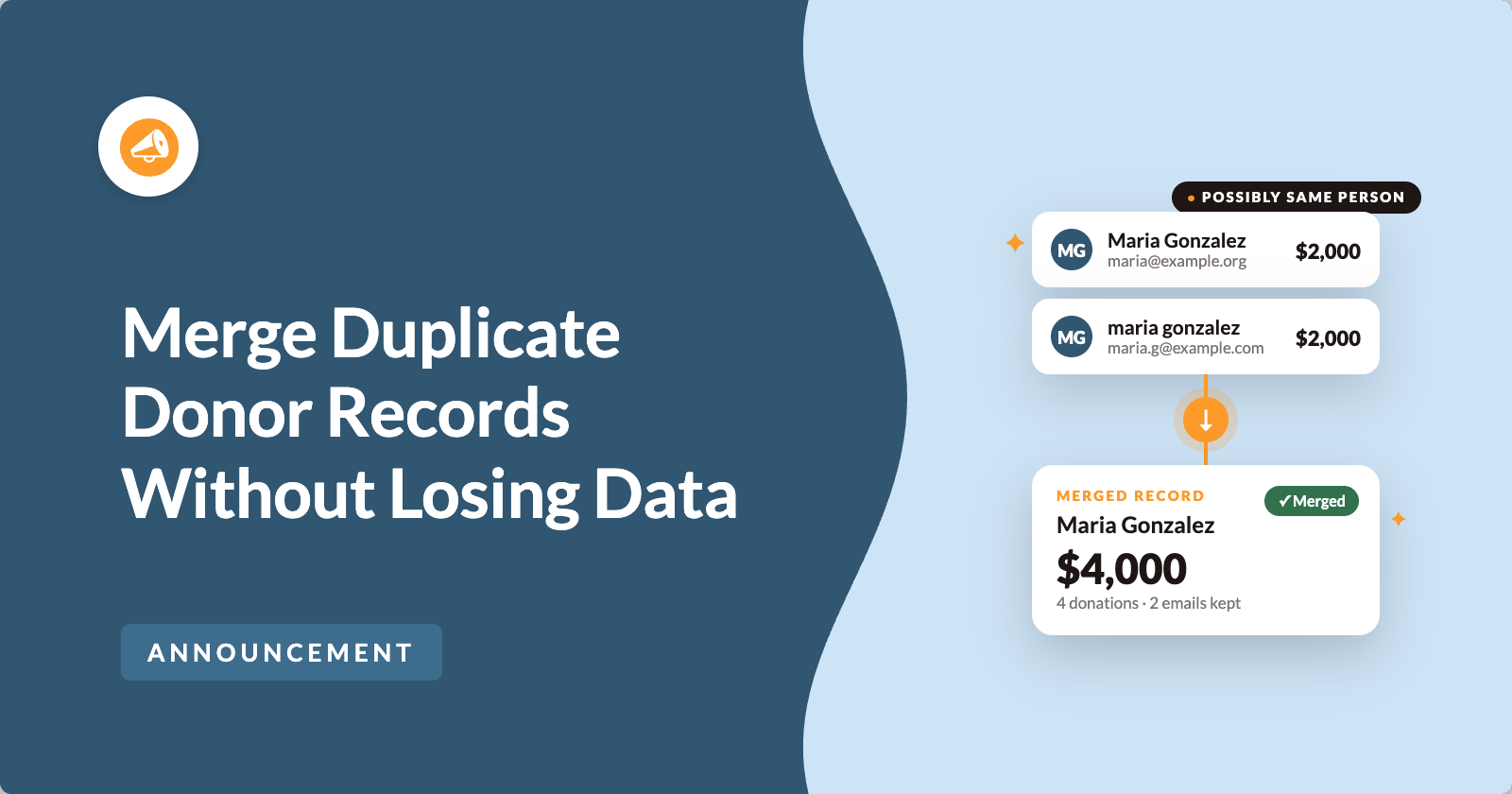
Every donation is still recorded and every receipt still went out. But your donor count is higher than the number of people you actually know. And a loyal supporter who has given $4,000 over 9 years looks like 2 people who gave $2,000 each.
Many of you asked for an easy way to clean this up, so we built one! From the Charitable Pro plugin 1.8.19.1, you can find duplicate donor records and merge them right from the Donors screen. You’ll see a preview before anything changes, and you can undo any merge afterwards.
Here’s What Donor Merging Looks Like
Charitable shows you groups of records that share a name. Each record shows its email address, how many donations it has, and its lifetime total.
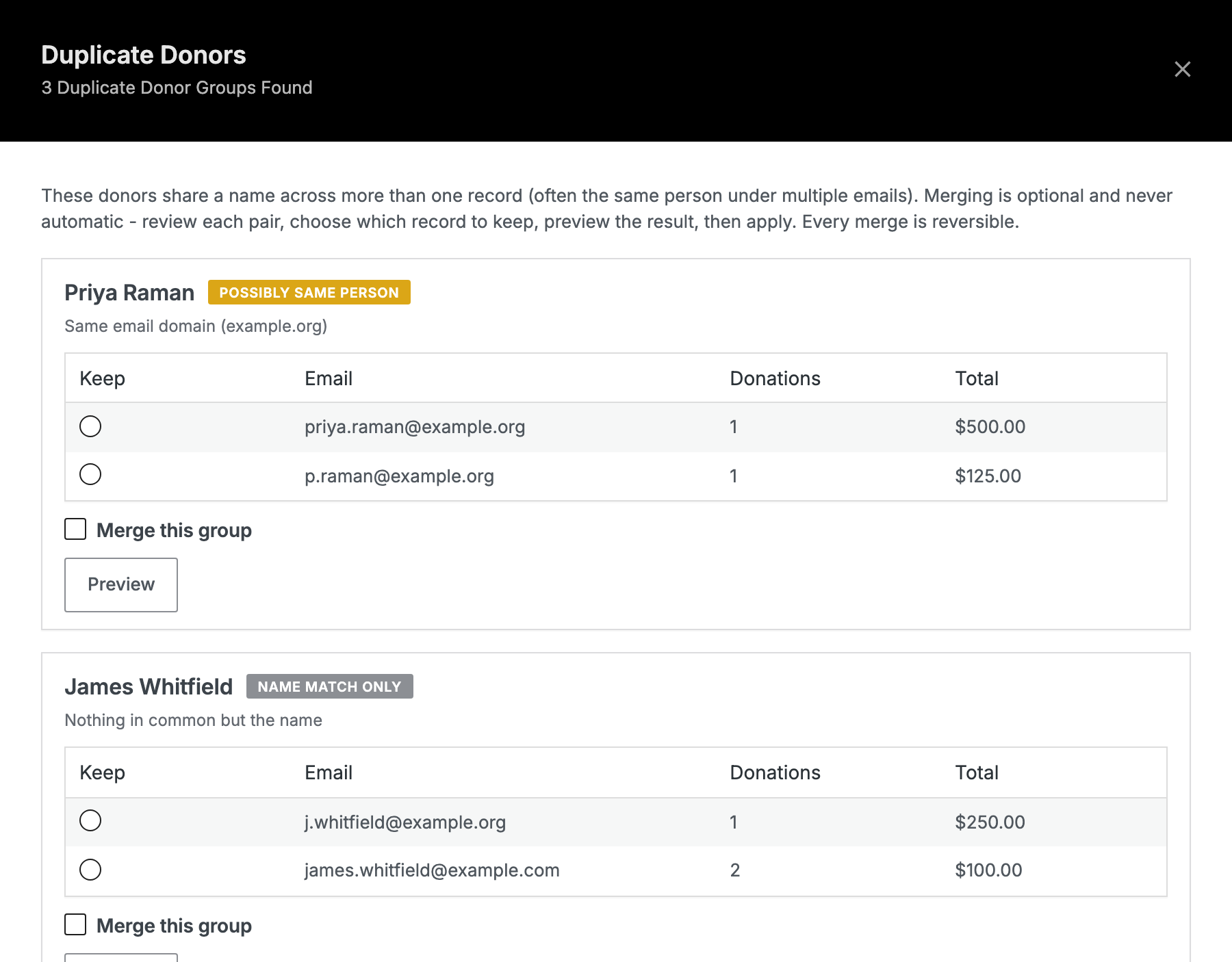
Nothing is merged until you choose to merge it.
Let’s start by showing you how to find duplicate donor records in Charitable.
Where to Find the Find Duplicates Link
To get started, head over to Charitable » Donors. Above the donor list, next to Filter and Export, you’ll now see a Find Duplicates link.
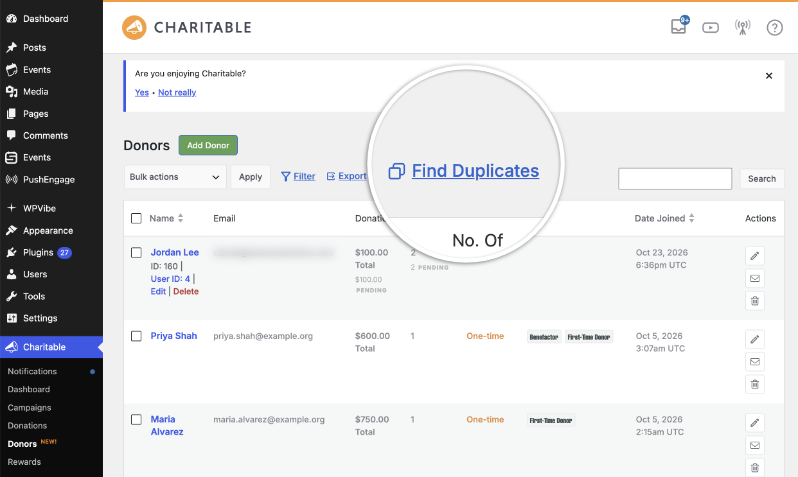
When you click it, Charitable checks your donor records and tells you how many groups of possible duplicates it found.
What You Can Use This For
- 📥 The week after an import. Moving your donors over from another plugin is when most sites end up with duplicates. It’s also when they’re hardest to spot, because every record is new to you.
- ✉️ Before a year-end appeal. A family with 2 records gets 2 copies of the same letter, often with their name spelled 2 slightly different ways. Merging first means each household gets one letter.
- ⭐ When a major donor is missing from your top donors. 2 records of $2,000 each won’t show up where one record of $4,000 would. Split giving history is the most common reason a big supporter goes unnoticed.
- 📊 When your board asks how many donors you have. A count that includes duplicates will drop later when you clean up your data. It’s easier to report the real number from the start.
Charitable Matches Duplicate Donors by Name, Not Email
This part surprises people, so we’ll explain it plainly.
Charitable groups records by name. It compares the first and last name together and ignores capital letters, spacing and punctuation. So Maria Gonzalez, maria gonzalez and Maria Gonzalez all count as the same name.
Records with no name at all are skipped.
If 2 records have the same name and different email addresses, Charitable shows them to you as a group. That’s the duplicate people usually create, because having 2 email addresses is the most common reason a donor ends up with 2 records.
If 2 records have the same email address and different names, Charitable won’t group them. So if someone is in your list as both “Bob Smith” and “Robert Smith”, you won’t see that pair, because the names don’t match.
Each Duplicate Donor Group Shows How Sure the Match Is
2 different people really can share a name. That’s why every group carries a badge.
| Badge | What it means |
|---|---|
| POSSIBLY SAME PERSON | Something beyond the name matches. The records share an email domain, an address or a phone number, or they have very similar email addresses. |
| NAME MATCH ONLY | The records have nothing in common except the name. |
Under each badge, Charitable shows the reason in plain words, like “Same email domain (example.org)” or “Nothing in common but the name”.
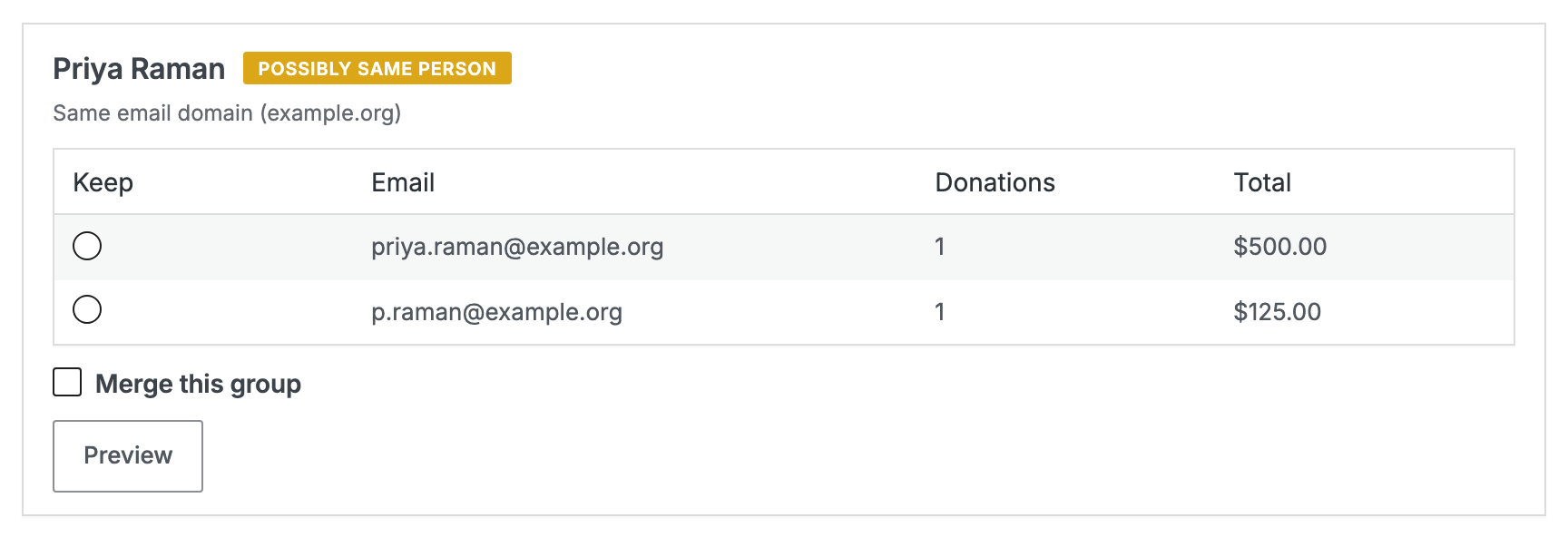
Think of NAME MATCH ONLY as a question for you to answer. In a list of 4,000 donors, some of those groups will be 2 different people.
How to Merge Duplicate Donors in 3 Steps
There’s nothing to set up or switch on. Once you’re on the Charitable Pro plugin 1.8.19.1, the Find Duplicates link is already on your Donors screen.
Each merge follows the same 3 steps, in the same order, every time.
Step 1: Choose Which Record to Keep
Each row has a Keep button and shows that record’s email, donation count and total. Click Keep on the record you want to stay.
You won’t lose any donations or email addresses whichever record you pick. But the record you keep supplies the name, address, phone number and marketing consent from now on. So it’s usually best to keep the more complete or more recently used one.
Step 2: Preview the Merge
Next, click Preview to see exactly what the merge will do.
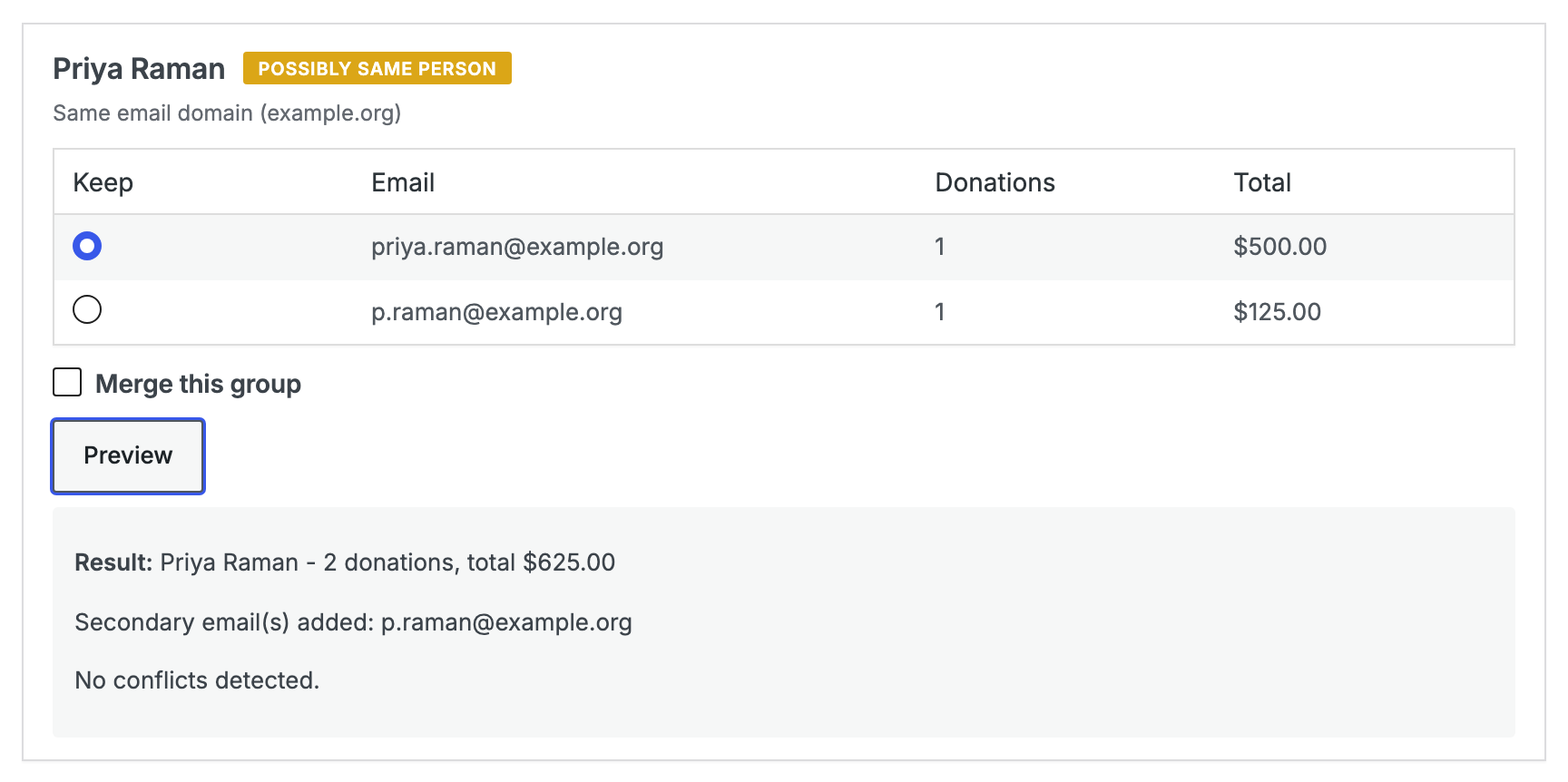
The preview shows the donor you’re keeping, the combined number of donations and the combined total. It also lists the email addresses that will be added as secondary emails, plus any conflicts between the 2 records.
If you click Preview before choosing a record to keep, you’ll see “Choose which record to keep first.” That’s just a reminder of the order.
Read the full Merging Duplicate Donors Documentation Here »
Step 3: Tick the Group and Apply
Finally, tick Merge this group and click Apply Selected Merges. You can tick several groups and apply them all at once.
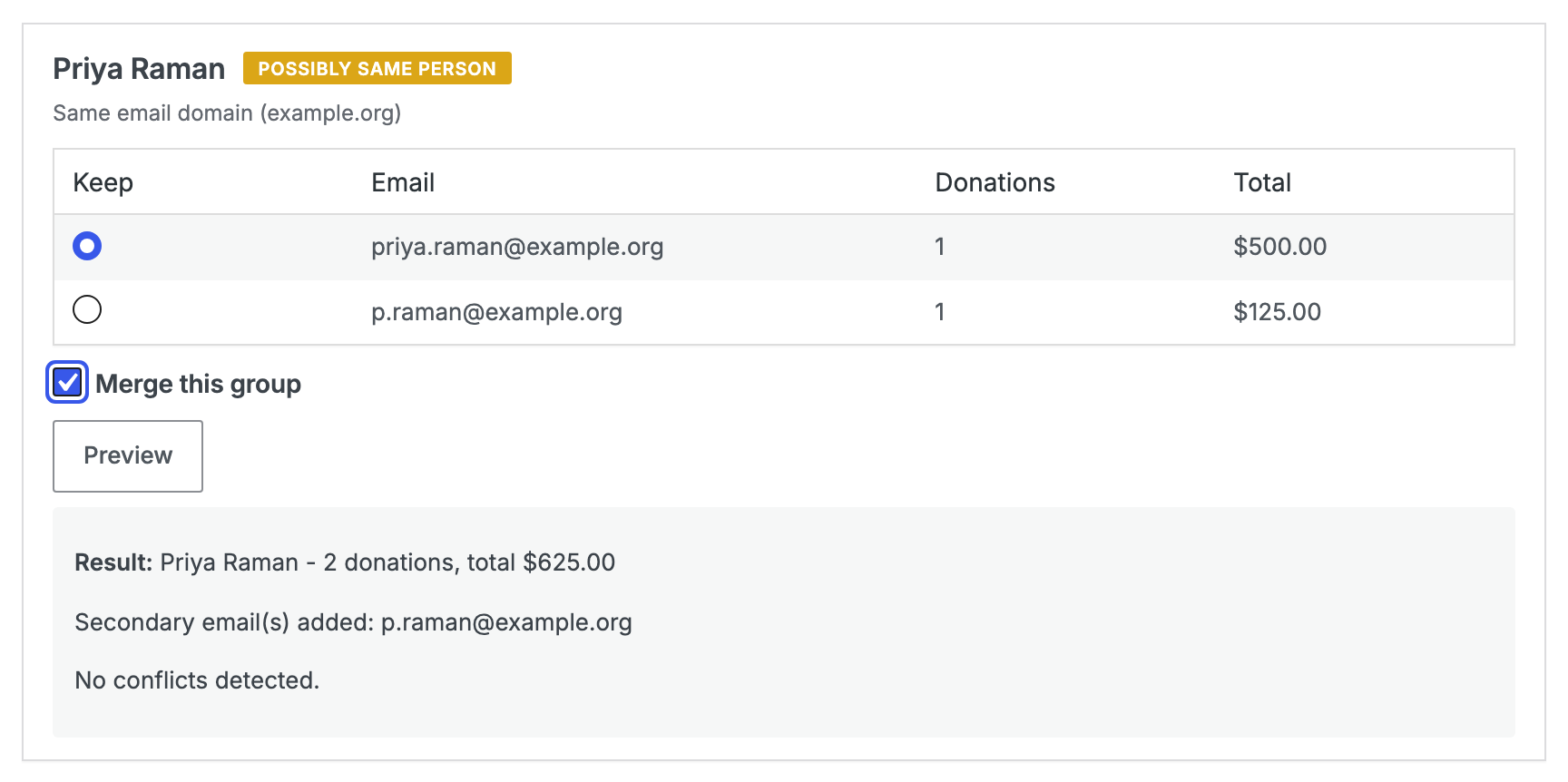
There’s no “merge everything” button. We left it out on purpose, and we explain why further down.
The Second Email Address Stays Searchable
When 2 records become one, the other record’s email addresses are saved on the record you kept as secondary emails. Each address is saved on its own, and you can still search for it.
So if a donor writes to you from the address you merged away, you can search for that address and find them straight away.
Charitable Flags Donor Merge Conflicts and Leaves the Decision to You
Sometimes the 2 records disagree about something important. When that happens, the preview tells you, and you decide what to do.
| What’s flagged | What happens |
|---|---|
| Both records are linked to a WordPress user. | The record you keep keeps its own user. The other user account is never deleted. |
| A linked user has a membership or login. | The membership stays. A merge never deletes a membership. |
| The marketing consent is different. | The record you keep keeps its own consent setting. |
| The billing addresses are different. | The record you keep keeps its own address. The other address is saved in the snapshot. |
| The phone numbers are different. | The preview tells you they’re different. |
These are the 2 things most people want to know before they click anything. Merging never deletes a WordPress user account or a membership, and you can undo every merge.
You Can Undo Any Donor Merge
Before each merge runs, Charitable saves a full snapshot of the record being merged away. The snapshot is detailed enough to put that record back exactly as it was, down to fields that were empty.
Charitable keeps a record of every merge, and you can undo each one on its own. If you try to undo a merge that’s already been undone, Charitable tells you.
Your donor data stays in your own WordPress database the whole time. No outside service sees your donor list.
Example: Cleaning Up Duplicate Donors After an Import
Let’s say a charity moves 4,000 donors over from another plugin. Afterwards, the donor count is higher than the number of people they know they have. Here’s how they’d clean it up.
- Export your donors first. Go to Donors » Export and save the CSV. You can undo merges one at a time, but a CSV from before you started is the quickest way to see what a record looked like last week.
- Decide your rule before you start. “Merge only if the giving histories don’t overlap in time” is a rule you can apply the same way to all 200 groups. “Merge if it looks fine” isn’t, because you’ll judge group 180 differently from group 4.
- Open Find Duplicates and check the count. If the number is large, split the work over a few days. You’ll make fewer mistakes that way.
- Start with the POSSIBLY SAME PERSON groups. They have extra evidence beyond the name, so they’re quicker to judge.
- Apply several merges at once. Tick a few groups, then click Apply Selected Merges once.
- Take your time with NAME MATCH ONLY groups. Open each record and compare the donation history. 2 gifts from different cities 5 years apart are probably from 2 people. 2 gifts of the same amount a week apart are probably from one person.
- Leave any group you’re unsure about. An unmerged duplicate only makes your list a little untidy. Merging 2 different people means an undo and possibly an apology, so when in doubt, leave it.
Merged Donors Show Up Everywhere You Already Work
Find Duplicates sits on the Donors screen, next to the Filter and Export tools you already use. Once you merge a group, your exports, filters and tags all see the merged record straight away.
There’s one thing to check after a merge. Donor tags stay on the record they were added to, so tags on the record you merged away don’t move across. If you use tags to group your donors, take a quick look at the kept record’s tags afterwards.
Why Every Organization Ends Up With Duplicate Donors
Duplicate donor records don’t mean anyone made a mistake. They happen because of how people give, and almost every organization with a growing donor list has some.
Most people have more than one email address, often a work one, a personal one and one they share with family. The one they use depends on where they were when they saw your appeal.
Email addresses also stop working. Someone changes jobs or providers, and the address they gave you in 2019 no longer exists. When they give again in 2024 from a new address, a donation form has no way of knowing it’s the same person.
Imports copy exactly what’s in the old system. If it had 2 rows for one person, your new list will too. And if your Charitable site already had that person, you’ll now have 3.
Households are another common case. 2 people with the same surname and address can be one supporter or 2, and the right answer depends on how you want to thank them.
Then there’s simple typing. A capital letter here, an extra space there or a middle initial one time and not the next is all it takes.
None of this can be stopped at the donation form, and you wouldn’t want it to be. A form that turned away a gift because it suspected a duplicate would cost you donations. It’s better to accept every gift and tidy up the records later, which is what Find Duplicates is for.
What Duplicate Donors Do to Your Numbers
Duplicates change 3 numbers you probably report on, and they make your fundraising look weaker than it really is.
Your donor count is too high, because some people are counted twice. That number will drop later when you clean up, which is awkward to explain.
Your average gift is too low, because your total raised is divided by too many donors. If you use your average gift to set suggested amounts, you may be asking for less than your donors would give.
The share of donors who give again looks too low as well. Someone who gave in 2023 from one address and in 2024 from another looks like 2 one-time donors, not one donor who came back. Funders often ask about this number.
Merging doesn’t change how much you raised. It means your records can show you which donors keep giving year after year.
Why There’s No Bulk Donor Merge
We could have added a button that merges every group at once. We chose not to.
The badges explain why. Charitable shows POSSIBLY SAME PERSON and NAME MATCH ONLY because it can’t know for sure whether 2 records are the same person. A shared name is a clue, and only you can confirm it.
A bulk merge would treat every clue as a certainty across hundreds of records. You could undo each merge, but undoing hundreds of them by hand would take a very long time.
So every merge needs you to choose a record, tick the group and apply. It takes a little longer, and it keeps you in control of your supporter list.
For Agencies and Developers
Donor Merge Hooks and Filters
// After a merge completes.
do_action( 'charitable_donors_merged', $survivor_id, $loser_id, $record );

// After a merge is undone.
do_action( 'charitable_donor_merge_undone', $survivor, $loser, $merge_id );

// Which donor meta keys a merge fills in on the survivor when the
// survivor's own value is empty.
apply_filters(
    'charitable_donor_merge_fillable_meta_keys',
    array( 'addresses', 'phone', 'company', 'title', 'first_name', 'last_name' )
);
Carry Your Own Custom Field Across a Merge
add_filter(
    'charitable_donor_merge_fillable_meta_keys',
    function ( $keys ) {
        $keys[] = 'my_crm_reference';
        return $keys;
    }
);
Copy Donor Merges Into an External CRM
add_action(
    'charitable_donors_merged',
    function ( $survivor_id, $loser_id, $record ) {
        $survivor = charitable_get_donor( $survivor_id );

        if ( ! $survivor ) {
            return;
        }

        my_crm_merge_contacts( $survivor->get_email(), $record['snapshot']['email'] ?? '' );
    },
    10,
    3
);
How Donor Merge Data Is Stored
Secondary emails are stored as donor meta under secondary_email, with one row per address. That’s what keeps each one searchable on its own. The survivor’s own primary address is never copied into that list.
Conflicts come back as an array of flags. Each flag has a code, a severity of high, warn or info, and a readable message.
The flags are advisory only. Nothing in the merge path resolves a conflict on its own.
FAQs on Merging Duplicate Donors
Does merging delete anything?
Merging never deletes a WordPress user account or a membership. Charitable saves a snapshot of the record you merge away before the merge runs, so you can put it back.
Can I undo a donor merge?
Yes, you can undo each merge on its own. A merge that has already been undone can’t be undone a second time.
What happens to the second email address?
It’s saved on the record you kept as a secondary email, and you can still search for it.
Will Charitable merge donors automatically?
No. Every merge needs you to choose a record, tick the group and click apply. There’s no bulk merge and no scheduled merge.
Why does it say no duplicates were found when I know I have some?
Charitable matches on name, so pairs with different names and different emails, like “Bob” and “Robert”, aren’t shown. Edit one record so the names match, and they’ll be grouped the next time you check.
Why does a group show 0 donations and $0.00?
Those are 2 real donor records with no completed donations, usually from an import or a donation form that was never finished. You can safely merge them, there’s just nothing to combine.
Why does the lifetime total still look low after merging?
Lifetime totals only count approved donations. Pending, failed and refunded donations aren’t counted as money received.
Can I merge donors with the free version of Charitable?
The free version of Charitable doesn’t include the Donors screen. Donor management, including merging, is part of the Charitable Pro plugin, on the Basic plan and higher.
Start Merging Duplicate Donors Today
If you already have the Charitable Pro plugin, update to 1.8.19.1. Then head over to Charitable » Donors and click Find Duplicates.
Even if you don’t merge anything today, take a look at the number it finds. Most people are a little surprised by it!
Not Yet on a Charitable Paid Plan?
Donor management in the Charitable Pro plugin shows you everything about each supporter in one place, not just a list of transactions. You get donor records with lifetime totals, tags, filtered exports and now duplicate merging to keep your list accurate.
Already using the free version of Charitable? Your campaigns, donations and donor history all carry over when you upgrade, so there’s nothing to move.
Charitable Has 1.2+ Million Downloads!
Trusted by millions to power successful fundraising campaigns. Try Charitable risk-free today.
✅ 14-day money-back guarantee
✅ Transparent pricing
✅ Code-free setup
Not yet a Charitable Pro user? Sign up today and get up to 50% off on your plan. We’re confident you’ll love raising funds with Charitable. If, for any reason, Charitable is not the right fit for you, we’ll refund your purchase with our 14-day money-back guarantee. Get Charitable Pro Now »
Stay Connected for More Nonprofit Resources
For more tutorials and videos tailored to nonprofits, subscribe to our YouTube channel. We regularly publish expert tips, step-by-step guides on online donations, fundraising strategies, and practical resources to help your organization succeed.
🗞️ Get weekly tips and exclusive guides in your inbox
Join our newsletter →
🎥 Watch step-by-step tutorials and success stories
Subscribe to our YouTube channel →
👩🏽💻 Connect with our community and get daily nonprofit insights
Follow us on LinkedIn →
🥳 Fun reels and non-profit insights
Follow us on Instagram →
👀 Insightful & fun videos to help you grow your cause
Follow us on TikTok→
🌎 Subscribe and follow for general fundraiser tips
Get Fundraiser Tips on TikTok →
Powerful Fundraising Resources
🤖 Use Charitable with Your AI Assistant
⬇️ Download proven strategies, campaign ideas, and expert tools
Get the Fundraising Kit →
💸 Get Free Fundraising Resources
Head to the Charitable Fundraising Hub →
🤔 Got questions about Charitable?
Charitable FAQs →
🏎️ Take Charitable for a spin
Create your Charitable Demo →
Understand non-profit terms and jargon
Non-Profit Glossary →
% Looking for non-profit deals and discounts?
Best Non-Profit Deals and Discounts →





Leave a Reply