
Charitable Blog

Everything you need to know about Charitable and our team.

Introducing Charitable Donor Dashboard

Introducing the New Donor Dashboard: A Personalized Space for Your Supporters

Last updated on

  • By

We’re excited to introduce a brand new Donor Dashboard designed to transform how your supporters interact with your organization. Built from the ground up in Charitable Pro, this powerful self-service portal gives your donors complete control over their giving journey.

We’ve created a secure, personalized space where donors can manage their information, view their impact, and access important documents. Whether you’re running a small nonprofit or a large charitable organization, the Donor Dashboard adapts to your needs while maintaining simplicity and ease of use.

The new Donor Dashboard is available in all Charitable Pro plans. Learn more about Charitable Pro here »

What’s New?

We’ve been working hard to create a better experience for your donors. The new Donor Dashboard gives them a dedicated space to manage their giving journey and stay connected with your cause.

Every time a donor logs in, they’ll have access to their personalized dashboard that shows their impact, donation history, and profile information like this:
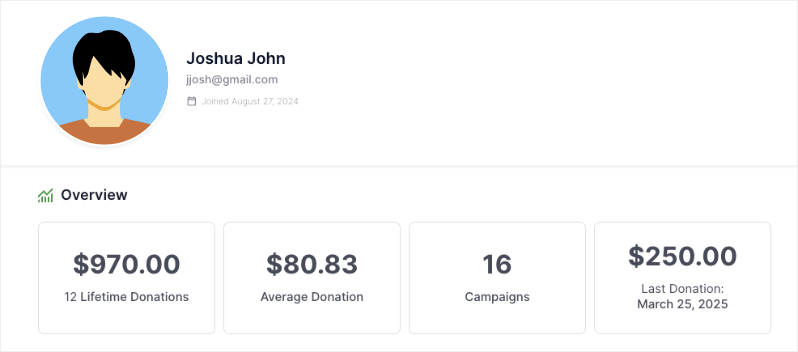
Donor dashboard overview

Here are a few highlights of the new Donor Dashboard:

  • 📊 Impact Overview: Donors can see their lifetime contributions, average donations, and number of supported campaigns at a glance.
  • 🧾 Self-Service Records: Download donation receipts, access annual reports, and view complete giving history anytime.
  • 👤 Profile Management: Update contact information, manage multiple addresses, and customize communication preferences easily.
  • 💳 Donation Control: View all donations, manage recurring contributions, and track campaign support in one place.
  • 🔐 Secure Access: Private, password-protected portal for each donor to manage their giving journey.
  • 📱 Mobile-Friendly: Access the dashboard from any device with a responsive, user-friendly design.

All these features work together to create an engaging donor experience while reducing administrative work for your team.

A Better Experience for Your Donors

The new dashboard includes five powerful tabs designed to give donors complete control over their giving journey:
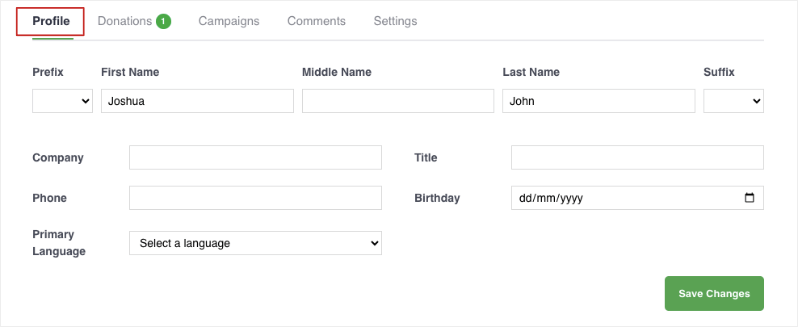
Edit profile in donor dashboard

Profile Donors: can easily update their contact info, addresses, and communication preferences in one place.

Donations: Complete donation history with downloadable receipts and recurring donation management.

Campaigns: Track supported campaigns and monitor fundraising progress.

Comments: View comments they’ve made on campaigns along with the comment status.

Powerful Controls for Administrators

As an administrator, you get complete control over the dashboard experience. You can enable the dashboard with just a single click:
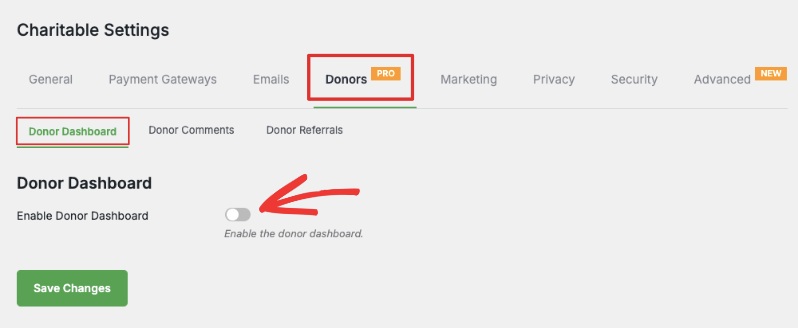
Enable donor dashboard


Then you can customize fields, enable features, and choose what information appears – all without touching any code. You can simply turn fields on and off by clicking the toggle button.
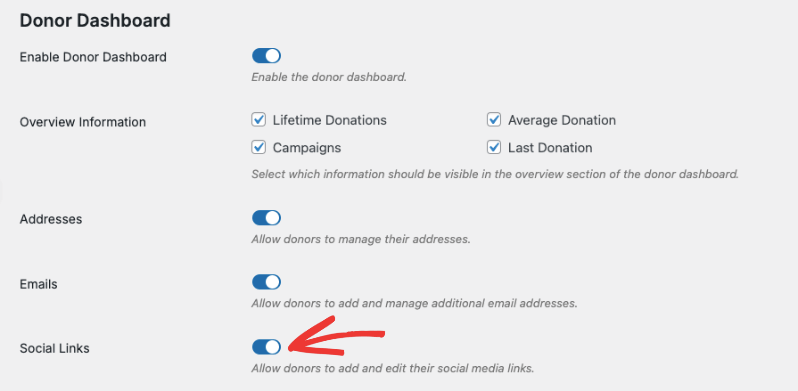
Edit options in the donor dashboard

How to Get Started

The Donor Dashboard is available now in all Charitable Pro plans. Here’s how to activate it:

Follow the step by step instructions here: How to Use the Donor Dashboard »

Who Needs the Donor Dashboard?

The Donor Dashboard is perfect for:

  • Nonprofits looking to provide a better donor experience
  • Organizations that want to reduce administrative work
  • Charities seeking to increase donor retention
  • Fundraisers who want to give donors more control over their giving
  • Any organization using Charitable Pro for fundraising

How To Get Started

The Donor Dashboard is included with Charitable Pro. Here’s how to get started:

For Existing Charitable Pro Customers:

  • Download the latest version from your account’s Downloads page
  • Update your plugin in WordPress
  • Visit Charitable » Settings » Donors » Donor Dashboard to configure your settings

For New Customers:

  • Visit our plans page to choose the right Charitable Pro package
  • Install and activate the plugin
  • Enter your license key to unlock all features
  • Configure your Donor Dashboard settings

Need help getting started? Check out our complete guide to setting up the Donor Dashboard »

author avatar
David Bisset Project Manager
David is the project manager of Charitable since 2022. David works with several non-profits (one operated by his wife) along with managing and developing features, support, and marketing for Charitable. Has been with WordPress since 2006 and has been lead organizer of multiple conferences, events, and meetups.

Disclosure: Our content is reader-supported. This means if you click on some of our links, then we may earn a commission. We only recommend products that we believe will add value to our readers.

Leave a Reply

Your email address will not be published. Required fields are marked *

Get free tips and resources right in your inbox, along with 60,000+ others

Join our Newsletter

We won’t spam you. We only send an email when we think it will genuinely help you. Unsubscribe at any time!

Featured Video:

Watch more videos on our YouTube channel.

What's New In Charitable

View The Latest Updates
🔔 Subscribe to get our latest updates
📧 Subscribe to Emails

Email Subscription

Join our Newsletter

We won’t spam you. We only send an email when we think it will genuinely help you. Unsubscribe at any time!

ambassadors improved

Moderation and Directory Screens In Ambassadors 3.0

Ambassadors 3.0 has new features: moderation and directory screens… now easily see those who are earning donations on your peer to peer network – including campaign creators that might need to be verified – all in one place. Generate reports, email ambassadors and campaign creators directly and more.

🚀 See when campaign creators and ambassadors have updated their campaigns, what donors/donation they have brought in and more.

🎉 Manually add ambassadors and campaign creators, and approve them in one-click!

Visit this page to learn more.

author avatar
David Bisset Project Manager
David is the project manager of Charitable since 2022. David works with several non-profits (one operated by his wife) along with managing and developing features, support, and marketing for Charitable. Has been with WordPress since 2006 and has been lead organizer of multiple conferences, events, and meetups.
New Payments

⚡ Unlock India-Based Donations: Meet Charitable’s Native Razorpay Integration

Trying to collect donations in India? Charitable’s native Razorpay integration features:

⚡ Instant UPI Integration: Accept fast, local donations directly inside your form via apps like PhonePe, Google Pay, Paytm, and BHIM without sending donors away from your site.

📲 Auto-Generated Campaign QRs: Instantly render scannable QR codes encoding a UPI deep link directly on your public campaign pages and sidebars for an effortless “scan-to-give” experience.

💰 Dual Local & Global Reach: Headline your campaigns in INR while seamlessly accepting major international currencies like USD, EUR, GBP, and CAD to maximize global support.

🔁 Seamless Recurring Giving: Fully integrates with the Charitable Recurring addon to manage automatic monthly subscriptions directly through Razorpay without extra code.

↩️ Automatic Two-Way Sync: Keep your books perfectly clean with two-way refund syncing—issue a refund inside WordPress or your Razorpay dashboard and both sides update automatically.

🔒 Webhook-Verified Security: Automatically protect your donation records using HMAC-signed webhook verification to ensure every status update represents real money cleared on the rails.

Visit this page to learn more.

author avatar
David Bisset Project Manager
David is the project manager of Charitable since 2022. David works with several non-profits (one operated by his wife) along with managing and developing features, support, and marketing for Charitable. Has been with WordPress since 2006 and has been lead organizer of multiple conferences, events, and meetups.
Integration New

🎉 New Built-in PushEngage Integration

Struggling with falling email open rates and rising ad costs just to keep your supporters engaged? Charitable’s built-in PushEngage integration features:

🔔 Zero-Fee Direct Messaging: Deliver crisp, instant pop-up notifications straight to your donors’ desktops and mobile devices.

⏱️ Four Smart Automated Triggers: Automatically send updates for immediate donation thank yous, full-list campaign launches, urgent “ending soon” alerts, and goal milestone celebrations.

📈 Group Momentum Broadcasts: Turn private milestones into public wins by automatically broadcasting alerts to your entire subscriber list the moment a campaign hits 50%, 75%, or 100% of its goal.

📊 Automatic Analytics Tracking: Monitor exactly where your incoming notification traffic is coming from with built-in attribution that requires zero complex configuration.

Visit this page to learn more.

author avatar
David Bisset Project Manager
David is the project manager of Charitable since 2022. David works with several non-profits (one operated by his wife) along with managing and developing features, support, and marketing for Charitable. Has been with WordPress since 2006 and has been lead organizer of multiple conferences, events, and meetups.
New Security

💂‍♂️ New DonationGuard 🛡️ Automatically Protects Your Donations!

Worried about card testing attacks or spam bots flooding your donation forms, but don’t want to ruin the giving experience for your real supporters? Charitable’s DonationGuard features:

🛡️ Real-Time Bot Detection: Actively monitors every donation submission for five distinct attack signals without slowing down your human donors.

📊 Smart Traffic Scoring: Instantly evaluates activity against a learned baseline of your site’s normal donation rhythms to catch sneaky, slow-drip card testing.

🚨 Severity-Tiered Alerts: Immediately opens structured “Attack Records” and notifies you via email and admin alerts the moment a campaign starts taking fire.

🎯 Single-Click Defense: Deploy instant security using the “Recommended Settings” preset to turn on Honeypot, Time Trap, and Rate Limit modules all at once.

🚫 Automated Blocklists: Permanently stop repeat offenders by automatically blocking suspicious email addresses based on your customized rules.

Visit this page to learn more.

author avatar
David Bisset Project Manager
David is the project manager of Charitable since 2022. David works with several non-profits (one operated by his wife) along with managing and developing features, support, and marketing for Charitable. Has been with WordPress since 2006 and has been lead organizer of multiple conferences, events, and meetups.
GiveWP Migrations New

🧤 White Glove Migration Service for GiveWP

Thinking about switching your fundraising platform from GiveWP to Charitable, but don’t want to risk losing your data or handle a complex technical setup yourself? Charitable’s White Glove Migration Service features:

👥 Flawless Donor Mapping: Safely transfer your entire supporter database with zero data loss.

📊 Complete Financial History: Meticulously preserve every historical transaction for continuous, accurate reporting.

🔄 Seamless Recurring Giving: Safely transfer active sustaining subscriptions without disrupting your incoming revenue or requiring your donors to update their information.

💳 Zero Gateway Disruptions: Keep using Stripe, PayPal, or any other GiveWP-compatible processor you already love.

🚀 Expert Technical Setup: Relax while our team handles the heavy lifting to install and configure your forms—plus, qualifying users get a full year of Charitable Pro completely free.

Visit this page to learn more.

author avatar
David Bisset Project Manager
David is the project manager of Charitable since 2022. David works with several non-profits (one operated by his wife) along with managing and developing features, support, and marketing for Charitable. Has been with WordPress since 2006 and has been lead organizer of multiple conferences, events, and meetups.




