
Automations are supposed to save you time. But setting one up from a blank screen takes thought, and once it is running, it is easy to forget about. Then a webhook URL changes or a service has a bad afternoon, and your donors quietly stop getting their thank-yous.
Automation Connect 2.5 fixes both ends of that problem. You can start from a ready-made recipe in a couple of clicks, send gift alerts straight to Slack, and know right away when something needs your attention.
Why Reliable Automations Matter
Every automated thank-you, tag, and team alert is part of how your donors experience your organization. When one breaks silently, the donor does not know it was a technical problem. They just feel unthanked.
Version 2.5 is about making automations easy to start and hard to break without you knowing.
See It In Action
Start in Seconds with Ready-Made Recipes
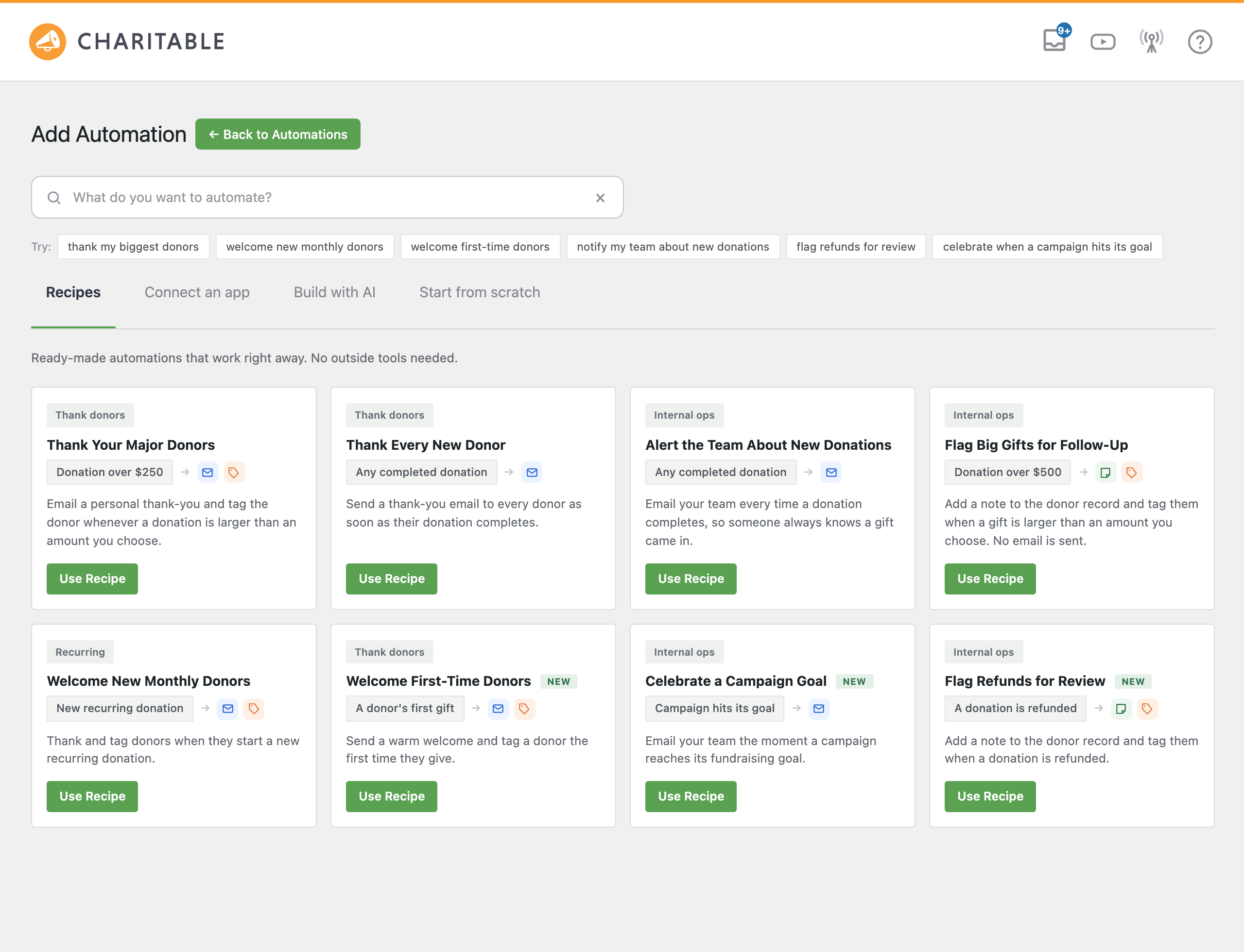
The new Add Automation screen gives you 4 ways to begin. You can choose Recipes, Connect an app, Build with AI, or Start from scratch. Recipes open with everything already filled in, so you review, save, and you are done.
🎯 Thank Your Major Donors: Email a personal thank-you and tag anyone who gives over an amount you choose.
😊 Welcome New and Monthly Donors: Greet first-time givers and new recurring donors automatically.
📣 Keep Your Team in the Loop: Email staff about new gifts or the moment a campaign hits its goal.
✅ Flag What Needs a Human: Add a note and a tag to big gifts and refunds so someone follows up.
There are 8 recipes in all, and none of them need an outside service. Each one is a normal automation, so you can change the wording or add steps whenever you like.
Here’s an Example: Thank Your Major Donors in 5 Steps
Here’s how quickly a recipe goes from idea to running. This one emails a personal thank-you to anyone who gives more than $250 and tags them as a Major Donor.
Step 1: Open Your Automations
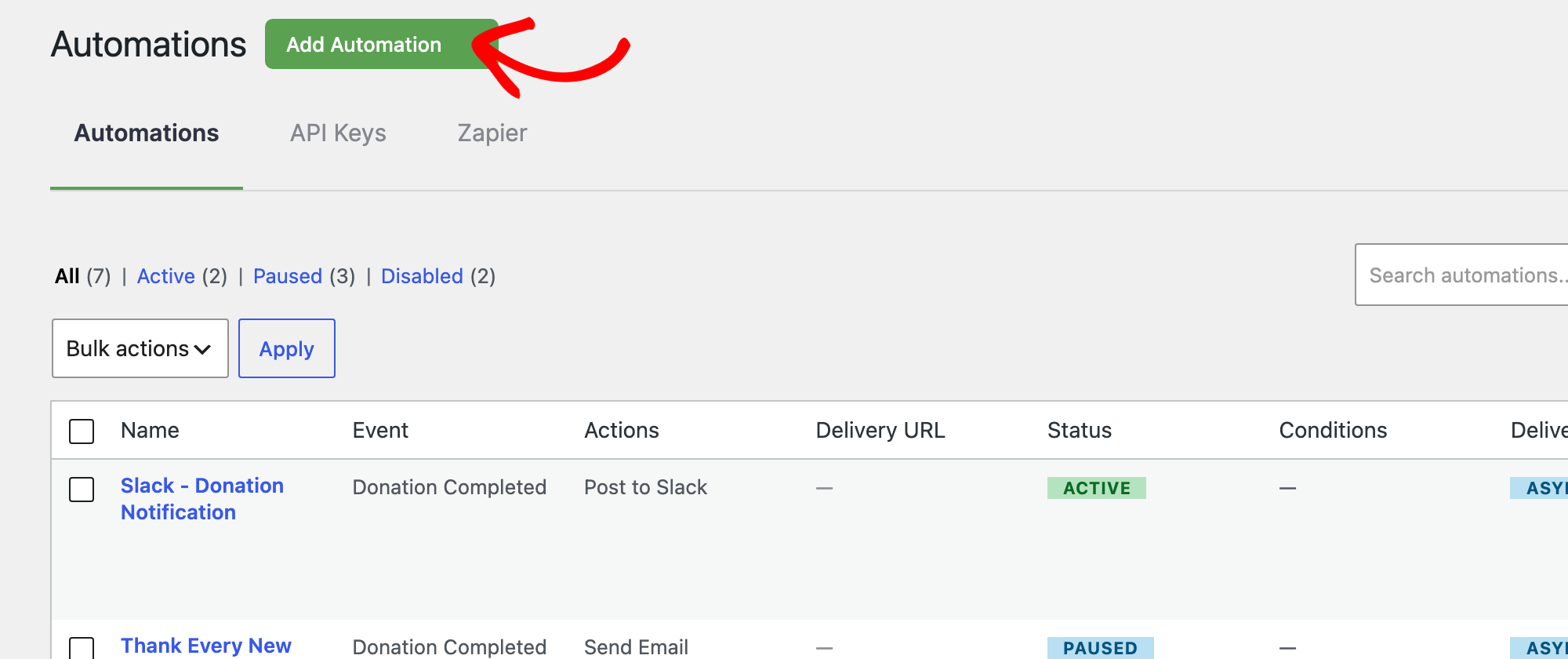
In your WordPress dashboard, go to Charitable » Automations and click Add Automation.
Step 2: Pick the Recipe
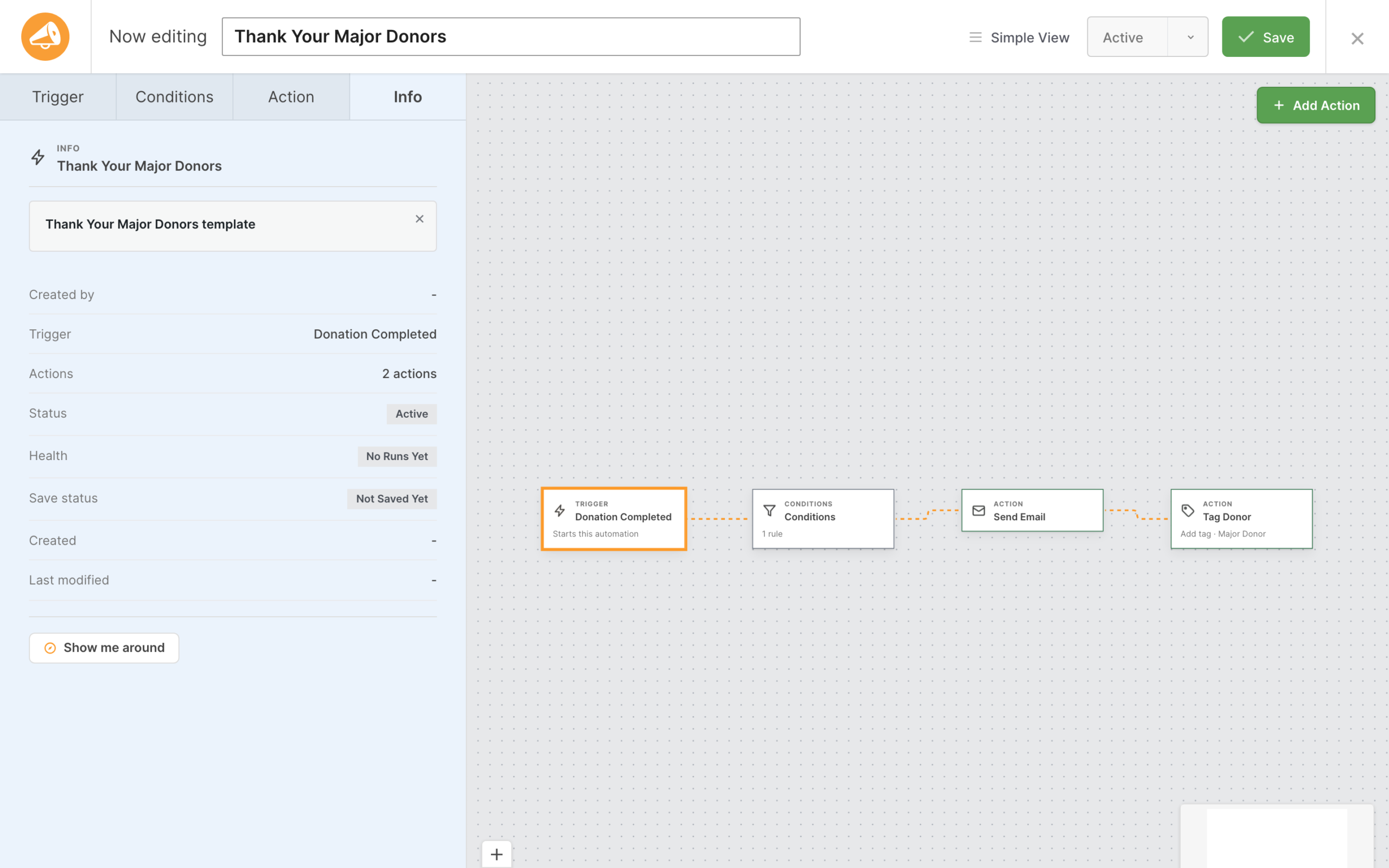
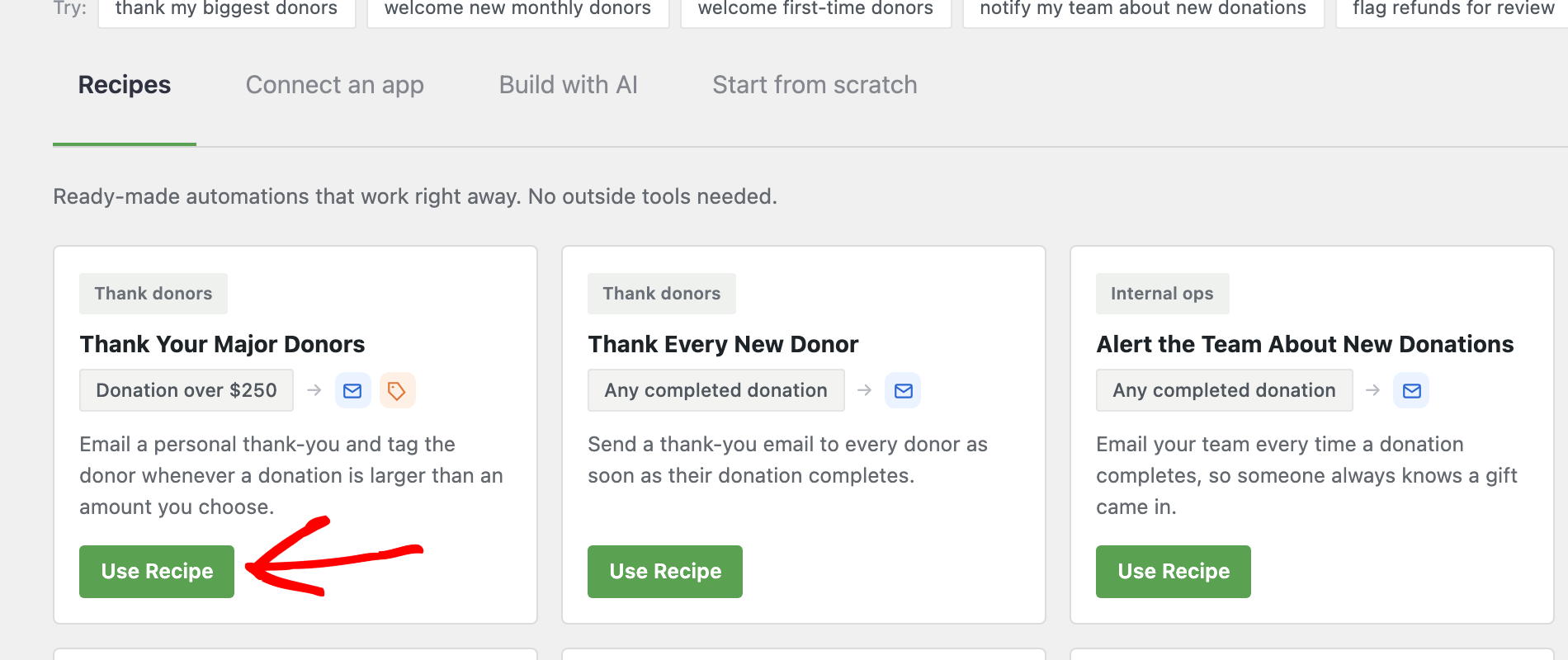
On the Recipes tab, find Thank Your Major Donors and click Use Recipe. The builder opens with the trigger, condition, and both actions already in place.
Step 3: Set Your Major Gift Amount
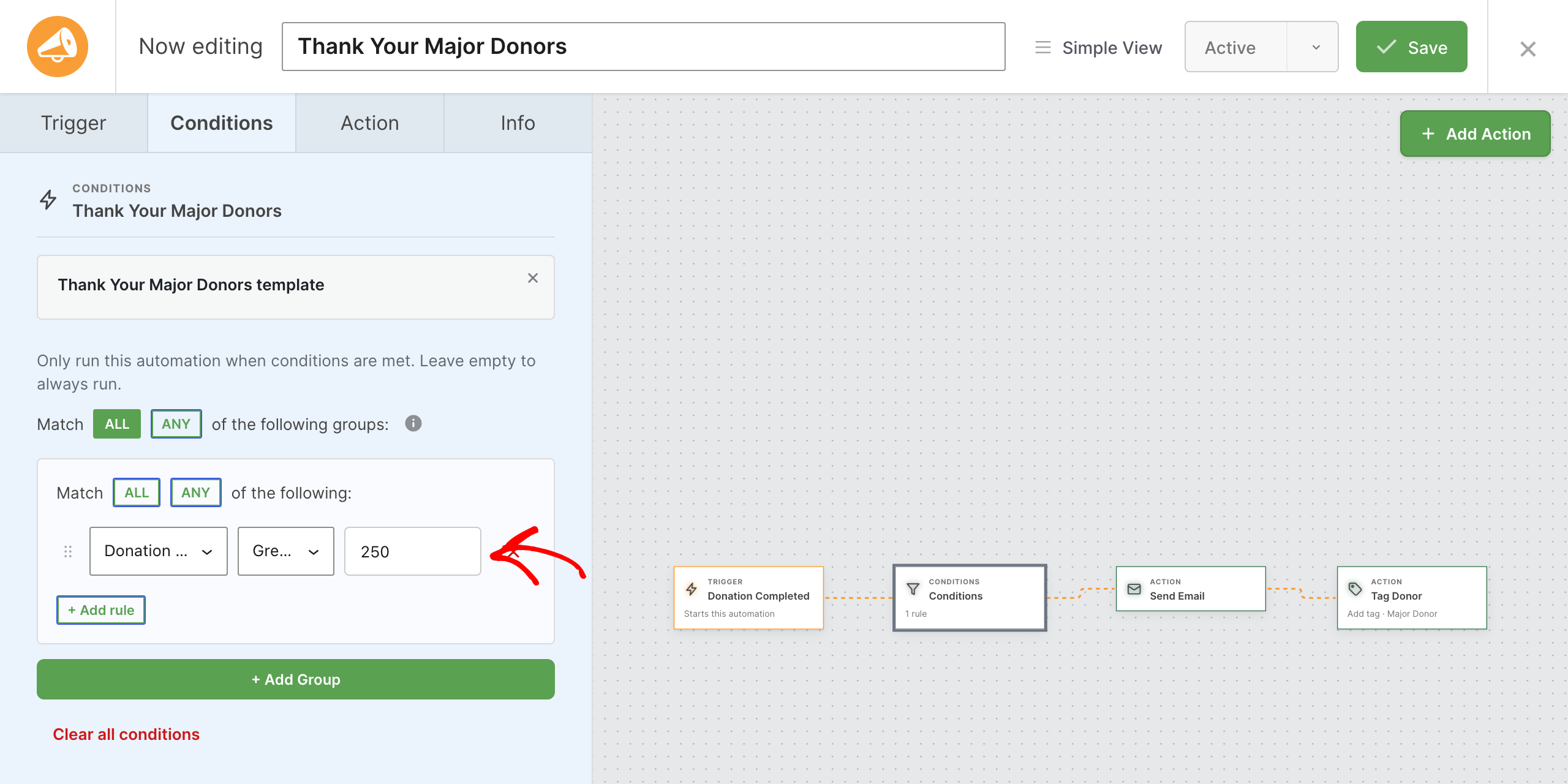
Open the Conditions tab. The recipe runs for donations greater than 250. Change the amount to whatever counts as a major gift for your organization.
Step 4: Check the Thank-You Email
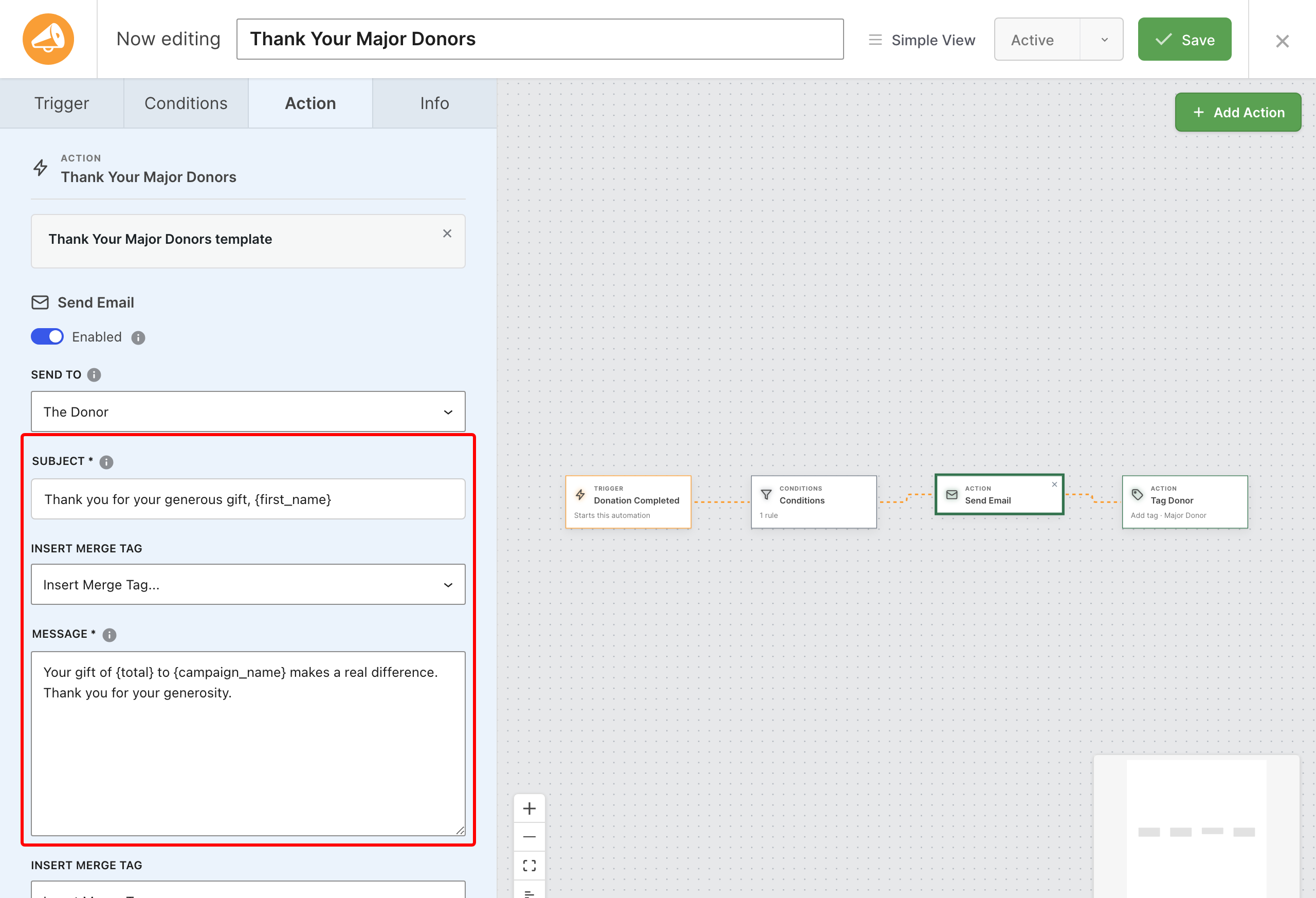
Click the Send Email card. The subject and message are already written, with merge tags like {first_name}, {total}, and {campaign_name} that fill in for each donor. Make the wording sound like you.
Step 5: Save It Paused, Then Switch It On
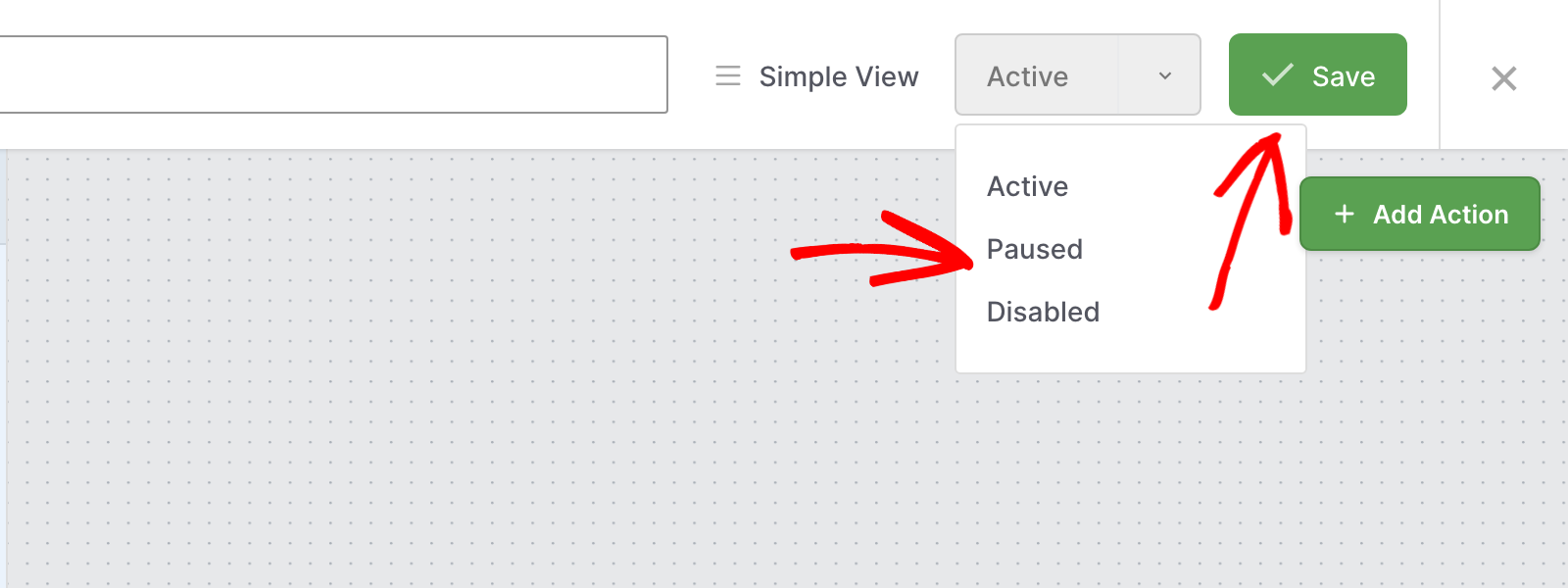
Choose Paused from the status menu and click Save, so nothing goes out while you look it over. When you’re happy, set the status to Active and save again. From now on, every major gift gets a thank-you and a tag, with no one having to remember.
Donation Alerts, Right in Slack
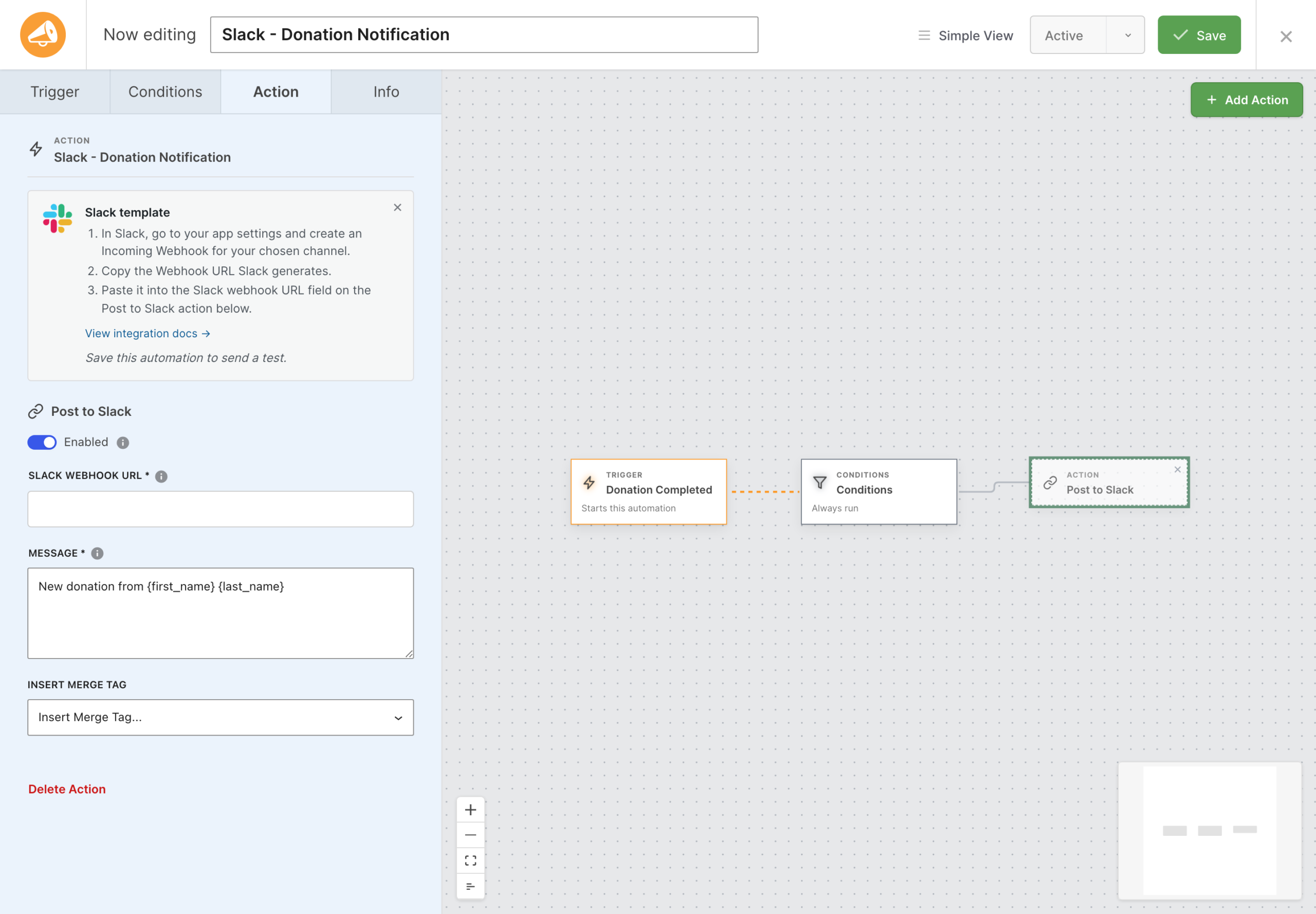
If your team lives in Slack, your donations can too. The new Post to Slack action sends a clean card to any channel with the amount, donor, campaign, and date, plus a link back to the record in your dashboard.
💬 Your Words on Top: Write the headline with merge tags like {first_name} and {total}.
👁️ Know Why a Plan Stopped: Cancelled and failed recurring payments show the reason on the card.
⚡ Preview Before It Goes Live: Send Test posts a sample card so you can check it before switching the automation on.
Automations That Fix Themselves, or Tell You When They Can’t
This is the part we are most excited about. Automation Connect now watches every automation for you.
🚀 Automatic Retries: If the receiving service has a temporary problem, the webhook tries again after about a minute, 5 minutes, and 30 minutes. Most hiccups clear up without you ever knowing.
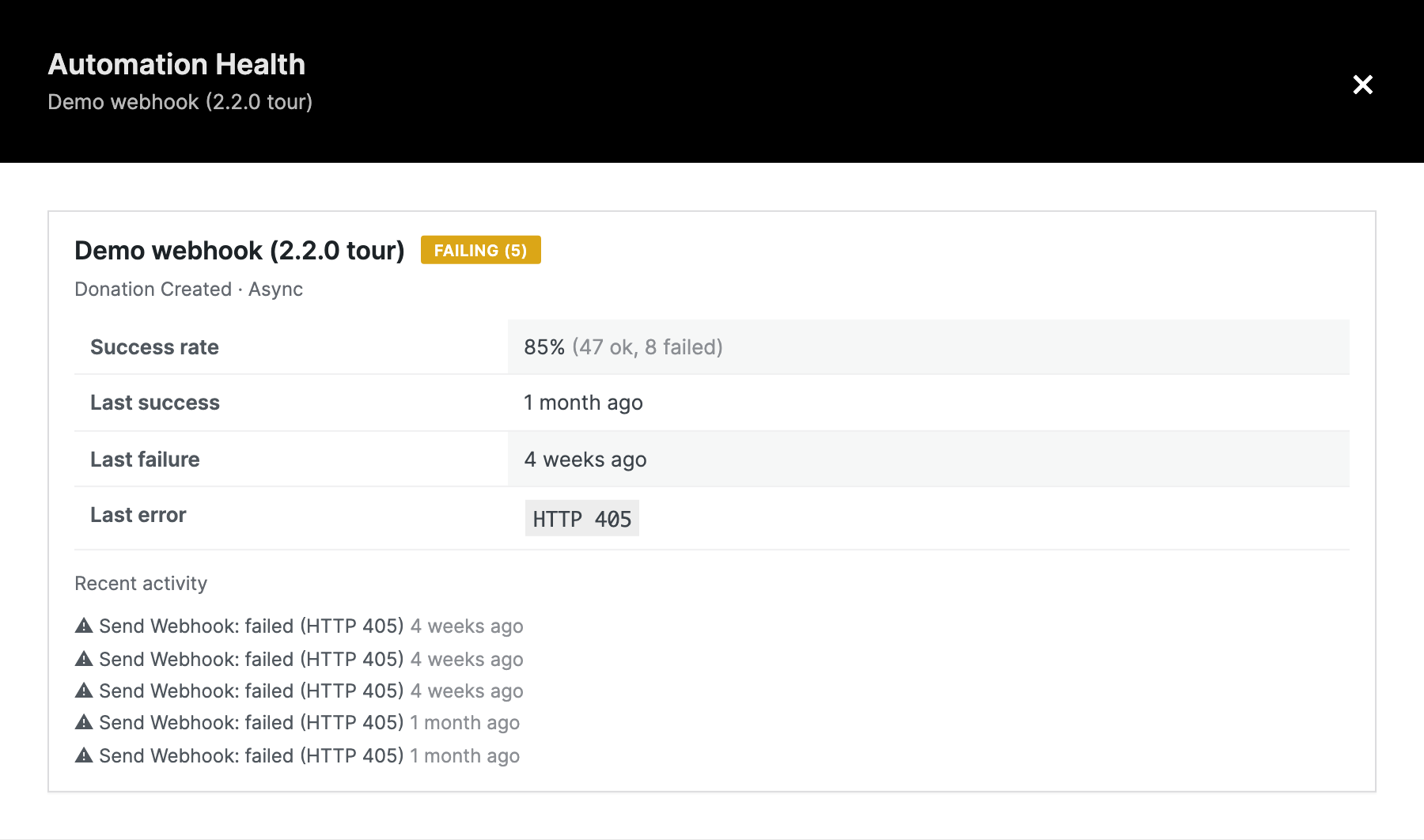
📣 Early Warning Emails: If an automation fails 3 times in a row, you get an email before it is switched off.
🩺 Health at a Glance: A new Health details view shows each automation’s success rate, last success, last error, and recent activity.
🛠️ One-Click Resend: Resend a failed delivery straight from Health details once the problem is fixed.
More Useful Data for Your Integrations
Your webhooks, emails, and Slack messages now know more about the donor and the campaign.
💰 Donor History Built In: New fields for a donor’s lifetime giving and total number of donations.
🗓️ Campaign Timing: The campaign end date is included, so your tools can act on deadlines.
✅ Amounts That Look Right: Merge tags like {total} now show as $50.00 instead of 50.
🧩 Smarter Refund Rules: The Donation Refunded trigger now supports the same conditions as new donations.
For Agencies and Developers
Hooks, Filters, and Full Customization
Version 2.5 adds filters for retry attempts and timing, failure alert thresholds, recipients, and wording, and the key a payload field is sent under. You can also add your own recipes through the existing charitable_automation_connect_templates filter.
A Clearer View for AI Assistants
If you build automations with Claude or ChatGPT through WPVibe, your assistant can now see each automation’s health too. Ask it which automations are failing and why.
Watch the Automation Tutorials
Prefer to watch? These short tutorials walk through real automations, step by step.
Your First Automations
- How to Get an Email When Someone Donates for the First Time (WordPress)
- How to Tag Major Donors Automatically in WordPress (Charitable)
- How to Tag Donors by Campaign Automatically in WordPress (Charitable)
- How to Get Notified When a Monthly Donation Fails in WordPress (Charitable)
Automation for Developers
- How to Receive and Verify Charitable Webhooks in Your Own Code (WordPress)
- How to Choose Which Fields a Charitable Webhook Sends (WordPress)
- What Happens When a Charitable Webhook Fails (Retries, Health and Resend)
FAQs on Automation Connect 2.5
Which Plan Do I Need for Automation Connect 2.5?
Automation Connect is in the Charitable Pro plugin, Pro plan and higher, and needs the Charitable Pro plugin 1.8.13 or later. The Build with AI option needs the Charitable Pro plugin 1.8.19.1 or later and the free WPVibe plugin.
Will My Existing Automations Change When I Update?
No. Your automations keep working exactly as before. They pick up automatic retries, health tracking, and failure alerts on their own, with nothing to set up.
Do Recipes Need Zapier or Another Outside Service?
No. Recipes use the actions built into Charitable, such as Send Email, Tag Donor, and Add Donor Note, so they work right away without connecting anything.
Will a Recipe Start Emailing Donors Right Away?
Recipes open ready to go live, so a recipe that emails donors starts sending as soon as you save it as Active. To look it over first, save it as Paused, then switch it to Active when you’re ready. Send Test never emails or tags real donors, so it’s safe to click at any time.
Why Didn’t My Failed Webhook Retry?
Only temporary problems are retried, such as a server error, a timeout, a rate limit, or a dropped connection. Errors like 404 Not Found or 401 Unauthorized fail right away, because retrying a wrong URL or bad credentials won’t fix them. Open Health details on the Automations list to see the exact error.
Who Gets the Failure Alert Email?
Your site admin email address, after an automation fails 3 times in a row, and at most once a day for each automation. Developers can change the recipient, the threshold, or turn alerts off with filters.
Do I Need Newsletter Connect for Mailchimp?
To sync opted-in donors straight to Mailchimp, Brevo, ActiveCampaign, and other email platforms, yes. Charitable’s Newsletter Connect feature does it with no webhook. You can still send donation data to those platforms through Zapier or Make if you prefer.
Get Started with Automation Connect 2.5
Update Automation Connect from your Plugins screen, then click Add Automation to try a recipe. Your existing automations get retries, health tracking, and alerts automatically.
Read the Automation Connect 2.5 Documentation →
Not Yet on a Charitable Paid Plan?
Charitable Has 1.2+ Million Downloads!
Trusted by millions to power successful fundraising campaigns. Try Charitable risk-free today.
✅ 14-day money-back guarantee
✅ Transparent pricing
✅ Code-free setup
What’s New in Charitable
We also launched these new features and improvements recently.
🔑
Supporters can sign up to fundraise for you with just an email address, no password needed.
🖨️
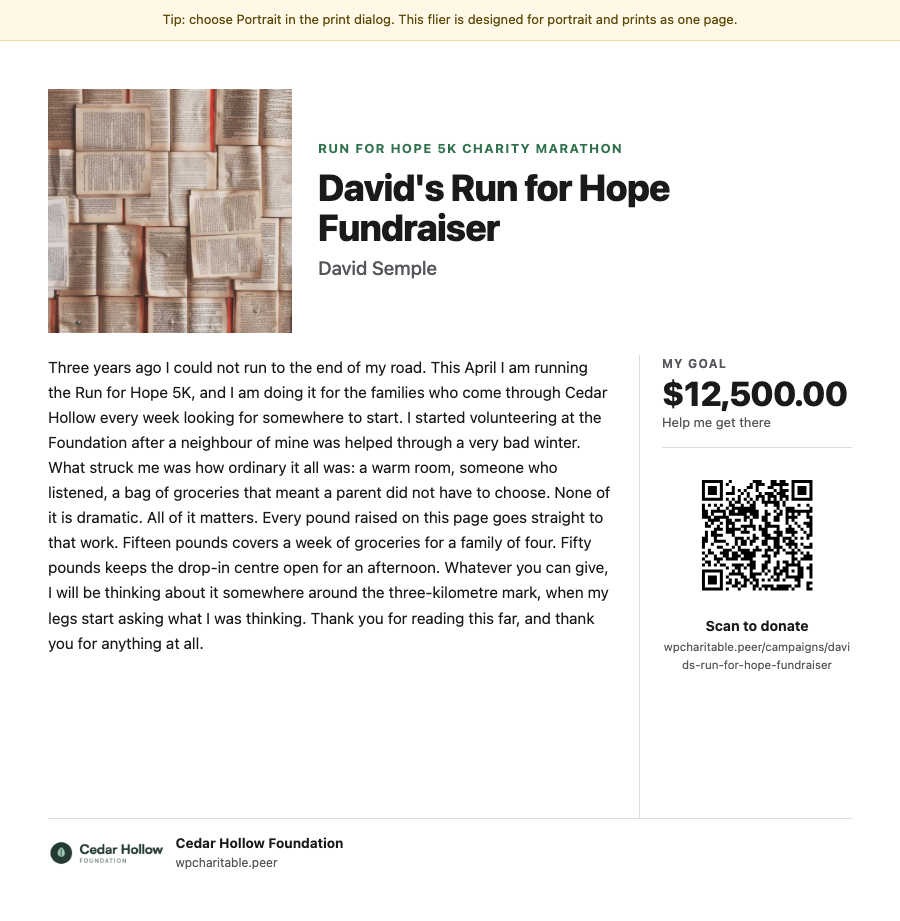
Print fliers and posters with a QR code that takes people straight to your campaign.
📊
Compare date ranges, export reports, and see how your fundraising is doing at a glance.
We’ve been adding to Charitable constantly, features and improvements designed to help you raise more and serve your donors better. See everything we’ve shipped at the Charitable Changelog.
Not yet a Charitable Pro user? Sign up today and get up to 50% off on your plan. We’re confident you’ll love raising funds with Charitable. If, for any reason, Charitable is not the right fit for you, we’ll refund your purchase with our 14-day money-back guarantee. Get Charitable Pro Now »
Stay Connected for More Nonprofit Resources
For more tutorials and videos tailored to nonprofits, subscribe to our YouTube channel. We regularly publish expert tips, step-by-step guides on online donations, fundraising strategies, and practical resources to help your organization succeed.
🗞️ Get weekly tips and exclusive guides in your inbox
Join our newsletter →
🎥 Watch step-by-step tutorials and success stories
Subscribe to our YouTube channel →
👩🏽💻 Connect with our community and get daily nonprofit insights
Follow us on LinkedIn →
🥳 Fun reels and non-profit insights
Follow us on Instagram →
👀 Insightful & fun videos to help you grow your cause
Follow us on TikTok→
🌎 Subscribe and follow for general fundraiser tips
Get Fundraiser Tips on TikTok →
Powerful Fundraising Resources
🤖 Use Charitable with Your AI Assistant
⬇️ Download proven strategies, campaign ideas, and expert tools
Get the Fundraising Kit →
💸 Get Free Fundraising Resources
Head to the Charitable Fundraising Hub →
🤔 Got questions about Charitable?
Charitable FAQs →
🏎️ Take Charitable for a spin
Create your Charitable Demo →
Understand non-profit terms and jargon
Non-Profit Glossary →
% Looking for non-profit deals and discounts?
Best Non-Profit Deals and Discounts →





Leave a Reply