
Charitable Blog

Everything you need to know about Charitable and our team.

Introducing sending annual receipts in bulk

Send Year-End Receipts for Every Donor in Minutes With New Annual Receipts 2.0!

Last updated on

  • By

Every January, nonprofit admins face the same task: getting annual donation receipts into the hands of every donor before tax season. Until now, that meant exporting spreadsheets, writing individual emails, or directing donors to download their own receipts.

With Annual Receipts 2.0.0, Charitable Pro handles the entire process for you with a guided wizard, smart batching, and a complete audit trail.

Why Automated Annual Receipts Matter for Donor Retention

Annual receipts are more than a tax document. They’re a touchpoint that reminds donors of the impact they made. A timely, professional receipt reinforces trust and makes it easy for donors to claim their tax deduction. When receipts arrive late, or not at all, donors notice. Automating this process means every donor gets their receipt on time, every year, without manual effort on your part.

Send Receipts to Hundreds of Donors Without Leaving WordPress
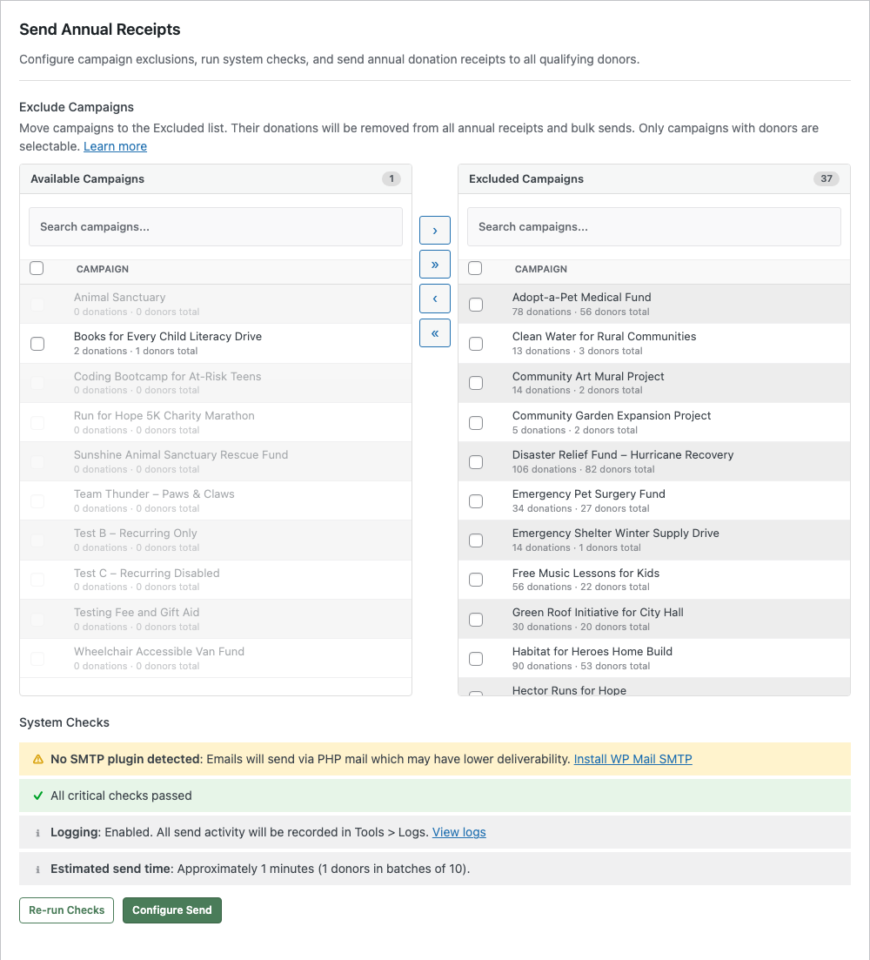
The new bulk send wizard lives right in your Annual Receipts settings. Choose a fiscal year, review your donor list, and send. The wizard walks you through three steps: configure, review, and send.

📧 One-Click Year-End Sends: Select a year, click send, and every qualifying donor receives a personalized email with a link to their annual receipt.

🎯 Campaign Exclusion: Move event registrations, merchandise, or non-deductible campaigns to the Excluded list so those donations never appear on receipts.

🔍 Dry Run Mode: Simulate the entire send without delivering a single email. See exactly who would receive a receipt, who would be skipped, and why, before you commit.

See It In Action

Built for Real-World Email Infrastructure

Not every nonprofit runs a dedicated email server. Charitable detects your SMTP setup and adapts automatically.

⚡ SMTP-Aware Batching: The system detects WP Mail SMTP, FluentSMTP, and Post SMTP, then adjusts batch sizes and delays to stay within your provider’s limits.

🛡️ Daily Limit Protection: Using Gmail or another provider with a daily cap? Charitable pauses the send automatically and resumes the next day. No emails lost, no provider suspensions.

✅ Pre-Flight System Checks: Before you send a single email, the wizard verifies your email configuration, cron availability, logging status, and donor count. Issues are flagged with direct links to fix them.

Every Send Leaves a Complete Audit Trail

Nonprofits need records. Every receipt sent, skipped, or failed is logged in two places: your system-wide log in Tools and the individual donor’s profile.

📋 System Log: Filter by “Annual Receipts” in Tools > Logs to see every send event with donor names, dates, and reasons for any skips or failures.

👤 Donor Log: Each donor’s Logs tab shows exactly when their receipt was emailed and the total donation amount. No guessing, no searching through email.

📊 Send History: A history table tracks how many receipts were sent for each year, with a one-click option to clear and resend.

Secure Receipt Links, No Login Required

Each email includes a unique, secure link that lets donors view their annual receipt without logging in. Links use HMAC authentication and expire after 30 days. Donors click the link, see their receipt, and can print or download a PDF, all without creating an account.

Donation Type Labels on Every Receipt

Receipts now show whether each donation was one-time or recurring. This small detail helps donors and their accountants understand the nature of each contribution at a glance.

For Agencies and Developers

Hooks, Filters, and Full Customization

The donation type label is filterable via charitable_annual_receipt_donation_type_label. Campaign exclusions are applied at the SQL level via the charitable_query_where filter. The receipt token expiry is filterable via charitable_annual_receipt_token_expiry.

Template Overrides

Receipt templates (annual-receipt.php and pdf.php) can be overridden in your theme at charitable/charitable-annual-receipts/.

Get Started with Annual Receipt Bulk Send

Update your Annual Receipts addon to version 2.0.0, enable the Annual Receipt email in Settings > Emails, and head to Advanced > Annual Receipts to send your first batch.

Read the Annual Receipt Bulk Send Documentation →

Learn how to set up Annual Receipts →

Features In Annual Receipts You’ll Want to Know About

Aside from the bulk send feature, our Annual Receipts feature has powerful elements that you may not know about.

→ First, you can build your Annual Receipt page in the WordPress editor in no time at all, while enjoying a live preview so you can see what an annual receipt will look like for your donors. Simply create a new page, add the Annual Receipt block, and tweak the settings to suit your needs.
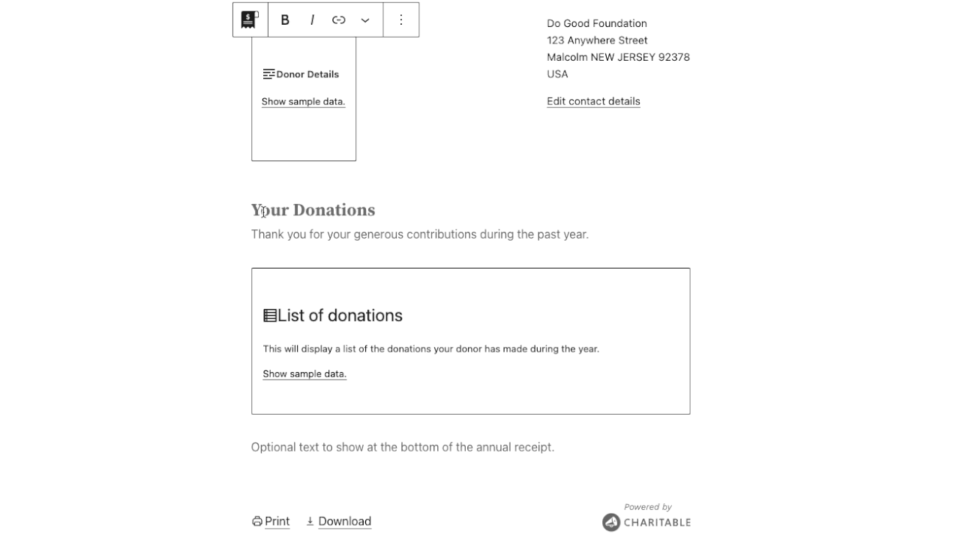
Short video showing how to edit the annual receipt block

→ If you’re using a Full Site Editing-enabled block theme, you can also tweak the borders of the annual receipt.

→ One benefit of the Annual Receipt block is that you can also tailor its design to your needs by customizing the colour of the text and the background used for the annual receipt. You can even set up interesting background gradients to really make your annual receipt stand out.

→ You can change the end of financial year date. The date marking the end of the financial year changes country by country. Annual Receipts defaults to using December 31 as the final day of the financial year, but you can change this easily enough.

  1. In your WordPress dashboard, go to Charitable » Settings » Extensions.
  2. You will find the “End of financial year” setting in the “Annual Receipts” section. Set the day and month to match your country’s end of financial year date.
  3. Click Save Changes.

→ If you are not using the block editor, you can still create an Annual Receipt page using the [charitable_annual_receipt] shortcode. It supports most of the same settings that are supported by the block, but it does not have the same styling customization options.

→ Also, your donors can print and download their annual receipt!
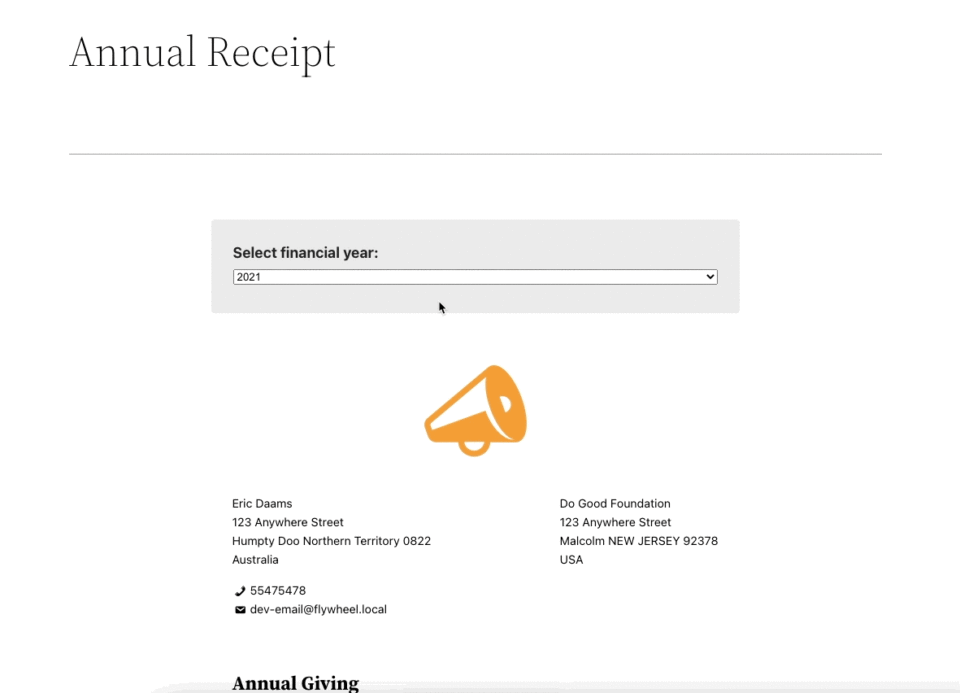
Short video showing an annual receipt with ability to print

Your donors can securely access their annual receipt on your website. From there, a single click is all it takes for them to download their receipt or get a printable version.

See our guide on getting started with Annual Receipts »

Not Yet a Charitable Pro User?

Charitable powers donation forms for thousands of nonprofits on WordPress, with over 1 million downloads. Annual Receipt Bulk Send is included with every Charitable Pro license.

Stay Connected for More Nonprofit Resources

For more tutorials and videos tailored to nonprofits, subscribe to our YouTube channel. We regularly publish expert tips, step-by-step guides on online donations, fundraising strategies, and practical resources to help your organization succeed.

🗞️ Get weekly tips and exclusive guides in your inbox
Join our newsletter →  

🎥 Watch step-by-step tutorials and success stories
Subscribe to our YouTube channel →  

👩🏽‍💻 Connect with our community and get daily nonprofit insights
Follow us on LinkedIn →

🥳 Fun reels and non-profit insights
Follow us on Instagram → 

👀 Insightful & fun videos to help you grow your cause
Follow us on TikTok→  

🌎 Subscribe and follow for general fundraiser tips
Get Fundraiser Tips on TikTok → 

Powerful Fundraising Resources

⬇️ Download proven strategies, campaign ideas, and expert tools
Get the Fundraising Kit →  

💸 Get Free Fundraising Resources
Head to the Charitable Fundraising Hub

🤔 Got questions about Charitable?
Charitable FAQs

🏎️ Take Charitable for a spin
Create your Charitable Demo

Understand non-profit terms and jargon
Non-Profit Glossary

% Looking for non-profit deals and discounts?
Best Non-Profit Deals and Discounts →

author avatar
David Bisset Project Manager
David is the project manager of Charitable since 2022. David works with several non-profits (one operated by his wife) along with managing and developing features, support, and marketing for Charitable. Has been with WordPress since 2006 and has been lead organizer of multiple conferences, events, and meetups.

Disclosure: Our content is reader-supported. This means if you click on some of our links, then we may earn a commission. We only recommend products that we believe will add value to our readers.

Leave a Reply

Your email address will not be published. Required fields are marked *

Get free tips and resources right in your inbox, along with 60,000+ others

Join our Newsletter

We won’t spam you. We only send an email when we think it will genuinely help you. Unsubscribe at any time!

Featured Video:

Watch more videos on our YouTube channel.

What's New In Charitable

View The Latest Updates
🔔 Subscribe to get our latest updates
📧 Subscribe to Emails

Email Subscription

Join our Newsletter

We won’t spam you. We only send an email when we think it will genuinely help you. Unsubscribe at any time!

donation form Feature New

📝 Donation Form Block: Embed a Working Donation Form Anywhere

With the new Donation Form Block for Charitable Pro, you can drop a fully working donation form directly onto any page or post in the WordPress block editor. No redirects, no page reloads, and zero friction between reading your story and making a contribution.

📝 Drop Forms Anywhere: Place a working form directly onto your homepage, inside a story-driven blog post, on a dedicated landing page, or within a campaign announcement.

🎯 Dynamic Campaign Binding: Easily choose a specific campaign from the block sidebar or set it to automatically bind to whichever campaign is currently being viewed.

📐 Full vs. Minimal Form Views: Switch between a full layout or a compact minimal view to perfectly fit sidebars, narrow columns, or wide landing pages.

🎨 Scoped No-Code Styling: Customize typography, container spacing, border radius, amount buttons, and accent colors independently for every form instance without touching a line of CSS.

Learn more here.

author avatar
David Bisset Project Manager
David is the project manager of Charitable since 2022. David works with several non-profits (one operated by his wife) along with managing and developing features, support, and marketing for Charitable. Has been with WordPress since 2006 and has been lead organizer of multiple conferences, events, and meetups.
ambassadors New

👤 Creator Profiles: Put a Face to Every Peer-to-Peer Campaign

Ambassadors 3.3.0 now provies Creator Profiles — giving your supporters a permanent, shareable public home that turns one-time fundraisers into ongoing relationships.

👤 Public Creator Pages: Give every fundraiser an instant, clean landing page at /creator/their-name/ to showcase their custom avatar, bio, and a browsable grid of their campaigns.

📊 Proof of Impact: Boost donor trust by displaying site-wide milestones on the profile—like total funds raised and total donor counts.

💳 Interactive Hover Cards: When donors hover over a creator’s name on a campaign page, a compact card expands with their bio and social handles right at the moment of decision.

📍 Responsible Location Sharing: Allow creators to safely show local supporters where they are based using only city, state, and country details.

🛠️ Self-Serve Customization: Fundraisers can update their own profiles and link up to six social networks directly from the My Campaigns hub, saving you admin time.

Ready to empower your advocates? Update to Ambassadors 3.3.0 and turn on “Enable Public Creator Page” today!

author avatar
David Bisset Project Manager
David is the project manager of Charitable since 2022. David works with several non-profits (one operated by his wife) along with managing and developing features, support, and marketing for Charitable. Has been with WordPress since 2006 and has been lead organizer of multiple conferences, events, and meetups.
Improvement Payments

📱 Turn Mobile Scrollers Into Donors: Meet Charitable’s Mollie Upgrade

Losing mobile supporters because they hate typing out long card numbers on their phones? Charitable’s updated Mollie integration features:

⚡ One-Tap Wallet Checkout: Enable donors to complete their gifts instantly using Apple Pay or Google Pay with a simple face scan, fingerprint, or tap.

💰 No Extra PCI Burden: Skip complex domain verification and security compliance since all wallet transactions run safely through Mollie’s hosted checkout.

🛠️ Custom Cancel Routing: Keep the experience predictable by automatically sending donors who back out to your cancellation page, or use developer filters to route them to a custom page.

Visit this page to learn more.

author avatar
David Bisset Project Manager
David is the project manager of Charitable since 2022. David works with several non-profits (one operated by his wife) along with managing and developing features, support, and marketing for Charitable. Has been with WordPress since 2006 and has been lead organizer of multiple conferences, events, and meetups.
ambassadors improved New

Moderation and Directory Screens In Ambassadors 3.0

Ambassadors 3.0 has new features: moderation and directory screens… now easily see those who are earning donations on your peer to peer network – including campaign creators that might need to be verified – all in one place. Generate reports, email ambassadors and campaign creators directly and more.

🚀 See when campaign creators and ambassadors have updated their campaigns, what donors/donation they have brought in and more.

🎉 Manually add ambassadors and campaign creators, and approve them in one-click!

Visit this page to learn more.

author avatar
David Bisset Project Manager
David is the project manager of Charitable since 2022. David works with several non-profits (one operated by his wife) along with managing and developing features, support, and marketing for Charitable. Has been with WordPress since 2006 and has been lead organizer of multiple conferences, events, and meetups.
New Payments

⚡ Unlock India-Based Donations: Meet Charitable’s Native Razorpay Integration

Trying to collect donations in India? Charitable’s native Razorpay integration features:

⚡ Instant UPI Integration: Accept fast, local donations directly inside your form via apps like PhonePe, Google Pay, Paytm, and BHIM without sending donors away from your site.

📲 Auto-Generated Campaign QRs: Instantly render scannable QR codes encoding a UPI deep link directly on your public campaign pages and sidebars for an effortless “scan-to-give” experience.

💰 Dual Local & Global Reach: Headline your campaigns in INR while seamlessly accepting major international currencies like USD, EUR, GBP, and CAD to maximize global support.

🔁 Seamless Recurring Giving: Fully integrates with the Charitable Recurring addon to manage automatic monthly subscriptions directly through Razorpay without extra code.

↩️ Automatic Two-Way Sync: Keep your books perfectly clean with two-way refund syncing—issue a refund inside WordPress or your Razorpay dashboard and both sides update automatically.

🔒 Webhook-Verified Security: Automatically protect your donation records using HMAC-signed webhook verification to ensure every status update represents real money cleared on the rails.

Visit this page to learn more.

author avatar
David Bisset Project Manager
David is the project manager of Charitable since 2022. David works with several non-profits (one operated by his wife) along with managing and developing features, support, and marketing for Charitable. Has been with WordPress since 2006 and has been lead organizer of multiple conferences, events, and meetups.






