
CHARITABLE VS ZEFFY
Keep 100% of Your Donations.
Every Time.
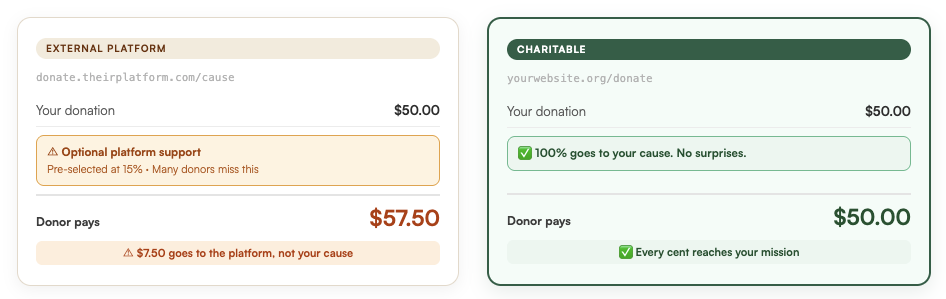
Zeffy calls itself “free” but your donors are quietly charged a pre-selected tip to fund their platform. That money doesn’t reach your mission, and donors are not happy when they find out.
Charitable Pro is different: donors stay on your website and you own your data. Our pricing starts at $69 per year. That’s it. You keep 100% of every donation.






Here’s What Charitable Gives You
Zero Platform Fees Forever
Charitable Pro starts at $69 your first year, then $149/year. That’s it. No transaction fees, no hidden tips, no percentage taken from your donations.
Every dollar your donors intend for your mission reaches your mission.
No “Tips” or Hidden Fees
Charitable Pro doesn’t charge you or your donor any hidden fees. There’s one transparent annual fee, and after that, all the money you raise is yours to keep.
No surprise charges. No pre-selected tips. No awkward conversations with confused donors
No Middleman. No Hold
With Charitable Pro, your donations go directly to your bank account – full stop. We don’t hold your money, batch it, or release it on a schedule that works for us but not for you.
No waiting periods and no “under review” emails when you need your funds most.

Here’s What Nobody Tells You About Zeffy
“Free” is doing a lot of heavy lifting in their marketing. Zeffy doesn’t charge your nonprofit, but someone does pay. That someone is your donor. At checkout, Zeffy adds a pre-selected platform tip, often 15% or more. Donors can opt out, but many don’t notice it in time.
When that extra charge shows up on a donor’s statement, they don’t blame Zeffy. They blame you. That confusion erodes the trust you worked hard to build. It leads to negative reviews, through no fault of your own, and turns one-time donors into people who don’t come back.
Charitable costs $69 your first year, then $149/year. Your donors are never charged a single cent to fund our platform. Not a tip. Not a fee. Not ever. Donors stay happy because the checkout is straightforward: they’re never confused, surprised, or nudged into paying for something they didn’t knowingly agree to.
That’s the trade-off worth making.


David Bisset
Project Manager, Charitable
The Real Cost of Zeffy vs Charitable
Zeffy costs nonprofits nothing. Charitable starts at $69 your first year. That’s the surface comparison. Here’s what it actually looks like for the donors funding your mission.
| Monthly donations raised | Zeffy: Donor tips to platform / year | Charitable annual cost | Your donors save |
|---|---|---|---|
| $1,000/mo | $1,800/year | $69 | $1,731+ |
| $5,000/mo | $9,000/year | $69 | $8,931+ |
| $10,000/mo | $18,000/year | $69 | $17,931+ |
*Estimates based on – 5% default tip rate. · Charitable: $69 first year, $149/year after.
Charitable starts at $69 for your first year and renews at $149/year. Your donors pay $0 to fund our platform. The question isn’t whether Charitable is worth it. It’s whether you’re comfortable with what Zeffy costs the people who show up for your cause.
What Charitable Users Say
Charitable has 200+ 5-star reviews from real users! Here are just a few experiences of real organizations that left expensive, confusing platforms behind – and what changed when they did.

@mikisdad
“I’ve checked out many – this is one of the best. Charitable is easy to use. It doesn’t confuse with a million and one setting and options. It installs quickly and without drama. Above all, the service is superb.”

“After years of working with high cost donation management companies, I decided to give Charitable a go. Not only does it offer almost every feature I was looking for at a fraction of what I was previously paying, but when I asked about the lack of a feature, it was implemented and released as an update within a week..”

“I tried “Give” before this plugin but I really couldn’t figure it out and found it frustrating. I didn’t experience any of the issues I had with Give with Charitable.”

Steven Bauwens
“I tried the plugin ‘Give’ first, but I just couldn’t get it to work, it would freeze my WP dashboard. I found this plugin which has the same feature that I could add campaigns with a specific donation option that I can add to my pages.”
Zeffy vs Charitable: Feature Comparison
An honest look at how the two platforms compare. Where Zeffy genuinely has a feature, we’ve marked it. Every ❌ is a real gap.
| Feature | Charitable | Zeffy |
|---|---|---|
| Donor stays on YOUR website | ✅ Always | ❌ Donors leave your site |
| SEO benefits your domain | ✅ None. Ever. | ⚠️ Donor-facing “optional” tip |
| You own your donor data | ✅ 100% on your server | ❌ Data lives on Zeffy’s platform |
| Platform lock-in risk | ✅ None — self-hosted | ⚠️ Dependent on Zeffy’s policies |
| Pricing model | $69 yr 1, $149/yr after | Transaction/platform fees |
| WordPress native plugin | ✅ Yes | ❌ External hosted platform |
| Full branding & customization | ✅ Complete control | ⚠️ Limited |
| SEO benefit to your domain | ✅ Campaigns on your site | ❌ Traffic goes to Zeffy |
| Recurring donations | ✅ Built-in (Pro) | ✅ Yes |
| Peer-to-peer fundraising | ✅ Built-in (Pro) | ✅ Yes |
| Donor management / CRM | ✅ Full built-in system | ⚠️ Basic |
| Payment gateways | ✅ Stripe, PayPal, Square + more | ⚠️ Stripe only |
| PDF receipts & tax statements | ✅ Automated (Pro) | ✅ Yes |
| Dedicated human support | ⭐ 5-star rated team | ⚠️ AI-powered assistant |
| 14-day money-back guarantee | ✅ Yes | N/A (free product) |
The Problem Isn’t the Tip. It’s That Donors Don’t Know.
Zeffy is, genuinely, free for nonprofits. No monthly charge, no plan to upgrade. Their business model is built differently: instead of charging you, they add a pre-selected “optional tip” to your donors’ checkout. When a donor gives $50 to your cause, they see a dropdown pre-set at 15% – an extra $7.50 going to Zeffy, not to your organization. Donors can remove it. Many don’t notice it.
Real donors have noticed. And they’re not happy – not with Zeffy, but with the organizations they donated to. When someone is surprised by an unexpected charge on their statement, they blame the cause they were trying to support. The frustrated email arrives in your inbox. The donor who felt misled doesn’t become the recurring supporter you need.
Here’s what real donors have written about the Zeffy experience:
Zeffy Reviews
I made a donation through Zeffy by…
I made a donation through Zeffy by entering the amount I intended to give and completed the payment process. At no point before clicking pay was it clearly disclosed that a 15% fee would be added to my donation. I only discovered this fee after the transaction was completed. This lack of clear upfront disclosure is misleading and prevented me from making an informed decision about the total amount I was agreeing to pay. I will never donate through Zeffy again because the experience feels purposefully deceptive.

17% Add-On Fee !!
I’m sorry the organization I want to donate to is using Zeffy [first time I’ve heard of them]. Could not believe they charge a 17% [!!] add on fee to one’s original donation. That is a ridiculous amount of extra money asked for. I will find another way to donate to Save the Ridglan Beagles.

An extra 17% was added to my donation…
An extra 17% was added to my donation without any warning. No hint of a drop-down menu or choice – just deducted, and the first hint of a surcharge was on the confirmation email. There is an option link within the confirmation email to have the surcharge refunded, which takes two weeks. Feels like very sharp practice to me, and I won’t be donating again to any organisation using Zeffy.

Zeffy hides a donation to Zeffy when…
Zeffy hides a donation to Zeffy when you make a donation – I found the 15% donation fee they give themselves to be very devious!
We don’t usually do comparisons like this. But when it comes to something that directly affects your donors’ trust – and your organization’s reputation – we feel you deserve the full picture.
What Happens When You Build on Someone Else’s Platform
Platform dependency is easy to ignore when things are working. It becomes visible the moment something changes. Zeffy controls whether your account stays active, when your funds are released, and what happens to your campaigns if they change their policies or shut down. Several donation platforms have done exactly that with little warning, leaving nonprofits scrambling.
There’s also the question of what you leave behind. When you run campaigns on Zeffy, every campaign URL is on Zeffy’s domain. Every link you share, every mention in your newsletter – it sends traffic to Zeffy, not to your website. If you ever leave, those links don’t follow you. Neither does the search authority you’ve built.
With Charitable, there’s no platform in between. Your campaigns live at your URL. Your donor database lives in your WordPress site. Your payment gateway pays you directly. If you ever decide to stop using Charitable, you take everything with you.
📁 Your data, your rules
Donor records, campaign data, giving history – all stored in your own WordPress database. Export it anytime, back it up, or integrate it with your CRM. No platform can lock you out.
🌐 Campaigns on your domain
Every campaign URL, every social link, every newsletter mention – drives traffic to your website. Your SEO authority builds on your domain, not Zeffy’s.
💳 Direct payouts
Your payment gateway (Stripe, PayPal, or Square) pays you directly with no platform approval queue. No holds. No policy reviews. Your money, on your timeline.
Import Your Zeffy Donors in Under a Day
Switching platforms feels risky. The data, the campaigns, the donor history – it all feels fragile. The migration path is simpler than most people expect, and Zeffy allows you to export your donor data as a CSV file from your dashboard.
Most organizations complete the full migration in a few hours:
- Export your donor data from Zeffy: Download a CSV of your donor list and donation history from your Zeffy dashboard.
- Install Charitable on your WordPress site: Available free on WordPress.org. Both plugins can run simultaneously during the transition.
- Run the importer: Upload your CSV in Charitable’s built-in import tool. It brings in donor records and donation history.
- Connect your payment gateway: Link Stripe, PayPal, Square, or your preferred processor. You control when funds hit your account.
- Go live: Launch your first Charitable campaign on your own domain. Donors complete the full experience on your site, without a single tip prompt.
If you get stuck at any point, our support team will help you migrate for free. We’ve done this before, and we’re ready to do it with you.
Not Convinced Yet?
Check out what WPBeginner has to say about Charitable:
Charitable vs Zeffy –
Frequently Asked Questions
Do you have a question about the Charitable compared to Zeffy? See the list below for our most frequently asked questions. If your question is not listed here, please contact us.
Does Charitable take a percentage of each donation?
- Pro version: Charitable Pro does not have any platform fee whatsoever. You only pay standard annual subscription (starting at $69 per year) + any fees from your payment gateway.
- Lite version: Charitable Lite is free to use. There are no annual subscription charges. We only charge a nominal 3% flat fee on every donation. You may also incur transaction fees from your payment gateway that goes directly to them.
Are there any limits on the number of campaigns or donation forms with Charitable?
No. Charitable lets you create unlimited donation campaigns and forms from day one – no paid upgrades or restrictions.
Can I manage recurring donations with Charitable?
Yes! Charitable includes robust recurring donation features so your supporters can contribute weekly, monthly, or on a custom schedule – helping you achieve a reliable, steady income.
Does Charitable integrate with my favorite tools and services?
Charitable works seamlessly with many popular platforms, including MailChimp, ActiveCampaign, Constant Contact, HubSpot, MailPoet, Zapier, and more.
Is Charitable easy to set up and use?
Yes. Charitable is designed to be easy for anyone to use – no coding and beginner-friendly. We’ve included a setup wizard that guides you through the process so you can set up and launch your first campaign in minutes, not hours, not days!
What kind of support does Charitable offer?
Lite users can post questions in the WordPress support forum. Charitable Pro plugin customers can reach out to us through the support channel. You’ll receive friendly, responsive support from a team experienced in helping charities succeed. We’re here to answer questions and resolve any issues quickly.
Does Charitable host my campaigns on their platform?
No. All of your fundraising campaigns live 100% on your own WordPress website. You’re in full control of your branding, your donor data, and your content.




