
Between 50 and 70 percent of donors who start a donation form never finish it.
Not because they changed their minds. Because life interrupted — a phone call, a slow connection, a browser tab they forgot to come back to. The intent was there. The donation was almost there. And then it was gone.
Until now, recovering those donors meant setting up third-party abandonment tools, connecting your donation platform to an external email service, and hoping the handoff worked. Most organizations never bother. The revenue just disappears.
Charitable Pro’s new Donation Recovery feature changes that. It automatically captures donor intent, detects abandonment, and sends a personalized reminder email — with a direct link back to their pre-filled form — built right into Charitable! No third-party tools. No developer. No ongoing maintenance.
How It Works
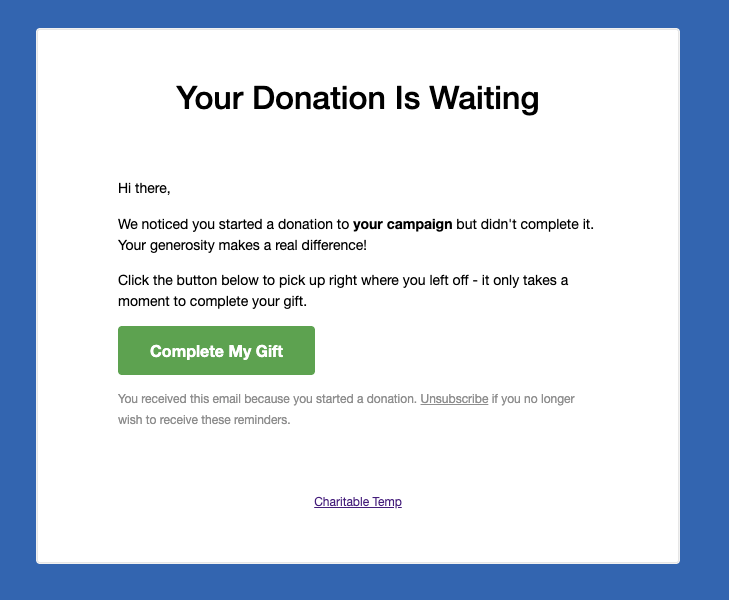
When a donor visits a donation form for a recovery-enabled campaign, a lightweight background tracker captures their email address, name, and donation amount as they type. If they leave without completing the donation, Charitable detects the abandoned session and sends a recovery email approximately one hour later.
The email includes a personalized Complete My Gift button. When the donor clicks it, they return to the exact page where they started — with their information already filled in. Completing the gift takes seconds.
You enable it once. After that, Charitable handles everything in the background.
Built for the Whole Team — Not Just Developers
Every part of Donation Recovery was built to be usable without technical help.
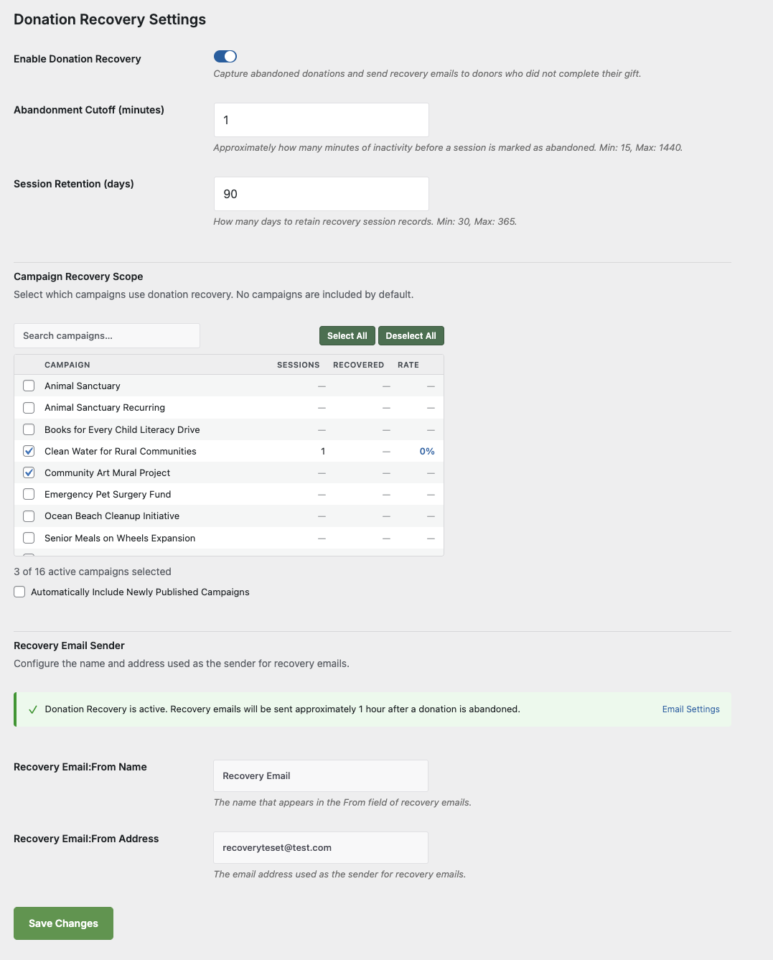
Setup takes under two minutes. Go to Charitable → Settings → General → Donation Recovery, check Enable Donation Recovery, select your campaigns, and save. That’s it.
Choose exactly which campaigns participate. The Campaign Recovery Scope panel lists every published campaign along with its tracked sessions, recovered donations, and recovery rate. Check the ones you want — or enable automatic inclusion for any newly published campaigns.
Customize the recovery email. The default template is ready to use out of the box, but you can override it in your theme to match your organization’s branding and voice exactly.
Unsubscribe is built in. Every recovery email includes a one-click unsubscribe link. Donors who opt out are added to a suppression list automatically — no manual management required.
A Recovery Report Built In
Donation Recovery comes with its own dedicated reports tab at Charitable → Reports → Donation Recovery.
You can see at a glance how many sessions were tracked, how many were abandoned, how many donors came back, your overall recovery rate, and the total revenue recovered. Filter by date range — Last 7 days, Last 30 days, Last 90 days, or a custom range — and drill down into the full sessions table to see individual donor details and statuses.
A recovery summary also surfaces directly on the Reports Overview tab, so your recovered revenue is always visible alongside your total donation numbers.
[screenshot: donation-recovery-reports.png — The Donation Recovery reports tab showing stats tiles, sessions table, and per-campaign breakdown]
What the Donor Experiences
When a donor clicks the recovery link in their email, they land back on the original donation page — not your homepage, not a generic donations page, but the specific page they were on when they filled out the form. Their email address, name, and donation amount are already filled in. If they had selected a preset amount, that radio button is pre-selected.
There is no starting over. No hunting for the right campaign. One click, then a few seconds to confirm payment details and submit.
This frictionless return path is the reason recovery works. The donor’s intent was already there. You’re just removing every barrier between that intent and a completed donation.
Available Now in Charitable Pro 1.8.13.5
Donation Recovery is available on the Pro and Elite plans of Charitable Pro, starting with version 1.8.13.5.
If you’re already on Pro or Elite, update to the latest version and head to Charitable → Settings → General → Donation Recovery to turn it on.
If you’re on Charitable Lite or a lower paid tier, this is a strong reason to upgrade. Charitable Pro starts at $199/year and comes with a 14-day, no-questions-asked money-back guarantee.
Read the Donation Recovery Documentation →
Set It Up in Under Two Minutes
- Update Charitable Pro to version 1.8.13.5 or later
- Go to Charitable → Settings → General → Donation Recovery
- Check Enable Donation Recovery
- Select the campaigns you want to track under Campaign Recovery Scope
- Click Save Settings
Charitable takes it from there.









Leave a Reply