
Charitable Blog

Everything you need to know about Charitable and our team.

Introducing donation recovery

Win Back Abandoned Donations Automatically with Charitable’s New Donation Recovery Feature

Last updated on

  • By

Between 50 and 70 percent of donors who start a donation form never finish it.

Not because they changed their minds. Because life interrupted — a phone call, a slow connection, a browser tab they forgot to come back to. The intent was there. The donation was almost there. And then it was gone.

Until now, recovering those donors meant setting up third-party abandonment tools, connecting your donation platform to an external email service, and hoping the handoff worked. Most organizations never bother. The revenue just disappears.

Charitable Pro’s new Donation Recovery feature changes that. It automatically captures donor intent, detects abandonment, and sends a personalized reminder email — with a direct link back to their pre-filled form — built right into Charitable! No third-party tools. No developer. No ongoing maintenance.


How It Works
When a donor visits a donation form for a recovery-enabled campaign, a lightweight background tracker captures their email address, name, and donation amount as they type. If they leave without completing the donation, Charitable detects the abandoned session and sends a recovery email approximately one hour later.

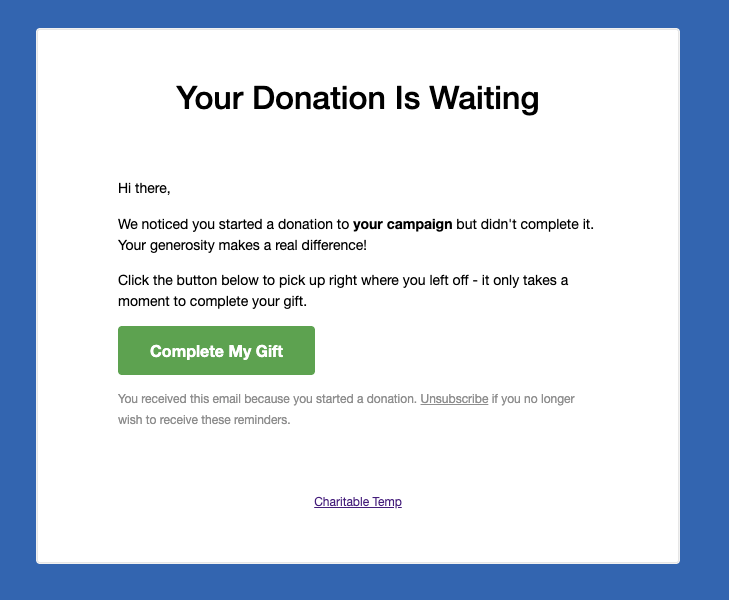
The email includes a personalized Complete My Gift button. When the donor clicks it, they return to the exact page where they started — with their information already filled in. Completing the gift takes seconds.

You enable it once. After that, Charitable handles everything in the background.


Built for the Whole Team — Not Just Developers

Every part of Donation Recovery was built to be usable without technical help.

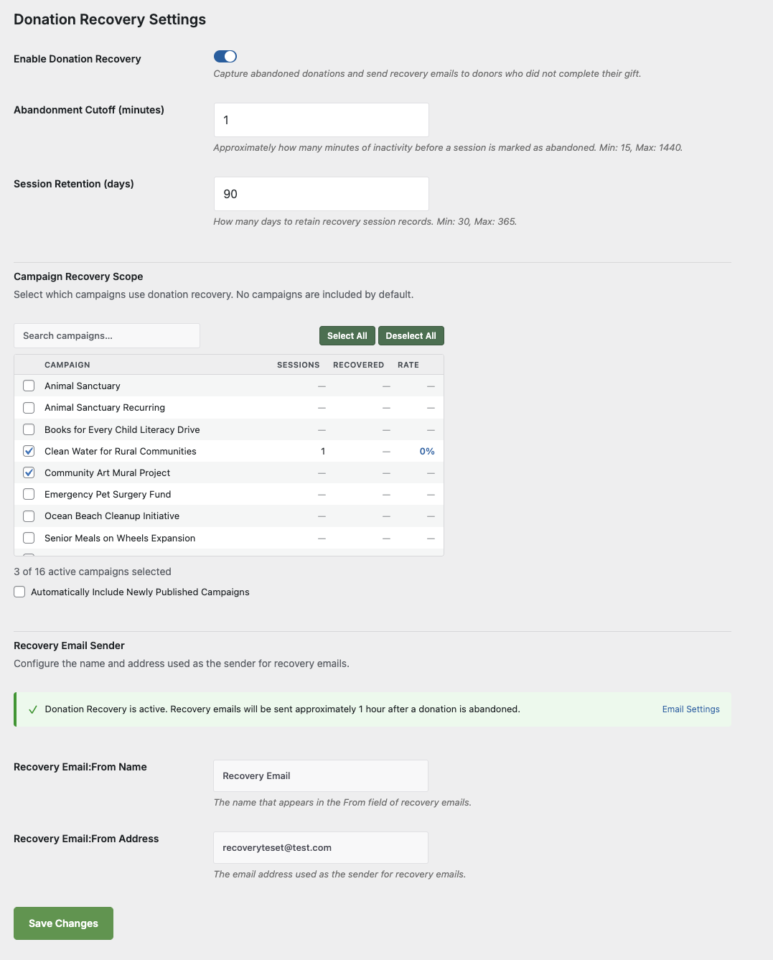
Setup takes under two minutes. Go to Charitable → Settings → General → Donation Recovery, check Enable Donation Recovery, select your campaigns, and save. That’s it.

Choose exactly which campaigns participate. The Campaign Recovery Scope panel lists every published campaign along with its tracked sessions, recovered donations, and recovery rate. Check the ones you want — or enable automatic inclusion for any newly published campaigns.

Customize the recovery email. The default template is ready to use out of the box, but you can override it in your theme to match your organization’s branding and voice exactly.

Unsubscribe is built in. Every recovery email includes a one-click unsubscribe link. Donors who opt out are added to a suppression list automatically — no manual management required.


A Recovery Report Built In

Donation Recovery comes with its own dedicated reports tab at Charitable → Reports → Donation Recovery.

You can see at a glance how many sessions were tracked, how many were abandoned, how many donors came back, your overall recovery rate, and the total revenue recovered. Filter by date range — Last 7 days, Last 30 days, Last 90 days, or a custom range — and drill down into the full sessions table to see individual donor details and statuses.

A recovery summary also surfaces directly on the Reports Overview tab, so your recovered revenue is always visible alongside your total donation numbers.

[screenshot: donation-recovery-reports.png — The Donation Recovery reports tab showing stats tiles, sessions table, and per-campaign breakdown]


What the Donor Experiences
When a donor clicks the recovery link in their email, they land back on the original donation page — not your homepage, not a generic donations page, but the specific page they were on when they filled out the form. Their email address, name, and donation amount are already filled in. If they had selected a preset amount, that radio button is pre-selected.

There is no starting over. No hunting for the right campaign. One click, then a few seconds to confirm payment details and submit.

This frictionless return path is the reason recovery works. The donor’s intent was already there. You’re just removing every barrier between that intent and a completed donation.


Available Now in Charitable Pro 1.8.13.5

Donation Recovery is available on the Pro and Elite plans of Charitable Pro, starting with version 1.8.13.5.

If you’re already on Pro or Elite, update to the latest version and head to Charitable → Settings → General → Donation Recovery to turn it on.

If you’re on Charitable Lite or a lower paid tier, this is a strong reason to upgrade. Charitable Pro starts at $199/year and comes with a 14-day, no-questions-asked money-back guarantee.

Get Charitable Pro →

Read the Donation Recovery Documentation →


Set It Up in Under Two Minutes

  1. Update Charitable Pro to version 1.8.13.5 or later
  2. Go to Charitable → Settings → General → Donation Recovery
  3. Check Enable Donation Recovery
  4. Select the campaigns you want to track under Campaign Recovery Scope
  5. Click Save Settings

Charitable takes it from there.

author avatar
David Bisset Project Manager
David is the project manager of Charitable since 2022. David works with several non-profits (one operated by his wife) along with managing and developing features, support, and marketing for Charitable. Has been with WordPress since 2006 and has been lead organizer of multiple conferences, events, and meetups.

Disclosure: Our content is reader-supported. This means if you click on some of our links, then we may earn a commission. We only recommend products that we believe will add value to our readers.

Leave a Reply

Your email address will not be published. Required fields are marked *

Get free tips and resources right in your inbox, along with 60,000+ others

Join our Newsletter

We won’t spam you. We only send an email when we think it will genuinely help you. Unsubscribe at any time!

Featured Video:

Watch more videos on our YouTube channel.

What's New In Charitable

View The Latest Updates
🔔 Subscribe to get our latest updates
📧 Subscribe to Emails

Email Subscription

Join our Newsletter

We won’t spam you. We only send an email when we think it will genuinely help you. Unsubscribe at any time!

Improvement Migrations

↔️ Importing From GiveWP, Donorbox, GiveButter… even CSV!

Whether you’re migrating from another platform or consolidating your records, moving your data to Charitable is now faster and more flexible than ever. We’ve streamlined the process so you can bring over your entire fundraising history in just a few clicks.

🔄 Native GiveWP, Donorbox, & GiveButter Support: Switching from a major platform? Our dedicated migration tools handle the heavy lifting, automatically mapping your donors and donations directly into Charitable—no technical skills required.

📂 Universal CSV Import: Moving from a custom system or a specialized CRM? If you can export it to a CSV, you can import it here. Our smart mapping tool lets you align your columns to Charitable fields like names, emails, phone numbers, and addresses in seconds.

Instant Donor Profiles & Custom Tags: Automatically create rich donor profiles and bring in custom tags to keep your data organized. Segment and engage your supporters from day one with a clean, professional database structure.


Ready to make the switch?

Check out our GiveWP Migration Guide

Learn more about our Import Tools

author avatar
David Bisset Project Manager
David is the project manager of Charitable since 2022. David works with several non-profits (one operated by his wife) along with managing and developing features, support, and marketing for Charitable. Has been with WordPress since 2006 and has been lead organizer of multiple conferences, events, and meetups.
Improvement Payments

💳 New Braintree Features For Your European Donors

With the release of Braintree addon version 1.3.0, you can now empower your European donors with the payment methods they trust and prefer, making giving seamless for international supporters.

🌍 Six New European Payment Methods: Support popular local options like iDEAL (Netherlands), Bancontact (Belgium), BLIK (Poland), and more to meet donors where they are.

⚡ Frictionless Donor Experience: These bank-based methods allow donors to authenticate directly with their own bank in a secure popup… no credit card numbers required.

⚙️ Automatic Currency Sync: No complex setup needed. The builder automatically displays the correct payment buttons based on your site’s currency (EUR or PLN), ensuring a relevant experience for every visitor.

author avatar
David Bisset Project Manager
David is the project manager of Charitable since 2022. David works with several non-profits (one operated by his wife) along with managing and developing features, support, and marketing for Charitable. Has been with WordPress since 2006 and has been lead organizer of multiple conferences, events, and meetups.
Campaigns New

🖼️ Campaign Featured Images: Pro-Level Visuals Made Simple

With the new Campaign Featured Image setting in our visual builder, you now have a single, dedicated place to manage how your fundraisers look across your entire site and beyond.

🖼️ One Image, Everywhere: Set a primary thumbnail that automatically syncs to campaign grids, lists, and shortcodes—no more relying on layout order.

📱 Social Sharing Optimized: Easily upload images at the perfect size to ensure your campaigns look stunning and professional when shared on social media.

🔍 SEO & Accessibility Ready: Add custom alt text directly within the builder to improve search rankings and ensure your mission is accessible to every supporter.

author avatar
David Bisset Project Manager
David is the project manager of Charitable since 2022. David works with several non-profits (one operated by his wife) along with managing and developing features, support, and marketing for Charitable. Has been with WordPress since 2006 and has been lead organizer of multiple conferences, events, and meetups.
Improvement receipts

🗓️ Annual Receipts 2.0: Send Year-End Receipts to Every Donor in Minutes

You can now send annual receipts in minutes with a few clicks to all your donors.

📧 One-Click Bulk Send Wizard that guides you to sending to hundreds of donors simultaneously directly from your WordPress dashboard.

🔍 Smart “Dry Run” Mode: See exactly who will receive a receipt and who will be skipped (and why) before a single email leaves your server.

🛡️ SMTP-Aware & Limit Protection: Charitable now detects your email setup and automatically adjusts batch sizes and pauses for daily limits to ensure your emails land in inboxes.

✅ Complete Audit Trail: Dedicated system log and on the individual donor’s profile, giving you a clear history for every fiscal year.

Stop dreading tax season and start spending that time on your mission. Update to Annual Receipts 2.0 and automate your year-end reporting today.

author avatar
David Bisset Project Manager
David is the project manager of Charitable since 2022. David works with several non-profits (one operated by his wife) along with managing and developing features, support, and marketing for Charitable. Has been with WordPress since 2006 and has been lead organizer of multiple conferences, events, and meetups.
Addon Donations Improvement

🎈Recurring Donations 2.0: Smarter Automation, Better Recovery, and More Control

We’ve completely rebuilt our Recurring Donations system to help you grow your reliable income stream while giving you (and your donors) more powerful tools than ever before.

What’s New:

🔒 Recurring-Only Campaigns: You can toggle “Recurring Only” mode in the campaign builder to hide the one-time option entirely, ensuring your supporters stay focused on long-term commitment.

📧 Automatic Payment Recovery: Our new Payment Failed Email fires automatically the moment a subscription fails.

🛠️ Self-Service Donor Control:The new Cancel Subscription Button appears directly in the donor dashboard, allowing supporters to pause or end their recurring gifts on their own terms—reducing your admin burden and payment disputes.

📊 Real-Time Revenue Insights: Track your growth, monitor active subscriptions, and see exactly how much predictable support is coming in each month at a glance.

Our new Recurring Donations addon gives you the professional-grade tools you need to grow your mission.

author avatar
David Bisset Project Manager
David is the project manager of Charitable since 2022. David works with several non-profits (one operated by his wife) along with managing and developing features, support, and marketing for Charitable. Has been with WordPress since 2006 and has been lead organizer of multiple conferences, events, and meetups.




