
If you’ve been Googling “GiveWP” lately and landed here, you’re probably wondering the same thing a lot of nonprofit WordPress users have been asking recently: what is actually happening to GiveWP? Why is there no GiveWP.com anymore? Should you be worried about the plugin you’ve built your fundraising on?
Yes, GiveWP.com is no more… but the Give plugin at the time I right this still exists. But with the uncertainly of recent events, there are reasonable questions and concerns in the WordPress and non-profit community. Our team here at Charitable have been watching this and wanted to share a few things… because there’s a lot of confusion in the air.
If you are having second thoughts or if you’ve been already affected by the changes already – you might be looking at alternative solutions. If you’re considering options, have questions, or are ready to move, our team is here to help. In the end, we care about what you care about – your cause. You deserve the best platform to meet your needs and help your cause thrive.
GiveWP.com No Longer Exists
While the Give plugin has survived, the Givewp.com website no longer exists. It now redirects to Liquid Web.
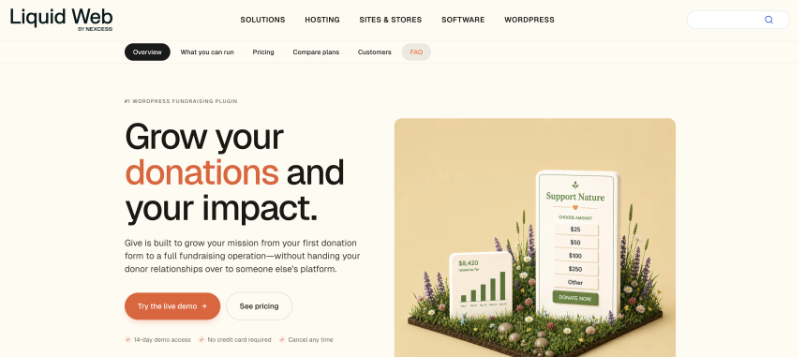
On May 12, 2026, Liquid Web by Nexcess published an official announcement confirming what had been unfolding for over a year if you watch the space: the StellarWP brand is gone, and their WordPress plugin portfolio has been consolidated into four core products sold directly under the Nexcess name.
Give is one of its four surviving products alongside Kadence, LearnDash, and The Events Calendar.
The other StellarWP brands didn’t survive as standalone products:
- SolidWP → absorbed into Kadence Security
- Iconic → absorbed into Kadence Shop Kit
- Restrict Content Pro → absorbed into Kadence Memberships
- MemberDash → absorbed into LearnDash
Those brands are no longer sold. Their features live inside Kadence or LearnDash now – and only if you upgrade to the new plans. If you were an existing customer of any of these products, you keep what you have today, but you’re now on a legacy plan.
What This Shift Means for Give Users Right Now
The official announcement has details every current GiveWP user needs to read carefully. Here’s what you need to know:
Your existing plan is frozen in place
Nexcess says existing customers keep their current plans, pricing, and features. Those features will continue receiving updates and security patches. That’s the good news. The important caveat: “Your current plan gives you access to your existing features only.” You won’t get access to the new tiered plan features unless you upgrade and pay again.
Let your subscription lapse, and you lose your plan forever
This is the part that should make every GiveWP user take notice. The announcement states directly: “If your subscription lapses, you’ll need to purchase one of the new software plans to reinstate access.”
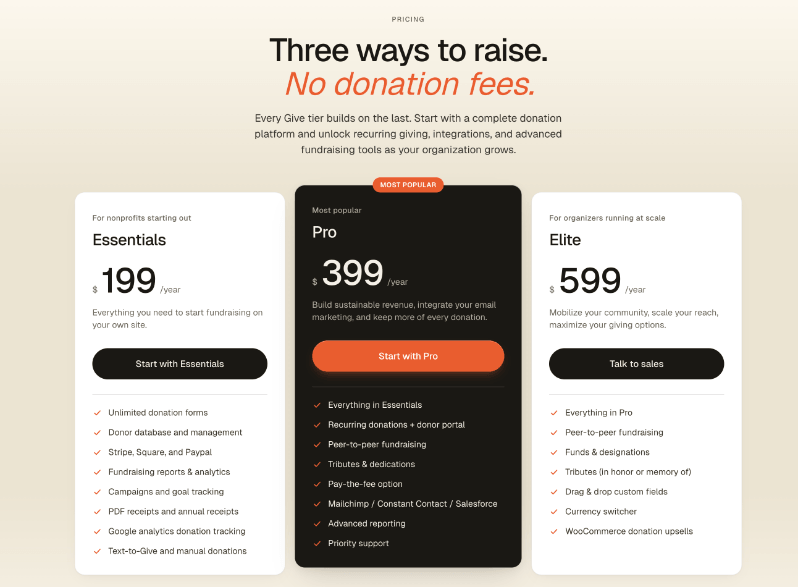
That means if you miss a renewal, for any reason, you can’t just pick up where you left off. You’re forced onto one of the new plans at new pricing starting at $199 per year. Your old plan is gone.
The MemberDash integration for Give is being retired
The announcement specifically calls this out under the Give section: the MemberDash integration is being retired. If your fundraising setup relies on Give’s MemberDash integration, it will no longer receive updates or new releases – only critical security patches through April 2027. After that, you’re on your own.
Everything moves to a new unified portal
All license keys, billing, and support are now live at software.liquidweb.com. Old portal links redirect automatically. That’s a reasonable operational change – but it’s also one more step in Give becoming a line item in a hosting company’s dashboard rather than a product built around your needs as a nonprofit.
What We Offer You at Charitable
Charitable has been in nonprofit WordPress fundraising for over 15 years. We’re focused on helping you succeed, raise more funds for your cause, and handle the technical stuff so you can focus on your mission.
We continue to innovate, personally talk to users every day, and provide 5-star support. See our 200+ 5 star reviews on WordPress.org.
See What Our Charitable Users Have To Say

@mikisdad
“I’ve checked out many – this is one of the best. Charitable is easy to use. It doesn’t confuse with a million and one setting and options. It installs quickly and without drama. Above all, the service is superb.”

Steven Bauwens
“I tried the plugin ‘Give’ first, but I just couldn’t get it to work, it would freeze my WP dashboard. I found this plugin which has the same feature that I could add campaigns with a specific donation option that I can add to my pages.”

“I tried “Give” before this plugin but I really couldn’t figure it out and found it frustrating. I didn’t experience any of the issues I had with Give with Charitable.”

“After years of working with high cost donation management companies, I decided to give Charitable a go. Not only does it offer almost every feature I was looking for at a fraction of what I was previously paying, but when I asked about the lack of a feature, it was implemented and released as an update within a week..”
What You Get When You Switch to Charitable
If you are a Give user, then here’s how Charitable is different – but I encourage you to do your own research and reach out to us to ask us questions. We want to make sure that YOU are comfortable if you decide to switch – in the end it’s about providing the best for your campaigns, donors, and your cause. With Charitable I think we can be the right choice.
Straightforward Pricing
Give’s new tiered pricing means that if your subscription ever lapses, you can’t go back to your old plan. Their pricing starts at $199 per year.
With Charitable, you’re not at risk of that kind of forced migration.
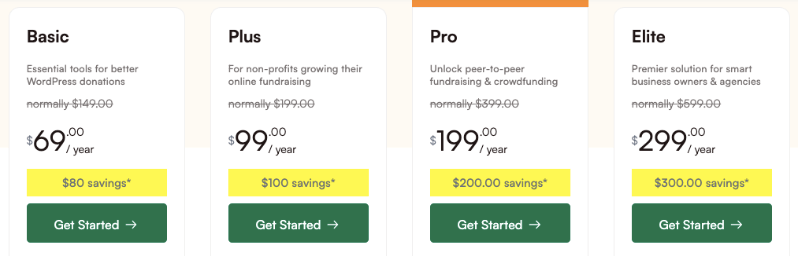
Our plans are transparent: $69/year to start (renews at $149), with unlimited campaigns, the visual campaign builder, full donation management, receipts, reporting, a donor dashboard, and leaderboards.
Our Pro plan is $199/year (renews at $399) and includes everything – recurring donations, peer-to-peer fundraising, crowdfunding, fee relief, gift aid, donation recovery, anonymous donations, ambassadors, donation teams, Google Analytics, email marketing integrations, and automated workflows.
No add-ons. No extensions. No risk of losing your plan if you miss a renewal date.
Everything you need to fundraise, right out of the box
Charitable gives you a complete fundraising toolkit, no add-ons required. Here’s what’s included from day one:
- Unlimited campaigns: create as many fundraisers as you need, with no per-campaign fees or artificial limits
- Visual Campaign Builder: drag-and-drop campaign creation with pre-built templates for nonprofits, churches, schools, medical causes, emergency relief, and more
- Donation Forms: fully customizable forms with suggested amounts, custom fields, and your branding
- Multiple payment gateways: Stripe, PayPal, Square, Authorize.Net, Braintree, GoCardless, and more, all included
- Offline donations: log cash and check donations alongside online gifts so your reporting is always complete
- Donor dashboard: supporters can log in to view their donation history, download receipts, and manage their giving
- Fundraising goals and progress bars: show donors how close you are to your target and build momentum
- Donor leaderboards: celebrate your top supporters and encourage friendly competition
- Full donation management: view, filter, and export every donation from your WordPress dashboard
- Auto-generated receipts: instant email receipts for every donation, with your custom messaging
- In-depth reporting: campaign performance, donor history, and revenue trends, all in one place
Advanced fundraising features
When you’re ready to grow, the Plus ($99/year, renews at $199) and Pro plan ($199/year, renews at $399) adds advanced tools:
- Recurring donations: weekly, monthly, quarterly, or annual giving schedules that donors can manage themselves
- Peer-to-peer fundraising: let supporters create their own campaign pages and fundraise on your behalf
- Crowdfunding: run community-powered campaigns with individual fundraiser pages under one umbrella
- Fee relief: give donors the option to cover transaction fees so you receive the full donation amount
- Gift Aid: automatically collect Gift Aid declarations from UK donors to boost the value of every donation
- Annual receipts: one-click annual giving summaries your donors can use for tax purposes
- Anonymous donations: let donors give without their name appearing publicly
- Ambassadors and donation teams: mobilize your community with team fundraising pages and ambassador programs
- Google Analytics integration: track donation conversions and campaign performance directly in your analytics dashboard
- Email marketing integrations: sync donors automatically to Mailchimp, ActiveCampaign, Constant Contact, HubSpot, MailPoet, and more
- Automated workflows: trigger actions based on donation events without any custom code
- Donation Recovery: Capture donors who abandoned the donation form
- Conversion Tracking: Track conversions with Meta Pixel, TikTok Pixel, Google Ad Manager.
- Campaign Updates: Publish updates to your fundraising campaigns to keep donors informed and show potential donors your progress.
14-day Money Back Guarantee vs 48-hour Demo
In my opinion a 48 hour demo (currently what Give offers) isn’t enough time to judge a donation platform. It’s not enough time to test the platform, set up your gateway, and receive donations. You can probably browse through the dashboard, maybe a quick donation. That’s about it.
At Charitable, we’ve talked to users and tested it ourselves. We know how long you need to truly understand the value of what you’re signing up for. We’re confident you’ll love fundraising with Charitable. But for any reason, it’s not the right fit, we offer a 14-day money-back guarantee.
Everything included, nothing gated by a hosting relationship
Give’s future is now tied to Nexcess’s hosting ecosystem. The features that get built, the integrations that get prioritized, the support team’s focus – all of it will increasingly be shaped by what’s good for a hosting company, not what’s good for nonprofits.
Charitable is a WordPress plugin built for nonprofits, period. We’re not a hosting company. We don’t have a hosting product to upsell you on. Every feature we build is because nonprofit fundraisers asked for it.
See our latest feature launches »
Support from a team that knows nonprofits
Our support team has been with Charitable for years. They know the product, they know nonprofits, and they’re invested in your success. Reach out to us anytime and we’ll help you migrate your data, and get you fundraising and receiving donations in no time.
Worried About Losing Data? We’ve Got You Covered.
This Is Exclusively for GiveWP Users – Because You Asked For It
We’ve heard from so many of you that switching platforms feels overwhelming. So we listened.
Our white-glove migration service is available exclusively to qualifying GiveWP customers – our team handles the entire move so you can focus on your mission, not the technical stuff. We’ll move your donors, donations, and campaigns over to Charitable for you – cleanly and safely.
A free year of Charitable Pro may be waiting for you too. Check if you’re eligible »
Migrating From GiveWP to Charitable on Your Own
It’s not. We built a migration tool specifically for this. Here’s what that looks like:
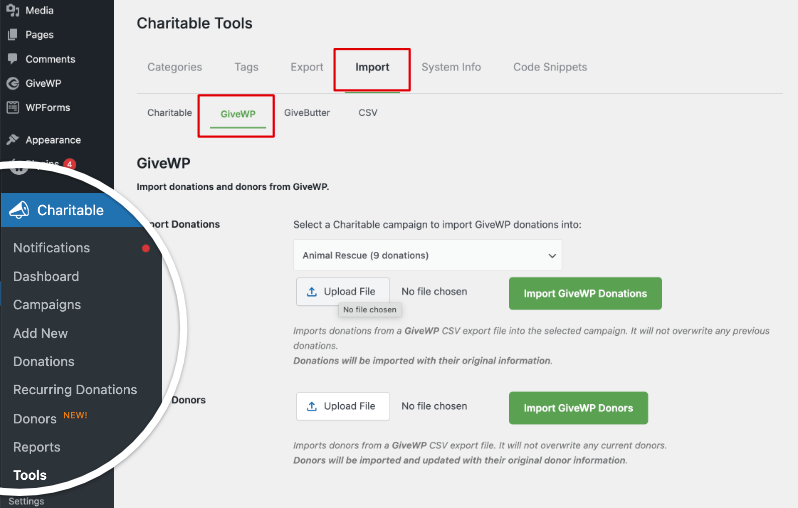
If you can click a few buttons, you can migrate to Charitable.
Here’s the full step-by-step guide: How to Switch From Give To Charitable »
Or watch our video tutorial below:
It covers both the automatic and manual methods, post-migration cleanup, and how to set up your payment gateways in Charitable once you’re live.
To give you a brief understanding of how easy it is, if GiveWP is still active on your site, you can import your data in a few clicks. No CSV files, no spreadsheets, no manual entry.
From your WordPress dashboard, go to Charitable » Tools » Import » GiveWP tab and you’ll find one-click import for:
- Campaigns
- Single donations
- Recurring donations
- Donors (with duplicate detection by email)
Most nonprofits complete the full migration in under 30 minutes. Donor names, emails, donation amounts, dates, and recurring schedules all come over clean. We also support a manual CSV import path for teams who want more control.
After migration, run a test donation in Charitable’s test mode, confirm everything looks right in your dashboard, then deactivate GiveWP. That’s it.
You can also import any CSV into Charitable. So if you have data from other platforms or stored offline, you can go to Charitable » Tools » Import » CSV.
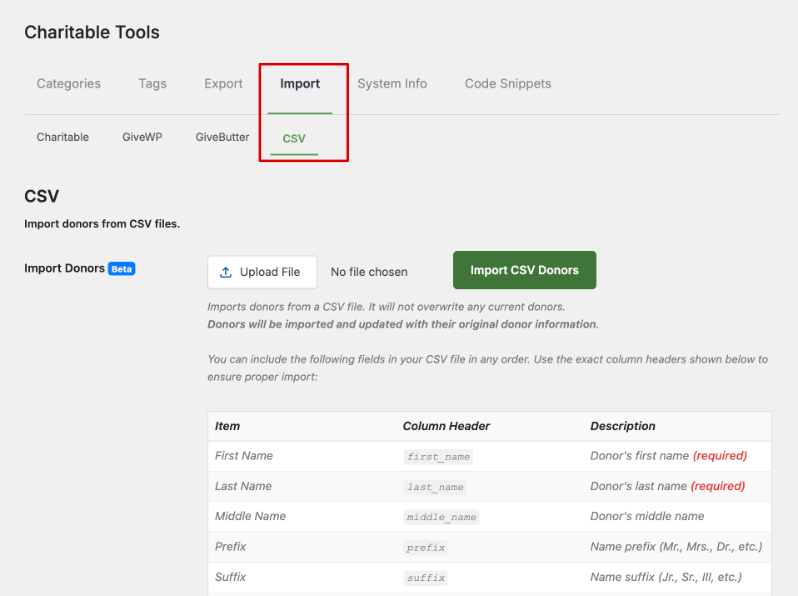
Here you can import any CSV file. There are clear instructions on how to map your fields to ensure the import is completed without errors.
Haven’t signed up for Charitable yet?
Not yet on Charitable Pro? You can get up to 50% off when you sign up for or upgrade to Charitable Pro. We want to ensure that you can try the advanced fundraising features like Recurring Donations, Donation Recovery, and more at a significantly reduced cost.
Join over a million satisfied Charitable Pro users today. Every purchase comes with a 14-day money-back guarantee, ensuring you’re supported every step of the way.
If you have any questions or need assistance, our support team is ready to help you make the most of these new features.
The Bottom Line
GiveWP isn’t dead. If anyone says that, it’s not true. BUT it’s no longer the GiveWP that you know.
Recent events could make some reasonably concerned – Give is a product in a hosting company’s portfolio and one can argue has been restructured around a business model built for web agencies rather than nonprofits.
If that’s not the foundation you want to build the next five years of your fundraising on, Charitable is ready for you. We’ve been doing this for over 15 years, we’re not going anywhere, and we’ll make sure your donor data comes with you. Again, feel free to contact us first. Ask questions. Look at our “what’s new” changelog – we add something new EVERY WEEK.
Questions before you switch? Reach out to our team – we’re happy to walk you through what migration looks like for your specific setup.









Leave a Reply