
We’ve seen non-profits handling mundane tasks manually when they could be automated.
Every donation means manually updating your CRM. Every new donor requires copying their info to your email list. Every campaign milestone triggers a checklist of tasks you have to remember to do. It’s exhausting, time-consuming, and honestly? It pulls you away from what matters most -connecting with donors and growing your impact.
We want to make fundraising as easy as it can be!
That’s why we built the Uncanny Automator Integration for Charitable Pro (1.8.12)
Now, your fundraising platform actually works with the rest of your tools. Automatically. Without you lifting a finger.
When someone donates? Automator can instantly add them to your email sequence, update your spreadsheet, notify your team on Slack, and trigger a personalized thank you – all without you touching a thing.
No more manual work. No more missed follow-ups. No more switching between a dozen tabs.
Just smooth, automated workflows that let you focus on fundraising, not busy work.
Not yet a Charitable Pro user? Sign up today and get up to 50% off on your plan. We’re confident you’ll love raising funds with Charitable. If, for any reason, Charitable is not the right fit for you, we’ll refund your purchase with our 14-day money-back guarantee. Get Charitable Pro Now »
What Uncanny Automator Integration Can Do
The Uncanny Automator Integration connects Charitable with 210+ apps and plugins, letting you:
- Automate donor management: Automatically add donors to your CRM, email lists, or membership sites the moment they give
- Trigger personalized follow-ups: Send custom thank you messages, certificates, or updates based on donation amount or campaign
- Sync data everywhere: Keep your tools in sync without manual exports, imports, or copy-pasting
- Create complex workflows: Build multi-step automations that would normally take hours of manual work
The magic happens through Automator’s simple recipe builder. You create automations in minutes by choosing a trigger (like when a donation is made) and connecting it to actions (like adding that donor to your email list). It’s point-and-click simple, but powerful enough to handle complex workflows.
What really sets Automator apart is its massive library of integrations. With over 210 connections available, you can link Charitable to Google Sheets, Slack, Mailchimp, Facebook, Twitter, WhatsApp, and virtually every popular WordPress plugin you’re already using.
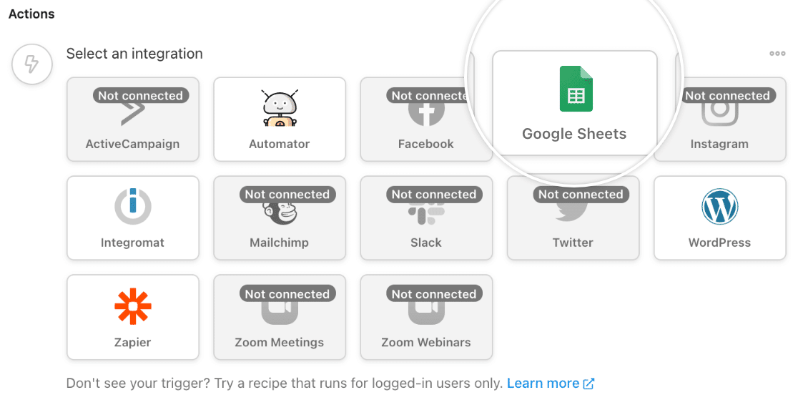
The best part? Major platforms use 1-click connections, so you don’t need to mess with API keys or technical setup.
You also get smart conditions that let you run actions only when specific criteria are met. Want to send a special email only to donors who give over $100? Or add VIP donors to a specific list? Conditions make it possible.
Plus, with over 9,000 dynamic tokens available, you can personalize everything by pulling data directly from donors, campaigns, and form submissions.
Getting Started (It Takes 5 Minutes)
First, make sure you’ve updated to Charitable Pro version 1.8.12. You can grab the latest version of the plugin in the Download tab inside your Charitable account.
Then download and install Uncanny Automator on your site. The free version works perfectly for most nonprofits.
Now here’s where it gets really easy. Create a new campaign in Charitable or open an existing one.
Navigate to the Marketing tab and open Uncanny Automator. You’ll see a green button that says “Activate Uncanny Automator.”
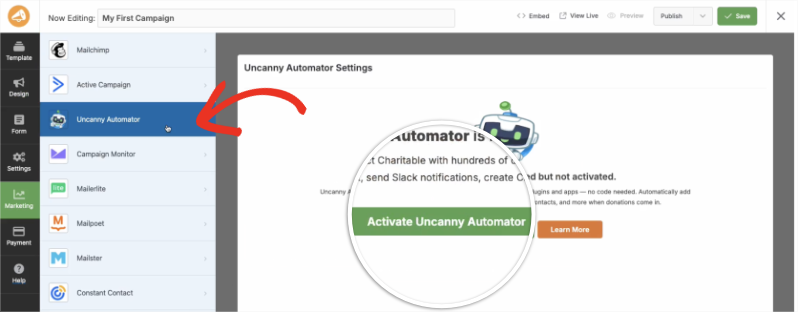
Click that button and watch the magic happen. The integration activates automatically with no manual configuration needed on your part.
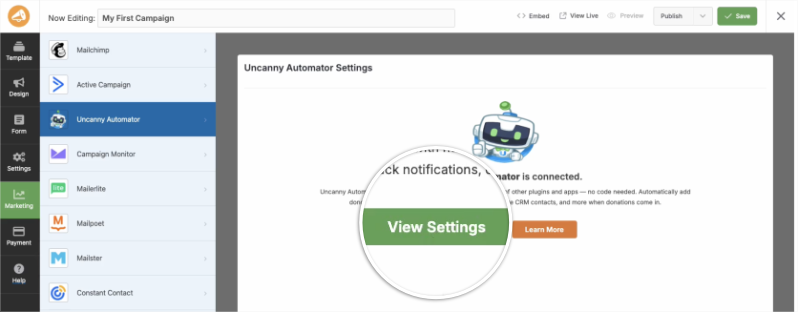
Once it’s done, you’ll see a green “View Settings” button that takes you straight to where you can start building your first automation.
Creating your first recipe in Uncanny Automator is simple. Choose a trigger like “A user makes a donation.”
Then add an action like “Add user to Mailchimp list.” If you want, set conditions to make it more specific. Save your recipe, and it runs on autopilot from that moment forward. Learn how to create recipes here »
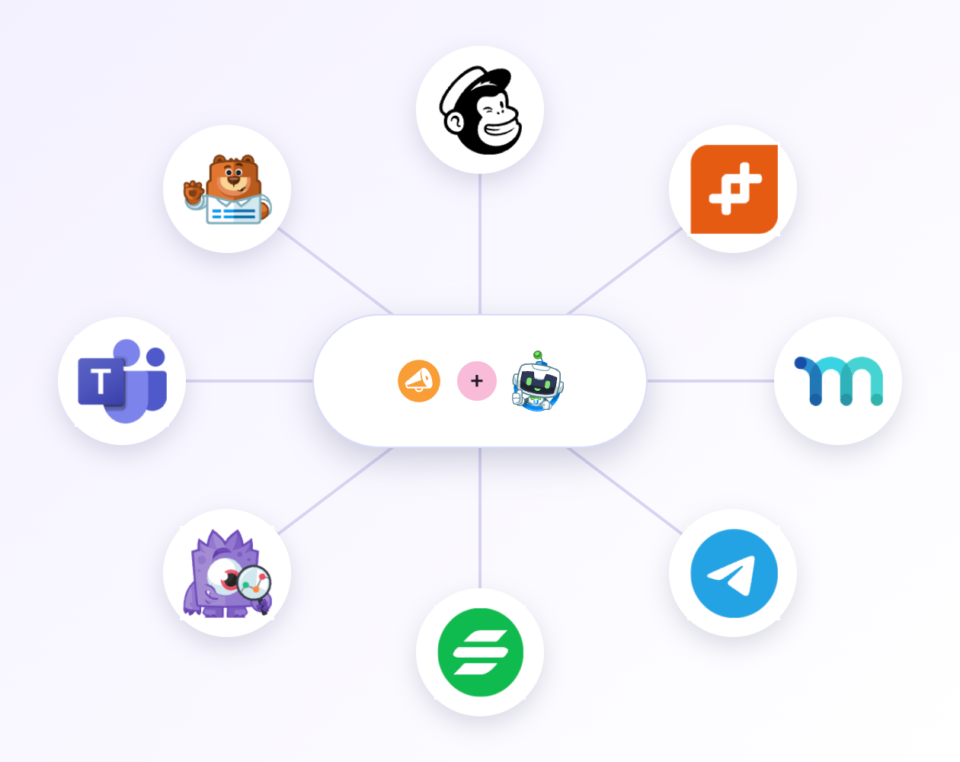
That’s it. Your fundraising workflows are now automated, and you can get back to what matters most – raising money and making an impact.
Why You’ll Love This Integration
This isn’t just about saving time (though you’ll save hours every week). It’s about creating a donor experience that feels personal and professional – without the manual effort.
Get Time Back: Automate the repetitive tasks that eat up your day – data entry, email follow-ups, donor tracking – all handled automatically
Never Miss a Follow-Up: Set it once and every donor gets the right message at the right time, every single time
Connect Your Stack: Already using tools like Mailchimp, Google Sheets, Slack, WordPress users, WooCommerce, or hundreds of others? Now they all talk to Charitable seamlessly
No Code Required: Build powerful automations with a simple point-and-click interface. If you can use WordPress, you can use this.
Ready to Enhance Your Campaigns?
Upgrade to Charitable Pro 1.8.12 and start automating your fundraisers today. Get version 1.8.12 here »
Not yet on Charitable Pro?
Sign up today and get up to 50% off on your plan. We’re confident you’ll love raising funds with Charitable. If, for any reason, Charitable is not the right fit for you, we’ll refund your purchase with our 14-day money-back guarantee.
Uncanny Automator is the latest addition to our Integrations. Charitable also works beautifully with other apps:
- Envira Gallery – Check out the Gallery widget →
- Elementor users – Check out our native Elementor widgets →
- WPBakery users – See the WPBakery integration →
- Divi users – See the Divi integration →
Check out all Integrations here »
Don’t see the integration you want? Let us know what you need →
Charitable Has 1.2+ Million Downloads!
Trusted by millions to power successful fundraising campaigns. Try Charitable risk-free today.
✅ 14-day money-back guarantee
✅ Transparent pricing
✅ Code-free setup
Charitable + Uncanny Automator –
Frequently Asked Questions
Everything you need to know about using Charitable with Uncanny Automator. See the list below for our most frequently asked questions. If your question is not listed here, please contact us.
What is Uncanny Automator?
Uncanny Automator is a WordPress plugin that lets you create automated workflows called recipes. Each recipe connects a trigger event in one plugin to one or more actions in other plugins or external services, all without writing code. It supports over 170 plugins and services, making it one of the most versatile automation tools available for WordPress.
Do I need coding experience to use this integration?
No. Uncanny Automator is designed for non-developers. You build recipes using a visual point-and-click interface, selecting triggers and actions from dropdown menus. No developer skills, API knowledge, or technical background is required.
Which Charitable events can trigger automations?
You can trigger automations when a donation is completed, when a campaign reaches its goal, when a donor registers a new account, or when a recurring donation is processed. You can also filter triggers by campaign, donation amount, or payment method to ensure the right recipe fires for the right donation.
What actions can I automate after a donation?
The possibilities are extensive. You can send notification emails to your team, add the donor to an email marketing list, update a CRM contact record, enroll the donor in an online course, post a message to Slack, log donation details to a Google Sheet, trigger a webhook, or run any other action supported by Uncanny Automator’s 170+ integrations.
Does this integration work with the free version of Charitable?
The Uncanny Automator integration requires Charitable Pro. You will also need either the free or paid version of Uncanny Automator installed on your site. Donation triggers for anonymous donors (which covers most fundraising scenarios) require Uncanny Automator Pro.
How do I install and activate the integration?
Install both Charitable Pro and the Uncanny Automator plugin from your WordPress dashboard, then download and activate the Charitable Uncanny Automator extension from your Charitable account. Once activated, Charitable triggers and actions will appear automatically in Uncanny Automator’s recipe builder with no additional configuration required.
Can one donation trigger multiple automated actions?
Yes. Each recipe can include as many actions as you need. A single donation can simultaneously send a thank-you email to the donor, notify your fundraising team via Slack, add the donor to your CRM, enroll them in a welcome email sequence, and log the gift to a spreadsheet, all from one recipe.
Is there a limit to how many automations I can create?
The free version of Uncanny Automator allows unlimited automations for logged-in users. Uncanny Automator Pro removes all restrictions and adds support for anonymous user triggers, which is required for donation-based automations since donors may not be logged in to your site when they give.
Stay Connected for More Nonprofit Resources
For more tutorials and videos tailored to nonprofits, subscribe to our YouTube channel. We regularly publish expert tips, step-by-step guides on online donations, fundraising strategies, and practical resources to help your organization succeed.
🗞️ Get weekly tips and exclusive guides in your inbox
Join our newsletter →
🎥 Watch step-by-step tutorials and success stories
Subscribe to our YouTube channel →
👩🏽💻 Connect with our community and get daily nonprofit insights
Follow us on LinkedIn →
🥳 Fun reels and non-profit insights
Follow us on Instagram →
👀 Insightful & fun videos to help you grow your cause
Follow us on TikTok→
🌎 Subscribe and follow for general fundraiser tips
Get Fundraiser Tips on TikTok →
Powerful Fundraising Resources
🤖 Use Charitable with Your AI Assistant
⬇️ Download proven strategies, campaign ideas, and expert tools
Get the Fundraising Kit →
💸 Get Free Fundraising Resources
Head to the Charitable Fundraising Hub →
🤔 Got questions about Charitable?
Charitable FAQs →
🏎️ Take Charitable for a spin
Create your Charitable Demo →
Understand non-profit terms and jargon
Non-Profit Glossary →
% Looking for non-profit deals and discounts?
Best Non-Profit Deals and Discounts →









Leave a Reply