
Charitable Blog

Everything you need to know about Charitable and our team.

Introducing PayPal commerce

Introducing PayPal Commerce in Charitable: One Connection, Six Ways to Donate

Last updated on

  • By

Donors are evolving! They want easy payment options like Venmo, Pay Later, or Apple Pay. When they don’t see it on your donation form, most of these donors disappear, and they don’t tell you why.

With Charitable Pro 1.8.15 and Charitable 1.8.11 we’re shipping PayPal Commerce!

This is a single integration that gives your donors the modern PayPal experience: PayPal balance, Venmo, Pay Later financing, credit and debit cards, Apple Pay, and Google Pay.

The best part, you can set this up through one one-click connection.

It’s PayPal – modernized! Ready for donors who want fast payment options, so you can capture every donation!

Why One Modern PayPal Connection Changes Everything

If you’ve been on the older Legacy PayPal integration, you’re missing out on Venmo, Pay Later, Apple Pay, Google Pay, and the modern card fields that PayPal now ships by default.

Donors who don’t see their preferred payment option don’t switch; they leave.

PayPal Commerce closes that gap.

All you have to do is click on a “Connect with PayPal” button. We’ll handle the rest.

This gives your donation form everything PayPal supports today, and your donors check out faster because PayPal already knows them.

More Ways to Pay, Without More Setup Work

What I love about this new PayPal connection is that it gives you everything in one connection. Earlier, adding payment methods used to mean adding plugins, copying API keys, and reading vendor docs. That’s done!
Paypal sample

Here’s how easy it is now:

🚀 One-Click “Connect with PayPal”: Sign in to your PayPal business account, approve the connection, and your donation form is live. No API keys, no developer needed.

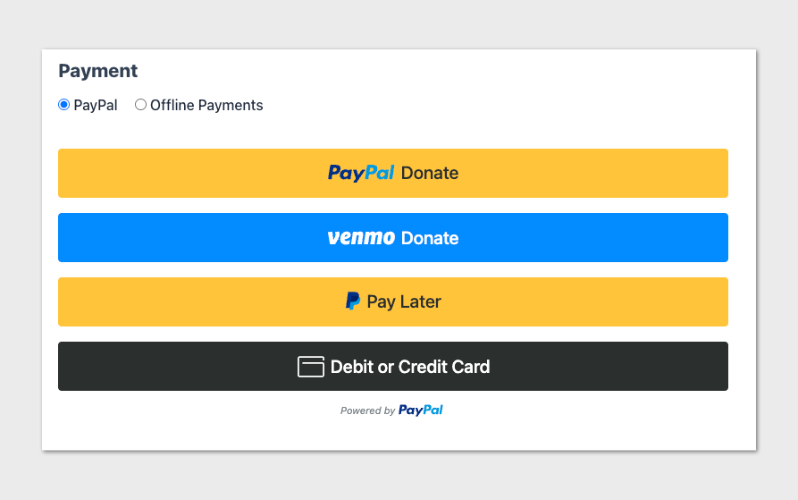
💳 Six Ways to Donate: PayPal balance, Venmo (US), Pay Later financing, credit and debit cards through PayPal’s PCI-compliant card fields, Apple Pay on Safari, and Google Pay on Chrome. All available on the same form, with each donor seeing the options that work for them.

⚡ Save and Reuse Payment Methods: Returning donors can save their PayPal account or card during checkout and reuse it on future donations with a single tap. Faster checkout means more completed donations.

✅ Real-Time Capability Status: The connection panel shows you exactly which payment methods PayPal has approved on your account, with a Refresh Status button to recheck after PayPal updates your eligibility. No guesswork about why a button isn’t showing.

Recurring Donations That Just Work

Whether you want PayPal to manage the recurring schedule or you want full control, PayPal Commerce supports both.

Two Recurring Modes, Same Donor Experience: Choose PayPal Subscriptions API (PayPal manages the renewal cycle automatically and shows the subscription in the donor’s PayPal account), or Vault + Cron (your site stores the saved payment method and triggers each renewal). Donors see the same “Make it monthly” checkbox either way.

Donor Trust, From Start to Finish

The hardest moment in any donation flow is when something goes wrong. PayPal Commerce is built so that even the unhappy paths feel professional.

💬 Friendly Inline Error Messages: When PayPal can’t process a donation (a restricted merchant, a declined card, a country mismatch), donors see a plain-language inline message with a recovery hint, like “Your payment method was declined. Please try a different card or use PayPal balance.” No hostile browser alert dialogs.

👁️ Admin-Only Diagnostic Detail: If you’re signed in as an admin and a donor hits an error on your form, you see the underlying PayPal reason and debug ID inline. Triage takes seconds, not a log dive.

📣 Refunds and Cancellations From WordPress: Issue a refund or cancel a recurring donation directly from the donation admin. No need to log in to PayPal. The plugin updates the donation log with the refund ID and confirms with PayPal automatically.

For Agencies and Developers

Hooks, Filters, and Full Customization

Per-renewal platform fee logging is exposed via the charitable_paypal_log_platform_fee_on_donation filter (off by default), and the fee percentage itself is filterable via charitable_paypal_platform_fee_percentage. The donor cancellation redirect can be customized via charitable_donation_cancellation_page and charitable_donation_cancellation_args.

One PayPal Per Site

To prevent confusion on the donation form, only one PayPal integration shows at a time. Sites running Legacy PayPal continue using Legacy PayPal exclusively; new and unused sites see PayPal Commerce exclusively. The donation form stays predictable for your donors no matter which side you’re on.

Get Started With PayPal Commerce

PayPal Commerce is available right now in Charitable Pro 1.8.15 and Charitable Lite 1.8.11.

Update Charitable Pro, head to Charitable » Settings » Payment Gateways » PayPal Commerce, and click Connect with PayPal. You’ll be accepting modern PayPal donations in under five minutes.

Note if you are already using Legacy PayPal – PayPal Commerce won’t be available currently to maintain your current PayPal workflow. An “upgrade” option will be available soon if you do wish to update to the new PayPal Commerce.

Also note that Charitable Pro at this time is the only plugin that will have recurring donations support with PayPal Commerce.

For a step by step set up guide, head to our guide on Getting Started with PayPal Commerce »

Not Yet a Charitable Pro User?

Charitable powers fundraising on more than a million WordPress sites and has been the trusted nonprofit donation plugin since 2014.

Charitable Pro adds the gateways, recurring donations, donor management, and advanced campaign features your nonprofit needs to grow without the per-transaction overhead of hosted donation platforms.

Stay Connected for More Nonprofit Resources

For more tutorials and videos tailored to nonprofits, subscribe to our YouTube channel. We regularly publish expert tips, step-by-step guides on online donations, fundraising strategies, and practical resources to help your organization succeed.

🗞️ Get weekly tips and exclusive guides in your inbox
Join our newsletter →  

🎥 Watch step-by-step tutorials and success stories
Subscribe to our YouTube channel →  

👩🏽‍💻 Connect with our community and get daily nonprofit insights
Follow us on LinkedIn →

🥳 Fun reels and non-profit insights
Follow us on Instagram → 

👀 Insightful & fun videos to help you grow your cause
Follow us on TikTok→  

🌎 Subscribe and follow for general fundraiser tips
Get Fundraiser Tips on TikTok → 

Powerful Fundraising Resources

🤖 Use Charitable with Your AI Assistant

See Charitable + AI →

⬇️ Download proven strategies, campaign ideas, and expert tools
Get the Fundraising Kit →  

💸 Get Free Fundraising Resources
Head to the Charitable Fundraising Hub →

🤔 Got questions about Charitable?
Charitable FAQs →

🏎️ Take Charitable for a spin
Create your Charitable Demo →

Understand non-profit terms and jargon
Non-Profit Glossary →

% Looking for non-profit deals and discounts?
Best Non-Profit Deals and Discounts →

author avatar
Melinda Bartley
I’m the senior writer at Charitable, with over 15 years of experience in content creation, digital marketing, and SEO. Beyond my professional role, I’m the co-founder and trustee of a non-profit organization committed to animal rescue and welfare. Throughout my career, I’ve helped build 17+ blogs – many from the ground up, transforming them into successful marketing platforms that drive traffic, boost brand visibility, and generate revenue.

Disclosure: Our content is reader-supported. This means if you click on some of our links, then we may earn a commission. We only recommend products that we believe will add value to our readers.

Get free tips and resources right in your inbox, along with 60,000+ others

Join our Newsletter

We won’t spam you. We only send an email when we think it will genuinely help you. Unsubscribe at any time!

Featured Video:

Watch more videos on our YouTube channel.

What's New In Charitable

View The Latest Updates
🔔 Subscribe to get our latest updates
📧 Subscribe to Emails

Email Subscription

Join our Newsletter

We won’t spam you. We only send an email when we think it will genuinely help you. Unsubscribe at any time!

Feature New

🎟️ Introducing Charitable Events: Sell Tickets Inside Your Campaigns!

Most nonprofits sell event tickets in one tool and collect donations in another, which leaves two sets of reports and a manual match at the end of the year. Charitable Events brings both together, selling tickets through the same donation forms and payment gateways you already run in Charitable. Why this is important:

  • 🎟️ Every ticket is a donation: Ticket sales run through the gateway you already use and count toward the campaign goal, with everything managed under Charitable » Events.
  • 📱 QR check-in from any phone: Each attendee gets their own QR code on the receipt, and volunteers scan at the door through a check-in link that needs no WordPress account.
  • 🧾 Receipts ready for tax time: Give each ticket type a fair market value, and Charitable puts the correct tax-deductible amount on every donor receipt.
  • 📋 Attendee details at checkout: Ask every guest for a meal choice, shirt size, or access needs, with a separate attendee record created for each ticket.
  • 🗓️ Blocks and calendars included: Three editor blocks plus Sugar Calendar and The Events Calendar support put your events where supporters already look.

Check out our announcement here.

author avatar
Melinda Bartley
I'm the senior writer at Charitable, with over 15 years of experience in content creation, digital marketing, and SEO. Beyond my professional role, I'm the co-founder and trustee of a non-profit organization committed to animal rescue and welfare. Throughout my career, I've helped build 17+ blogs - many from the ground up, transforming them into successful marketing platforms that drive traffic, boost brand visibility, and generate revenue.
ai New

🚀 Unleash AI Power in Charitable!

Your AI assistant can now build, edit, and manage your Charitable fundraising campaigns directly — just by asking. With Charitable Pro adding write support for the WordPress Abilities API, tools like ChatGPT, Claude, and Cursor can handle full administrative actions safely through MCP. Why this is important:

  • 🤖 Campaign creation in plain language: Prompt your assistant with a goal like “Set up a fundraiser for the shelter with a $5,000 goal”, and it builds a real draft campaign complete with suggested donation tiers.
  • 🎨 Instant donation form tweaks: Add custom fields, change button colors, or reorder elements without diving into form settings.
  • 📝 Offline gift logging: Tell your assistant about cash or check gifts, and it will match donor emails and record transactions into your history.
  • 🛡️ Safety and control by default: Write access stays strictly off until turned on in Charitable » Tools » AI MCP, keeping read-only reporting safe by default.
  • 📜 Full audit logging: Every change made by an AI assistant is tracked under Charitable » Tools » Logs, so you always know who (or what) updated your site.

Check out our announcement here.

author avatar
Melinda Bartley
I'm the senior writer at Charitable, with over 15 years of experience in content creation, digital marketing, and SEO. Beyond my professional role, I'm the co-founder and trustee of a non-profit organization committed to animal rescue and welfare. Throughout my career, I've helped build 17+ blogs - many from the ground up, transforming them into successful marketing platforms that drive traffic, boost brand visibility, and generate revenue.
Improvement Payments

💰 Accept Recurring Donations with Windcave and Charitable

A donor sets their gift up once on Windcave’s secure payment page, and Charitable bills every renewal after that on schedule. Why this is important:

🏦 Organizations banked in New Zealand or Australia: monthly giving on the gateway your bank already set you up with, with no second processor to onboard.
⛪ Churches taking regular tithes and offerings: congregants set their own schedule once, which is the simplest way to launch recurring church giving without a separate platform.
🌏 Groups with donors in several currencies: Windcave handles more than 20, so a supporter can give in the currency they actually hold.
📅 Operating funds rather than one-time campaigns: switch on Recurring Only mode and the one-off option disappears, so every gift to that campaign is a subscription.
🧾 Teams with no developer on staff: 3 sets of credentials pasted into a settings page, and no code anywhere.

Check out our announcement here.

author avatar
Melinda Bartley
I'm the senior writer at Charitable, with over 15 years of experience in content creation, digital marketing, and SEO. Beyond my professional role, I'm the co-founder and trustee of a non-profit organization committed to animal rescue and welfare. Throughout my career, I've helped build 17+ blogs - many from the ground up, transforming them into successful marketing platforms that drive traffic, boost brand visibility, and generate revenue.
automation update

⚡ Visual Automation Builder: Drag and Drop With No Code!

Charitable Automation Connect 2.3.0 introduces the Visual Automation Builder, a full-screen canvas that lays each automation out as a flow of connected cards: a trigger, optional conditions, and a list of actions that run in order.

🧩 Many actions, one trigger: Tag a donor, send an email, add a note, and fire a webhook from a single event, dragged into any order.

✉️ Act inside Charitable: New Send Email, Tag Donor, and Add Donor Note actions run with no external service required.

🔤 Merge tags: Personalize emails and notes with live fields like {first_name}, {total}, and {campaign_name}.

🔁 Apply to existing donors: Run Tag Donor and Add Donor Note against the donors you already have.

🖥️ Canvas or Simple: Switch views anytime, and automations built before 2.3.0 keep working unchanged.

Read more here.

author avatar
Melinda Bartley
I'm the senior writer at Charitable, with over 15 years of experience in content creation, digital marketing, and SEO. Beyond my professional role, I'm the co-founder and trustee of a non-profit organization committed to animal rescue and welfare. Throughout my career, I've helped build 17+ blogs - many from the ground up, transforming them into successful marketing platforms that drive traffic, boost brand visibility, and generate revenue.
Integration updated

📬 Introducing Brevo for Charitable: Turn Donors into Subscribers Automatically

The moment a supporter makes a gift is when they are most engaged. With the new Brevo integration for Charitable, you can automatically turn those one-time donors into long-term subscribers without touching a single spreadsheet.

Simply collect donor consent right on your donation form and start your welcome series immediately.

What’s New:

🔄 Automated Subscriber Sync: New donors who opt in are added straight to your Brevo contact list as soon as their payment clears—no manual exports or CSV imports required.

🎯 Granular Consent & Opt-In Control: Customize your checkbox label, choose whether it defaults to checked or unchecked, or turn on Brevo double opt-in to keep your list clean and compliant.

📋 Per-Campaign List Mapping: Route supporters to your global email list or map specific campaigns to targeted Brevo lists to tailor your follow-up messaging.

⚡ 5-Minute Setup: Connect instantly by pasting your Brevo API key into the Newsletter settings, map your contact fields, and start building your email list on autopilot.

Ready to grow your mailing list? Brevo is available now starting on the Charitable Plus plan—connect your account today!

author avatar
Melinda Bartley
I'm the senior writer at Charitable, with over 15 years of experience in content creation, digital marketing, and SEO. Beyond my professional role, I'm the co-founder and trustee of a non-profit organization committed to animal rescue and welfare. Throughout my career, I've helped build 17+ blogs - many from the ground up, transforming them into successful marketing platforms that drive traffic, boost brand visibility, and generate revenue.





