
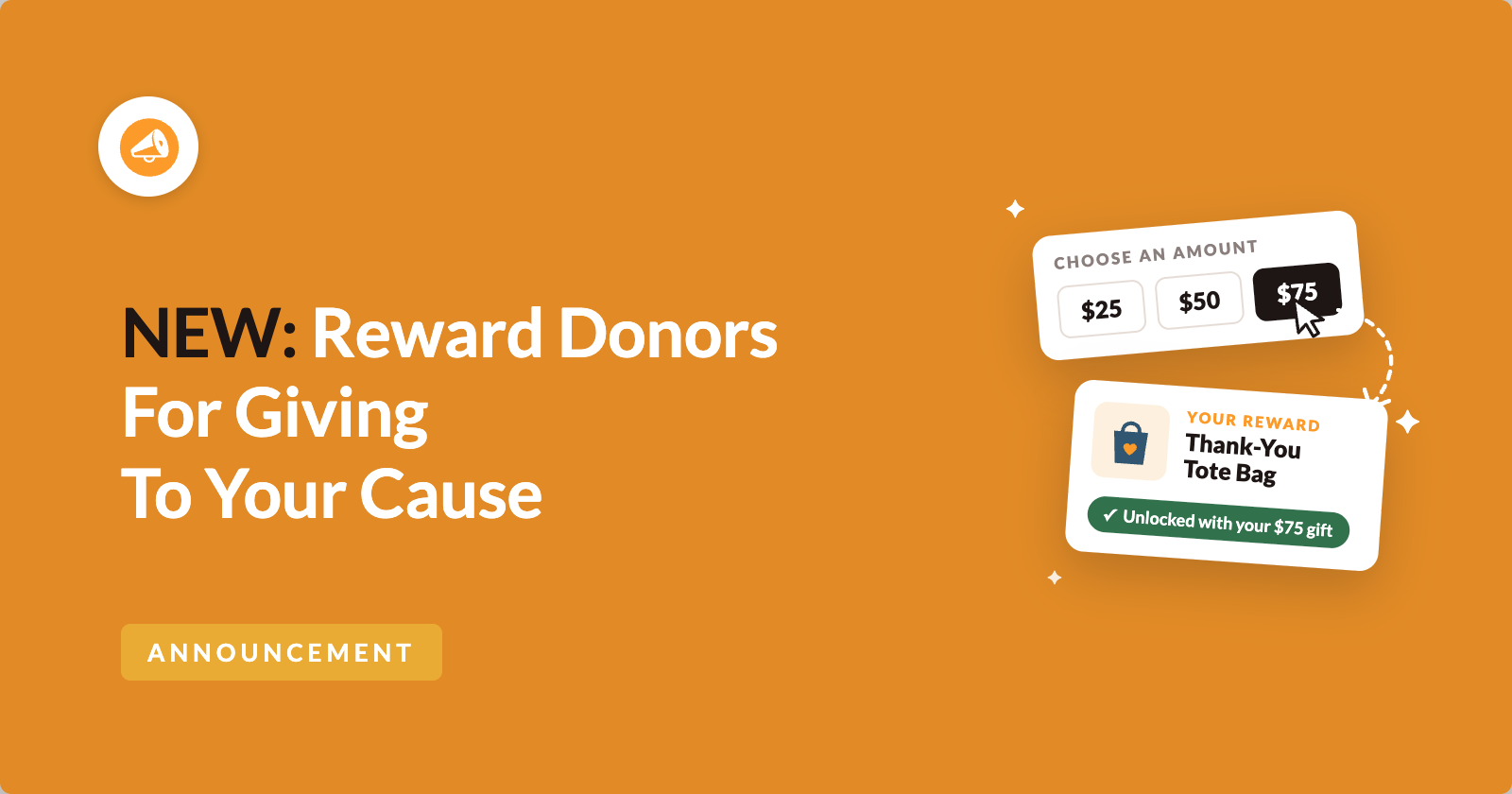
Charitable Rewards is here! 🎉
You can now thank donors with a tote bag, a signed poster or their name on your donor wall, right on the donation forms on your own website.
Rewards also gives donors a reason to give more. A donor who picks $50 can see that $75 unlocks the next reward, and many will happily add the extra $25. That’s a bigger gift from someone who was already giving.
Crowdfunding sites have offered perks like this for years. Now you can offer them too, while your donor list stays yours and every gift goes straight to your account through Stripe, PayPal or the payment gateway you already use.
You build a library of rewards once and attach them to any campaign you like.
Charitable then works out who earned what and keeps your tax receipts accurate. It also gives you one list of everything you still need to send. 🎁
See Charitable Rewards in Action
If you’d rather watch than read, this short video shows you how to build a reward and add it to a campaign. Then it shows what your donor sees on the form.
When Should You Use Charitable Rewards?
Rewards fits almost any campaign where you’d like to thank donors with something more than a receipt.
- 🎄 Year-end appeals. Set a few reward amounts so a $50 donor can see that $75 earns them a tote bag.
- 🏛️ Capital campaigns. Offer giving levels like Friend, Champion and Benefactor, and the donation amount follows the level.
- 🎉 Galas and auctions. Turn your sponsorship packages into levels, and include a signed poster or a stuffed panda with the top tier.
- 🏃 Peer-to-peer events. Set up rewards once on the main campaign, and every fundraiser page uses them.
Donors See Exactly What Their Next Step Unlocks
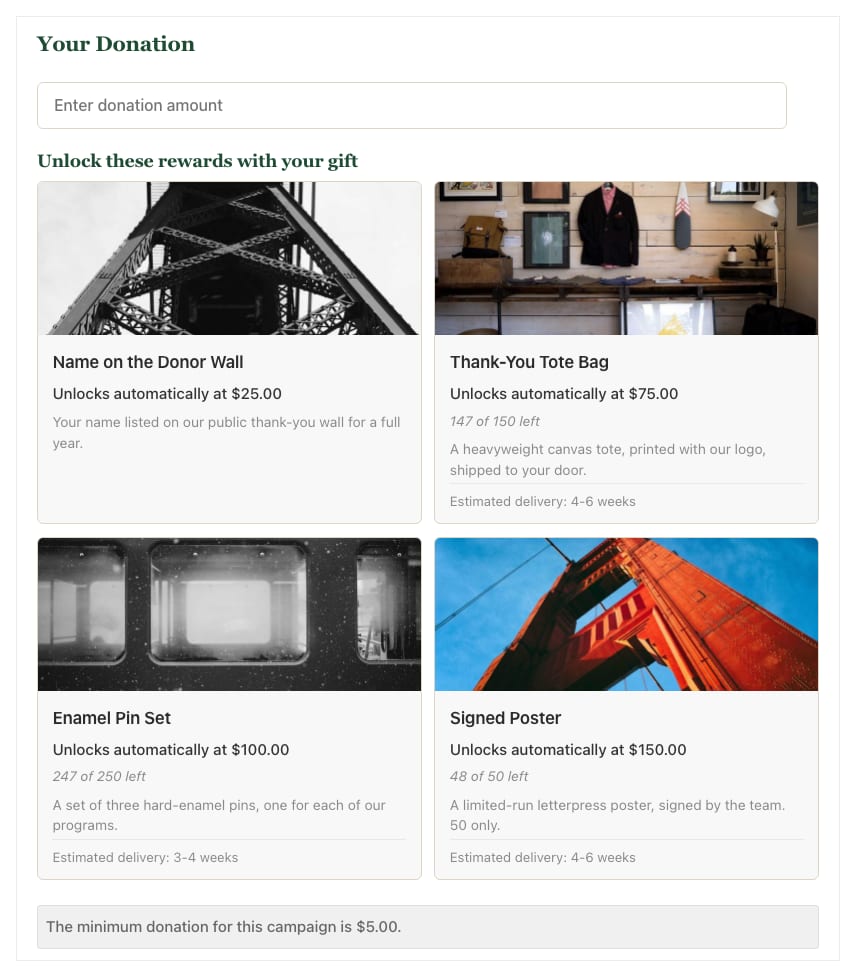
In automatic mode, reward cards sit right on the donation form. Each card tells the donor how close they are, like “Add $65.00 more to unlock”.
The number updates as soon as the donor changes their amount.
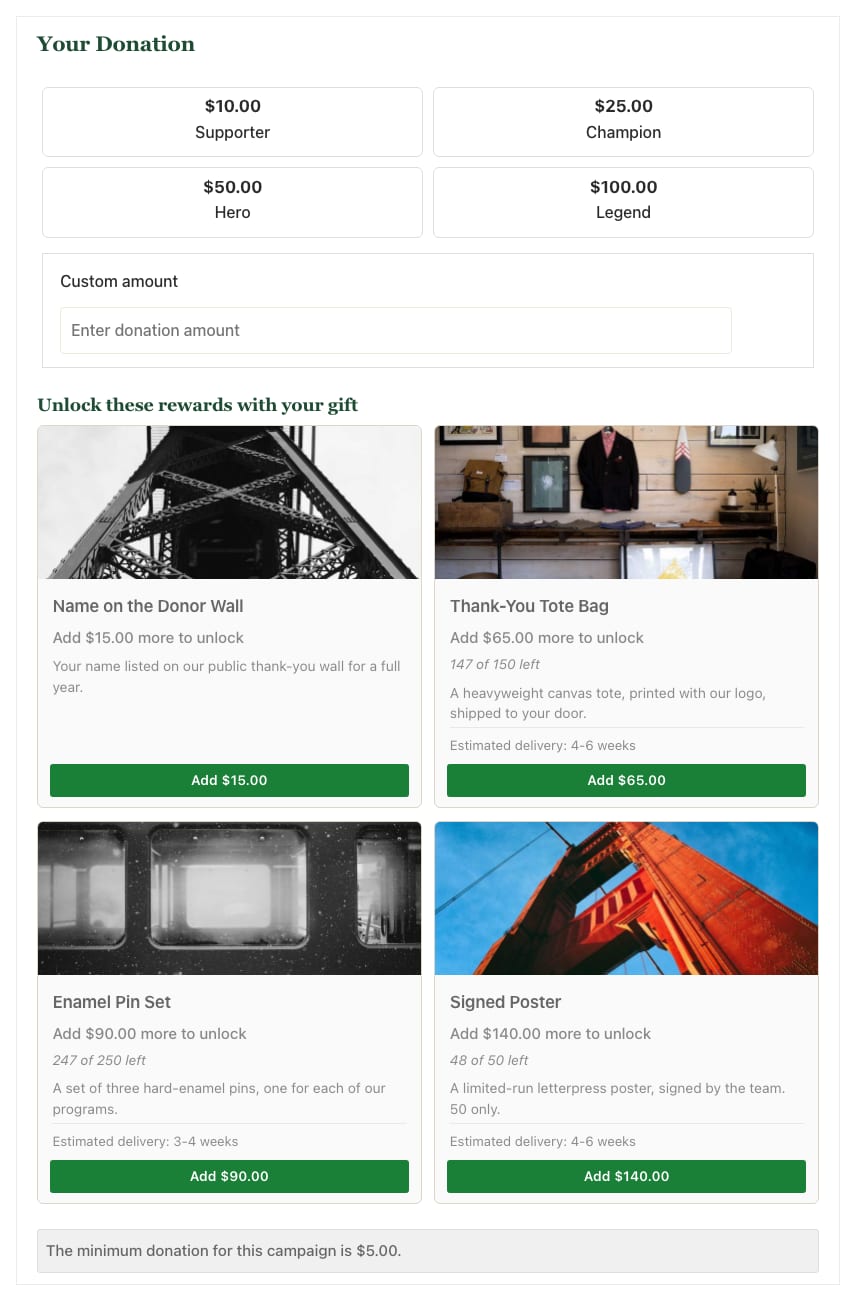
A donor who has picked $10 and sees “Add $15.00 more to unlock” isn’t being pushed. They’re being shown what’s on offer, and the choice stays with them.
If they click the Add button on a card, the new amount fills in for them and the card turns green.
This mode suits a general donation page where you can’t predict what someone will give. It also suits a year-end appeal where you want to raise the average gift.
Only the Top Reward Is Granted, Unless You Choose Otherwise
Say you offer rewards at $25, $75, $100 and $150, and someone gives $175. Do they get all 4?
By default, no. Highest stacking gives the donor the single most valuable reward they qualified for. That keeps your packing list short, because a $175 donor gets 1 signed poster instead of 4 separate items to post.
If your perks are meant to build on each other, like a sticker plus a tote bag plus a mention in your newsletter, you can switch to Cumulative stacking instead.
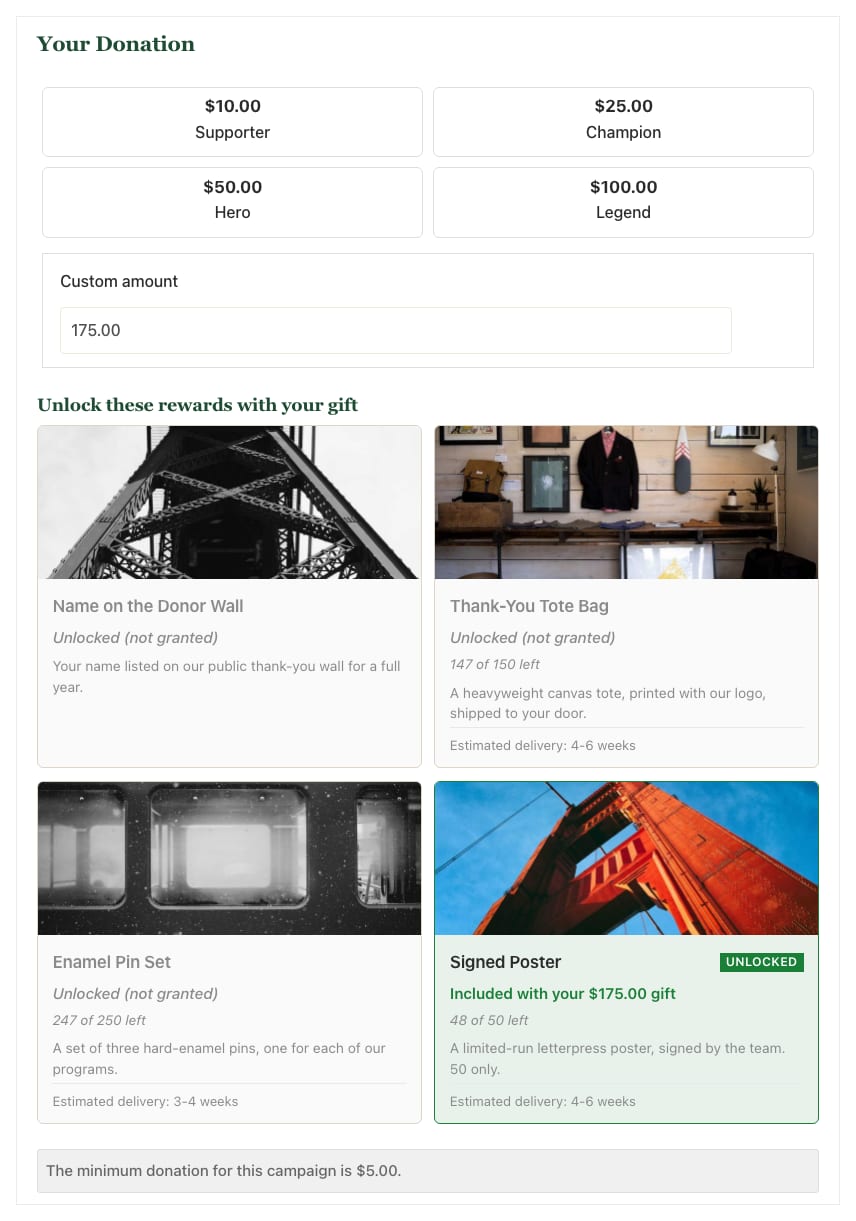
On the form, the cards a donor passed but won’t receive turn gray and read “Unlocked (not granted)”. This means they crossed that amount, but with Highest stacking only the top reward is granted.
Some donors may ask you about that label. If you’d rather avoid the question, Cumulative stacking gives them every reward they unlock.
Or Let Donors Pick a Level, Like a Crowdfunding Campaign
If you’d rather offer fixed tiers the way crowdfunding campaigns do, levels mode does that. The donor picks a level, and the level sets the donation amount.
Each level card can show the following.
- An image and a colored badge
- The price of the level
- The reward it includes
- A list of perks
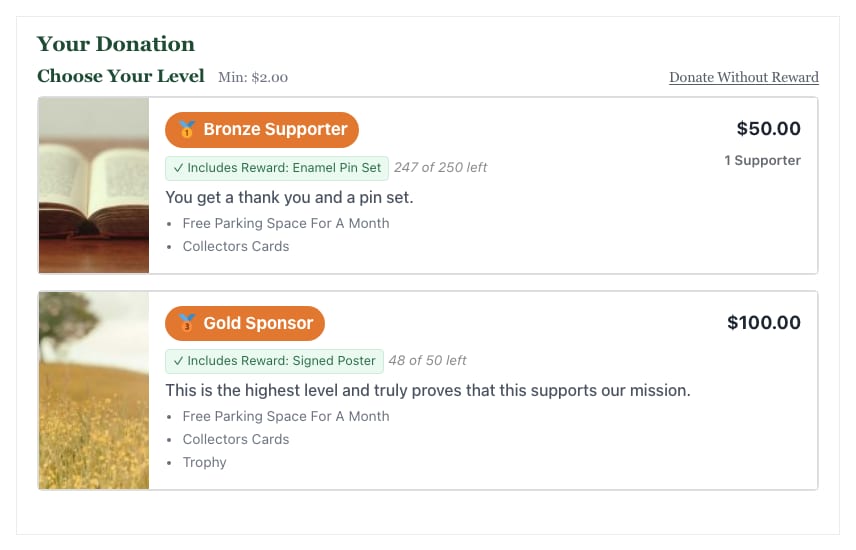
A level and a reward are 2 different things. A level is a priced tier on 1 campaign’s form. A reward is the thank-you gift itself, and it lives in your catalog.
A level usually includes a reward, but it doesn’t have to. You can run levels with no rewards attached, and you can run rewards with no levels.
Build Your Rewards Once, Then Use Them on Any Campaign
Your rewards live in a catalog, which is a shared library you build once. The tote bag you created for your spring appeal can be used again in your fall appeal without building it again.
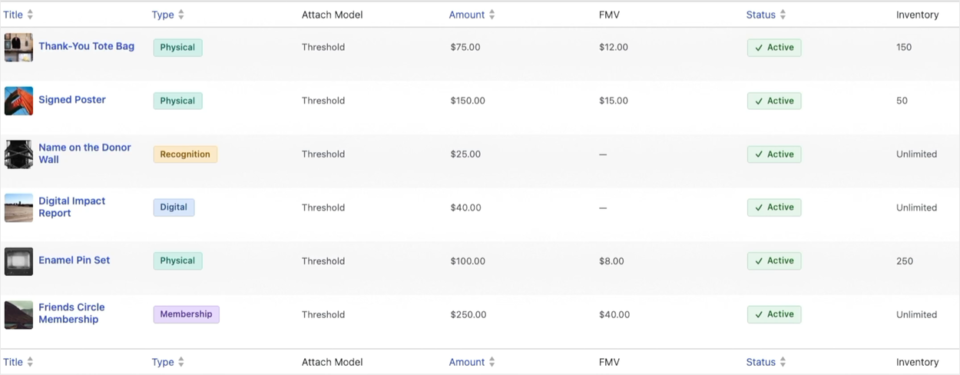
Every reward has 1 of 4 types. The type you pick decides what Rewards does after a donor earns it.
- Recognition is a public thank-you, like a name on your donor wall or a certificate. There’s nothing to ship, so it never adds work to your fulfillment list.
- Digital is a file, a code or a link, and Rewards emails it to the donor automatically.
- Physical is something you post. Rewards collects the shipping address on the form and shows your delivery estimate on the card, so a donor knows a tote bag will arrive in 4 to 6 weeks.
- Membership is an ongoing benefit, like a place in your friends circle or supporters club.
Pick the type carefully, because it can’t be changed after you create the reward. If you choose the wrong one, you can create a new reward and archive the old one.
A Limited Run of 50 Stays a Limited Run of 50
You can put a stock limit on any reward. When it runs out, the card shows that it’s sold out and stops unlocking.
The tricky part is the short gap between a donor choosing a reward and their payment going through. Without protection, 2 donors could both claim the last signed poster in that gap.
So Rewards places a reservation hold on the item while the payment is being processed. You set the hold time in minutes for your whole site, and it starts at 30.
We suggest setting it a little longer than your slowest checkout. Holds only apply to rewards that have a stock limit, because an unlimited reward has nothing to hold.
Digital Rewards Stay With the Donor Who Earned Them
When you upload a file as a digital reward, Rewards keeps it in protected storage instead of your public uploads folder. Each donor gets their own download link, and that link is protected in 3 ways.
- It’s signed for that donor and that reward, so changing any part of the URL stops it from working.
- It expires after 7 days by default.
- It can be capped, so you decide how many times the file can be downloaded.
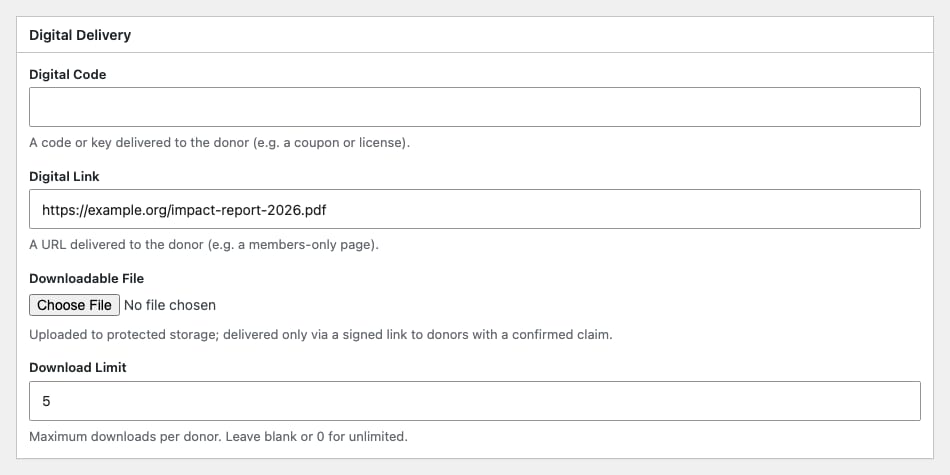
If a donor tells you their link has expired, resend the delivery email instead of attaching the file. If emails from your site go missing, a WordPress email delivery plugin helps them reach the inbox. That way your download counts stay accurate.
Your Tax Receipts Stay Accurate, Even When Values Change Later
I’m using US rules as the example here, since that’s the system most of our readers know. When a donor receives something of value for their gift, the tax-deductible part of the gift goes down by that value, and the receipt needs to say so.
Add a fair market value to a reward, and Rewards works out the deductible amount and shows it on the donation receipt. For example, a $75 gift that earns a $12 tote bag has a deductible amount of $63.
Rewards also saves the value at the moment of the donation. If you raise the value of your tote bag next March, the receipts you sent last year stay exactly as they were.

On campaigns where you turn it on, donors can also decline a reward. A donor who would rather keep the full deduction can tick the box, and their whole gift stays deductible.
If your organization is outside the US, a local tax advisor can walk you through what your own country expects.
One List for Everything You Need to Send
Once donations come in, the Claims list is where your team works from. It shows every reward you owe, and you can filter it by status and type.
Each row shows the donor, how the reward was earned, the shipping details and the fair market value.
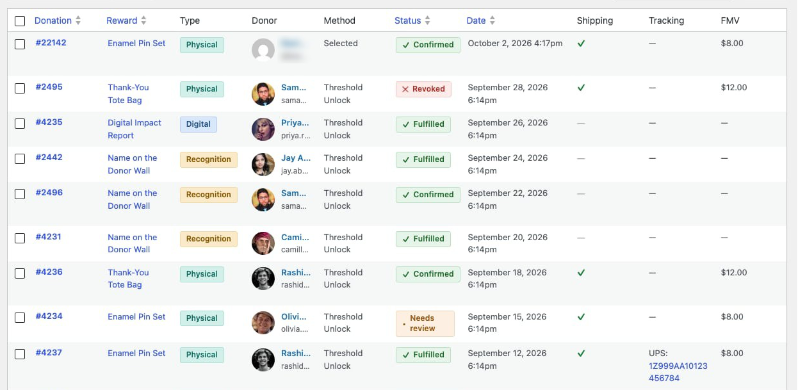
Each claim has its own status. You can tell a reward that’s waiting to be packed from one that was refunded or needs a closer look.
After a packing session, you can select a batch of claims and mark them all as fulfilled at once. For posted items, add the carrier and tracking number, and Rewards emails the donor a tracking link. Our guide to the donation thank-you email has ideas for what else to say once a gift is on its way.
Peer-to-Peer Fundraisers Use the Main Campaign’s Rewards
If you run peer-to-peer campaigns with Charitable Ambassadors, each fundraiser page uses its parent campaign’s rewards automatically. The supporters raising money for you don’t have to set anything up.
When you set a reward’s stock to shared, the limit covers every fundraiser page together. So 50 signed posters means 50 in total, not 50 for each page.
For rewards to appear on a fundraiser’s donation form, keep the parent campaign in automatic mode. Donors on a fundraiser page give their own amount and unlock rewards as they go, rather than picking a level.
See What Your Rewards Are Bringing In
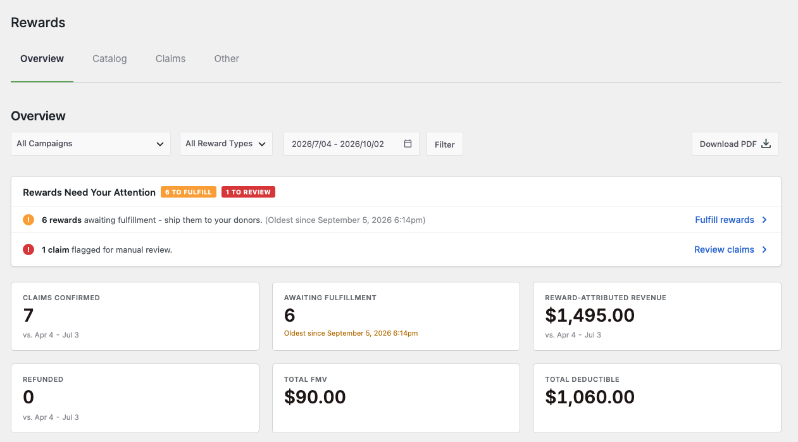
You’ll find everything under Charitable » Rewards. There’s an Overview dashboard, your Catalog, the Claims list and your settings.
A banner at the top of the Overview tells you what still needs to be sent. The tiles below it show how much came in on gifts that earned a reward.
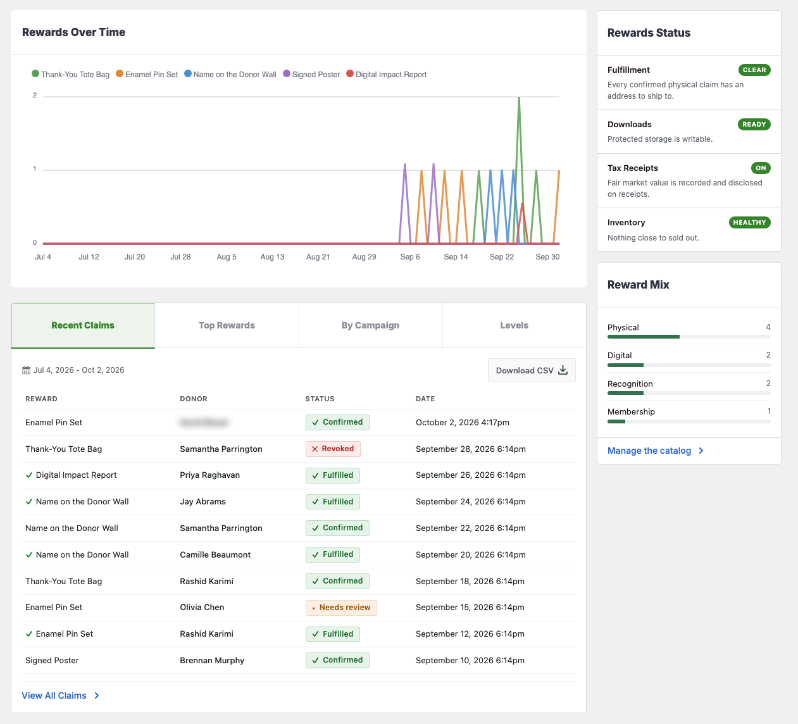
Further down, you can see which rewards donors choose most.
Get Started With Charitable Rewards
Charitable Rewards is available in version 1.8.16 of the Charitable Pro plugin, Pro plan and higher.
Already on the Pro or Elite plan? To get started, install the Rewards addon from your dashboard, then open Charitable » Rewards. The setup wizard walks you through your first reward in about 3 minutes.
There’s 1 setting to check before you launch. Attaching a reward to a campaign doesn’t turn rewards on for that campaign, so open the campaign builder and switch on Enable Rewards too.
Since Rewards is a big feature, we’ve created smaller guides that will walk you through different aspects step by step. Get started below with Charitable Rewards, in the order most people set it up.
- Charitable Rewards. Start here for how the 2 modes work, the 4 reward types and who can do what.
- Setup Wizard. Walk through the 6 steps that create your first reward and attach it to a campaign.
- Creating Rewards. Build rewards in the catalog, set stock limits and attach them to any campaign.
- Automatic Mode. Let donors give any amount and see each reward unlock as their gift grows.
- Levels Mode. Set up giving levels donors pick from, like a crowdfunding campaign.
- Digital and Physical Delivery. Learn how downloads reach donors by email and how shipping addresses are collected.
- Claims and Fulfillment. Work through the list of rewards you owe and mark each one as sent.
- Tax Receipting and Fair Market Value. Record each reward’s value so your receipts show the right deductible amount.
- The Donor Experience. See where donors find their rewards after they give, from the receipt to their dashboard.
- Rewards Reporting. Read the Rewards Overview and export your claims as a CSV or PDF.
- Rewards for Peer-to-Peer Campaigns. Share the main campaign’s rewards with every fundraiser page under it.
- Hooks and Filters. Find every action and filter developers can use to change how Rewards behaves.
Charitable Has 1.2+ Million Downloads!
Trusted by millions to power successful fundraising campaigns. Try Charitable risk-free today.
✅ 14-day money-back
✅ Transparent pricing
✅ Code-free setup
What’s New in Charitable
We’ve also launched these features and improvements recently.
🎟️
Sell event tickets inside your campaigns, so tickets and donations share one set of reports.
💳
Donors set up a gift once, and Charitable bills every renewal through Windcave on schedule.
⚡
Lay out each automation as a flow on a full-screen canvas, with no code.
We keep adding features and improvements to help you raise more and look after your donors. See everything we’ve shipped in the Charitable Changelog.
Not yet a Charitable Pro user? Sign up today and get up to 50% off on your plan. We’re confident you’ll love raising funds with Charitable. If, for any reason, Charitable is not the right fit for you, we’ll refund your purchase with our 14-day money-back guarantee. Get Charitable Pro Now »
Stay Connected for More Nonprofit Resources
For more tutorials and videos tailored to nonprofits, subscribe to our YouTube channel. We regularly publish expert tips, step-by-step guides on online donations, fundraising strategies, and practical resources to help your organization succeed.
🗞️ Get weekly tips and exclusive guides in your inbox
Join our newsletter →
🎥 Watch step-by-step tutorials and success stories
Subscribe to our YouTube channel →
👩🏽💻 Connect with our community and get daily nonprofit insights
Follow us on LinkedIn →
🥳 Fun reels and non-profit insights
Follow us on Instagram →
👀 Insightful & fun videos to help you grow your cause
Follow us on TikTok→
🌎 Subscribe and follow for general fundraiser tips
Get Fundraiser Tips on TikTok →
Powerful Fundraising Resources
🤖 Use Charitable with Your AI Assistant
⬇️ Download proven strategies, campaign ideas, and expert tools
Get the Fundraising Kit →
💸 Get Free Fundraising Resources
Head to the Charitable Fundraising Hub →
🤔 Got questions about Charitable?
Charitable FAQs →
🏎️ Take Charitable for a spin
Create your Charitable Demo →
Understand non-profit terms and jargon
Non-Profit Glossary →
% Looking for non-profit deals and discounts?
Best Non-Profit Deals and Discounts →







Leave a Reply