
Requires: Charitable Pro plugin 1.8.16+
Pro plan and higher
Do you need your donation receipts to show the right deductible amount when a donor receives a reward? When a donor gives $75 and receives a tote bag valued at $12, they’ve made a $63 gift and received a $12 tote. US rules call this a quid pro quo contribution, and the receipt has to say so.
This guide covers turning on tax receipting, recording a fair market value, how the deductible amount is worked out, and where those numbers appear.
Rewards handles this for you once you tell it what each reward is valued at. I’m using US rules here since that’s the system most readers know, and this page describes what the software does. Your accountant can confirm the thresholds and wording for your own organization, and if you’re outside the US, a local tax advisor can walk you through what your own country expects.
Charitable Rewards needs version 1.8.16 or higher of the Charitable Pro plugin, on the Pro plan and higher.
What’s In This Guide?
Watch the Video
If you’d rather watch than read, this video shows how rewards appear on your tax receipts.
Turning On Tax Receipting
To get started, head over to Charitable » Rewards » Other.
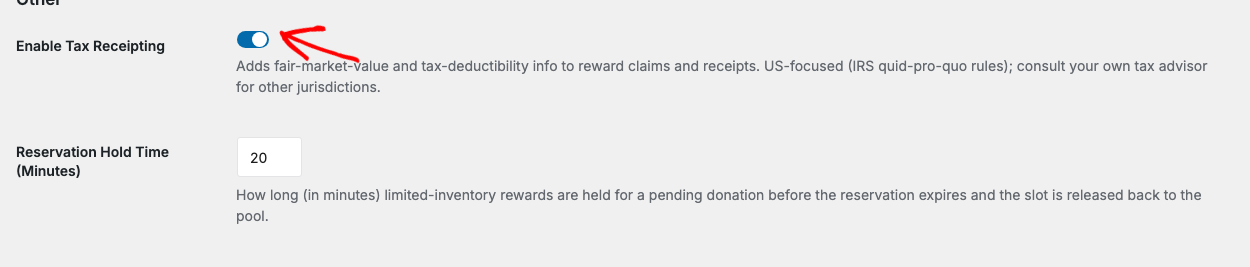
Switch on “Enable Tax Receipting”. With it off, Rewards still records any fair market values you enter, but it doesn’t put anything on receipts or show the tax columns.
Important: Turn it on before you start taking donations. Values are saved onto claims as they happen, so turning it on later won’t go back and add details to gifts that already came in.
Recording a Value
Every reward has an optional fair market value field. It’s separate from the amount that unlocks the reward.
| Field | Means |
|---|---|
| Amount | What a donor must give to earn the reward |
| Fair market value | The real value of the thing the donor receives |
A signed poster might unlock at $150 and have a fair market value of $15. The 2 numbers aren’t related, and both matter.
Recognition rewards usually have no fair market value at all. A name on a donor wall has no value in the sense the rules mean, so leave the field empty and the whole gift stays deductible.
The Value Is Saved at the Moment of the Gift
This part matters most, and it’s easy to miss because you don’t see it when it works.
When a donor claims a reward, Rewards copies the fair market value onto the claim record. The claim keeps its own copy instead of pointing back at the reward.
Say you create a tote bag at $12, take 50 donations, and then find the real cost is $18 and update the reward. Those 50 donors’ receipts still say $12.
That’s correct, because $12 was the value you disclosed at the time and those receipts have already gone out. Changing them would make your records disagree with what donors hold. New claims from that point on use $18.
What the Donor Sees
With tax receipting on, the receipt shows the deductible portion with wording like this.
The tax-deductible portion of your $75.00 contribution is $63.00.
A developer can change the heading and the disclaimer wording with filters if your legal advisor wants different phrasing.
Letting a Donor Decline
If you turn on the decline option for a campaign, a donor who would rather have the full deduction than the tote bag can say so. Ticking it creates no claims at all, so the donor receives nothing in return and the entire gift stays deductible.
We suggest turning it on for campaigns with valuable rewards, because some donors care a lot about this.
See Automatic Mode for the setting.
How the Deductible Amount Is Worked Out
The 2 numbers work together in a slightly different way than people expect.
The fair market value is saved onto the claim. The deductible amount is worked out from it each time it’s shown, as the donation total minus the saved value of everything claimed on that donation, and it never goes below zero.
In practice, the result is the same as saving both, because the value it starts from never changes. It also means there’s 1 number of record instead of 2 that could drift apart.
When a single donation earns more than 1 reward, Rewards adds the values together before subtracting.
Where the Numbers Show Up

| Place | What you get |
|---|---|
| Donation receipt | The deductible portion, shown to the donor |
| Claims list | A fair market value column |
| Claims CSV export | Fair market value and deductible columns |
| Overview dashboard | Total fair market value and total deductible tiles for the period |
| Rewards Status panel | A check confirming that tax receipting is on |
Look at the Overview tiles before you hand anything to your accountant.
Tips Worth Keeping in Mind
These habits keep your receipts accurate from the first gift.
- Turn it on before launch, not after. Turning it on later doesn’t add details to past gifts.
- Record a value on every physical and digital reward that has one, even a small amount.
- Leave recognition rewards blank, because there’s nothing to value.
- Don’t edit a fair market value to correct a past receipt, because it won’t change it. Issue a corrected receipt through your normal process instead.
- Turn on the decline option where rewards are valuable, and word the label plainly.
Developer Reference
Settings
| Key | Default | Purpose |
|---|---|---|
enable_tax_receipting | false | Record values and disclose the deductible portion |
Read it with Charitable_Rewards_Settings::get( 'enable_tax_receipting', false ).
Filters
| Filter | Purpose |
|---|---|
charitable_rewards_tax_receipt_heading | The heading above the disclosure on the receipt |
charitable_rewards_tax_receipt_disclaimer | The disclosure wording itself |
charitable_rewards_receipt_heading | The heading of the rewards block on the receipt |
charitable_rewards_receipt_pending_note | The note shown for a claim not yet fulfilled |
Tax Helpers
Charitable_Rewards_Tax::deductible( $donation_total, $total_fmv ) is a pure helper that returns the deductible amount, floored at zero.
It’s the single place the subtraction happens, and the receipt, the claims export, and the Overview tiles all use it.
Claim Storage
Each claim carries fmv_snapshot, the frozen fair market value.
The schema also declares deductible_snapshot and tax_profile_version columns, which are not currently written. The deductible is derived from the frozen value at render time rather than stored, so don’t build reporting that reads those 2 columns expecting data.
Capabilities
Changing fair market values and tax settings requires charitable_manage_reward_tax. A volunteer with only charitable_fulfill_rewards can mail a package without being able to change tax figures.
Customization Examples
Reword the receipt disclosure.
add_filter( 'charitable_rewards_tax_receipt_disclaimer', function () {
    return __( 'Under IRS rules, only the portion of your gift above the value of benefits received is deductible.', 'your-textdomain' );
} );
Change the heading above the rewards block on receipts.
add_filter( 'charitable_rewards_receipt_heading', function () {
    return __( 'Your thank-you gifts', 'your-textdomain' );
} );
Wrapping Up
You now know how to turn on tax receipting, record a fair market value, and find the deductible figures on receipts, exports, and the Overview dashboard.
Next, you can add values to the rewards in your Catalog. If you get stuck on any step, our support team is happy to help.
You May Also Want to Read
These guides cover the other places tax figures appear.
- Creating Rewards. Record a fair market value on each reward.
- Automatic Mode. Turn on the decline option for a campaign.
- Claims and Fulfillment. Find the tax columns in the claims list and export.
- Reporting. Read the total value and total deductible tiles.
Helpful Links
🤝 Get help when you need it
Connect with Customer Support →
📑 Find the guide you need
Browse the Documentation Hub →
⬇️ Download proven strategies, campaign ideas, and expert tools
🔗 Let your AI Assistant do the fundraising work for you.
Connect Charitable to your AI assistant →
💸 Get Free Fundraising Resources
Head to the Charitable Fundraising Hub →
🤔 Got questions about Charitable?
Charitable FAQs →
Need help understanding non-profit terms and jargon?
See our Non-Profit Glossary →




