
Requires: Charitable Pro plugin 1.8.16+
Pro plan and higher
Do you want to know how a digital download or a posted item actually reaches your donor? Two of the 4 reward types need delivery, with digital rewards sent by email and physical rewards sent by mail.
This guide covers both. It explains the 3 kinds of digital reward, how download links are protected, and how Rewards collects shipping addresses for physical items.
Getting delivery right means donors receive what they earned, and your files stay with the people who earned them. Recognition and membership rewards need no delivery, because they’re recorded and that’s the end of it.
Charitable Rewards needs version 1.8.16 or higher of the Charitable Pro plugin, on the Pro plan and higher.
What’s In This Guide?
Watch the Video
If you’d rather watch than read, this video shows a digital reward and a physical reward from setup to delivery.
Digital Rewards
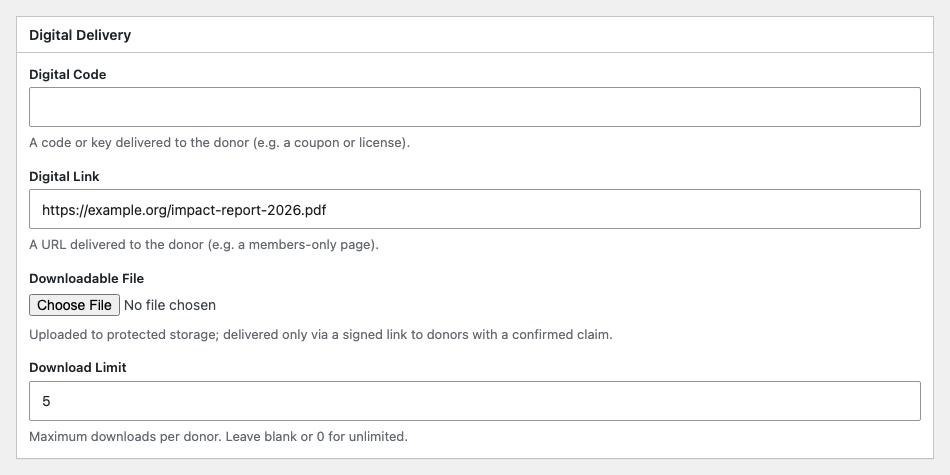
A digital reward is a code, a link, or a file. You pick which when you create it.
| Kind | Use it for | What the donor gets |
|---|---|---|
| Code | A discount code, a voucher, or an access key | The code itself, in the delivery email |
| Link | Something hosted elsewhere, like a video or a form | The URL, in the delivery email |
| File | A PDF, an image pack, or an audio file | A protected download link |
Files Are Protected
This is the difference between a real download and a URL anyone can pass around.
An uploaded file does not sit in your public uploads folder, where someone could guess the URL. It goes into protected storage, and the donor receives a link with 3 protections.
- Signed. The URL carries a cryptographic signature tied to that donor and that reward. Changing any part of it stops it from working.
- Expiring. The link stops working after a set time, 7 days by default.
- Capped. You can limit how many times a single reward’s file can be downloaded.
So a link that’s forwarded on after it expires won’t work. If a donor needs it again, resend the delivery email rather than hunting for a file URL.
Setting a Download Limit
The “Download Limit” on a digital reward caps how many times the file can be downloaded. Leave it empty for unlimited downloads.
A small number like 3 or 5 usually works well. It’s enough for a donor who loses the file or switches devices, and few enough that a leaked link has limited value.
What Donors Receive
When a digital claim is confirmed, the reward digital delivery email goes out with the code, the link, or the download URL.
It’s a normal Charitable email that you can edit under the email settings, so you can set the tone and add your own instructions.
Physical Rewards
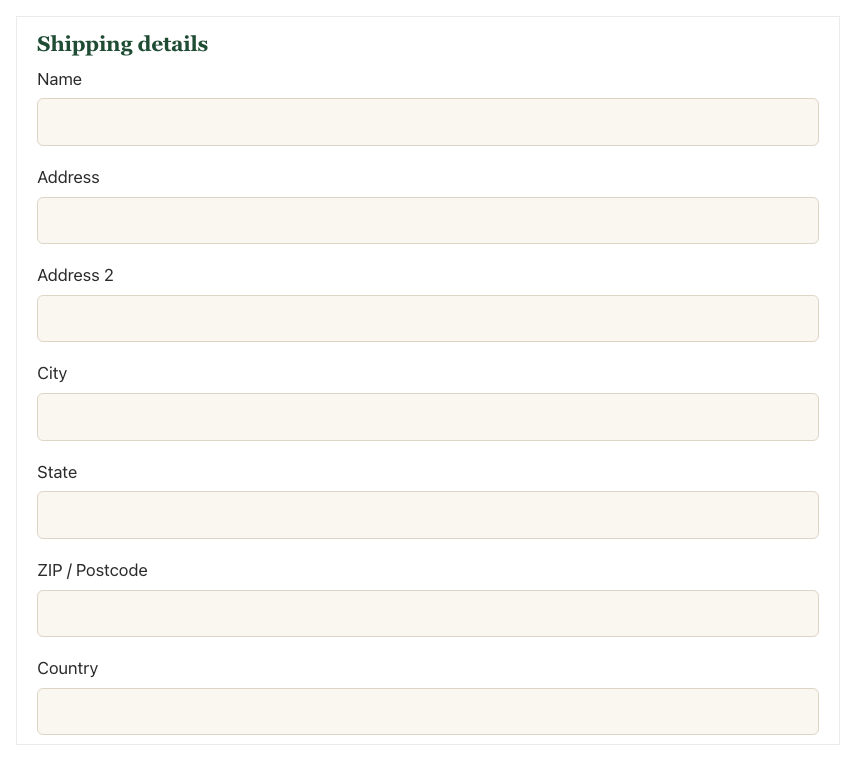
A physical reward needs somewhere to go, so Rewards collects a shipping address on the donation form itself. The fields only appear when the donor is in line for something physical.
Rewards collects 7 fields.
- Name
- Address
- Address line 2
- City
- State
- Postal code
- Country
Estimated Delivery
Each physical reward can show an estimated delivery time on the reward card. It’s free text, so “4-6 weeks” or “ships in time for the holidays” both work.
We suggest filling it in. The most common question about a physical reward is when it’s coming, and answering it on the form saves an email.
Addresses Live on the Donation
Shipping details are stored against the donation, not the reward or the claim. A donor’s address belongs to the gift, and 1 donation that earns 2 physical rewards has 1 address, not 2.
In practice, the address shows on the donation record and on each claim from it. Seeing it requires the charitable_view_reward_pii capability.
Then It’s a Fulfillment Job
Once the claim is confirmed, the item joins your claims list. Mark it fulfilled and record the carrier and tracking number, and Rewards sends the reward shipped email with a tracking link.
See Claims and Fulfillment for the full steps.
Tips Worth Keeping in Mind
These habits keep your rewards protected and your inbox quieter.
- For files, upload them rather than linking to your own media library. An uploaded file gets the protected, expiring link, and a plain link to a public URL does not.
- Set a download limit, even a generous one. An unlimited link that leaks stays unlimited forever.
- Fill in estimated delivery on everything physical. It’s the cheapest way to cut down support emails.
- If a donor says a link expired, resend the delivery email. Sending the file as an attachment skips the download count, so your numbers stop being accurate.
- The default link lifetime is 7 days, which is generous. Shorten it if your files are sensitive, and rely on the download limit rather than the clock for anything valuable.
Developer Reference
Filters
| Filter | Default | Purpose |
|---|---|---|
charitable_rewards_download_url_ttl | 604800 (7 days) | Lifetime in seconds of a signed download URL |
charitable_rewards_allowed_file_types | plugin default | Permitted file types for digital uploads |
charitable_rewards_max_file_size | plugin default | Upload size ceiling |
charitable_email_reward_digital_delivery_recipient | the donor | Who the delivery email goes to |
charitable_email_reward_shipped_recipient | the donor | Who the shipped email goes to |
Both emails also expose _default_subject, _default_headline, and _default_body filters under the same prefix.
Signed Download URLs
Charitable_Rewards_Download builds and validates the signed URL. The signature is an HMAC over the request payload using a WordPress salt, so URLs can’t be forged without the site’s keys.
Download counts are tracked in donation meta per reward, alongside a last-download timestamp.
The TTL filter is the supported way to change link lifetime. Don’t try to lengthen it by reissuing URLs yourself.
Shipping Fields
Charitable_Rewards_Shipping::field_keys() returns the 7 field definitions. They’re registered as Charitable donation fields, so they appear in exports and on the donation record like any other field.
parts_for_donation() reads them back as a keyed array, and format_address() renders them as a single comma-separated line.
Fields are stored as donation post meta prefixed charitable_rewards_shipping_.
Reward Payload Keys
Digital and physical settings live in the reward’s payload rather than as columns. The keys are digital_code, digital_link, digital_file, download_limit, and estimated_delivery.
Customization Examples
Tighten download links to 1 hour.
add_filter( 'charitable_rewards_download_url_ttl', function () {
    return HOUR_IN_SECONDS;
} );
Allow ePub and MOBI uploads.
add_filter( 'charitable_rewards_allowed_file_types', function ( $types ) {
    $types['epub'] = 'application/epub+zip';
    $types['mobi'] = 'application/x-mobipocket-ebook';
    return $types;
} );
Send the shipped notification to your shipping desk as well.
add_filter( 'charitable_email_reward_shipped_recipient', function ( $email ) {
    return $email . ',[email protected]';
} );
Wrapping Up
You now know how digital rewards reach donors through protected links, and how Rewards collects addresses for physical items.
Next, you can work through your claims list and record tracking. If you get stuck on any step, our support team is happy to help.
You May Also Want to Read
These guides cover the steps around delivery.
- Creating Rewards. Choose a type and set up the reward’s delivery details.
- Claims and Fulfillment. Work through your claims list and record tracking.
- Donor Experience. See where donors find their rewards after donating.
- Reporting. Check download totals and the protected storage health check.
Helpful Links
🤝 Get help when you need it
Connect with Customer Support →
📑 Find the guide you need
Browse the Documentation Hub →
⬇️ Download proven strategies, campaign ideas, and expert tools
🔗 Let your AI Assistant do the fundraising work for you.
Connect Charitable to your AI assistant →
💸 Get Free Fundraising Resources
Head to the Charitable Fundraising Hub →
🤔 Got questions about Charitable?
Charitable FAQs →
Need help understanding non-profit terms and jargon?
See our Non-Profit Glossary →




