
Requires: Charitable Pro plugin 1.8.16+
Pro plan and higher
A donor who earns a reward shouldn’t have to email you to find out what they got. Rewards shows their claims everywhere a donor already looks.
This guide covers the donation receipt, the donor dashboard, the My Donations shortcode, the reward cards shortcode and the levels mini widget.
When donors can check their own rewards, you’ll answer far fewer “where is my thing” emails.
Charitable Rewards needs version 1.8.16 or higher of the Charitable Pro plugin, on the Pro plan and higher.
What’s In This Guide?
Watch the Video
If you’d rather watch than read, this short video shows what your donor sees.
On the Donation Receipt
Straight after donating, the receipt lists what the gift earned. For a reward not yet fulfilled, a short pending note sets expectations rather than leaving a bare line item.
With tax receipting turned on, the receipt also discloses the deductible portion. See Tax Receipting.
In the Donor Dashboard
If your site uses Charitable’s donor dashboard, Rewards adds 2 things to it.
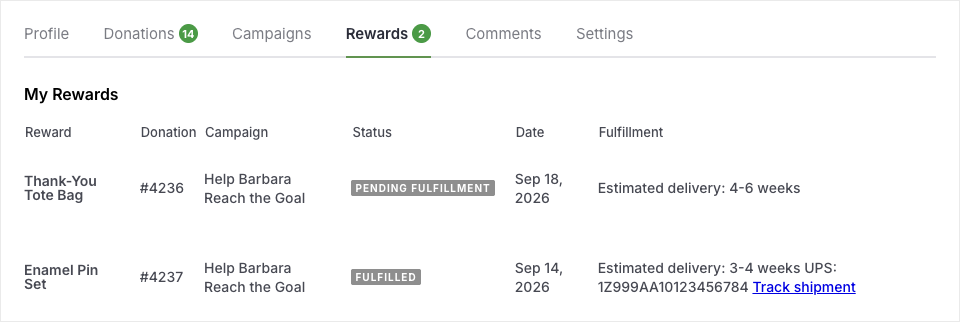
- A rewards column on the donations table, showing a small indicator on any donation that earned something.
- A Rewards tab, listing everything that donor has claimed with its current status.
The tab is where a donor goes to answer “has my tote bag shipped yet?” That’s the question you most want them answering for themselves.
In the My Donations Shortcode
Sites using [charitable_my_donations] rather than the full dashboard get a rewards column there too. The donation history then shows which gifts earned perks.
Both places use the same renderer, so a claim looks the same wherever a donor sees it.
The Reward Cards Shortcode
Reward cards don’t have to live on a donation form. The shortcode shows them on any page or post.
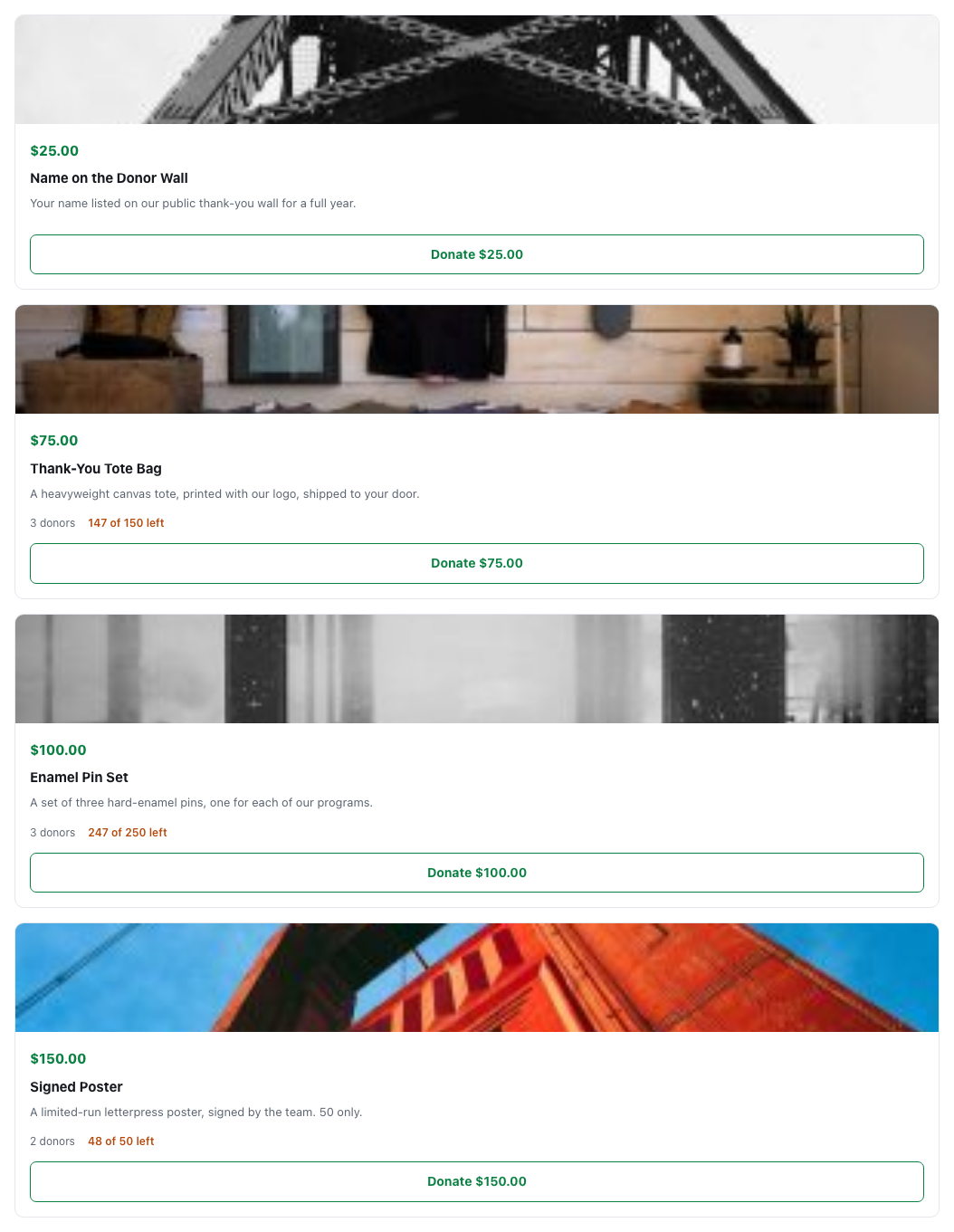
[charitable_reward_cards]Here are a few places it helps.
- A dedicated “ways to give” page that explains the tiers before anyone reaches a form
- A campaign landing page where the cards are the pitch
- An email-friendly page you can link supporters to
The cards are for display in this context. Donating still happens on the campaign’s own form, which the cards link to.
The Levels Mini Widget
Where levels are in use, a compact widget sums up the giving tiers for a sidebar or a narrow column, without the full card design.
What a Donor Cannot Do
Knowing these limits helps you answer donor questions with confidence.
- Change a claim. Once a reward is earned, the donor can’t swap it for a different one. That’s a conversation with you.
- Re-download past an expired link. Digital download links expire. Resend the delivery email rather than sending the file directly, so the download counts stay right.
- See other donors’ claims. A donor only ever sees their own.
Tips Worth Keeping in Mind
These small steps save you a lot of donor emails.
- If you use the donor dashboard, point donors to the Rewards tab in your confirmation email. It answers most “where is my thing” questions.
- Put
[charitable_reward_cards]on a ways-to-give page for campaigns where the perks are a big part of the pitch. - Fill in estimated delivery on physical rewards. The receipt and dashboard both show it, and it answers the timing question before it’s asked.
FAQs on the Donor Experience
Can a donor swap their reward for a different one?
No. Once a reward is earned, the donor can’t change it themselves, so they’ll need to contact you.
Can donors donate from the reward cards shortcode?
The cards link to the campaign’s own donation form, and the donation happens there.
Why is the Rewards tab missing from my donor dashboard?
A theme that overrides the donor dashboard templates without keeping Charitable’s hooks will lose the rewards column and tab. Check your theme’s template overrides first.
Developer Reference
Shortcode
| Shortcode | Renders |
|---|---|
[charitable_reward_cards] | Reward cards for a campaign, outside the donation form |
Filters
| Filter | Purpose |
|---|---|
charitable_reward_cards_shortcode | Filter the shortcode output or its resolved attributes |
charitable_rewards_receipt_heading | Heading of the rewards block on the receipt |
charitable_rewards_receipt_pending_note | The note shown against a claim not yet fulfilled |
charitable_rewards_view_models | The view models behind card rendering, shared by form and shortcode |
charitable_rewards_form_heading | Heading above the rewards block on a donation form |
charitable_rewards_form_heading_no_reward | That heading when no reward is currently in reach |
charitable_rewards_summary_label | The label used in the donation summary |
charitable_rewards_change_amount_level_label | Label on the “change your level” link in levels mode |
charitable_rewards_change_amount_level_link | The link itself |
Integration Hooks Used
Rewards attaches to Charitable’s own donor-facing tables rather than replacing them.
| Hook | Adds |
|---|---|
charitable_my_donations_table_header_after_receipt | The rewards column header in My Donations |
charitable_my_donations_table_after_receipt | The rewards cell in My Donations |
charitable_donor_dashboard_donations_table_header_after_actions | The rewards column header in the dashboard |
charitable_donor_dashboard_donations_table_after_actions | The rewards cell in the dashboard |
charitable_donor_dashboard_after_campaigns_nav_tab | The Rewards nav tab |
charitable_donor_dashboard_after_campaigns_tab_content | The Rewards tab content |
Because these are additive hooks, a theme that overrides the donor dashboard templates without keeping those hook calls will lose the rewards column and tab.
If a client’s dashboard is missing them, check the theme’s template overrides first.
Customization Examples
Reword the rewards heading on the donation form.
add_filter( 'charitable_rewards_form_heading', function () {
    return __( 'Pick your thank-you gift', 'your-textdomain' );
} );
Change the pending note donors see on receipts.
add_filter( 'charitable_rewards_receipt_pending_note', function () {
    return __( 'We will email you as soon as this ships.', 'your-textdomain' );
} );
Wrapping Up
You now know where donors see their rewards, how to show reward cards on any page, and what donors can and can’t change themselves.
If you get stuck on any step, our support team is happy to help.
You May Also Want to Read
These guides cover what happens behind the screens your donors see.
- Delivering Rewards. See the emails and download links donors receive.
- Claims and Fulfillment. Learn the statuses donors see on their claims.
- Tax Receipting and Fair Market Value. Find out what the receipt discloses.
- Levels Mode. Set up the tiers the mini widget sums up.
Helpful Links
🤝 Get help when you need it
Connect with Customer Support →
📑 Find the guide you need
Browse the Documentation Hub →
⬇️ Download proven strategies, campaign ideas, and expert tools
🔗 Let your AI Assistant do the fundraising work for you.
Connect Charitable to your AI assistant →
💸 Get Free Fundraising Resources
Head to the Charitable Fundraising Hub →
🤔 Got questions about Charitable?
Charitable FAQs →
Need help understanding non-profit terms and jargon?
See our Non-Profit Glossary →




