
Requires: Charitable Pro plugin 1.8.16+
Pro plan and higher
Do you want donors to pick a giving tier, the way a crowdfunding campaign works? In levels mode, donors don’t type an amount. They pick a card, and the card sets the amount.
This guide covers how levels differ from rewards, what each level can carry, recurring levels, and what happens when an amount doesn’t match a level.
You could offer Friend at $25, Supporter at $75, and Champion at $100. Each one has its own picture, its own list of what’s included, and its own price.
Charitable Rewards needs version 1.8.16 or higher of the Charitable Pro plugin, on the Pro plan and higher.
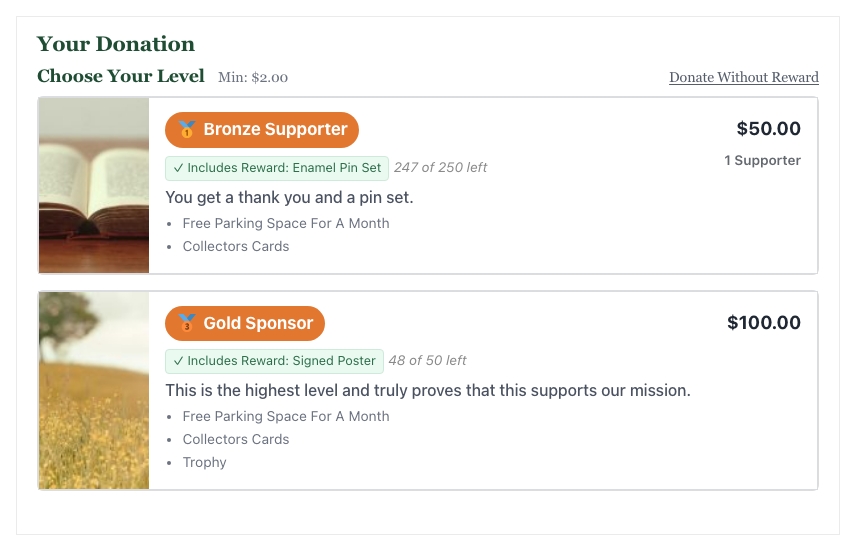
The levels replace the amount step entirely, so there’s no separate “choose an amount” block above them. Picking Champion is entering $100.
What’s In This Guide?
- Levels Are Not the Same Thing as Rewards
- When You'd Use Levels Mode
- Where to Find It
- What Each Level Can Carry
- Showing How Many Have Chosen Each Level
- Recurring Levels
- What Happens When the Amount Doesn't Match a Level
- Layout
- Tips Worth Keeping in Mind
- FAQs on Levels Mode
- Developer Reference
- Customization Examples
Watch the Video
This video walks through building giving levels and shows how they look on the donation form.
Levels Are Not the Same Thing as Rewards
This trips people up, so here’s the difference.
A reward is the perk itself. It lives in your catalog, where several campaigns can share it.
A level is a priced tier on 1 specific campaign. It can point at a reward from the catalog, but it doesn’t have to.
| Reward | Level | |
|---|---|---|
| Lives in | The shared catalog | 1 campaign |
| Has a price | Yes, the amount that unlocks it | Yes, and it sets the donation amount |
| Reusable across campaigns | Yes | No |
| Can exist without the other | Yes | Yes. A level with no reward attached is a priced tier |
So a level can be a giving tier with a nice description and no perk to send out. Or it can carry a reward, in which case the card shows a chip reading “Includes Reward: Thank-You Tote Bag”, and choosing the level claims the reward.
When You’d Use Levels Mode
Levels mode works well in these situations.
- A capital or crowdfunding campaign where the tiers are the pitch.
- A membership drive where each tier is a membership level with its own benefits.
- A gala or event where levels match your sponsorship packages.
- Any campaign where you want to control the price points exactly rather than inviting any amount.
If you’d rather let donors give any amount and encourage them to give more, use Automatic Mode instead.
Where to Find It
To get started, edit the campaign and open the Rewards panel in the campaign builder. Then set “Reward Mode” to Levels.
The level editor appears below, where you add and order the tiers.
What Each Level Can Carry
| Field | What it does |
|---|---|
| Title | The tier name, which shows in the badge |
| Amount | The donation amount this level sets |
| Description | A sentence on what the money does at this level |
| Perks | One perk per line. These show as a bulleted list on the card |
| Image | The card picture, with a focus point so crops don’t cut off faces |
| Icon | An emoji shown inside the badge |
| Badge color | The badge background, so the tiers read as a ladder |
| Reward | An optional reward from the catalog to include |
| Billing period | Optional. This makes the level recurring |
| Enabled | Hides a level without deleting it |
You can drag levels into any order, and the order you set is the order donors see.
The Image Focus Point
Reward and level images get cropped to fit the card, and a center crop can easily cut off the head of whoever is in the photo.
The focus point lets you choose which part of the image matters, as a percentage across and down. The crop keeps that point in the frame.
If your photo shows a person’s face in the upper third, set the vertical focus to around 30 percent and the crop will keep them.
Showing How Many Have Chosen Each Level
When you turn on “Show Backers,” each card shows how many donors have picked it, like “3 Supporters.” You choose the word with “Backers Term.”
Showing a count can encourage others to give, but a new campaign showing “0 Supporters” on every tier works against you. Leave it off until some donations have come in.
Note: Charitable has no pledges. The donor-facing words are “donors” and “donate,” never “backers” and “pledge.” The backers term exists only because some campaigns prefer their own word for the count.
Recurring Levels
A level can carry its own billing period, which turns that tier into a recurring gift. Benefactor at $250 per month shows as $250.00/month and sets up a recurring donation when chosen.
Rewards doesn’t fix the list of periods. It comes from whatever the campaign’s own recurring settings allow, plus the option to leave the level as a one-time gift.
Here’s how a level’s period works with the campaign’s period.
- The level sets a period. The level’s period wins, and the donor can’t change it if you locked it.
- The level inherits, and the campaign is recurring-only. The campaign’s period applies and is locked.
- The level inherits, and the campaign allows a choice. The donor picks, as they normally would.
Important Note: Recurring levels need Charitable Recurring active on the site. Without it, a level with a period set falls back to a one-time donation.
What Happens When the Amount Doesn’t Match a Level
Donors can arrive with an amount already set, from a deep link or a shared URL, that doesn’t match any level. You choose what happens.
| Behavior | What the donor sees |
|---|---|
| Prompt (default) | They’re asked to pick a level, or to continue without one |
| Auto-select highest | The best level at or below their amount is chosen for them |
| Decline | It’s treated as a no-reward donation at the amount they brought |
Below the cheapest level, all 3 options fall back to prompting, because there’s no level to select.
Layout
Levels can show in 1 of 2 layouts.
- Image on top shows a grid of cards with the image as a banner. It’s the default, and it’s the one that looks like a crowdfunding page.
- Image on side shows a single-column list with the image beside the text. It’s better when your descriptions are long.
Tips Worth Keeping in Mind
These tips help you build levels that donors read and choose.
- Offer 3 or 4 levels. A list of 6 is a menu nobody reads.
- Make the middle tier the one you want chosen, and make it clearly better value. Most donors pick the second or third option.
- Write perks as outcomes, not objects. “Feeds a family for a week” beats “1x food box.”
- Use the badge colors as a ladder, getting richer as the price rises. Donors can see the order before they read a word.
- If a level includes a physical reward, choosing it collects a shipping address. Keep that in mind for your cheapest tier.
FAQs on Levels Mode
Does every level need a reward?
No. A level with no reward attached is a priced tier with a description and perks list.
Can I hide a level without losing it?
Yes. Turn off its Enabled setting, and the level is hidden without being deleted.
Do levels show on peer-to-peer fundraiser pages?
No. Levels don’t carry down to fundraiser donation forms, so use automatic mode on the parent campaign for peer-to-peer.
Developer Reference
Filters
| Filter | Default | Purpose |
|---|---|---|
charitable_rewards_level_image_size | large or thumbnail by context | Registered image size for level card images |
charitable_rewards_tier_image_size | thumbnail | Image size for the reward chip image |
charitable_rewards_unlock_color | #1a7f37 | Accent color for the selected state |
Level Fields
Levels are stored in their own table, with 1 row per level per campaign. The fields map to the editor as follows.
| Field | Notes |
|---|---|
title, description, amount | The basics. Amount is what the level sets |
perks | Newline-separated. Rendered as a list |
image_id, image_focus_x, image_focus_y | Attachment ID plus focus percentages, both defaulting to 50 |
icon, badge_color | Emoji and hex color for the badge |
reward_id | Optional link to a catalog reward. Null for a tier with no perk |
display_order | Drag order |
enabled | 0 hides the level without deleting it |
recurring_period | Empty means inherit from the campaign |
recurring_default | Locks the period so the donor can’t change it |
Period Resolution
Charitable_Rewards_Level_Recurring::resolve_period() decides the effective period. It returns the period, whether it’s locked, and which of the 3 rules above produced it.
Sanitization checks a posted period against the campaign’s own allowed list, so a level can never offer a period the campaign doesn’t support.
Markup
The level list is a ul.charitable-reward-level-list inside .charitable-reward-levels-wrap, which also carries a charitable-reward-levels-layout-top or -side class. The plugin grids the list at 3 columns on desktop, 2 below 900px, and 1 below 600px.
Each level card is an li carrying .charitable-reward-level. It reuses the donation-amount suggested-donation-amount classes so core’s amount-selection behavior applies.
Unmatched Amounts
Charitable_Rewards_Unmatched resolves what to do with an amount that matches no level. It returns an action (prompt, a level to select, or a decline), the level ID, and how much more would be needed.
The campaign setting key is unmatched_amount_behavior, with the values prompt, auto_highest, and decline.
Customization Examples
Serve full-size images to level cards.
add_filter( 'charitable_rewards_level_image_size', function () {
    return 'full';
} );
Match the selected-level accent to your brand color.
add_filter( 'charitable_rewards_unlock_color', function () {
    return '#31714c';
} );
Wrapping Up
You now know how to set up giving levels, attach a reward to a level, make a level recurring, and choose what happens when an amount doesn’t match.
Next, add 3 or 4 levels to a draft campaign and preview the form. If you get stuck on any step, our support team is happy to help.
You May Also Want to Read
These guides cover the other parts of Charitable Rewards that work with levels.
- Automatic Mode. Let donors give any amount and unlock rewards as their gift grows.
- Creating Rewards. Build the catalog that levels can point at.
- Claims and Fulfillment. See what happens after a donor chooses a level.
- Rewards on Peer-to-Peer Campaigns. Find out why levels don’t carry down to fundraiser pages.
Helpful Links
🤝 Get help when you need it
Connect with Customer Support →
📑 Find the guide you need
Browse the Documentation Hub →
⬇️ Download proven strategies, campaign ideas, and expert tools
🔗 Let your AI Assistant do the fundraising work for you.
Connect Charitable to your AI assistant →
💸 Get Free Fundraising Resources
Head to the Charitable Fundraising Hub →
🤔 Got questions about Charitable?
Charitable FAQs →
Need help understanding non-profit terms and jargon?
See our Non-Profit Glossary →




