
Requires: Charitable Pro plugin 1.8.16+
Pro plan and higher
Do you want to thank your donors with something more than a receipt? Charitable Rewards lets you offer a perk for giving, like a name on your donor wall, a downloadable impact report, a tote bag in the mail, or a year in your friends circle.
This guide covers the 2 reward modes, the 4 reward types, where to find everything, and who on your team can do what.
You build a library of rewards once and attach them to any campaign. Rewards then works out who earned what, collects a shipping address when something needs posting, keeps the tax math straight, and gives you a list of things to send out.
Charitable Rewards needs version 1.8.16 or higher of the Charitable Pro plugin, on the Pro plan and higher.
What’s In This Guide?
Watch the Video
If you’d rather watch than read, this video gives you a quick tour of Charitable Rewards.
Automatic Mode and Levels Mode
Rewards can work in 1 of 2 ways on any campaign. Nearly every question about Rewards comes down to which mode you picked.
| Mode | What the donor sees | Who decides the amount |
|---|---|---|
| Automatic | A row of reward cards that unlock as the amount goes up, like “Add $25.00 more to unlock.” | The donor types any amount they like |
| Levels | Giving-level cards they pick from, each with its own price | Picking a level sets the donation amount |
Automatic mode suits a normal donation form where you want to encourage larger gifts. Levels mode suits a crowdfunding-style campaign where the tiers are the ask.
You set the mode for each campaign, not for the whole site. So one campaign can run levels while another runs automatic.
When You’d Use Rewards
Here are a few campaigns where Rewards fits well.
- A year-end appeal. Set a few automatic amounts so a $50 donor sees that $75 earns them a tote bag.
- A capital campaign. Use levels so supporters pick “Friend,” “Champion,” or “Benefactor” and the amount follows.
- A membership drive. Add a membership reward to a monthly level, so the perk renews with the gift.
- A peer-to-peer event. Set the rewards once on the parent campaign, and every fundraiser’s page uses them.
Where to Find Rewards
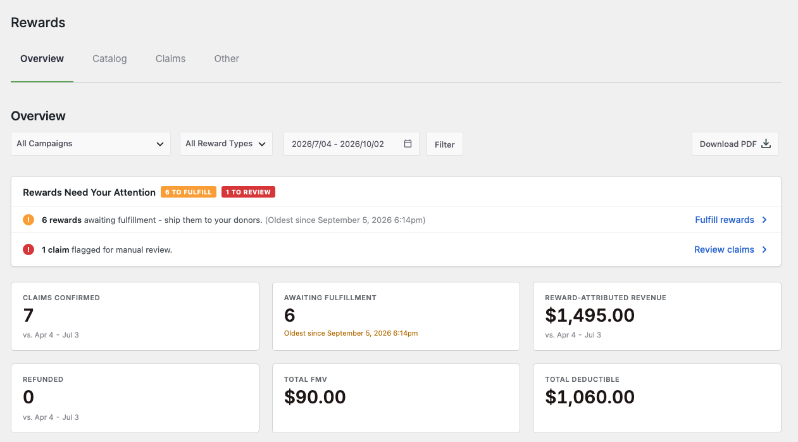
Once Charitable Rewards is installed and activated, you’ll find it at Charitable » Rewards in your WordPress admin.
You’ll see 4 tabs.
- Overview is your dashboard. It shows what’s been claimed, what it earned, and what needs sending.
- Catalog is the library of rewards you’ve built.
- Claims lists every reward a donor has unlocked or chosen, and it’s where you fulfill them.
- Other holds the settings, plus the button to run the setup wizard again.
Getting Started
The fastest route is the setup wizard. It runs automatically the first time you open Rewards and walks you through creating your first reward in about 3 minutes.
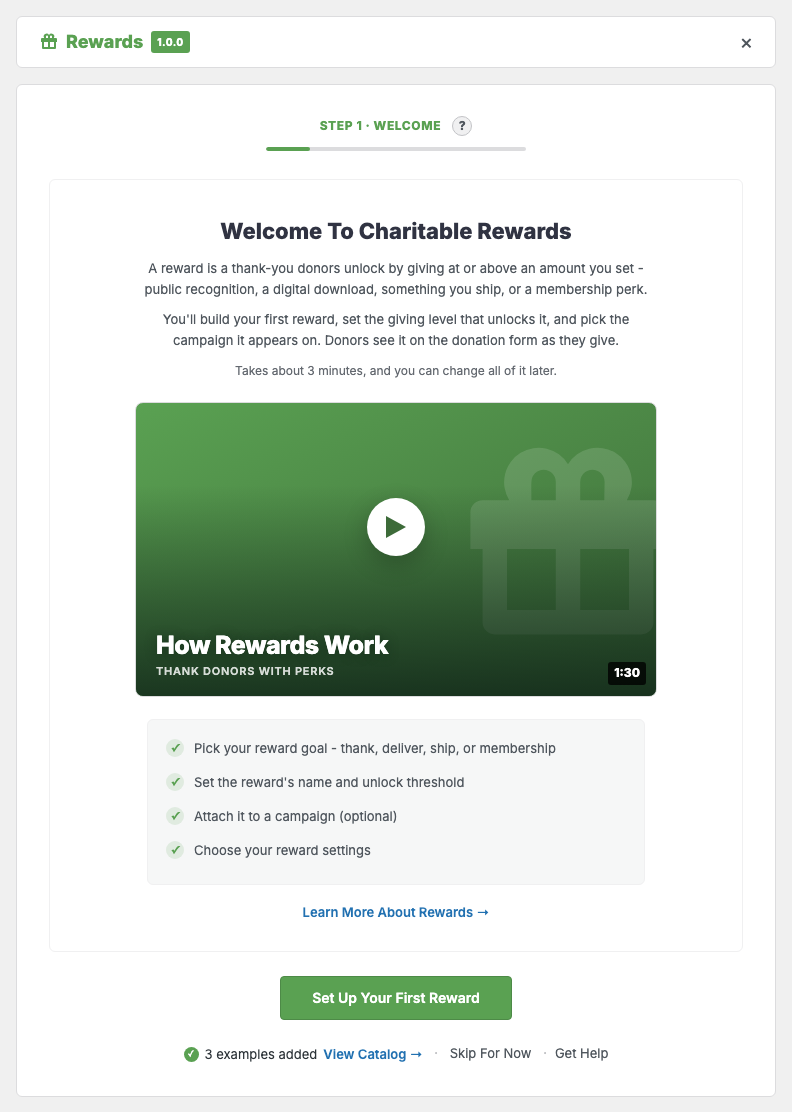
If you’d rather set things up by hand, follow these steps in order.
- To start, create a reward in the Catalog. Give it a name, pick its type, and set the amount that unlocks it.
- Next, attach it to a campaign. Rewards live in a shared library, so 1 reward can serve several campaigns at once.
- Then choose the campaign’s mode, automatic or levels, in the campaign’s Rewards settings.
- Finally, check your settings on the Other tab, particularly tax receipting if you’re a US charity.
See the Setup Wizard guide for a walkthrough of each step.
The 4 Reward Types
Every reward is 1 of 4 types. The type decides what Rewards does when someone earns it.
| Type | What it means | What happens on a claim |
|---|---|---|
| Recognition | There’s nothing to deliver. It could be a name on a wall or a mention in the annual report. | It’s recorded as claimed, with nothing to ship. |
| Digital | It’s a file, a link, or a code. | It’s delivered by email through a protected, expiring download link. |
| Physical | It’s something you mail. | Rewards collects a shipping address and adds it to the fulfillment list. |
| Membership | It’s an ongoing benefit. | It’s recorded as claimed, and it can renew if the donation recurs. |
Important: A reward’s type can’t be changed after you create it. The wizard warns you about this on the type step.
If you picked the wrong type, create a new reward and archive the old one.
See Creating Rewards for the details on each type, and for why the type is permanent.
Why You Can’t Delete a Reward
There’s no delete button anywhere in Rewards, and that’s on purpose. Every claim record points back at a reward.
Deleting a reward would leave past donors holding a perk that no longer exists. It would also break your own reporting history.
Instead, you archive a reward. It stops being offered on new donations and disappears from the catalog’s default view, while every past claim stays intact and readable.
Keeping the Tax Math Accurate
If you’re a US charity, a reward with real value makes part of the gift non-deductible. Rewards handles this for you in 3 ways.
- You record a fair market value on any reward that has one.
- When a donor claims the reward, that value is frozen onto the claim. Editing the reward later never changes what a past donor was told.
- The receipt shows the deductible portion of the gift.
To turn it on, switch on Tax Receipting on the Other tab. See Tax Receipting and Fair Market Value for the details.
Who Can Do What
Rewards adds 4 capabilities, so you can give each person on your team only the access they need. Someone who packs parcels doesn’t need to see donor tax data.
| Capability | Lets someone |
|---|---|
| Manage rewards | Create, edit, and archive rewards |
| Fulfill rewards | Work the claims list and mark things fulfilled |
| View reward PII | See donor names and shipping addresses |
| Manage reward tax | Change fair market values and tax settings |
The capability strings are charitable_manage_rewards, charitable_fulfill_rewards, charitable_view_reward_pii, and charitable_manage_reward_tax.
Peer-to-Peer Campaigns
If you run Charitable Ambassadors, every fundraiser page under a parent campaign uses the rewards set on that parent. Your organization owns the tiers, and individual fundraisers can’t change them.
Important Note: Inherited rewards appear on a fundraiser’s donation form only when the parent campaign is in automatic mode. See Rewards on Peer-to-Peer Campaigns for more.
Tips Worth Keeping in Mind
These habits keep your rewards easy for donors to read and easy for you to manage.
- Start with 2 or 3 rewards, not 10. A short list of perks is easier to read than a long one.
- Put a real fair market value on anything physical, even if it’s small. Recording it now is much easier than working it out at tax time.
- Set an inventory cap on anything that’s truly limited. Rewards holds 1 for a donation that’s still in payment, so 2 people can’t claim the last item.
- If a reward is a thank-you rather than a product, make it Recognition. That keeps your fulfillment list free of things that don’t need shipping.
FAQs on Charitable Rewards
Can I change a reward’s type later?
No. A reward’s type is permanent, so create a new reward with the right type and archive the old one.
How do I remove a reward I no longer offer?
Archive it. It stops appearing on new donations, and every past claim stays in your records.
Can 2 campaigns use different modes?
Yes. The mode is set for each campaign, so one can run levels while another runs automatic.
Developer Reference
Constants
| Constant | Value | Purpose |
|---|---|---|
Charitable_Rewards_Env::MIN_PRO_VERSION | 1.8.16 | Below this, the admin UI locks and a notice explains why |
Filters
| Filter | Default | Purpose |
|---|---|---|
charitable_rewards_tier_image_size | thumbnail | Registered image size used for reward card images |
charitable_rewards_level_image_size | large / thumbnail | Image size for giving-level cards, by context |
charitable_rewards_unlock_color | #1a7f37 | Accent color for the unlocked state |
charitable_rewards_download_url_ttl | 604800 (7 days) | Lifetime in seconds of a signed digital-download URL |
charitable_rewards_carriers | USPS, UPS, FedEx, DHL, Other | Carrier list offered when entering tracking |
charitable_rewards_onboarding_docs_url | /documentation/charitable-rewards | Base URL for the wizard’s “Learn more” links |
Settings
Settings are stored in the charitable_rewards_settings option and read through Charitable_Rewards_Settings::get().
| Key | Default | Purpose |
|---|---|---|
enable_tax_receipting | false | Record fair market value and disclose it on receipts |
reservation_ttl_minutes | 30 | How long a limited reward is held for a pending donation |
Custom Tables
Rewards stores its data in its own tables rather than post meta. There are tables for rewards, campaign attachments, claims, claim activity, reservations, and campaign levels.
Table names and lifecycle are covered on the storage page rather than here, because schemas change between releases.
Logging
Reward activity is written to Charitable » Tools » Logs, and a Rewards section is added to Charitable » Tools » System Info. See Reporting for logs and System Info.
Customization Examples
Serve a larger image to reward cards.
add_filter( 'charitable_rewards_tier_image_size', function () {
    return 'medium_large';
} );
Shorten the digital-download link lifetime to 5 minutes.
add_filter( 'charitable_rewards_download_url_ttl', function () {
    return 5 * MINUTE_IN_SECONDS;
} );
Add a courier to the tracking dropdown.
add_filter( 'charitable_rewards_carriers', function ( $carriers ) {
    $carriers['royal-mail'] = __( 'Royal Mail', 'your-textdomain' );
    return $carriers;
} );
Recolor the unlocked state to match your brand.
add_filter( 'charitable_rewards_unlock_color', function () {
    return '#31714c';
} );
Wrapping Up
You now know how the 2 reward modes work, what each reward type does, and where to find everything in Charitable Rewards.
Next, you can run the setup wizard to build your first reward. If you get stuck on any step, our support team is happy to help.
You May Also Want to Read
These guides walk through each part of Charitable Rewards in more detail.
- Setup Wizard. Follow the 3-minute path to your first reward.
- Creating Rewards. Learn about the catalog, the 4 types, and inventory.
- Automatic Mode. Set amounts that unlock rewards as the gift grows.
- Levels Mode. Offer giving-level cards that set the amount.
- Claims and Fulfillment. Work through the claims list, the statuses, and getting things posted.
Helpful Links
🤝 Get help when you need it
Connect with Customer Support →
📑 Find the guide you need
Browse the Documentation Hub →
⬇️ Download proven strategies, campaign ideas, and expert tools
🔗 Let your AI Assistant do the fundraising work for you.
Connect Charitable to your AI assistant →
💸 Get Free Fundraising Resources
Head to the Charitable Fundraising Hub →
🤔 Got questions about Charitable?
Charitable FAQs →
Need help understanding non-profit terms and jargon?
See our Non-Profit Glossary →




