
What’s the best way for a church to accept online tithes and offerings on its own website?
If your church site runs on WordPress, install a donation plugin such as Charitable, connect Stripe, PayPal or Square, and create a giving page for each fund.
Your members give on your church’s own website, the money goes straight from the payment gateway to the church bank account, and every giving record stays with you.
You already know why online giving matters. Members travel, watch the service from home, and carry cards instead of cash. So I’ll skip the case for it and show you the setup.
I’ve set up many giving pages for small nonprofits and community groups, and this is the quickest route I know for a church with a WordPress site. It takes about 15 minutes, with no developer and no code.
Below you’ll find what to decide before you start, the 9 setup steps, and answers to the questions church treasurers ask me most.
- Why Take Tithes on Your Own Church Website
- What You Need Before You Start
- Charitable: Online Tithing on Your Own WordPress Site
- How to Accept Tithes Online in WordPress (Code-Free)
- Optional Extras for Church Giving
- Tips for Getting Members to Give Online
- FAQs on Accepting Tithes Online
- Start Taking Tithes on Your Church Website
Why Take Tithes on Your Own Church Website
Most churches start online giving with a separate giving app. That works, but your members leave your website to give, and the giving records live in someone else’s system.
Taking tithes on your own site changes 3 things for the church office.
- You control your data. Every member’s giving history sits in your WordPress dashboard. You can export it, take it with you and move it any time, and use it in your church management software, your email tool or a spreadsheet.
- You control your funds. You decide which funds exist, whether each one has a goal, and when a special appeal ends or runs longer.
- Payouts go directly from your payment gateway. Gifts go from Stripe, PayPal or Square straight to the church bank account. The plugin never holds the money.
Members also see your church’s name, colors and photos the whole way through. For an older member who is careful about giving card details online, that matters. They know exactly who they are giving to.
Tithes, Offerings and Funds
A tithe is the regular gift a member gives to the church, traditionally a tenth of their income.
An offering is any gift on top of that, such as a gift for missions, the building fund or a family in need.
Your treasurer needs to know which is which, because designated gifts often have to be spent on what the giver chose. So the cleanest setup is one giving page per fund. Members pick the fund by picking the page, and your reports split themselves.
Many churches use these funds.
- Tithes and general offering
- Building fund or capital campaign
- Missions
- Benevolence, for members and neighbors in need
- Youth group trips and camps
You don’t need all of them on day one. Start with tithes and offerings, then add the others when you need them. If you’re looking for ideas beyond weekly giving, my list of church fundraising ideas has plenty.
What You Need Before You Start
Gather these before you sit down, and the setup will go in one sitting.
- A WordPress website. Any host works, as long as you can log in as an administrator and add plugins.
- A church bank account. Gifts should always land in an account in the church’s name, never a staff member’s or volunteer’s personal account.
- A payment gateway account. Stripe, PayPal or Square, opened in the church’s name and linked to that bank account. If you already use Square for in-person giving, use it here too.
- Your church’s legal name and tax details. These go on giving receipts.
- A list of your funds. Even if you start with one, know which ones you will add.
I’m using the US as the example here since that’s the system most readers know. In the US, churches that meet the 501(c)(3) rules are treated as tax-exempt without having to apply, and a gift of $250 or more needs a written receipt for the giver’s taxes.
If your church is elsewhere, a local accountant can walk you through what your own country expects.
Charitable: Online Tithing on Your Own WordPress Site
Charitable is the WordPress donation plugin I use for this. It turns your church website into a giving page, with no separate giving app for members to download and no account they need to create.
For a church, these are the parts that matter most.
- One giving page per fund. Create unlimited campaigns, so tithes, missions and the building fund each get their own page and report.
- Stripe, PayPal and Square built in. Members give by card or PayPal, and gifts are paid out by your gateway to the church account.
- Offline gifts in the same records. Record cash and checks from the plate, so each member’s giving history is complete.
- Weekly or monthly tithes. Members set up a recurring gift once, and it continues when they travel or miss a Sunday.
- Receipts sent for you. Every member gets an email receipt, and year-end giving statements can go out in bulk.
- A giving history for members. The donor dashboard lets members see and download their own gifts without calling the office.
- Point and click setup. A new volunteer can follow the same steps when your treasurer changes.
You can start with Charitable Lite, the free version on WordPress.org. It includes unlimited campaigns, Stripe, PayPal, Square and offline gifts, email receipts and a CSV export of your giving records.
Recurring tithes, Fee Relief and year-end statements come with Charitable’s paid plans, on the Plus plan and higher. Plus is $99 a year (normally $199).
On every paid plan, Charitable takes no percentage of your gifts. You pay the yearly license and your gateway’s standard processing fee, and that’s it. Every paid plan has a 14-day money-back guarantee.
Get Charitable for your church, 14 days risk-free »
How to Accept Tithes Online in WordPress (Code-Free)
Here are the 9 steps, from installing the plugin to adding a Give button to your menu. Steps 1 to 6 and step 8 work in the free version.
Step 1: Install Charitable
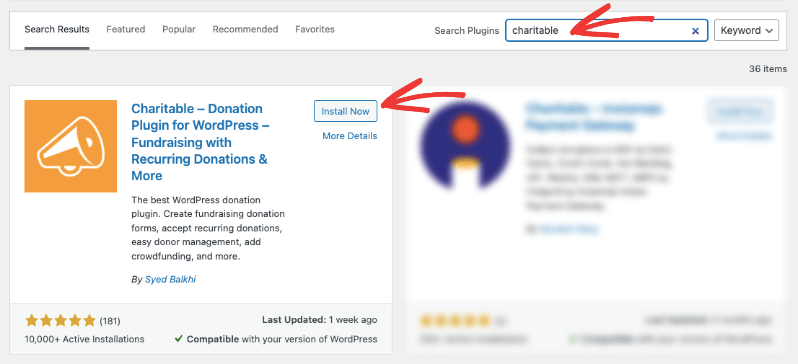
To get started, log in to WordPress and head over to Plugins » Add New Plugin. Search for “Charitable”, then click Install Now and Activate.
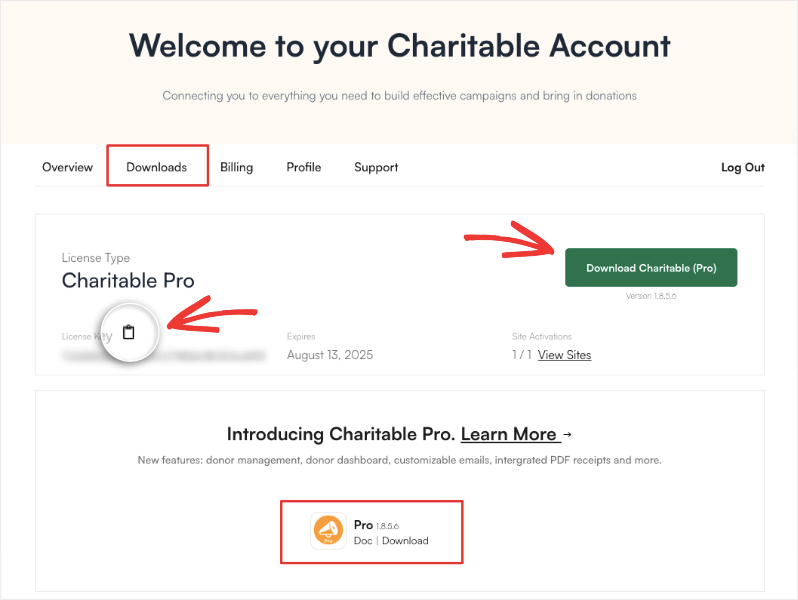
If you bought a paid plan, download the Charitable Pro plugin from your account page and copy your license key.
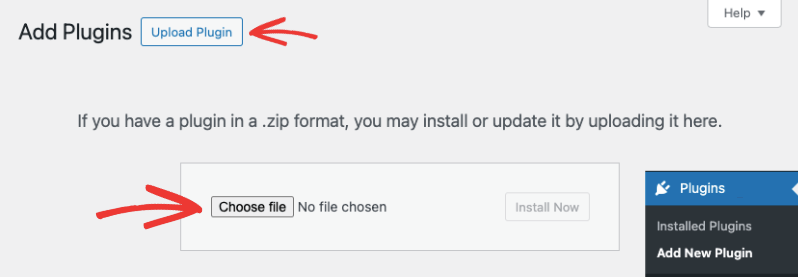
In your WordPress admin, upload the plugin under Plugins » Add New Plugin » Upload Plugin.
Once activated, enter your license key under Charitable » Settings. That’s it, you’re ready to use Charitable.
Step 2: Connect Stripe, PayPal or Square
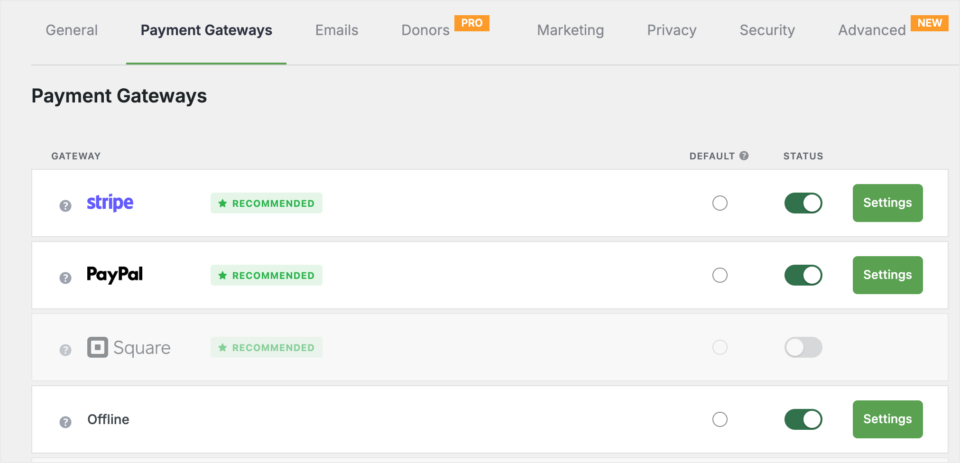
Next, go to Charitable » Settings » Payment Gateways. Turn on the gateway your church uses and click its connect button. Stripe connects in one click, and you sign in to your church’s Stripe account to finish.
This is the step that makes payouts go directly to your church. Each gift is processed by your gateway and paid into the bank account linked to it, on the gateway’s normal payout schedule. You can turn on more than one gateway, so members who prefer PayPal can still use it.
For more detail on how the money moves, see my guide to nonprofit payment processing and direct payouts.
Step 3: Turn On Offline Gifts for Cash and Checks
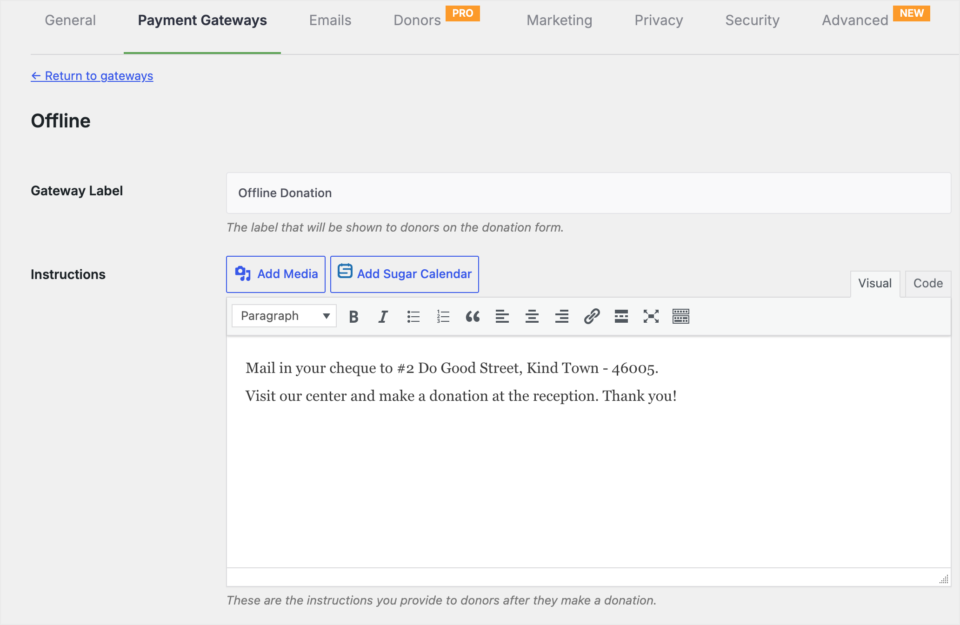
Online giving won’t replace the offering plate, and it shouldn’t. On the same Payment Gateways screen, turn on Offline Donations and add short instructions, such as where to mail a check.
Your treasurer can also add plate gifts by hand after each service. Then a member’s year-end total includes every gift, online and in person. My guide to tracking offline donations in WordPress shows how.
Step 4: Create Your Tithes and Offerings Page
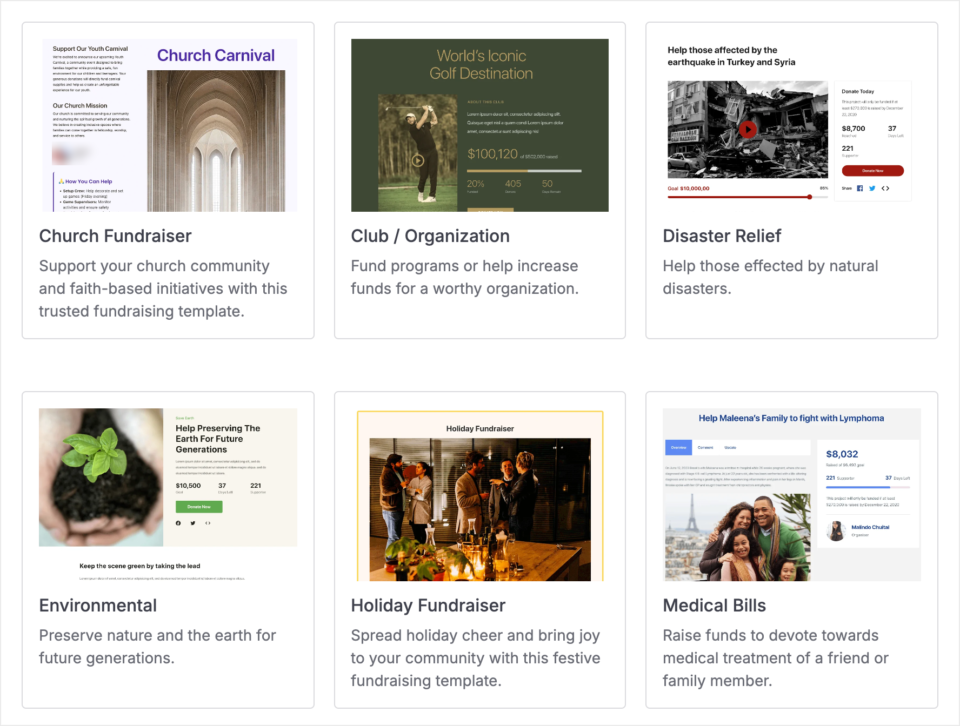
Now head to Charitable » Campaigns » Add New. Charitable opens its template gallery. Pick the Church Fundraiser template, name the campaign “Tithes and Offerings”, and the visual campaign builder opens with the page laid out for you.
Replace the sample text with a short message from your pastor and a photo of your congregation.
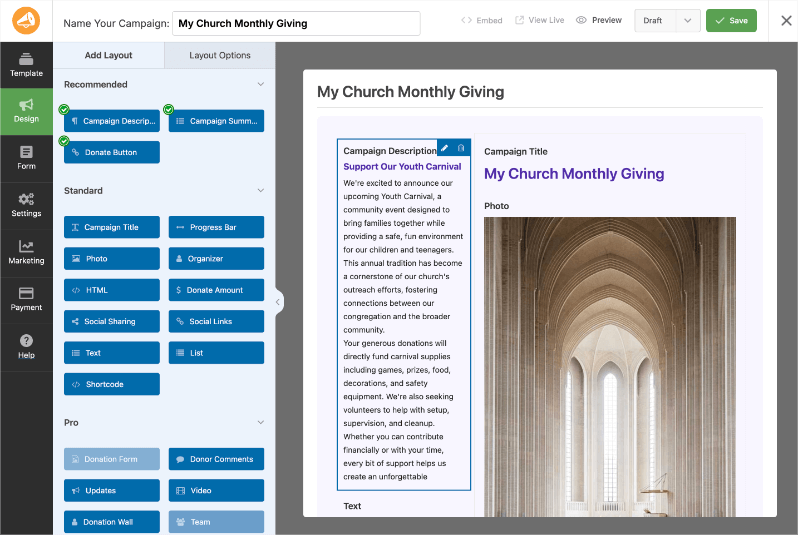
A few sentences are enough. Members already know why they give, so tell them what this season’s giving supports.
Step 5: Set Suggested Amounts
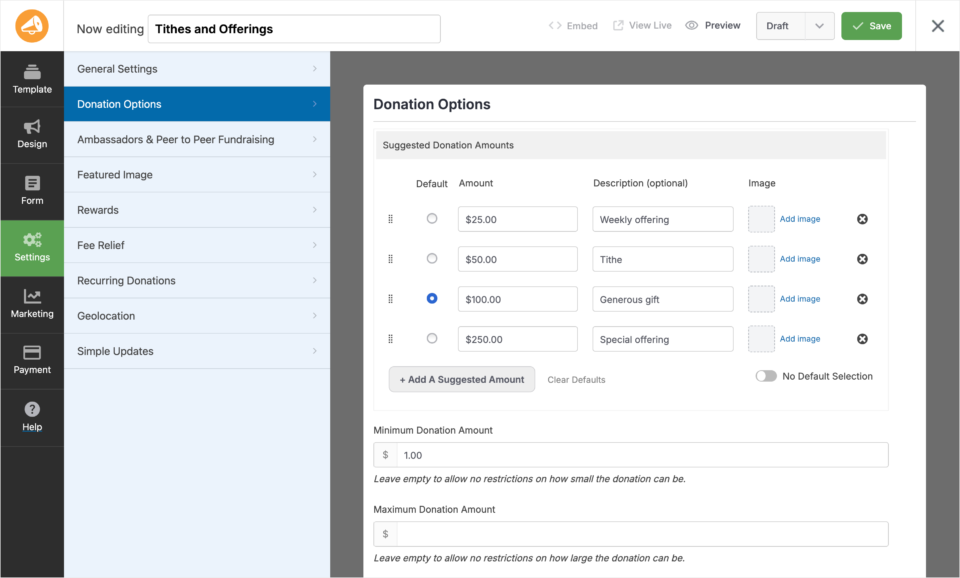
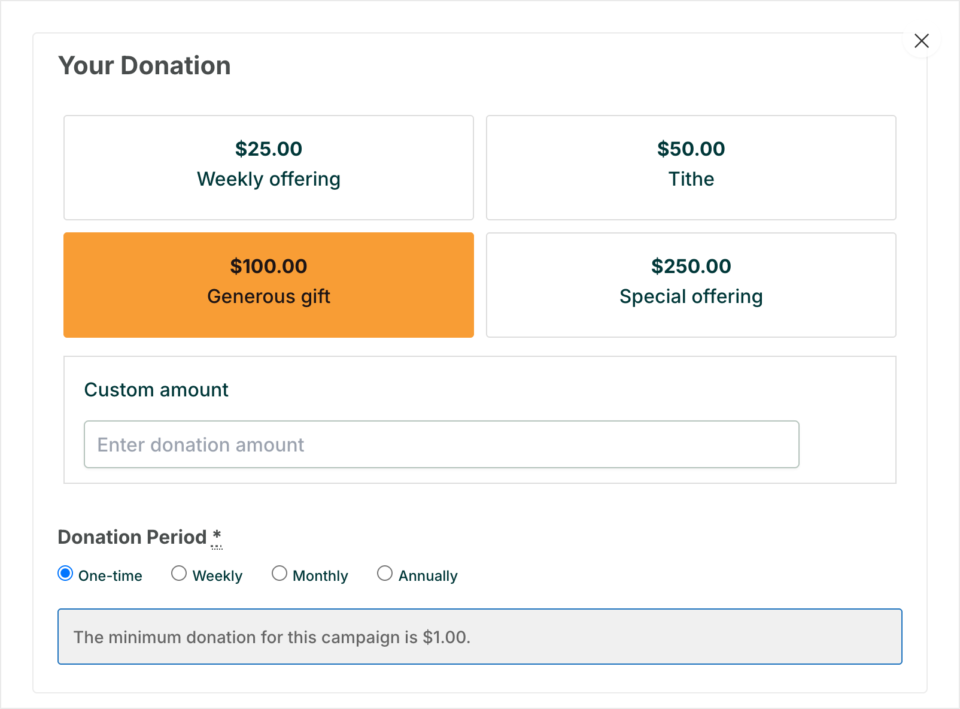
In the builder’s settings, add suggested gift amounts such as $25, $50, $100 and $250. Keep the custom amount box turned on, because most members tithe an amount they have already worked out.
You can also set a minimum gift. A low minimum, such as $5, lets children and teenagers give too.
Step 6: Leave the Goal and End Date Open
Tithes don’t end, so leave the goal and end date empty on this page. It will stay open all year.
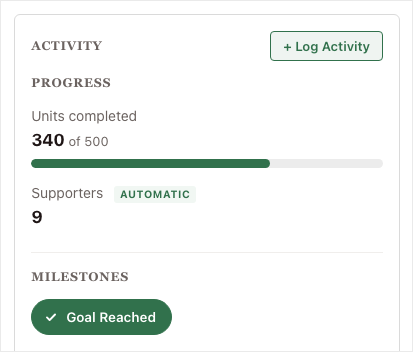
For an appeal that does have a target, such as a new roof, set a goal and an end date. A fundraising progress bar shows members how close you are. You decide whether to extend the date if you’re nearly there.
Step 7: Let Members Tithe Weekly or Monthly
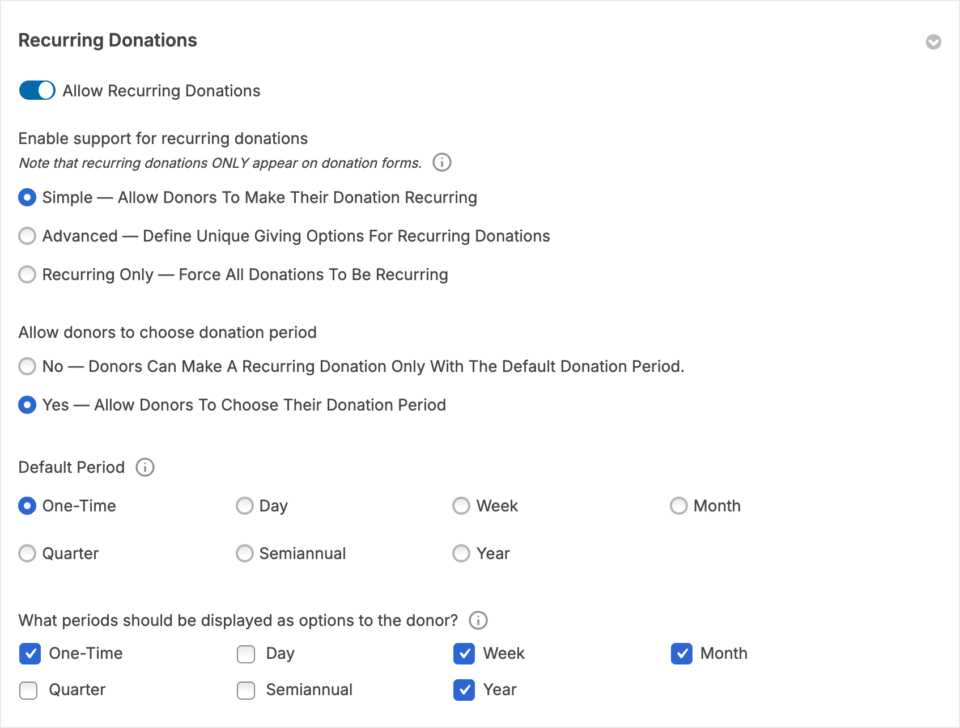
With the Plus plan and higher, turn on recurring giving in the campaign’s settings. Members then choose a one-time gift or a weekly, monthly, quarterly, or yearly gift on the same form.
A recurring tithe keeps coming in when a member travels or is ill. For the full walkthrough, read how to launch recurring church donations.
Step 8: Add a Page for Each Fund
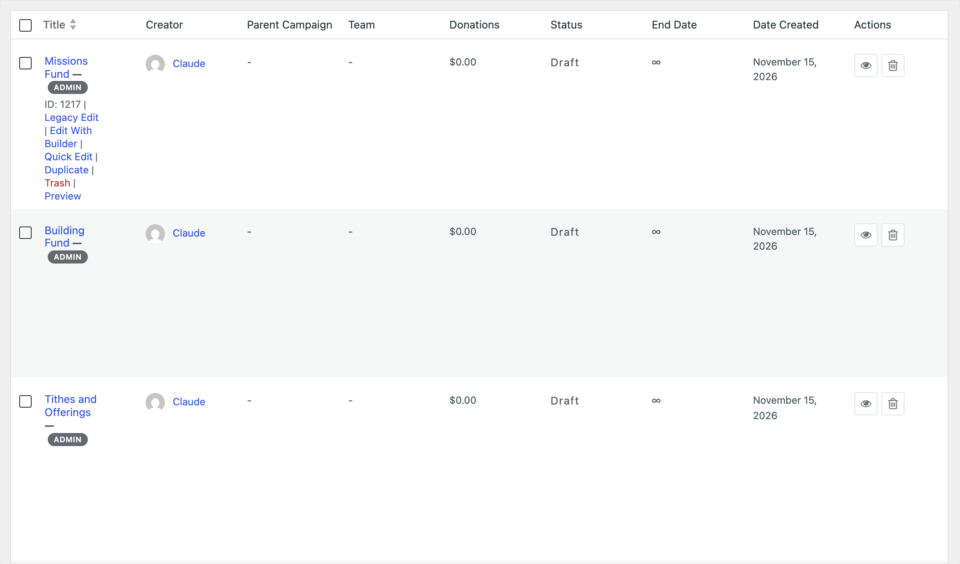
Repeat steps 4 to 6 for each fund, such as Missions or the Building Fund. Each fund gets its own page, link, and report, so your treasurer never has to sort gifts by hand.
If you’d rather keep everything on your existing Give page, add each fund’s form with the Donation Form block instead.
Step 9: Publish and Add a Give Button to Your Menu
When the page looks right, click Publish, then open the page and make a small test gift to check that it reaches your gateway. You can refund it afterwards.
Finally, go to Appearance » Menus (or Appearance » Editor on a block theme) and add a “Give” link to your main menu. Put the same link in your bulletin, your slides and your weekly email. That’s it!
Optional Extras for Church Giving
Once tithes are coming in, these extras save your office time. Each one is a setting you turn on, not a new system to learn.
Let Members Cover the Card Fee
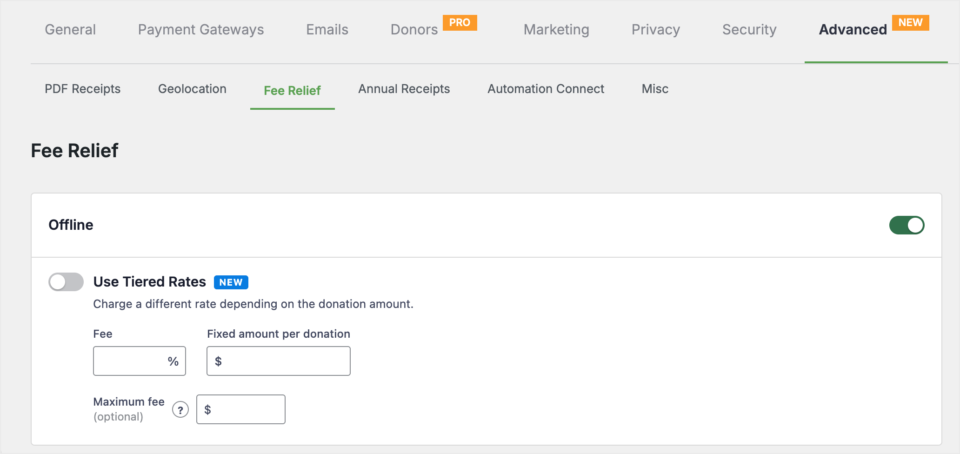
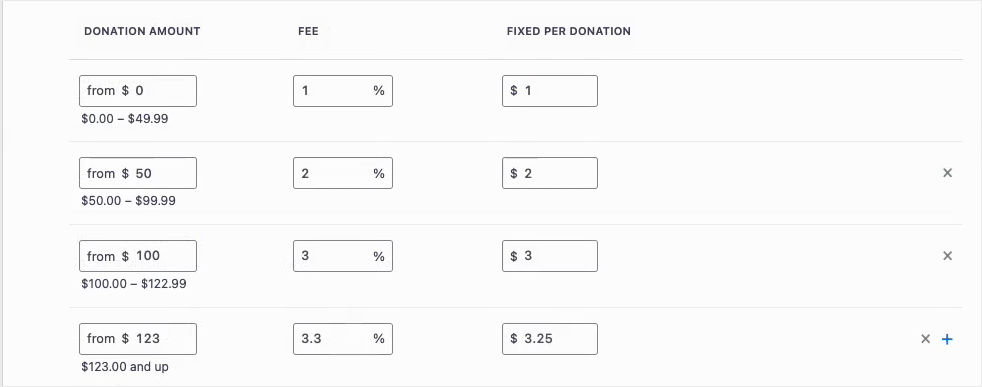
Every gateway charges a small processing fee on each gift. Charitable’s Fee Relief feature adds a checkbox so members can add that fee to their gift. It’s on the Plus plan and higher.
To set your fee rates, head over to Charitable » Settings » Advanced » Fee Relief. Then the church receives the full amount each member meant to give.
Send Year-End Giving Statements
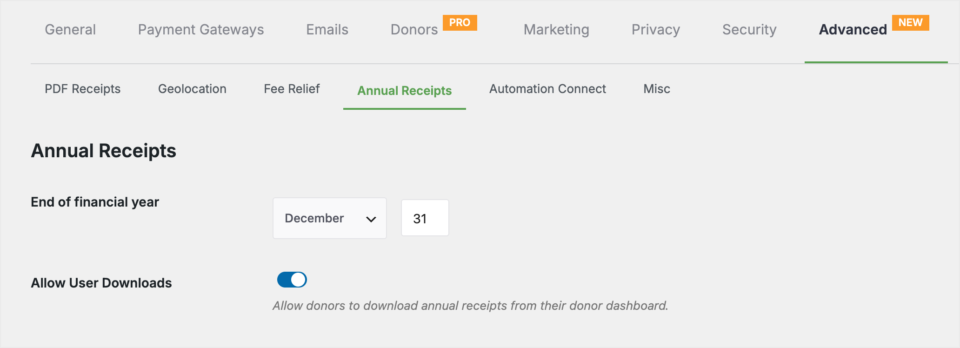
Every January, members ask for their giving total. Charitable’s Annual Receipts feature builds a statement for each member and sends them all at once.
You set your financial year under Charitable » Settings » Advanced » Annual Receipts. My guide to sending annual donation summaries walks through it, and you can brand each receipt with your church’s logo using branded church receipts.
Give Members Their Own Giving History
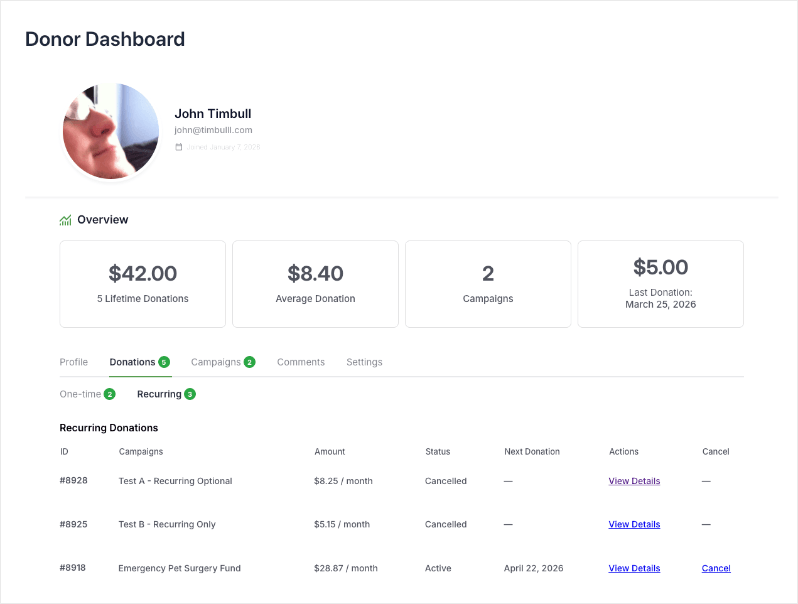
The donor dashboard gives each member a page on your site where they can see past gifts and download receipts. It’s on every paid plan.
Export Giving Records to Your Church Software
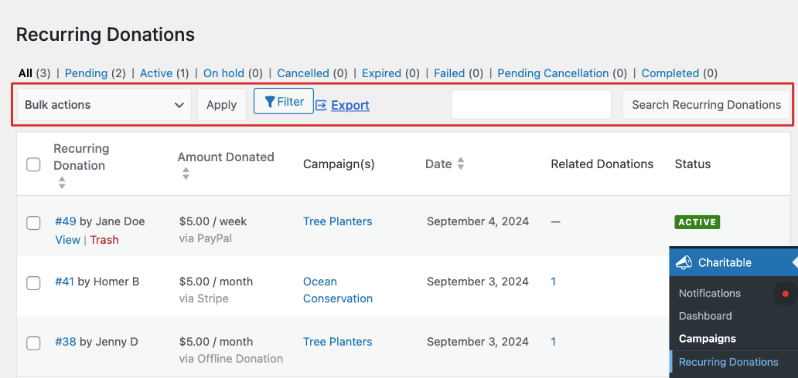
Your giving records belong to the church. Export them to CSV whenever you need to, for your church management software, your accountant or a board report.
If you ever move from another giving tool, the donor data migration guide shows how to bring your history with you.
Tips for Getting Members to Give Online
A giving page only works if members know it’s there. These are the habits I’ve seen make the biggest difference.
- Announce it from the front. A 30-second mention during the offering time does more than any email.
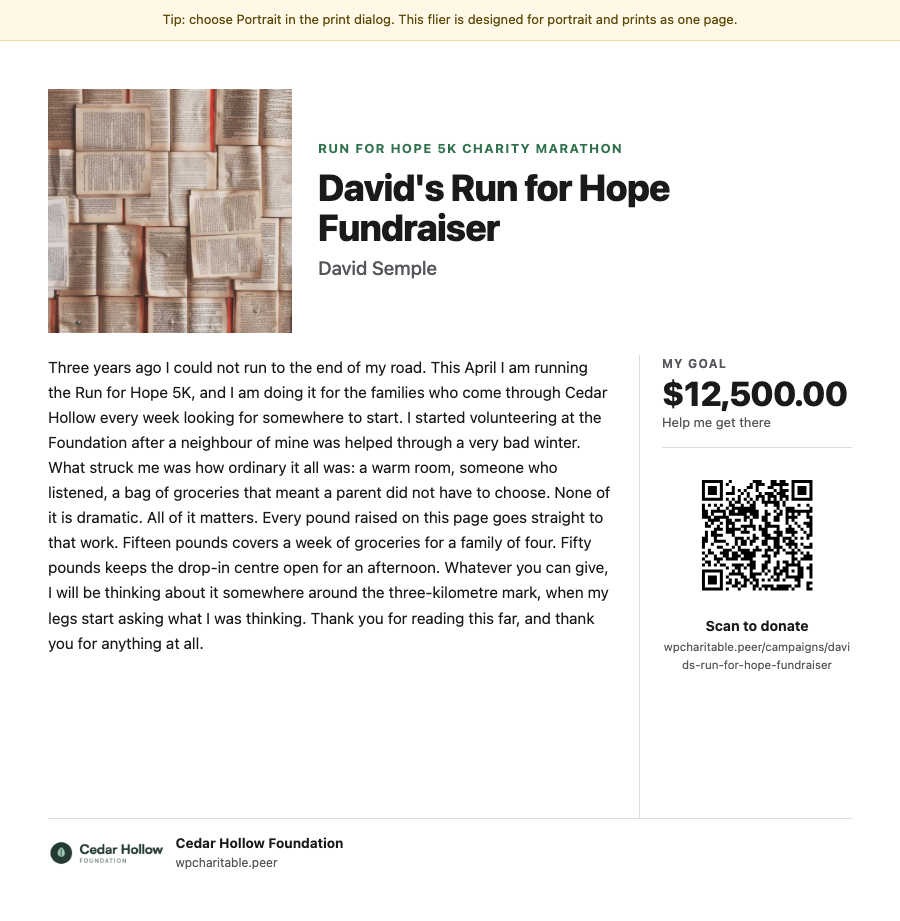
- Show a QR code. Put it on the slides and in the bulletin, linked to your tithes page.
- Help older members once. Offer to walk anyone through their first online gift after the service. Once they’ve seen it, most are happy to continue.
- Keep the plate. Some members will always give in person, and the plate is part of worship for many people.
- Report back. Tell the congregation what their giving made possible, such as the mission trip or the new roof.
For help with the form itself, see how to stop donors from abandoning the donation form.
FAQs on Accepting Tithes Online
Can we accept tithes on our own church website without a giving app?
Yes. If your website runs on WordPress, a donation plugin such as Charitable adds giving pages to your own site. Members give there without downloading an app or creating an account.
What is the easiest way to collect tithes online?
For a church with a WordPress site, the easiest way is a donation plugin connected to Stripe, PayPal or Square. Setup takes about 15 minutes, and members give from any phone or computer.
Can members tithe with a credit card?
Yes. Stripe, PayPal and Square all accept credit and debit cards. With Stripe or Square you can also turn on Apple Pay and Google Pay.
Is online tithing safe?
Card details are handled by your payment gateway, such as Stripe or PayPal, not stored on your website. Make sure your site uses HTTPS, which most hosts include for free.
What fees does a church pay for online giving?
Your payment gateway charges a processing fee on each gift. On Charitable’s paid plans, Charitable takes no percentage of gifts, so the church pays the yearly license and the gateway’s fee. With Fee Relief, members can choose to cover that fee.
How does tithe money reach the church bank account?
Your payment gateway pays each gift into the bank account linked to your church’s gateway account. Charitable never holds the money.
Can members set up recurring tithes?
Yes. With the Plus plan and higher, members can choose a weekly, monthly, quarterly or yearly gift. They can manage it from the donor dashboard.
Can we keep tithes and building fund gifts separate?
Yes. Create a separate campaign for each fund. Each one has its own page, link and report.
Should we still accept cash and checks?
Yes. Keep the plate and record those gifts as offline donations, so each member’s giving history is complete in one place.
Does a church need 501(c)(3) status to accept online gifts?
Not to accept them, but it affects whether gifts are tax-deductible. In the US, churches that meet the 501(c)(3) rules are treated as tax-exempt without applying. If your church is elsewhere, a local accountant can tell you what your country expects.
Start Taking Tithes on Your Church Website
Your members want to give, and many of them would give more often if it took less than a minute from their phone. A giving page on your own site makes that possible, and every record stays with your church.
You can start with Charitable Lite today and have your tithes page live before Sunday. When you’re ready for recurring tithes and year-end statements, pick a paid plan, 14 days risk-free »
Charitable Has 1.2+ Million Downloads!
Trusted by millions to power successful fundraising campaigns. Try Charitable risk-free today.
✅ 14-day money-back guarantee
✅ Transparent pricing
✅ Code-free setup
Stay Connected for More Nonprofit Resources
For more tutorials and videos tailored to nonprofits, subscribe to our YouTube channel. We regularly publish expert tips, step-by-step guides on online donations, fundraising strategies, and practical resources to help your organization succeed.
🗞️ Get weekly tips and exclusive guides in your inbox
Join our newsletter →
🎥 Watch step-by-step tutorials and success stories
Subscribe to our YouTube channel →
👩🏽💻 Connect with our community and get daily nonprofit insights
Follow us on LinkedIn →
🥳 Fun reels and non-profit insights
Follow us on Instagram →
👀 Insightful & fun videos to help you grow your cause
Follow us on TikTok→
🌎 Subscribe and follow for general fundraiser tips
Get Fundraiser Tips on TikTok →
Powerful Fundraising Resources
🤖 Use Charitable with Your AI Assistant
⬇️ Download proven strategies, campaign ideas, and expert tools
Get the Fundraising Kit →
💸 Get Free Fundraising Resources
Head to the Charitable Fundraising Hub →
🤔 Got questions about Charitable?
Charitable FAQs →
🏎️ Take Charitable for a spin
Create your Charitable Demo →
Understand non-profit terms and jargon
Non-Profit Glossary →
% Looking for non-profit deals and discounts?
Best Non-Profit Deals and Discounts →




Leave a Reply