

If you manage a non-profit, you know the reality: not everyone gives online. Checks still arrive in the mail. Cash gets handed over at galas. Bank transfers land in your account with nothing but a confusing reference code.
The problem is that most WordPress donation systems are built strictly for the digital world. That leaves you stuck juggling spreadsheets, sticky notes, and manual data entry to track those physical gifts. You end up running two separate fundraising operations – one digital, one analog.
In this guide, I’m going to show you how to track offline donations in WordPress using tools that actually unify your data.
You’ll learn how to handle donor pledges (like “I’ll mail a check”) and manual admin entries (like that envelope of cash from an event). By the end, you’ll have a single system that tracks every dollar and automates receipts, no matter how the money comes in.
⚡ Quick Answer: How to Track Offline Donations in WordPress
To track offline donations in WordPress, install Charitable and enable the Offline Donations gateway under Charitable » Settings » Payment Gateways. From there you have two workflows:
- Donor-initiated pledges: When a donor selects “Pay by Check” or “Bank Transfer” on your donation form, Charitable automatically records the gift as Pending and sends them payment instructions.
- Admin-initiated entries: For cash, checks, or wire transfers received outside your website, go to Charitable » Donations » Add Donation and manually enter the gift in under a minute.
All offline donations appear alongside your online gifts in Charitable » Reports, giving you a complete and accurate fundraising picture. Receipts and year-end summaries are sent automatically – no spreadsheets, no separate email platform required.
Why You Need to Digitize Offline Giving
Running your fundraising on disconnected systems costs you money and ruins donor relationships. It’s that simple.
The “Check in the Mail” Isn’t Going Away
We live in a hybrid fundraising world. While online payments are standard, offline giving is still massive. Older donors often prefer writing checks. Corporate donors usually issue bank transfers. Event attendees hand over cash on the spot. For many organizations, up to 50% of revenue still comes through these traditional channels.
If your WordPress setup ignores these gifts, you are effectively blind to half your operation.
The Spreadsheet Nightmare
Here is what happens when offline donations live in Excel while online donations live in WordPress:
- You lose data.
- Someone updates the spreadsheet but forgets to email the tax receipt.
- Bookkeeping marks a check as deposited, but nobody records it in the donor database.
- A major donor who gave $10,000 via wire transfer looks like a $0 donor in your WordPress reports.
These aren’t just administrative annoyances; they damage ultimate donor engagement and relationships. Donors notice when you don’t acknowledge their gifts quickly or when your “thank you” letter gets their lifetime giving total wrong.
Stop Guessing Your Revenue
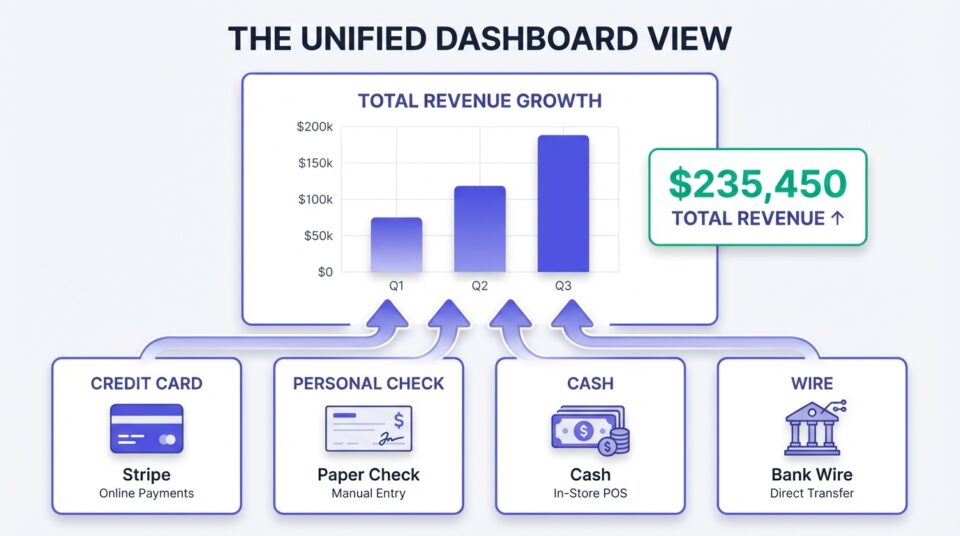
When you track offline donations inside WordPress, you finally get the full picture. Your dashboard shows total revenue – Stripe payments, checks, cash, and wires – in one view.
You can see fundraising reports every nonprofit needs to determine which campaigns are actually working and make decisions based on real numbers, not half data.
Automate the “Thank You”
With offline donations entered in WordPress, you can send professional and personalized donation receipts automatically. You don’t need to type out individual emails for every check.
You don’t need to wonder if you sent a receipt for that cash donation last week. The system handles it using the same template as your online gifts.
Know Your Donors
This is the most important part. When all donations flow through one system, you see the truth about your supporters. Your dashboard shows that Susan gave $500 online last year and $1,000 via check this year. When it’s time for year-end appeals, you can segment your list properly because you know the complete history of every person in your database.
What Are The Two Types of Offline Donations?
Before we get into the “how-to,” we need to make a distinction. There are two different scenarios for offline donations, and they require different workflows.
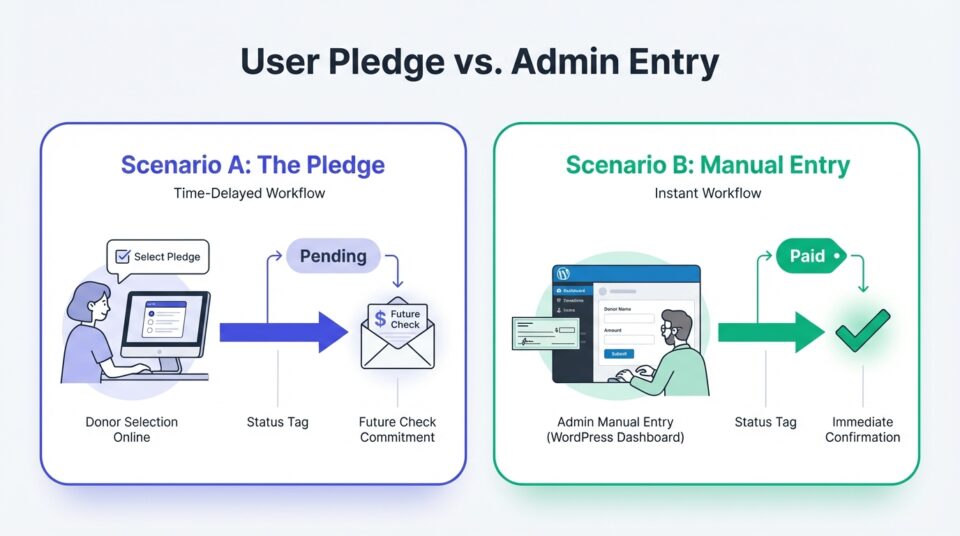
Scenario A: The Pledge (User-Initiated)
Here, the donor goes to your website and fills out your form. But instead of entering a credit card, they select ‘Pay by Check’ or ‘Bank Transfer.’
The system records their intent to donate. The donation appears in your admin area immediately, but the status is ‘Pending’ because you don’t have the money yet. The donor gets an email telling them where to mail the check. This workflow is user-facing.
Scenario B: The Manual Entry (Admin-Initiated)
Here, the donation happens offline first. Someone hands you cash. A check shows up in the mail from a donor who never touched your website.
Now you – the admin – need to create the record in WordPress to reflect that income. You are entering data after the fact. This workflow is admin-facing.
Understanding these workflows, we’ve built Charitable to handle both scenarios with ease – without any expensive add-ons.
Why Choose Charitable to Handle All Donations
Most donation plugins were built for e-commerce, then awkwardly retrofitted for nonprofits. Charitable (wpcharitable.com) was built differently – designed from the ground up for organizations that operate in the real world, where generosity doesn’t always come with a confirmation email.
Here’s what that means for you:
- No expensive add-ons required. Both offline donation workflows – pledges and manual admin entries – are built right into the core plugin.
- One unified dashboard. Every dollar your organization receives, whether it came from a Stripe payment at midnight or a check handed over at a fundraising dinner, lives in the same place.
- Automated receipts for every gift. The moment you record an offline donation, Charitable can fire off a professional, tax-compliant receipt – the same one your online donors receive. No manual email drafting. No wondering if you forgot someone.
- Donor profiles that tell the whole truth. Charitable builds a complete giving history for every supporter, combining their online and offline gifts into a single record. When Susan gives $500 online and $1000 offline, Charitable knows Susan is a $1,500 donor (as long as you recorded the offline donation).
- Pledge management that works. When a donor selects “Pay by Check” on your campaign page, Charitable records the pending gift immediately, sends the donor clear payment instructions, and updates the donation status automatically when you confirm receipt.
Charitable has 1+ million downloads and is trusted by nonprofits, churches, and charitable organizations running on WordPress. It’s the platform that finally closes the gap between your digital fundraising and the physical world where so much generosity still happens.
Charitable Has 1.2+ Million Downloads!
Trusted by millions to power successful fundraising campaigns. Try Charitable risk-free today.
✅ 14-day money-back guarantee
✅ Transparent pricing
✅ Code-free setup
How to Track Offline Donations in WordPress Using Charitable
Ready to eliminate the spreadsheet chaos for good? Here’s exactly how to set it up — and trust us, it’s far simpler than you might expect.
Step 1: How Do I Enable the Offline Donations Gateway in Charitable?
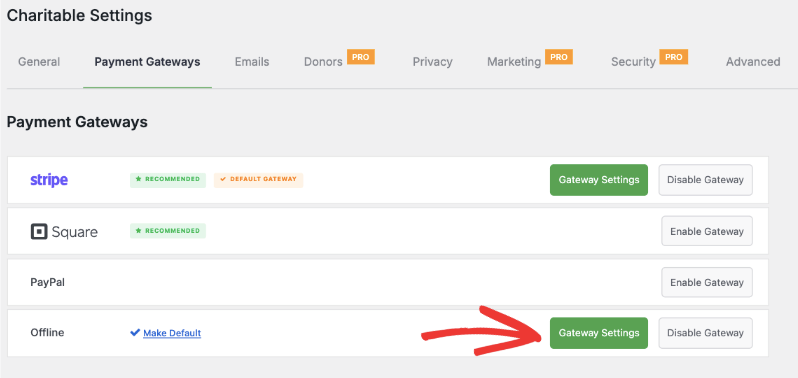
Charitable treats offline giving like a first-class payment method – because it is. To turn it on, navigate to Charitable » Settings » Payment Gateways in your WordPress dashboard.
You’ll see Offline Donations listed right alongside Stripe, PayPal, and Square. Toggle it on, then click the Gateway Settings button to open the configuration page.
This is where the magic starts.
Step 2: How Do I Give Donors Clear Instructions for Giving Offline?
Here’s something most donation plugins completely miss: donors who want to give by check or wire transfer are often stopped in their tracks because the instructions aren’t clear. Charitable gives you a dedicated space – right on your donation form – to spell it out.
You can include everything a donor needs:
- Who to make checks payable to
- Your mailing address for check donations
- Full bank details for wire transfers, including bank name, account number, routing number, and reference instructions
Here’s an example of what clear, donor-friendly instructions look like:
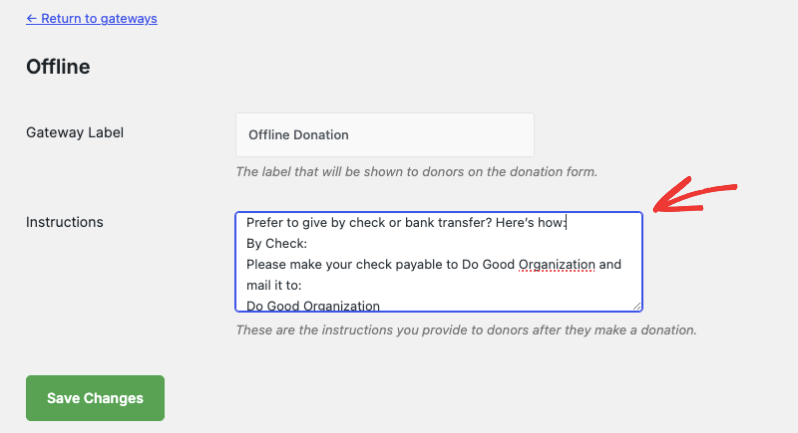
Here are sample instructions. Feel free to customize this information to match your organization’s needs.
By Check:
Make checks payable to Do Good Organization and mail to:
Do Good Organization
123 Kindness Ave
Suite 400
New York, NY 10001
USABy Bank Transfer:
Bank: Community Trust Bank
Account Name: Do Good Organization
Account Number: 987654321
Routing Number: 021000021
Reference: [Your Name or Campaign Name]
No ambiguity. No back-and-forth emails asking “Who do I make the check out to?” Your donor reads the form, knows exactly what to do, and follows through.
💡 Pro Tip: A personal thank-you call or note for each offline gift goes a long way. These donors are often your most loyal — they took extra steps to give. Acknowledge that.
When you’re happy with your instructions, hit Save in the Payment Gateways tab.
Step 3: Where Do Offline Donations Appear After a Donor Submits the Form?
When a donor visits your campaign page and selects Offline Donation as their payment method, Charitable does the heavy lifting immediately:
- The donation is recorded automatically under Charitable » Donations
- The Amount Donated column clearly flags it as an offline gift
- The status is set to Pending – because you haven’t received the money yet
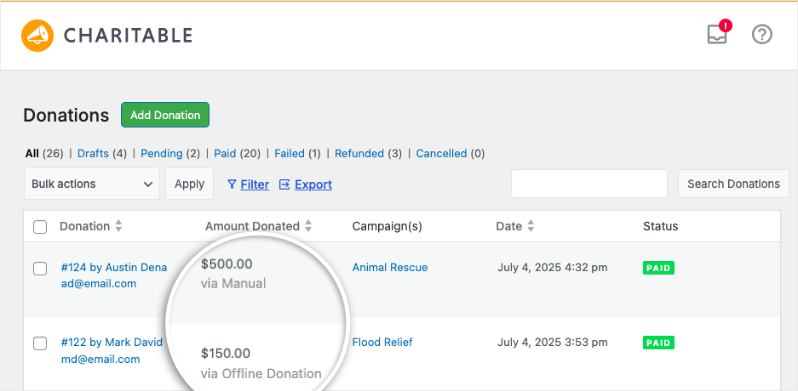
From your donations list, you can update that status with a single click to reflect exactly where things stand.
You can edit any record and change the donation status to paid, pending, failed, cancelled or refunded.
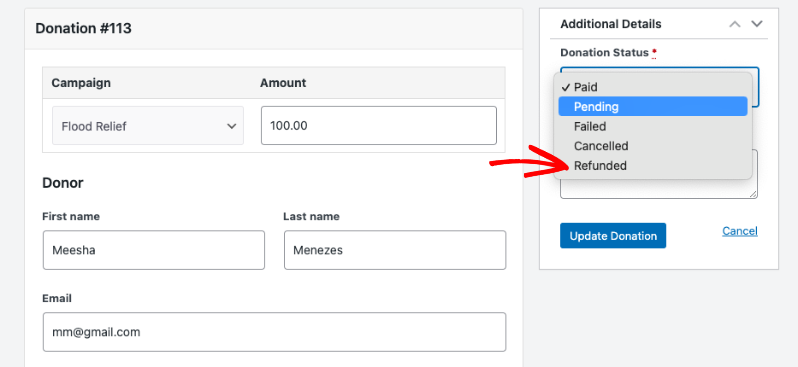
That way, you have full control over the donation record. So if the donor submitted their intent to donate online and never made the payment in reality, you can always set the donation record to failed or cancelled.
Step 4: How Do I Manually Add a Donation That Happened Outside of Charitable?
Here’s where Charitable truly separates itself from every other WordPress donation plugin.
Got a cash envelope from last Saturday’s gala? A check that arrived with no campaign attached? A wire transfer from a corporate donor who never touched your website?
You can enter every single one of these in under a minute.
Go to Charitable » Donations and click the Add Donation button.

On the donation record page:
- Select the campaign this gift belongs to
- Enter the amount received
- Assign the donor – either pull up an existing donor from your donor database with a few keystrokes, or enter new donor information on the spot
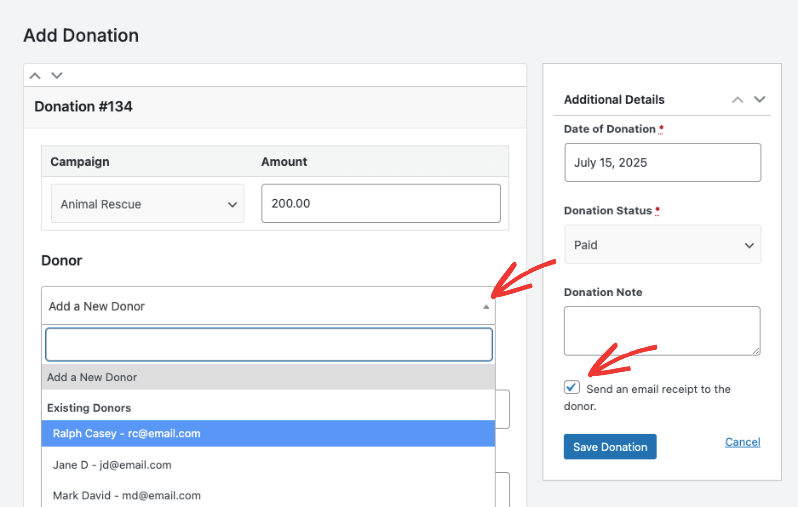
Here’s the part I really love: Charitable automatically sends a personalized email receipt, just like it does for online gifts. Just make sure you check the box that says “Send an email receipt to the donor”. Then hit Save Donation.
Susan mailed you a $1,000 check and never logged into your website? She still gets a professional, branded receipt in her inbox. Every donor feels seen. Every gift is acknowledged. And you didn’t type a single individual email.
PRO TIP: You never have to juggle a separate email platform to make it happen – Charitable handles receipts and annual summaries entirely from within WordPress. Set up your automated donor emails once under Charitable » Settings » Emails, and the system takes it from there. Every acknowledgment, every year-end summary, sent automatically – no third-party inbox required.
Step 5: How Do I See My Complete Fundraising Picture – Online and Offline Combined?
Once your offline donations are in Charitable, they don’t live in a separate bucket. They flow directly into your unified reports.
Head to Charitable » Reports to see:
- Total revenue across all channels – online and offline combined
- Donor activity showing complete giving histories
- Campaign performance based on real numbers, not partial data
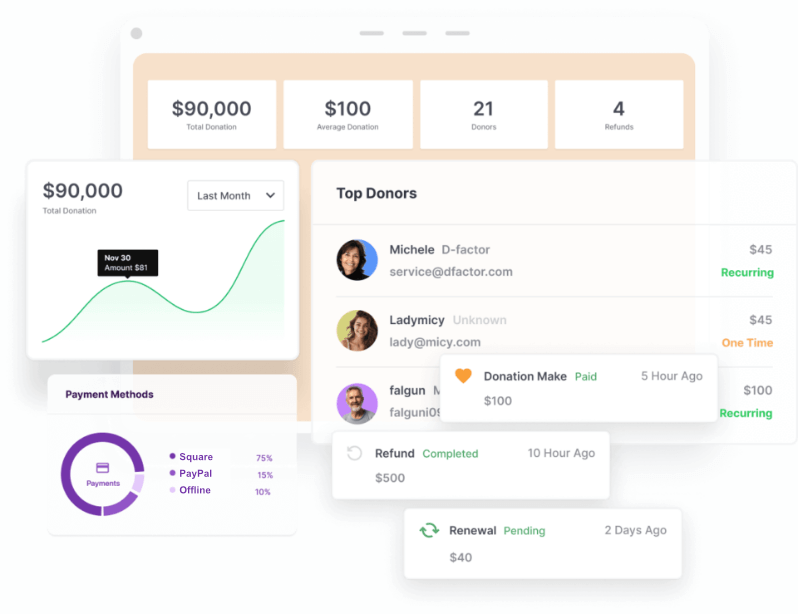
This is the moment the spreadsheet officially becomes unnecessary. Every dollar, every donor, every campaign – one dashboard, one source of truth.
Beyond Offline: Every Payment Gateway You Need
Charitable doesn’t just solve offline giving. It gives your donors complete flexibility with a full suite of payment options right out of the box:
Charitable provides three payment gateways out of the box:
For detailed setup instructions, see How to Set Up Payment Gateways »
If you upgrade to Charitable Pro, you unlock even more gateways for donors around the world – that include Authorize.net, Mollie, GoCardless, and more.
You’ll also get access to more donor management tools, more automation, and more ways to turn one-time givers into lifelong supporters.
We’re confident you’ll love what Charitable Pro does for your organization, but if it’s not the right fit, we offer a 14-day money-back guarantee. No risk, no hassle.
See It in Action
Sometimes a walkthrough is worth a thousand words. We’ve put together a complete video tutorial, from setting up your first campaign all the way through accepting payments, so you can follow along at your own pace:
Best Practices for Reconciling Offline Gifts
Respect the ‘Pending’ Status
Do not mark a check as ‘Paid’ until it clears. It is tempting to mark it paid as soon as you open the envelope, but if that check bounces, your reports will be wrong. Keep it ‘Pending’ until the money is in the bank.
Fix Your Email Delivery
WordPress is terrible at sending emails. If you rely on the default settings, your automated receipts will likely end up in spam folders. Install a plugin like WP Mail SMTP to route your emails through a real service (like Gmail, Outlook, or SendLayer). This ensures your donors actually get their receipts.
Batch Process Your Events
If you collect 50 checks at a gala, don’t try to enter them during the event. Secure the money, enjoy the night, and batch-process the data the next morning. It’s faster, and you’ll make fewer mistakes.
Frequently Asked Questions
Can I send a receipt for a cash donation?
Yes. When you manually enter the donation, just ensure you have the donor’s email address. The system will treat it like any other transaction and send the receipt.
Does tracking offline donations cost extra fees?
No. Since you aren’t processing a credit card, there are no Stripe or PayPal fees (usually 2.9% + 30¢). You keep 100% of the donation.
How do I handle recurring offline donations?
This is manual work. If someone pledges $50/month by check, you record the first one. Then, every month when the check arrives, you enter a new manual donation. Charitable’s paid plans have tools to help manage recurring profiles, but the entry process for checks is always manual.
Can I import old data?
Yes. If you have years of history in Excel, Charitable has a CSV import tool. You can bulk-upload your past donations to create a complete history in WordPress instantly.
Every Dollar Counts – Make Sure You’re Counting Every Dollar
Offline giving isn’t going away. – even with the rise of AI. Checks, cash, and wire transfers are still a significant part of how people support the causes they care about – and your WordPress setup should reflect that reality.
With Charitable, you’re no longer running two separate fundraising operations held together with spreadsheets and good intentions. Every gift, no matter how it arrives, flows into one unified system that tracks donations, builds complete donor profiles, sends automated receipts, and gives you the accurate reports you need to make smart decisions.
The setup takes minutes. The impact lasts for years.
Your donors trust you with their generosity – give them the experience they deserve, and give yourself the clarity your organization needs.
Stay Connected for More Nonprofit Resources
For more tutorials and videos tailored to nonprofits, subscribe to our YouTube channel. We regularly publish expert tips, step-by-step guides on online donations, fundraising strategies, and practical resources to help your organization succeed.
🗞️ Get weekly tips and exclusive guides in your inbox
Join our newsletter →
🎥 Watch step-by-step tutorials and success stories
Subscribe to our YouTube channel →
👩🏽💻 Connect with our community and get daily nonprofit insights
Follow us on LinkedIn →
🥳 Fun reels and non-profit insights
Follow us on Instagram →
👀 Insightful & fun videos to help you grow your cause
Follow us on TikTok→
🌎 Subscribe and follow for general fundraiser tips
Get Fundraiser Tips on TikTok →
Powerful Fundraising Resources
🤖 Use Charitable with Your AI Assistant
⬇️ Download proven strategies, campaign ideas, and expert tools
Get the Fundraising Kit →
💸 Get Free Fundraising Resources
Head to the Charitable Fundraising Hub →
🤔 Got questions about Charitable?
Charitable FAQs →
🏎️ Take Charitable for a spin
Create your Charitable Demo →
Understand non-profit terms and jargon
Non-Profit Glossary →
% Looking for non-profit deals and discounts?
Best Non-Profit Deals and Discounts →








Leave a Reply