
A visitor is three paragraphs into your best story, the one about the family your program helped last winter. They are moved. They are ready. And then the page ends with a line like: “To donate, click here to visit our campaign page.”
So they click. The page reloads. The moment cools. Some of them give anyway. Many of them do not.
That never sat right with us either.
A donor’s decision to give shouldn’t have to survive a page load.
So we built the new Donation Form block for Charitable Pro 1.8.17: a real, working donation form you can drop onto any page in the WordPress block editor, right at the moment a donor decides to act. No reload, no detour, no second page to lose them on. ⚡
Here’s What It Looks Like
Before we get into how it works, here’s what a page with the Donation Form block actually looks like once it’s styled. This is a real page, built in the block editor with a few clicks of color pickers. No custom CSS, no theme file, no separate plugin.
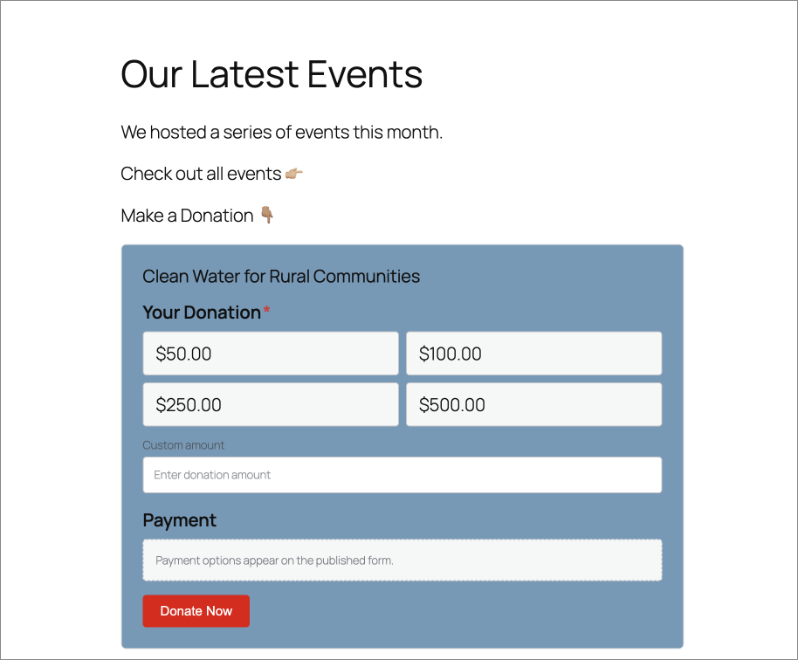
That’s the whole point. One page, one scroll, one decision. The heading, the story, and the form all live in the same place, so there’s never a moment where a donor has to go looking for the thing they just decided to do.
Why Placing the Form Anywhere Decides Whether the Gift Happens
Every extra click between a donor and the donate button is a place where a gift can quietly disappear, exactly the kind of drop-off donation recovery exists to catch. Redirects, in particular, are where momentum goes to die: the visitor made a decision, and you asked them to make it again on a new page.
The Donation Form block removes that friction. Drop a real, working form onto the exact page a visitor is already on, your homepage, a landing page, or the middle of a blog post, and the distance between “I want to help” and “done” collapses to zero.
You are not rebuilding your campaign. You are meeting donors where their attention already is.
See It in Action
If you’d rather watch than read, here’s the two-minute version of everything below.
When You’ll Feel the Difference
A few places the block turns a page into a place to give:
🏠 Your homepage: Put a compact form above the fold so first-time visitors can give without hunting for a campaign.
📝 A story-driven blog post: End an impact story with the actual form, right where the reader is most moved.
🎯 A dedicated landing page: Build a focused, no-navigation page with a landing page builder like SeedProd for an ad or email campaign, with the form built in.
📣 A campaign-launch announcement: Embed the form in the post that announces the campaign, so the news and the ask share one page.
🧩 A “current campaign” template: Place the block once on a campaign template and let it bind automatically to whichever campaign is being viewed.
A Real Form, Right in the Editor
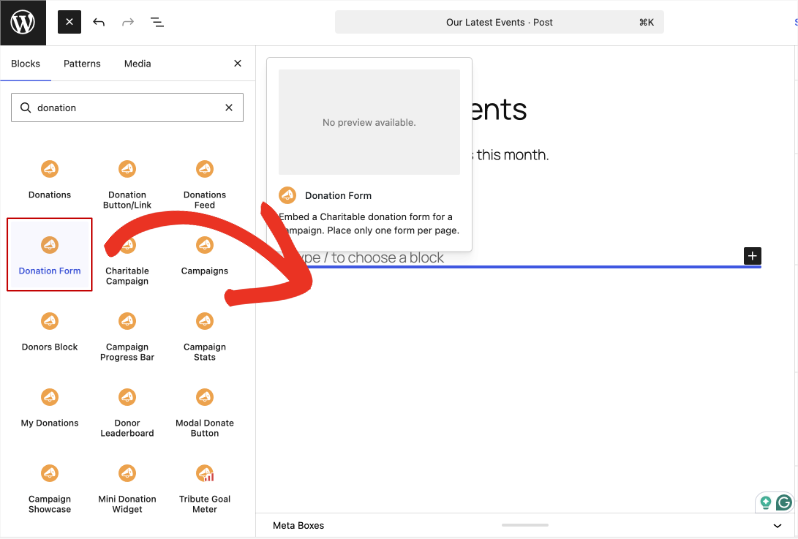
The block is built for the modern WordPress editing experience, so what you build is what your donors see. Add it the same way you’d add any other block: open the inserter, search, and drop it in.
🧩 Any campaign, any page: Pick a published campaign from a dropdown, or choose “Use current campaign” to bind the form dynamically on campaign templates.
👁️ Full-fidelity preview: The editor shows a true-to-life form using the campaign’s real donation amounts, default selection, custom-amount option, and field order, not a gray placeholder.
🎚️ Full or Minimal: Choose the Full form (all fields) or a Minimal, compact layout (amounts and payment) that fits neatly in a sidebar or footer.
⚡ No shortcodes to memorize: Add it from the block inserter like any other block. Existing [charitable_donation_form] shortcodes even convert to the block automatically when you edit them.
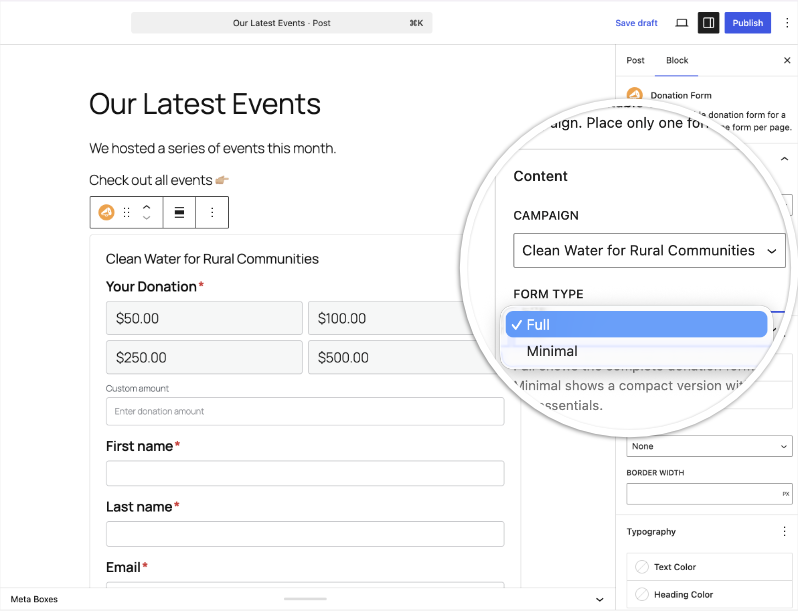
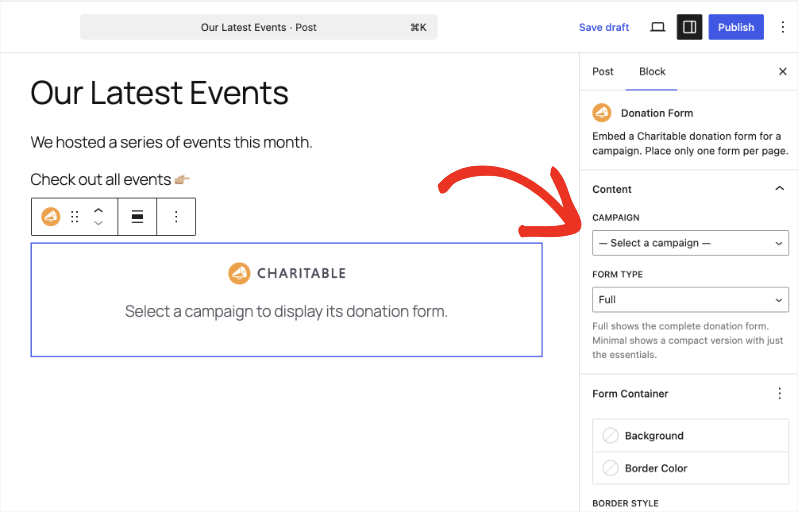
Picking the campaign and the form type both happen right in the sidebar, with the live preview updating as you choose:
Style It to Match the Page
Because it is a native block, the form bends to fit its surroundings, with nineteen styling controls grouped for clarity. Every control lives in the same block settings sidebar, so you’re never hunting for the right one.
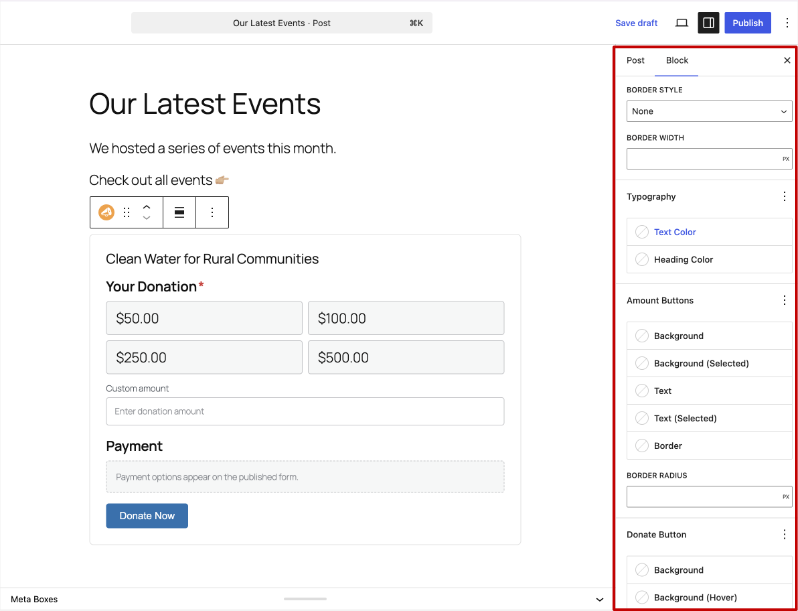
🎨 Form container: Set the background color and a border (style, width, and color) so the form frames itself the way your page needs.
🔤 Typography and accents: Control text and heading color, link color, and even the required-field asterisk color.
🔘 Amount buttons: Style the background, selected state, text, border, and corner radius of your donation amount buttons.
✅ Donate button: Set the button background, hover color, text color, and radius to match your call to action.
Scroll down and you’ll find the Donate Button and Accents groups, including that easy-to-miss required-field asterisk color:
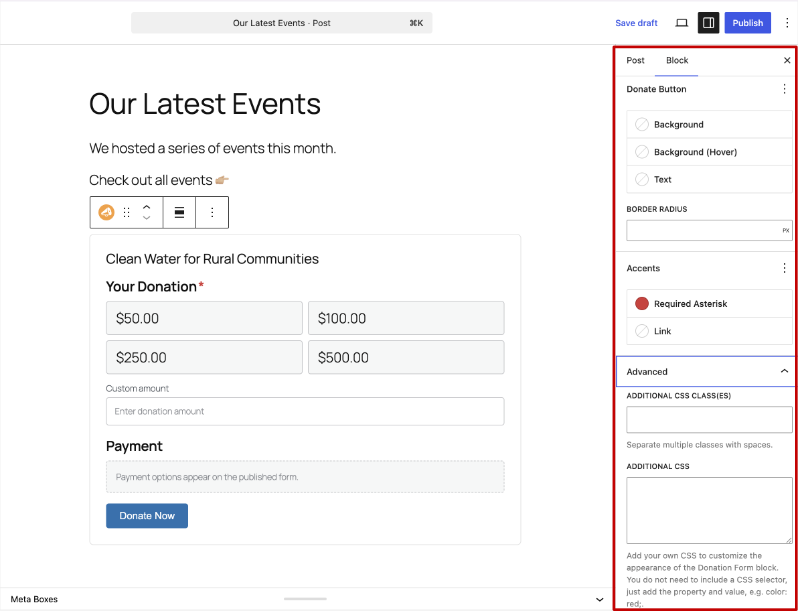
Each block instance gets its own scoped styles, so you can place more than one form across your site, each customized without writing code, and none of them will step on each other’s styling.
Getting Started: Embedding Your First Form
You can have a form live on any page in under a minute. Here’s exactly what that looks like, step by step.
Step 1: Add the Block
Open any page or post, click the block inserter (+), and search for Donation Form.
Step 2: Choose a Campaign
With the block selected, open the block settings sidebar and choose a campaign from the Campaign dropdown, or select Use current campaign.
Step 3: Pick Full or Minimal
Optionally set the Form Type to Full or Minimal, depending on how much room the page gives you.
Step 4: Style It
Style the form using the Form Container, Typography, Amount Buttons, Donate Button, and Accents controls, watching the preview update live.
Step 5: Publish
Publish or update the page. Your working donation form is live.
One note: place a single donation form per page for the cleanest, fastest experience.
Why You’ll Love This
⚡ Zero friction: Donors give on the page they are already reading, with no redirect.
👁️ What you see is what they get: The editor preview reflects the campaign’s real amounts and fields.
🎨 Styled to fit: Nineteen controls let the form match any page, with per-instance scoping.
🔄 Effortless upgrade: Old donation-form shortcodes convert to the block automatically.
🧱 Block-theme friendly: It uses standard block registration and alignment, so it works with block themes and full-site editing.
For Agencies and Developers
Built the WordPress-Native Way
The block is registered as charitable/donation-form with a server-side render_callback, so the front-end output is always the canonical, secure form, not a client-side approximation.
Per-instance CSS is generated through charitable_donation_form_scoped_css(), with dedicated color and length sanitizers, and a recursion guard prevents trouble if a form is ever nested. The block also declares itself to Charitable’s cache layer, so pages containing a live form are automatically excluded from full-page caching, no manual exclusions required.
Shortcode Compatible
A registered transform converts the legacy [charitable_donation_form] shortcode into the block on edit, so migrating existing pages is painless.
Frequently Asked Questions
Does this require Charitable Pro?
Yes. The Donation Form block ships in Charitable Pro 1.8.17 and is not part of the free Lite plugin.
What is the difference between Full and Minimal?
Full renders the complete donation form with all fields. Minimal is a compact layout (donation amounts and payment) that fits well in tighter spaces like sidebars and footers.
Can I put more than one form on a page?
For the best, fastest experience we recommend one form per page. Each block instance is style-scoped independently.
Will it work with my block theme or full-site editing?
Yes. The block uses standard WordPress block registration and alignment support, so it works with block themes and FSE.
Do my existing shortcodes still work?
Yes, and when you edit a page that uses [charitable_donation_form], it converts to the block automatically.
Get Started with the Donation Form Block
The Donation Form block is available now in Charitable Pro 1.8.17. Open any page or post, add the block, pick a campaign, and start collecting donations right where your donors already are.
Read the Donation Form Block documentation →
More in Charitable Pro 1.8.17
The Donation Form block is one of several ways 1.8.17 makes Charitable more flexible.
Also new:
- Styles tab for visual restyling
- Beacon templates and Campaign Hero field
- Visual donation amounts with per-amount images
- New fundraising widgets for Elementor, WPBakery, and Divi
Not Yet a Charitable Pro User?
Charitable powers fundraising for organizations worldwide, with more than one million downloads and counting. Charitable Pro gives you the flexibility to collect donations anywhere on your site, exactly the way you want.
What’s New in Charitable
We also launched several powerful features and improvements recently:
📱
Mollie One-Tap Wallet Checkout
Donors on mobile can check out instantly with Apple Pay or Google Pay through Mollie.
🤝
New moderation and directory screens let you manage every campaign creator and ambassador in one place.
⚡
Accept donations in India via UPI, QR codes, and major international currencies.
🔔
Built-in push notifications for donation thank-yous, campaign launches, and goal milestones.
🛡️
Real-time bot detection that flags attacks and blocks bad actors before they hit your donation forms.
🧤
White Glove Migration for GiveWP
Charitable’s team handles your full migration from GiveWP, data and all.
We’ve been adding to Charitable constantly, features and improvements designed to help you raise more and serve your donors better. See everything we’ve shipped at the Charitable Changelog.
Not yet a Charitable Pro user? Sign up today and get up to 50% off on your plan. We’re confident you’ll love raising funds with Charitable. If, for any reason, Charitable is not the right fit for you, we’ll refund your purchase with our 14-day money-back guarantee. Get Charitable Pro Now »
If you have any questions or need a hand placing your first form, our support team is ready to help.
Stay Connected for More Nonprofit Resources
For more tutorials and videos tailored to nonprofits, subscribe to our YouTube channel. We regularly publish expert tips, step-by-step guides on online donations, fundraising strategies, and practical resources to help your organization succeed.
🗞️ Get weekly tips and exclusive guides in your inbox
Join our newsletter →
🎥 Watch step-by-step tutorials and success stories
Subscribe to our YouTube channel →
👩🏽💻 Connect with our community and get daily nonprofit insights
Follow us on LinkedIn →
🥳 Fun reels and non-profit insights
Follow us on Instagram →
👀 Insightful & fun videos to help you grow your cause
Follow us on TikTok→
🌎 Subscribe and follow for general fundraiser tips
Get Fundraiser Tips on TikTok →
Powerful Fundraising Resources
🤖 Use Charitable with Your AI Assistant
⬇️ Download proven strategies, campaign ideas, and expert tools
Get the Fundraising Kit →
💸 Get Free Fundraising Resources
Head to the Charitable Fundraising Hub →
🤔 Got questions about Charitable?
Charitable FAQs →
🏎️ Take Charitable for a spin
Create your Charitable Demo →
Understand non-profit terms and jargon
Non-Profit Glossary →
% Looking for non-profit deals and discounts?
Best Non-Profit Deals and Discounts →









Leave a Reply