
Do you want to know exactly how a donation gets from your website to your nonprofit’s bank account, and how long it takes to get there?
You already know why it matters. Rent, salaries and program costs don’t wait, so you need to know when the money will be there. I’ll skip the pitch and get straight to how it works.
With Charitable, you connect your own Stripe, PayPal or Square account to your WordPress site in a few clicks. Every gift goes from that payment gateway straight to your account. Charitable never holds the money.
In this guide, I’ll walk you through the path a donation takes, how long each gateway takes to pay you, and how to connect your gateway step by step. I’ve set up every one of these gateways while testing Charitable, so I’ll also share what to watch for along the way.
What’s In This Guide
- What Is Nonprofit Payment Processing?
- Who Holds Your Donations Before They Reach You?
- How Long Each Payment Gateway Takes to Pay You
- Which Payment Gateways Work With Charitable
- How to Connect Your Payment Gateway in Charitable (Step by Step)
- Tips for Getting Your Donations on Time
- FAQs on Nonprofit Payment Processing
What Is Nonprofit Payment Processing?
Nonprofit payment processing is everything that happens between a donor clicking “Donate” and the money arriving in your bank account. It checks the donor’s card, takes the payment and moves the funds to you.
Most of that work is done by a payment gateway. This is a company like Stripe, PayPal or Square that accepts card and wallet payments online. Your nonprofit opens its own account with the gateway, and every donation is recorded in that account.
Here is the path a single online donation takes.
- The donor fills in the donation form on your website and pays by card, PayPal, Apple Pay or another method.
- The gateway checks the payment with the donor’s bank or card network and approves it.
- The gift appears as a balance in your own gateway account, minus the gateway’s processing fee.
- The gateway sends that balance to your nonprofit’s bank account on its payout schedule. This transfer is called a payout.
Step 4 is where most of the waiting happens. The gateway decides when payouts are sent, and each gateway has its own schedule. I’ll cover those schedules in a moment.
If you want to dig into the cost side, I’ve written a separate guide on understanding nonprofit payment processing fees. This post stays on the money’s journey.
Who Holds Your Donations Before They Reach You?
This is the question I’d ask first about any donation tool. There are 2 common ways an online donation can reach you, and they work very differently.
Your Own Gateway Account
With this setup, the account belongs to your nonprofit. The gateway pays out to the bank account you added, on the schedule you choose in your gateway dashboard.
You can log in to Stripe or PayPal at any time and see every gift and every payout. If you ever change your donation software, the gateway account and its history stay with you.
A Hosted Fundraising Site’s Account
Some hosted fundraising sites like Donorbox and Zeffy collect gifts into an account they control. They hold the money first, then send you a transfer later on their own schedule.
That can mean an extra wait, a minimum amount before a transfer is sent, or a request you have to submit to get paid. Before you sign up for any hosted tool, read its payout terms so you know when your money will arrive.
How Charitable Handles Payments
Charitable is a WordPress plugin, so it runs on your own website. It connects to your own gateway account and never sits between you and your money.
Our Mollie integration puts it simply. “Charitable connects to your own Mollie account, so your donor details and your transactions stay between you and Mollie.” The same is true for Stripe, PayPal, Square and every other gateway Charitable supports.
That also means you keep your donor records. The donor’s details are saved in your WordPress site’s donor database, and you can export them whenever you want.
How Long Each Payment Gateway Takes to Pay You
Since the gateway sends the payout, the gateway also sets the timing. Here are the standard schedules each gateway publishes on its own help pages, checked in November 2026.
| Gateway | When the money reaches your bank |
|---|---|
| Stripe | Stripe pays out 2 business days after a payment in the US and Australia, and 3 business days in the UK, Canada and most of Europe. |
| PayPal | The gift lands in your PayPal balance, and a standard transfer to your bank takes 1 to 3 business days. |
| Square | Payments taken in the US before 5 PM PT reach your bank the next business day. |
| Braintree | Card payments are usually deposited 2 to 5 business days after they settle. |
| Mollie | Mollie pays out weekly on Wednesdays by default, and you can switch to daily payouts. |
| GoCardless | UK bank payments are paid out 2 business days after the charge date. |
Weekends and bank holidays add time to all of these. Let’s look at the 3 gateways that are built into Charitable in a little more detail.
Stripe for Nonprofits
Stripe is the gateway I recommend to most nonprofits starting out, because it takes cards, Apple Pay and Google Pay in one account. According to Stripe’s payouts guide, the standard wait is 2 business days in the US and Australia, 3 in the UK, Canada and most of Europe, and 4 in New Zealand and Japan.
Your very first payout takes longer. Stripe says it typically arrives 7 to 14 days after your first live payment, depending on your country, industry and risk level.
After that, Stripe can send automatic payouts every business day, or you can pick a weekly or monthly schedule in your Stripe Dashboard. See how to accept Stripe donations with Charitable »
PayPal for Nonprofits
PayPal works a little differently. Each gift goes into your PayPal balance first, and you move it to your bank from there.
PayPal’s help center says a standard transfer to a US bank typically takes 1 to 3 business days with no fee. An instant transfer usually arrives within minutes, but it carries a fee.
Many donors already have a PayPal account, so it’s a good second option next to Stripe. My complete guide to PayPal for nonprofits covers the account setup in full.
Square for Nonprofits
Square is a great fit if you already take payments in person at events or a thrift store. Your online donations and in-person payments then show up in the same Square account.
According to Square’s transfer FAQs, US payments taken before 5 PM PT reach your bank the next business day. Next business day transfers are free, and instant transfers cost a small fee. Learn more about accepting Square donations with Charitable »
Braintree, Mollie and GoCardless
These gateways come with Charitable’s paid plans, and each one has its own payout rules.
- Braintree usually deposits card payments 2 to 5 business days after they settle, per Braintree’s getting paid guide. Payments made with PayPal through Braintree are paid out by PayPal separately.
- Mollie pays out weekly on Wednesdays by default, per Mollie’s payout docs. You can change it to every day, every business day or monthly, and funds arrive 1 to 2 hours after a payout starts.
- GoCardless takes payments straight from a donor’s bank account. In the UK, the payout is sent 2 business days after the charge date, per GoCardless’s payment timings.
With GoCardless, you’ll see a donation marked as Pending in Charitable for a few days before it changes to Paid. That’s normal, because bank payments are not instant.
Which Payment Gateways Work With Charitable
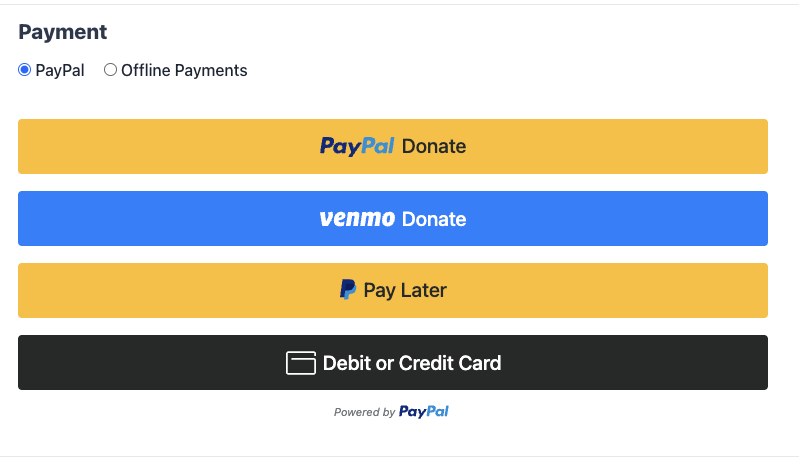
Now that you know how payouts work, let’s look at where you set all this up. Charitable lets you offer multiple payment gateways on the same donation form, so donors can pick the way they prefer to give.
Four payment options are built into the free Charitable plugin, with nothing extra to install.
- Stripe takes cards, Apple Pay and Google Pay.
- PayPal lets donors pay with their PayPal account or a card.
- Square keeps online and in-person payments in one account.
- Offline Donations records checks, bank transfers and cash gifts.
More gateways come with the Charitable Pro plugin, Basic plan and higher. These help if your donors are in a country where Stripe or PayPal is less common.
- Authorize.Net takes card payments and connects with your API keys.
- Braintree takes cards, PayPal and local payment methods.
- Mollie covers popular European payment methods.
- GoCardless collects bank payments, which suit regular gifts.
- Payfast serves nonprofits in South Africa and pays out in Rand.
- Paystack serves nonprofits across Africa.
- Windcave serves nonprofits in New Zealand and Australia.
Payrexx and PayU are also on the Basic plan and higher, and Razorpay is in beta on the Pro plan and higher. Whichever gateway you pick, the payout still goes from that gateway to your own account.
If you’re still deciding which one suits your nonprofit, my roundup of the best payment gateways for nonprofits compares them side by side.
How to Connect Your Payment Gateway in Charitable (Step by Step)
Connecting a gateway takes about 10 minutes, and you don’t need a developer. I’ll use Stripe as the main example, since it’s the quickest to connect.
Step 1. Install Charitable
If you don’t have Charitable yet, you can start with Charitable Lite for free. To install it, head to Plugins » Add New Plugin in your WordPress dashboard, search for Charitable, then click Install Now and Activate.
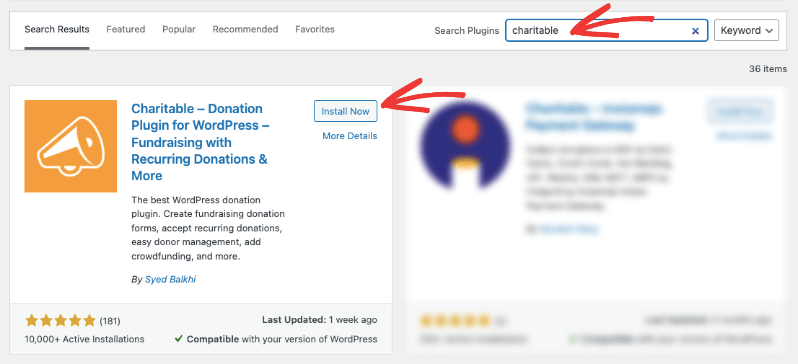
If you’d like the extra gateways, recurring donations and peer-to-peer fundraising, you can get the Charitable Pro plugin instead. Every paid plan comes with a 14-day money-back guarantee.
Step 2. Open the Payment Gateways Settings
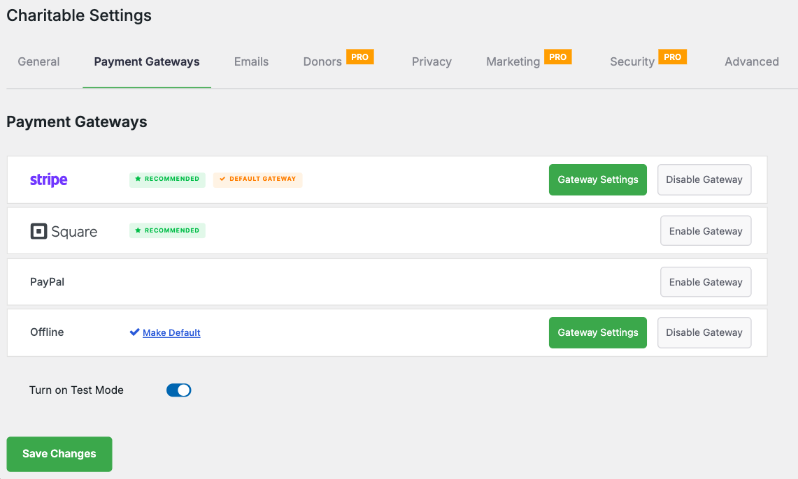
Next, go to Charitable » Settings » Payment Gateways. You’ll see a list of every gateway available on your plan.
Each gateway has its own row. Click Enable Gateway to turn one on, then the green Gateway Settings button to set it up. If you’re on a paid plan, you can install the extra gateway addons first from Charitable » Addons.
Step 3. Connect Your Stripe Account
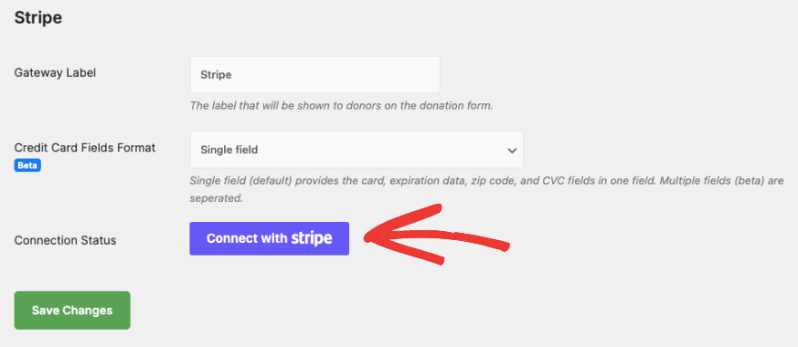
To connect Stripe, click Gateway Settings on the Stripe row, then click the Connect with Stripe button. You’ll be taken to Stripe to log in or create your account.
Once you’re done, click Return to WP Charitable. There are no API keys to copy and no webhooks to set up by hand. The status will read “Connected in live mode” or “Connected in test mode”.
This is also when you choose where the money goes. Stripe asks for your nonprofit’s bank details during signup, and that bank account is where every payout will land. The Charitable Stripe documentation covers each screen if you get stuck.
Step 4. Add PayPal or Square
For a second option, go back to the Payment Gateways list and click Enable Gateway on the PayPal or Square row, then Gateway Settings. Both connect by signing in, just like Stripe.
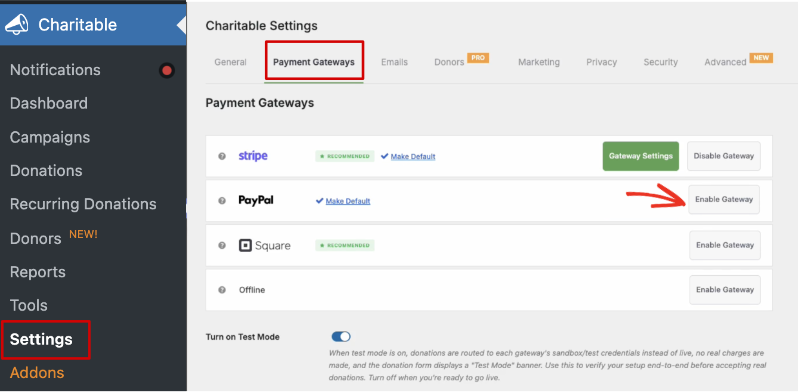
For PayPal, click Connect with PayPal and log in to your PayPal business account. For Square, click Connect to Square Account and then Allow on Square’s permission screen.
Once both are on, donors will see each option on your donation form. The guide on how to accept PayPal donations in WordPress walks through the PayPal side in more detail.
Step 5. Run a Test Donation
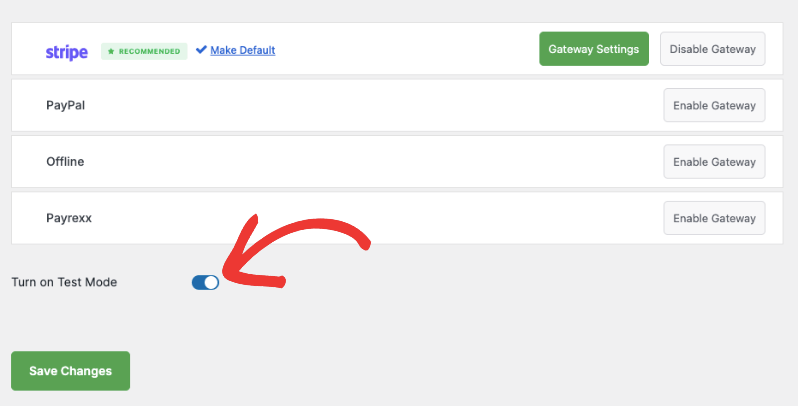
Before you share your campaign, make one practice gift. To do this, scroll to the bottom of Charitable » Settings » Payment Gateways and turn on Test Mode.
Every gateway you’ve turned on now uses its test account, and no real charges are made. Give a small test donation on your campaign page, then check that it shows up in Charitable and in your gateway’s test dashboard.
When everything looks right, turn Test Mode off. With Square, you’ll need to connect your live account again after switching back.
Step 6. Set Your Payout Schedule in Your Gateway
The last step happens outside WordPress, in your gateway account. This is where you decide how often the money is sent to your bank.
In Stripe, you’ll find this under the payout settings in your Stripe Dashboard. You can keep daily automatic payouts or switch to weekly or monthly. In PayPal, the money stays in your PayPal balance until you transfer it to your bank.
Daily payouts suit most small nonprofits, because the money is in the bank sooner. Weekly payouts can make it easier to match deposits to donations in your accounting.
Bonus Step. Pay Peer-to-Peer Fundraisers With Stripe Connect
Do you let supporters run their own fundraisers on your site? Charitable’s peer-to-peer fundraising feature can send each campaign’s donations straight to that creator’s own Stripe account with Stripe Connect.
Stripe Connect is in the Charitable Pro plugin, Pro plan and higher. To set it up, open your Ambassadors settings and choose Stripe Connect as the way you send money to ambassadors. Each creator is then asked to connect their Stripe account after they submit their first campaign.
You can also set a platform fee, which is a percentage your organization keeps from each creator’s donations. Set it to 0 if you don’t want to keep any. The Stripe Connect documentation explains each setting.
Tips for Getting Your Donations on Time
A few small habits will help you avoid surprises when you’re counting on a payout. These are the ones I’d set up on day one.
- Connect your gateway well before launch. Stripe’s first payout can take up to 2 weeks, so set up your account before a big campaign like Giving Tuesday.
- Finish your gateway’s account checks. Gateways ask for details about your organization and bank. Payouts can be paused until these are complete.
- Offer 2 gateways. Stripe plus PayPal gives donors a choice, and you still get paid if one account has a problem.
- Plan around weekends and holidays. Banks don’t move money on those days, so a Friday gift may not reach you until the middle of the next week.
- Match payouts to donations each month. Your gateway dashboard lists which gifts are in each payout, and Charitable’s donation reports show the same gifts on your side.
If processing fees are eating into your gifts, Charitable’s Fee Relief feature lets donors choose to cover them. It’s in the Charitable Pro plugin, Plus plan and higher.
FAQs on Nonprofit Payment Processing
Does Charitable hold my donations?
No. Charitable connects to your own Stripe, PayPal, Square or other gateway account, and the gateway pays out straight to your bank. Charitable never holds the money.
How long does it take for a donation to reach my bank account?
It depends on your gateway and country. Stripe takes 2 business days in the US, Square pays the next business day for US payments before 5 PM PT, and PayPal transfers take 1 to 3 business days.
Why is my first Stripe payout taking longer?
Stripe says a new account’s first payout typically arrives 7 to 14 days after the first live payment. After that, payouts follow the normal schedule for your country.
Can I change how often my gateway pays me?
Yes, in your gateway account rather than in Charitable. Stripe and Mollie both let you choose daily, weekly or monthly payouts from their dashboards.
Do I need a merchant account to accept donations?
Not with Stripe, PayPal or Square, because your gateway account does that job for you. Other gateways can have their own sign-up requirements, so check them when you open your account.
Can I use more than one payment gateway?
Yes. You can turn on as many gateways as you like in Charitable » Settings » Payment Gateways, and donors choose one on the form. Each gateway pays out to the bank account linked to it.
Are test donations sent to my bank account?
No. With Test Mode on, every gateway uses its test account and no real charges are made, so nothing is paid out.
How do peer-to-peer fundraisers get paid?
Donations to a peer-to-peer campaign normally go to your nonprofit’s gateway account. On the Pro plan and higher, Stripe Connect can send them to each creator’s own Stripe account instead.
Your donors trust you with their gifts, and you deserve to know exactly where that money goes. Connect your own gateway, and every donation will go straight from it to your bank. You can start with Charitable Lite today, or pick a paid plan risk-free with our 14-day money-back guarantee »
Charitable Has 1.2+ Million Downloads!
Trusted by millions to power successful fundraising campaigns. Try Charitable risk-free today.
✅ 14-day money-back guarantee
✅ Transparent pricing
✅ Code-free setup
Stay Connected for More Nonprofit Resources
For more tutorials and videos tailored to nonprofits, subscribe to our YouTube channel. We regularly publish expert tips, step-by-step guides on online donations, fundraising strategies, and practical resources to help your organization succeed.
🗞️ Get weekly tips and exclusive guides in your inbox
Join our newsletter →
🎥 Watch step-by-step tutorials and success stories
Subscribe to our YouTube channel →
👩🏽💻 Connect with our community and get daily nonprofit insights
Follow us on LinkedIn →
🥳 Fun reels and non-profit insights
Follow us on Instagram →
👀 Insightful & fun videos to help you grow your cause
Follow us on TikTok→
🌎 Subscribe and follow for general fundraiser tips
Get Fundraiser Tips on TikTok →
Powerful Fundraising Resources
🤖 Use Charitable with Your AI Assistant
⬇️ Download proven strategies, campaign ideas, and expert tools
Get the Fundraising Kit →
💸 Get Free Fundraising Resources
Head to the Charitable Fundraising Hub →
🤔 Got questions about Charitable?
Charitable FAQs →
🏎️ Take Charitable for a spin
Create your Charitable Demo →
Understand non-profit terms and jargon
Non-Profit Glossary →
% Looking for non-profit deals and discounts?
Best Non-Profit Deals and Discounts →


Leave a Reply