
If your nonprofit’s website runs on WordPress, you’ve probably asked this question already. Should you add Donorbox to your site, or should you use a donation plugin that is built into WordPress itself?
You’re not alone in asking. Almost every nonprofit team I talk to with a WordPress site gets stuck here at some point, usually right before a big campaign.
I’ve spent more than 15 years helping nonprofits raise money online, and I co-founded a nonprofit myself. I’ve read Donorbox’s pricing page and its WordPress plugin listing line by line, and I’ve set up donation plugins on WordPress sites many times.
Here’s what I’ve learned. Both choices put a donation form on your website. The real difference is what sits behind that form, meaning where your donor records are stored, how you pay for the tool, and who decides what changes.
In this guide, I’ll walk through each of those differences fairly, including the places where Donorbox is the better fit. By the end, you’ll have a short list of questions to answer for your own nonprofit, so you can pick with confidence.
- Donorbox vs a WordPress Plugin: The Short Answer
- What the Donorbox WordPress Plugin Actually Does
- Where Your Donor Records Live, and Why It Matters
- Donorbox Fees vs a WordPress Plugin: What Each One Costs Over a Year
- Who Controls Your Donation Forms and Campaigns
- What Donorbox Does Well
- What You Take On With a WordPress Donation Plugin
- Which One Fits Your Nonprofit?
- Charitable: The Donation Solution for WordPress
- Bonus: How to Move From Donorbox to Your WordPress Site
- My Final Recommendation
- FAQs on Donorbox vs WordPress Donation Plugins
Donorbox vs a WordPress Plugin: The Short Answer
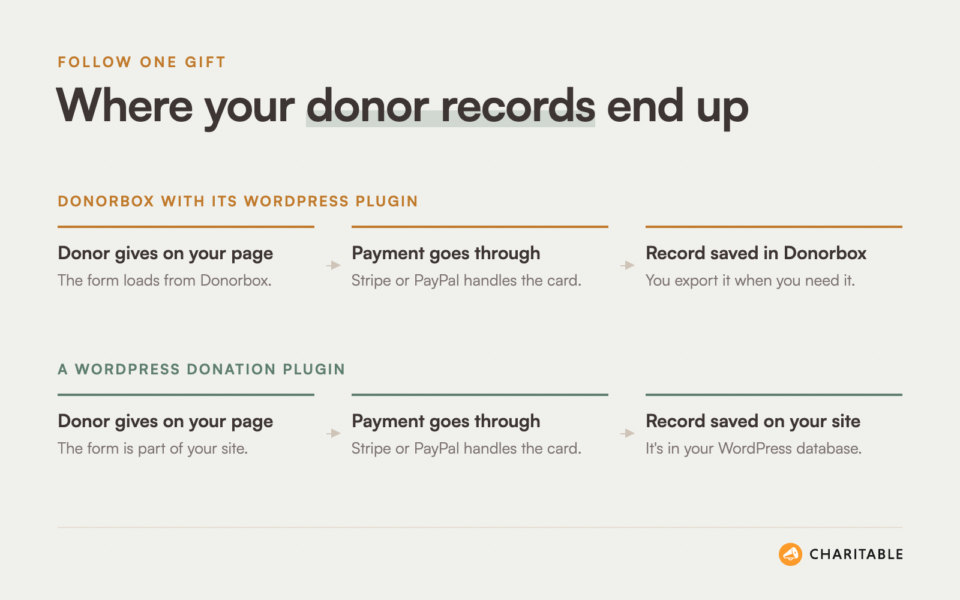
Donorbox is a hosted fundraising service. “Hosted” means the forms, the payments and your donor records all live on Donorbox’s own servers. Its WordPress plugin shows a Donorbox form inside your pages.
A WordPress donation plugin works the other way around. The forms, the campaigns and the donor records are part of your own WordPress site, and they’re stored in your site’s own database.
If you want to see the main differences before reading the detail, here they are side by side.
| Donorbox (with its WordPress plugin) | A WordPress donation plugin | |
|---|---|---|
| Where donor records are stored | They’re stored in your Donorbox account. | They’re stored in your WordPress database. |
| How the form appears | A Donorbox form is shown inside your page through an embed frame. | The form is part of your page and uses your theme. |
| How you pay for it | Donorbox takes a percentage of each gift, and Pro adds a monthly fee. | Most plugins charge a yearly license instead of a cut of each gift. |
| Who looks after the software | Donorbox runs and updates everything. | You keep WordPress, the plugin and your hosting up to date. |
| Works on non-WordPress sites | Yes, it works on almost any website. | No, it needs a WordPress site. |
Neither column is right for every nonprofit. The rest of this post explains what each row means in practice, starting with the plugin itself.
What the Donorbox WordPress Plugin Actually Does
A lot of people search for the Donorbox WordPress plugin expecting a full donation system inside WordPress. It’s helpful to know what it does before you install it.
According to its listing on WordPress.org, the plugin gives you “everything you need to embed a Donorbox donation form into your website.” You build your campaign inside your Donorbox account first. Then you paste the campaign’s link into the plugin settings and add a shortcode, such as [donate], to a page.
When a visitor opens that page, the plugin replaces the shortcode with what the listing calls “an embed frame.” In plain terms, that’s a window on your page that shows a form loaded from Donorbox.
The listing is also clear about where the records go. “After successful donations, donor records get created on your Donorbox account for easy donor management.” So the plugin is a way to display Donorbox, and the donation system itself stays on Donorbox.
That isn’t a flaw. It’s simply how a hosted service works, and the plugin does that one job well. It has more than 8,000 active installs and a 4.8 star rating at the time of writing.
A WordPress donation plugin is a different kind of tool. It adds campaigns, donation forms, donor records, receipts and reports to WordPress itself. You manage all of it from your WordPress dashboard, next to your pages and posts.
If you’ve never set one up, my guide on how to add a donation form for free in WordPress shows what that looks like.
Once you see that split, the bigger questions are easier to answer. The first one is about your donor list.
Where Your Donor Records Live, and Why It Matters
Your donor list is one of the most valuable things your nonprofit owns. It holds the names, the giving history and the contact details of every person who has backed your work.
With Donorbox, that list sits in your Donorbox account. You can reach it any time you log in, and you can download it. Donorbox’s help center explains how to export CSV files from the Donations, Supporters and Plans pages, which is good to know.
With a WordPress donation plugin, the same list sits in your own site’s database. You don’t need to log in anywhere else to see who gave, and the records stay where they are if you change tools later.
What Changes in Day-to-Day Work
For many small teams, the difference shows up in ordinary tasks. With a hosted service, a lot of jobs mean exporting a file from one place and importing it into another.
Here are a few tasks that feel different when the records live on your own site.
- Looking up a donor: You open their profile in WordPress, next to the campaign page they gave on.
- Adding a check or cash gift: You add the gift to the same records as your online donations, so your totals stay complete.
- Pulling a board report: You run it from your dashboard instead of combining files from 2 systems.
- Backing up your data: Your donor records go into the same backup as the rest of your website.
The Honest Counterpoint
Keeping records on your own site also means keeping them safe yourself. Your hosting, your backups and your WordPress logins all matter more when your donor list is stored there.
That’s very manageable, and good hosts make it easy. Still, it’s a real job, and with Donorbox you don’t have to do it. If you go the WordPress route, my guides on how to back up your nonprofit website and nonprofit website security cover the basics.
Where your records live is half of the picture. The other half is what each choice costs you as your fundraising grows.
Donorbox Fees vs a WordPress Plugin: What Each One Costs Over a Year
Donorbox and most WordPress donation plugins charge in very different ways. Donorbox takes a percentage of each gift. A paid WordPress plugin usually charges one yearly price, however much you raise.
Card processing fees from Stripe or PayPal apply in both cases. Those fees go to the payment company, not to Donorbox or the plugin, so I’ve left them out of the comparison below.
How Donorbox Pricing Works
Donorbox has 3 plans. I checked these numbers on Donorbox’s own pricing page in November 2026.
- Standard: There’s no monthly fee. Donorbox takes 2.95% of gifts made through donation forms, fundraising pages and crowdfunding pages, and 3.95% for event tickets, memberships and supporter peer-to-peer pages.
- Pro: This plan costs $150 a month. The platform fee drops to 1.75% on donation forms and pages, and to 2% on event tickets.
- Premium: Pricing is by quote. The platform fee drops to 1.6% on donation forms and pages, and stays at 2% on event tickets.
Some features cost extra on top of the plan. For example, Zapier and API access is a $17 a month add-on on Standard, and text-to-give starts at $19 a month.
How WordPress Plugin Pricing Usually Works
Most WordPress donation plugins have a free version on WordPress.org and paid plans billed once a year. With a paid plan, the cost stays the same whether you raise $5,000 or $500,000.
Plugins differ a lot in what each plan includes, though. Some charge separately for add-ons like recurring donations or extra payment gateways. Before you compare prices, check whether the plan you’re looking at already includes the features you need.
A $50,000 Year, Worked Through
Numbers are easier to judge with a real example. Let’s say a small food bank raises $50,000 a year online, all through donation forms.
- Donorbox Standard: The food bank would pay 2.95% of $50,000, which comes to $1,475 a year in platform fees.
- Donorbox Pro: The food bank would pay $1,800 for 12 months of Pro, plus 1.75% of $50,000, which is $875. That adds up to $2,675 a year.
- A paid WordPress plugin: The food bank would pay the plugin’s yearly license. Charitable’s paid plans, for example, start at $69 a year and take no percentage of donations.
Here’s something that surprised me when I did the math. Donorbox Pro only becomes cheaper than Standard once you raise about $150,000 a year through forms. Below that point, the $150 monthly fee costs more than the lower percentage saves.
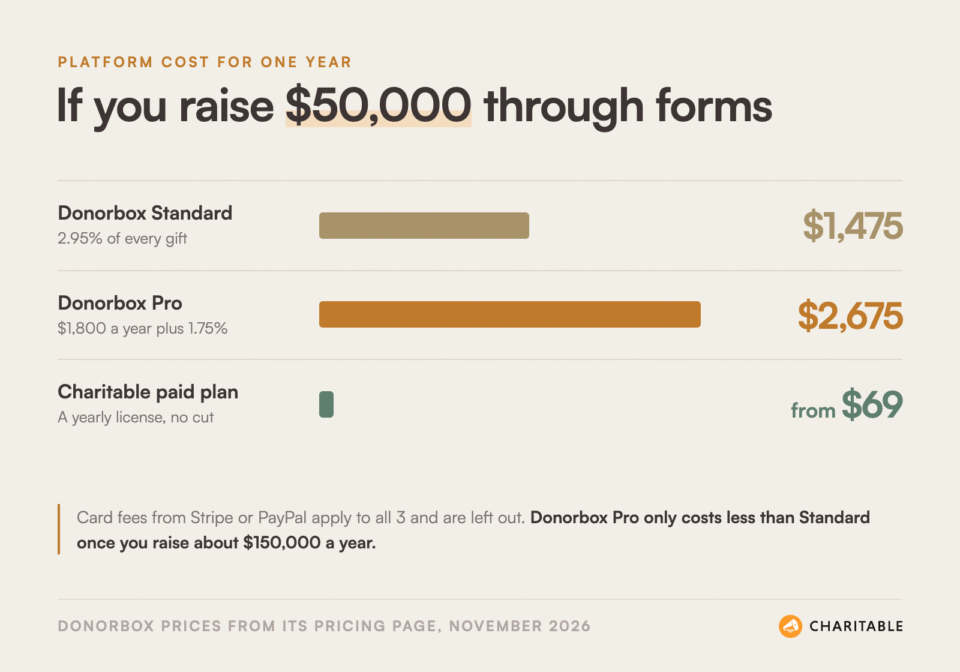
The gap also grows as you grow. On Donorbox, a nonprofit that doubles its online giving also doubles its platform fee. With a yearly license, the software cost stays the same.
Letting Donors Cover the Fees
Yes, and this is a fair point in Donorbox’s favor. Donorbox lets you ask donors to cover the fees at checkout, and its pricing page says most of them do.
Even so, that money still comes from your supporters. A donor who adds $3 to cover fees is a donor who could have given $3 more to your programs.
Many WordPress plugins offer the same “cover the fees” option, so this feature doesn’t decide the choice either way. If you want to learn more, read my guide on how fee relief boosts donations.
Cost is easy to measure. Control is harder to measure, and it matters just as much once a campaign is live.
Who Controls Your Donation Forms and Campaigns
When you use a hosted service, you work within the choices that service has made. That includes how the form looks, which features each plan unlocks and what the pricing will be next year.
How the Form Looks on Your Page
An embedded Donorbox form keeps the Donorbox design. You can change colors and some content, and Pro adds more form customization, header images and trust badges. The form still loads in its own frame, separate from your theme.
A WordPress plugin builds the form as part of your page. It picks up your theme’s fonts and colors, so the donation form looks like the rest of your site. For some donors that makes the page feel more trustworthy, because nothing on it looks borrowed from another website.
Hosted Pages and Your Own Address
Donorbox also offers full campaign pages that it hosts for you. These pages live on Donorbox’s website, not yours. Custom domains, which let you show your own web address instead, are listed as a Premium plan feature.
With a WordPress plugin, every campaign page is a page on your own site, with your own address. Every visitor who comes to give also sees your other pages, your stories and your newsletter sign-up.
Who Decides What Changes
Every hosted service can change its prices, its plan limits or its features. That’s true of Donorbox and of every other company like it. It isn’t a reason to avoid hosted tools, but it’s a good reason to know how you would move if you ever needed to.
A WordPress plugin can change its prices too. The difference is that your campaigns and records stay on your site whatever happens to that plugin’s pricing, so you can move at your own pace.
So far this might sound like a clear win for WordPress. It isn’t, and Donorbox has real strengths that deserve a fair look.
What Donorbox Does Well
This post wouldn’t be fair if it only showed one side. Donorbox is popular for good reasons, and for some nonprofits it really is the better choice.
These are the strengths I’d weigh most.
- ✅ Nothing to maintain: Donorbox runs the servers, the security and the updates for you.
- ✅ No cost until you raise money: The Standard plan has no setup fee and no monthly fee, so a brand-new nonprofit can start without paying anything up front.
- ✅ Works on any website: You can embed a form on Wix, Squarespace, a custom site or WordPress, which helps if you might move away from WordPress.
- ✅ Many tools in one account: Donorbox includes event ticketing, memberships and peer-to-peer pages, and it offers paid add-ons like text-to-give and an in-person giving app.
There are trade-offs on this side too, and they line up with the sections above.
- ❌ Fees grow with your giving: The platform fee is a percentage, so a better year means a bigger bill.
- ❌ Records live outside your site: Donor records are stored in your Donorbox account, and you export them when you need them elsewhere.
- ❌ Branding needs higher plans: Removing “Powered by Donorbox” from receipts comes with Pro and Premium, and custom domains are a Premium feature.
A WordPress plugin has its own trade-offs. You should know them before you decide.
What You Take On With a WordPress Donation Plugin
Moving your donations into WordPress gives you more control. With that control come a few jobs that a hosted service would otherwise do for you.
Here’s what you’ll be responsible for.
- Updates: WordPress, your theme and your plugins need updates every so often. Most updates take a single click.
- Hosting: Your site needs a reliable host with an SSL certificate, so the address starts with https.
- Backups: Because your donor records are on your site, regular backups protect them.
- Choosing a good plugin: Not every donation plugin is well looked after. Check when it was last updated, how many sites use it and what support it offers.
One thing you don’t take on is card security. A well-built donation plugin sends card details straight to Stripe, PayPal or your other payment company, so card numbers never touch your server.
If you already run a WordPress site, you’re doing most of these jobs today. In that case, a donation plugin adds very little extra work. That brings us to the most useful question of all, which is how to choose for your own nonprofit.
Which One Fits Your Nonprofit?
I don’t think there’s one right answer for every nonprofit. Instead of a verdict, I’ll give you the questions I’d ask myself.
Donorbox Is Likely the Better Fit If
A hosted service makes the most sense in a few situations.
- Your website isn’t on WordPress, or you plan to move away from it soon.
- Nobody on your team is comfortable updating plugins or talking to a web host.
- You raise a small amount online and want to pay nothing until gifts come in.
- You need text-to-give or an in-person giving app from the same company.
A WordPress Donation Plugin Is Likely the Better Fit If
A plugin makes more sense when your website is already the center of your fundraising.
- Your site already runs on WordPress and someone keeps it updated.
- You want your donor records stored on your own site, next to your campaigns.
- Your online giving is growing, and you’d rather pay a fixed yearly price than a percentage.
- You want campaign pages on your own web address that match the rest of your site.
Ask Yourself These Questions
If you’re still unsure, take 10 minutes with your team and talk through these.
- How much did we raise online last year, and how much do we expect to raise in 3 years?
- If our fundraising tool doubled its price tomorrow, how long would it take us to move?
- Who on our team looks after the website today?
- Where do we want to look when a board member asks who our top 20 donors are?
If your answers point toward WordPress, the next step is picking a plugin. Here’s the one our team builds, and why we built it this way.
Charitable: The Donation Solution for WordPress
Charitable is the WordPress donation plugin our team builds. More than 10,000 nonprofits use it, and the free version has more than one million downloads.
We built Charitable because so many nonprofits told us the same thing. They wanted their fundraising to live on their own website, under their own name, without handing their donor list to someone else.
You can create campaigns like these in minutes:

You Control Your Data
Every donation and every donor record is stored in your WordPress database. You can export it, take it with you, move whenever you want and use it anywhere.
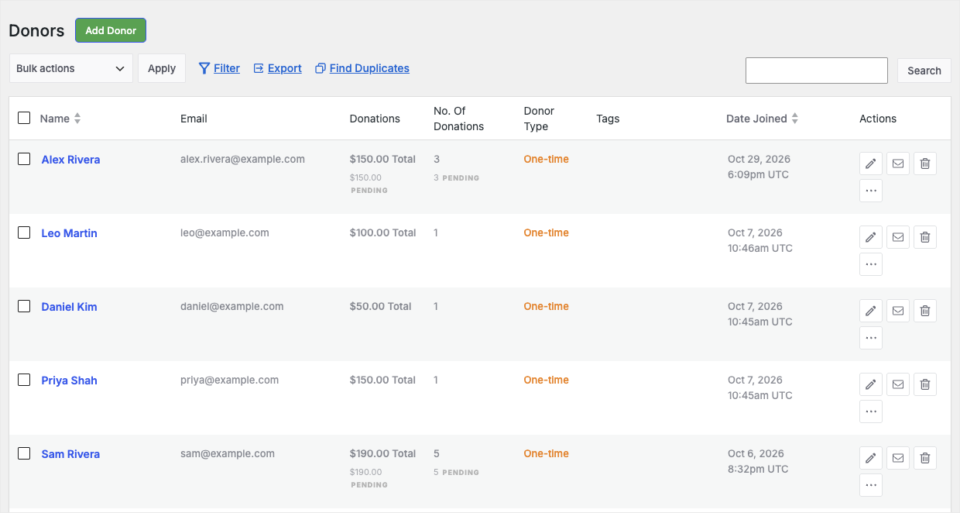
On paid plans, Charitable’s Donor Management feature gives every supporter a profile with their giving history, notes and tags. You can also add offline gifts, so your records stay complete. My guide to exporting and importing donor data walks through how that works.
You Control Your Fundraisers
You decide how much to raise, what the goal is, when the campaign ends and whether to extend it. Charitable’s visual campaign builder lets you build each campaign page by pointing and clicking, with a live preview as you go.
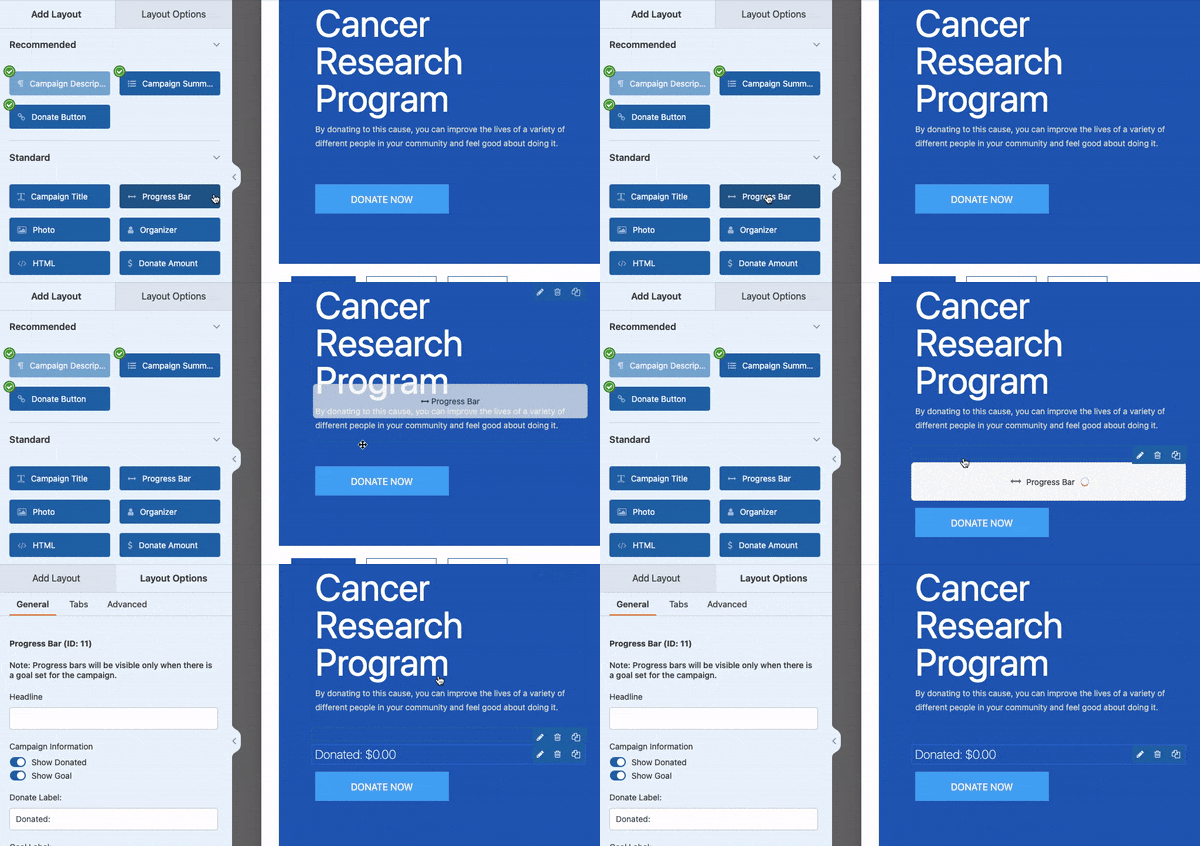
Campaigns are unlimited on every plan. You can run a year-end appeal, a building fund and a memorial fund at the same time, all on your own site.
Payouts Go Directly From Your Payment Gateway
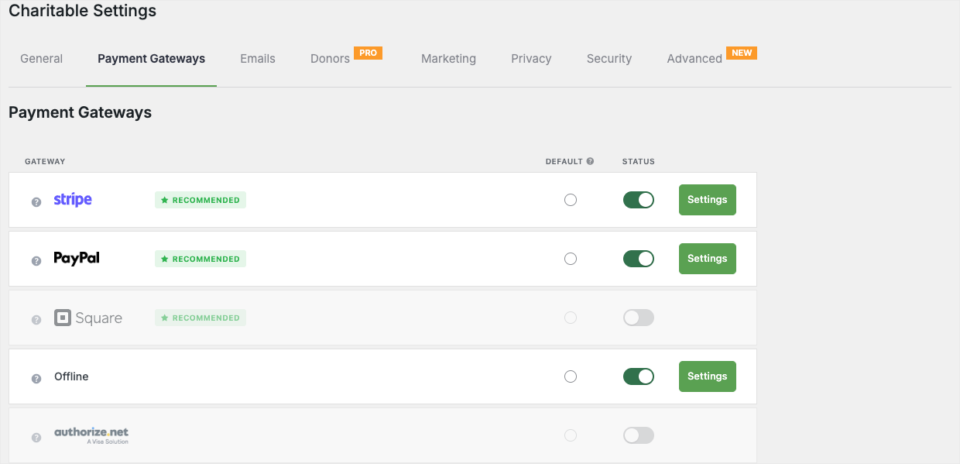
Donations go straight from Stripe, PayPal, Square or your other payment gateway to your account. Charitable never holds the money.
Stripe, PayPal, Square and offline donations come with the free plugin. Paid plans add gateways like Authorize.Net, Mollie and GoCardless. You can compare them in my roundup of the best payment gateways for nonprofits, or see Charitable’s payment gateway options.
Donors Stay on Your Site
Charitable’s donation forms are part of your page and use your theme, with no custom CSS needed. Donors give on your web address and see your brand from the first click to the receipt.
As you grow, you can add more without leaving WordPress. Paid plans include features like these.
- Recurring donations: Donors can give weekly, monthly, quarterly or yearly, on the Plus plan and higher.
- Fee Relief: Donors can choose to cover the processing fee, on the Plus plan and higher.
- Donor Dashboard: Donors log in on your site to see their history and download receipts, on the Basic plan and higher.
- Peer-to-peer fundraising: Supporters create their own fundraising pages under your campaign, on the Pro plan and higher.
What Charitable Costs
You can start with Charitable Lite for free. It includes unlimited campaigns, Stripe, PayPal, Square and offline donations, automatic receipts and basic reports.
When you need more, the Charitable Pro plugin comes with 4 plans. On every paid plan, Charitable takes no percentage of your donations. You pay the yearly license, and your payment company charges its usual processing fee.
- Basic: The Basic plan is $69 a year for one site.
- Plus: The Plus plan is $99 a year for one site and adds recurring donations and Fee Relief.
- Pro: The Pro plan is $199 a year for one site and adds peer-to-peer fundraising and automations.
- Elite: The Elite plan is $299 a year and covers 5 sites.
Every plan includes everything listed for it, with no extra add-ons to buy. You can see the full breakdown on the Charitable pricing page, or read Charitable Lite vs Pro to see what the free version covers.
If you’d like a direct, side-by-side look at both products, our Charitable vs Donorbox page covers it feature by feature.
Get Charitable Now » Every paid plan comes with a 14-day money-back guarantee, no questions asked.
If you’re already on Donorbox, you don’t have to start from scratch. Charitable can bring your Donorbox history with you.
Bonus: How to Move From Donorbox to Your WordPress Site
Charitable has a Donorbox importer that moves your donations, donors and campaigns into WordPress from Donorbox’s own CSV exports. It’s included in every paid plan and needs version 1.8.14 or later of the Charitable Pro plugin.
Here’s how the move works from start to finish.
Step 1: Install Charitable
To get started, first you’ll install and activate the Charitable Pro plugin on your WordPress site. Version 1.8.14 or later includes the importer.
Head to wpcharitable.com/pricing and create an account. Then you’ll need to download the Pro plugin from your Charitable account in the Downloads tab. Copy you license key here, you’ll need it for later.
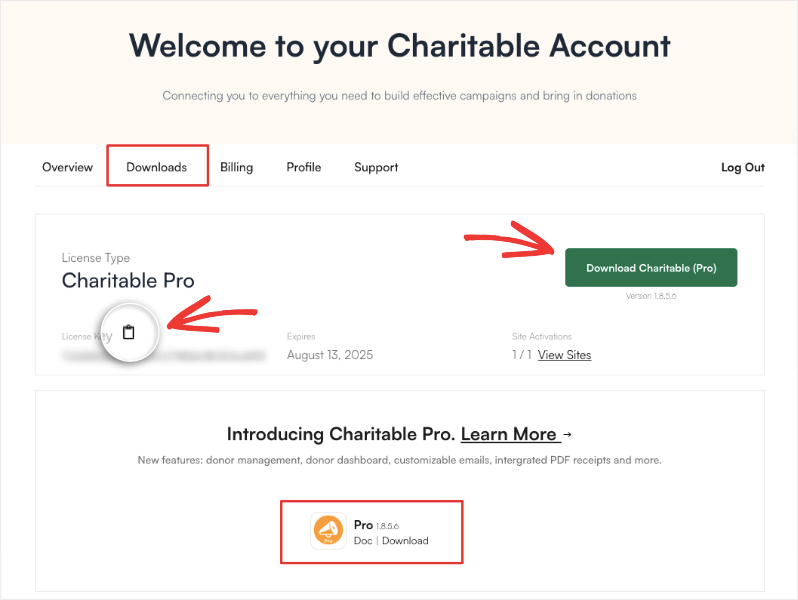
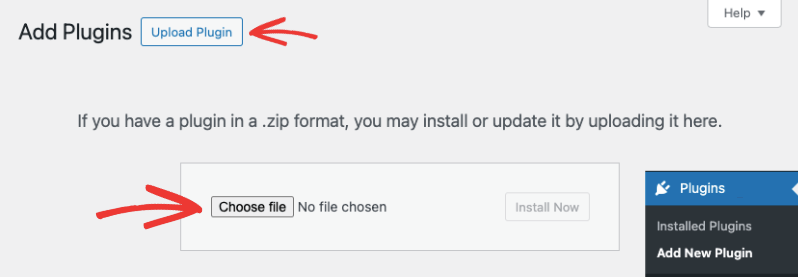
Next, in your WordPress admin, go to Plugins » Add New » Upload Plugin. Upload the plugin file you downloaded here.
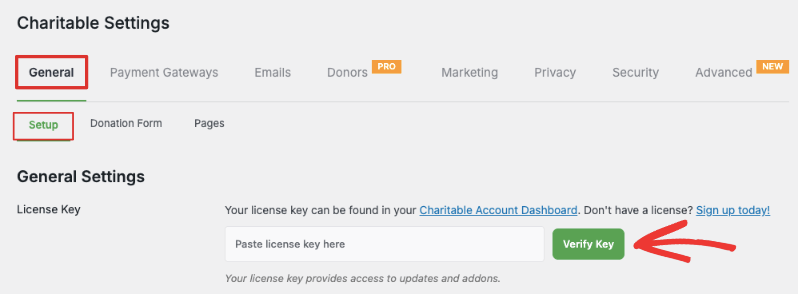
Once you activate it, head to Charitable » Settings and paste your license key here.
Step 2: Connect Your Payment Gateway
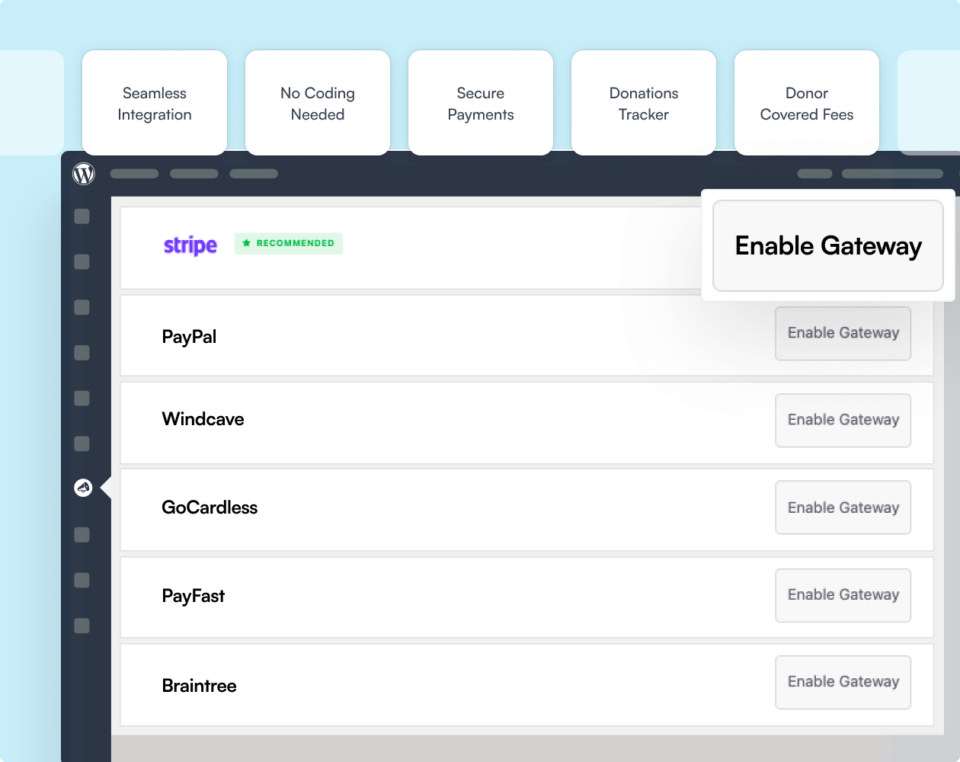
Next, head over to Charitable » Settings » Payment Gateways. Connect Stripe, PayPal or the gateway you’d like to use, so your new forms are ready to accept gifts.
Step 3: Export Your Records From Donorbox
In your Donorbox account, download the CSV export from the Donations page. You can also export the Supporters and Recurring Plans pages if you’d like full donor details and a record of past plans.
Step 4: Upload the Files and Do a Dry Run
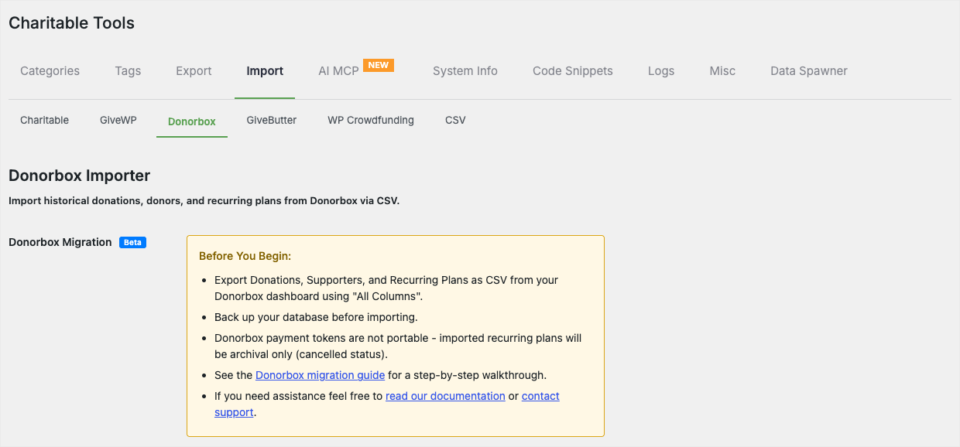
Back in WordPress, go to Charitable » Tools » Import and choose the Donorbox option. Upload your files, check the preview counts and run the dry run, which checks for errors without saving anything.
Step 5: Run the Import
When the dry run looks right, choose your import options and run the import. Charitable creates a campaign for each campaign name in your Donorbox export and links every donation to its donor. If anything looks wrong afterward, the rollback option removes that import’s records.
Step 6: Invite Monthly Donors to Restart Their Gifts
Payment details can’t be moved from Donorbox, so recurring plans come over as a record of past giving with a cancelled status. Send your monthly donors a short, friendly note with a link to your new recurring donation form, so they can restart their gift on your site.
For every option and screen, see the Donorbox importer documentation. I’d run the import before you point any public links to your new pages, so your records are in place on day one.
My Final Recommendation
If your site isn’t on WordPress, or no one can look after it, Donorbox is a solid and simple choice. If your site already runs on WordPress, a donation plugin lets your fundraising grow on your own site, with your own records and a price that doesn’t rise with every gift.
Whichever way you lean, start by answering the 4 questions above with your team this week. If WordPress wins, you can start with Charitable Lite today and have your first campaign live in under 10 minutes.
FAQs on Donorbox vs WordPress Donation Plugins
Is there a Donorbox WordPress plugin?
Yes. The free Donorbox plugin on WordPress.org lets you place a Donorbox form on your pages with a shortcode. The form and your donor records still live in your Donorbox account.
How much are Donorbox fees?
On the free Standard plan, Donorbox takes 2.95% of donation form gifts and 3.95% of event and membership payments. Pro costs $150 a month and lowers the fee to 1.75% on forms. Card processing fees from Stripe or PayPal are charged on top.
Is Donorbox free?
The Standard plan has no setup or monthly fee. Donorbox earns its money from the platform fee it takes on each gift.
Can I export my donor data from Donorbox?
Yes. Donorbox lets you download CSV files from its Donations, Supporters and Plans pages. Charitable’s Donorbox importer reads those same files.
Do monthly donors carry over when I move from Donorbox?
Their giving history carries over, but their payment details don’t. You’ll need to invite monthly donors to set up their gift again on your new recurring donation form.
Is a WordPress donation plugin secure?
A well-built plugin sends card details straight to your payment company, so card numbers never touch your server. Keep WordPress updated, use a good host and take regular backups to protect your donor records.
Charitable Has 1.2+ Million Downloads!
Trusted by millions to power successful fundraising campaigns. Try Charitable risk-free today.
✅ 14-day money-back guarantee
✅ Transparent pricing
✅ Code-free setup
Stay Connected for More Nonprofit Resources
For more tutorials and videos tailored to nonprofits, subscribe to our YouTube channel. We regularly publish expert tips, step-by-step guides on online donations, fundraising strategies, and practical resources to help your organization succeed.
🗞️ Get weekly tips and exclusive guides in your inbox
Join our newsletter →
🎥 Watch step-by-step tutorials and success stories
Subscribe to our YouTube channel →
👩🏽💻 Connect with our community and get daily nonprofit insights
Follow us on LinkedIn →
🥳 Fun reels and non-profit insights
Follow us on Instagram →
👀 Insightful & fun videos to help you grow your cause
Follow us on TikTok→
🌎 Subscribe and follow for general fundraiser tips
Get Fundraiser Tips on TikTok →
Powerful Fundraising Resources
🤖 Use Charitable with Your AI Assistant
⬇️ Download proven strategies, campaign ideas, and expert tools
Get the Fundraising Kit →
💸 Get Free Fundraising Resources
Head to the Charitable Fundraising Hub →
🤔 Got questions about Charitable?
Charitable FAQs →
🏎️ Take Charitable for a spin
Create your Charitable Demo →
Understand non-profit terms and jargon
Non-Profit Glossary →
% Looking for non-profit deals and discounts?
Best Non-Profit Deals and Discounts →





Leave a Reply