
Switching donation platforms is easy to justify and painful to execute. Your donor list, campaign history, and years of giving records live inside Donorbox – and moving to a new platform has traditionally meant one of two things: start fresh and lose your history, or spend days manually wrestling spreadsheets into shape.
The Donorbox Importer for Charitable Pro eliminates that tradeoff.
It reads the same CSV files Donorbox already lets you export, maps them to Charitable’s data model, and walks you through the entire migration in a guided six-stage wizard. Donors, campaigns, donation history, and recurring plan records all land in Charitable intact – ready to power your thank-you emails, re-engagement campaigns, and long-term reporting.
A built-in dry-run mode lets you preview exactly what will be imported before a single record is written. And if something looks wrong after you commit, a one-click rollback removes everything the import created, leaving your database exactly as it was.
Available in Charitable Pro 1.8.14 and later.
Here’s a sneakpeek of what the tool looks like:

What’s in This Guide?
What You Get in the Donorbox Importer
Here’s what included in this feature:
- Six-stage wizard: upload, preview, options, import, results, and optional rollback.
- Imports donors, campaigns, donations, and recurring plans (archival only) from standard Donorbox CSV exports.
- Auto-detects CSV columns from a stable schema allow-list with multiple header aliases per field.
- Dry-run mode previews everything without writing a single record.
- Per-import batch ID stamps every record so a full rollback is one click away if the import is wrong.
- Synchronous rollback for small imports and async batched rollback for very large ones.
- Configurable date format (ISO, MM/DD/YYYY, DD/MM/YYYY) for CSVs from different regions.
- Optional override of duplicate donors and donations on re-import.
- Optional use of Donorbox’s converted amounts for multi-currency sites.
- 24-hour cleanup of abandoned imports, so a closed browser tab does not leave staging files behind.
- Concurrency guard prevents two imports from running at the same time.
Why Use the Donorbox Importer?
Moving away from Donorbox without losing your history was, until now, a manual exercise in spreadsheet wrangling.
The Donorbox Importer reads the same CSVs Donorbox itself exports, maps them to Charitable’s data model, and brings everything across in one guided flow.
Your donors, your campaigns, and the donation history that proves the relationship all land in Charitable, where they can power thank-you emails, segmented re-engagement campaigns, and your ongoing reporting.
Requirements
- Charitable Pro 1.8.14 or later
- PHP 7.4 or higher (the importer checks and refuses to run below this)
- Recent database backup (strongly recommended before any large import)
- Donorbox account with permission to export Donations, Supporters, and Recurring Plans as CSV
Getting Started
Before you begin, log in to your Donorbox dashboard and export your data as CSV using the “All Columns” option:
- Donations CSV (required)
- Supporters CSV (optional but recommended)
- Recurring Plans CSV (optional)
Important: Back up your WordPress database. You can use a tool like Duplicator to run a quick back up of your website.
Know that Donorbox payment tokens are not portable. Imported recurring plans are archival only and arrive in Charitable with a cancelled status. You will need to re-collect payment authorization from those donors if you want recurring billing to continue in Charitable.
Where to Find The Donorbox Importer
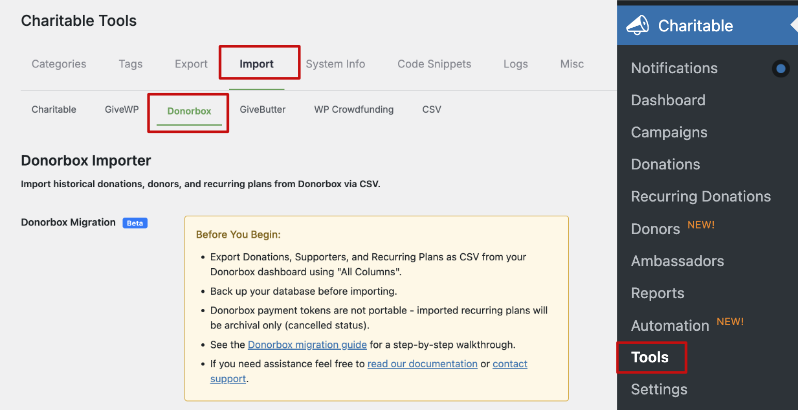
In your WordPress admin, go to Charitable → Tools → Import → Donorbox.
Start Migrating To Charitable
The Donorbox Importer is a six-stage wizard. Each stage waits for explicit confirmation before moving on, and the dry run can be repeated as many times as you like before committing.
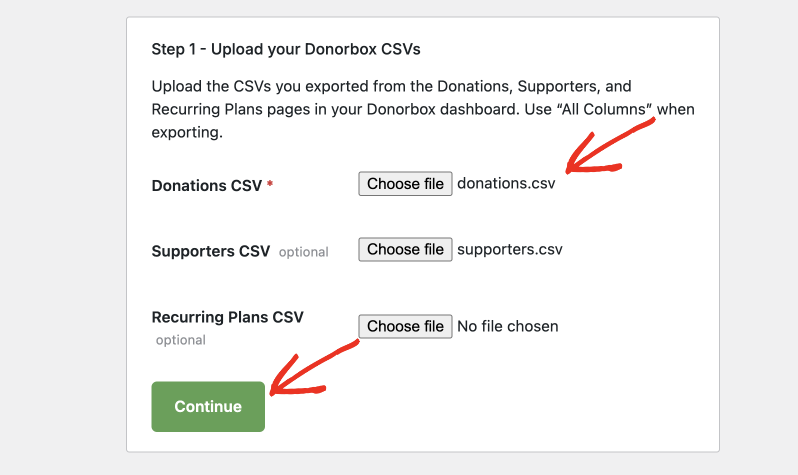
Stage 1: Upload CSVs
Upload your Donorbox Donations CSV. The Supporters and Recurring Plans CSVs are optional but strongly recommended. Once you click Continue, the importer parses the headers, detects the delimiter (comma, semicolon, or tab), and matches columns against the Donorbox schema.
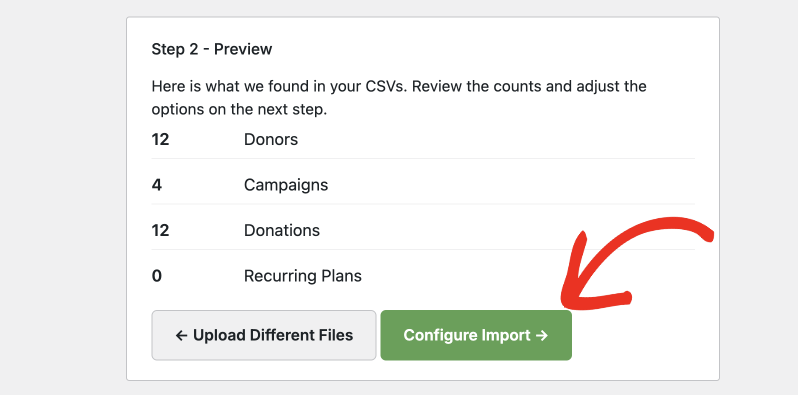
Stage 2: Preview Counts
A dry-run runs against your uploaded files and reports how many donors, campaigns, donations, and recurring plans were found. Nothing is written to your database at this stage. Use the counts to sanity-check that the import sees what you expect.
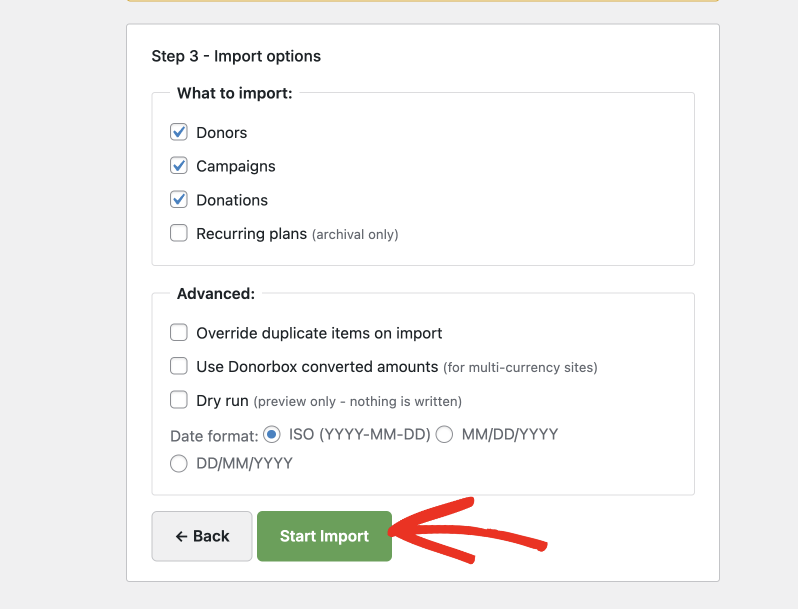
Stage 3: Import Options
Pick which entities to import and configure advanced behavior:
- What to import: Donors, Campaigns, Donations, Recurring Plans
- Override duplicates on import
- Use Donorbox converted amounts (for multi-currency sites)
- Dry run (preview only, nothing is written)
- Date format: ISO (YYYY-MM-DD), MM/DD/YYYY, or DD/MM/YYYY
Stage 4: Importing
The importer processes one phase at a time (donors, then campaigns, then recurring, then donations) in batches of 200 rows by default. Progress updates live in the browser, and every imported record is stamped with the import’s batch ID.
Stage 5: Results
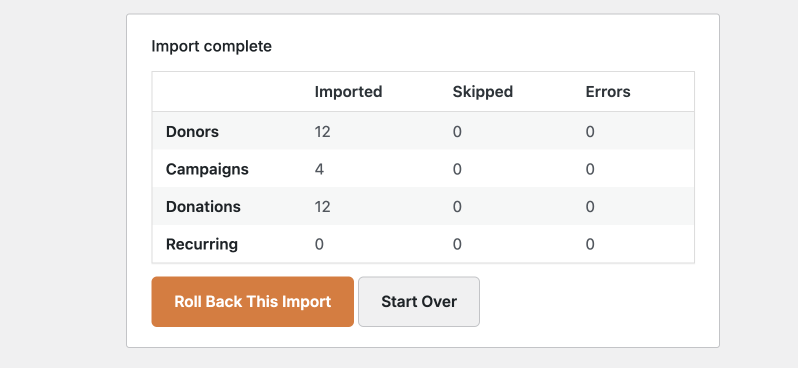
A summary shows the count of imported, skipped, and errored records for each entity, plus any warnings. From here you can keep the import or trigger a rollback.
Stage 6: Rollback (Optional)
If the import is not what you expected, the Rollback button removes everything stamped with this import’s batch ID. Small imports run synchronously; very large imports (over 5,000 records by default) run in background batches.
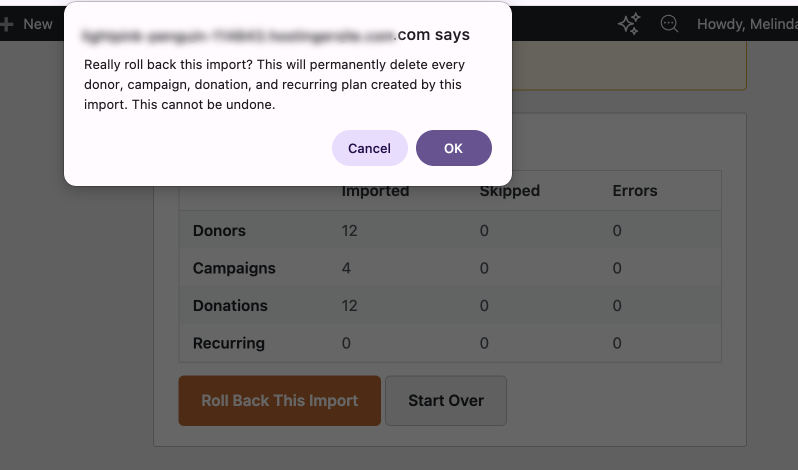
When you rollback, you’ll see a warning message to confirm your decision. That way, you don’t accidentally start a rollback.
Configuration Options
Import Options (Stage 3)
| Option | Type | Default | Description |
|---|---|---|---|
| Import Donors | boolean | true | Process the Supporters CSV (when uploaded) to create donor records. |
| Import Campaigns | boolean | true | Create Charitable campaigns from unique campaign names in the donations export. |
| Import Donations | boolean | true | Create donation records linked to donors and campaigns. |
| Import Recurring Plans | boolean | true (when plans CSV uploaded) | Create archival recurring plan records (cancelled status). |
| Override Duplicates | boolean | false | When checked, re-importing a record updates the existing one instead of skipping it. |
| Use Converted Amounts | boolean | false | Use Donorbox’s converted amount column instead of the original donation currency. |
| Dry Run | boolean | false | Read and parse everything without writing any record to the database. |
| Date Format | string | iso | iso (YYYY-MM-DD), mdy (MM/DD/YYYY), or dmy(DD/MM/YYYY). |
Donorbox Fields Imported
Donations CSV (required)
Donation ID, donor email/first/last name, amount, converted amount, currency, donation date, donation status, payment method, Stripe/PayPal transaction IDs, processing fee, refund amount, campaign name and ID, comment, anonymous flag, gift aid, employer, occupation, recurring flag, plan ID, full address, phone, UTM source/medium/campaign, IP address.
Supporters CSV (optional)
Donor email, first/last name, full address, phone, employer, occupation, date joined, Donorbox donor ID, lifetime donation count, lifetime amount.
Recurring Plans CSV (optional)
Donorbox plan ID, donor email, first/last name, campaign name, amount, currency, frequency, start date, next charge date, status, payment method, donation count.
The importer accepts multiple alias names for each field (for example email, donor_email, email_address all map to the donor email), so older or relabeled exports usually work without manual cleanup.
Customization
Batch Size
The default batch size is 200 rows per request. Define CHARITABLE_DONORBOX_BATCH_SIZE in wp-config.php for an environment-wide override, or hook the charitable_donorbox_batch_size filter for finer control:
add_filter( 'charitable_donorbox_batch_size', function( $size ) {
    return 500;
} );
Troubleshooting
“Another Donorbox import is already in progress”
The importer only allows one import at a time. Wait for the existing import to finish, or use the rollback flow on the existing import before starting a new one.
“PHP Version Not Supported”
The importer requires PHP 7.4+. Update PHP in your hosting control panel and reload the page.
CSV columns are not recognized
Re-export from Donorbox using the “All Columns” option. Donorbox occasionally changes header names; if your export uses a header the importer does not recognize, hook charitable_donorbox_csv_schema to extend the allow-list.
Recurring plans are imported as cancelled
This is intentional. Donorbox payment tokens are not portable, so the plans are brought across as archival historical records. To resume recurring billing in Charitable you will need to re-collect payment authorization from those donors using a Charitable recurring donation form.
Import looks wrong; how do I undo it?
Use the Rollback button on the Results screen. The importer stamps every record it creates with the import’s batch ID and the rollback removes only those records.
Developer Resources
Hooks & Filters
charitable_donorbox_batch_size— change how many CSV rows are processed per AJAX request (default 200).charitable_donorbox_csv_schema— extend or override the column allow-list per entity type (donations,supporters,plans).charitable_donorbox_rollback_async_threshold— change the record count above which rollback runs asynchronously (default 5,000).charitable_donorbox_verbose_logging— enable verbose internal logging for the active import.
Constants
CHARITABLE_DONORBOX_BATCH_SIZE— define inwp-config.phpfor an environment-level batch size override.
Useful Classes
Charitable_Donorbox_Importer— main orchestrator. Phase order is donors → campaigns → recurring → donations.Charitable_Donorbox_CSV_Parser— streaming CSV parser with delimiter detection, header normalization, and per-entity schema allow-lists.
Logging
Import events are logged with the source donorbox and appear in the standard Charitable logs (Charitable → Tools → Logs), filterable by the Donorbox Import source.
Frequently Asked Questions
Do I need to reformat my Donorbox CSV before importing?
In most cases, no. Export your data from Donorbox using the “All Columns” option and upload the file as-is. The importer recognizes multiple header aliases per field, so older or relabeled exports usually work without any manual cleanup.
Will the import affect my live site while it’s running?
The importer processes records in batches in the background, so your site stays online. However, we strongly recommend taking a full database backup before running any large import, just in case.
What happens to my recurring donors?
Recurring plans are imported as archival records with a cancelled status. Donorbox payment tokens are not portable, so active billing cannot be transferred. To resume recurring giving in Charitable, you will need to re-collect payment authorization from those donors using a Charitable recurring donation form.
Can I preview the import before committing?
Yes. Dry-run mode reads and parses your CSV files and reports exactly what would be imported – donors, campaigns, donations, and recurring plans – without writing a single record to your database. You can run it as many times as you like before committing.
What if I import something by mistake?
Use the Rollback button on the Results screen. The importer stamps every record it creates with a unique batch ID, so the rollback removes only what that import created and nothing else. Small imports roll back instantly; very large imports run the rollback in the background.
Can I run the importer more than once?
Yes, but only one import can run at a time. If you need to re-import, wait for the current import to finish or roll it back first. Enable the Override Duplicates option if you want re-imported records to update existing ones rather than be skipped.
My CSV columns are not being recognized. What do I do?
Re-export from Donorbox using the “All Columns” option, as Donorbox occasionally changes header names. If the problem persists, a developer can hook the charitable_donorbox_csv_schema filter to add unrecognized column names to the allow-list.
Does the importer support non-US date formats?
Yes. You can choose from three date formats in the Import Options stage: ISO (YYYY–MM–DD), MM/DD/YYYY, or DD/MM/YYYY, to match whichever format your CSV uses.
What happens if I close the browser tab mid-import?
Any staging files left behind are automatically cleaned up after 24 hours. The concurrency guard will also prevent a new import from starting until the abandoned one clears.
Do I need the Supporters and Recurring Plans CSVs?
Only the Donations CSV is required. The Supporters and Recurring Plans CSVs are optional but strongly recommended – the Supporters CSV brings in richer donor profile data, and the Recurring Plans CSV ensures your historical recurring giving records are preserved.
What version of Charitable Pro do I need?
The Donorbox Importer is available in Charitable Pro 1.8.14 and later. You will also need PHP 7.4 or higher on your server.
Helpful Links
🤝 Get help when you need it
Connect with Customer Support →
📑 Find the guide you need
Browse the Documentation Hub →
⬇️ Download proven strategies, campaign ideas, and expert tools
🔗 Let your AI Assistant do the fundraising work for you.
Connect Charitable to your AI assistant →
💸 Get Free Fundraising Resources
Head to the Charitable Fundraising Hub →
🤔 Got questions about Charitable?
Charitable FAQs →
Need help understanding non-profit terms and jargon?
See our Non-Profit Glossary →




