
Most donation confirmations are an afterthought. If Maria gave to your year-end appeal from her phone, she would tap Donate, enter her card, and hit submit, only to land on a plain gray line:
“Thank you, your donation was successful.”
Then nothing.
With a warm thank-you page in place instead, Maria would land on a page with your logo, a heartfelt message, a line showing exactly what her gift makes possible, and a gentle nudge to share it or make it monthly.
That kind of page is the difference between a one-time gift and a lifelong supporter. 🎉
With Custom Receipts, you decide which page your donors see, on every campaign. Here’s how it works, and why it’s worth turning on today.
Why the Thank-You Page Decides What Happens Next
The on-screen receipt is the one moment you have a donor’s full attention, right after they’ve shown they believe in your cause. It’s prime real estate for saying thank you, showing impact, and inviting the next step. A generic confirmation wastes it. A thoughtful receipt turns a transaction into a relationship.
Custom Receipts lets you own that moment, without touching a line of code. Here are 2 examples of receipts built in a few minutes:
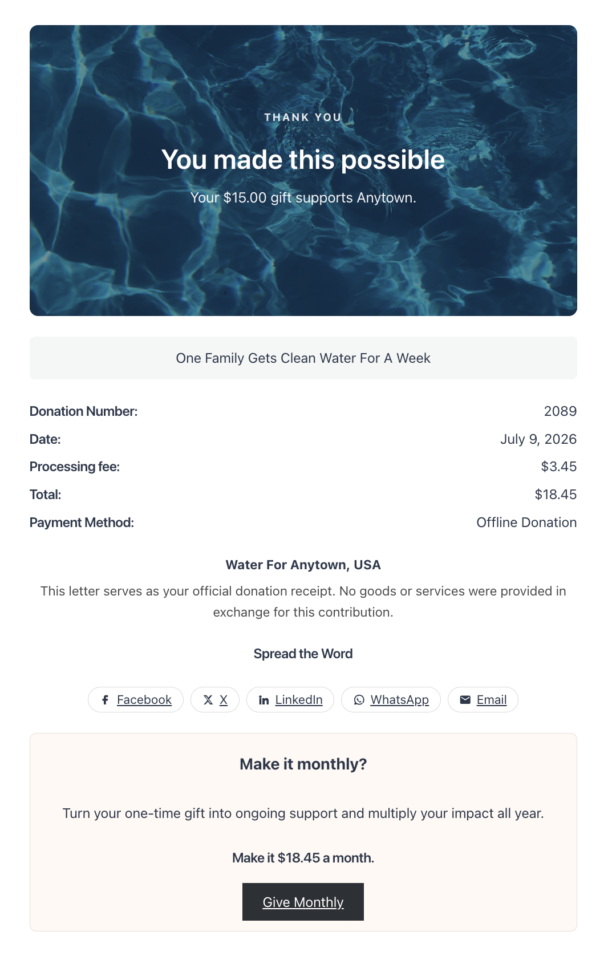
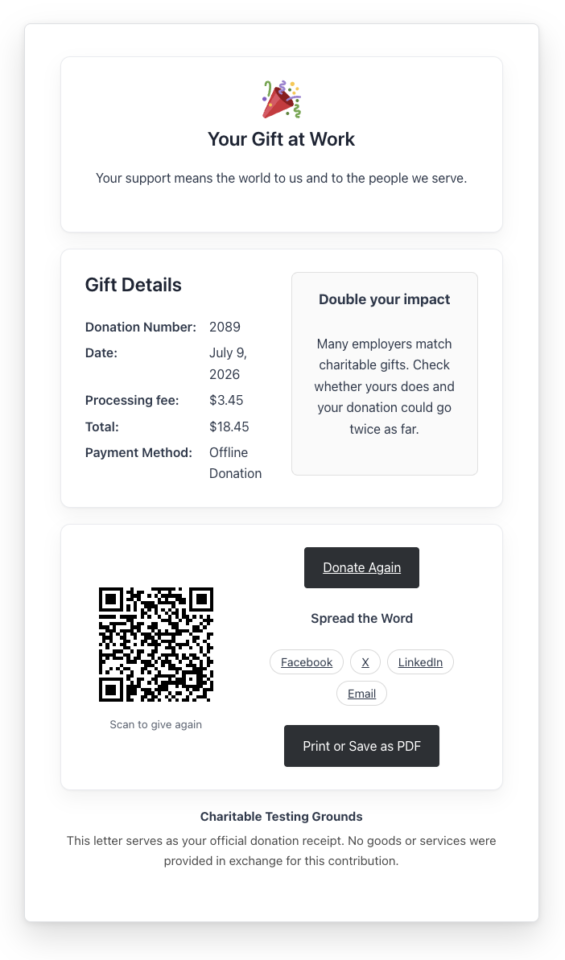
From One Gift to a Lasting Relationship
Most nonprofits pour their energy into winning the first gift, then send donors straight into silence. But the first donation isn’t the finish line. It’s the start of a relationship, and the thank-you page is where that relationship is either won or quietly lost. Winning a brand-new donor almost always costs more than keeping an existing one, and a donor who gives a second time is far more likely to keep giving for years to come. Your receipt is the first, and best, chance to earn that second gift.
A receipt built for the relationship does 3 things a generic confirmation cannot. It builds trust, since thanking donors by name and showing where their money goes signals that the gift landed with a real, accountable organization, not a black box. It reinforces impact by connecting the amount to a concrete outcome, which reminds donors that their gift mattered, and that feeling is exactly what brings them back. And it opens the next step: a well-timed invitation to give again, switch to monthly, or share turns a single gift into recurring revenue and a wider circle of supporters. 🤝
Every donation is a moment of maximum goodwill. Custom Receipts helps you use it, instead of letting it slip away with a gray confirmation and a dead end. Multiply that across a year of campaigns, and a better thank-you page becomes one of the highest-leverage changes you can make to your fundraising.
When You’ll Feel the Difference
A few moments where a campaign-specific receipt earns its keep:
- 📅 Year-end appeal: Reinforce the goal and invite donors to share while momentum is high.
- 🎗️ Memorial or tribute campaign: Give a gentle, respectful thank-you that fits the moment.
- 💎 Major gifts: Show a special message only to donors who give above a threshold.
- 🔁 Recurring growth: Invite one-time donors to become monthly supporters right on the receipt.
- 🌍 Global campaigns: Surface a country-specific note, like a Gift Aid reminder, only where it applies.
What Custom Receipts Can Do
Start from a ready-made design, then make it yours in the block editor.
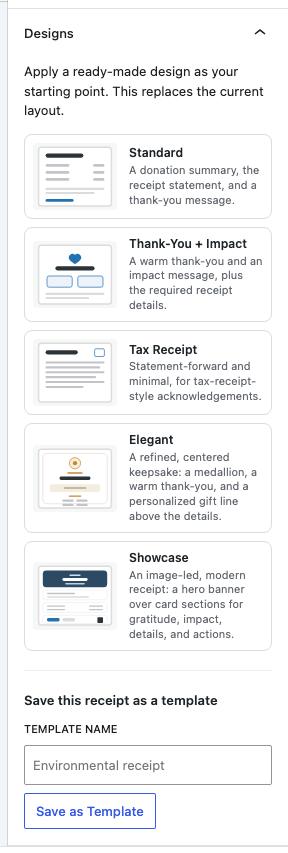
Five built-in designs ship with Custom Receipts: Standard, Thank-You and Impact, Tax Receipt, Elegant, and Showcase. Pick one as a starting point and it’s yours to adjust, not a template you’re locked into. Under the hood, a full set of receipt blocks handles the donation summary, thank-you message, impact statement, organization details, and QR code, each one wired to live donation data instead of placeholder text.
The Personalized Content block lets you show or hide sections by amount, gift type, payment method, country, and more, so different donors can see different receipts without you having to build separate pages. And the give-again QR code is generated on your own server, so nothing about a donor’s visit gets sent to a third party.
A Unique Receipt for Every Campaign
There’s no one-size-fits-all thank-you. Custom Receipts is built around the same idea behind campaign-specific receipt content: every campaign gets its own receipt. Your memorial fund, your year-end appeal, and your monthly giving program can each greet donors with a completely different page, and you set it right where you already manage the campaign.
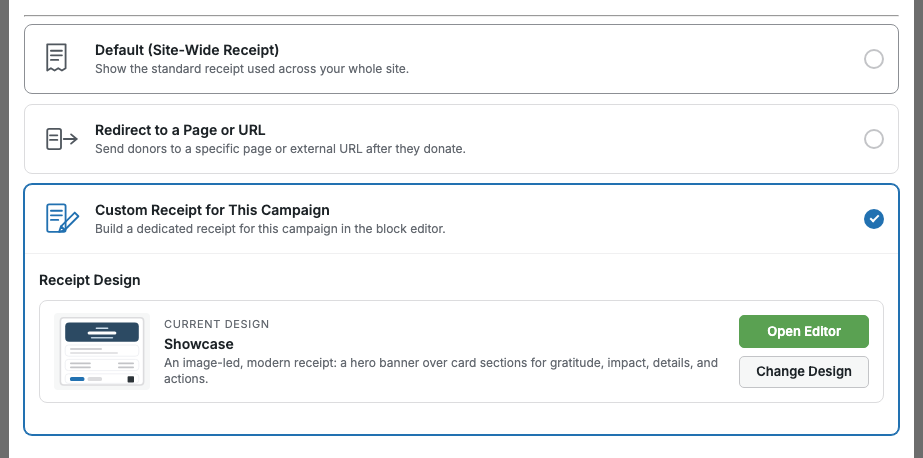
Each campaign gets 3 modes to choose from. Keep the Default receipt for campaigns that don’t need anything special. Choose Redirect to send donors to a dedicated landing page, or any URL, after they give. Or choose Custom to design a one-of-a-kind receipt for that campaign alone, right in the block editor.
Happy with a design? Save it as a template and reuse it across as many campaigns as you like, so a consistent, on-brand thank-you is always one click away, while any campaign that needs something different is free to stand on its own.
Personalize the Receipt for Each Donor
Not every donor needs the same message. The Personalized Content block lets part of your receipt appear only when a gift matches the rules you set, so the right supporters see the right thing, automatically.
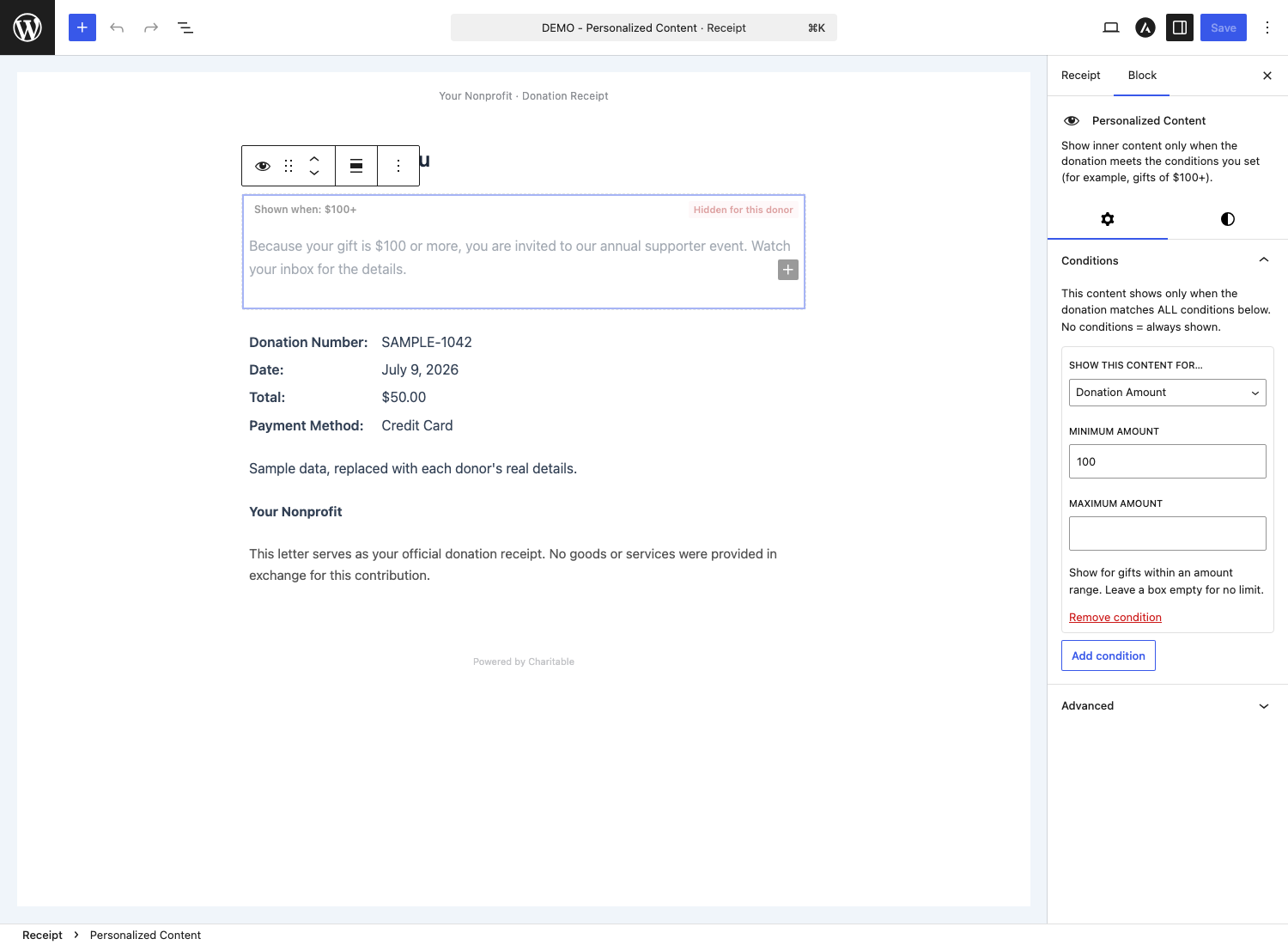
Nonprofits use it to thank major donors with an exclusive event invitation that only shows for gifts of $250 or more, or to welcome monthly supporters with a message that acknowledges their ongoing commitment. A UK charity might display a Gift Aid reminder only to donors in the United Kingdom, while a campaign that accepts offline donations can show mailing and payment instructions only to the donors who chose to pay that way.
Conditions stack, so you can combine them (for example, gifts over $250 from returning donors) and use “Preview as” to see exactly what each type of donor will see before you publish.
Every Block You Need to Build a Receipt
Custom receipts are assembled from a dedicated set of blocks, each one wired to live donation data. Mix and match to build exactly the thank-you page you want:
- The essentials: Donation Summary and Receipt Statement, the official record required on every receipt.
- Gratitude and impact: Thank-You Message, Impact, Receipt Hero, and Icon.
- Details: Organization Details, Donor Details, and Tax Receipt Details.
- Next steps and sharing: Donate Again, Share, Print or Save as PDF, Download PDF Receipt, Track Your Giving, and QR Code.
- Personalization and recurring: Personalized Content, Matching Gifts, Recurring Upsell, and Recurring Details.
Add your own text, images, columns, and buttons alongside them, just like any other block.
Getting Started: Designing Your First Receipt
You can have a custom receipt live in minutes.
Step 1: Open the Receipt Settings
In your WordPress admin, head to Charitable. Create or edit an existing campaign.
Inside the campaign builder, open Settings » Receipt.
Step 2: Customize the Design
Select Custom, then open the receipt in the editor.
Choose a starting design from the Designs panel. You can also adjust the blocks to fit your campaign.
Step 3: Preview and Save
Click Preview On Site to see the receipt rendered with sample donation data before anyone else does.
Save the receipt, and it goes to work on the next donation to that campaign.
Why You’ll Love The New Custom Receipts
Everything happens in the familiar block editor, so no code is required at any point. A welcome walkthrough, a design chooser, and a live “Preview On Site” button guide you from the moment you turn Custom Receipts on.
It plays well with your other add-ons, too: Recurring, Tributes, and Fee Relief are all respected out of the box.
And because QR codes are generated on your own server, nothing about them requires an external call. 🔒
For Agencies and Developers
Hooks, Filters, and Full Customization
Custom Receipts ships with a well-documented set of filters and actions, so you can register your own condition types, add or modify the built-in designs, adjust receipt widths, and shape the rendered output. Everything is namespaced under charitable_custom_receipts_.
Built on the Block Editor
Receipts are composed from native WordPress blocks, so your designs are portable, themeable, and easy to hand off across client deployments.
FAQs on Custom Receipts
Does this require Charitable Pro?
Yes. Custom Receipts needs an active Charitable Pro license (Plus, Pro, or Elite) and Charitable 1.8.17 or later.
Does it change my donation receipt emails or PDF receipts?
No. Custom Receipts changes only the on-screen thank-you page. Your receipt emails and the PDF Receipts add-on are untouched.
What happens to a tribute donation?
Tribute gifts keep their dedicated Charitable Tributes receipt, so that experience is preserved.
If I change a built-in design later, do my existing receipts update?
No. Applying a design copies it into that campaign’s receipt, so each one stays independent and editable. Re-apply a design any time with “Change Design.”
Get Started With Custom Receipts
Custom Receipts is available now for Charitable Pro (Plus, Pro, and Elite), with Charitable 1.8.17 or later. Edit any campaign, open the Receipt settings, and design a thank-you page your donors will remember.
Read the Custom Receipts Documentation →
Charitable Has 1.2+ Million Downloads!
Trusted by millions to power successful fundraising campaigns. Try Charitable risk-free today.
✅ 14-day money-back guarantee
✅ Transparent pricing
✅ Code-free setup
What’s New in Charitable
We also launched several powerful features and improvements recently:
📝
Drop a fully working donation form directly onto any page or post in the block editor, no redirect required.
📱
Donors on mobile can check out instantly with Apple Pay or Google Pay through Mollie.
🤝
New moderation and directory screens let you manage every campaign creator and ambassador in one place.
⚡
Accept donations in India via UPI, QR codes, and major international currencies.
🔔
Built-in push notifications for donation thank-yous, campaign launches, and goal milestones.
🛡️
Real-time bot detection that flags attacks and blocks bad actors before they hit your donation forms.
We’ve been adding to Charitable constantly, features and improvements designed to help you raise more and serve your donors better. See everything we’ve shipped at the Charitable Changelog.
Not yet a Charitable Pro user? Sign up today and get up to 50% off on your plan. We’re confident you’ll love raising funds with Charitable. If, for any reason, Charitable is not the right fit for you, we’ll refund your purchase with our 14-day money-back guarantee. Get Charitable Pro Now »
If you have any questions or need a hand getting set up, our support team is ready to help you make the most of Custom Receipts.
Stay Connected for More Nonprofit Resources
For more tutorials and videos tailored to nonprofits, subscribe to our YouTube channel. We regularly publish expert tips, step-by-step guides on online donations, fundraising strategies, and practical resources to help your organization succeed.
🗞️ Get weekly tips and exclusive guides in your inbox
Join our newsletter →
🎥 Watch step-by-step tutorials and success stories
Subscribe to our YouTube channel →
👩🏽💻 Connect with our community and get daily nonprofit insights
Follow us on LinkedIn →
🥳 Fun reels and non-profit insights
Follow us on Instagram →
👀 Insightful & fun videos to help you grow your cause
Follow us on TikTok→
🌎 Subscribe and follow for general fundraiser tips
Get Fundraiser Tips on TikTok →
Powerful Fundraising Resources
🤖 Use Charitable with Your AI Assistant
⬇️ Download proven strategies, campaign ideas, and expert tools
Get the Fundraising Kit →
💸 Get Free Fundraising Resources
Head to the Charitable Fundraising Hub →
🤔 Got questions about Charitable?
Charitable FAQs →
🏎️ Take Charitable for a spin
Create your Charitable Demo →
Understand non-profit terms and jargon
Non-Profit Glossary →
% Looking for non-profit deals and discounts?
Best Non-Profit Deals and Discounts →








Leave a Reply