
You did not choose your page builder by accident.
You chose Elementor, WPBakery, or Divi because it works the way you think, and because you can build a polished page without touching code. Then, when it came time to add fundraising, you hit a wall: drop in a shortcode, guess at the output, publish, refresh, repeat.
We’re tearing this wall down – Meet Charitable Pro 1.8.17!
This release brings a wave of native fundraising building blocks into all three builders, so donation widgets, countdowns, feeds, leaderboards, and showcases drag, drop, style, and preview right alongside the rest of your page. 🧱
Why Native Page Builder Support Changes How You Build
Switching between your builder and a separate plugin screen breaks your flow, and every context switch is a chance to lose the thread of what you were designing. Worse, shortcode-based elements make you design blind: you cannot see the result until you leave the editor.
Native elements fix both problems. When a donation widget lives in your builder’s own element library, you configure it in the same panel, style it with the same controls, and see it in the same live canvas as everything else on the page. That means faster launches, consistent design, and no code to bridge the gap. And because all three builders render through the exact same engine under the hood, what you build looks identical no matter which one you use.
When You’ll Feel the Difference
A few ways teams put these to work:
⏳ A deadline-driven appeal: Drop a Campaign Countdown into your existing Elementor or WPBakery layout to build urgency, complete with a celebration effect when the goal is hit.
📣 A homepage that proves momentum: Add a live Donation Feed so visitors see the social proof of real people giving right now.
🏆 A donor-recognition page: Place a Donor Leaderboard to celebrate top supporters and spark friendly giving.
🖼️ A “our campaigns” landing page: Use the Campaign Showcase to feature multiple campaigns in a grid or carousel, with search, filters, and badges.
📊 A Divi 5 microsite: Anchor a section with the native Campaign Progress Bar module and watch it preview live on the Divi canvas.
Five New Elementor Widgets
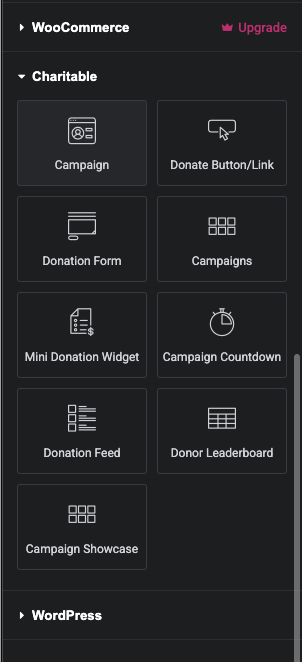
Elementor users get a full set of drag-and-drop widgets, all grouped under a Charitable category in the widget panel, each with live preview in the editor.
⚡ Mini Donation: A compact, high-converting donation widget with preset amounts, impact text, and full color control.
⏳ Campaign Countdown: A live countdown to your deadline, with custom labels, expired-state behavior, and optional confetti or fireworks when time runs out.
📣 Donation Feed: Recent donations for social proof, with list or card layouts, filtering, and live updates.
🏆 Donor Leaderboard: A ranked list of supporters with gold, silver, and bronze styling and rich display options.
🖼️ Campaign Showcase: One or many campaigns in a grid or carousel, with ordering, categories, badges, and search and filters.
Five New WPBakery Elements
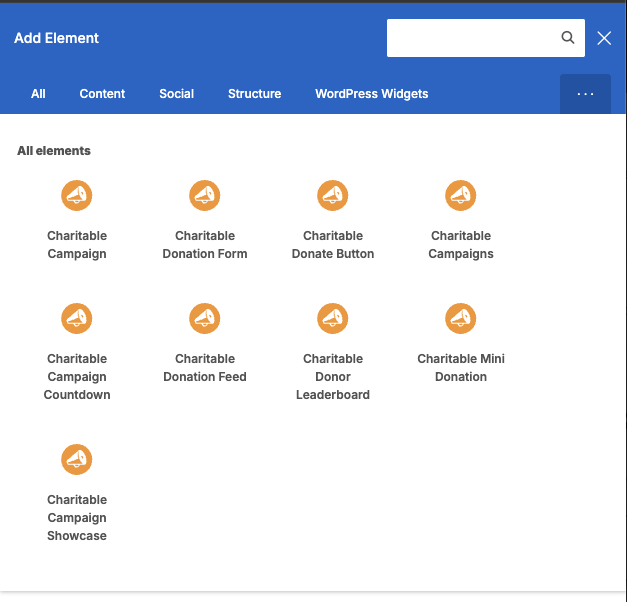
WPBakery gets the same five fundraising building blocks as native elements, listed under Charitable in the element library with the Charitable icon.
🛠️ Full parity: Mini Donation, Campaign Countdown, Donation Feed, Donor Leaderboard, and Campaign Showcase are all available.
🎨 Style in place: Configure each element in the WPBakery editor and see it render on the page.
✅ No shortcodes needed: Add fundraising features from the element library like anything else.
A Native Divi 5 Module
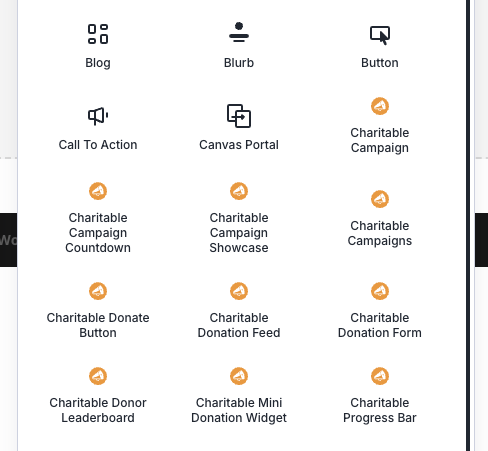
Divi users building in the Divi 5 Visual Builder get a brand-new, fully native module.
📊 Campaign Progress Bar: Drop a live progress bar into any Divi 5 layout and show goal progress in real time, with controls for bar and track color, height, radius, and the donations and goal labels.
👁️ Visual Builder ready: Configure and preview it directly on the Divi canvas, as a first-class Divi 5 module rather than a legacy shim.
The Detail That Makes This Special
Here is what makes these integrations more than a checkbox: all three builders map their controls onto the same underlying block engine and render through the identical server-side code. A Mini Donation widget in Elementor, a Mini Donation element in WPBakery, and the block editor version all produce the same output, pixel for pixel. That means you get true feature parity across builders, consistent results for every client, and no surprises when you switch tools or hand a site off.
Getting Started
Update to Charitable Pro 1.8.17, then open your builder of choice:
Elementor 1. Edit a page with Elementor and open the widget panel. 2. Search for “Charitable” or scroll to the Charitable category. 3. Drag a widget (for example, Mini Donation) onto the page and configure it in the panel, watching the live preview.
WPBakery 1. Edit a page and click Add Element. 2. Find the Charitable category or search for the element you want. 3. Add it, set its parameters, and publish.
Divi 5 1. Open a page in the Divi 5 Visual Builder and add a module (+). 2. Search for Campaign Progress Bar and add it. 3. Select your campaign, adjust the design controls, and preview live on the canvas.
Why You’ll Love This
🧱 Native, not bolted on: Fundraising elements live in your builder’s own library.
👁️ Design with live preview: See widgets update in the canvas as you configure them.
🔁 Identical everywhere: The same rendering engine powers all three builders and the block editor.
🎨 Deep styling: Colors, layouts, badges, and animations are all built in.
🧩 Five tools, two builders, plus Divi 5: Mini Donation, Countdown, Feed, Leaderboard, and Showcase in Elementor and WPBakery, and a native Progress Bar in Divi 5.
For Agencies and Developers
Consistent architecture, easy to reason about
Because Elementor widgets, WPBakery elements, and Divi 5 modules all delegate to Charitable’s shared block renderers, there is a single source of truth for output, so a fix or enhancement lands everywhere at once. Integrations can be switched off with the CHARITABLE_DISABLE_ELEMENTOR_INTEGRATION and CHARITABLE_DISABLE_WPBAKERY_INTEGRATION constants, and campaign caches clear automatically on save through Charitable’s cache hooks.
FAQs on Page Builder Integrations
Does this require Charitable Pro? Yes. These builder integrations ship in Charitable Pro 1.8.17.
Do I need the page builder installed? Yes. Each integration activates only when its builder is active. WPBakery requires version 6.0 or later, and the Campaign Progress Bar module requires Divi 5. On Divi 4, you get Charitable’s existing legacy modules instead.
Are the widgets the same across builders? Effectively, yes. Elementor and WPBakery share the same five elements, and they render through the same engine as the block editor, so output is consistent.
Will these work with my theme? The elements render through Charitable’s standard front-end code, so they display consistently across themes.
Can I still use shortcodes? Yes. Charitable’s shortcodes continue to work. The new widgets and modules simply give you a native, visual way to add the same features.
Get Started With Your Page Builder
The new widgets and modules are available now in Charitable Pro 1.8.17.
Make sure you’re running the latest version of Charitable.
Open Elementor, WPBakery, or Divi and look for the new Charitable elements in your library.
That’s it.
More in Charitable Pro 1.8.17
These integrations are part of a big release. Also new: the Styles tab for visual restyling, the Beacon templates and Campaign Hero field, the Donation Form Gutenberg block, and visual donation amounts with per-amount images.
Charitable Has 1.2+ Million Downloads!
Trusted by millions to power successful fundraising campaigns. Try Charitable risk-free today.
✅ 14-day money-back
✅ Transparent pricing
✅ Code-free setup
What’s New in Charitable
We also launched several powerful features and improvements recently:
📱
Donors on mobile can check out instantly with Apple Pay or Google Pay through Mollie.
🤝
New moderation and directory screens let you manage every campaign creator and ambassador in one place.
⚡
Accept donations in India via UPI, QR codes, and major international currencies.
🔔
Built-in push notifications for donation thank-yous, campaign launches, and goal milestones.
🛡️
Real-time bot detection that flags attacks and blocks bad actors before they hit your donation forms.
🧤
White Glove Migration for GiveWP
Charitable’s team handles your full migration from GiveWP, data and all.
We’ve been adding to Charitable constantly, features and improvements designed to help you raise more and serve your donors better. See everything we’ve shipped at the Charitable Changelog.
Not yet a Charitable Pro user? Sign up today and get up to 50% off on your plan. We’re confident you’ll love raising funds with Charitable. If, for any reason, Charitable is not the right fit for you, we’ll refund your purchase with our 14-day money-back guarantee. Get Charitable Pro Now »
If you have any questions or want help adding these to your site, our support team is ready to lend a hand.
Stay Connected for More Nonprofit Resources
For more tutorials and videos tailored to nonprofits, subscribe to our YouTube channel. We regularly publish expert tips, step-by-step guides on online donations, fundraising strategies, and practical resources to help your organization succeed.
🗞️ Get weekly tips and exclusive guides in your inbox
Join our newsletter →
🎥 Watch step-by-step tutorials and success stories
Subscribe to our YouTube channel →
👩🏽💻 Connect with our community and get daily nonprofit insights
Follow us on LinkedIn →
🥳 Fun reels and non-profit insights
Follow us on Instagram →
👀 Insightful & fun videos to help you grow your cause
Follow us on TikTok→
🌎 Subscribe and follow for general fundraiser tips
Get Fundraiser Tips on TikTok →
Powerful Fundraising Resources
🤖 Use Charitable with Your AI Assistant
⬇️ Download proven strategies, campaign ideas, and expert tools
Get the Fundraising Kit →
💸 Get Free Fundraising Resources
Head to the Charitable Fundraising Hub →
🤔 Got questions about Charitable?
Charitable FAQs →
🏎️ Take Charitable for a spin
Create your Charitable Demo →
Understand non-profit terms and jargon
Non-Profit Glossary →
% Looking for non-profit deals and discounts?
Best Non-Profit Deals and Discounts →







Leave a Reply