
Donors procrastinate. It’s not a character flaw – it’s human nature. Someone lands on your campaign page, feels genuinely moved by what you’re doing, and thinks: I’ll come back and give when I have a minute. Then life happens. The tab gets closed. The moment passes. Your campaign ends without that donation.
This is one of the quietest ways fundraising campaigns underperform. Not because donors don’t care. Because nothing on the page gave the deadline any real weight.
A vague end date tucked into a sidebar doesn’t create urgency – it gets skipped. Donors need to feel the ticking clock. They need to see time actually running out, right now, in front of them. Most campaign pages don’t give them that. And that absence costs real donations.
That’s exactly what the Campaign Countdown Timer delivers. 🎉
It’s a visual countdown block you add directly to any Charitable campaign page – displaying the exact time remaining before your campaign closes, down to the second, updating live as your donors watch.
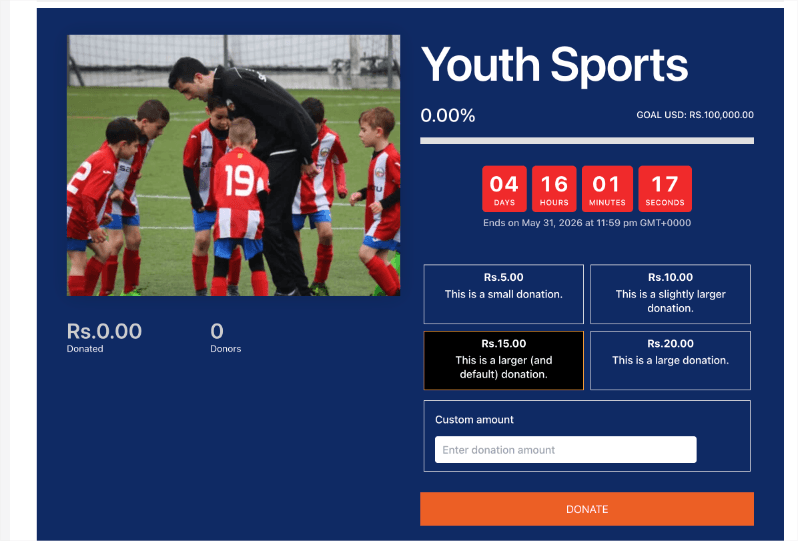
Time is ticking. Now your donors can see it.
Here’s why that shift in presentation can make a real difference.
Why a Countdown Timer Changes Donor Behavior
Urgency is one of the most consistent drivers of donor action. Deadline-driven campaigns regularly outperform open-ended ones – and visual cues amplify that effect considerably. When a donor sees “2 Days, 4 Hours, 17 Minutes, 33 Seconds” ticking down in real time, an abstract deadline becomes concrete. It stops being someday and becomes right now. The question shifts from “should I give?” to “can I afford to wait?”
The Campaign Countdown Timer adds that urgency directly to your campaign page, no extra plugin, no developer, no custom code. You set your campaign’s end date, choose a layout that fits your design, and the timer runs automatically from that moment forward: counting down to the second your campaign closes.
Consider a year-end giving campaign with a matching pledge active through December 31st. Without a countdown, that deadline is just a line of text that donors skim past. With a live countdown front and center, every visitor sees exactly how many hours remain before the match expires. That’s not just information – that’s motivation. It answers the question every hesitating donor is silently asking: why give today rather than tomorrow?
And when your campaign wraps up, you stay in full control of the experience. You can display a custom end-of-campaign message, keep the timer frozen at zero, or hide the countdown entirely – whatever fits your campaign’s story. Donors land on a page that’s intentional and on-brand, not a broken counter or an unexpected blank space where something used to be.
What the Campaign Countdown Timer Can Do
Here’s a look at everything you can configure, most of it in under a minute.
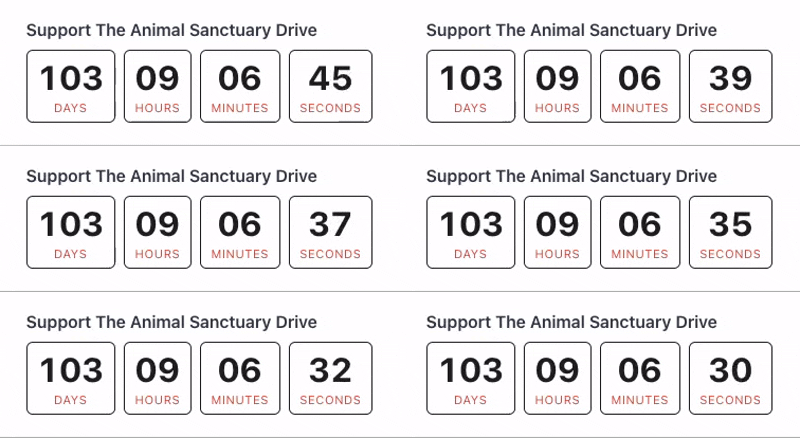
- Live days, hours, minutes, and seconds display: The timer counts down in real time and reads your campaign’s end date automatically. Set the date once and the timer handles the rest.
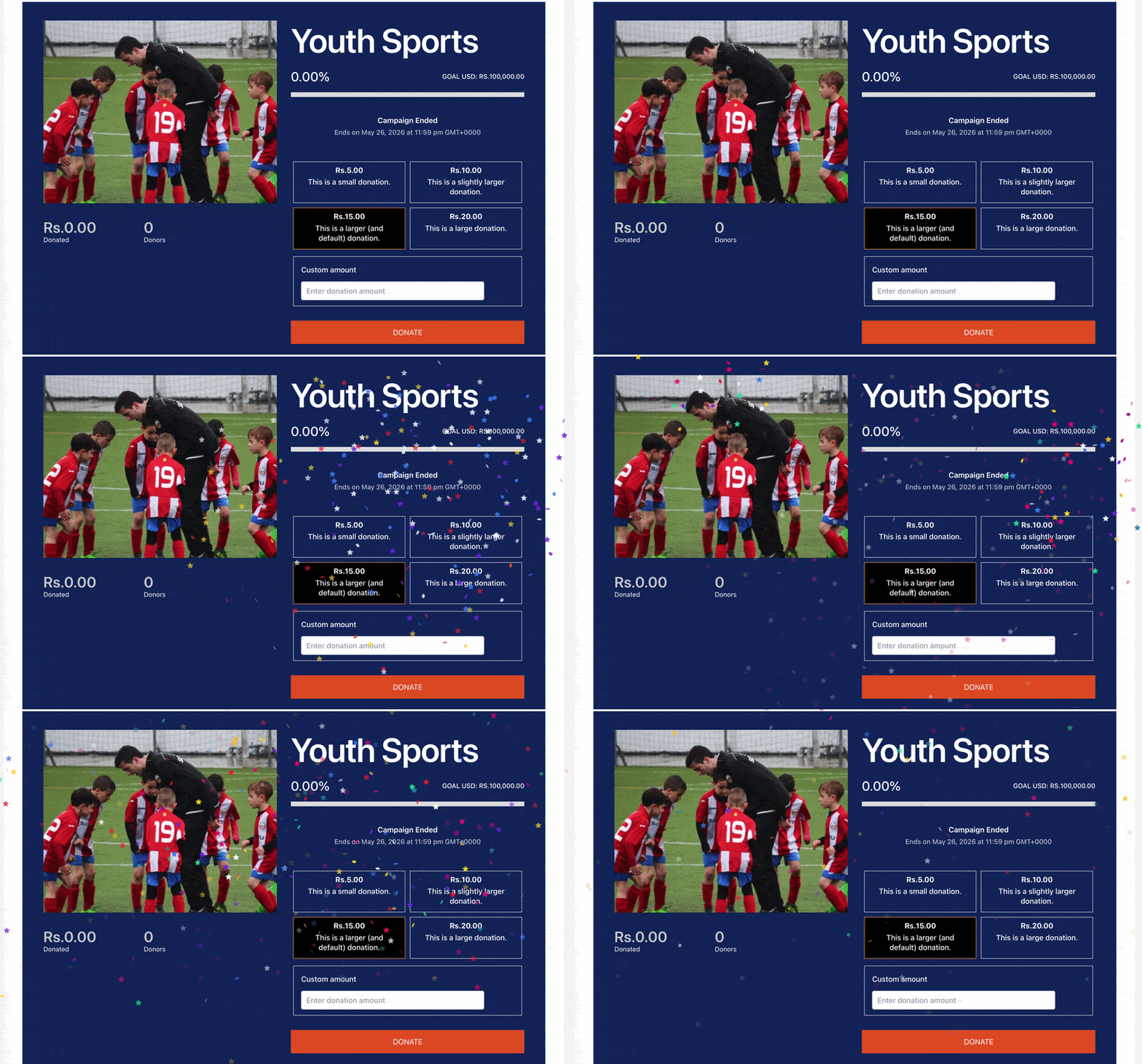
- Celebration effects: Choose Confetti or Fireworks to trigger a burst of animated energy the moment your campaign closes. A small touch that turns a deadline into a moment worth celebrating.
- End-date text position: Control where the end date label appears relative to the timer: above it, below it, or hidden entirely for a cleaner look.
- Full color customization: Independently set the color for numbers, labels, background, and border. Adjust font sizes and border radius too – all from the settings panel, no CSS required.
- Campaign-end behavior: When the timer hits zero, choose exactly what happens: show a custom message, keep the timer frozen at zero, or hide the countdown block completely.
- Custom expired message: Write the exact text your donors see when the campaign closes. The default is “Campaign Ended,” but you can make it anything that fits your campaign’s voice.
- Fully responsive: The timer looks sharp on desktop, tablet, and mobile without any extra configuration on your end.
How to Add a Countdown Timer to Your Campaign
Here’s all it takes. First, make sure you update your Charitable Pro plugin to the latest version available.
In your WordPress dashboard, go to Charitable » Add New to create a campaign. Choose a template and go to the campaign builder. You can also open any existing campaign and enter the campaign builder.
In the Add Layout panel on the left, scroll to the Pro section and click Countdown. You can drag and drop the Countdown block into your campaign where you want it to appear.
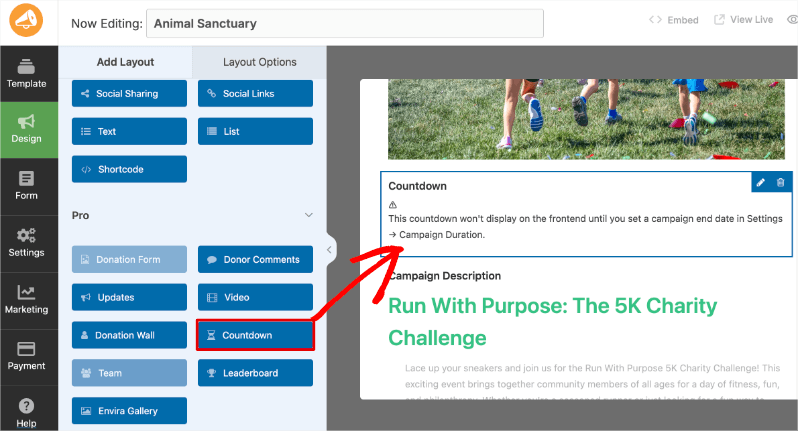
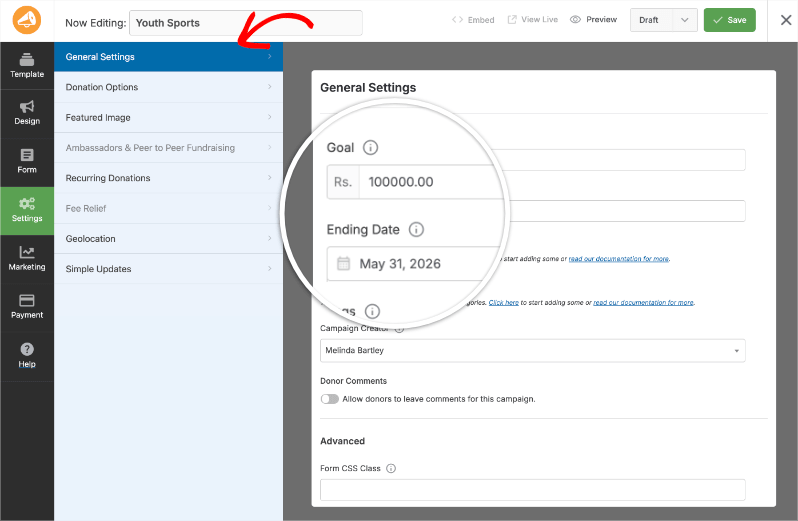
If you haven’t set a campaign end date yet, click Settings in the left sidebar, open General Settings, and fill in the Ending Date field. The timer reads that date automatically once you save.
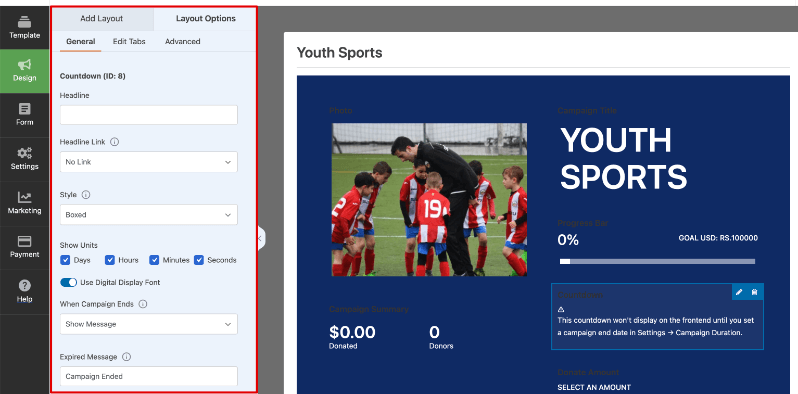
Click back into the Design tab in the left menu, select the Countdown block, and click Layout Options to open the settings panel. Here you can customize the headline, appearance, colors, and so much more.
Set your Celebration Effect – choose Confetti, Fireworks, or leave it as None.
Use the End-Date Text Position dropdown to show the end date above the timer, below it, or hide it. Under Countdown Colors, set individual colors for the Number, Label, Background, and Border. Adjust font sizes and border radius to match your campaign’s design.
Scroll down to When Campaign Ends and choose your preferred behavior: Show Message, Keep Timer at Zero, or Hide Countdown. If you choose Show Message, fill in the Expired Message field with your closing text.
Click Save. The timer is live on your campaign page.
Takes less than five minutes from start to finish. No developer needed.
Follow the full tutorial here »
Why You’ll Love This
The setup is fast. The impact isn’t.
- 🕐 Donors see the deadline and act on it – a live countdown makes “I’ll donate later” a much harder rationalization when the clock is right there
- 🎉 Confetti or fireworks when the campaign closes – mark the moment with a celebration instead of silence, and give donors a reason to share the finish line
- 🎨 Matches any campaign’s design without code – independent color controls for every element mean the timer looks like it belongs, not bolted on
- ⚡ Live in minutes, not hours – add the block, configure a few settings, hit save
- 📱 Works on every device, automatically – fully responsive with no extra effort on your end
Available on All Charitable Pro Plans
The Campaign Countdown Timer is included in every Charitable Pro plan – Basic, Plus, Pro, and Elite – starting at $69/year for a single site. Every display option, every celebration effect, and every color control are included. No add-ons, no extras, no transaction fees taken from your donations.
Not yet on Charitable Pro? Every plan comes with a 14-day money-back guarantee. Try it completely risk-free, no questions asked.
A countdown timer is one of those features that takes minutes to set up and quietly changes the outcome of campaigns you’re already running – not because it adds complexity, but because it removes the one thing that lets hesitant donors off the hook.
Already on a Charitable Pro plan? Check out the Campaign Countdown Timer documentation to get it configured on your next campaign. Questions? Our support team is ready to help.
Looking for developer documentation? Head to our About Campaign Countdown guide »
Not yet a Charitable Pro user? Sign up today and get up to 50% off on your plan. We’re confident you’ll love raising funds with Charitable. If, for any reason, Charitable is not the right fit for you, we’ll refund your purchase with our 14-day money-back guarantee. Get Charitable Pro Now »
Stay Connected for More Nonprofit Resources
For more tutorials and videos tailored to nonprofits, subscribe to our YouTube channel. We regularly publish expert tips, step-by-step guides on online donations, fundraising strategies, and practical resources to help your organization succeed.
🗞️ Get weekly tips and exclusive guides in your inbox
Join our newsletter →
🎥 Watch step-by-step tutorials and success stories
Subscribe to our YouTube channel →
👩🏽💻 Connect with our community and get daily nonprofit insights
Follow us on LinkedIn →
🥳 Fun reels and non-profit insights
Follow us on Instagram →
👀 Insightful & fun videos to help you grow your cause
Follow us on TikTok→
🌎 Subscribe and follow for general fundraiser tips
Get Fundraiser Tips on TikTok →
Powerful Fundraising Resources
🤖 Use Charitable with Your AI Assistant
⬇️ Download proven strategies, campaign ideas, and expert tools
Get the Fundraising Kit →
💸 Get Free Fundraising Resources
Head to the Charitable Fundraising Hub →
🤔 Got questions about Charitable?
Charitable FAQs →
🏎️ Take Charitable for a spin
Create your Charitable Demo →
Understand non-profit terms and jargon
Non-Profit Glossary →
% Looking for non-profit deals and discounts?
Best Non-Profit Deals and Discounts →






