
Should your nonprofit stay quiet on Black Friday and save everything for Giving Tuesday?
The inbox is full of sales, everyone is shopping, and asking for a donation in the middle of all that can feel wrong.
But people are not too busy to spend that weekend. They are spending more than ever.
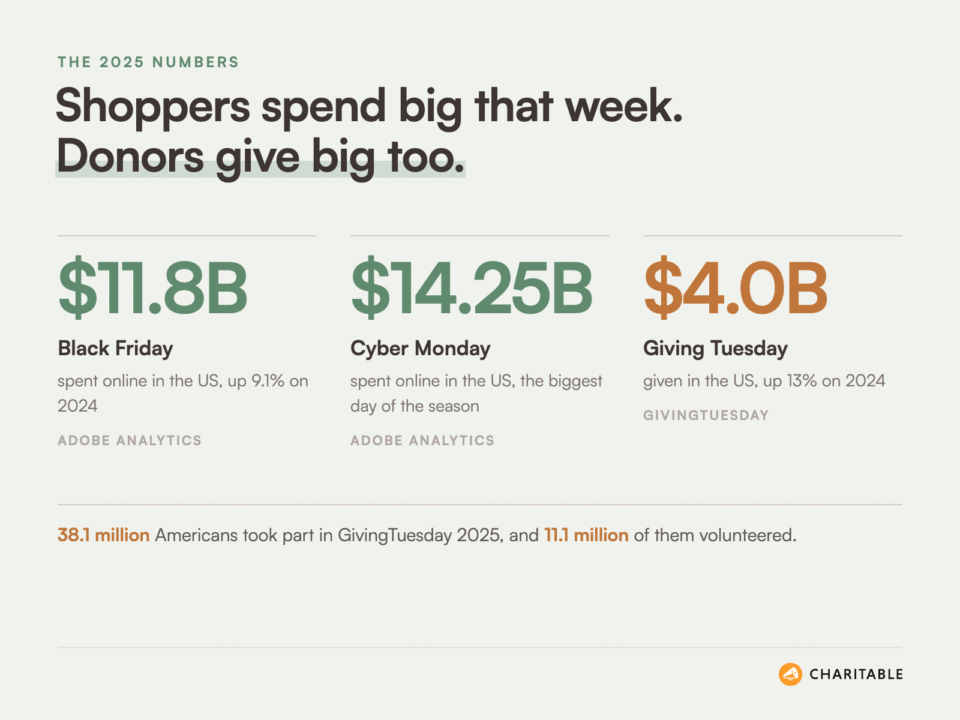
Adobe reported that US shoppers spent a record $11.8 billion online on Black Friday 2025, and $44.2 billion across the whole Cyber Week. Four days later, Americans gave $4.0 billion on GivingTuesday 2025, up 13% on the year before.
So the real question is how to take part without sounding like another store. In this post, I’ll clear up the myths that keep nonprofits on the sidelines.
Then I’ll share 31 practical ideas for the Black Friday to Giving Tuesday week. You don’t need all of them, so pick the 3 or 4 that fit your team and your donors.
What’s In This Guide
- Should Nonprofits Stay Out of Black Friday?
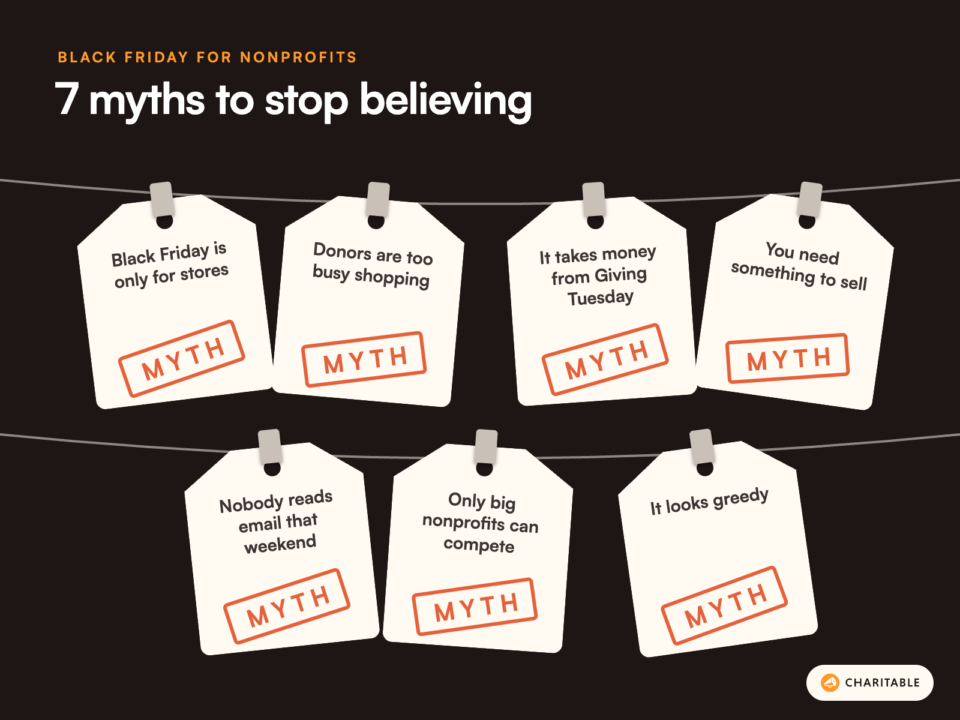
- 7 Black Friday Myths Nonprofits Can Stop Believing
- Myth 1. Black Friday Is Only for Stores
- Myth 2. Donors Are Too Busy Shopping to Give
- Myth 3. A Black Friday Ask Takes Money Away From Giving Tuesday
- Myth 4. You Need Something to Sell
- Myth 5. Nobody Will See Your Email That Weekend
- Myth 6. Only Big Nonprofits Can Compete
- Myth 7. Fundraising on Black Friday Looks Greedy
- Black Friday Ideas That Offer Donors Something Different
- Black Friday Ideas With Local Businesses
- Black Friday Ideas for Selling With a Purpose
- Black Friday Weekend Ideas That Build Up to Giving Tuesday
- How to Run Your Black Friday Campaign on Your Own Website
- Cyber Monday Fundraising Ideas for Nonprofits
- Ideas for After the Weekend Ends
- Where to Start This Black Friday
- FAQs on Black Friday Fundraising for Nonprofits
- Should nonprofits take part in Black Friday?
- Will a Black Friday appeal hurt our Giving Tuesday results?
- When is Giving Tuesday in 2026?
- When is Black Friday in 2026?
- When is Cyber Monday in 2026?
- Can a small nonprofit run a Black Friday campaign?
- Should a nonprofit offer Black Friday discounts?
- Do I need a special tool to run a Black Friday campaign on my website?
Should Nonprofits Stay Out of Black Friday?
My short answer is no. But I also don’t think you should copy what retailers do.
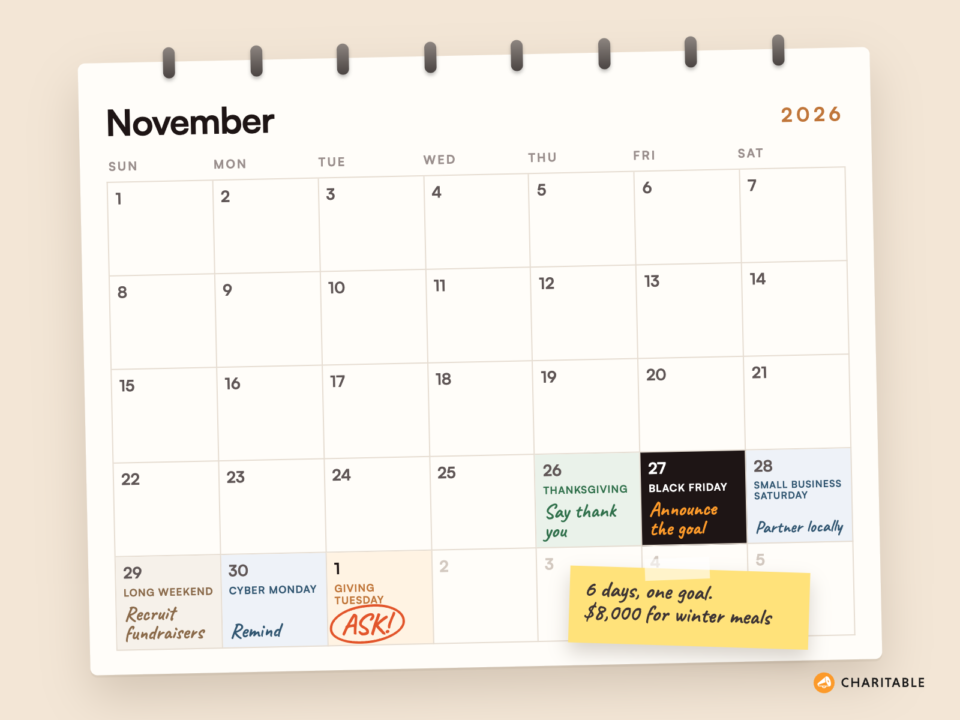
The best way to see Black Friday is as the first day of a 5-day giving season. In 2026, the dates line up like this.
- Thursday, November 26. Thanksgiving in the US, a natural day to say thank you.
- Friday, November 27. Black Friday, the busiest shopping day of the year.
- Saturday, November 28. Small Business Saturday, when people shop at local stores.
- Monday, November 30. Cyber Monday, the biggest online shopping day.
- Tuesday, December 1. Giving Tuesday, the global day of giving.
Your donors are thinking about money, gifts and the people they love all week. That’s a good moment to remind them about your cause. If you stay silent until Tuesday, you miss 4 days when they are already in a giving and buying mood.
There is a fair case on the other side, though. A very small team may only have the energy for one big push, and Giving Tuesday is the day donors expect to hear from nonprofits.
If that’s you, don’t run a full Black Friday appeal. Use the weekend to warm people up for Tuesday instead. Several of the ideas below do exactly that.
We’ve compared the 2 days in more detail in Giving Tuesday vs. Black Friday, if you want to see which one deserves more of your time. For now, let’s look at the beliefs that keep many nonprofits out of the weekend completely.
7 Black Friday Myths Nonprofits Can Stop Believing
Most of the reasons I hear for skipping Black Friday come from a few common ideas. Some have a little truth in them. None of them are a good reason to stay silent for the whole week.
Myth 1. Black Friday Is Only for Stores
Black Friday started as a retail day, but it has turned into a week when everyone talks about spending. Some of the best-known Black Friday campaigns had nothing to do with discounts.
In 2015, the outdoor store REI closed its stores on Black Friday and asked people to spend the day outside instead. People still talk about it 10 years later. A nonprofit can offer the same kind of alternative, and it fits your mission much better than it fits a store.
Myth 2. Donors Are Too Busy Shopping to Give
Shoppers have their wallets out and their card details saved. Giving a $25 donation takes the same steps as buying a $25 gift.
The clearest proof is Patagonia. In 2016, the company gave away 100% of its Black Friday sales to environmental groups. It brought in $10 million, 5 times what it expected.
People were happy to spend on Black Friday when they knew the money was doing good.
Myth 3. A Black Friday Ask Takes Money Away From Giving Tuesday
This is the worry I hear most. It makes sense if you send the same appeal on Friday and again on Tuesday.
The fix is to give each day its own job. Friday announces the goal, Monday reminds, and Tuesday asks. When donors already know the goal and the deadline before Tuesday, your Giving Tuesday email has a story to finish instead of starting from zero.
Myth 4. You Need Something to Sell
You don’t need a product or a discount. Your “product” is the impact of a gift.
A food bank can say that $30 fills a family’s table for a week. An animal shelter can say that $50 covers a dog’s first vet visit. Donors understand prices this week, so give them one that means something.
Myth 5. Nobody Will See Your Email That Weekend
Inboxes are crowded, and I won’t pretend otherwise. But your donors are still reading, and many of them are looking for something that isn’t a sale.
What gets lost is an email that looks like every other sale. A plain subject line from a real person, such as “A thank you before the sales start”, stands out next to 40 emails shouting “50% off”. Your donors signed up to hear from you, so they will notice you.
Myth 6. Only Big Nonprofits Can Compete
You are not competing with Amazon. You are reaching people who already care about your cause.
A small group has a real advantage here. You can partner with the coffee shop down the road, name your volunteers in a social post and send a personal thank you to every donor. Big brands can’t do any of that.
Myth 7. Fundraising on Black Friday Looks Greedy
It only looks greedy if you copy the language of a sale. “Last chance!” and “Don’t miss out!” feel wrong coming from a charity.
Gratitude, honesty and a clear goal never look greedy. If your message says thank you first and shows what the money will do, most donors will see it as a welcome break from the sales.
With those myths out of the way, here are the ideas. I’ve grouped them by the kind of campaign, so you can go straight to the type that suits you.
Black Friday Ideas That Offer Donors Something Different
These ideas work by giving people a break from the shopping noise. They are the easiest place to start if you’ve never done anything on Black Friday before.
#1 Turn Black Friday Into a “Give Friday” Campaign
Give the day a new name and a single goal. “Give Friday” or “Kind Friday” tells donors straight away that this is not another sale.
Keep the campaign short, from Friday morning to Sunday night, with a clear target such as “$5,000 for winter coats”. A short window gives people a reason to act now instead of later.
A new name turns a shopping day into a giving day your donors can join.
To set it up, create a separate campaign page with its own goal and end date. You can follow our guide on creating time-sensitive or goal-based fundraising campaigns.
#2 Launch a “Buy Nothing, Give Something” Challenge
Ask supporters to skip one purchase they don’t need and give the money to your cause instead. Many people already feel tired of the shopping rush, so this gives them a positive way to say no to it.
Ask people to post what they skipped and tag your organization. “I skipped a new phone case and gave $20 to the shelter” is an easy post to write and share.
This idea lets people feel good about spending less, and your cause gets the money.
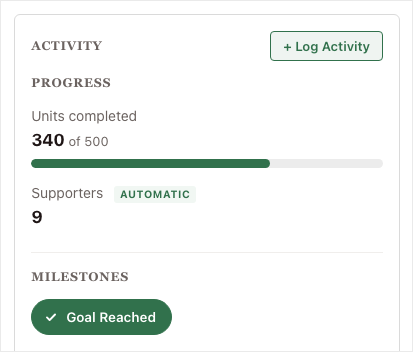
Put a simple progress bar on the page so people can see the total grow as more supporters join.
Charitable’s fundraising progress bar comes with the free plugin.
#3 Give Your Impact a Price Tag
Shoppers spend the weekend comparing prices. Meet them there by showing what each amount does.
For example, a food bank could say that $15 packs a bag of fresh groceries, $30 fills a family’s table for a week, and $100 covers a month of meals for a senior. Real prices make a gift feel as concrete as anything in a shopping cart.
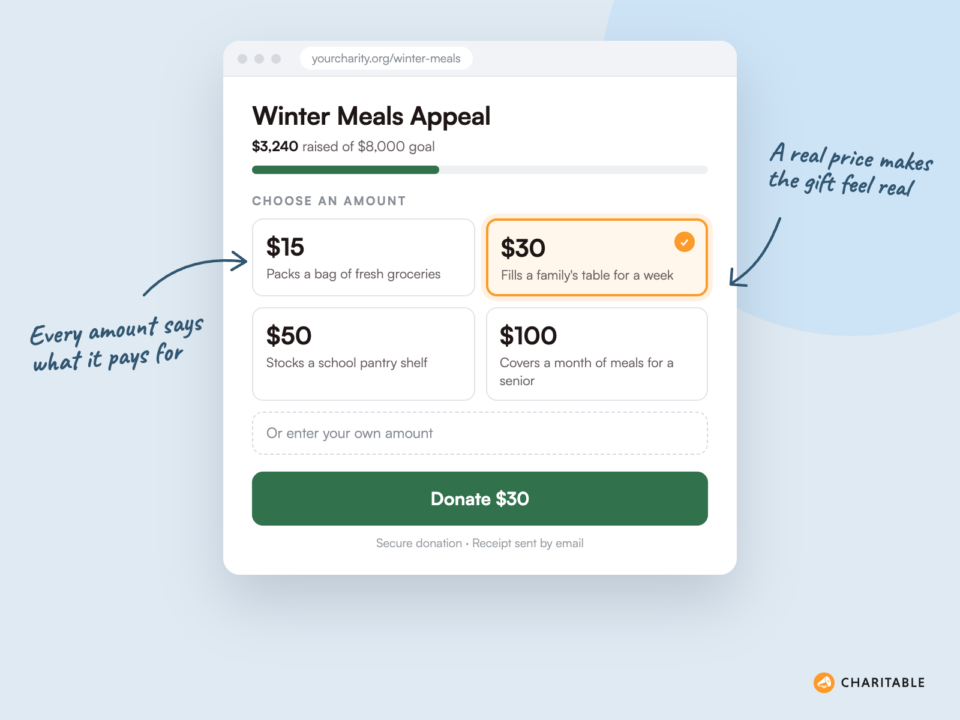
A donor who can see what $30 buys finds it easier to give $30.
Add these amounts as suggested donation levels on your form, each with a short description.
Charitable’s donation forms let you set them up without code.
#4 Offer a 24-Hour Matching Gift
A store has a doorbuster deal. You can have a doorbuster match, where every gift on Black Friday is doubled up to a set amount.
Ask a board member, a local business or a long-time donor to put up the match a few weeks early. Then tell donors exactly when it starts and ends.
A match doubles the impact of every gift, and the deadline gives people a reason to act today.
Say “Every gift is doubled until midnight, up to $2,500” in your email subject, on the campaign page and in your social posts. Repeat the same words everywhere so nobody is confused.
#5 Host a Volunteer Day Instead of a Sale
This takes the REI idea and applies it to your cause. Invite people to spend Black Friday morning cleaning a park, packing food boxes or walking shelter dogs.
Volunteering also counts on Giving Tuesday. GivingTuesday’s own data shows 11.1 million Americans volunteered on GivingTuesday 2025, up 20% on the year before.
People who give their time this week are more likely to give money next week.
At the end of the day, thank your volunteers and share a link to your Giving Tuesday campaign. Many of them will want to keep helping.
#6 Make a “Giving List” to Go With the Gift List
Everyone is writing gift lists this week. Invite supporters to add one more name, your cause.
Share a simple printable or a social graphic with space for “people I’m buying for” and “causes I’m giving to”. It’s a light, friendly way to ask without sounding pushy.
When your cause sits on the same list as family and friends, the gift feels personal.
Link the graphic to a single campaign page so people who are inspired can give in a few clicks.
Black Friday Ideas With Local Businesses
Businesses want to look good this week, and many want to be linked to a local cause. That makes it one of the easiest times of year to ask for a partnership.
#7 Ask a Shop to Give a Share of Its Sales
Ask a local store, cafe or online shop to give 5% or 10% of its Black Friday sales to your nonprofit. You don’t need Patagonia’s 100% to make it work.
The business gets a good story to tell its customers. You get the money and you reach new people who may never have heard of you.
Both sides gain, so most business owners are happy to listen.
Approach businesses by early November. Give them a ready-made sign for the window and a social post they can copy.
#8 Team Up for Small Business Saturday
Small Business Saturday is all about supporting your local community, and so is your nonprofit. It’s a natural fit.
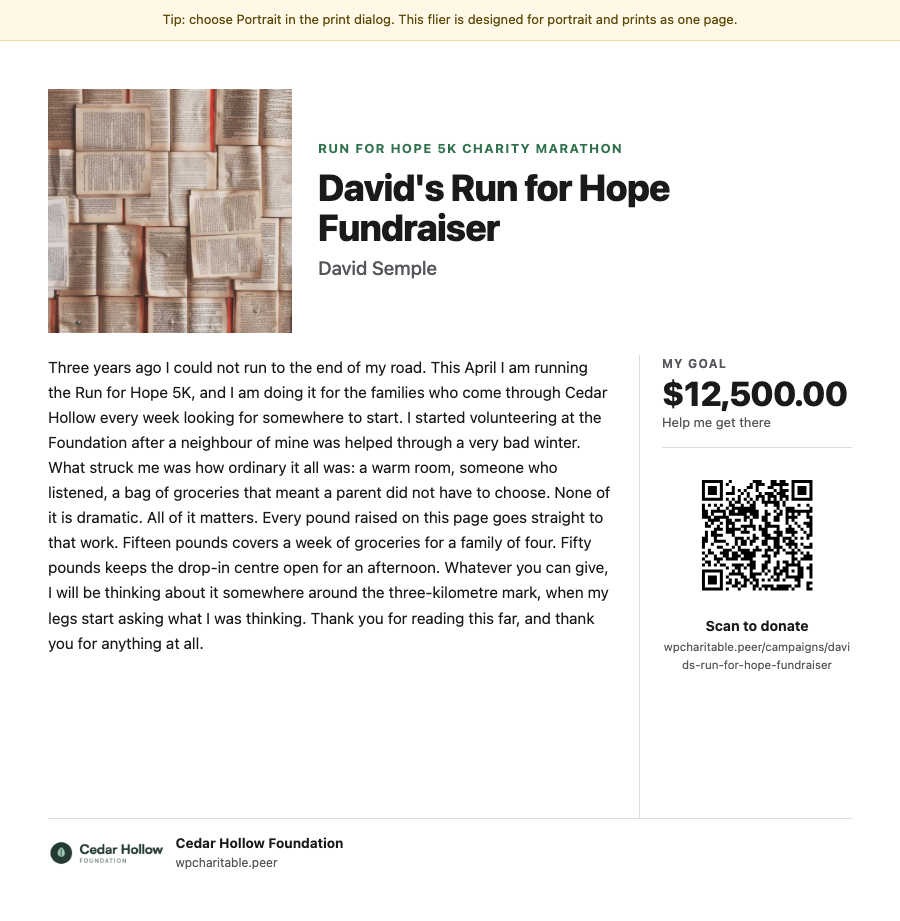
Ask a few nearby businesses to hand out a flyer with every purchase. Or set up a table outside a busy shop with a QR code that goes straight to your donation page.
People who shop local already care about their town, and many of them will care about your work too.
Test the QR code on 2 or 3 phones before you print it. Make sure it opens a page that works well on a small screen.
#9 Set Up a Round-Up at the Register
Ask a partner shop to invite customers to round up their total to the nearest dollar for your cause. Each gift is small, but a busy weekend adds up quickly.
Give staff one sentence to say at the till, such as “Would you like to round up for the animal shelter today?” Short and clear works best.
Small gifts from many people can match one big gift from one person.
After the weekend, share the total publicly and thank the business by name. It helps them agree to do it again next year.
#10 Ask a Sponsor to Fund Your Giving Tuesday Match
Some businesses don’t want to run anything in the store, but they would happily put money into a match. Black Friday week is a good time to ask because they are thinking about their year-end giving too.
Give them clear benefits, such as their name on the campaign page and a thank you in your emails.
A business match brings in new money and makes every donor’s gift count twice.
Our Giving Tuesday toolkit has more ideas for planning your match.
#11 Partner on a “Buy One, Give One” Offer
A local bakery could give a loaf to your food bank for every loaf it sells on Black Friday. A bookshop could donate a book to your literacy program for every book sold.
These offers work well because shoppers can see exactly what their purchase does. They also bring you items you would otherwise have to buy.
A gift that comes with a purchase feels like a bonus to the shopper.
Agree on a limit in advance, such as “up to 200 loaves”, so the business knows its cost.
Black Friday Ideas for Selling With a Purpose
If you do have something to sell, Black Friday is the week people are looking to buy. These ideas turn a sale into support for your mission.
#12 Run a Mission Merch Sale
T-shirts, mugs, calendars and tote bags make good holiday gifts. When they carry your logo or message, every gift also spreads the word about your cause.
Tell buyers how much of each sale goes to the mission. “$12 from every mug pays for a night of shelter” is far stronger than “proceeds support our work”.
Good merch works twice, once as a gift and once as a conversation starter.
A Black Friday price is fine here, because this is a real product. Keep the discount small so the mission still gets a fair share.
#13 Sell “Gift of Impact” Cards
Many people struggle to buy for the person who has everything. Offer them a donation made in that person’s name, with a card to give on the day.
Start by creating a few set amounts, such as $25, $50 and $100, and design a simple card for each. The buyer gets a meaningful gift, and the person who receives it learns about your cause.
A gift card that changes a life is an easy sell in a week of gift shopping.
Send the card as a PDF in the thank-you email so the buyer can print it or forward it straight away.
#14 Release Tickets for Your Holiday Event
If you hold a holiday party, a winter gala or a New Year’s fun run, open ticket sales on Black Friday. People are already in a buying mood and planning their December.
An early-bird price for the weekend only gives people a fair reason to buy now.
Early ticket sales give you a clear idea of numbers and bring in cash before the event.
You can sell tickets to your fundraising event with WordPress right on your own site.
#15 Offer an Early Membership Renewal
If your nonprofit has members, such as a museum, a zoo or a community group, Black Friday is a great time to ask for renewals. Add a small thank-you gift for people who renew before Giving Tuesday.
Memberships also make great holiday gifts. Remind people they can buy one for a friend or family member.
Members who renew early give you money you can plan with for the year ahead.
Send the renewal email to current members only, and keep your general appeal for everyone else.
Black Friday Weekend Ideas That Build Up to Giving Tuesday
If you only have the energy for one big ask, use the weekend for these. They don’t ask for money on Friday, but they make Tuesday’s appeal much stronger.
#16 Send a Thanksgiving Thank-You With No Ask
Send a short email on Thanksgiving Day that only says thank you. Share one story of what your donors made possible this year, and don’t include a donate button.
It’s a small thing, but donors notice it. When your appeal arrives a few days later, it comes from someone who already thanked them.
Thanking people before you ask makes the ask feel fair.
Our guide to thank-you emails for donations has templates you can adapt.
#17 Announce Your Giving Tuesday Goal on Black Friday
Tell donors on Friday what you’re raising money for on Tuesday, and how much you need. “On Tuesday, we’re raising $8,000 to keep our after-school program open in January” is clear and easy to remember.
That way, Tuesday’s email doesn’t have to explain everything from the start. It just has to say “Today’s the day”.
A goal people already know is a goal people want to see you reach.
Need ideas for the goal itself? Take a look at these Giving Tuesday ideas for nonprofits.
#18 Unlock Your Match Early
If you have a Giving Tuesday match, consider opening it on Black Friday for your most loyal donors. Call it an “early access” match.
Loyal donors like being treated as insiders. And when part of the goal is already raised by Tuesday, new donors see that the campaign is working.
A campaign that’s already moving feels safer to join.
Send this email only to people who have given before, with a personal note from your director.
#19 Add a Countdown to Giving Tuesday
Every store has a countdown clock on Black Friday. A countdown on your campaign page shows donors exactly how long they have.
It also gives you something new to post each day, such as “3 days to go” or “24 hours left”.
A visible deadline helps people decide today rather than “later”.
Charitable’s campaign countdown timer adds one to your campaign page without any code.
#20 Recruit Peer-to-Peer Fundraisers Over the Long Weekend
Many people have time off between Thanksgiving and Monday. That makes it a good time to ask your biggest fans to set up their own fundraising page for Giving Tuesday.
A supporter who shares their own page reaches friends and family you could never reach alone. Give them a short guide, a photo and a sample post to make it easy.
Each fundraiser brings their own circle of people to your cause.
Charitable’s peer-to-peer fundraising feature lets supporters create their own pages linked to your main campaign. It’s in the Charitable Pro plugin, Pro plan and higher.
#21 Grow Your List Before Tuesday
Your Giving Tuesday email can only reach people on your list. Use the weekend to bring in new sign-ups.
Offer something useful in return, such as a free holiday volunteering guide or a behind-the-scenes video. Promote it on social media and at any partner shops.
Every new subscriber on Saturday is one more person who hears your Tuesday appeal.
For donors who don’t want to share an email address, web push notifications reach them with one click. Here are some push notification ideas for nonprofits to try alongside your email list.
How to Run Your Black Friday Campaign on Your Own Website
Every idea so far needs a place for donors to land. If that place is a third-party page, your donors leave your website, and you may not even get to keep their details for your Giving Tuesday email.
If your nonprofit’s website runs on WordPress, Charitable lets you run the whole week on your own site. More than 10,000 nonprofits use it, and you don’t need a developer to set it up.
Here’s what it gives you for a Black Friday to Giving Tuesday campaign.
- A campaign page for each idea. Create unlimited campaigns, so Give Friday, your merch sale and Giving Tuesday can each have their own page, goal and end date.
- A live progress bar. Donors can watch the total climb, which encourages more people to join in.
- Your donor data stays yours. Every donor’s details stay on your website, ready for your thank-you emails and your next appeal.
- Donors stay on your site. People give on a page that looks like your brand, not someone else’s.
- Payouts go straight to you. Money goes from Stripe, PayPal or your other payment gateway directly to your account.
- Automatic receipts. Every donor gets a receipt the moment their gift is completed.
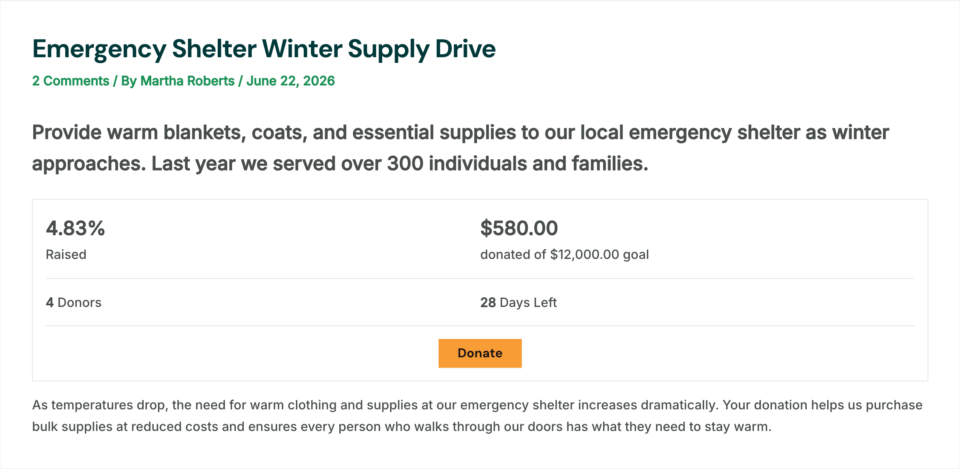
The free plugin covers everything on that list. You can start with Charitable Lite today and have your first campaign page live in a few minutes.
When you’re ready to do more, the Charitable Pro plugin adds the tools that help during a busy giving week.
- Donor leaderboards. Show the latest and top donors on your campaign page, Basic plan and higher.
- Recurring donations. Turn a one-time Black Friday donor into a monthly supporter, Plus plan and higher.
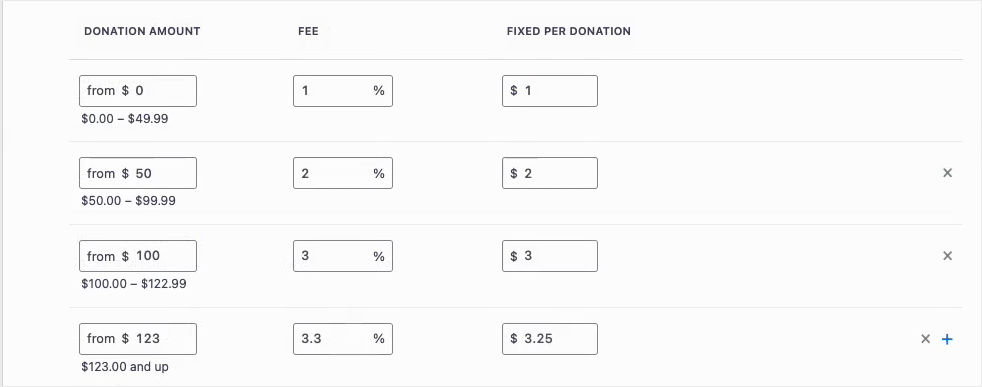
- Fee Relief. Let donors cover the payment processing fee, so more of each gift reaches your mission, Plus plan and higher.
- Email marketing connections. Add new donors straight to Mailchimp and other email tools, Plus plan and higher.
- Peer-to-peer fundraising. Let supporters raise money on their own pages, Pro plan and higher.
- Campaign updates. Tell everyone who gave how the campaign is going, Pro plan and higher.
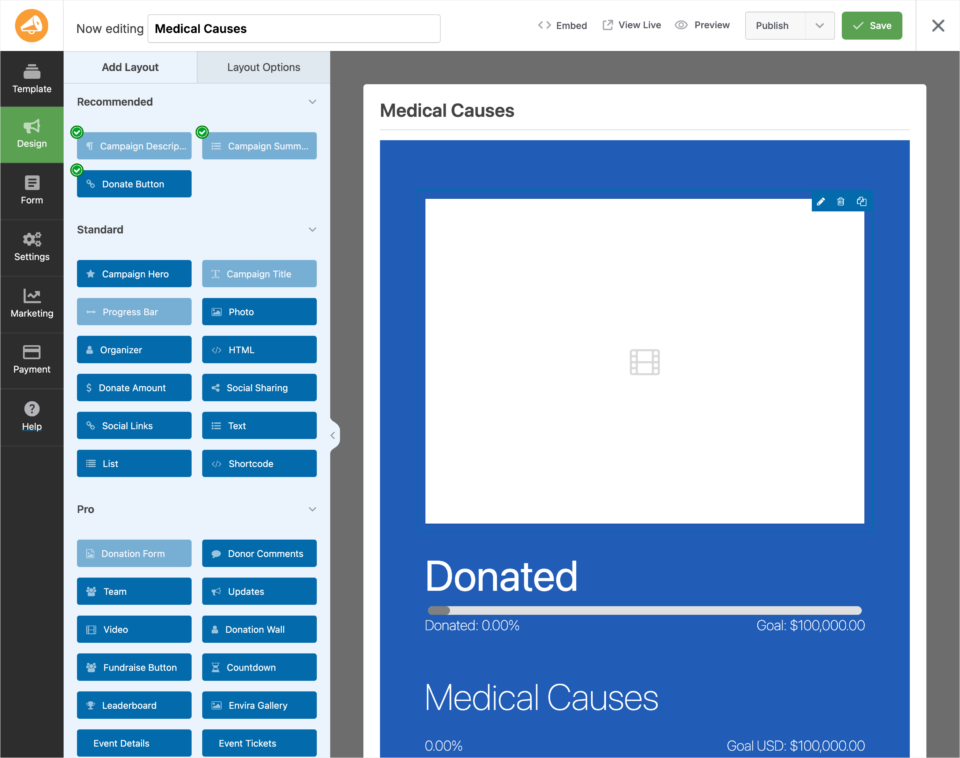
Paid plans start at $69 a year on sale, and Charitable takes no percentage of your donations on any paid plan. You can compare everything in Charitable Lite vs Pro, and every paid plan comes with a 14-day money-back guarantee.
Get Charitable now and launch your Black Friday campaign »
Now let’s look at the 2 days at the end of the week, Cyber Monday and the days that follow.
Cyber Monday Fundraising Ideas for Nonprofits
Cyber Monday is the biggest online shopping day of the year. Adobe reported $14.25 billion in US online spending on Cyber Monday 2025. It’s also the day before Giving Tuesday, so these ideas focus on getting your donation page ready.
#22 Send a “Cyber Monday for Good” Email
On Monday, send a short email that says “Before you finish your online shopping, add one gift that matters”. Link it to your Giving Tuesday campaign.
Some donors prefer to give a day early, and that’s fine. Their gift still counts toward Tuesday’s goal.
Monday’s email catches the people who won’t open anything on Tuesday.
Our nonprofit email marketing guide covers how to plan a short series like this one.
#23 Make Your Donation Form Easy on a Phone
A lot of Cyber Monday shopping happens on phones, between other tasks. If your donation form is long or hard to tap, people will give up.
To test it, open your form on your own phone and make a small gift. Count the fields, check the buttons and make sure the payment step works.
A form that works in under a minute on a phone keeps more donors to the end.
Here’s how to stop donors from abandoning your donation form, with a list of fixes you can make in an afternoon.
#24 Offer a Monthly Gift Like a Subscription
Cyber Monday is full of subscription offers. A monthly gift works the same way, and it’s often easier for donors to give $15 a month than $180 at once.
Give your monthly program a name, such as “The Warm Home Circle”, and say what a year of monthly gifts achieves.
One monthly donor from this week can keep giving for years.
Read the benefits of monthly giving, then turn on recurring donations in Charitable.
#25 Ask Donors to Cover the Fees
Card fees take a small bite out of every gift, and in a busy week that adds up. Add a simple checkbox that lets donors cover the fee for you.
Many donors are happy to add a little extra when they know the full gift will reach the cause.
The same donors, giving the same amount, can bring in more for your mission.
Charitable’s Fee Relief feature adds the checkbox to your form. It’s in the Charitable Pro plugin, Plus plan and higher.
#26 Show Who Has Already Given
Online shoppers read reviews before they buy. Donors look for the same kind of proof that others trust you.
Showing a list of recent donors on your campaign page tells new visitors that real people are giving right now.
Seeing other donors makes it easier to become one.
Learn more about social proof for nonprofits, and add a donor leaderboard to your campaign.
Ideas for After the Weekend Ends
What you do after Giving Tuesday decides whether this week’s donors give again. These last ideas help you keep them.
#27 Share the Results Publicly
Tell everyone how the week went, even if you didn’t reach your goal. “Together you raised $6,200 for winter coats, which means 124 children will be warm this winter” is a message donors love to read.
Post it on your website, on social media and in your next email.
Donors who see the result trust you with their next gift.
If you didn’t reach your goal, say so honestly and extend the campaign through December.
#28 Thank Every Donor Within 48 Hours
Your automatic receipt goes out straight away, but a personal thank you means more. Aim to send one within 2 days of the gift.
For first-time donors, a short phone call or a handwritten card can make a big difference.
A fast thank you shows the gift was noticed.
Our post on why your donation receipt email matters shows how to make the receipt itself feel like a thank you.
#29 Send Campaign Updates to Everyone Who Gave
A few weeks later, send donors an update about what their money did. Share a photo, a short story or a number.
Donors who hear what happened next feel part of the work, not just a source of money.
An update with no ask is the best way to prepare for your next one.
Charitable’s Campaign Updates feature sends news to the donors of a specific campaign. It’s in the Charitable Pro plugin, Pro plan and higher.
#30 Roll Straight Into Your Year-End Appeal
Giving Tuesday is not the end of the season. December is the biggest giving month of the year, and M+R Benchmarks found it brings in about 40% of a typical nonprofit’s online one-time revenue.
Invite anyone who didn’t give during the week to join before December 31. Thank those who did, and ask them to share the campaign with a friend.
Black Friday week is the start of your year-end campaign, not a separate event.
Our year-end fundraising playbook walks you through all of December.
#31 Send Annual Receipts in January
Many people give during this week partly for tax reasons. A clear yearly summary in January helps them with their taxes and reminds them of everything they gave.
I’m using the US as the example here, since that’s the system most readers know. If you’re elsewhere, a local tax advisor can tell you what your donors need.
A helpful receipt in January is one more reason to give again next November.
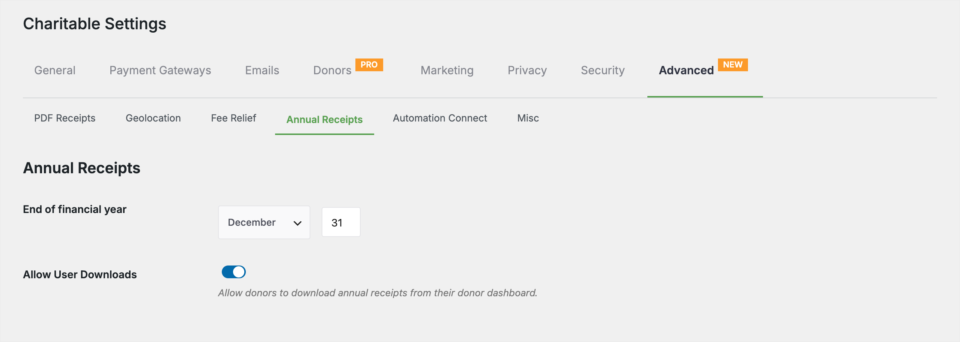
Charitable’s Annual Receipts feature sends every donor a yearly statement in one click. It’s in the Charitable Pro plugin, Plus plan and higher.
Where to Start This Black Friday
If 31 ideas feel like too many, start with these 3. They take very little time, and they work for any size of nonprofit.
- Send a thank-you email on Thanksgiving with no ask (idea #16).
- Announce your Giving Tuesday goal on Black Friday, with a countdown on the campaign page (ideas #17 and #19).
- Test your donation form on your phone before Cyber Monday (idea #23).
Once those are in place, add a business partner or a match next year. For a full step-by-step plan for the day itself, read how to launch a Black Friday donation campaign.
FAQs on Black Friday Fundraising for Nonprofits
Should nonprofits take part in Black Friday?
Yes, but not by copying retailers. Use the weekend to thank donors, announce your Giving Tuesday goal or offer a giving alternative to shopping.
Will a Black Friday appeal hurt our Giving Tuesday results?
Not if each day has its own job. Use Friday to announce the goal and Tuesday to make the main ask, so both messages work together.
When is Giving Tuesday in 2026?
Giving Tuesday is on Tuesday, December 1, 2026.
When is Black Friday in 2026?
Black Friday is on November 27.
When is Cyber Monday in 2026?
Cyber Monday is on November 30.
Can a small nonprofit run a Black Friday campaign?
Yes. A thank-you email, one campaign page and a partnership with a local shop are enough for a small team to take part.
Should a nonprofit offer Black Friday discounts?
Only on real products, such as merchandise, event tickets or memberships. For donations, show what each amount achieves instead of offering a discount.
Do I need a special tool to run a Black Friday campaign on my website?
If your site runs on WordPress, the free Charitable plugin gives you campaign pages, goals, progress bars and receipts. The paid plans add tools like recurring donations, Fee Relief and peer-to-peer fundraising, with a 14-day money-back guarantee.
Charitable Has 1.2+ Million Downloads!
Trusted by millions to power successful fundraising campaigns. Try Charitable risk-free today.
✅ 14-day money-back guarantee
✅ Transparent pricing
✅ Code-free setup
Stay Connected for More Nonprofit Resources
For more tutorials and videos tailored to nonprofits, subscribe to our YouTube channel. We regularly publish expert tips, step-by-step guides on online donations, fundraising strategies, and practical resources to help your organization succeed.
🗞️ Get weekly tips and exclusive guides in your inbox
Join our newsletter →
🎥 Watch step-by-step tutorials and success stories
Subscribe to our YouTube channel →
👩🏽💻 Connect with our community and get daily nonprofit insights
Follow us on LinkedIn →
🥳 Fun reels and non-profit insights
Follow us on Instagram →
👀 Insightful & fun videos to help you grow your cause
Follow us on TikTok→
🌎 Subscribe and follow for general fundraiser tips
Get Fundraiser Tips on TikTok →
Powerful Fundraising Resources
🤖 Use Charitable with Your AI Assistant
⬇️ Download proven strategies, campaign ideas, and expert tools
Get the Fundraising Kit →
💸 Get Free Fundraising Resources
Head to the Charitable Fundraising Hub →
🤔 Got questions about Charitable?
Charitable FAQs →
🏎️ Take Charitable for a spin
Create your Charitable Demo →
Understand non-profit terms and jargon
Non-Profit Glossary →
% Looking for non-profit deals and discounts?
Best Non-Profit Deals and Discounts →



Leave a Reply