

Confused about whether to focus on Black Friday or Giving Tuesday?
Most nonprofits feel torn between jumping into the Black Friday chaos or waiting for the “official” day of giving. Meanwhile, you’re watching other organizations raise serious money on Black Friday while wondering if you should stick to the traditional Giving Tuesday approach.
Here’s what the data actually shows about both days – and why the smartest nonprofits have stopped choosing sides entirely. The real opportunity isn’t picking one day, it’s understanding how to use both strategically.
Let’s break down which day delivers better results for nonprofits and exactly how to maximize both opportunities.
The Numbers Don’t Lie: What the Data Shows
Let’s cut through the hype and look at what we actually know about both days.
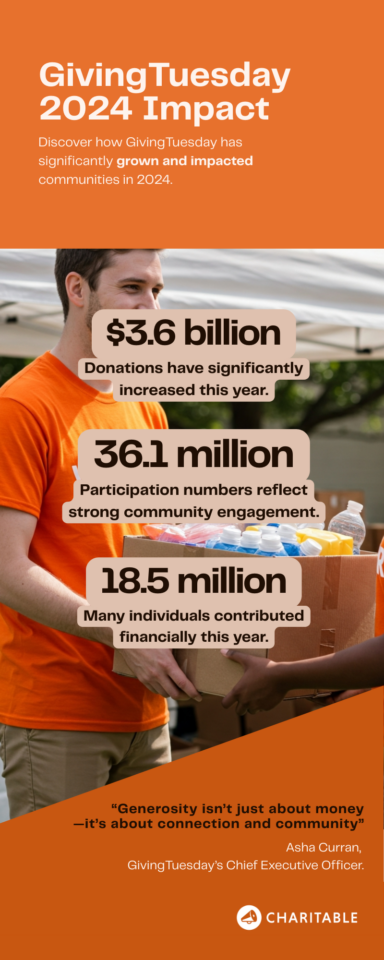
- Giving Tuesday growth: Giving Tuesday has seen massive growth since its launch, with billions donated annually. However, participation has also exploded, meaning more nonprofits are competing for the same donor attention. “The GivingTuesday Data Commons estimates that a record-breaking $3.6 billion was donated in the US alone, which brings the sum of GivingTuesday donations since its launch in 2012 to more than $18.5 billion.” – GivingTuesday.org
- The competition factor: Your supporters’ inboxes get flooded on Giving Tuesday. Most donors report feeling overwhelmed by the sheer volume of appeals they receive that day.
- Black Friday opportunity: While comprehensive data on Black Friday nonprofit fundraising is limited, organizations that test campaigns on Black Friday consistently report less email competition and higher engagement rates compared to Giving Tuesday.
The reality: Most nonprofits put all their energy into Giving Tuesday because that’s what everyone else does, not because the data necessarily supports it as the only strategy.
The key insight isn’t about specific numbers – it’s about donor behavior. People are already in a spending and giving mindset during Black Friday weekend. The question is whether you’re there to meet them or waiting until everyone else shows up on Tuesday.
Black Friday: The Case for Getting There First
While most nonprofits are preparing for Giving Tuesday, Black Friday presents a unique opportunity that many organizations completely overlook.
Why Black Friday Works for Nonprofits?
- Your donors are already spending. Black Friday kicks off the biggest consumer spending weekend of the year. People have their credit cards out, they’re making purchasing decisions, and they’re thinking about holiday giving. Instead of fighting this mindset, smart nonprofits work with it.
- Less nonprofit noise. Check your inbox on Black Friday versus Giving Tuesday. You’ll see dozens of retail promotions on Friday, but very few donation appeals. On Tuesday, every nonprofit you’ve ever supported will be asking for money. Where would you rather compete?
- Extended giving timeline. Black Friday doesn’t have to be a one-day push. It naturally extends into the weekend and connects to the broader holiday giving season. You’re not cramming everything into 24 hours like Giving Tuesday demands.
The trick isn’t to mimic retail tactics – nobody wants donation “flash sales.” Instead, frame Black Friday as the start of your giving season. Position it as “while others are buying things, you can change lives” or “the best deal this Friday? Making a real difference.”
Think early access rather than discounts. Give your supporters first access to new campaigns, special updates from the field, or exclusive content about your impact. You’re not competing with retailers – you’re offering something completely different.
So what actually works?
Successful Black Friday nonprofit campaigns focus on urgency that feels authentic. Instead of artificial scarcity, use real deadlines – like funding a project before year-end or matching gift deadlines that actually exist.
The messaging is less about “giving” and more about “impact.” Your supporters are already thinking about spending money meaningfully during the holidays. Show them how their donation creates more lasting value than anything they could buy.
Giving Tuesday: The Traditional Powerhouse
Giving Tuesday has earned its reputation as the nonprofit Super Bowl for good reason. But understanding both its strengths and growing challenges is crucial for your strategy.
Why Giving Tuesday matters?
- Built-in momentum. Giving Tuesday benefits from massive collective energy. When millions of people participate simultaneously, it creates social proof that encourages more giving. Your donors see friends posting about their donations, which naturally prompts them to give too.
- Media coverage and awareness. News outlets cover Giving Tuesday extensively, providing free publicity for the entire giving movement. Your organization benefits from this broader awareness without paying for advertising.
- Donor expectations. Many supporters specifically save money to donate on Giving Tuesday. They’ve been conditioned to expect giving opportunities that day and actively look for organizations to support.
- Proven fundraising infrastructure. Years of Giving Tuesday campaigns mean you have data on what works, established email sequences, and refined messaging. There’s less guesswork involved.
Now there are some major factors to consider here before you launch your Giving Tuesday campaigns:
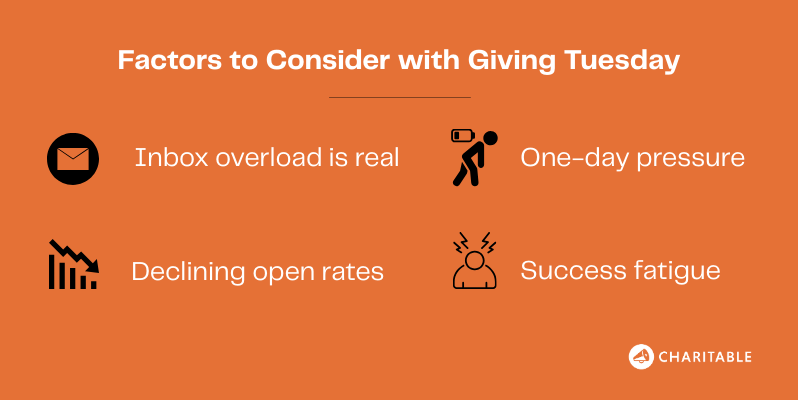
- Inbox overload is real. Your supporters receive dozens of donation requests on Giving Tuesday. Even loyal donors report feeling overwhelmed and sometimes choosing to ignore everything rather than pick favorites.
- Declining open rates. As more nonprofits participate, email performance typically drops on Giving Tuesday compared to regular fundraising campaigns. You’re literally competing with every other nonprofit your donors support.
- One-day pressure. Putting your entire year-end hopes on a single Tuesday creates unnecessary stress and risk. If your campaign doesn’t perform as expected, you have limited time to recover.
- Success fatigue. Paradoxically, Giving Tuesday’s own success has made it less effective for individual organizations. The bigger the movement gets, the smaller each organization’s slice of attention becomes.
The bottom line: Giving Tuesday remains valuable, but it’s no longer the guaranteed fundraising home run it once was for many nonprofits.
The Smart Strategy: Why You Need Both
Here’s what successful nonprofits have figured out: the Black Friday vs. Giving Tuesday debate is the wrong question entirely. The right question is how to use both days to create a strategic giving weekend that maximizes your results.
Different Days, Different Donors
Black Friday and Giving Tuesday attract different types of supporters, which means you’re not competing with yourself – you’re expanding your reach.
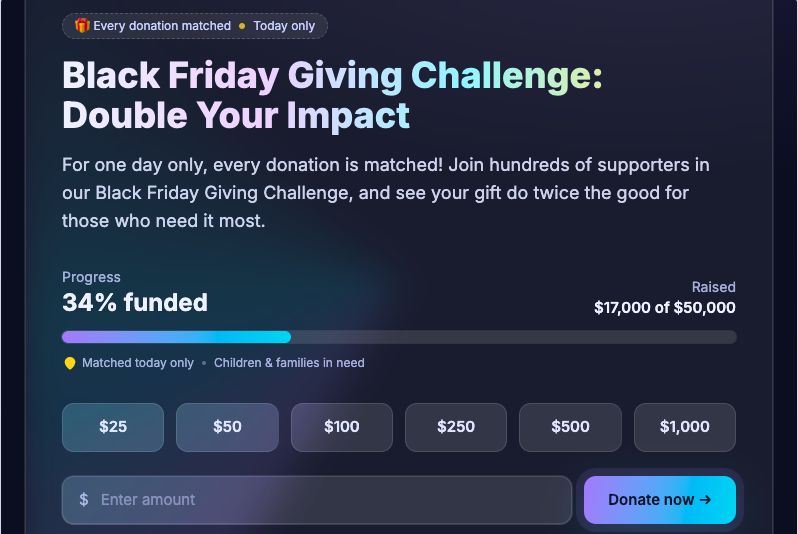
Black Friday donors tend to be impulse givers who respond to urgency and opportunity. They’re already in spending mode and looking for meaningful purchases. These supporters might not have planned to donate, but the right message at the right moment converts them.
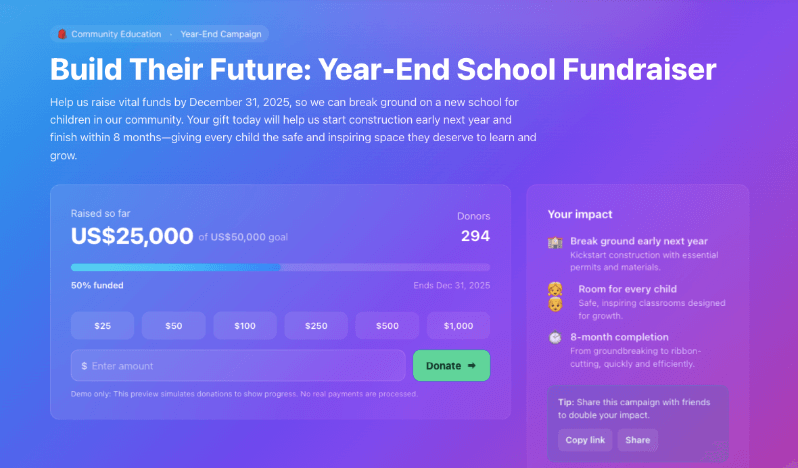
Giving Tuesday supporters are your committed advocates who specifically plan to give on that day. They’re often your most loyal donors who have been waiting for Giving Tuesday to make their annual or holiday donation.
Building momentum step by step
Smart organizations use Black Friday to warm up their audience for Giving Tuesday rather than treating them as competing events. Your Black Friday campaign becomes the opening act that builds excitement for your Giving Tuesday finale.
Start conversations on Black Friday, share impact stories over the weekend, and create anticipation for your big Giving Tuesday push. Supporters who don’t give on Friday become more primed to give on Tuesday because they’ve been engaged all weekend.
Extended Campaign Benefits
A five-day campaign from Black Friday through Giving Tuesday gives you multiple touchpoints with supporters instead of one make-or-break moment. Some donors need to see your message several times before acting – an extended timeline accommodates different decision-making styles.
You also capture people when they’re available. Someone traveling on Friday might be home and ready to donate on Tuesday. A supporter dealing with family obligations on Tuesday might have had a quiet moment on Saturday to contribute.
Risk Diversification
Putting all your fundraising hopes on Giving Tuesday alone is risky. What if there’s a major news event that dominates attention? What if your email gets caught in spam filters? What if donors are just overwhelmed that particular Tuesday?
A multi-day approach spreads your risk while increasing your opportunities for success.
How to Execute a Dual Strategy
Now that you understand why both days matter, let’s get tactical about making this work without overwhelming your donors or burning out your team.
Black Friday: The Conversation Starter
Your messaging focus: Position Black Friday as the beginning of something bigger, not a standalone ask. Use language like “kicking off our season of giving” or “while others shop, you can create change.”
Suggested approach: Launch a new campaign or initiative on Black Friday. This gives supporters something fresh to engage with rather than feeling like you’re just copying retail tactics. Think of it as a soft launch that builds momentum.
Content strategy: Share behind-the-scenes content, impact stories, or exclusive updates that make supporters feel like insiders. You’re building relationship and anticipation, not just asking for money immediately.
Weekend Bridge: Keep the Momentum
Saturday and Sunday become your relationship-building days. Share donor stories, post impact updates, or give sneak peeks of what you’ll accomplish with weekend donations. This keeps your organization top of mind without constant asking.
Use this time to segment your audience based on engagement. Who opened Black Friday emails but didn’t donate? Who shared your content? Who donated immediately? Each group gets different messaging on Giving Tuesday.
Giving Tuesday: The Grand Finale
Your messaging focus: This is your mission-driven, community-focused day. Lean into the collective energy and social proof that makes Giving Tuesday powerful.
Suggested approach: Present your biggest, most inspiring opportunity. If Black Friday was your soft launch, Giving Tuesday is your main event with clear goals, progress tracking, and social sharing.
Content strategy: Real-time updates, progress bars, thank you posts, and social proof content that shows the community rallying around your cause.
How to Create Effective Black Friday and Giving Tuesday Campaigns
Here’s where having the right tools matters. You need to track performance across both campaigns, manage different messaging sequences, and avoid donor fatigue.
Charitable makes this straightforward by letting you create separate campaigns for each day while managing everything from one dashboard.
Charitable is the perfect choice for launching Black Friday and Giving Tuesday campaigns because it’s designed specifically for nonprofits and makes fundraising simple, flexible, and affordable.
Why Use Charitable?
- Built for Nonprofits: Charitable focuses on fundraising needs, offering easy campaign setup, donor management, and reporting tailored for nonprofits, not just businesses.
- Fast, Customizable Campaigns: You can create and launch a campaign in minutes—no coding required—and customize it with images, impact stories, progress bars, and preset donation amounts.
- Advanced Features Unlock More Donations: Upgrade to Charitable Pro for recurring donations, donor dashboards, PDF receipts, more payment gateways, and email integrations—all tools that help you raise more and build donor trust.
- Low Cost, High Value: Charitable has transparent, affordable pricing—often at a fraction of competitor platforms—so more of your donations go directly to your cause.
- Full Control and Data Privacy: Unlike many hosted fundraising platforms, Charitable keeps your data on your own site, protects donor privacy, and avoids extra transaction fees.
- Year-End Readiness: It’s designed for seasonal campaigns—you can set deadlines, goals, and use urgency-based features that fit Black Friday or Giving Tuesday perfectly.
WP Charitable helps nonprofits stay in control, save money, and launch campaigns quickly with all the tools needed to make holiday fundraising a success. Here’s how to set up your campaign:
Step 1: Install and Activate WP Charitable
Go to your WordPress dashboard. Search for and install the “Charitable” plugin. Activate the plugin and, if you have Pro, enter your license key for extra features.
Step 2: Create Your Campaign
In your WordPress dashboard sidebar, go to Charitable » Add New. This will open up the template library where you can choose from premade designs and layouts.
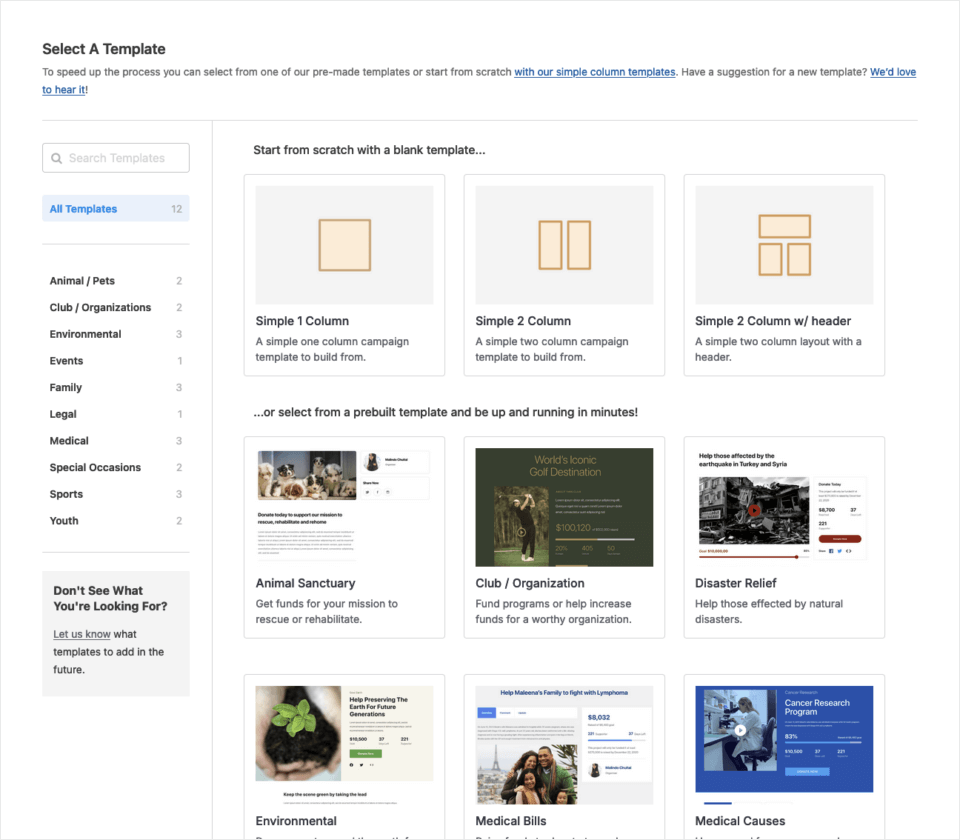
Once you select a template, the campaign builder will launch. Here, you can simply drag and drop new fields into your fundraiser design.
Everything is designed to be code-free and can be done with the clicks of your mouse.
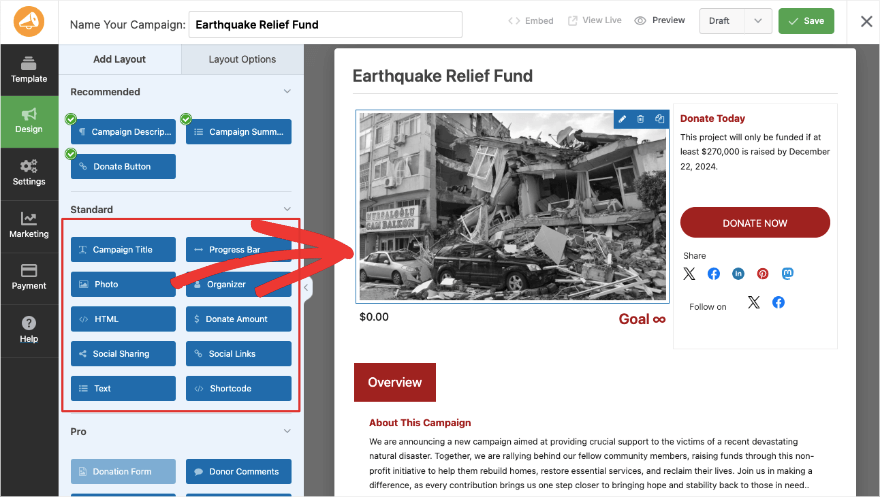
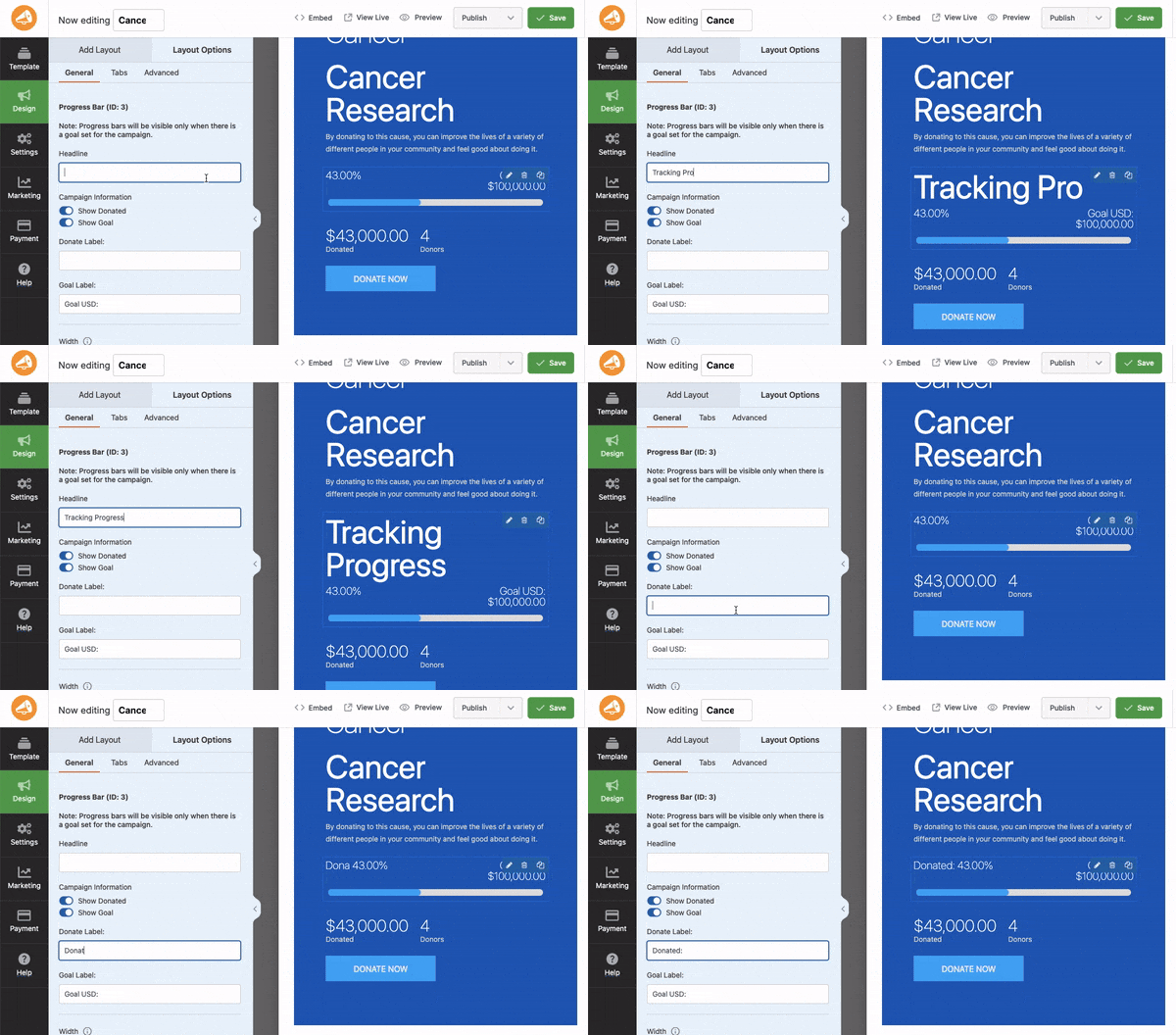
You can add photos, videos, social icons, and a progress bar. Once you add a field, you’ll see editing options appear so you can change the label, formatting, style, and more.
With Charitable, the progress bar will automatically count donations as they come in and update on its own.
You can also allow donors to leave comments to share their message and story.
In the Settings tab, you’ll find more options to add a goal and end date. This helps create a sense of urgency and need for completion.
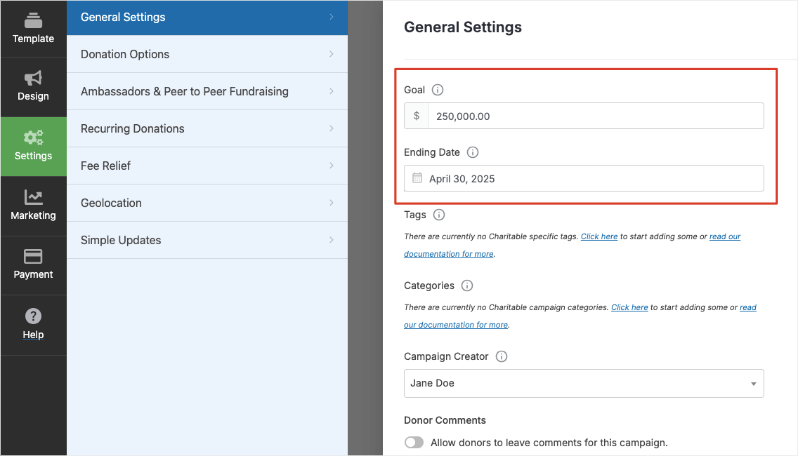
You’ll also see options to set up advanced features such as recurring donations and donor-covered fee relief.
Step 3: Launch Your Campaign
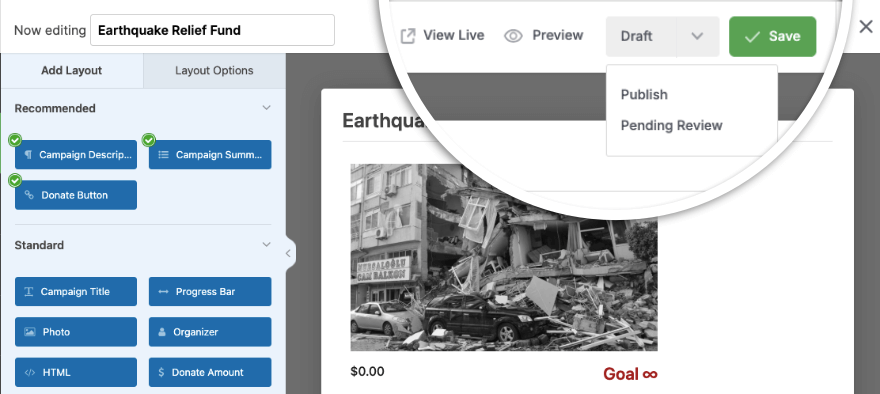
When your campaign is ready, head over to the top-right corner of the Charitable builder. Choose Publish from the dropdown menu and hit the Save button.
Now you can embed your campaign on any page or post on your website. If you’re using the block editor, there are readymade blocks available. You simply need to search for Charitable, add the block, and select your campaign from your drop down menu.
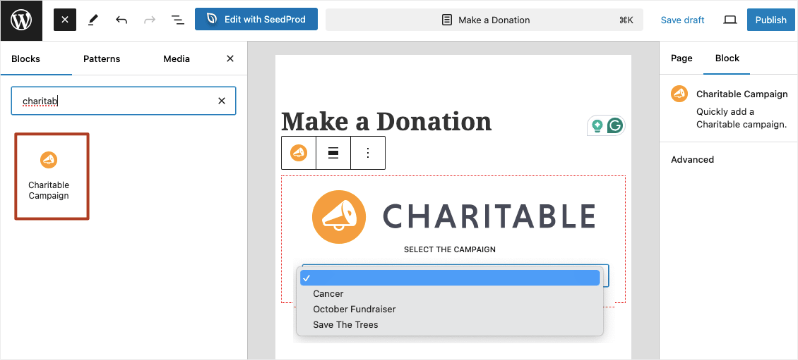
Once you save and publish your page, the campaign will appear on your site.
For step-by-step guidance on setting up your first campaign, follow this guide: Creating Your First Campaign »
Completely new to Charitable? Then Start Here »
The best part about building your Black Friday and Giving Tuesday fundraiser campaigns with Charitable is that many of the processes are automated.
As donations roll in, donation records are automatically created for you. You can set up automated emails that will be sent to your donors upon successful contributions. They’ll receive a confirmation and thank you message along with their donation receipt. This takes so much off your plate right away.
You can also view readymade reports on top donors, recurring donors, top payment methods, best-performing campaigns, as well as a real-time activity tracker.
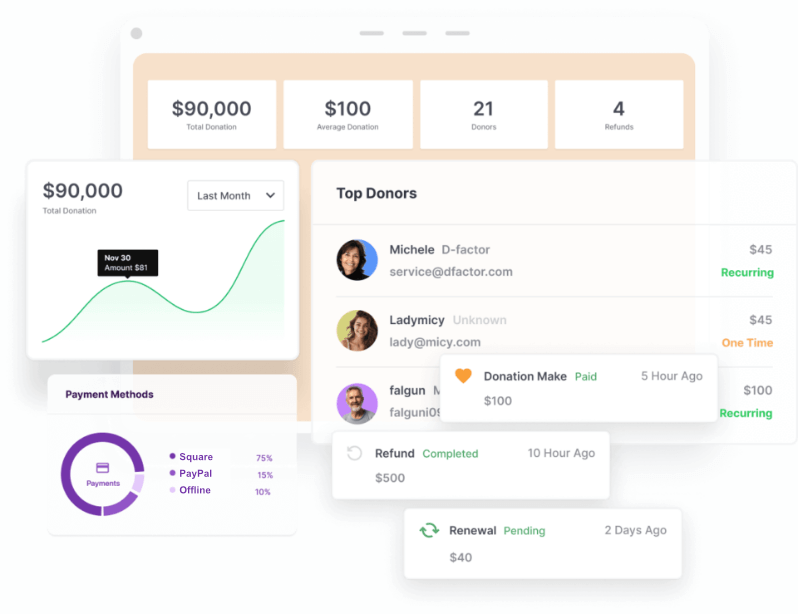
If you’re using Charitable Pro, you’ll also get an organized donor database that can be exported with just a click. You can even enable a donor dashboard. This allows donors to log in to their own donor profiles and adjust their recurring contributions, and download receipts.
Ready to take your fundraising to the next level?
Get Charitable today and start creating impactful campaigns that truly make a difference.
Still not convinced? Check out what others have to say about their Charitable experience »
Need more help? Refer to our Documentation hub »
Before I wrap up, I want to help you avoid some mistakes I’ve seen happen often (I’ve made some of them myself!)
Common Mistakes That Kill Results
Even with the best strategy, these mistakes can sabotage your dual-day approach and frustrate your supporters.
Donor Burnout: The Biggest Risk
The mistake: Hitting the same donors with aggressive asks every single day from Friday through Tuesday. This turns supporters into people actively avoiding your messages.
The fix: Segment your audience based on engagement. If someone donates on Black Friday, they get a different message sequence focused on impact updates and thank yous, not constant additional asks. Use Charitable’s donor management to track who’s already given and adjust your messaging accordingly.
Generic Messaging Across Both Days
The mistake: Using the same donation appeal for Black Friday and Giving Tuesday. This makes you look lazy and misses the unique opportunity each day provides.
The fix: Black Friday messaging should feel like early access or exclusive opportunity. Giving Tuesday should emphasize community impact and collective action. Different days require different emotional appeals, even for the same campaign.
Poor Timing Kills Conversion
The mistake: Sending Black Friday emails at 3 PM when people are shopping, or Giving Tuesday messages at 6 AM when donors aren’t ready to engage yet.
The fix: Black Friday emails work best mid-morning or early evening when people are taking breaks from shopping. Giving Tuesday performs better with multiple touchpoints – morning inspiration, afternoon urgency, evening final push.
Forgetting Mobile Optimization
The mistake: Assuming people will switch to desktop to donate during a busy weekend. Most giving happens on phones during Black Friday through Giving Tuesday.
The fix: Test every donation form on mobile before launching. If your checkout process requires zooming or multiple screen switches, you’re losing donations. Charitable’s forms are mobile-optimized by default, but always test your specific setup.
Neglecting Follow-Up
The mistake: Going silent after Giving Tuesday ends, treating donors like ATMs instead of relationships to nurture.
The fix: Plan your thank you sequence before you launch. Weekend donors should get immediate confirmation, impact updates within a week, and ongoing relationship building through the holiday season.
The goal isn’t just raising money over one weekend – it’s building supporter relationships that last all year.
The Verdict: Strategy Beats Single-Day Thinking
The choice between Black Friday and Giving Tuesday is a false dilemma. Smart nonprofits have moved beyond picking sides to creating strategic giving experiences that span the entire weekend.
Here’s what the evidence shows: organizations running coordinated campaigns across both days consistently outperform those putting everything into Giving Tuesday alone.
You’re not splitting donor attention – you’re meeting supporters when they’re ready to give and expanding your opportunities for meaningful engagement.
Black Friday captures impulse givers and starts conversations. Giving Tuesday converts your committed supporters and leverages collective momentum. Together, they create a powerful fundraising weekend that works with donor behavior instead of against it.
Your Action Plan
This year: Start simple. If Giving Tuesday is already planned, add a soft Black Friday component – share impact stories, launch a new initiative, or give supporters early access to your Tuesday campaign.
Next year: Plan both days from the beginning. Create separate but connected campaigns that build momentum across the entire weekend.
Right now: Set up the tools you need to execute this strategy effectively. You can’t manage complex campaigns with basic tools.
Ready to Maximize Both Days?
The key to successful dual-day fundraising is having systems that can handle multiple campaigns, track different donor segments, and provide the insights you need to improve year after year.
Charitable makes it simple to create separate Black Friday and Giving Tuesday campaigns while managing everything from one dashboard.
Track which day drives more engagement, see how different messaging performs, and build a data-driven approach to your biggest fundraising weekend.
Stop choosing between Black Friday and Giving Tuesday. Start maximizing both with Charitable.








Leave a Reply