
Some of your most committed supporters do not want to give forever. They want to fund a capital campaign, pledge twelve monthly gifts before the year ends, or support a specific project until it is finished. Then they want to stop, cleanly, on their terms.
Until now, every recurring donation in Charitable ran indefinitely. That meant someone on your team had to remember to cancel each subscription by hand when the commitment ended. Miss the date, and a donor who already completed their pledge gets charged again. Fix it manually, and you have just spent twenty minutes on something that should have taken zero.
Charitable Recurring Donations 2.2.0 introduces Fixed-Term Subscriptions. 🎉
Set the commitment once, and Charitable ends it on schedule for you, automatically, at the gateway level, with confirmation sent to your donor.
Why This Changes Everything for Your Fundraising
Here is something fundraisers have known for a long time: a recurring gift that ends on its own is far easier to ask for than an open-ended subscription.
When you ask a donor for “monthly support,” many hesitate. They picture a bill that runs forever and wonder what canceling it will feel like. When you ask for “12 monthly gifts to fund our scholarship program,” the math is clear, the commitment is bounded, and the answer comes faster.
Fixed terms turn pledges, installment giving, capital campaigns, and anniversary programs into something you can actually run inside Charitable, without spreadsheets, without calendar reminders, and without manual cancellations. Your admin time goes down. Your donor conversion rate goes up.
When You Would Use This: Fixed Term vs. Indefinite
Not every recurring giving program needs a term. Here is a quick guide to help you decide which approach fits each campaign.
| If you’re running… | Use | Why it works |
|---|---|---|
| An annual pledge drive – “Give $50/month for 12 months” | Fixed term: 12 payments | The pledge ends itself. No one gets charged after it’s fulfilled. |
| A capital campaign with a hard close date | Fixed term: end date | Charitable stops the giving when the campaign closes. No manual cancellations. |
| A matching gift window – “we’ll match every dollar for 6 months” | Fixed term: 6 payments | When the match expires, the subscription should too – not keep running unmatched. |
| A memorial or tribute fund tied to a specific year | Fixed term: end date | A defined period deserves a clean, intentional close. |
| A first-time recurring donor challenge – “try your first 3 gifts” | Fixed term: 3 payments | A bounded ask is easier to say yes to. Great for converting one-time donors into recurring ones. |
| Monthly sustaining donors with no planned end | Indefinite | They intend to keep giving. No term needed. |
| Core program or operational support | Indefinite | The need doesn’t expire. Let the relationship grow. |
See It in Action
How to Set Up a Fixed-Term Subscription
Setting a term takes about thirty seconds and requires no code. Here is how it works step by step.
Step 1: Open the Recurring Donation
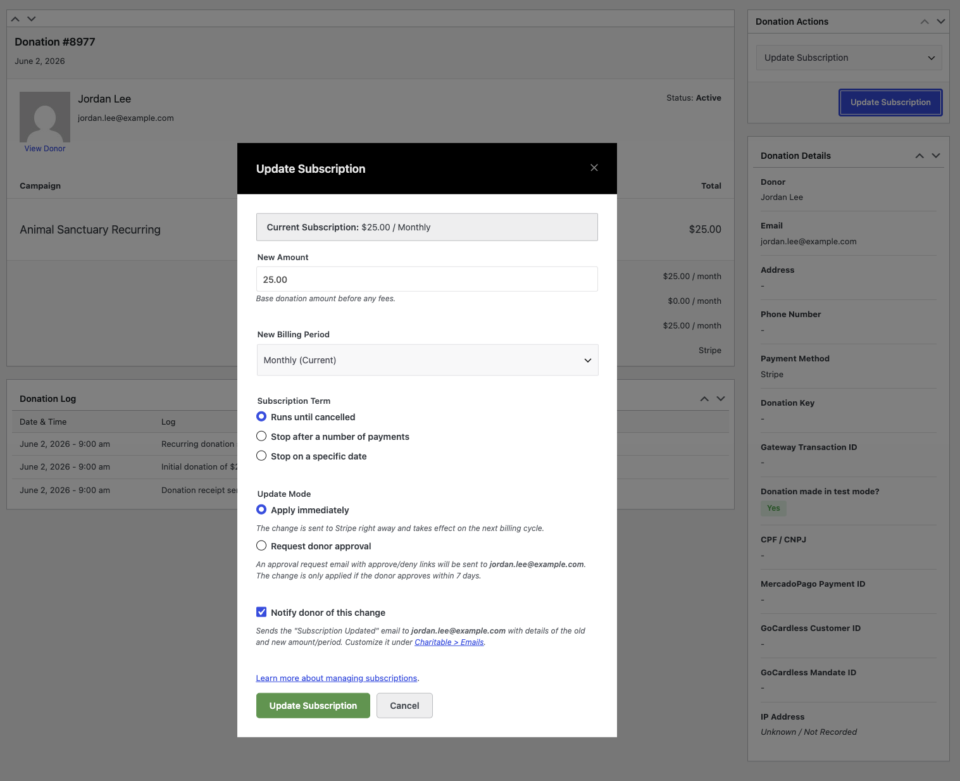
From your WordPress dashboard, go to Charitable » Donations and open any active recurring donation. You will see the donation details along with a Donation Actions panel on the right side of the screen.
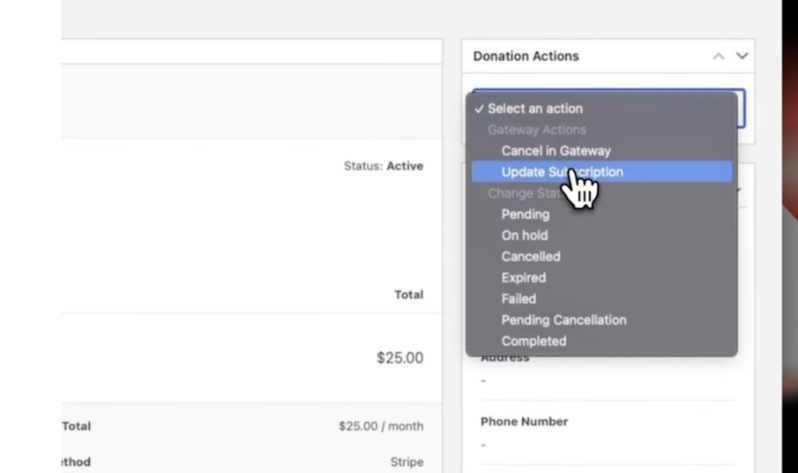
Under Donation Actions, click Update Subscription. This opens the Update Subscription screen, where you can adjust the donation amount, frequency, and now, the subscription term.
Step 2: Choose How the Subscription Ends
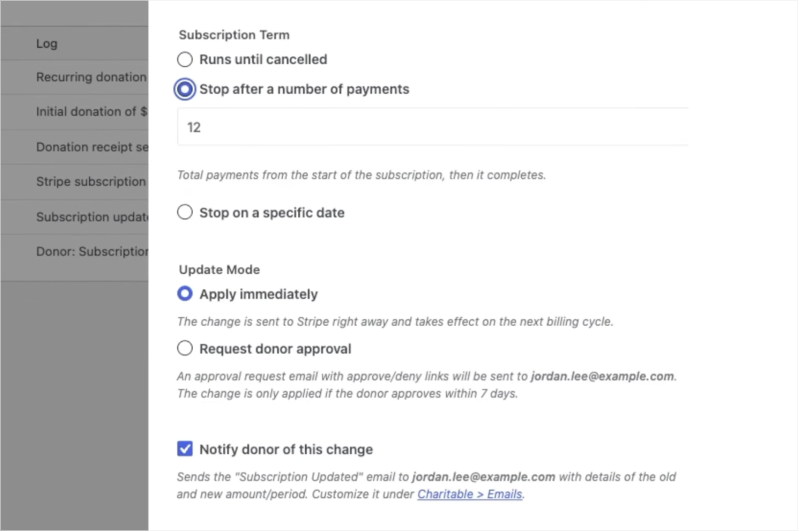
You have two options for defining the term. Pick whichever fits your campaign:
- Stop after a number of payments: Enter a number, such as 12, and Charitable will cancel the subscription automatically after that many charges are completed. This is ideal for pledge drives, anniversary campaigns, and installment gifts.
- Stop on a specific date: Choose a calendar date, such as June 3, 2027, and Charitable will cancel the subscription on that day. This works well for project-based campaigns with a defined end date.
Step 3: Save and Confirm
Click Update Subscription and confirm the prompt. Charitable communicates the new term to Stripe immediately. The donation log updates with the confirmation, and the new plan, including the term details, is reflected on the subscription record.
That is it. Charitable handles the rest from here.
Optional: Request Donor Approval for Changes
If you are making a change on behalf of a donor, such as updating their amount or adjusting the term, you can check Request Donor Approval before saving.
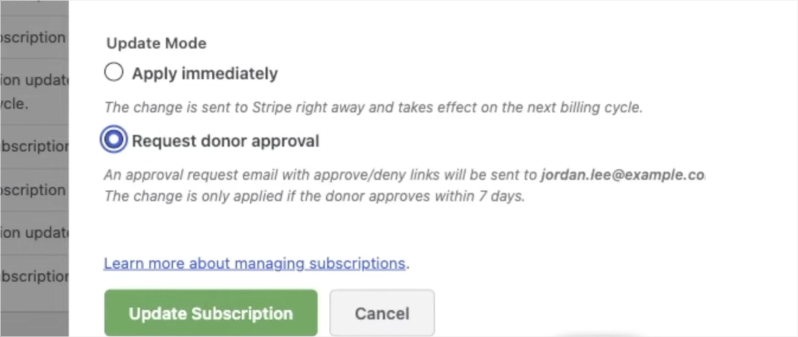
This sends the donor an email showing the proposed changes. They can approve or decline directly from the email, giving you a clear paper trail and keeping the donor in control of their giving.
What Your Donors See
Transparency builds trust. Fixed-term subscriptions surface the full picture everywhere a donor or admin might look.
📋 Visible everywhere: The term appears on the donor dashboard, the donation receipt, and the WP Admin screen, written in plain language like “for 12 payments” or “until June 3, 2027.” No one has to guess what the commitment was.
📊 Progress at a glance: Count-based terms show an “X of Y payments made” indicator on every view, so donors know exactly where they stand in their pledge, and so do you.
📨 Automatic completion email: When the final payment processes and the subscription completes, Charitable can send the Recurring Donation Completed email, so the donor receives a clear, satisfying confirmation that their commitment is fulfilled.
Everything That Happens Automatically
Once a term is set, there is nothing left for your team to track.
⏳ Two ways to define the end: Stop after a set number of payments, or stop on a specific calendar date. Both options are available on any recurring donation.
✅ Automatic completion: When the term is reached, Charitable marks the donation Completed and cancels the subscription at the payment gateway. Your donor is never charged past what they agreed to.
🤝 Donor-approved changes: Term changes can flow through the existing donor approval workflow, so a supporter can confirm any modification by email before it takes effect.
Frequently Asked Questions
Can I apply a term to an existing recurring donation, or only to new ones?
Both. You can set a term on any active recurring donation through the Update Subscription screen, regardless of when it was created. There is no need to cancel and recreate a subscription to add a term.
Does this work with all payment gateways?
The Subscription Term controls currently appear for Stripe subscriptions. Exact-date cancellation uses Stripe’s native cancel_at on Charitable Pro 1.8.16 and later. A gateway-agnostic backstop handles completion on the first renewal after the term is reached for setups that do not use native Stripe scheduling.
What happens if a donor cancels before the term ends?
The donation is marked Cancelled, not Completed. Donors are not locked in by the term. If they cancel early, the term simply no longer applies and no further payments are taken.
Can donors set their own term when they make a donation?
Not at the time of donation. Terms are set and managed through the Update Subscription screen in WP Admin. Donor-facing self-service term setting from the donation form is not currently available.
Can I change or extend the term after it is set?
Yes. Open the recurring donation, go to Update Subscription, and choose a new term or adjust the payment count or end date. You can apply the change immediately or route it through the donor approval workflow so the supporter confirms before it takes effect.
Will my donor be notified when their subscription completes?
Yes, if the Recurring Donation Completed email is enabled in your Charitable email settings. When the final payment processes, Charitable sends this email automatically so the donor receives a clear confirmation that their commitment is fulfilled.
For Agencies and Developers
Hooks, Filters, and Full Customization
Fixed terms are built on filterable values and clear action hooks, including charitable_recurring_term_type, charitable_recurring_end_date, and charitable_recurring_donation_completed. You can adjust default behavior, modify how terms are displayed, or trigger your own logic the moment a subscription completes.
Reliable Across All Setups
Exact-day cancellation uses Stripe’s native scheduling on Charitable Pro 1.8.16 and later. A gateway-agnostic backstop guarantees the subscription still completes once its term is reached, even on older versions. Enforcement never silently fails, regardless of the payment gateway your site is running.
What’s New in Charitable
Fixed-Term Subscriptions is part of an ongoing stream of updates across Charitable. Here is a quick look at other recent additions.
- Ambassadors 3.0: New moderation and directory screens let you see every campaign creator and ambassador in one place, approve them in one click, and generate reports or email them directly from your dashboard.
- Razorpay Integration: Accept donations in India via UPI, scan-to-give QR codes, and major international currencies, with full recurring giving support and automatic two-way refund sync.
- DonationGuard: Automatic fraud protection that detects card testing attacks in real time, scores traffic against your site’s normal patterns, and blocks repeat offenders without disrupting legitimate donors.
- Automation Connect 2.0: Connect your donation forms to any external app using 17 event triggers, conditional logic across 11 fields, and 80+ data fields. Includes pre-built templates for Zapier, Make.com, HubSpot, and Slack.
- PayPal Commerce: A modernized PayPal integration supporting six payment methods in a single connection, including Venmo, Pay Later, Apple Pay, and Google Pay.
- Campaign Countdown: A live, real-time countdown timer for donation campaigns with full design controls and configurable expiry behavior.
- Annual Receipts 2.0: Send year-end tax receipts to all donors in minutes with a bulk send wizard, dry-run preview, SMTP-aware batching, and a complete per-donor audit trail.
- White Glove Migration for GiveWP: Full-service migration from GiveWP to Charitable, including donor records, transaction history, and active recurring subscriptions, handled by the Charitable team.
See the full Charitable changelog →
Get Started with Fixed-Term Subscriptions
Update to Charitable Recurring Donations 2.2.0, open any recurring donation, and set its term from the Update Subscription screen. It takes about thirty seconds and no code.
Read the Fixed-Term Subscriptions Documentation →
Not Yet a Charitable Pro User?
Charitable powers fundraising for organizations around the world, with more than 1 million downloads. Recurring Donations, along with features like fixed-term subscriptions, is part of what makes Charitable Pro the simplest way to grow sustainable giving on WordPress.
Charitable Has 1.2+ Million Downloads!
Trusted by millions to power successful fundraising campaigns. Try Charitable risk-free today.
✅ 14-day money-back guarantee
✅ Transparent pricing
✅ Code-free setup
Stay Connected for More Nonprofit Resources
For more tutorials and videos tailored to nonprofits, subscribe to our YouTube channel. We regularly publish expert tips, step-by-step guides on online donations, fundraising strategies, and practical resources to help your organization succeed.
🗞️ Get weekly tips and exclusive guides in your inbox
Join our newsletter →
🎥 Watch step-by-step tutorials and success stories
Subscribe to our YouTube channel →
👩🏽💻 Connect with our community and get daily nonprofit insights
Follow us on LinkedIn →
🥳 Fun reels and non-profit insights
Follow us on Instagram →
👀 Insightful & fun videos to help you grow your cause
Follow us on TikTok→
🌎 Subscribe and follow for general fundraiser tips
Get Fundraiser Tips on TikTok →
Powerful Fundraising Resources
🤖 Use Charitable with Your AI Assistant
⬇️ Download proven strategies, campaign ideas, and expert tools
Get the Fundraising Kit →
💸 Get Free Fundraising Resources
Head to the Charitable Fundraising Hub →
🤔 Got questions about Charitable?
Charitable FAQs →
🏎️ Take Charitable for a spin
Create your Charitable Demo →
Understand non-profit terms and jargon
Non-Profit Glossary →
% Looking for non-profit deals and discounts?
Best Non-Profit Deals and Discounts →









Leave a Reply