
If your nonprofit serves Indian donors, you already know how much giving has shifted to UPI. Donors now expect to pay with the same quick scan and pay they use for groceries, transit, and the cup of chai!
Until today, getting that experience inside a Charitable donation form meant custom code, a heavyweight third-party plugin, or sending donors to a hosted Razorpay page that broke the campaign experience.
The new Charitable Razorpay integration is here and makes it a breeze to accept local payments in India.
It is currently available as a beta addon for the Charitable Pro plugin (you need to have a Chariable Pro or Charitable Elite plan to currently access it) and brings native Razorpay support, UPI as a first-class payment method, and per-campaign QR codes into the donation form your donors already trust.
What You Get with The Razorpay Integration
With this new payment integration, your fundraising campaigns are set to reach new heights. Here’s a snapshot of the core features:
- UPI and QR Code Donations: Native support for UPI, allowing donors to quickly and easily contribute without the need for redirects.
- Multi-Payment Options: Donors can use cards, netbanking, digital wallets, and UPI directly from the popup.
- Per-Campaign QR Codes: Automatically generate QR codes for each campaign, enabling effortless donations.
- Multi-Currency Support: Accept INR and several international currencies (USD, EUR, GBP, SGD, AED, CAD, AUD) to maximize your global reach.
UPI is the rails for digital giving in India, and it rewards speed. Every extra second between “I want to donate” and “payment confirmed” costs conversions. Charitable Razorpay closes that gap by accepting UPI inside the form, accepting QR scans on the campaign page, and confirming the donation through Razorpay webhooks the moment the rails clear.
See It In Action
Why You’ll Love Razorpay Integration 🌟
This integration brings unparalleled convenience and flexibility to your donation processes:
A Donation Form Donors Already Know How to Use
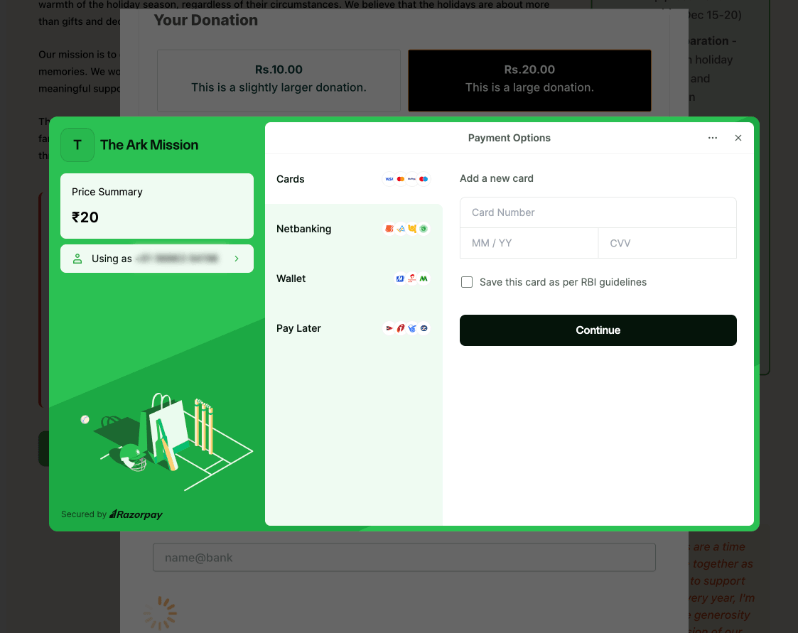
The Razorpay popup opens directly on top of your campaign, pre-filled with the donor’s name, email, and amount. Card, netbanking, wallet, and UPI options appear inside the same window, branded with your image and theme color. No tabs to switch, no checkout to redirect to, no friction.
⚡ Instant UPI: Donors enter a VPA and confirm in their UPI app, and the donation is recorded the second the rails clear.
🎯 One-tap restart: If a donor cancels the popup, they can re-open it without losing the form they just filled in.
💰 Multi-currency: INR is the headline use case, with USD, EUR, GBP, SGD, AED, CAD, and AUD also supported for global campaigns.
QR Codes That Turn Any Campaign Page into a Scan Point
Enable QR Code Generation, drop your UPI merchant ID into settings, and every published campaign automatically gets a scannable QR rendered on its public page (and in the sidebar layout).
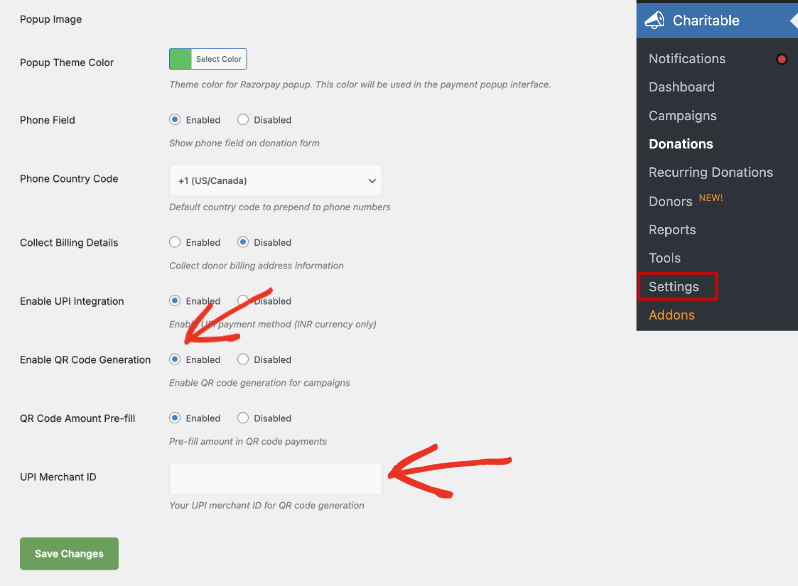
The QR encodes a UPI deep link straight to your account, with the campaign goal amount pre-filled so the donor’s app opens at the right number.
📲 Scan-to-give from any UPI app: PhonePe, Google Pay, Paytm, BHIM, all of them open at the right amount and merchant.
🖼️ Designed for shareable graphics: The QR template is yours to override, so you can wrap it in branded artwork for socials, pamphlets, and event signage.
🎯 Pre-filled or open-ended: Toggle Amount Pre-fill on or off, depending on whether you want donors to top up beyond the goal.
Recurring, Refunds, and Reporting Without the Stitching
Razorpay subscriptions plug into the Charitable Recurring addon, so monthly giving works the same way it does for any other Charitable gateway. Refunds you issue inside Charitable propagate to Razorpay through the API, and refunds you issue inside the Razorpay dashboard come back through the webhook. The donation record in Charitable always tells the truth.
🔁 Recurring donations: Razorpay subscriptions integrate with the Charitable Recurring addon out of the box.
↩️ Two-way refunds: Issue inside Charitable or inside Razorpay, both sides stay in sync.
🔒 Webhook-verified payments: Every status update is HMAC-signed, so the donation record reflects what actually happened on the rails.
How to Get Started With Razorpay in Charitable
Getting started with Razorpay in Charitable Pro is simple:
Navigate to Charitable » Settings » Payment Gateways in your WordPress dashboard.
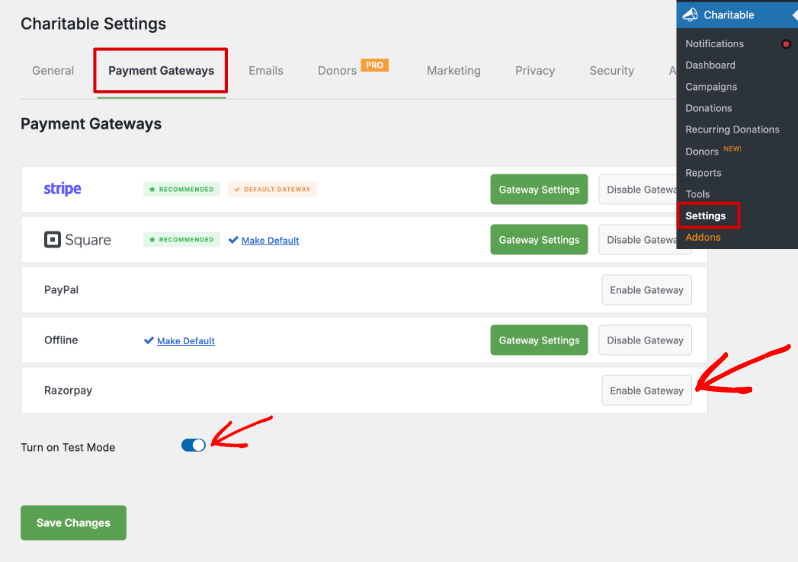
Enable Razorpay and toggle the test mode to prevent actual transactions during setup.
Click the green Gateway Settings button to access the Razorpay settings page.
Enter your Razorpay live or test keys, then save your changes.
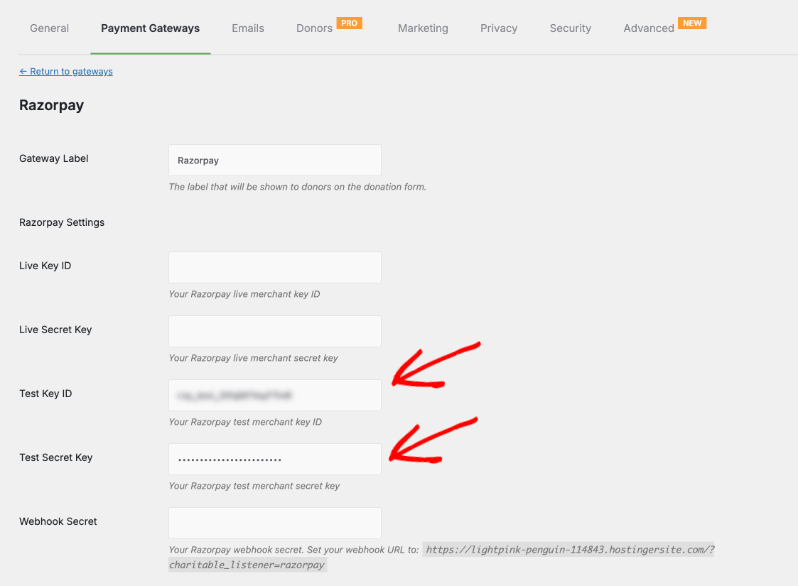
Your donors can now select Razorpay as a gateway on your campaign pages, where they’ll see the familiar Razorpay popup.
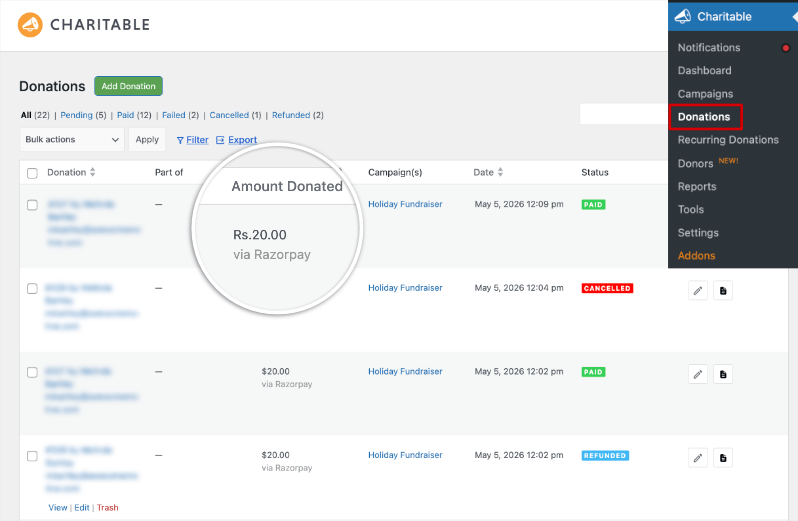
Once donors start making contributions with Razorpay, you’ll see the donation records appear in your dashboard with the payment gateway mentioned:
See all payment gateways available with Charitable »
The Technical Stuff for Agencies and Developers
Hooks, Filters, and Full Customization
Charitable Razorpay exposes a lifecycle action and a translation-directory filter for extension code, and inherits all of Charitable’s gateway-level filters for fee handling, currency formatting, and payment metadata. Everything you can override on Stripe or PayPal, you can override here.
Template Overrides
Both the UPI form fields and the campaign QR display are theme-overridable. Drop a copy of the template into your-theme/charitable/... and Charitable will load yours instead.
Built for Multi-Site and Client Deployments
The addon ships without telemetry or external runtime dependencies beyond the Razorpay PHP SDK. It is safe to vendor into managed deployments and behaves the same on multisite as on a single site.
Help Us Make RazorPay Beta 1.0.0 Land Well
This is a public beta. We have stress-tested the gateway in our own environments and with a small group of partner nonprofits, and we want a wider audience to find the rough edges before the general release.
That means we need you to actually use it and then tell us honestly what happened.
Did the payment flow feel smooth? Did something break or behave unexpectedly? Was there a moment where you weren’t sure what to do next? All of that is useful to us, whether it’s a bug, a confusing label, or just a gut feeling that something felt off.
Here’s what we’d love you to do:
- Run a real or test transaction through RazorPay Beta 1.0.0
- Take note of anything that surprises you – good or bad
- Fill out the short feedback form below
You can spend just a minute giving just a one-line observation can point us in the right direction (or provide deeper details would be even better) The more people who try it and report back, the better the general release will be for everyone.
Thanks for being part of this. It genuinely makes a difference.
For more help, read the Charitable Razorpay Documentation →
Ready to transform your fundraising with Razorpay? Enable the integration today and experience the future of donations in India.
Not Yet a Charitable Pro User?
Sign up for the Charitable Pro plugin today and get up to 50% off! No code needed.
With the discount, the Charitable Pro plan with Razorpay starts at just $199 per year. Don’t miss this opportunity to elevate your fundraising.
Charitable powers fundraising for over a million WordPress sites worldwide. Charitable Pro adds the campaign builder, recurring donations, donor management, and the full library of payment-gateway addons (Razorpay included).
Charitable Has 1+ Million Downloads!
Trusted by millions to power successful fundraising campaigns. Try Charitable risk-free today.
✅ 14-day money-back guarantee
✅ Transparent pricing
✅ Code-free setup
Stay Connected for More Nonprofit Resources
For more tutorials and videos tailored to nonprofits, subscribe to our YouTube channel. We regularly publish expert tips, step-by-step guides on online donations, fundraising strategies, and practical resources to help your organization succeed.
🗞️ Get weekly tips and exclusive guides in your inbox
Join our newsletter →
🎥 Watch step-by-step tutorials and success stories
Subscribe to our YouTube channel →
👩🏽💻 Connect with our community and get daily nonprofit insights
Follow us on LinkedIn →
🥳 Fun reels and non-profit insights
Follow us on Instagram →
👀 Insightful & fun videos to help you grow your cause
Follow us on TikTok→
🌎 Subscribe and follow for general fundraiser tips
Get Fundraiser Tips on TikTok →
Powerful Fundraising Resources
🤖 Use Charitable with Your AI Assistant
⬇️ Download proven strategies, campaign ideas, and expert tools
Get the Fundraising Kit →
💸 Get Free Fundraising Resources
Head to the Charitable Fundraising Hub →
🤔 Got questions about Charitable?
Charitable FAQs →
🏎️ Take Charitable for a spin
Create your Charitable Demo →
Understand non-profit terms and jargon
Non-Profit Glossary →
% Looking for non-profit deals and discounts?
Best Non-Profit Deals and Discounts →








Leave a Reply