
Charitable Lite is the free version of Charitable. It gives you the tools you need to raise money on your WordPress site, including donation forms, Stripe, Square and PayPal payments, and donation management.
For many nonprofits just getting started with online donations, it’s a solid place to begin. But as your fundraising grows, you might be curious about the paid version, the Charitable Pro plugin.
The Charitable Pro plugin adds the tools that help you raise more. This includes a donor database, self-service donor accounts, recurring donations, peer-to-peer campaigns, event tickets and much more.
We’ve also made it easy to move over from other fundraising tools. You can now import your data from GiveWP, Donorbox and Givebutter, and if you’re coming from GiveWP, our team can even do the whole move for you.
So do you need the paid features, or will Charitable Lite be enough for your organization? This article compares Charitable Lite with each of the paid plans, so you can decide if upgrading is the right step for your fundraising.
Charitable Lite vs Pro at a Glance
First, here are the core features you’ll get with both Lite and the paid plans.
When you install the plugin, a setup wizard helps you get started quickly. It walks you through the right settings and your first campaign, so you can start raising funds right away.
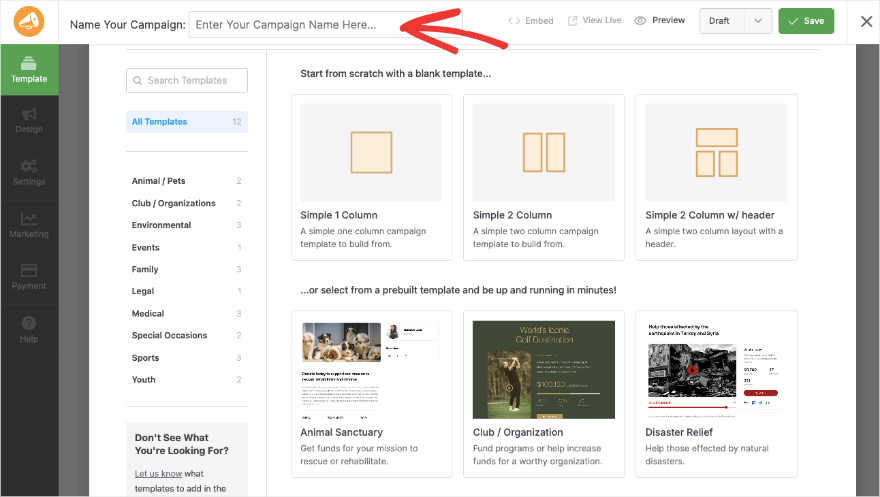
To build your campaign, you can pick a premade template or start designing from scratch.
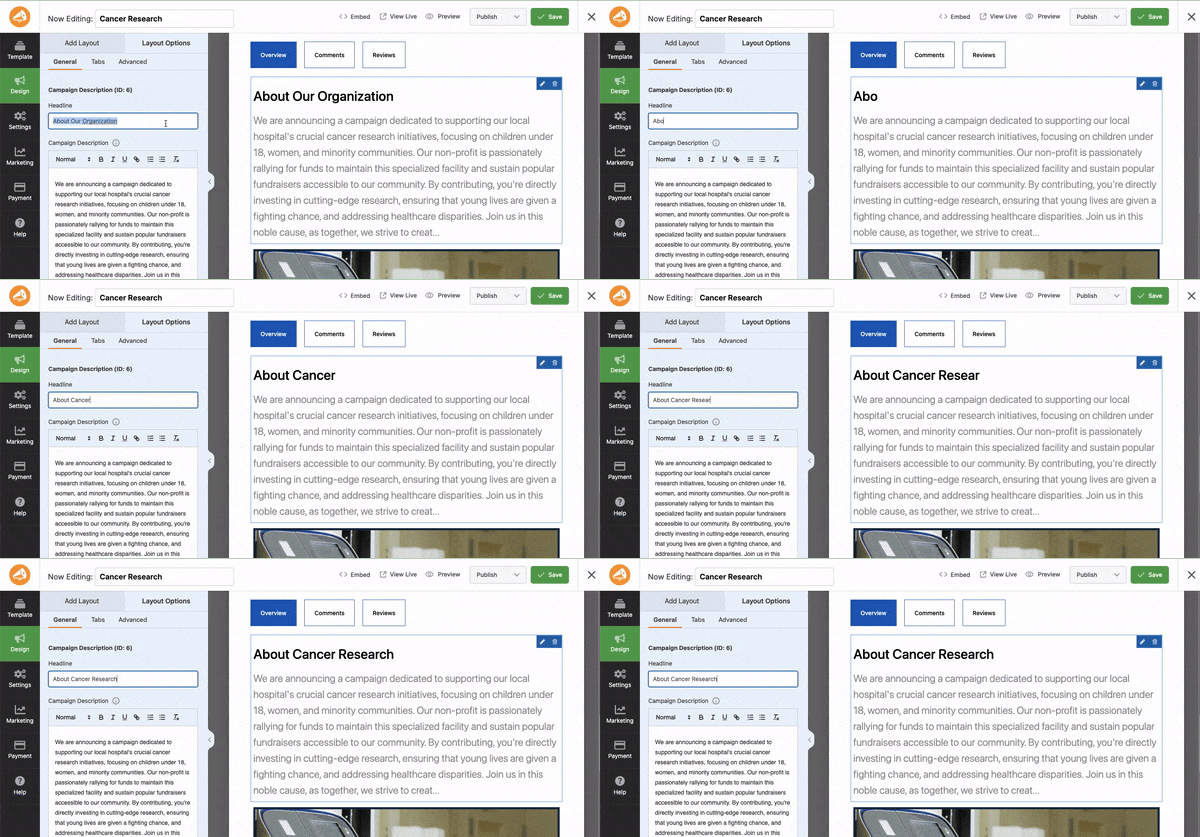
Next, there’s a drag and drop builder to customize your fundraiser. You can add fields like progress bars, donation amounts, social links, photos and more.
A live preview shows you what your campaign will look like on the front end as you design it. Simply click on any field to edit it.
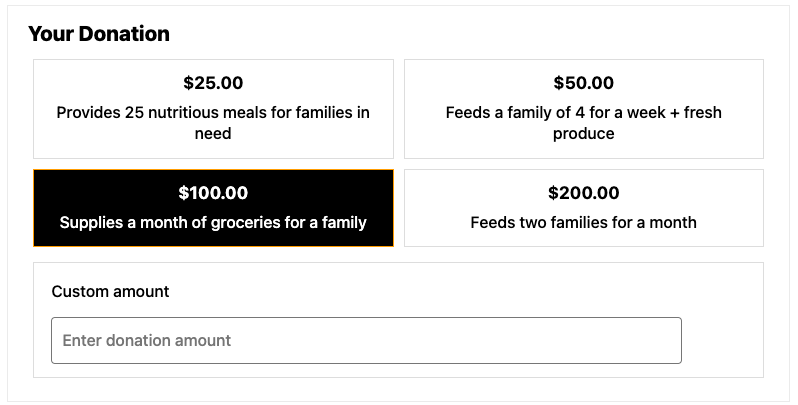
You can also choose the donation amounts your donors see, and let them enter a custom amount of their own.
You can accept online payments through Stripe, Square and PayPal. They’re all built in, so you simply need to enable the gateway and link your account. You can also record offline gifts like checks, cash and bank transfers.
Donations go straight from your payment gateway to your account. Charitable never holds the money, and your donor data stays on your own website.
With all versions of the plugin, you’ll get these features.
- Unlimited campaigns and donation forms
- Donation records you can add, edit and delete
- Stripe, Square, PayPal and offline donations
- Campaign creation with templates and the drag and drop builder
- Donation reports
- Donation receipts and admin email notifications
- AI assistant support through WPVibe
- GDPR compliance tools
- Mobile-responsive design
Now let’s look at what Charitable Lite offers and who it’s designed for. Want to know how much the paid plans cost right away? Skip ahead »
The Charitable Lite Plugin

Charitable Lite gives you the tools to start accepting donations on your WordPress website. You can create unlimited fundraising campaigns, with goals, deadlines and progress bars that keep your donors engaged.
For payments, Charitable Lite works with Stripe, Square and PayPal, plus offline donations. This means you can start accepting one-time donations securely right away. The donation forms are simple, mobile-responsive and GDPR compliant.
Every donation creates a donation record automatically, and you can add, edit or delete records whenever you need to. You can send email notifications and export your donation data to CSV at any time.
Charitable Lite also works with AI assistants like Claude and ChatGPT through WPVibe. You can ask your assistant to create or update a campaign, or record an offline gift, just by describing it in plain language.
What’s In Charitable Lite
Here’s what you get with Charitable Lite.
- Unlimited fundraising campaigns with goals, deadlines and progress tracking
- One-time donations through Stripe, Square and PayPal with secure processing
- Offline donations for checks, cash and bank transfers
- Donation forms with suggested and custom amounts
- Donation records you can add, edit and delete
- Donation receipts, email notifications and CSV data export
- Basic reports and donation tracking
- AI assistants that can create and update campaigns for you through WPVibe
- Mobile-responsive design that fits your WordPress theme
- GDPR compliance and community forum support
Limitations of Charitable Lite
Charitable Lite is a strong foundation, but it does have limits compared to the paid plans. You won’t find recurring donations, extra payment gateways or a donor database with self-service donor accounts.
Peer-to-peer fundraising, event tickets, email marketing integrations and the migration importers are also part of the paid plans only.
Here are the limits at a glance.
- No recurring donations
- Stripe, Square, PayPal and offline donations only
- No donor database, donor profiles or donor dashboard
- No peer-to-peer fundraising or event tickets
- No Donorbox importer or white glove migration
- Community forum support only
Who Should Use Charitable Lite?
Charitable Lite is perfect for organizations just starting with online fundraising. If you’re a new nonprofit trying online donations for the first time, or a small charity with simple fundraising needs, this free version could be all you need.
It’s also a great way to try Charitable before you choose a paid plan.
How Much Does Charitable Lite Cost?
Charitable Lite is free to download and use. You can simply install it on your website and get started.
Your payment gateway, such as Stripe or PayPal, charges its own fee for processing each donation. That fee goes directly to them, and it applies whichever version of Charitable you use.
How to Get Charitable Lite?
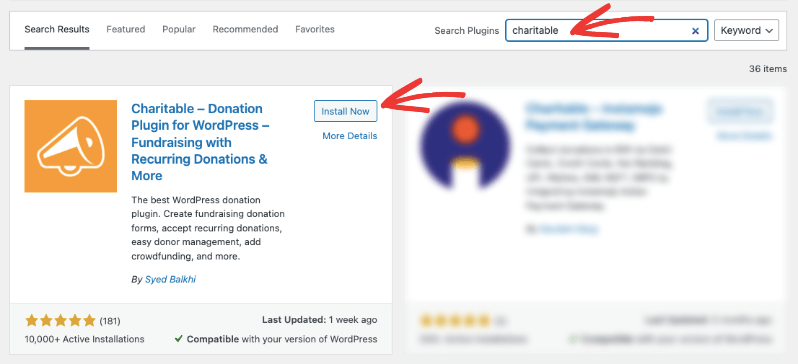
You can start with Charitable Lite from the WordPress.org plugin repository. In your WordPress dashboard, head over to the Plugins » Add New Plugin page. Search for Charitable, then install and activate the plugin on your site.
That’s it, you’re ready to use Charitable Lite. No license required.
Now, let’s take a look at what the Charitable Pro plugin has to offer.
The Charitable Pro Plugin (Premium)
With the Charitable Pro plugin, you unlock more donation options and a full donor management system. It’s built to handle everything a fundraising website needs, from accepting payments and managing donors to issuing receipts, selling event tickets and sending emails.
First, when you’re creating campaigns, you can duplicate existing ones. I love this feature because it saves so much time. I set up my campaign once with all the right settings, then duplicate it and change the content as needed.
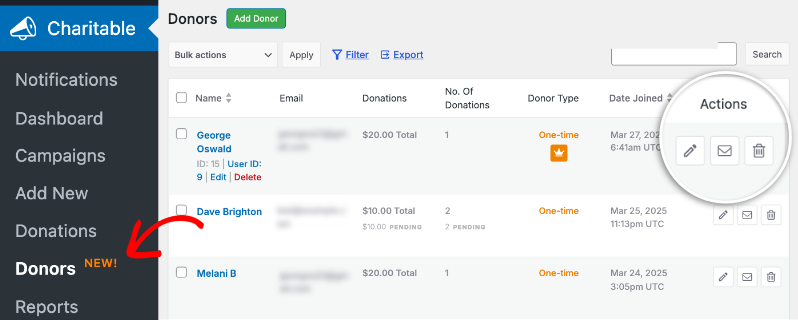
Next, when someone donates, a donation record is created along with a new donor profile, which is added to your donor database.
On top of that, you get features that help you raise more, like recurring giving and more payment gateways. For instance, you can offer both one-time and recurring donation options like this.
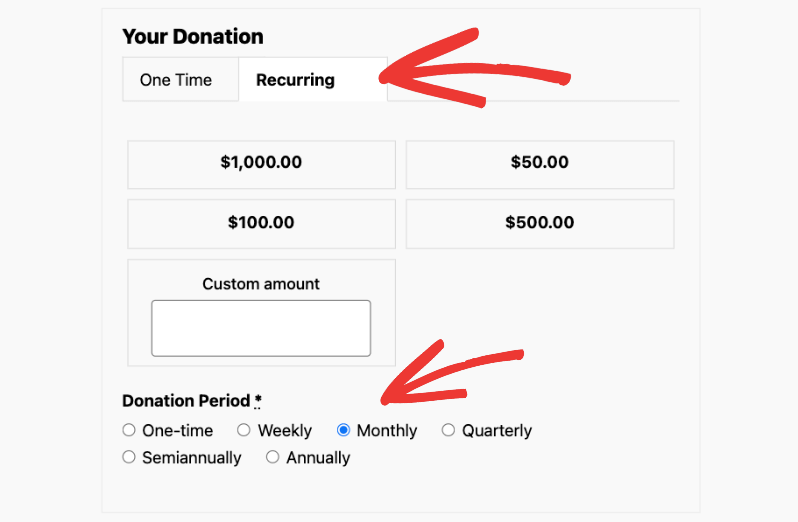
You can add suggested amounts and recurring donation periods. If a donor’s card expires, they can update it from their dashboard without cancelling their recurring gift.
There’s also Fee Relief, which lets donors cover the processing costs, and Gift Aid for charities in the UK.
The Charitable Pro plugin gives you one place to manage donor relationships, with a donor database and detailed profiles. Donors get self-service accounts where they can see their giving history, change their recurring gifts and download their receipts whenever they need.
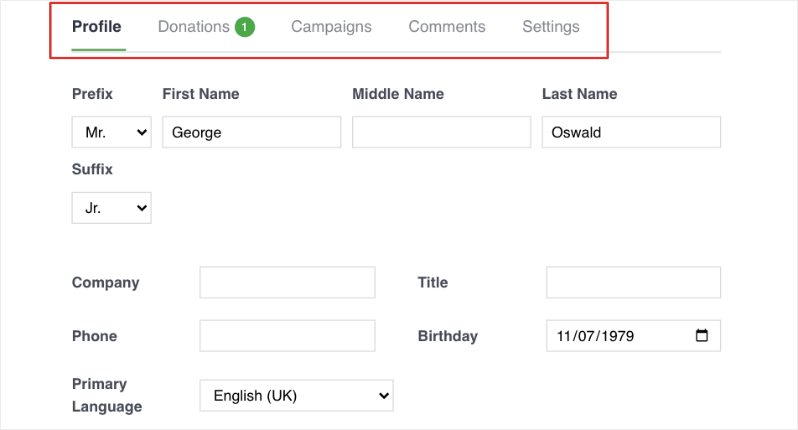
This gives everyone a more professional and simple experience.
There’s more!
Charitable also lets you launch peer-to-peer fundraising campaigns and connect with your email marketing tools. These features help you reach more of your community and raise more for your cause.
You’ll also get priority access to our support team when you need it, so your fundraising keeps running smoothly.
To use the Charitable Pro plugin, you need a paid license, which you can get on the Charitable pricing page.
What’s New in the Charitable Pro Plugin
We’ve added a lot to the paid plans recently, much of it based on what our customers asked for. Here are some of the newest features.
- Events and Tickets lets you sell event tickets inside your campaigns, with QR check-in at the door from any phone.
- Tributes lets donors give in honor or in memory of someone special.
- Custom Receipts lets you design your own receipt pages for each campaign.
- Donation Recovery helps you win back donations that were started but never completed.
- Multi-Currency lets donors give in their own currency.
- Conversion Tracking shows you which ads and channels bring in donations.
- The Visual Automation Builder lets you build automations by dragging steps onto a canvas, with no code.
- Card Updates lets recurring donors replace an expired card without losing their subscription.
- The updated dashboard lets you compare any 2 time periods and export your summary as a CSV or PDF.
What’s in the Charitable Pro Plugin?
Here’s a peek at what you can get with the Charitable Pro plugin.
- Recurring donations with custom giving intervals
- 10 more payment gateways, plus Fee Relief
- A donor database with donor profiles and self-service accounts
- Peer-to-peer fundraising, Ambassadors and donation teams
- Events and Tickets
- Email marketing integrations, including Mailchimp, ActiveCampaign and Brevo
- Custom donation forms with advanced fields
- Automated PDF receipts, annual receipts and Custom Receipts
- Tributes for gifts in honor or in memory of someone
- Gift Aid for UK charities
- Anonymous donations
- Customizable email templates
- Advanced reporting and analytics, including Google Analytics and Conversion Tracking
- Donation Recovery and Multi-Currency
- Automations with the Visual Automation Builder, Zapier and webhooks
- More AI assistant tools, such as donor records and donation form editing
- Importers for GiveWP, Donorbox and Givebutter
- Priority support and regular updates
See the full feature list here »
That’s a long list, but it’s not everything. Let’s see who the Charitable Pro plugin is best for.
Who Should Use the Charitable Pro Plugin?
The Charitable Pro plugin is the right choice if you match any of these.
- Your nonprofit is growing and needs more than the basic donation tools.
- You want supporters to raise funds for you through peer-to-peer campaigns.
- You need a donor database and detailed reports.
- You want recurring donations and more payment gateways.
- You sell tickets for galas, runs or other fundraising events.
- You want to give donors a professional experience with self-service accounts.
- You’re a UK charity that needs Gift Aid.
- You’re moving from GiveWP, Donorbox or Givebutter and want to bring your data with you.
- You need priority support and regular updates.
If you see your organization in any of these, upgrading could make a big difference to your fundraising.
Let’s move on to what the paid plans cost, to see if one fits your budget.
How Much Does the Charitable Pro Plugin Cost?
The Charitable Pro plugin needs a paid license. Head over to the Charitable pricing page to see the available plans.
There are 4 plans to choose from.
- Basic
- Plus
- Pro
- Elite
On every paid plan, Charitable takes no cut of your donations. You pay the annual license, and your payment gateway’s own processing fee goes directly to them. Every plan also comes with a 14-day money-back guarantee.
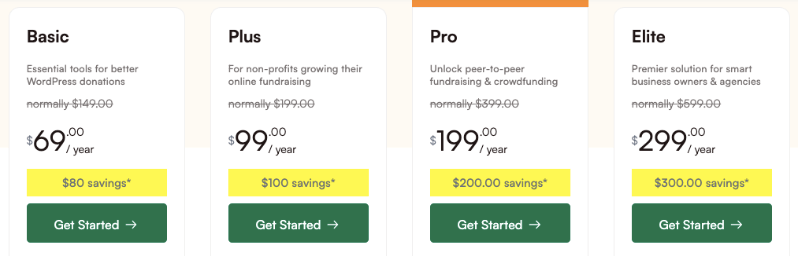
Let’s look at these plans in detail.
Basic ($69/year)
The Basic plan is perfect for small nonprofits who are ready to move beyond the free version but don’t need recurring donations yet. It gives you custom forms, PDF receipts, a donor dashboard and more payment gateways.
It’s a good fit for local charities, religious organizations and community groups with simple donation needs.
You’ll get these features.
- A license for one site
- Essential donation features
- Custom donation forms
- Full donation management
- PDF receipts and reports
- Donor dashboard and donor leaderboards
- Donor updates
- Stripe, Square, PayPal, Authorize.net and 7 other payment gateways
- The Donorbox importer
- Standard support
Plus ($99/year)
The Plus plan is designed for growing nonprofits that want steady funding through recurring donations. It’s also the plan for you if you use email marketing, or want donors to cover processing costs with Fee Relief.
If you’re a UK charity that needs Gift Aid, this plan has you covered too.
You get all the features in the Basic plan, plus these.
- Advanced fundraising tools
- Recurring donations with Card Updates
- Fee Relief
- Gift Aid support
- Annual receipts and Custom Receipts
- Tributes
- Anonymous donations
- DonorTrust
- Email marketing integrations (Mailchimp, ActiveCampaign, Brevo and more)
Pro ($199/year)
The Pro plan is built for nonprofits who want their community to help them fundraise. It’s the right choice if you’re planning peer-to-peer campaigns, ambassador programs, ticketed events or crowdfunding campaigns.
It’s also the plan for organizations that want to automate their work and track where their donations come from.
In addition to all the features in the other plans, you’ll also get these.
- Peer-to-peer fundraising
- Crowdfunding
- Ambassadors and donation teams
- Events and Tickets
- Donation Recovery
- Multi-Currency
- Conversion Tracking and Google Analytics
- Campaign updates
- Stripe Connect and Razorpay
- Automation tools (Smart Workflows with the Visual Automation Builder, Zapier, Webhooks, Zoho Flow and Uncanny Automator)
- Priority support
Elite ($299/year)
The Elite plan is made for agencies and larger organizations that manage several WordPress sites. If you handle donations across more than one website or manage client sites, this plan gives you 5 site licenses.
Web developers, agencies and organizations with several chapters or locations will find the multisite support and client management especially useful.
You get everything in Pro, along with these.
- 5 site licenses
- Multisite support
- Client management
- Premium support
Ready to get the Charitable Pro plugin? See how to do that below.
How to Get the Charitable Pro Plugin?
To get started, head over to the Charitable pricing page. Here you’ll find the details of each plan, so you can pick the one that matches your fundraising needs. When you’re ready, click “Get Started” to buy your plan.
After your purchase, you’ll get access to your new Charitable account straight away. You’ll use it for these tasks.
- Downloading plugins
- Managing license keys
- Accessing receipts
- Getting customer support
Open the Downloads tab in your account and click the Download Charitable button to download the plugin file. You’ll also find your license key there. Just click the clipboard icon to copy it, and keep it handy for the final step.
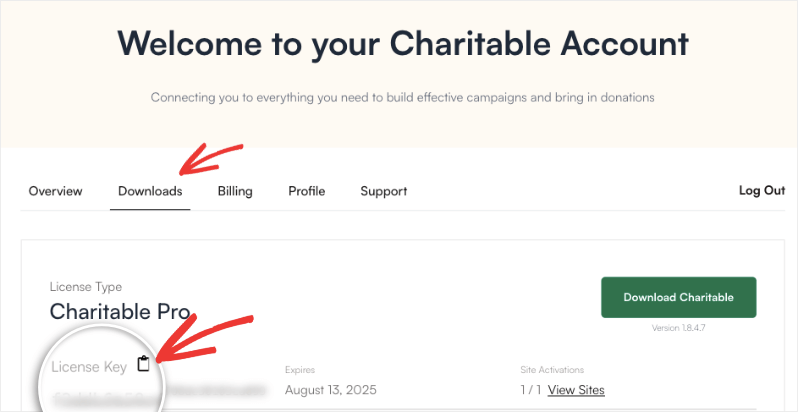
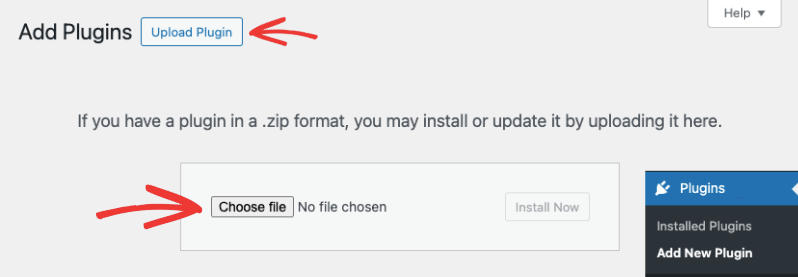
Now log in to your WordPress website and go to Plugins » Add New Plugin » Upload Plugin. Choose the file you downloaded, then upload, install and activate it.
Next, go to Charitable » Settings, paste your license key and click the Verify Key button.
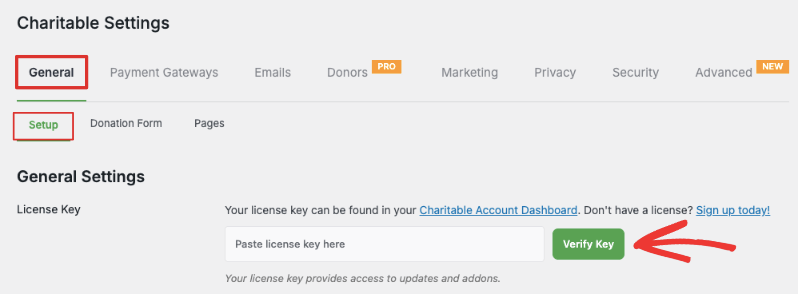
The paid version is now installed and ready to use. For more detailed instructions, follow our guide, How to Upgrade to Charitable Pro.
Use AI Assistants With Charitable Through WPVibe
Charitable now works with AI assistants like Claude and ChatGPT. You describe what you want in plain language, and your assistant does the work inside Charitable for you.
For example, you can ask it to “set up a fundraiser for the shelter with a $5,000 goal”, and it builds a draft campaign with suggested donation amounts.
Your assistant connects to your site through WPVibe, a free tool that works with Charitable out of the box. Setup takes about 10 minutes, and you only do it once.
This works on Charitable Lite as well as the paid plans. On Lite, your assistant can create and update campaigns, change their status and record offline gifts.
The Charitable Pro plugin adds more. Your assistant can also look up donor records and giving histories, edit donation forms and pull retention and recurring giving reports.
You stay in control the whole time. Your assistant can only read your data until you switch on write access, and every change it makes is logged. You’ll need WordPress 6.9 or later. See our Charitable AI setup guide to get started.
Switching to Charitable From GiveWP, Donorbox or Givebutter
If you already raise money with another tool, you don’t have to start over. Charitable has easy migrations from popular fundraising platforms, so you can bring your donors and donation history with you.
Moving From GiveWP
If GiveWP is active on your site, Charitable’s import tool moves your campaigns, donations and donors in a few clicks. Our guide on migrating from GiveWP to Charitable walks you through it.
Rather not do it yourself? We offer a free White Glove Migration Service for GiveWP users. Our team moves your donor records, donation history and recurring giving plans for you, and you keep using the payment gateway you already have.
Switching From GiveWP? We’ll Move Everything for You.
Worried about losing data or that it would take too much time? Our team will handle it for you. Sit back and relax.
With our white glove migration service, we move your donors, donations and campaigns into Charitable. You keep working on your mission while we handle the technical part.
Qualifying GiveWP customers can also get their first year of the Charitable Pro plugin free. Check if you’re eligible »
Qualifying GiveWP customers can also get their first year of the Charitable Pro plugin free. You can check if you’re eligible on the White Glove Migration page.
Moving From Donorbox
The Donorbox Importer reads the CSV files you export from Donorbox. It brings over your donors, campaigns and donation history, and keeps a record of your recurring plans.
Before anything is saved, you can run a test import that shows exactly how many records it found. The Donorbox Importer is included in every paid plan.
Moving From Givebutter
Charitable has a Givebutter import tab, so you can upload your Givebutter exports and bring in your donations and donors. Our guide on switching from Givebutter to Charitable shows each step.
Coming from somewhere else? The CSV donor import tool imports donors from any platform or spreadsheet that can export a CSV file.
Quick Comparison of Charitable Lite and Pro
Here’s a table to make it easy for you to see the differences between Lite and the paid plans.
| Feature | Lite | Paid Plans |
|---|---|---|
| Core Features | ||
| Unlimited Campaigns | ✓ | ✓ |
| Donation Forms | ✓ | ✓ |
| Suggested and Custom Amounts | ✓ | ✓ |
| Add, Edit and Delete Donation Records | ✓ | ✓ |
| Basic Reports | ✓ | ✓ |
| Payment Processing | ||
| Stripe, Square and PayPal | ✓ | ✓ |
| Offline Donations | ✓ | ✓ |
| Additional Payment Gateways | ✖ | ✓ |
| Recurring Donations | ✖ | ✓ |
| Fee Relief | ✖ | ✓ |
| Gift Aid (UK) | ✖ | ✓ |
| Multi-Currency | ✖ | ✓ |
| Form Features | ||
| Custom Fields | ✖ | ✓ |
| Modal Forms | ✖ | ✓ |
| Tributes | ✖ | ✓ |
| Donor Management | ||
| Donor Database and Profiles | ✖ | ✓ |
| Donor Dashboard | ✖ | ✓ |
| PDF, Annual and Custom Receipts | ✖ | ✓ |
| Donation Recovery | ✖ | ✓ |
| Advanced Features | ||
| Peer-to-Peer Fundraising | ✖ | ✓ |
| Crowdfunding | ✖ | ✓ |
| Events and Tickets | ✖ | ✓ |
| Email Marketing Integration | ✖ | ✓ |
| Visual Automation Builder | ✖ | ✓ |
| AI and Migration | ||
| AI Assistants Through WPVibe (Campaigns and Offline Gifts) | ✓ | ✓ |
| AI Assistants for Donor Records, Forms and Reports | ✖ | ✓ |
| Donorbox Importer | ✖ | ✓ |
| White Glove Migration From GiveWP | ✖ | ✓ |
| Support | ||
| Forum Support | ✓ | ✓ |
| Priority Support | ✖ | ✓ |
Making Your Decision: Charitable Lite or Pro?
The choice between Charitable Lite and the paid plans comes down to your organization’s needs and how fast you’re growing.
Stick with Charitable Lite if you match these.
- You’re just starting to fundraise online.
- Your donation needs are simple.
- You only need Stripe, Square, PayPal and offline payments.
- You’re happy with simple donation records.
- You have a limited budget for fundraising tools.
Upgrade to the Charitable Pro plugin if you match these.
- You want to set up recurring donations.
- Your organization is growing.
- You need peer-to-peer fundraising.
- You want to sell tickets for your events.
- A donor database is a priority.
- You need more payment gateway options.
- Email marketing integration is important to you.
- You need UK Gift Aid support.
- You’re moving from GiveWP, Donorbox or Givebutter.
- Priority support matters to you.
Consider Your Growth Plans
Think about where your organization will be next year. If you’re planning to grow your fundraising, starting on a paid plan now gives you a stronger base. Remember, you can always start with the Basic plan and upgrade as your needs change.
A paid plan can quickly cover its own cost through more donations, donors who keep giving and less time spent on admin. And with the 14-day money-back guarantee, you can try it with no risk.
Ready to get started with the Charitable Pro plugin?








Leave a Reply