
A card expires. A bank reissues a number after a fraud alert. It happens to every recurring donor eventually, and until now the fix was painful for everyone: either your team collected new card details by hand, which is a compliance headache, or you asked the donor to cancel and start over, which quietly kills a lot of recurring gifts.
🎉 With Charitable Recurring 2.3, donors can update their own saved card in seconds through Stripe’s secure Customer Portal, and the subscription never skips a beat.
Why Self-Service Card Updates Change Everything
Failed renewals from stale cards are one of the biggest silent leaks in recurring fundraising. The old workarounds made it worse.
Cancel-and-resubscribe loses the donor’s history and momentum, and hand-entering a card puts sensitive data where it should never be.
Letting the donor refresh their own card inside Stripe keeps the original subscription intact, keeps card numbers off your site entirely, and turns a support ticket into a 30-second self-service moment.
Like to see how it works? I’ve created a video walkthrough for you.
See It In Action
Donors Fix Their Own Card, Securely
All you have to do is turn on one setting and an Update Card control appears next to each recurring donation on the donor dashboard.
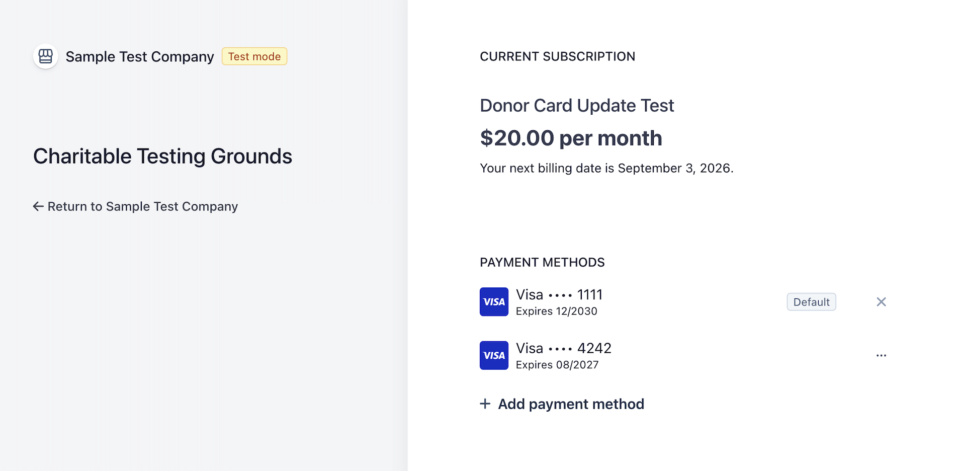
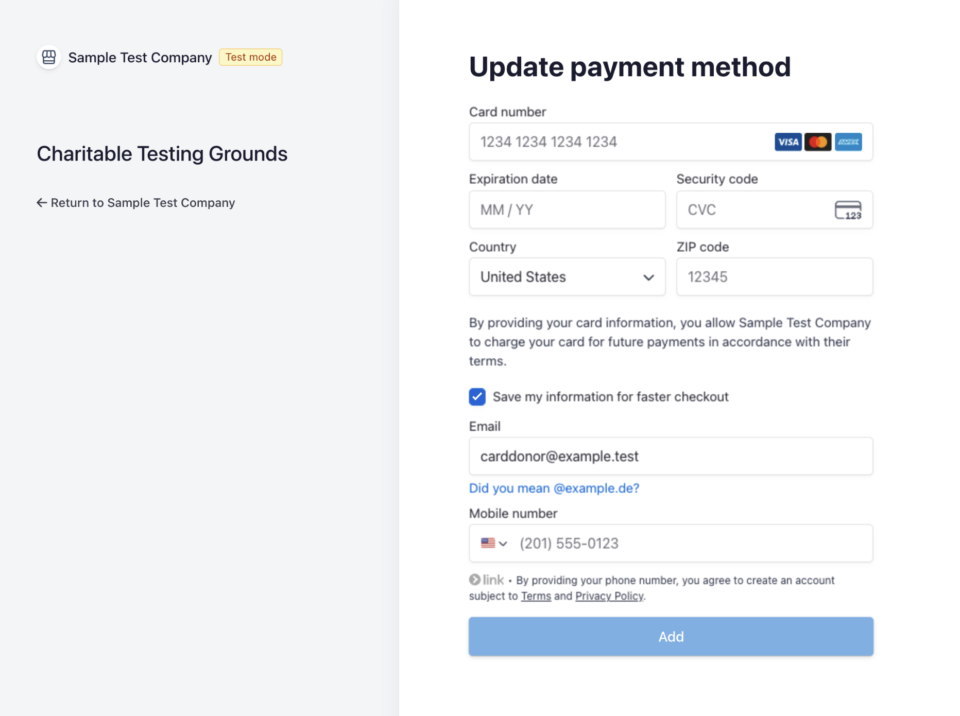
The donor clicks it, lands in Stripe’s own PCI-compliant Customer Portal, enters a new card, and comes back to a friendly confirmation.
Their amount, schedule, and giving history stay exactly as they were.
What you’ll love about this feature:
⚡ 30-second fix: Donors refresh an expired card themselves, no ticket required.
🔒 Card data never touches your site: Everything happens inside Stripe’s secure portal.
✅ Subscription stays intact: Same subscription, same history, just a fresh card for the next renewal.
Your Team Can Help Without Touching a Card Number
When a donor calls in, staff do not need to read card digits aloud or type them anywhere.
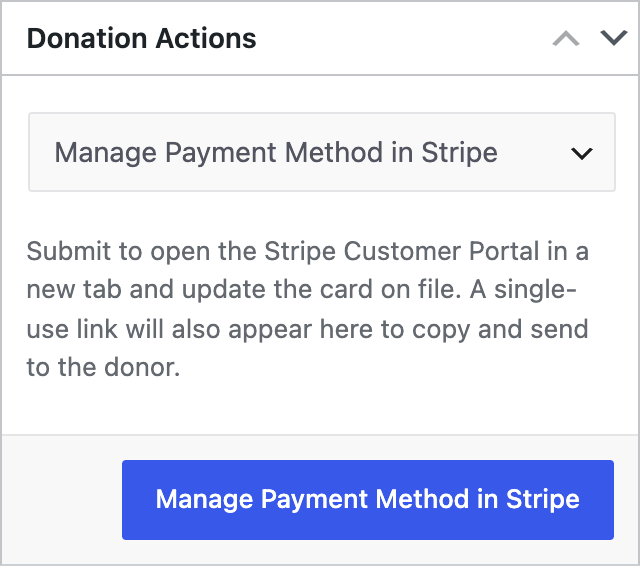
From the recurring donation edit screen, choose Manage Payment Method in Stripe.
The portal opens in a new tab so you can help live, and a single-use link appears that you can copy and email to the donor to finish on their own.
🤝 Help on the phone: Open the donor’s secure portal in one click.
🔗 Send a single-use link: Copy it with one tap and paste it into an email.
🛡️ Zero card handling: Your team never sees or stores a card number.
Locked Down to Card Updates by Default
The Stripe portal can do a lot, so Charitable scopes it to card update only out of the box. Donors cannot accidentally cancel or change their plan from inside the portal, which keeps donation status and your webhooks in sync.
Developers who want to expose more can do so with a single filter.
🎯 Card update only: No surprise cancellations or plan changes.
🧩 One filter to extend: charitable_recurring_stripe_portal_features opens it up when you need it.
🔁 Status stays correct: Cancellations still run through Charitable so nothing drifts.
Every Change Is Logged
Both card updates and cancellations are written to the donor log, visible right on the donor’s profile and in Charitable Tools. You get a clear, timestamped record of who did what, without any extra setup.
📋 Audit trail: Card updates and cancellations are recorded automatically.
👁️ On the donor profile: See the history without leaving the donor screen.
🕐 Timestamped: Know exactly when a donor refreshed their card.
For Agencies and Developers
Hooks, Filters, and Full Customization
The whole flow is extensible. Use charitable_recurring_stripe_portal_features to control exactly what the Stripe portal exposes, and charitable_recurring_donor_dashboard_card_update_enabled to gate the donor control with your own logic. The charitable_recurring_user_actions filter is the same seam that will power future donor self-service.
Built for Connect and Direct Keys
Card updates work whether you use Stripe Connect or direct API keys, and each donation is handled in its own test or live mode automatically, so mixed environments just work.
FAQs on Card Updates
Does this require Charitable Pro?
Yes. This card update feature is available in Charitable Pro with the Recurring Donations addon.
Will updating a card cancel or restart the donor’s subscription?
No. The subscription keeps its original ID, amount, schedule, and giving history. Only the payment method changes.
Does my team ever see or store the new card number?
No. Card entry happens entirely inside Stripe’s own PCI-compliant Customer Portal, so a raw card number never touches your site or your staff.
Can a donor cancel their subscription from inside the portal?
Not by default. Charitable scopes the portal to card updates only, so cancellations and plan changes still have to go through Charitable, which keeps donation status and webhooks in sync.
Does this work with Stripe Connect?
Yes. Card updates work whether you use Stripe Connect or direct API keys, and each donation is handled in its own test or live mode automatically.
Get Started with Card Updates
Update Charitable Recurring to 2.3.0+, then enable Update Payment Method under Charitable » Settings » Donors.
The admin controls are ready the moment the addon updates. That is all it takes to stop losing recurring donations to expired cards.
Charitable Has 1.2+ Million Downloads!
Trusted by millions to power successful fundraising campaigns. Try Charitable risk-free today.
✅ 14-day money-back
✅ Transparent pricing
✅ Code-free setup
What’s New in Charitable
We also launched several powerful features and improvements recently:
🧾
Design a personalized, on-brand thank-you page for every campaign, no code required.
🖼️
Launch a full-width fundraising page with a bold hero image and a locked-in donation widget.
📝
Drop a fully working donation form directly onto any page or post, no redirects.
📣
Moderate your peer-to-peer network with new directory screens and one-click approvals.
⚡
Accept UPI, cards, and global currencies for India-based donations, right inside your form.
🔔
Send instant push notifications for thank-yous, campaign launches, and goal milestones.
We’ve been adding to Charitable constantly, features and improvements designed to help you raise more and serve your donors better. See everything we’ve shipped at the Charitable Changelog.
Not yet a Charitable Pro user? Sign up today and get up to 50% off on your plan. We’re confident you’ll love raising funds with Charitable. If, for any reason, Charitable is not the right fit for you, we’ll refund your purchase with our 14-day money-back guarantee. Get Charitable Pro Now »
If you have any questions or run into anything setting up card updates, our support team is ready to help.
Stay Connected for More Nonprofit Resources
For more tutorials and videos tailored to nonprofits, subscribe to our YouTube channel. We regularly publish expert tips, step-by-step guides on online donations, fundraising strategies, and practical resources to help your organization succeed.
🗞️ Get weekly tips and exclusive guides in your inbox
Join our newsletter →
🎥 Watch step-by-step tutorials and success stories
Subscribe to our YouTube channel →
👩🏽💻 Connect with our community and get daily nonprofit insights
Follow us on LinkedIn →
🥳 Fun reels and non-profit insights
Follow us on Instagram →
👀 Insightful & fun videos to help you grow your cause
Follow us on TikTok→
🌎 Subscribe and follow for general fundraiser tips
Get Fundraiser Tips on TikTok →
Powerful Fundraising Resources
🤖 Use Charitable with Your AI Assistant
⬇️ Download proven strategies, campaign ideas, and expert tools
Get the Fundraising Kit →
💸 Get Free Fundraising Resources
Head to the Charitable Fundraising Hub →
🤔 Got questions about Charitable?
Charitable FAQs →
🏎️ Take Charitable for a spin
Create your Charitable Demo →
Understand non-profit terms and jargon
Non-Profit Glossary →
% Looking for non-profit deals and discounts?
Best Non-Profit Deals and Discounts →








Leave a Reply