
Gift Aid adds 25p to every £1 a UK taxpayer gives you, and it costs the donor nothing. Charitable has helped UK charities collect it since 2016.
Today we’re releasing Charitable Gift Aid 2.0, the biggest update to Charitable’s Gift Aid feature so far. 🇬🇧
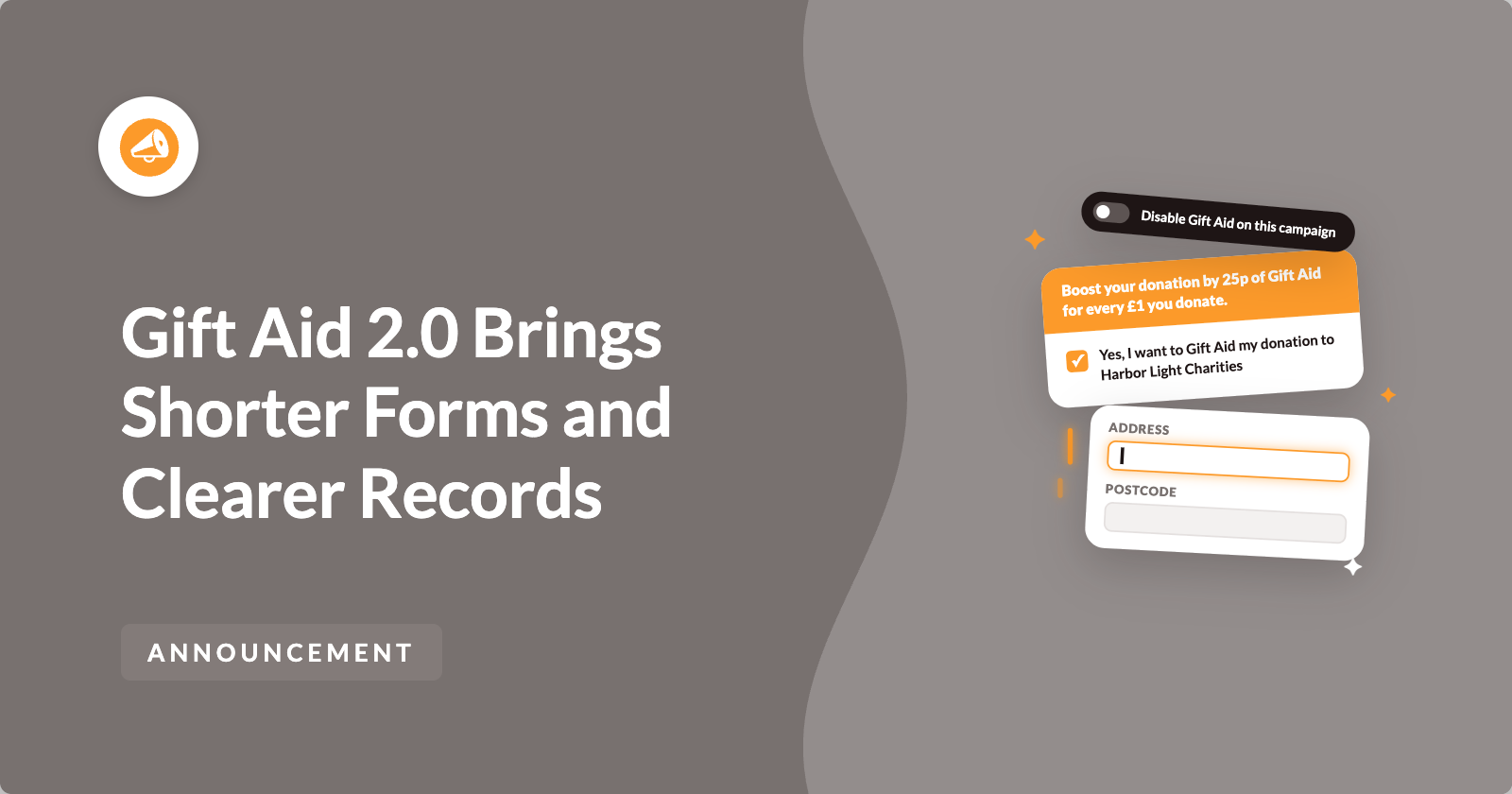
Gift Aid now has its own settings page. Donors are asked for a home address only when they claim Gift Aid. And every declaration now saves the exact wording the donor agreed to.
Here’s What Gift Aid 2.0 Looks Like
The change your donors will notice first is on the donation form itself.

With the new address setting on, the address fields stay hidden when the form loads. They appear, and become required, as soon as a donor ticks the Gift Aid box.
If the donor unticks the box, the fields hide again and nothing they typed is saved. So a donor who isn’t a UK taxpayer can give in a few clicks, and a donor who claims Gift Aid gives you everything HMRC needs.
Why Every Gift Aid Declaration Counts
Gift Aid is one of the simplest ways for a UK charity to raise more without asking donors to give more. But HMRC only pays it on donations with a valid declaration, a home address and a postcode.
So 2 things matter. The form needs to be short enough that people finish it, and your records need to show what each donor agreed to if HMRC ever asks. Gift Aid 2.0 helps with both.
Charitable’s Gift Aid feature is in the Charitable Pro plugin, Plus plan and higher, alongside recurring donations and Fee Relief.
When You’ll Feel the Difference
These are the campaigns and moments where Gift Aid 2.0 helps most.
- 🌍 Supporters outside the UK. They can’t claim Gift Aid, so they won’t be asked for a home address they don’t need to give.
- 🎟️ Raffles and reward appeals. Donors get something back, so these campaigns aren’t eligible. You can remove the Gift Aid box from just those campaigns.
- 🔁 Monthly giving. When a donor ticks Gift Aid on a recurring donation, every later payment is recorded as Gift Aid too.
- 📱 Apple Pay and Google Pay. Gift Aid and the donor’s address are now recorded on these quick wallet payments.
- 🧾 Claim time. Your Gift Aid export lines up with the columns in HMRC’s Charities Online claim schedule.
Gift Aid Settings Now Have Their Own Page
You’ll find them at Charitable » Settings » Advanced » Gift Aid. If you use Charitable without the Charitable Pro plugin, the same settings are at Charitable » Settings » Extensions.

The section header, checkbox label and declaration text you edited in the Customizer are all here. The Customizer still works too, and both places edit the same text, so a change in one shows in the other.
You can also choose whether the donor Title field is required, optional or hidden. HMRC’s claim schedule has a Title column, so if you hide the field, that column stays blank in your export.
And if you clear the checkbox label or the declaration by mistake, Charitable uses the default text instead. Your donors will always see a complete declaration.
Switch Gift Aid Off for Campaigns That Aren’t Eligible
Gift Aid stays on for every campaign by default. Some campaigns can’t claim it, such as raffles, appeals where donors receive something in return, or campaigns for a beneficiary outside the UK.
For those, open the campaign in the Campaign Builder and go to Settings » Gift Aid. Then turn on Disable Gift Aid on this campaign and save.

The Gift Aid section disappears from that campaign’s donation form, and later payments of recurring donations to it stop claiming Gift Aid. Fundraiser pages made under the campaign with Charitable Ambassadors follow the same setting.
Every other campaign keeps Gift Aid on, with no extra setup.
Gift Aid Records That Show What Each Donor Agreed To
HMRC can ask to see the declaration behind any Gift Aid claim. So every Gift Aid donation now saves the checkbox text the donor ticked, which includes your charity’s name, as well as the declaration itself.
Both appear in your standard donations export. If HMRC asks, you can show exactly what a donor agreed to on the day they gave.
Recurring donations get the same care. When a donor ticks Gift Aid on a monthly gift, every later payment is saved with the same declaration, title and address, and each one appears in your Gift Aid export.
Export Gift Aid Donations for Your HMRC Claim
When it’s time to claim, go to Charitable » Donations, click Export and choose Gift Aid as the type of report.

The CSV only includes Gift Aid donations. Its title, name, house, postcode, date and amount columns line up with HMRC’s Charities Online Gift Aid schedule, and dates use the DD/MM/YY format HMRC asks for.
When you copy the rows across, leave out the Donation ID and Status columns.
Gift Aid on More Payment Methods
Gift Aid is now recorded on PayPal donations made through PayPal Commerce, both one-time and recurring.
With the Charitable Pro plugin 1.8.19.5 or later, Gift Aid and the donor’s address are also recorded on Stripe Apple Pay, Google Pay, ACH, SEPA, BECS and Cash App donations. Stripe card payments and offline donations keep working as they did.
We also fixed 2 smaller things. Apostrophes and ampersands no longer show as codes in declarations saved from the Customizer, and the Gift Aid amount in campaign stats now shows correctly on Campaign Builder campaigns.
Set Up Gift Aid 2.0 in a Few Minutes
Gift Aid 2.0 works the same way as version 1.x until you change a setting, so updating won’t change your forms. Here’s how to try the new options.
Step 1: Update Charitable Gift Aid
To get started, update Charitable Gift Aid to 2.0 from Plugins » Installed Plugins. If you take Apple Pay or Google Pay, update the Charitable Pro plugin to 1.8.19.5 or later at the same time.
Step 2: Choose Your Form Settings
Next, head over to Charitable » Settings » Advanced » Gift Aid. Pick a Donor Title setting, and turn on Only show address fields when the donor opts in to Gift Aid if you want the shorter form.
On a multi-step Campaign Builder form, keep the Gift Aid checkbox on the same step as the address fields.
Step 3: Switch Gift Aid Off Where It Doesn’t Apply
Then open any raffle or reward campaign in the Campaign Builder and turn Gift Aid off under Settings » Gift Aid.
Step 4: Make a Test Donation
Finally, make a test donation with the Gift Aid box ticked, then run a Gift Aid export. If the row has the donor’s title, name, house and postcode, you’re ready for your next claim!
Read the Full Gift Aid Setup Guide →
For Agencies and Developers
Turn Gift Aid Off by Rule Instead of by Campaign
The new charitable_gift_aid_disabled_for_campaign filter decides whether Gift Aid is off for a campaign. It receives $disabled, $campaign_id and $form, so you can turn Gift Aid off by campaign category or author, or switch it on only for the campaigns you choose.
To check a campaign in your own code, or from a code snippets plugin, charitable_gift_aid_is_disabled_for_campaign( $campaign_id ) returns true when Gift Aid is off.
Export and Campaign Stats Filters
The charitable_giftaid_export_row and charitable_giftaid_export_entries_columns filters change the rows and columns of the Gift Aid CSV.
For campaign totals, the new charitable_gift_aid_campaign_builder_donation_summary filter covers Campaign Builder campaigns. It sits beside the existing filters for standard campaigns, the percentage raised and the Gift Aid total query.
FAQs on Gift Aid 2.0
Which Plan Do I Need for Gift Aid 2.0?
Gift Aid is in the Charitable Pro plugin, Plus plan and higher. Recording Gift Aid on Apple Pay, Google Pay and the other Stripe payment methods needs the Charitable Pro plugin 1.8.19.5 or later.
Will My Donation Forms Change When I Update?
No. Every new setting starts out working the same way as Gift Aid 1.x, and your existing Gift Aid text and records carry over.
Can I Still Edit the Gift Aid Text in the Customizer?
Yes. Go to Appearance » Customize » Charitable » Gift Aid. The Customizer and the settings page edit the same text.
Why Don’t the Address Fields Appear When the Box Is Ticked?
Check that the form includes an address field. On a multi-step form, move the Gift Aid checkbox to the same step as the address fields.
What Happens If I Go Back to Gift Aid 1.x?
The 2.0 settings are ignored, so campaigns where you turned Gift Aid off will show it again. Your donation records aren’t affected.
Get Started With Gift Aid 2.0
Gift Aid 2.0 is available now in the Charitable Pro plugin, Plus plan and higher. Update Charitable Gift Aid from your WordPress dashboard, then open Charitable » Settings » Advanced » Gift Aid to try the new options.
Read the Gift Aid Documentation →
Not Yet on a Charitable Paid Plan?
Charitable Has 1.2+ Million Downloads!
Trusted by millions to power successful fundraising campaigns. Try Charitable risk-free today.
✅ 14-day money-back guarantee
✅ Transparent pricing
✅ Code-free setup
What’s New in Charitable
We also launched several new features and improvements recently.
🏃
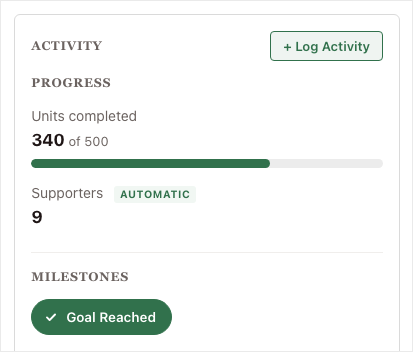
Track minutes read, miles walked or any goal beside the money on peer-to-peer fundraisers.
🖨️
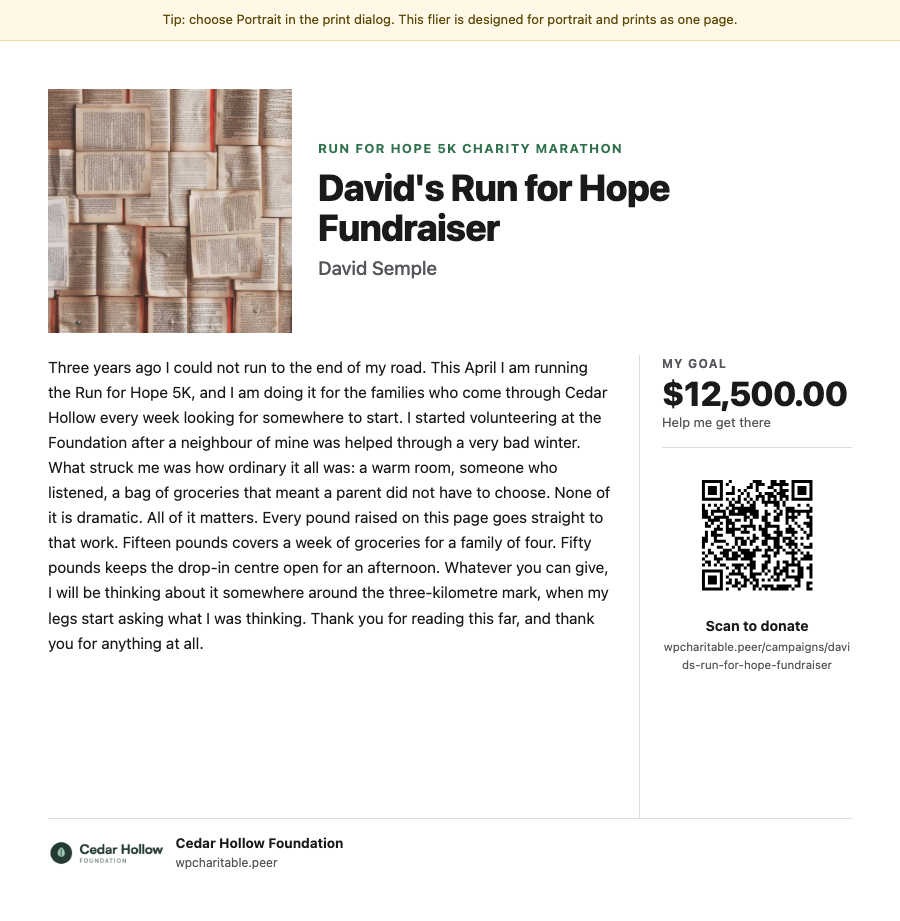
Print a flier or poster with a fundraiser’s own story and QR code to raise money away from the screen.
💸
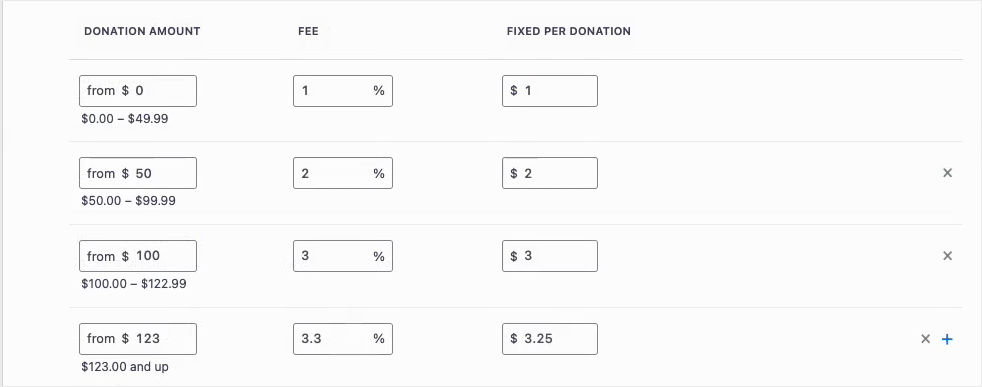
Set a different fee for each gift size, so the cover-the-fee ask always matches the gift.
📊
Compare date ranges, export reports and see a score for your fundraising in one place.
🎟️
Sell event tickets inside your campaigns, so tickets and donations share one set of reports.
We’ve been adding to Charitable constantly, with features and improvements designed to help you raise more and serve your donors better. See everything we’ve shipped at the Charitable Changelog.
Not yet a Charitable Pro user? Sign up today and get up to 50% off on your plan. We’re confident you’ll love raising funds with Charitable. If, for any reason, Charitable is not the right fit for you, we’ll refund your purchase with our 14-day money-back guarantee. Get Charitable Pro Now »
Stay Connected for More Nonprofit Resources
For more tutorials and videos tailored to nonprofits, subscribe to our YouTube channel. We regularly publish expert tips, step-by-step guides on online donations, fundraising strategies, and practical resources to help your organization succeed.
🗞️ Get weekly tips and exclusive guides in your inbox
Join our newsletter →
🎥 Watch step-by-step tutorials and success stories
Subscribe to our YouTube channel →
👩🏽💻 Connect with our community and get daily nonprofit insights
Follow us on LinkedIn →
🥳 Fun reels and non-profit insights
Follow us on Instagram →
👀 Insightful & fun videos to help you grow your cause
Follow us on TikTok→
🌎 Subscribe and follow for general fundraiser tips
Get Fundraiser Tips on TikTok →
Powerful Fundraising Resources
🤖 Use Charitable with Your AI Assistant
⬇️ Download proven strategies, campaign ideas, and expert tools
Get the Fundraising Kit →
💸 Get Free Fundraising Resources
Head to the Charitable Fundraising Hub →
🤔 Got questions about Charitable?
Charitable FAQs →
🏎️ Take Charitable for a spin
Create your Charitable Demo →
Understand non-profit terms and jargon
Non-Profit Glossary →
% Looking for non-profit deals and discounts?
Best Non-Profit Deals and Discounts →




Leave a Reply