
If your nonprofit has a WordPress website, your stories, your volunteer page and your events probably all live there.
But when someone gives through Zeffy, the gift happens on Zeffy’s system. Your donor list grows inside Zeffy’s database, your money arrives on Zeffy’s payout schedule, and your donors are asked to give a little extra to Zeffy at checkout.
Many of the nonprofits I work with picked Zeffy because it was free and quick to set up. Later, they started to wonder who really holds their donor records, and what would happen if Zeffy changed its rules.
That’s why I think most nonprofits are better off taking donations on their own website. Donors give under your name and your branding, so they know exactly who they’re supporting. Your donor list stays in your own database, where you can export it and take it anywhere.
Payouts also go straight from your payment gateway to your bank account. And every link you share keeps bringing people back to your site for years.
Don’t have a WordPress site yet? It’s easier to set one up than most people think, and our guide on how to create a nonprofit website walks you through it.
In this guide, I’ll compare 7 Zeffy alternatives that run on your WordPress site, with what each one costs, who it suits and where it falls short. Then I’ll show you how to move your donors from Zeffy to your own site, step by step.
What’s in This Guide?
- Zeffy Alternatives for WordPress: The Short Answer
- Why Nonprofits With a WordPress Site Look for a Zeffy Alternative
- What to Look for in a Zeffy Alternative
- 7 Best Zeffy Alternatives for Nonprofits With a WordPress Site
- Which Zeffy Alternative Should You Choose?
- How to Move Your Donors From Zeffy to Charitable (Code-Free)
- My Final Recommendation
- FAQs on Zeffy Alternatives
Zeffy Alternatives for WordPress: The Short Answer
If you’re short on time, here’s where I’d start. Each pick below is a WordPress plugin, so donors give on your own website and your donor records stay in your own database.
- Charitable: This is the best overall Zeffy alternative for a nonprofit with a WordPress site. It’s built only for fundraising, it has a free version, and paid plans start at $69 for the first year.
- GiveWP: This suits a nonprofit that also wants the other plugins in its owner’s yearly bundle.
- WPForms: This suits a team that mainly needs forms and wants to add a simple donation form to them.
- WP Simple Pay: This suits a nonprofit that only takes payments through Stripe and wants a light payment form.
- Formidable Forms: This suits a team that builds detailed forms and wants donations as one part of them.
- Gravity Forms: This suits a developer or agency that already uses it on client sites.
- Donation Platform for WooCommerce: This suits a nonprofit that already runs a WooCommerce shop.
Before we get to the full reviews, it helps to be clear about what Zeffy does well, because a good alternative has to match the parts that matter to you.
Why Nonprofits With a WordPress Site Look for a Zeffy Alternative
Zeffy is a hosted fundraising service. That means your donation forms, ticket pages and donor records all run on Zeffy’s own servers, and you link to them or embed them on your website.
What Zeffy Does Well
I want to be fair to Zeffy here, because it does a lot for small teams. Zeffy says it is 100% free for nonprofits. It doesn’t charge a platform fee, and it says it covers the card processing fees too.
Instead, Zeffy asks each donor for an optional contribution to Zeffy at checkout. The donor can change that amount or set it to 0. Zeffy says 2 out of 3 donors leave one.
It also covers more than donations. You can sell event tickets, run raffles and auctions, sell memberships and run a small online store from the same account. For a food pantry with 2 part-time staff and no website budget, that’s a lot of tools for nothing.
What Changes When You Already Have a WordPress Site
Once you have your own website, a few parts of the Zeffy setup start to matter more. Here are the 4 I hear about most often.
- Your forms live on Zeffy: Zeffy has a WordPress plugin called Zeffy Donate Button, but it only embeds a form hosted on Zeffy or opens one in a popup. The form itself still runs on Zeffy’s system.
- Your donor list lives in Zeffy’s database: You can export it, but the main copy of your records sits with Zeffy, under Zeffy’s rules.
- Payouts follow Zeffy’s schedule: Zeffy pays out weekly on Mondays by default, or monthly if you prefer. Some organizations can choose next-day payouts. Each payout also goes through an anti-fraud review that Zeffy says takes between one and 3 days.
- Donors see a request from Zeffy: At checkout, your donor is asked to support Zeffy on top of their gift. Some donors don’t mind. Others notice the extra line after they’ve paid and feel caught off guard.
For example, if a Canadian animal rescue had a WordPress site with 3 years of blog posts and adoption stories, every donate button would still send people into a Zeffy form. Their donor list would grow inside Zeffy rather than on their own site. If Zeffy ever changed its contribution prompt or its rules, they would have to move everything at once.
There’s also the question of where you are. Zeffy currently supports organization accounts in 6 countries, which are the US, Canada, the UK, Germany, Ireland and Australia. If your nonprofit is in India, New Zealand, South Africa or anywhere else, you can’t open a Zeffy account at all.
We wrote more about this in why free fundraising platforms aren’t really free. In short, the cost of a hosted tool often shows up later, in data and payouts you don’t fully control.
That’s why the alternatives in this guide are all WordPress plugins. But not every plugin solves these problems equally well, so here’s what I checked for each one.
What to Look for in a Zeffy Alternative
When I compare donation tools for a nonprofit with a WordPress site, I look at the same 7 things. They’re the questions that decide whether you’ll still be happy with the tool in 3 years.
- Donors give on your site: The form should run on your own web address, with your own branding and no outside request at checkout.
- You control your data: Your donor records should sit in your own database, and you should be able to export them at any time.
- Payouts come straight from your gateway: Money should go from Stripe, PayPal or your other payment gateway to your bank account, with no middle step.
- It’s built for fundraising: Campaign pages, goals, progress bars and donation receipts should be part of the tool, not something you build yourself.
- Monthly giving is possible: Recurring donations are where long-term income comes from, so check which plan includes them.
- It works in your country: Look for the payment gateways your donors use, and features like Gift Aid if you’re in the UK.
- The price is clear: You should know what you’ll pay this year and at renewal, without paying for extras later.
With those 7 points in mind, here are the plugins I’d recommend, starting with the one I’d pick for most nonprofits.
7 Best Zeffy Alternatives for Nonprofits With a WordPress Site
I checked every price and feature below on each company’s own website and WordPress.org listing in November 2026. Prices change often, so check the vendor’s pricing page before you buy.
1. Charitable
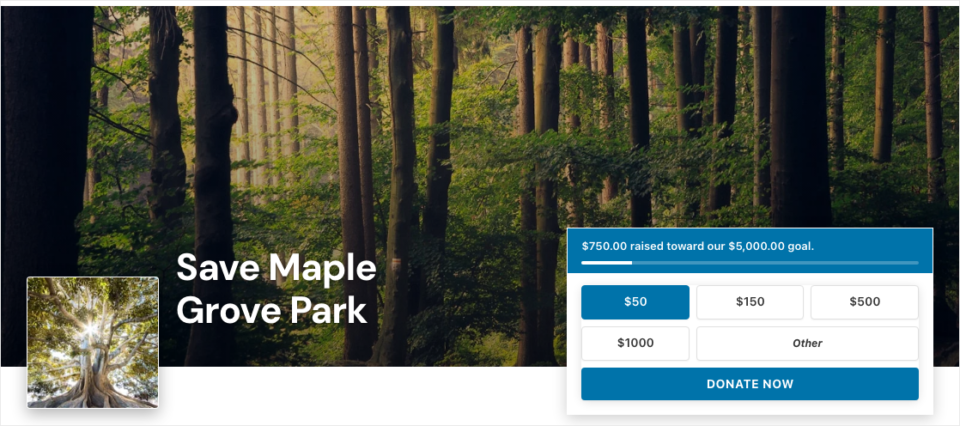
Charitable sits at the top of this list because it answers every point from the checklist above. It’s a WordPress donation plugin built only for fundraising, and it turns your own website into the place where donors give.
More than 10,000 nonprofits use it, and it has more than one million downloads. That’s a lot of small teams who wanted their fundraising on their own site.
You control your data. Every donor record is stored in your own WordPress database, and nobody else holds the main copy.
You can see each donor’s giving history in one list. You can also export your donations to a CSV file at any time, even on the free version.
You control your fundraisers. You decide how much to raise, the goal, the deadline and whether to extend it. You can create unlimited campaigns with the drag and drop campaign builder, and each one gets its own page, goal and progress bar.
Payouts go directly from your payment gateway. Charitable never holds your money. Donations go straight from Stripe, PayPal, Square or your other gateway to your account, on that gateway’s normal schedule.
Your donors also stay on your site the whole time. There’s no outside request at checkout, so the amount a donor chooses is the amount they give.
Charitable also covers more of what Zeffy does than most plugins. With Charitable Events, you can sell tickets inside a campaign, and every ticket counts toward your goal.
Guests get a QR code on their receipt, and volunteers can check them in at the door. Charitable Events is in the Charitable Pro plugin, Pro plan and higher.
It works outside North America too. Besides Stripe, PayPal and Square, the paid plans add gateways like Mollie, GoCardless, Windcave, Payfast and Paystack, and Razorpay is on the Pro plan and higher. UK charities can collect Gift Aid declarations on the Plus plan and higher.
To be fair, Charitable isn’t the right pick for everyone. You need a WordPress website to use it. And if you want raffles, auctions and an online store in one account with no website at all, Zeffy covers more of that out of the box.
Highlights
- Free version: Charitable Lite includes unlimited campaigns and donations, Stripe, PayPal, Square and offline gifts, goals, end dates, progress bars, automatic receipts and CSV export. You can also add, edit and delete donation records.
- Paid plans: Basic is $69 for the first year, then $149. Plus is $99, then $199. Pro is $199, then $399. Elite is $299 for 5 sites, then $599.
- No cut of donations on paid plans: On a paid plan, Charitable takes no percentage of your donations. You pay the annual license and your payment processor’s standard fees.
- Monthly giving: Recurring donations, Fee Relief and annual receipts are on the Plus plan and higher.
- Room to grow: Peer-to-peer fundraising with Ambassadors, donation teams and Events are on the Pro plan and higher.
Why Charitable Is Our Top Pick
Every other plugin on this list asks you to give something up. Some are form builders that leave the fundraising parts to you. Others only work with one payment gateway or come as part of a bigger bundle.
Charitable is the one I’d hand to a volunteer and expect a working campaign the same afternoon. You can start with Charitable Lite, then upgrade when you need monthly giving or events. Every paid plan comes with a 14-day money-back guarantee.
If you’d like the full side-by-side, we’ve compared both tools point by point in Charitable vs Zeffy.
See how you can own your donor list with Charitable, 14 days risk-free »
2. GiveWP
GiveWP has changed a lot in 2026. In May, its owner Liquid Web retired the StellarWP brand, and givewp.com now redirects to Liquid Web’s own site, where Give is sold only as part of a yearly bundle with The Events Calendar, LearnDash and Kadence, at $350 a year for one site. Liquid Web has also told existing customers that they will move to this bundle at renewal, so a plugin that used to start at $149 a year now costs more than twice that.
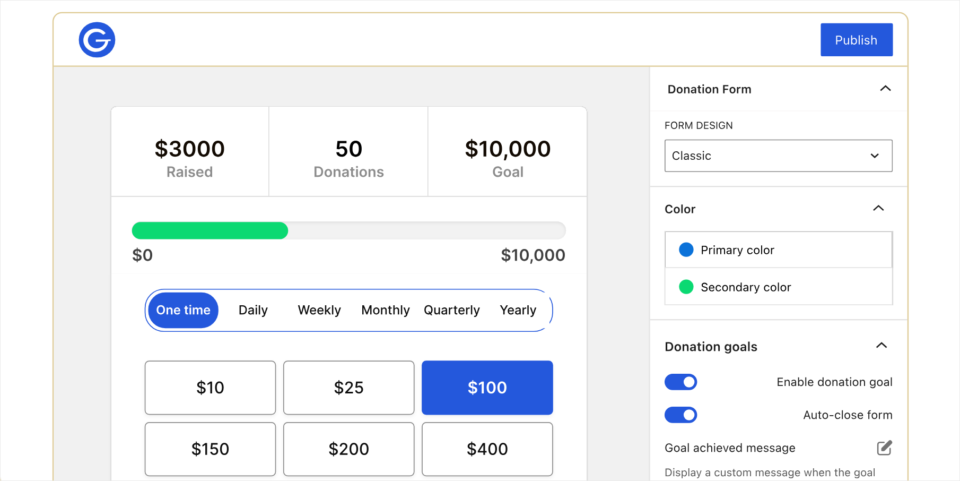
GiveWP earns its spot because it’s the most installed donation plugin on WordPress.org. It has more than 100,000 active installs and a 4.6 star rating from 708 reviews.
Like Charitable, it keeps donations on your own site and your donor records in your own database. It has a free version, donation forms, donor profiles and reports, so a nonprofit leaving Zeffy would find the main pieces in place.
The pricing is where it gets less simple. GiveWP is now sold by Liquid Web as part of a yearly bundle with The Events Calendar, LearnDash and Kadence.
The single-site plan costs $350 a year, and there’s no plan for the donation plugin alone. Recurring donations are part of that paid bundle.
That’s a fair deal if you’ll use the other plugins. If you only want donations, you’d be paying for course and event tools you may never open. The free version also doesn’t let you add, edit or delete donation records, which Charitable Lite does.
Here are the pros and cons in one place.
- ✅ It has a large user base and plenty of tutorials online.
- ✅ Donations and donor records stay on your own site.
- ✅ It has detailed donor management on the paid bundle.
- ❌ The paid version only comes as a $350 yearly bundle with 3 other plugins.
- ❌ The free version doesn’t let you edit donation records.
Highlights
- Pricing: A free version is on WordPress.org. The paid bundle is $350 a year for one site, and up to $999 a year for 100 sites.
- Monthly giving: Recurring donations are included in the paid bundle.
- Best for: It suits a nonprofit that will also use LearnDash, Kadence or The Events Calendar.
If you’re weighing these 2 plugins against each other, our GiveWP vs Charitable comparison and our list of the best GiveWP alternatives go into more detail.
See how GiveWP and Charitable compare on price and features »
3. WPForms
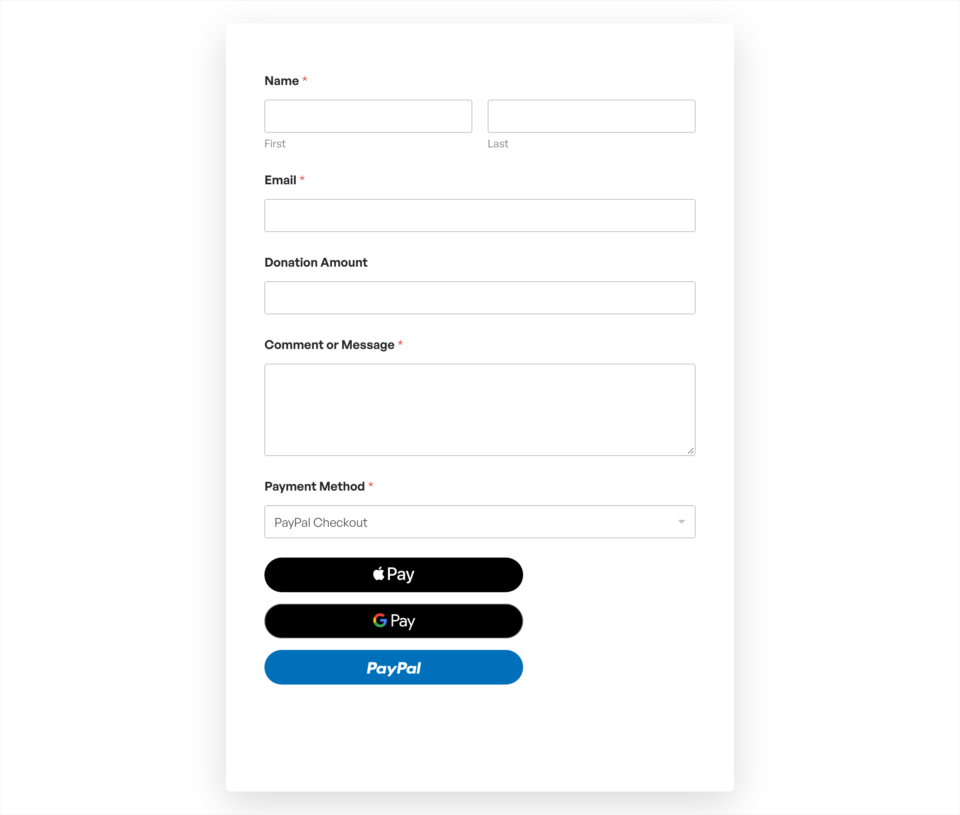
WPForms makes this list because it’s the form builder most WordPress sites already have. It has more than 5 million active installs and a 4.8 star rating from over 14,000 reviews.
If your nonprofit already uses WPForms for contact, volunteer or event sign-up forms, adding a donation form is quick. It has donation templates, and the free version, WPForms Lite, can take one-time and recurring payments through Stripe.
The limit is that WPForms is a form builder first. It doesn’t come with campaign pages, fundraising goals or a donor database built for fundraising, so you’d set those parts up yourself.
For a single donate form, that’s fine. For several campaigns a year, a dedicated plugin saves you work.
Here are the pros and cons in one place.
- ✅ It’s very easy to use, with a drag and drop form builder.
- ✅ The free version takes one-time and recurring Stripe payments.
- ✅ The same plugin handles all your other website forms.
- ❌ It has no campaign pages or fundraising goals of its own.
- ❌ The full set of payment features is on the Pro plan, at $199.50 for the first year and $399 after that.
Highlights
- Pricing: WPForms Lite is free. Paid plans start at $49.50 for the first year.
- Payments: Stripe is in the free version, and more payment options are on the paid plans.
- Best for: It suits a small team that needs one donation form alongside its other forms.
See how you can add a donation form to your site with WPForms »
4. WP Simple Pay
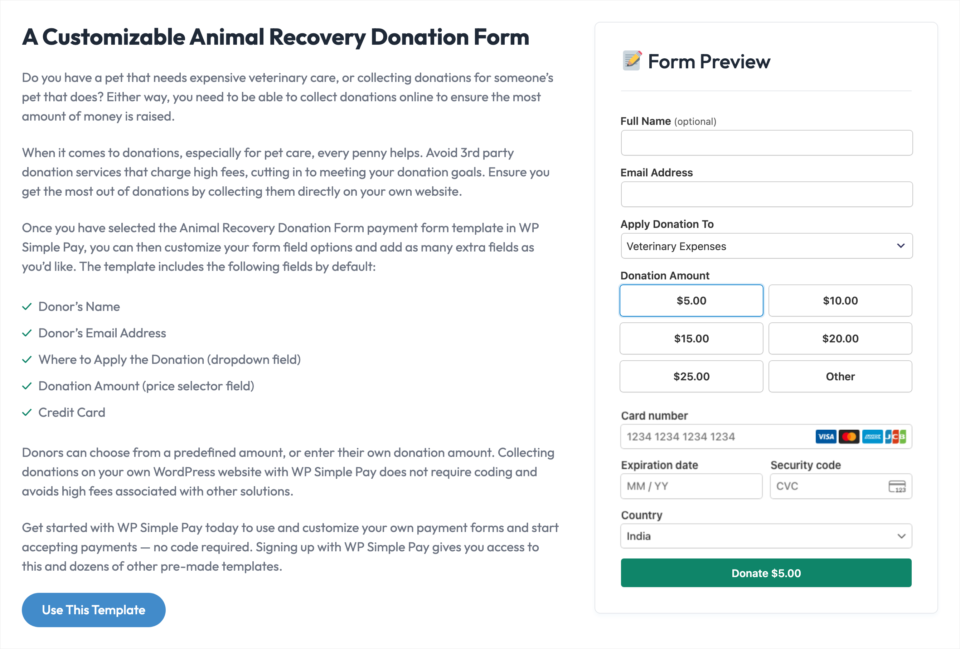
WP Simple Pay earns its place for nonprofits that want the lightest possible way to take payments on WordPress. It’s built only around Stripe, and it does that one job well.
The free version, WP Simple Pay Lite, now includes subscriptions, so you can set up a fixed monthly gift. To let donors type in their own amount, you’d need the Personal plan, which is $49.50 for the first year and $99 after that.
It has more than 8,000 active installs and a 4.4 star rating.
The trade-off is that it only works with Stripe. There’s no PayPal option on its pricing page, and many donors still like to give with PayPal. It also has no campaign pages, goals or progress bars, because it’s a payment form plugin, not a fundraising plugin.
Here are the pros and cons in one place.
- ✅ It’s quick to set up if you already have a Stripe account.
- ✅ The free version includes fixed recurring payments.
- ✅ Money goes straight from Stripe to your bank account.
- ❌ It works with Stripe only.
- ❌ Donor-entered amounts need a paid plan.
Highlights
- Pricing: WP Simple Pay Lite is free. The Personal plan is $49.50 for the first year, then $99.
- Payments: It supports Stripe, including cards and the other payment methods Stripe offers.
- Best for: It suits a nonprofit that only needs a simple Stripe donation form.
See how you can take Stripe donations with WP Simple Pay »
5. Formidable Forms
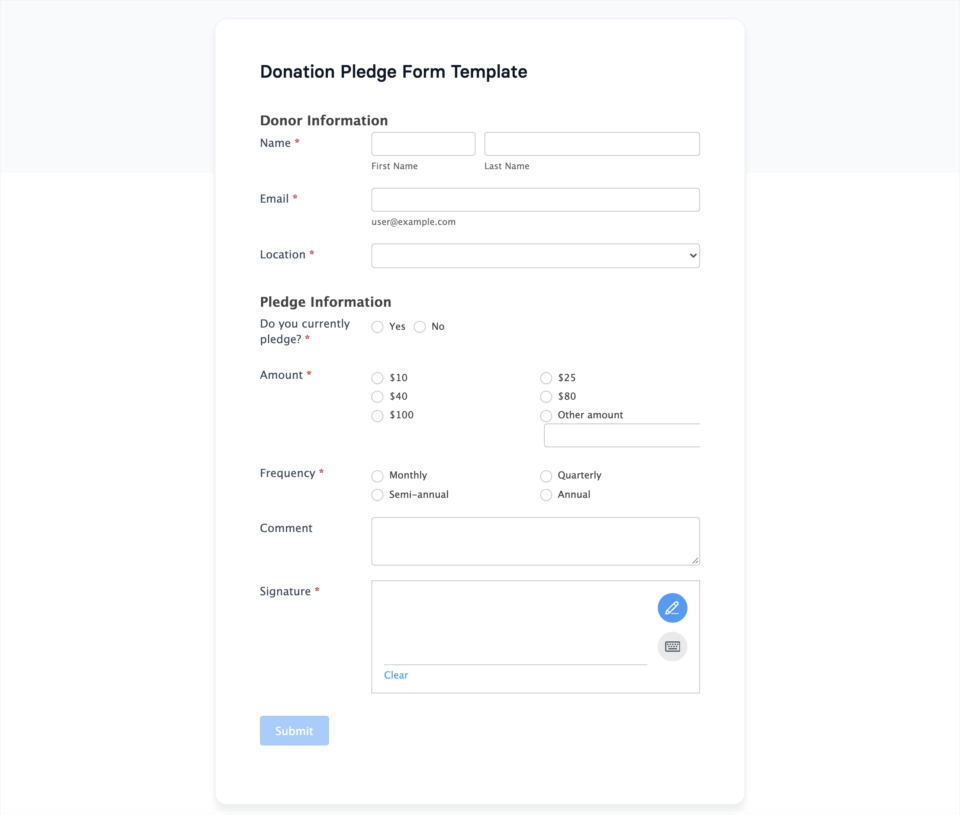
Formidable Forms makes the list for nonprofits that need more from their forms than a name, an email and an amount. It’s known for calculations, conditional fields and ways to show form entries back on your site.
That’s handy if your donation form is part of something bigger, such as a membership application or a sponsorship form with several options. The free version, Formidable Forms Lite, can take payments through Stripe and PayPal. It has more than 300,000 active installs and a 4.8 star rating.
Like WPForms, it’s a form builder rather than a fundraising plugin. You won’t get campaign pages, goals or donor receipts designed for giving without extra setup. Paid plans start at $39.50 for the first year, and the plan with the full payment features is Business, at $199.50 for the first year and $399 after that.
Here are the pros and cons in one place.
- ✅ It handles complex forms with calculations and conditional fields.
- ✅ The free version supports both Stripe and PayPal.
- ❌ It takes more setup to build a full fundraising campaign.
- ❌ The full payment features are on the Business plan.
Highlights
- Pricing: Formidable Forms Lite is free. Basic is $39.50 for the first year, and Business is $199.50.
- Payments: It supports Stripe and PayPal.
- Best for: It suits a team that builds detailed forms, with donations as one part of them.
6. Gravity Forms
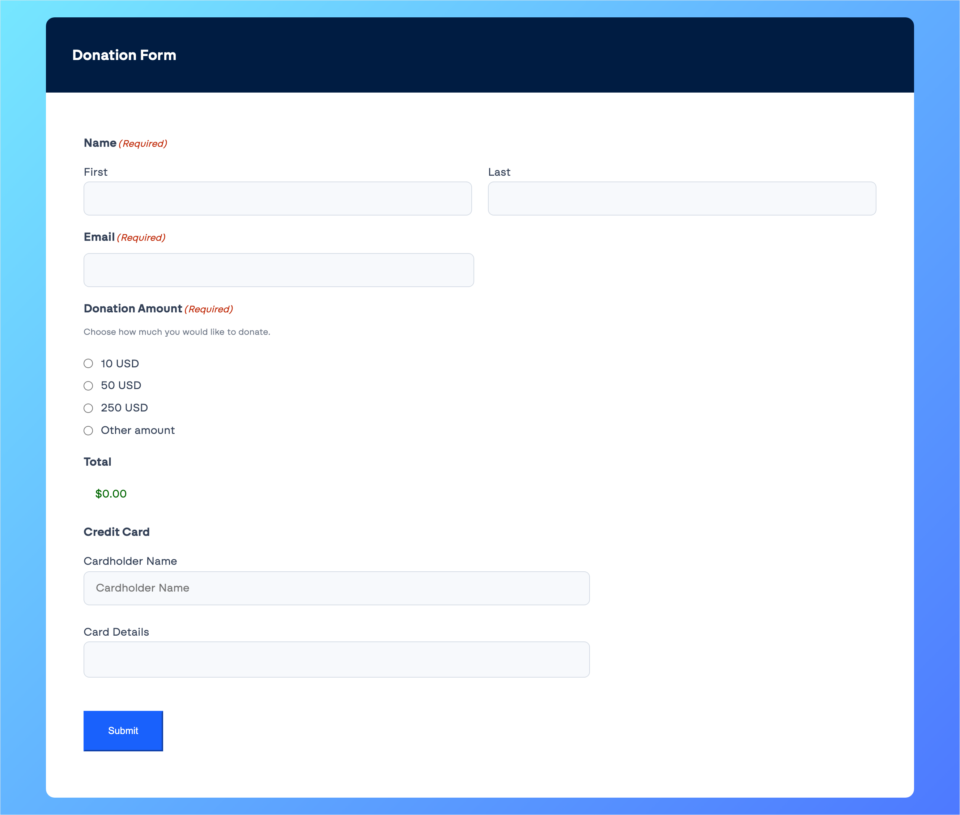
Gravity Forms is on this list because many WordPress agencies build client sites with it. If a developer built your nonprofit’s website, there’s a good chance it’s already installed.
It’s flexible, and its payment add-ons cover Stripe, PayPal Checkout and Square. Those add-ons start on the Pro plan, at $159 a year. The Basic plan, at $59, has no payment add-ons.
Gravity Forms also offers a Nonprofit License at $129 a year, which you apply for on its website.
The biggest limit for a small nonprofit is that there’s no free version and no free trial, so you can’t test it before you pay. It’s also a form builder, so like the 2 tools above, it leaves campaign pages and fundraising goals to you.
Here are the pros and cons in one place.
- ✅ It’s very flexible for developers.
- ✅ It works with Stripe, PayPal Checkout and Square.
- ✅ It has a discounted license for nonprofits that apply.
- ❌ It has no free version and no free trial.
- ❌ It doesn’t have fundraising campaigns built in.
Highlights
- Pricing: Basic is $59 a year, with no payments. Pro is $159 a year. The Nonprofit License is $129 a year, by application.
- Payments: It supports Stripe, PayPal Checkout and Square on the Pro plan and higher.
- Best for: It suits a developer or agency that already uses it.
7. Donation Platform for WooCommerce
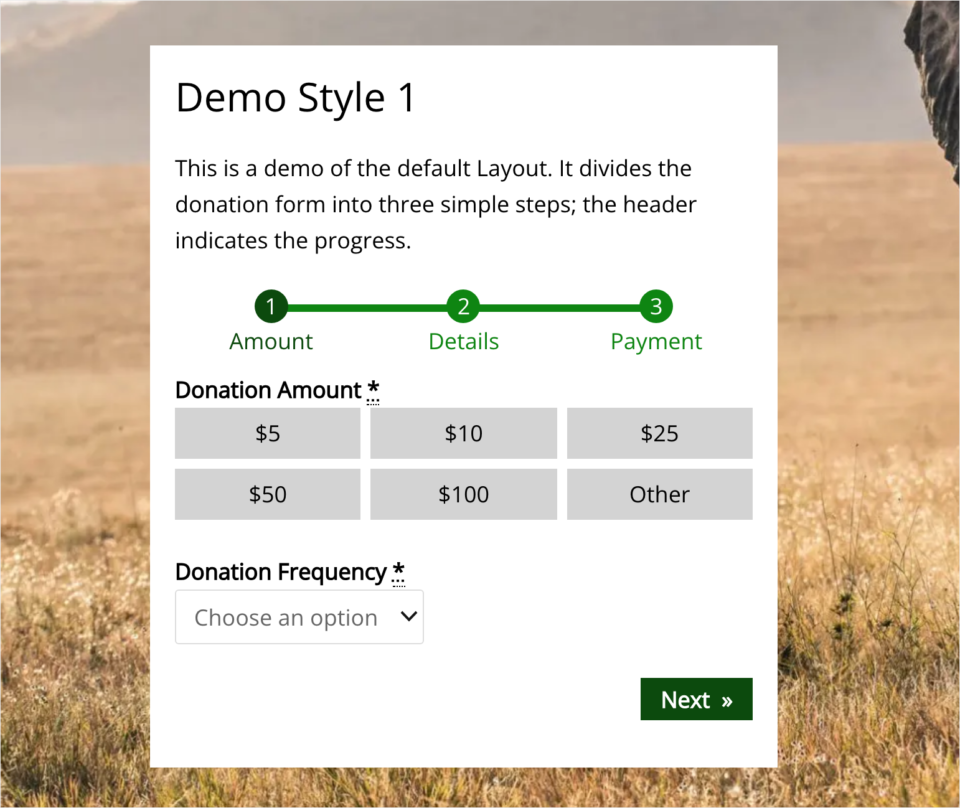
Donation Platform for WooCommerce rounds out the list for nonprofits that already run a WooCommerce shop. If you sell merchandise or event tickets through WooCommerce, this free plugin lets you take donations through the same checkout.
It’s completely free, and its WordPress.org listing says there are no paid extensions. It has more than 7,000 active installs, a 4.9 star rating, and it was last updated in October 2026, so it’s actively looked after.
The catch is that you need WooCommerce running first. That’s a lot to add to a site that only wants donations. For monthly giving, you’d also need a separate subscriptions plugin for WooCommerce.
Here are the pros and cons in one place.
- ✅ It’s free, with no paid extensions.
- ✅ It uses the WooCommerce checkout and payment gateways you already have.
- ❌ It only works on sites that run WooCommerce.
- ❌ Recurring donations need another plugin.
Highlights
- Pricing: The plugin is free.
- Payments: It uses whichever WooCommerce payment gateways your shop has set up.
- Best for: It suits a nonprofit that already sells through WooCommerce.
That covers the 7 plugins. Now let’s put them side by side, so you can match one to your own situation.
Which Zeffy Alternative Should You Choose?
The table below compares the 6 plugins after Charitable. Charitable isn’t in the table because it’s my top pick, and I’ve covered it in full above.
| Plugin | Best For | Pricing | Key Strength | Main Drawback |
|---|---|---|---|---|
| GiveWP | It suits nonprofits that use the other bundled plugins. | A free version exists. The paid bundle is $350 a year. | It has a large user base. | The paid version only comes as a bundle. |
| WPForms | It suits teams that need one simple donation form. | A free version exists. Paid plans start at $49.50. | It’s very easy to use. | It has no campaign pages or goals. |
| WP Simple Pay | It suits Stripe-only nonprofits. | A free version exists. Paid plans start at $49.50. | It’s quick to set up. | It works with Stripe only. |
| Formidable Forms | It suits teams with detailed forms. | A free version exists. Paid plans start at $39.50. | It handles complex forms. | Fundraising campaigns take extra setup. |
| Gravity Forms | It suits developers and agencies. | Payments start at $159 a year. | It’s very flexible. | It has no free version or trial. |
| Donation Platform for WooCommerce | It suits nonprofits with a WooCommerce shop. | The plugin is free. | It uses your shop’s checkout. | It needs WooCommerce to work. |
Prices in the table are first-year prices, checked on each vendor’s website in November 2026.
If you’re still unsure, these 4 situations cover most of the nonprofits I talk to.
- You run several campaigns a year: Choose Charitable. Each campaign gets its own page, goal and progress bar, and your donor list grows in one place.
- You need one donate form and nothing else: WPForms or WP Simple Pay will do the job, as long as you’re happy with Stripe.
- You already pay for a related plugin: If you use LearnDash or Kadence, the GiveWP bundle may make sense. If you have a WooCommerce shop, try Donation Platform for WooCommerce.
- You’re outside Zeffy’s 6 countries: Choose a plugin with gateways for your region. Charitable’s paid plans include Paystack for parts of Africa and Windcave for New Zealand and Australia, and the Pro plan adds Razorpay for India.
Whichever plugin you pick, the hardest part of leaving Zeffy is moving your donors. Here’s how to do that with Charitable.
How to Move Your Donors From Zeffy to Charitable (Code-Free)
Switching sounds like a big job. In practice, most of it is exporting a file from Zeffy and importing it into Charitable. If you’d like more background first, our guide on keeping your donor database on your own site explains how Charitable stores your records.
Step 1. Install Charitable
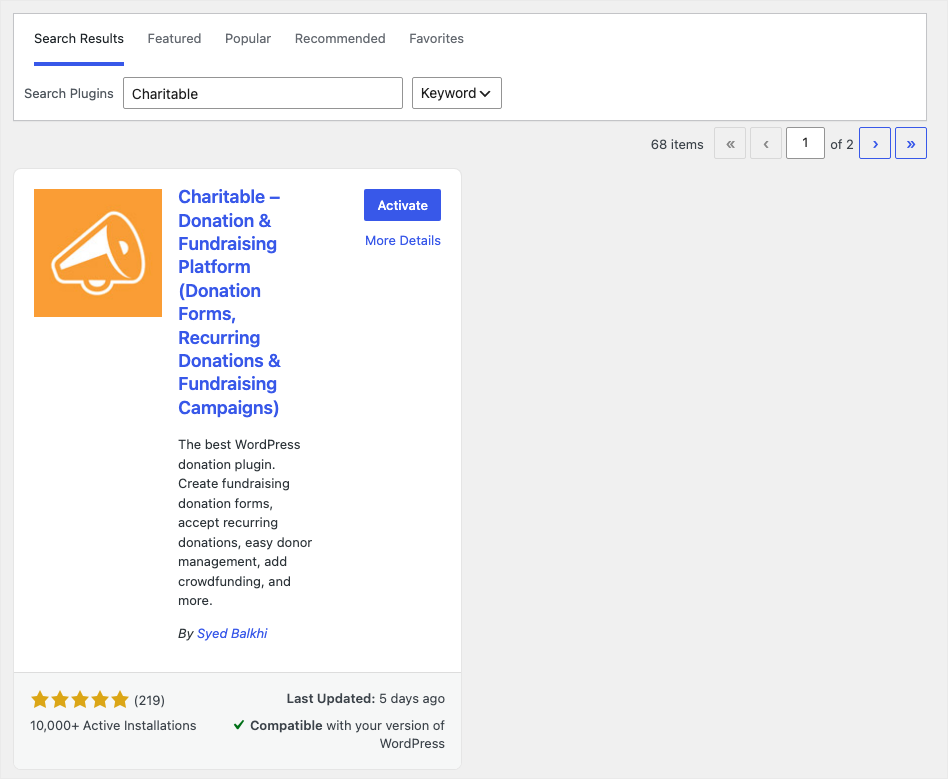
To get started, head over to Plugins » Add Plugin in your WordPress dashboard and search for Charitable. Click Install Now and then Activate.
The setup wizard walks you through the basics in a few minutes. Our guide on how to install the Charitable plugin covers each screen.
Step 2. Connect Your Payment Gateway
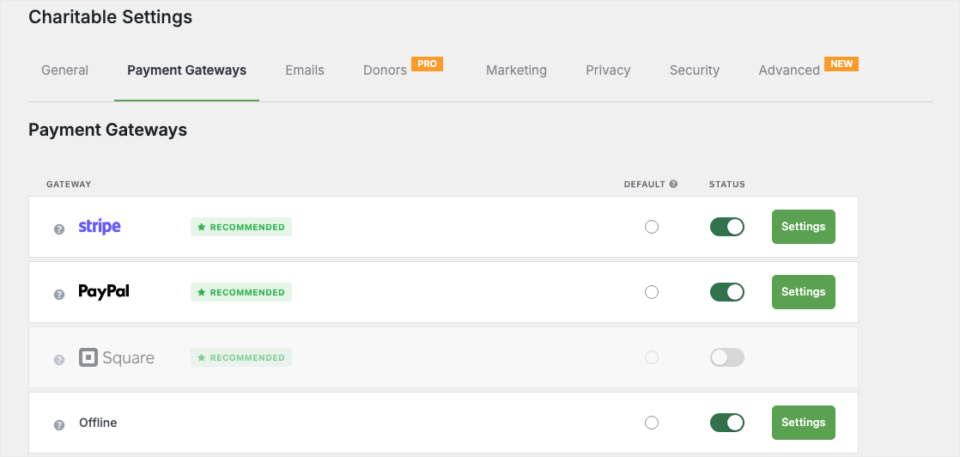
Next, go to Charitable » Settings » Payment Gateways. Turn on Stripe, PayPal or Square, then click Settings to connect your account.
This takes less than a minute for Stripe. From here on, donations go straight from that gateway to your bank account.
Step 3. Create Your Campaigns
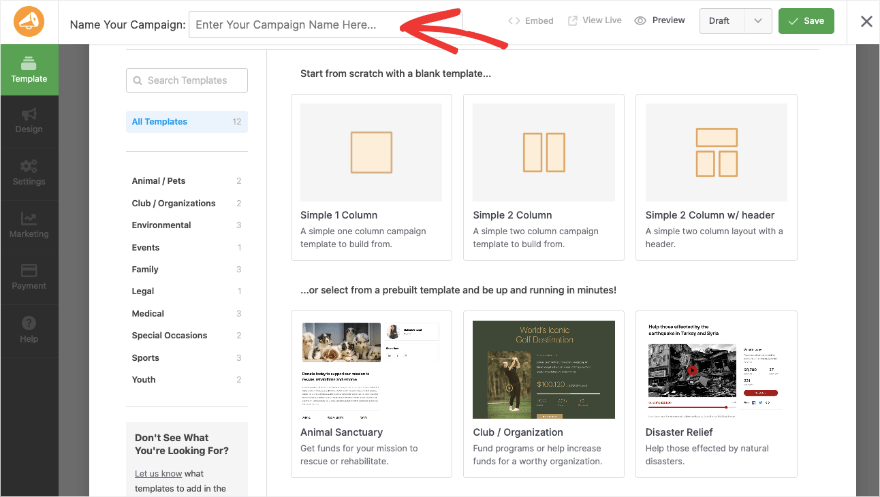
Now open Charitable » Campaigns and click Add New. Create a campaign for each Zeffy form you plan to replace, so your donate links have somewhere to point. First, you can pick a template and give your campaign a name.
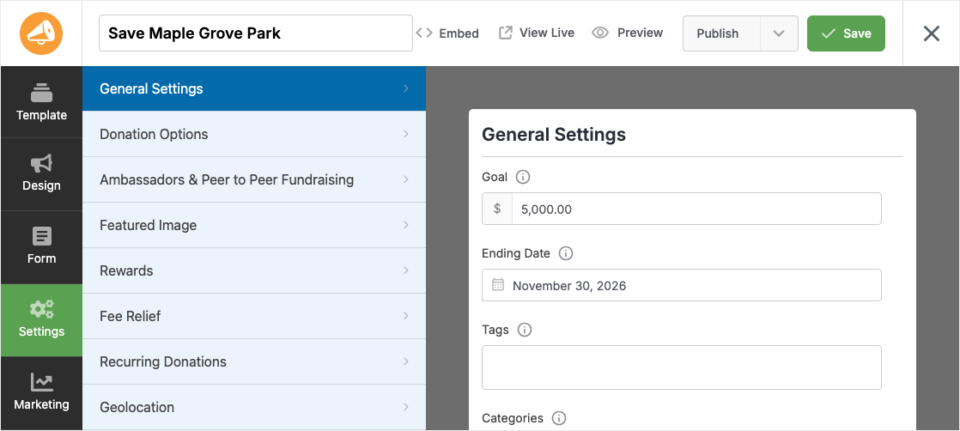
Then use the visual builder to customize it, set a goal and add a progress bar. Our guide on building a donation page that converts has tips for the page itself.
Step 4. Export Your Records From Zeffy
In your Zeffy account, export your contacts and your payments as CSV files. Save both files somewhere safe, because they’re also your backup of every past gift.
Next, open the contacts file in Excel or Google Sheets and check the column names. Charitable needs first_name, last_name and email columns, so rename them if Zeffy uses different names.
Step 5. Import Your Donors Into Charitable
Back in WordPress, go to Charitable » Tools » Import and open the CSV tab. Click Upload File, choose your contacts file and click Import CSV Donors. The tool is marked Beta on this screen.
Your file can also include phone numbers, company names, mailing addresses and tags. If a donor’s email address is already in Charitable, that row is skipped, so you won’t end up with duplicates. The CSV Donor Import tool is in the Charitable Pro plugin, on the paid plans.
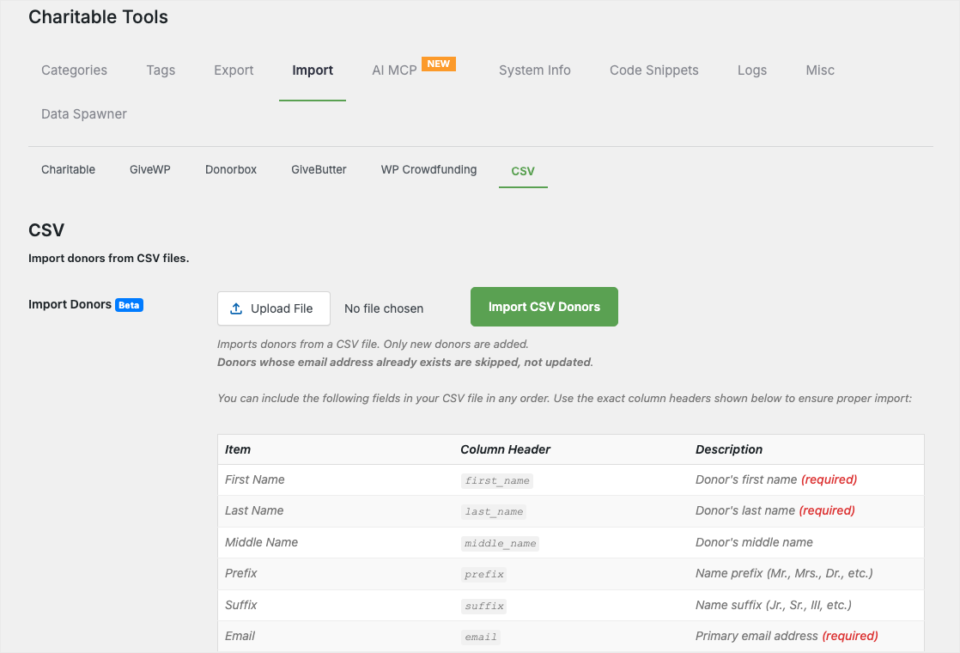
The CSV import brings in donor profiles. Keep your Zeffy payments file as the record of past gifts, so you can still look up what each donor gave before the move.
Step 6. Invite Your Monthly Donors to Set Up Their Gift Again
Monthly donors need the most care. The permission to charge their card is stored with the payment account Zeffy uses, so it can’t come across with the file.
Send them a short, warm email that explains the move and links to your new campaign page. Once they’ve set up their gift on your site, cancel their old Zeffy plan, so nobody is charged twice. Recurring donations are on the Plus plan and higher.
Step 7. Test, Then Switch Your Links
Make a small test donation on your new campaign page and check that it shows up under Charitable » Donations.
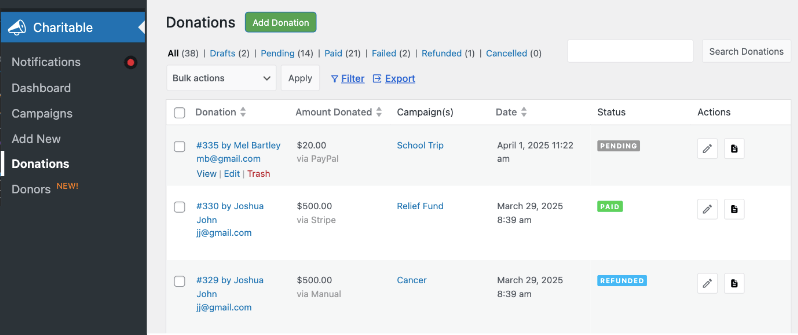
Then update the donate links on your website, your emails and your social profiles.
I’d keep your Zeffy forms open for a week or 2 while supporters get used to the new page. If you get stuck at any point, our support team will help you move.
Coming from another tool as well? We have guides for the Donorbox importer, switching from Givebutter and switching from GiveWP.
My Final Recommendation
If you have a WordPress site and you run more than one campaign a year, start with Charitable. It keeps your donors on your site, your records in your own database and your payouts coming straight from your own gateway.
You can start with Charitable Lite today and have your first campaign live in under 10 minutes. When you’re ready for monthly giving, events or peer-to-peer fundraising, compare the free and paid versions and upgrade with a 14-day money-back guarantee.
Get Charitable now, 14 days risk-free »

Ask ChatGPT or Claude to Do Your Fundraising Tasks
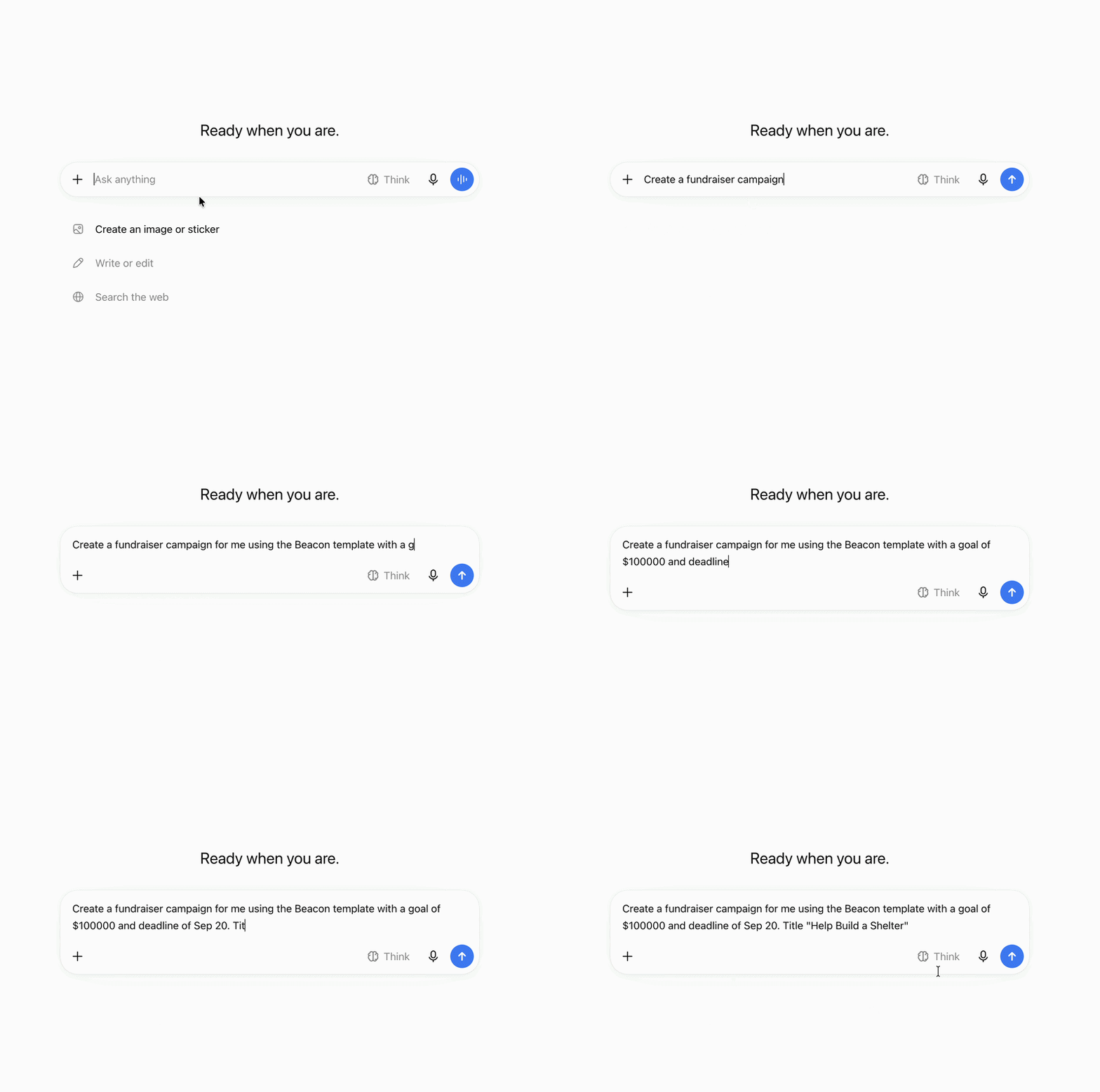
Charitable now works with ChatGPT, Claude and other AI assistants. You type what you need in plain words, and it gets done on your own site.
Here are a few things you can ask.
- “Create a spring appeal campaign with a $5,000 goal.”
- “Record a $50 check that came in from Sarah Jones.”
- “How much did we raise last month?”
- “Which campaign is doing best this year?”
It works on the free version of Charitable too, with no coding and no addon to buy. Paid plans add donor lookups and giving history. Anyone can do it!
FAQs on Zeffy Alternatives
What is the best Zeffy alternative for a nonprofit with a WordPress site?
Charitable is the best Zeffy alternative for most nonprofits with a WordPress site. It’s built only for fundraising, donors give on your own site, and your donor records stay in your own database.
Does Zeffy have a WordPress plugin?
Yes. The Zeffy Donate Button plugin embeds a Zeffy form on your page or opens it in a popup, but the form and your donor records still live on Zeffy’s system.
Which countries can use Zeffy?
Zeffy currently supports organization accounts in the US, Canada, the UK, Germany, Ireland and Australia. Nonprofits elsewhere can use a WordPress plugin like Charitable with a payment gateway that works in their country.
Can I move my donors from Zeffy to my WordPress site?
Yes. Export your contacts from Zeffy as a CSV file, then bring them into Charitable with the CSV Donor Import tool under Charitable » Tools » Import.
Will my Zeffy monthly donors move over automatically?
No. Their card permission stays with Zeffy’s payment account, so ask them to set up their monthly gift again on your new campaign page, then cancel the old plan.
Does Charitable take a cut of donations?
On a paid plan, Charitable takes no percentage of your donations. You pay the annual license and your payment processor’s standard fees, and payouts go straight from your gateway to your account.
Charitable Has 1.2+ Million Downloads!
Trusted by millions to power successful fundraising campaigns. Try Charitable risk-free today.
✅ 14-day money-back guarantee
✅ Transparent pricing
✅ Code-free setup
Stay Connected for More Nonprofit Resources
For more tutorials and videos tailored to nonprofits, subscribe to our YouTube channel. We regularly publish expert tips, step-by-step guides on online donations, fundraising strategies, and practical resources to help your organization succeed.
🗞️ Get weekly tips and exclusive guides in your inbox
Join our newsletter →
🎥 Watch step-by-step tutorials and success stories
Subscribe to our YouTube channel →
👩🏽💻 Connect with our community and get daily nonprofit insights
Follow us on LinkedIn →
🥳 Fun reels and non-profit insights
Follow us on Instagram →
👀 Insightful & fun videos to help you grow your cause
Follow us on TikTok→
🌎 Subscribe and follow for general fundraiser tips
Get Fundraiser Tips on TikTok →
Powerful Fundraising Resources
🤖 Use Charitable with Your AI Assistant
⬇️ Download proven strategies, campaign ideas, and expert tools
Get the Fundraising Kit →
💸 Get Free Fundraising Resources
Head to the Charitable Fundraising Hub →
🤔 Got questions about Charitable?
Charitable FAQs →
🏎️ Take Charitable for a spin
Create your Charitable Demo →
Understand non-profit terms and jargon
Non-Profit Glossary →
% Looking for non-profit deals and discounts?
Best Non-Profit Deals and Discounts →



Leave a Reply