

GiveWP is a popular choice for many nonprofits and fundraisers. But it’s not always the perfect fit for everyone. You may be looking for different features, a more budget-friendly option, or simply want to explore what else is out there. You’re in the right place.
In this article, we’ll dive into the best alternatives to GiveWP.
I’ve spent countless hours testing and comparing various donation plugins, and I’m here to share my insights with you. We’ll explore options that cater to different needs – from simple, straightforward donation buttons to feature-rich platforms that can handle complex fundraising campaigns.
We’ll look at ease of use, customization options, payment gateway integrations, and of course, pricing.
Ready to discover a donation plugin that could take your fundraising efforts to the next level? Let’s jump in and explore the top GiveWP alternatives that could be just what you’re looking for!
Worried about What’s Changing for GiveWP Customers? (Updated October 2026)
Many Give users are facing new costs of $399 a year for the Pro plan, and $599 a year for the Elite plan – a massive step up from its original $149 per year. Or you can upgrade to the Nexcess Plugin Stack, which bundles Kadence, LearnDash, The Events Calendar and Give into one plan from $350 a year. Customers who take no action are moved over automatically.
If your organization only needs donations, it’s a good time to compare your options before your renewal date. Charitable is an all-in-one solution for non-profits to fundraise online, manage donations, get reports, and more! You’re never stuck with plugins you don’t need. Our plans start at a discounted price of just $69 for your first year.
When you renew, you’re never moved onto a new plan or bundle, and you can upgrade or downgrade whenever you choose. There’s also a 14-day money-back guarantee to try it risk-free.
Compare GiveWP and Charitable » | View a Demo | Get Charitable Now »
1. Charitable

Charitable is the best all-in-one donation plugin for WordPress. It’s simple to create, customize, and launch fundraisers in minutes. There are plenty of templates to choose from and then you get a visual drag and drop builder to make any edits you need. You can add donate buttons, progress bars, photos, videos, checkboxes, and more. It’s so easy, you’ll wonder why you ever stressed about it before!
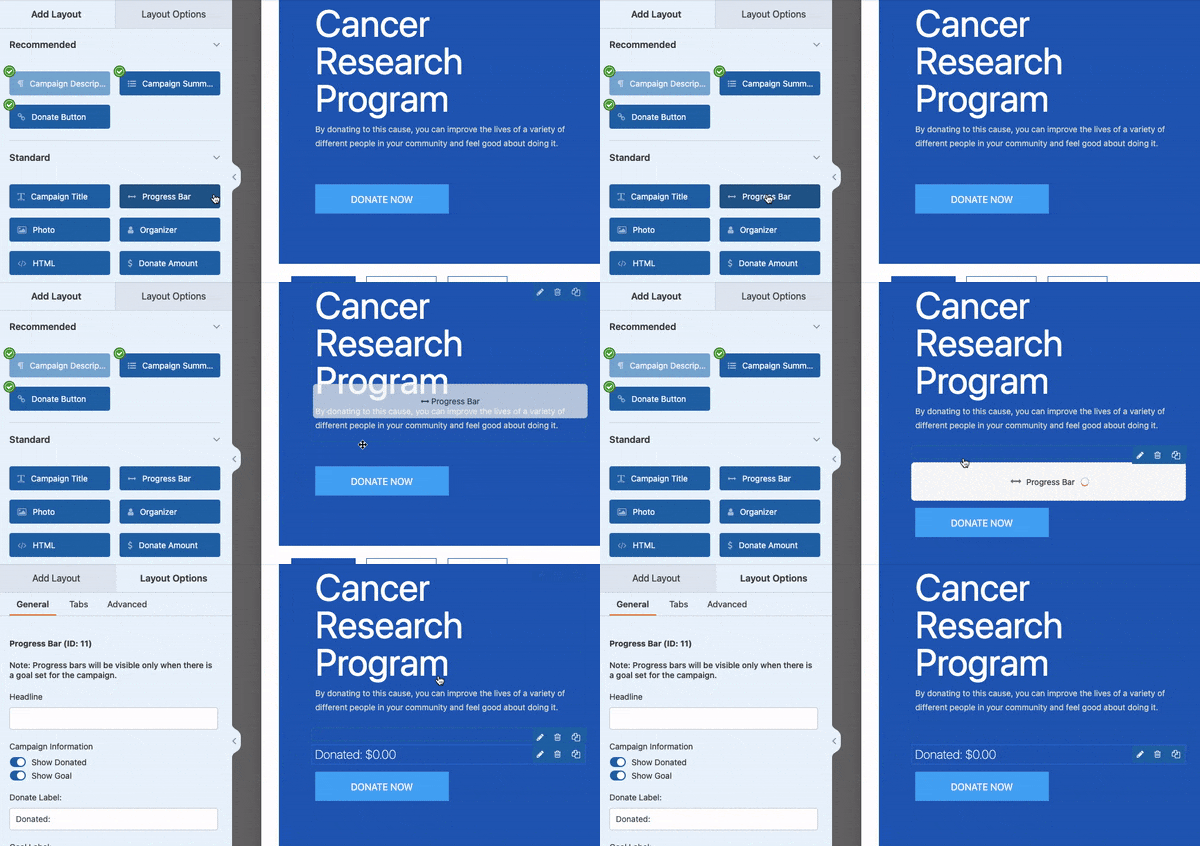
Now, every penny counts for your cause, which is why Charitable doesn’t charge any transaction fees. The only fees you’ll see are from your payment gateway, and even those can be covered by donors if they choose.
Speaking of payments, Charitable has got you covered with all the options – credit cards, PayPal, ACH, Apple Pay, Google Pay, and even offline donations. Your donors can contribute however they feel most comfortable. But there’s more…
Charitable is designed to be an all-in-one donation management system right inside your WordPress dashboard. You’ll be able to raise funds, track donations, manage donors, and get detailed reports to help you make smart, data-driven decisions.
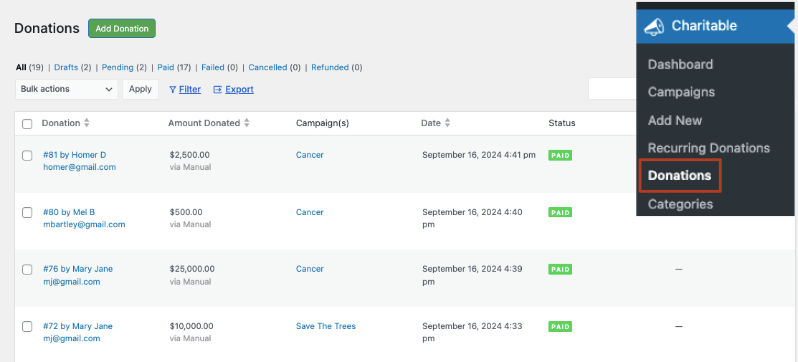
Also, because the Charitable team knows you’re busy changing the world, they’ve automated the tedious stuff.
Do you need tax receipts? Generate them in seconds.
Want to get email alerts or send email updates to donors? Set them up once and then emails automatically go out according to your rules. It’s so easy!
Charitable plays well with other tools too, integrating seamlessly with your favorite email and marketing services to keep your campaigns running smoothly.
Here are the features of Charitable that you’ll love:
- Customizable Donation Forms: Create appealing forms with a drag-and-drop builder, multiple templates, and custom fields for donor information.
- Flexible Payment Options: Accept donations through various gateways including PayPal, Stripe, and offline methods, with support for one-time and recurring donations.
- Campaign Management: Set up unlimited fundraising campaigns with goals, deadlines, progress bars, and team fundraising.
- Donor Management: Built-in database to track donor profiles, giving history, and enable easy communication with supporters.
- Fee Relief: Give donors the option to cover any transaction fees while they make their donation.
- Reporting and Analytics: Generate comprehensive donation reports and campaign performance analytics with export capabilities.
- Email Features: Send automated donation receipts, customize email templates, and integrate with popular email marketing platforms.
- Recurring Donations: Offer flexible recurring intervals and provide a donor portal for subscribers to manage their donations.
- Mobile Responsiveness: All forms and donation processes are optimized for various devices and screen sizes.
- Multi-Currency Support: Accept and automatically convert donations in multiple currencies to cater to a global audience.
- Tax Receipt Generation: Automatically create and send tax-deductible receipts with customizable templates.
For a more detailed comparison, see how GiveWP stacks up against Charitable »
The best part? You can try Charitable out for free. When you’re ready to unlock premium features, plans start at just $69 per year. Charitable also offers a 14-day money-back guarantee.
Join the 10,000+ organizations already using Charitable and start maximizing your donations today. It’s time to make fundraising easier, more effective, and fun!
Worried About Losing Data? We’ve Got You Covered.
This Is Exclusively for GiveWP Users – Because You Asked For It
We’ve heard from so many of you that switching platforms feels overwhelming. So we listened.
Our white-glove migration service is available exclusively to qualifying GiveWP customers – our team handles the entire move so you can focus on your mission, not the technical stuff. We’ll move your donors, donations, and campaigns over to Charitable for you – cleanly and safely.
A free year of Charitable Pro may be waiting for you too. Check if you’re eligible »
2. WP Simple Pay

WP Simple Pay is the best payment plugin for WordPress that lets you accept payments quickly without a complex setup process. This is by far the simplest solution on this list to accept donations online.
So if you don’t need to set up a full-fledged donation platform but rather just want a simple way for donors to send in money, this is the right plugin for you.
One of the standout features is its seamless integration with Stripe. If you’re already using Stripe or prefer it as a payment processor, WP Simple Pay makes it incredibly easy to connect and start accepting payments. The plugin handles all the heavy lifting of secure payment processing, which is a big plus for site owners who don’t want to deal with payment security concerns.
You can create and launch a donation form in minutes like this:
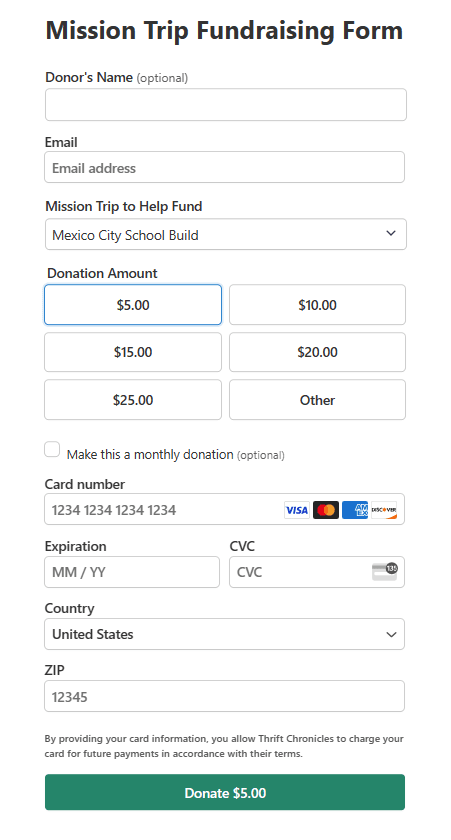
You can set up your donation amounts or allow users to choose a custom amount. All your settings can be configured with clicks of your mouse button. You never have to use any coding or worry about technical aspects.
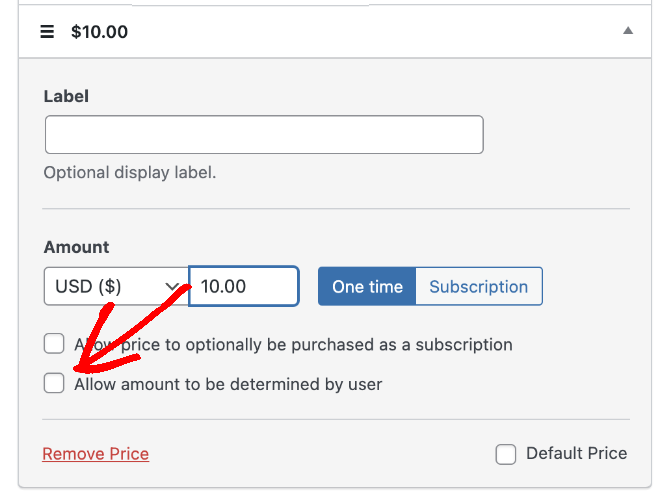
The plugin also supports recurring payments, which is great for collecting recurring donations, membership sites, or subscription-based services.
The free version is fully functional but you may need to upgrade to the pro version to access features like custom fields, recurring payments, and more payment button styles. The pricing is reasonable, but it’s something to keep in mind if you’re on a tight budget.
One area where WP Simple Pay really shines is its developer-friendly approach. If you’re comfortable with code, you can customize quite a bit using hooks and filters. This has allowed me to tailor the payment experience to very specific client needs.
In terms of support, I’ve found the documentation to be comprehensive, and the few times I’ve needed to reach out to their support team, they’ve been responsive and helpful.
Here’s a list of key features that make WP Simple Pay a notable alternative to GiveWP:
- Stripe Integration: Seamless connection with Stripe for secure payment processing.
- Custom Payment Forms: Create and customize payment forms without coding.
- One-Time and Recurring Payments: Support for both single and subscription-based payments.
- Multiple Currency Support: Accept payments in various currencies.
- Payment Form Templates: Pre-designed templates for quick setup.
- Apple Pay and Google Pay Support: Enable modern payment methods for easier donations.
- Coupon Codes: Create and manage discount codes for special promotions.
- Tax Rate Support: Add tax calculations to payments where necessary.
- Payment Confirmation Emails: Automatically send receipts to donors.
- GDPR Compliance Tools: Features to help meet data protection regulations.
Overall, WP Simple Pay is an excellent choice if you need a reliable, straightforward way to accept payments or donations on your WordPress site, especially if you’re already using Stripe. It’s not the most feature-rich donation plugin out there, but for many sites, its simplicity and ease of use makes it the perfect solution.
3. WPForms

WPForms is the best form builder plugin for WordPress and it lets you create any kind of form for your site including contact forms, login and registration, event booking, donation forms, surveys and polls, and more.
Making a donation form is simple. There are templates to choose from and a drag and drop builder to customize them to your liking. You can add spaces for donor info, let people choose how much to give, and even offer different donation choices.
What I love about WPForms is that you can customize the form and even add images to each custom donation amount. Here’s a sample form I created just to show you what you can do with this plugin:
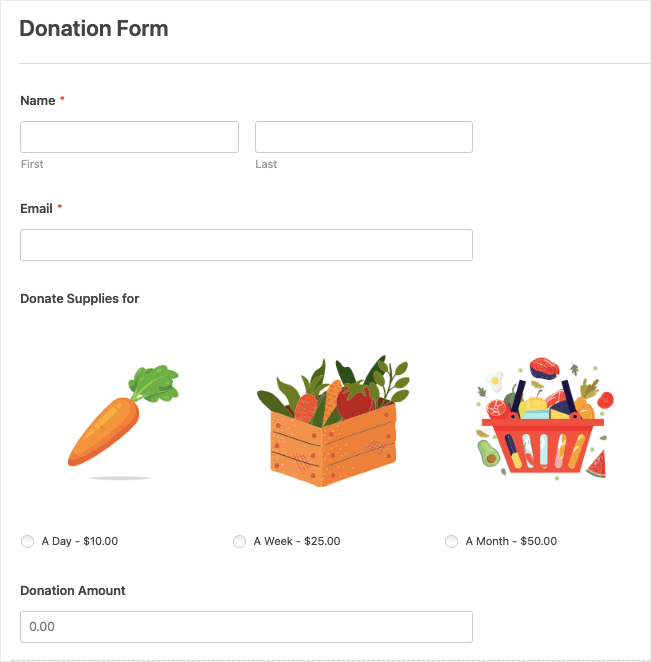
For non-profits, you might require multi-page forms if you need to collect more information from your donors. WPForms lets you split your form into multiple pages.
WPForms integrates well with popular payment gateways like PayPal and Stripe. The setup process for these integrations is relatively simple, which is a relief compared to some more complex systems I’ve worked with.
It also comes with built-in entry management. You can see submission details and export data.
Plus, WPForms offers excellent add-ons too, like the Form Abandonment add-on, for example, can help you follow up with potential donors who started but didn’t complete the donation process.
Here’s what stands out about WPForms as a GiveWP alternative:
- Drag-and-Drop Form Builder: Intuitive interface for creating custom donation forms without coding.
- Payment Integrations: Supports popular gateways like PayPal and Stripe for secure transactions.
- Multi-Page Forms: Ability to create multi-step donation forms for a better user experience.
- Conditional Logic: Customize the donation experience based on user inputs.
- Email Marketing Integrations: Connect with services like Mailchimp to build your donor list.
- Mobile Responsive: Forms look great on all devices, increasing donation potential.
- Form Templates: 1900+ pre-built donation form templates for quick setup.
- File Uploads: Allow donors to attach files if needed (e.g., for sponsorship forms).
- Entry Management: Built-in system to manage and review donation entries.
- Form Abandonment: Capture information from incomplete donation attempts for follow-up.
- Geolocation: Track where your donations are coming from.
- Survey and Polls: Gather donor feedback alongside donations.
- Form Analytics: Get insights into your donation form performance.
- Save and Resume: Donors can save their progress and complete the donation later.
WPForms proves to be a versatile solution that can handle donations, online payments, and donor management, while also serving other form needs on your WordPress site.
4. Donorbox

Donorbox is a robust donation platform that extends beyond just WordPress, making it an interesting alternative to GiveWP.
Unlike GiveWP, which is WordPress-specific, Donorbox can be embedded on any website platform. This makes it an excellent choice for organizations that may use WordPress now but want the flexibility to switch platforms in the future without changing their donation system.
The setup process is surprisingly straightforward. You don’t need to install a plugin; instead, you create your donation form on the Donorbox platform and then embed it on your WordPress site.
This approach has its pros and cons. On the plus side, it means less bloat on your WordPress installation. However, it also means you’re relying on an external service rather than having everything integrated into your WordPress dashboard.
One feature that really impresses me is Donorbox’s form builder. It’s intuitive and offers a good range of customization options. You can easily set up one-time and recurring donations, add custom fields, and even create suggested donation amounts. The forms are mobile-responsive and look professional out of the box.
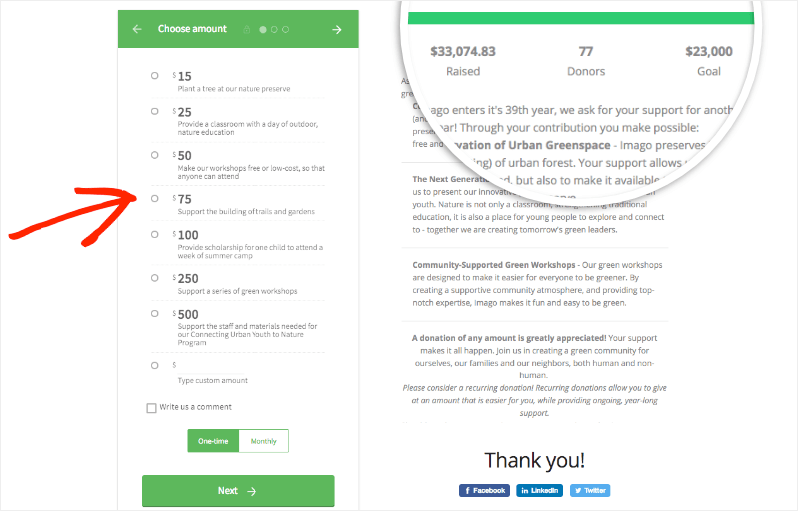
Donorbox also shines when it comes to payment options. It supports a wide range of payment gateways including PayPal, Stripe, and even Apple Pay and Google Pay. This variety can help boost conversion rates as donors can use their preferred payment method.
You can also allow recurring donations, and let donors easily update their information or cancel if needed. This self-service aspect can save your non-profit organization a lot of time in donor management.
The reporting features are quite comprehensive. You get access to detailed analytics about your donations, which can be crucial for refining your fundraising strategies. There’s also a donor management system to keep track of donor information and donation history.
Certainly! Here’s a list of key features that make Donorbox a strong alternative to GiveWP:
- Embeddable Donation Forms: Easily add donation forms to any website, not just WordPress.
- Recurring Donations: Support for flexible recurring donation options (weekly, monthly, annually).
- Multiple Payment Gateways: Integration with PayPal, Stripe, Apple Pay, Google Pay, and more.
- Multi-Currency Support: Accept donations in various currencies.
- Suggested Donation Amounts: Set predefined donation amounts to guide donors.
- Donor Management: Built-in CRM to manage donor information and giving history.
- Tax-Deductible Receipts: Automatic generation and sending of tax receipts.
- Fundraising Campaigns: Create and manage multiple fundraising campaigns.
- Peer-to-Peer Fundraising: Allow supporters to create their own fundraising pages.
- Donor Covers Fees: Allow donors to cover transaction fees.
- Donation Tracking and Reporting: Comprehensive analytics and reporting tools.
- Email Integrations: Connect with popular email marketing platforms.
One potential downside is the pricing structure. While Donorbox doesn’t charge a monthly fee for its basic plan, it does take a percentage of each donation (1.5% at the time of this review). For some organizations, especially those with larger donation volumes, this could end up being more expensive than GiveWP’s flat-rate pricing model.
You can get all these features and more with Charitable at a fraction of the cost.
See the difference between Donorbox and Charitable »
5. Donations via PayPal

Donations via PayPal is a lightweight, no-frills solution for adding PayPal donation buttons to your WordPress site. After thorough testing, here’s what I’ve found:
Firstly, installation and setup are straightforward. You don’t need extensive technical knowledge to get it up and running.
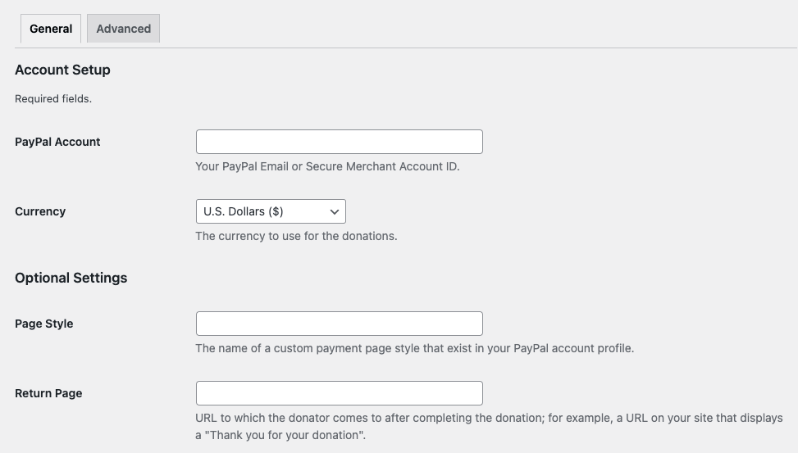
One of the key features is the ability to customize the appearance of your donation button. You can choose from PayPal’s pre-designed buttons or use your own custom image. This flexibility is nice, especially for maintaining brand consistency on your site.
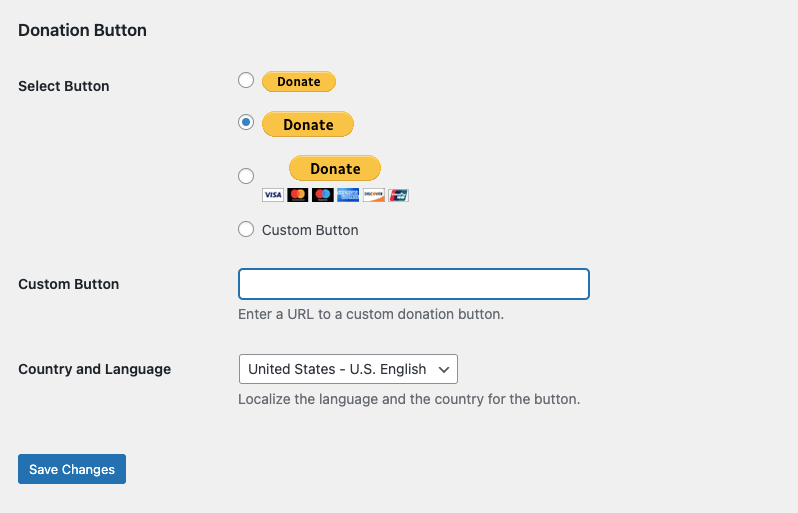
The plugin allows you to set a default donation amount, which can be helpful in guiding donors toward a suggested contribution. However, donors can still change this amount when they reach the PayPal page.
Integration with PayPal is, of course, seamless. This means you’re leveraging PayPal’s secure and widely recognized payment system, which can instill trust in your donors.
The plugin also supports multiple currencies, which is beneficial if you have an international donor base.
However, it’s important to note the limitations of this plugin compared to more robust solutions like GiveWP or Charitable:
- Limited Form Customization: While you can customize the button, you don’t have much control over the donation form itself, which is hosted on PayPal’s site.
- Basic Functionality: This plugin is designed for simple, one-time donations. It doesn’t support features like recurring donations or more complex fundraising campaigns out of the box.
- Minimal Donor Management: Unlike GiveWP, this plugin doesn’t offer built-in donor management tools. You’ll need to rely on PayPal’s interface for transaction details.
- Limited Reporting: The plugin itself doesn’t provide donation analytics. You’ll need to use PayPal’s reporting tools or integrate with another system for insights.
- Off-Site Donation Process: Donors are directed to PayPal’s site to complete their donation.
- No Additional Fields: You can’t easily collect additional information from donors beyond what PayPal’s standard form offers.
One advantage of this plugin is that it’s completely free, with no premium version to upgrade to. This can make it an attractive option for small organizations or individuals on a tight budget. At the same time, you can’t expect any new features and innovations.
In terms of updates and support, the plugin is fairly well-maintained, but you won’t get dedicated support you’d get with a premium plugin like Charitable.
Overall, the PayPal Donations plugin can be a good GiveWP alternative for those with very basic donation needs and limited budgets. It’s ideal for small organizations, personal blogs, or projects that just need a simple way to accept donations without any frills.
However, for organizations with more complex fundraising needs, requiring features like recurring donations, extensive customization, on-site donations, or detailed donor management, a more robust solution like Charitable would likely be a better fit. The choice ultimately depends on your specific needs, technical capabilities, and fundraising goals.
Those are the best GiveWP alternatives.
Which is The Best GiveWP Alternative?
Charitable stands out as the best GiveWP alternative for most users.
Here’s why:
- Feature-rich: Charitable offers a comprehensive set of features that rival GiveWP, including customizable forms, multiple payment gateways, recurring donations, and detailed reporting.
- User-friendly: Its intuitive interface and drag-and-drop form builder make it accessible for both beginners and experienced users.
- Cost-effective: Charitable doesn’t charge any transaction fees (beyond payment gateway fees), which can result in significant savings, especially for larger organizations.
- Flexibility: It offers both free and premium versions, allowing users to start with basic features and upgrade as needed.
- WordPress integration: As a dedicated WordPress plugin, it integrates seamlessly with your site, providing a cohesive experience for both admins and donors.
- Donor management: Charitable offers robust donor management tools right within your WordPress dashboard.
- Customization: The plugin allows for extensive customization to match your brand and specific needs.
- Support and updates: Charitable is well-maintained and offers reliable customer support.
And there’s so much more to this plugin. The team behind this tool is constantly innovating to make the tool better so that you have everything you need to raise funds faster and more efficiently.
Not sure if it’s the right one for you? Try Charitable out for free. When you’re ready to unlock premium features, plans start at just $69 per year. There’s also a 14-day money-back guarantee – no questions asked – so this is a risk-free trial.
Charitable crossed over 1+ million downloads! See our reviews and testimonials page to know why!








Leave a Reply