Charitable Blog

Everything you need to know about Charitable and our team.

How to Add Checkboxes to Donation Forms

How to Add Checkboxes To Your Donation Form

Last updated on

  • By

Charitable donation forms can be customized in various ways thanks to Charitable’s internal API. One of the most requested features is to add one or more custom fields to the Charitable donation form. In this post we are going to show you a few examples of adding custom fields with code snippets.

Even if you’re aren’t a developer, adding code snippets are easy to do. You have the option of installing a code snippet plugin of your choice but since Charitable works great with WPCode… we will assume you are using that for this post.

Note: If you ARE a developer then you are aware code snippets can be added to the functions.php of a WordPress theme or within it’s own plugin… if you go down this route we recommend you follow our instructions on best practices for writing code with Charitable. You should also be reading our Charitable_Donation_Field documentation.

Using WPCode

The first step is to install WPCode itself. You can install and activate the free version just like you can with any other WordPress plugin. However, Charitable has an easier built-in process. Please read our documentation on installing and browsing code snippets with WPCode.

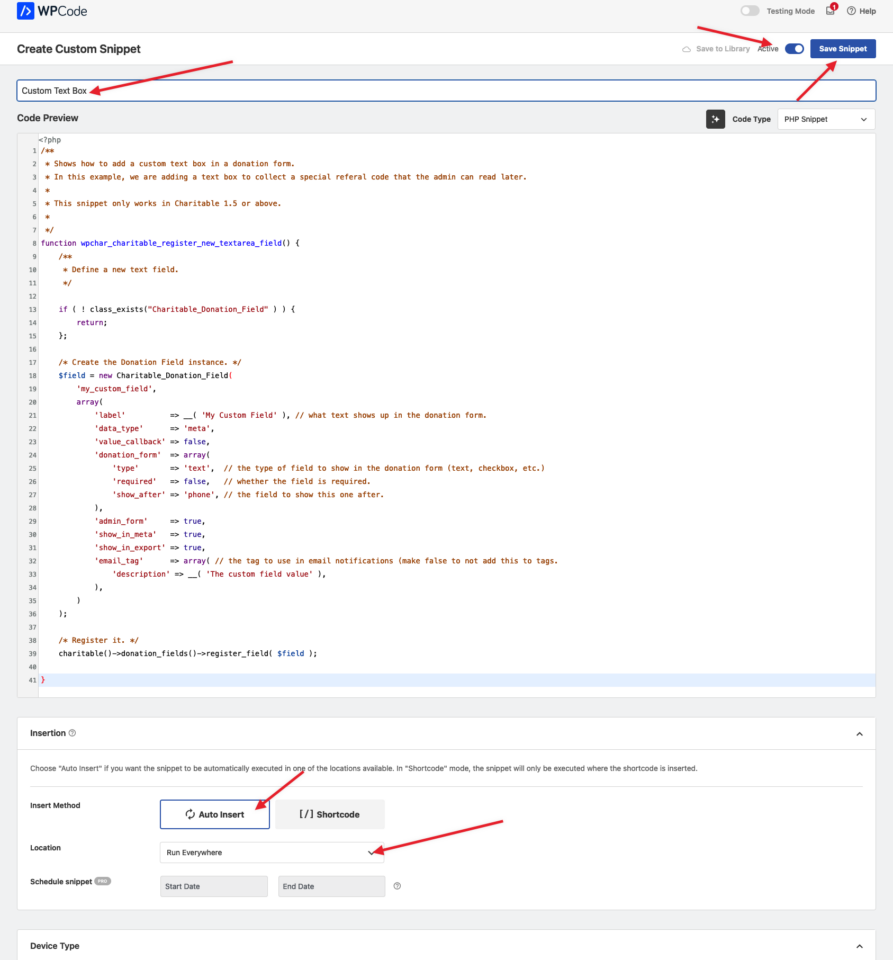
Remember that once is added (via the Charitable snippet screen or by copy and pasting the code) in WPCode you need give it a descriptive title, make sure the code type is “PHP snippet”, and that you’ve selected auto-insert/run everywhere. Make the snippet active/enabled. Here’s an example:
Adding A Checkbox

The code snippet for a single checkbox is not that different from a text box. Notice the use of “checkbox” as the “type”. You can also view this code on our WPCode snippet library.

/**
 * Collect a checkbox field in the donation form.
 *
 * This snippet only works in Charitable 1.5 or above.
 *
 * Related examples:
 *
 * @see Register a text field (detailed example) - https://github.com/Charitable/library/blob/master/donation-form/register-new-donation-field-1.5.php
 * @see Register multiple fields - https://github.com/Charitable/library/blob/master/donation-form/register-multiple-donation-fields.php
 * @see The old way to add fields - https://github.com/Charitable/library/blob/master/donation-form/legacy/add-checkbox-field-to-donation-form.php
 */
function wpchar_charitable_register_new_checkbox_field() {
	
	if ( ! class_exists("Charitable_Donation_Field" ) ) {
		return;
	};
	
    /**
     * Define a new checkbox field.
     */
    $field = new Charitable_Donation_Field( 'new_checkbox_field', array(
        'label' => __( 'New Checkbox Field', 'charitable' ),
        'data_type' => 'user',
        'donation_form' => array(
            'type' => 'checkbox',
            'show_before' => 'phone',
            'required'   => false,
        ),
        'admin_form' => true,
        'show_in_meta' => true,
        'show_in_export' => true,
        'email_tag' => array(
            'description' => __( 'The new checkbox field' , 'charitable' ),
        ),
    ) );

    /**
     * Register the checkbox field.
     */
    charitable()->donation_fields()->register_field( $field );
}

add_action( 'init', 'wpchar_charitable_register_new_checkbox_field' );

Here are the key fields to customize:

  • Label. Change the “My Custom Field” text within the quotes to what you want this to say to donors who see this field in the public donation form.
  • donation_form -> type. This is the type of donation field (text, select, checkbox, datepicker etc.). See our documentation for a full list of supported donation field types.
  • donation_form -> required. If you want this field to be required, set it to true.
  • email_tag. If you want to include the value entered into this field in your email with an email tag in Charitable, add a description here so you can see it appear in the email settings. By default, Charitable uses the key value as the tag (‘my_custom_field’ in this case).

Once this code (via the Charitable snippet screen or by copy and pasting the code) is in WPCode, make sure you give it a descriptive title, make sure the code type is “PHP snippet”, and that you’ve selected auto-insert/run everywhere. Make the snippet active/enabled.

One this is active, visit a donation form (either generated automatically by Charitable or via a shortcode) and you should see your checkbox. 🎉

Multiple Checkboxes

Adding multiple checkboxes requires adding “options” to the snippet and changing the type to “multi-checkbox”.

The below script adds MULTIPLE CHECKBOXES (using “multi-checkbox” and can also be found in our WPCode snippet library and you can also view another more real world examples of using checkboxes that add a bit more logic, like this example of adding a donation receipt opt out checkbox.

/**
 * Add three checkboxes (the same group) in the donation form.
 *
 * This snippet only works in Charitable 1.5 or above.
 *
 */
function wpchar_charitable_register_new_checkboxes_field() {
	
    if ( ! class_exists("Charitable_Donation_Field" ) ) {
	return;
    };
	
    /**
     * Define a new checkbox field.
     */
    $field = new Charitable_Donation_Field( 'new_checkboxes_field', array(
        'label' => __( 'New Checkboxes Field', 'charitable' ),
        'data_type' => 'user',
        'donation_form' => array(
            'type' => 'multi-checkbox',
            'show_before' => 'phone',
            'required'   => false,
            'options' => array (
                 'option_1_value' => 'Option One',
                 'option_2_value' => 'Option Two',
                 'option_3_value' => 'Option Three',
	     ),
        ),
        'admin_form' => true,
        'show_in_meta' => true,
        'show_in_export' => true,
        'email_tag' => array(
            'description' => __( 'The new checkbox field' , 'charitable' ),
        ),
    ) );

    /**
     * Register the checkbox field.
     */
    charitable()->donation_fields()->register_field( $field );
}

add_action( 'init', 'wpchar_charitable_register_new_checkboxes_field' );

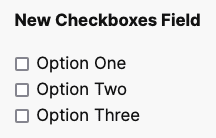
This should appear like this in your donation form:
author avatar
David Bisset Project Manager
David is the project manager of Charitable since 2022. David works with several non-profits (one operated by his wife) along with managing and developing features, support, and marketing for Charitable. Has been with WordPress since 2006 and has been lead organizer of multiple conferences, events, and meetups.

Disclosure: Our content is reader-supported. This means if you click on some of our links, then we may earn a commission. We only recommend products that we believe will add value to our readers.

Leave a Reply

Your email address will not be published. Required fields are marked *

Get free tips and resources right in your inbox, along with 60,000+ others

Join our Newsletter

We won’t spam you. We only send an email when we think it will genuinely help you. Unsubscribe at any time!

Featured Video:

Watch more videos on our YouTube channel.

What's New In Charitable

🔔 Subscribe to get our latest updates
📧 Subscribe to Emails

Email Subscription

Join our Newsletter

We won’t spam you. We only send an email when we think it will genuinely help you. Unsubscribe at any time!

donation form Donations New

💵 Mini Donation Widget: Show The Impact Of Every Dollar!

Not every donor who wants to give will navigate to your campaign page. Meet them exactly where they are by placing a fully functional giving experience directly on any page or post.

💬 Show the impact of every dollar: Attach custom messages to each preset amount so donors understand exactly what their gift provides.
🔄 Monthly and one-time giving: Supports a tabbed interface with independent amounts and impact statements for recurring giving programs.
🎨 Match your brand: Easily set accent colors and control size or alignment to fit the widget naturally into your layout without CSS.
⚡ Reduce donor friction: Open the donation form in a modal overlay to keep donors on the page and reduce drop-off.

author avatar
David Bisset Project Manager
David is the project manager of Charitable since 2022. David works with several non-profits (one operated by his wife) along with managing and developing features, support, and marketing for Charitable. Has been with WordPress since 2006 and has been lead organizer of multiple conferences, events, and meetups.
Donations Live New

👉🏻 Showcase Real Momentum with the Donations Feed

Give your donors a reason to trust. Our new feed lets you display a living, breathing record of people showing up for your cause.

🤝 Build instant trust: Overcome donor hesitation by showing a proven track record of community support.
💬 Highlight donor stories: Display real donor comments and locations to show the human side of your fundraising.
🛠️ Drop it anywhere: Easily add the block to your homepage, campaign pages, or confirmation screens in seconds.
📈 Curate your feed: Group multiple donations from the same person or sort by highest amounts to encourage larger gifts.

author avatar
David Bisset Project Manager
David is the project manager of Charitable since 2022. David works with several non-profits (one operated by his wife) along with managing and developing features, support, and marketing for Charitable. Has been with WordPress since 2006 and has been lead organizer of multiple conferences, events, and meetups.
Campaigns New

🎨 Campaign Showcase: Pro Level Display, No Coding Needed.

Display your causes with style and make it easier than ever for donors to find the right campaign. We are excited to announce the brand-new Campaign Showcase, a powerful, no-code tool designed to help you create beautiful, high-converting campaign grids and carousels.

The Ultimate Discovery Experience

Your mission deserves to be seen. With the Campaign Showcase, you can move beyond simple lists and create dynamic displays that highlight your most urgent needs, helping donors connect with the causes they care about most.

⚡ No-Code Customization: Effortlessly change layouts, columns, and styles with a single click. Whether you want a clean grid or an interactive carousel, you can match your organization’s look without any CSS or JavaScript.

🎯 Advanced Search & Filter: Empower your supporters with real-time filtering. Donors can quickly sort through campaigns by tags, popularity, or “ending soon,” making it easy to find exactly where their help is needed.

💰 Quick Donate Integration: Boost your conversions with instant giving. The Showcase allows donors to contribute via a modal popup directly from the display, featuring pre-selected amounts for a faster, friction-free experience.

author avatar
David Bisset Project Manager
David is the project manager of Charitable since 2022. David works with several non-profits (one operated by his wife) along with managing and developing features, support, and marketing for Charitable. Has been with WordPress since 2006 and has been lead organizer of multiple conferences, events, and meetups.
Addon New

🤯 New Addon: Campaign Updates

Keep your supporters informed and engaged with every step of your progress! Share the ongoing impact of your mission and build lasting trust with your donor community!

The Ultimate Engagement Tool

Fundraising is a journey, not a one-time event. Now, you can easily provide real-time updates directly on your campaign pages, ensuring your donors stay connected to the causes they care about most.

📣 Easy Storytelling: Quickly post text updates, milestones, or field reports to show exactly how donations are being put to work, keeping the momentum alive throughout your fundraiser.

🏗️ Visual Builder Integration: Seamlessly add the Updates block anywhere on your page using our drag-and-drop builder, or use a simple shortcode to display news in widgets and sidebars.

📩 Build Donor Trust: By consistently sharing progress and success stories, you create a transparent giving experience that encourages recurring support and deeper community involvement.

author avatar
David Bisset Project Manager
David is the project manager of Charitable since 2022. David works with several non-profits (one operated by his wife) along with managing and developing features, support, and marketing for Charitable. Has been with WordPress since 2006 and has been lead organizer of multiple conferences, events, and meetups.
Integration New

Build Beautiful Fundraising Pages Visually with WPBakery Integration

We are excited to announce our brand-new integration with WPBakery, one of the most popular WordPress page builders, designed to help you create stunning layouts for your campaigns without touching a single line of code.

The Ultimate Design Experience

Designing your nonprofit’s website should be as simple as your mission is powerful. Now, you can bring Charitable functionality directly into your WPBakery workflow, using native elements to build high-converting donation pages and campaign grids in seconds.

🖱️ Drag-and-Drop Building: Easily add donation forms, campaign progress bars, and “Donate Now” buttons to your layouts using the WPBakery elements you already know and love.

🎨 Total Creative Control: Customize the look and feel of your fundraising elements using WPBakery’s native design options. Adjust margins, padding, and borders to ensure your campaigns fit perfectly with your site’s branding.

📱 Seamlessly Responsive: Every element is built to be fully responsive and mobile-friendly, ensuring your donors have a smooth, professional experience whether they are giving from a phone, tablet, or desktop.

author avatar
David Bisset Project Manager
David is the project manager of Charitable since 2022. David works with several non-profits (one operated by his wife) along with managing and developing features, support, and marketing for Charitable. Has been with WordPress since 2006 and has been lead organizer of multiple conferences, events, and meetups.