
We noticed something in our users’ donation forms: we see people put real work into their campaign page, and the donation form sitting right in the middle of it looked like it belonged to a different website.
Wrong blue, wrong corners, no relationship at all to the logo three inches above it.
We wanted to make it as easy as it can possily be for anyone inside your nonprofit to set up a form that looks like it belongs on your website.
So that’s what we spent most of this release on. It’s called the Styles tab, it lives inside the Campaign Builder, and it’s the headline of Charitable Pro 1.8.17. 🎨
Inside the campaign builder, you’ll see it right next to the General tab. Let dive into what this can do for you.
Why the Way Your Form Looks Decides Whether People Give
Here’s the thing that kept nagging at me while I was building this: trust is basically the whole transaction online. Nobody can shake your hand or read your body language before they hand over a card number, so the page has to do that work instead. A form that looks odd like it’s an after thought attached to your site, introduces a half-second of doubt right when you need the opposite.
With many fundraising tools, closing that gap meant custom CSS, a developer, or a support ticket, which is exactly why so many good campaigns ship with a form that almost, but not quite, matches your nonprofit’s brand.
I wanted Charitable to never cause that problem for you. Design control lives inside the builder now, next to everything else you’re already managing, so on-brand is just what happens by default.
See It in Action
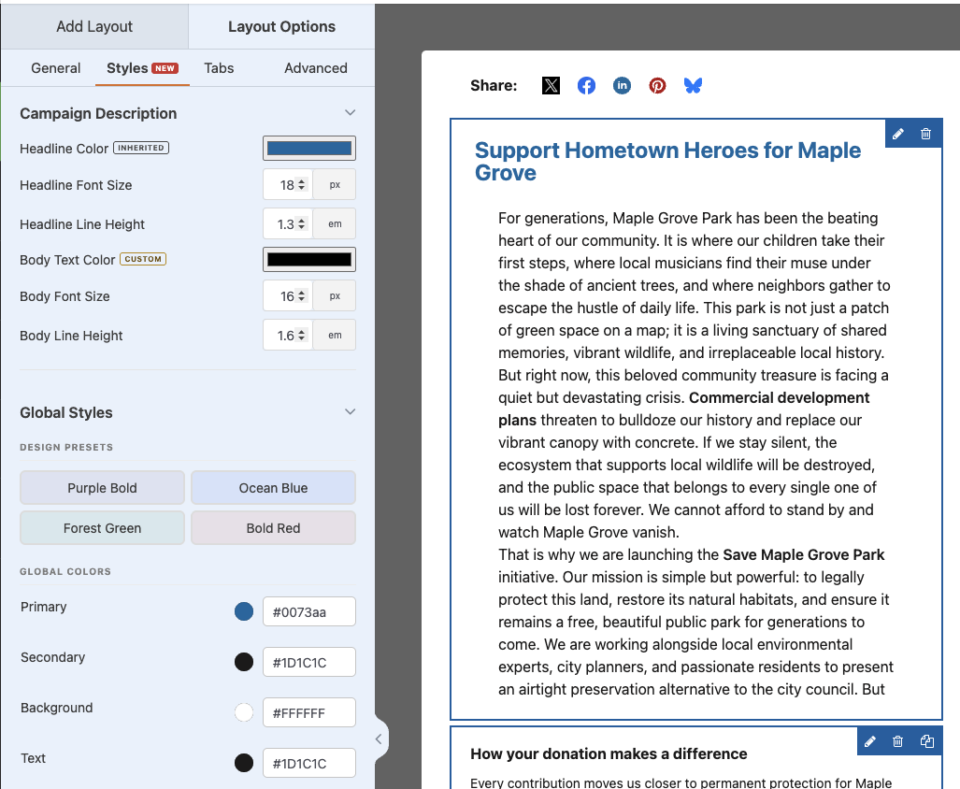
Here’s what it looks like the first time you open it:
When You’ll Feel the Difference
A few of the moments I had in mind while building this:
🎯 A brand refresh: New logo and colors this year? Apply your palette once as Global Colors and every field falls in line, no page-by-page editing.
🏢 Multiple causes, one site: Give your disaster-relief campaign an urgent red and your scholarship fund a calm green, each matching its own message.
✨ A flagship year-end appeal: Restyle the form to feel like a moment, with a bold accent on the donate button and a highlighted suggested amount.
🤝 Client work at an agency: Hand every client a form that matches their brand without writing a line of bespoke CSS per site.
♿ An accessibility-minded team: Dial motion down to none and let the builder honor visitors who prefer reduced motion, automatically.
Design Without a Developer
The Styles tab lives inside the Campaign Builder‘s Design panel. Look for the NEW badge if you don’t spot it right away. Every change you make shows up instantly in the live preview next to it. No save button, no refresh, no wondering if it actually worked.
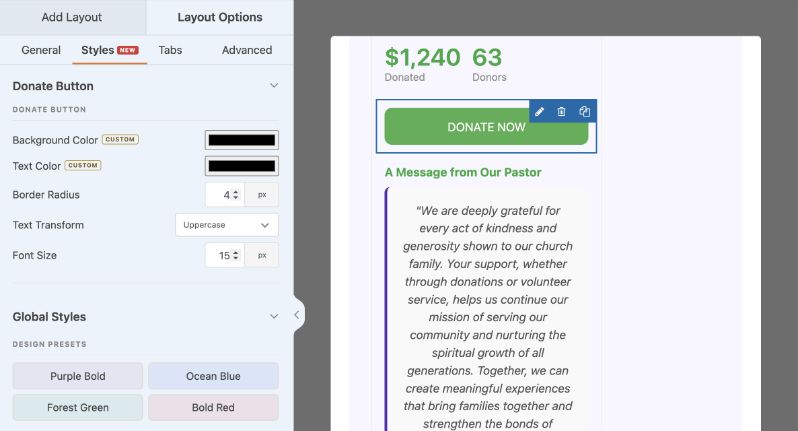
We shipped 4 presets because we didn’t want the first thing you see to be a blank slate: Purple Bold, Ocean Blue, Forest Green, and Bold Red. Pick one and you get a coordinated set of colors, typography, and motion in a single click, something real to react to and adjust instead of starting from nothing.
From there you’ve got 9 Global Colors to make your own: Primary, Secondary, Background, Text, Button Background, Button Text, Progress Bar, and the donation tab colors. Set them once and they flow into every campaign. Typography works the same way. Pick a font family (Theme Default, Sans-Serif, Serif, or Monospace) and set heading and body sizes to Small, Medium, or Large.
Animation gets three options too: None, Subtle, or Smooth, for how the form and progress bar move. I’ll admit I kept coming back to this tab while I was building it, mostly because watching a color update in real time never really got old.
Style Individual Fields, Down to the Detail
Sometimes a single field needs to stand out, or blend in. We added per-field Box Styles for exactly that, so you get real control over the fields that carry the most weight on the page.
On Text and List fields you can set background color, border style (No Border, Left Border Only, or Full Border), border color, border width, border radius, and alignment, one field at a time. The same styling reaches photos, countdowns, the progress bar, tabs, and other fields, so nothing on the form is stuck looking like it shipped years ago.
One default I’m particularly happy with: a List field’s accent border pulls from your campaign’s Secondary color automatically instead of defaulting to a fixed blue. You don’t have to touch that field for it to already match. Whatever you set, down to body line height and headline sizes, shows up on the live donation form exactly the way you designed it.
Getting Started: Styling Your First Campaign
I timed myself doing this the other day. From opening a campaign to a fully restyled form took under five minutes, and that includes pausing twice to second-guess a color. You can customize your donation form just as fast. Here’s the path I took.
- Go to Campaigns in wp-admin and open a campaign, or create a new one, then click Edit With Builder.
- In the builder, open the Design panel on the right and click the Styles tab (look for the NEW badge).
- Under Global Styles, pick a Design Preset to set the overall look, then fine-tune your Global Colors, Typography, and Animations.
- Click any field in the preview to open its Box Styles and adjust borders, background, and spacing for that field.
- Watch the live preview update as you go, then Save. Your new styling goes to work on the campaign page immediately.
For Agencies and Developers
Extend the Styles tab with your own controls
We built this to be extended, not just used. Register custom per-field controls in JavaScript through window.charitableDesignFieldControls, and hook into server-side rendering with the charitable_design_styles_global and charitable_design_styles_field actions.
Everything for a campaign lives in one campaign_style_tokens meta value, so it’s easy to read, move, and reason about, whether that’s you or me looking at it six months from now.
Built on a token system
Colors, typography, and animation are stored as design tokens instead of scattered inline styles. That was a deliberate call on my part. It keeps the output clean and makes a campaign portable if you ever need to move it somewhere else.
FAQs on the Styles Tab
Does this require Charitable Pro?
Yes. The Campaign Builder, including the Styles tab, is a Charitable Pro feature and requires Charitable Pro 1.8.17 or later.
Will it change campaigns I already built?
No, your existing campaigns keep their look. Campaigns created before the token system are migrated into the new Styles system automatically, with no data loss, so nothing breaks and everything stays editable.
Do I need to know CSS?
No, and that was the point. Everything is visual. Developers can still extend it with hooks and filters if they want to go further, but you’ll never need code just to use it.
Will my styling look right on mobile?
Yes. The Styles tab’s colors, typography, and field styling all carry through to the live donation form on any screen size.
Can I reuse a look across campaigns?
Apply the same Design Preset and Global Colors to any campaign to keep a consistent, on-brand feel, while any campaign that needs to stand apart is free to do so.
Get Started With the Styles Tab
The Styles tab is live now in Charitable Pro 1.8.17. Open a campaign, click over to the Styles tab, and see how fast your form starts looking like it actually belongs to you.
Read the Campaign Builder Styles Documentation →
More in Charitable Pro 1.8.17
The Styles tab was the biggest thing on my plate this release, but it wasn’t the only thing that shipped.
Also new:
- The Beacon templates
- Campaign Hero field
- The Donation Form Gutenberg block
- Visual donation amounts with per-amount images
- New fundraising widgets for Elementor, WPBakery, and Divi.
Charitable Has 1.2+ Million Downloads!
Trusted by millions to power successful fundraising campaigns. Try Charitable risk-free today.
✅ 14-day money-back
✅ Transparent pricing
✅ Code-free setup
What’s New in Charitable
We also launched several powerful features and improvements recently:
🧾
Design a personalized, on-brand thank-you page for every campaign, no code required.
📣
Moderate your peer-to-peer network with new directory screens and one-click approvals.
⚡
Accept UPI, cards, and global currencies for India-based donations, right inside your form.
🔔
Send instant push notifications for thank-yous, campaign launches, and goal milestones.
🛡️
Real-time bot detection that flags attacks and blocks bad actors before they hit your donation forms.
🧳
Let our team move your donors, donations, and recurring gifts over from GiveWP for you.
We’ve been adding to Charitable constantly, features and improvements designed to help you raise more and serve your donors better. See everything we’ve shipped at the Charitable Changelog.
Not yet a Charitable Pro user? Sign up today and get up to 50% off on your plan. We’re confident you’ll love raising funds with Charitable. If, for any reason, Charitable is not the right fit for you, we’ll refund your purchase with our 14-day money-back guarantee. Get Charitable Pro Now »
If you have any questions or want a hand getting set up, our support team is ready to help you make your campaigns look their best.
Stay Connected for More Nonprofit Resources
For more tutorials and videos tailored to nonprofits, subscribe to our YouTube channel. We regularly publish expert tips, step-by-step guides on online donations, fundraising strategies, and practical resources to help your organization succeed.
🗞️ Get weekly tips and exclusive guides in your inbox
Join our newsletter →
🎥 Watch step-by-step tutorials and success stories
Subscribe to our YouTube channel →
👩🏽💻 Connect with our community and get daily nonprofit insights
Follow us on LinkedIn →
🥳 Fun reels and non-profit insights
Follow us on Instagram →
👀 Insightful & fun videos to help you grow your cause
Follow us on TikTok→
🌎 Subscribe and follow for general fundraiser tips
Get Fundraiser Tips on TikTok →
Powerful Fundraising Resources
🤖 Use Charitable with Your AI Assistant
⬇️ Download proven strategies, campaign ideas, and expert tools
Get the Fundraising Kit →
💸 Get Free Fundraising Resources
Head to the Charitable Fundraising Hub →
🤔 Got questions about Charitable?
Charitable FAQs →
🏎️ Take Charitable for a spin
Create your Charitable Demo →
Understand non-profit terms and jargon
Non-Profit Glossary →
% Looking for non-profit deals and discounts?
Best Non-Profit Deals and Discounts →








Leave a Reply