
Most of your donors are giving from a phone, and on a phone the hardest part of any donation is typing in a card number. Every extra field is a chance to lose a supporter who meant to give.
With Charitable Mollie 1.1.0, your donors can skip all of that.
✨ Apple Pay and Google Pay are now supported through Mollie’s hosted checkout! ✨
Your donors can confirm a gift with a fingerprint, a face scan, or a single tap.
If you’re using Mollie, or thinking about switching to it, Apple Pay and Google Pay are now built right into your checkout.
Here’s how it works, and why it’s worth turning on today.
Why One-Tap Wallets Change the Outcome
Picture a donor scrolling Instagram on a Saturday morning. She sees a local animal rescue’s year-end post, taps the link, and lands on the donation page. She’s ready to give $25 right now, while she’s thinking about it.
Then the form asks for a card number, an expiration date, and a CVC. She starts typing, her phone buzzes with a text, she glances away, and she never comes back. That’s not a donor who didn’t want to give. That’s a donor who ran out of patience with the form standing between her and the cause.
Apple Pay and Google Pay remove that friction entirely.
The card is already stored, encrypted, and verified on the donor’s device, so there’s nothing to type and nothing to look up.
She taps the Apple Pay button, confirms with Face ID, and the gift is done in seconds. 🎉
For a mobile-first donor base, that difference is the difference between a completed donation and an abandoned one.
This matters most anywhere a donor is giving spontaneously rather than sitting down to fill out a form: social media links, peer-to-peer fundraising pages shared by a supporter, text-to-give campaigns, and the short, high-traffic windows around year-end giving or GivingTuesday.
Anywhere a donor is on their phone and moving fast, a one-tap wallet keeps them from dropping off.
When You’ll Feel the Difference
If most of your traffic already comes from a desktop donor filling out a form at their own pace, this update is a nice-to-have. If your donors are coming from social shares, email on their phone, peer-to-peer pages, or a QR code on a flyer, it’s a lot more than that.
- Peer-to-peer and Ambassador campaigns: Supporters share links directly to friends and family, who almost always open them on a phone.
- Giving Tuesday and year-end pushes: Traffic spikes fast, and every second a donor spends typing is a second they might close the tab.
- QR code campaigns: These donors are already holding their phone. A wallet button meets them exactly where they are.
- Recurring donor acquisition: A faster first gift means more donors who stick around long enough to become recurring ones.
What Apple Pay and Google Pay Support Can Do
Here’s a quick look at everything this update adds, most of it without you touching a single donation form.
- ⚡ One-tap confirmation: Donors confirm with Face ID, Touch ID, or a fingerprint instead of typing card details.
- 🎯 Automatic device matching: Apple Pay appears on Safari and iOS, Google Pay appears on Chrome and Android, with nothing to configure on your forms.
- 👁️ Live status panel: A new Apple Pay & Google Pay panel inside your Mollie gateway settings shows exactly which wallets are active on your account.
- 🧩 A nudge when something’s off: If a wallet isn’t enabled yet, you get a direct link to turn it on in your Mollie Dashboard, right from Charitable.
- 🔄 On-demand refresh: A “Refresh from Mollie” link rechecks your account status anytime, so you’re never looking at stale information.
- 🤝 Predictable cancellations: A donor who backs out of a Mollie payment now lands on your donation cancellation page instead of an unexpected destination.
- 🛠️ Custom cancel routing for developers: The new
charitable_mollie_cancel_urlfilter lets you send cancelled donors to any URL you choose, with the donation object available for context. - 💰 No added PCI burden: Because the wallets run through Mollie’s hosted checkout, there’s no extra compliance work or domain setup on your side.
Getting Started: Turning On Apple Pay and Google Pay
Here’s all it takes, and none of it touches your donation form.
- Go to Charitable » Settings » Payment Gateways and enable the Mollie gateway.
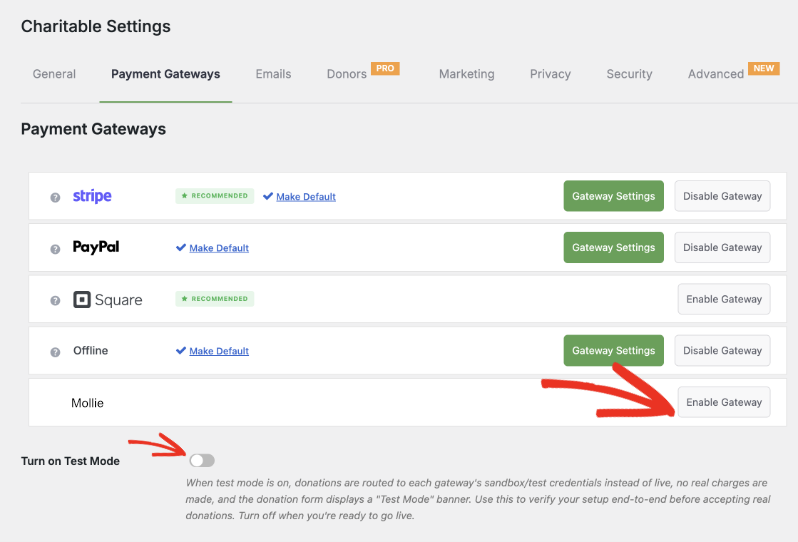
Open Mollie’s gateway settings, enter your Mollie API keys, and make the connection. Use Test Mode while you set this up, so you can confirm everything is working before you accept a live donation.
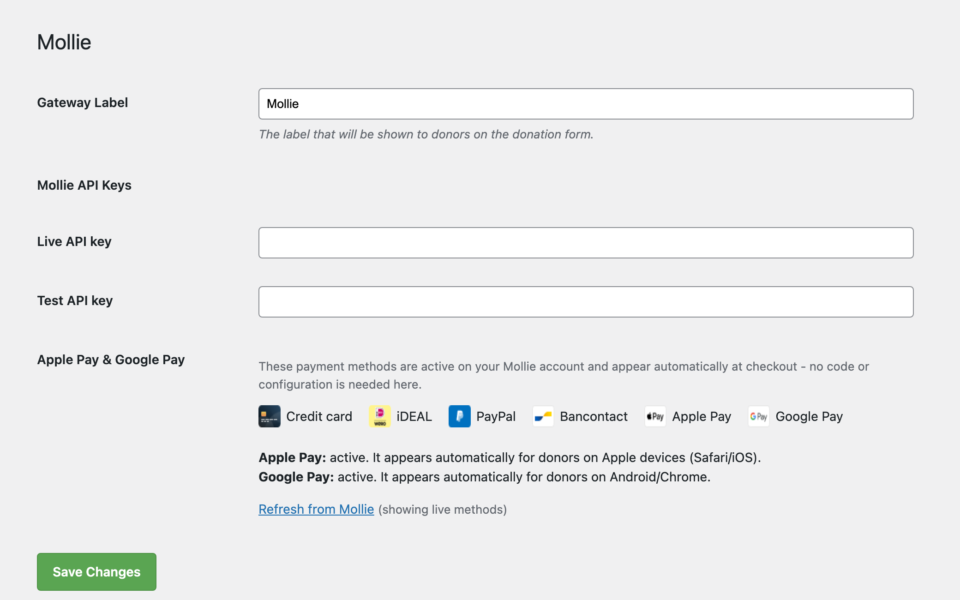
Log in to your Mollie Dashboard and enable Apple Pay and Google Pay under your payment methods. This is the part worth understanding clearly: Apple Pay and Google Pay are switched on and displayed on Mollie’s side. Mollie handles showing the wallet button and verifying the donor; Charitable’s job is simply to submit the donation to Mollie once they confirm it. You don’t add anything to your donation form for this to work.
Back in Charitable » Settings » Payment Gateways » Mollie, check the new Apple Pay & Google Pay panel to confirm both wallets show as active. If one isn’t live yet, click the link provided to jump straight to that setting in your Mollie Dashboard.
Once both wallets show as active in that panel and you’ve confirmed a test donation works, switch off Test Mode. Apple Pay and Google Pay will now show up automatically for the right visitors: no developer needed, and nothing else to configure.
Why You’ll Love This
The setup takes minutes. The impact doesn’t.
🧭 You always know what’s live, right from the Charitable dashboard, with a link to fix anything that isn’t.
🚀 Fewer abandoned donations from mobile visitors who don’t want to type a card number.
🔒 Donors trust wallet payments they already use every day, so more of them follow through.
🕐 Setup happens in your Mollie Dashboard and Charitable settings, nothing changes in your donation form.
For Agencies and Developers
Custom Cancel Page
Need to route cancelled payments somewhere specific, such as a tailored “we’d still love your support” page? The new charitable_mollie_cancel_url filter lets you set a custom cancel URL per donation, with the donation object available for context.
Built on Mollie’s Hosted Checkout
Because Apple Pay and Google Pay run through Mollie’s hosted checkout, there’s no extra PCI burden and no device or domain setup on your side. Mollie handles the wallet plumbing, and Charitable surfaces the status so you stay in control.
Frequently Asked Questions
Do I need to change my donation forms to support Apple Pay and Google Pay?
No. Once the wallets are enabled in your Mollie Dashboard, they show up automatically at checkout for the right device. There’s nothing to add or configure in your donation form builder.
Which browsers and devices show Apple Pay versus Google Pay?
Apple Pay appears for visitors on Safari and iOS. Google Pay appears for visitors on Chrome and Android. Mollie detects the device and shows the right option; a donor on an unsupported browser simply sees your other payment methods instead.
Is there extra PCI compliance work involved?
No. Apple Pay and Google Pay run entirely through Mollie’s hosted checkout, so card data never touches your server. There’s no additional compliance work or domain verification required on your end.
Can I test this before accepting live donations?
Yes. Use Test Mode in your Mollie gateway settings while you set everything up, confirm the wallets show as active in the Apple Pay & Google Pay panel, and run a test donation before you switch to live payments.
What happens if a donor cancels a wallet payment?
They’re returned to your donation cancellation page instead of an unexpected destination, so the experience stays predictable even when a donor changes their mind partway through.
Can developers customize where cancelled donors land?
Yes. The charitable_mollie_cancel_url filter lets you send cancelled donors to any URL you choose, with the donation object available for context.
Get Started with Apple Pay and Google Pay
Mollie is available as a payment gateway across every Charitable Pro plan, Basic, Plus, Pro, and Elite.
If you’re already running Mollie, update to version 1.1.0, add your API keys in the gateway settings, and enable Apple Pay and Google Pay in your Mollie Dashboard.
Read the Apple Pay & Google Pay setup documentation »
Read Mollie Gateway documentation »
Not yet on Charitable Pro? You can get up to 50% off when you sign up for or upgrade to Charitable Pro. We want to ensure that you can try the advanced fundraising features like Recurring Donations, Donation Recovery, and more at a significantly reduced cost.
Join over a million satisfied Charitable Pro users today. Every purchase comes with a 14-day money-back guarantee, ensuring you’re supported every step of the way.
If you have any questions or need assistance, our support team is ready to help you make the most of these new features.
Stay Connected for More Nonprofit Resources
For more tutorials and videos tailored to nonprofits, subscribe to our YouTube channel. We regularly publish expert tips, step-by-step guides on online donations, fundraising strategies, and practical resources to help your organization succeed.
🗞️ Get weekly tips and exclusive guides in your inbox
Join our newsletter →
🎥 Watch step-by-step tutorials and success stories
Subscribe to our YouTube channel →
👩🏽💻 Connect with our community and get daily nonprofit insights
Follow us on LinkedIn →
🥳 Fun reels and non-profit insights
Follow us on Instagram →
👀 Insightful & fun videos to help you grow your cause
Follow us on TikTok→
🌎 Subscribe and follow for general fundraiser tips
Get Fundraiser Tips on TikTok →
Powerful Fundraising Resources
🤖 Use Charitable with Your AI Assistant
⬇️ Download proven strategies, campaign ideas, and expert tools
Get the Fundraising Kit →
💸 Get Free Fundraising Resources
Head to the Charitable Fundraising Hub →
🤔 Got questions about Charitable?
Charitable FAQs →
🏎️ Take Charitable for a spin
Create your Charitable Demo →
Understand non-profit terms and jargon
Non-Profit Glossary →
% Looking for non-profit deals and discounts?
Best Non-Profit Deals and Discounts →
Charitable Has 1+ Million Downloads!
Trusted by millions to power successful fundraising campaigns. Try Charitable risk-free today.
✅ 14-day money-back guarantee
✅ Transparent pricing
✅ Code-free setup









Leave a Reply