
Look at the bank statement of almost any small nonprofit, and you’ll often find software bills that nobody remembers signing up for. Some started as a free trial and turned into a monthly charge. Others do the same job as a tool the team already pays for.
The hard part isn’t finding software. There are thousands of tools with “nonprofit” on the box. The hard part is choosing a small set that fits your team, fits your budget and actually works together.
When the tools don’t talk to each other, someone on your team ends up copying donor names from one screen into another. Gifts get missed. Thank-you emails go out late, or not at all.
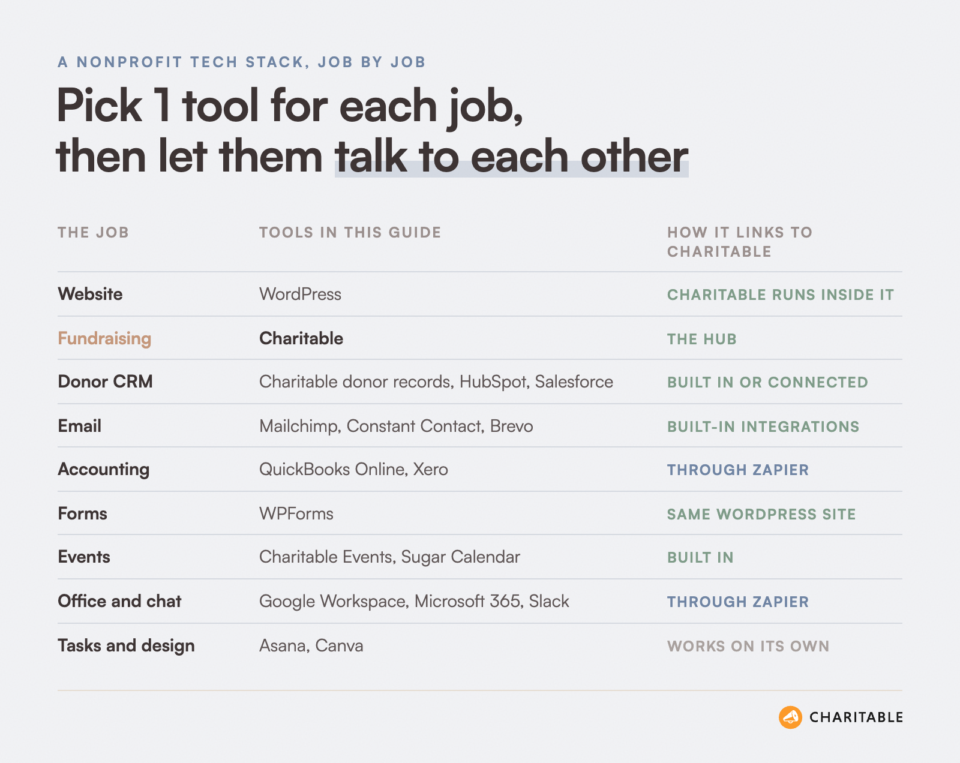
So in this guide, I’ve organized the best nonprofit software by the job it does. For each job, I’ll tell you what I’d pick, what it costs a nonprofit today, and where it falls short. You’ll also see how each tool connects to your fundraising, so your tools work as one system.
- How to Choose Nonprofit Software You Won't Regret
- Your Website
- Fundraising and Donations
- Donor CRM
- Email Marketing
- Accounting
- Forms and Volunteer Sign-Ups
- Events and Ticketing
- Team Tools for Office Work, Chat, Tasks and Design
- Automation
- Website Growth Tools
- Nonprofit Software at a Glance
- How to Connect Your Nonprofit Software to Charitable (Code-Free)
- Final Recommendation
- FAQs on Nonprofit Software

Ask ChatGPT or Claude to Do Your Fundraising Tasks
Charitable now works with ChatGPT, Claude and other AI assistants. You type what you need in plain words, and it gets done on your own site.
Here are a few things you can ask.
- “Create a spring appeal campaign with a $5,000 goal.”
- “Record a $50 check that came in from Sarah Jones.”
- “How much did we raise last month?”
- “Which campaign is doing best this year?”
It works on the free version of Charitable too, with no coding and no addon to buy. Paid plans add donor lookups and giving history. Anyone can do it!
How to Choose Nonprofit Software You Won’t Regret
Nonprofit software is any tool that helps a nonprofit run its work. That includes the tools that raise money, track donors, send email, keep the books and help the team work together.
The best way to choose your tools is by job, not by brand. Decide which jobs you need done, then pick one tool for each job. When 2 tools do the same job, they double your bills and split your data in 2 places.
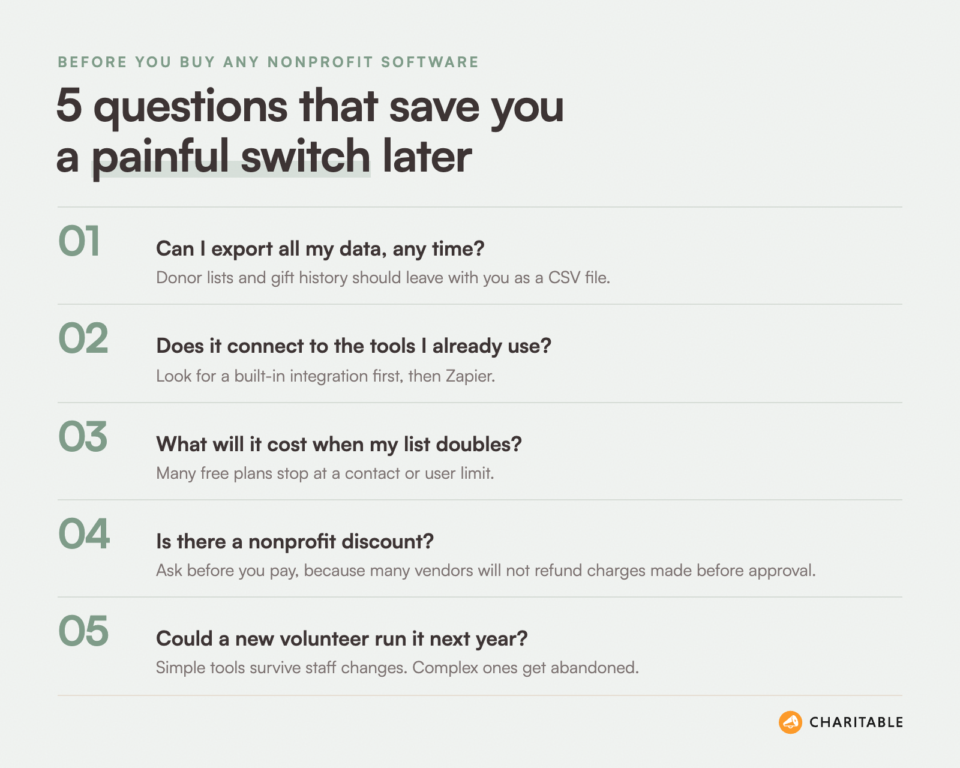
Before you buy anything, I suggest asking 5 questions. They come from my own mistakes, and each one has cost me money or a weekend of moving data at some point.
- Can I export all my data, any time? Your donor list and gift history belong to you. If a tool won’t let you download them as a CSV file, you are renting your own donors.
- Does it connect to the tools I already use? A built-in integration is best. A connection through Zapier is the next best thing.
- What will it cost when my list doubles? Many free plans stop at a set number of contacts or users. Check the next price tier before you commit.
- Is there a nonprofit discount? Most big software companies have one. Apply before you pay, because many vendors won’t refund charges made before your approval.
- Could a new volunteer run it next year? Staff and volunteers change. A simple tool that anyone can learn in an afternoon will outlast a complex one.
Keep those questions in mind as you read. I’ll start with the 2 jobs that everything else depends on, your website and your fundraising.
Your Website
Your website is the one place online that you fully own. Social networks change their rules, and platforms change their fees. Your own site stays yours.
It’s also where most of your other tools will connect. So the website you choose shapes every other tool you pick.
WordPress
WordPress sits at the top of my list for nonprofit websites because it’s free, it’s open source and you own everything on it. You pay only for hosting and any premium plugins you choose.
Plugins are small add-on programs that give your site new abilities. That’s what makes WordPress so useful for nonprofits. You can add donations, forms, event calendars, email signups and more, all on the same site, without a developer.
Because all those plugins share one site, they can share data too. A donation form and a volunteer form can both feed the same donor records. That’s much harder to do when every job lives on a different website.
That said, WordPress asks a little more of you than a hosted website builder. You’ll need to keep your plugins updated and choose a good host. Our guide to the best web hosting for nonprofits can help with that choice.
Highlights
- Price. The software is free. Hosting costs extra.
- Ownership. Your content and your data live on your own site.
- Plugins. You can add fundraising, forms, events and email tools as you need them.
See how you can build a site your nonprofit owns with WordPress »
Once your website is in place, the next job is the one that pays for everything else. You need a way to raise money on it.
Fundraising and Donations
Your fundraising tool is the hub that your other tools connect to. Every gift starts here, and every other tool reads from it. Your CRM needs the donor’s details, your email tool needs their address and your accountant needs the amount.
Many nonprofits start on a third-party fundraising platform because it’s quick. The trouble shows up later. The donor list sits on someone else’s server, the donor gives on someone else’s website and the money passes through someone else’s account before it reaches yours.
That’s why I recommend running your fundraising on your own WordPress site. For that job, I use Charitable.
This guide covers one fundraising tool, because the focus is on how everything fits together. If you’d like to compare donation plugins side by side, our guide to the best nonprofit fundraising software for recurring donations looks at Charitable, WPForms, GiveWP, Donorbox and others.
Charitable, the Fundraising Layer for WordPress
Charitable is a WordPress donation and fundraising plugin. It turns your website into the place where donors give, so you don’t need a separate fundraising platform. More than 10,000 nonprofits use it, and the free version has more than one million downloads.
Here’s what makes it the right hub for a nonprofit. First, you control your data. Every donor and every gift is stored on your own site, and you can export it as a CSV file whenever you like.
Second, you control your fundraisers. You decide the goal, the deadline and whether to extend a campaign.
Third, payouts go directly from your payment gateway. Gifts move from Stripe, PayPal or Square straight to your account, and Charitable never holds the money.
Donors also stay on your site from start to finish. They read your story, choose an amount and give, all under your own name and logo. And because Charitable is built for WordPress, everything is point and click with no coding.
You can start with Charitable Lite, the free version, and it covers a lot. It’s the plugin I suggest for any nonprofit that is just getting started. With the free version, you get these features.
- Unlimited campaigns and unlimited donations.
- Stripe, PayPal, Square and offline donations such as checks and bank transfers.
- Campaign pages with goals, end dates and progress bars.
- Automatic donation receipts and admin notifications.
- Donation records you can add, edit and delete by hand.
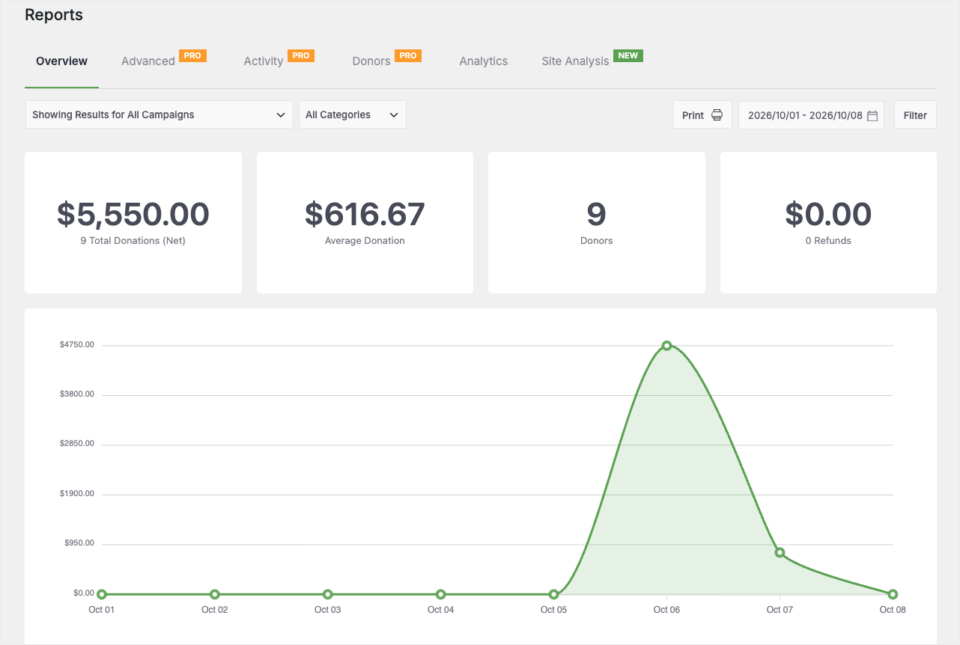
- Basic reports and CSV exports.
When you’re ready to grow, the Charitable Pro plugin adds the features that connect your fundraising to the rest of your tools. The paid version of Charitable offers 4 plans, Basic, Plus, Pro and Elite, and they start at $69 a year.
Here’s how the paid features map to the jobs in this guide.
- Donor care. A donor dashboard lets donors see their gifts and download their own receipts, from the Basic plan and higher.
- Regular income. Recurring donations let donors give every week, month, quarter or year, from the Plus plan and higher.
- Email. Built-in integrations add new donors to Mailchimp, Constant Contact, Brevo, ActiveCampaign, MailerLite and more, from the Plus plan and higher.
- Automation. Zapier, webhooks, Uncanny Automator and Smart Workflows connect gifts to your other tools, from the Pro plan and higher.
- Events. Charitable Events sells tickets through your donation forms, from the Pro plan and higher.
- Analytics. The Google Analytics integration shows which pages and campaigns bring in gifts, from the Pro plan and higher.
On paid plans, Charitable takes no percentage of your donations. You pay the annual license and your payment processor’s standard fees, and that’s it. Every paid plan comes with a 14-day money-back guarantee.
If you’re moving from another tool, Charitable can import your donors from a CSV file. Your past donors will sit right next to your new ones, so you won’t lose any history.
The one limit to know about is that Charitable runs on WordPress. If your website is on a different builder, you’ll need a WordPress site for your donation pages first.
Highlights
- Data. You own every donor record and can export it any time.
- Payouts. Money goes straight from your payment gateway to your account.
- Price. The plugin is free to start, and paid plans start at $69 a year.
- Connections. It works with the email, CRM, automation and AI tools in this guide.
Compare the free and paid versions of Charitable, with 14 days risk-free on every paid plan »
With your website and your fundraising in place, the next question is where you’ll keep everything you know about your donors.
Donor CRM
A CRM, short for customer relationship management, is a database of the people you work with. For a nonprofit, it holds each donor’s contact details, gift history and notes about your relationship.
Many small nonprofits don’t need a separate CRM at first. Your fundraising tool may already hold everything you need. A separate CRM makes sense when you track a lot more than donations, such as volunteers, grants, board members or major donor meetings.
Charitable’s Donor Records
I put Charitable’s own donor records first because they’re already there when you take your first gift. Every donor gets a profile in WordPress with their details and full giving history, so you can skip a second database.
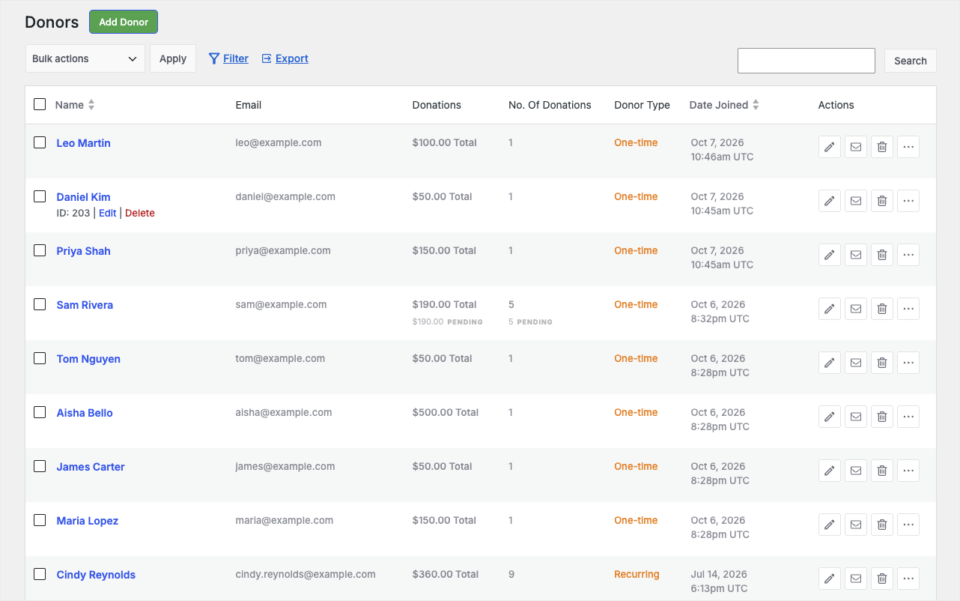
In the paid plans, the donor management tools add tags, notes, filters and segments. That’s enough for many small and mid-sized nonprofits to run their donor relationships from one screen.
The limit is scope. Charitable’s donor records are built around donations. If you also need to manage grants, volunteer hours or a full board pipeline, pair it with one of the CRMs below.
Highlights
- Setup. The records fill in on their own from every gift.
- History. Each profile shows lifetime giving and every campaign the donor supported.
- Export. You can download your donor list as a CSV file at any time.
See how you can manage every donor in one place with Charitable »
HubSpot

HubSpot earns its spot because you can start for free and grow into it. The free CRM includes up to 2 users and 1,000 contacts, which suits a small team that wants a proper contact database.
HubSpot is strong at marketing as well as contact records. As your team grows, it can track emails, website visits and conversations with each person in one timeline. Charitable connects to HubSpot through Zapier, from the Pro plan and higher, so new donors can flow into your HubSpot contacts.
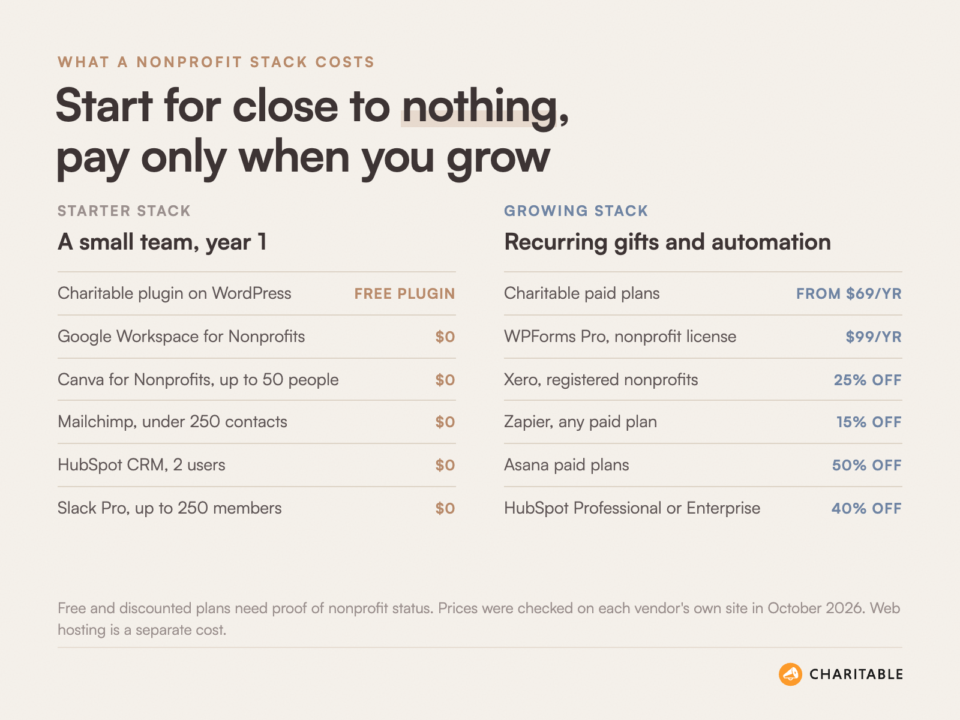
For nonprofits, HubSpot offers 40% off its Professional and Enterprise products. The discount is for new customers on a one-year contract, and your nonprofit must be registered in North America, Australia or New Zealand.
The catch is the price jump. The free plan is generous, but the Starter tier gets no nonprofit discount. The Professional tier costs a lot more, even after 40% off.
Highlights
- Free plan. It covers up to 2 users and 1,000 contacts.
- Nonprofit discount. New customers get 40% off Professional and Enterprise products in eligible regions.
- Charitable connection. Zapier sends new donors to HubSpot, from the Pro plan and higher.
See how you can keep every supporter in one timeline with HubSpot »
Salesforce Nonprofit Cloud
Salesforce is on this list for larger nonprofits with complex programs. Through its Power of Us program, any eligible nonprofit gets 10 Nonprofit Cloud Core licenses at no cost.
Salesforce can track almost anything, including donors, grants, programs, cases and volunteers. If your nonprofit has several departments that all need the same data, it can hold it all in one place.
Beyond the 10 free licenses, paid editions start at $70 per user per month, billed yearly. You can connect Charitable to Salesforce through Zapier, so each new gift creates or updates a record.
In my experience, the free licenses are the easy part. Salesforce takes real time to set up well, and many small teams end up paying a consultant to do it.
Highlights
- Free licenses. Eligible nonprofits get 10 Nonprofit Cloud Core licenses.
- Scope. It handles donors, grants, programs and volunteers.
- Charitable connection. Gifts can reach Salesforce through Zapier.
See how you can run a larger nonprofit from one database with Salesforce »
Whichever CRM you choose, the details in it are only useful if you stay in touch with people. That’s the job of your email tool.
Email Marketing
Email is still the most direct way to reach the people who already gave. A good email tool sends your newsletters, welcome messages and appeals, and it tracks who opened them.
The key question is how donors get onto your list. If your team adds them by hand, some will be missed. All 3 tools below connect to Charitable, so donors who opt in are added for you.
Mailchimp

Mailchimp makes my list because it’s familiar and easy to start with. Many volunteers have used it before, which helps when your team changes.
The free plan covers up to 250 contacts and 500 emails a month, with a limit of 250 emails a day. Mailchimp also gives nonprofits and charities 15% off. To get it, you sign up and then contact their billing team with your account name and your website.
The free plan is small, so most nonprofits outgrow it quickly. Once you pass 250 contacts, sending pauses until you upgrade.
Highlights
- Free plan. It covers up to 250 contacts and 500 emails a month.
- Nonprofit discount. Nonprofits and charities get 15% off.
- Charitable connection. A built-in integration adds donors to your lists, from the Plus plan and higher.
See how you can send your first donor newsletter with Mailchimp »
Constant Contact

Constant Contact is a good choice for nonprofits that want phone support and are happy to pay upfront. Its nonprofit discount is one of the clearest I’ve seen.
Nonprofits get 20% off when they prepay for 6 months, or 30% off when they prepay for 12 months. In the US, you’ll need your 501(c)(3) or 501(c)(6) letter. Outside the US, an equivalent document from your country works.
The discount only applies to prepaid plans, so monthly billing gets nothing. Its billing FAQ also says prepayments are non-refundable, so choose a length you’re sure about.
Highlights
- Nonprofit discount. It’s 20% off for 6 months prepaid, or 30% off for 12 months.
- Support. You can reach the team by phone.
- Charitable connection. A built-in integration sends new donors to your lists, from the Plus plan and higher.
See how you can grow your supporter list with Constant Contact »
Brevo
Brevo joined Charitable’s email integrations in August 2026. It made my list for nonprofits that want email and text messages in one tool.
With the Brevo integration, donors who opt in are added to a Brevo contact list as soon as their payment clears. You don’t have to export anything. Your welcome email can go out the same day as the gift.
Brevo gives verified nonprofits 20% off any monthly or yearly paid plan. You send its support team proof of your status, and they reply with a coupon code. The Charitable integration is available from the Plus plan and higher.
Highlights
- Timing. Donors join your list the moment a payment clears.
- Consent. Only donors who opt in are added.
- Charitable connection. It’s built in, from the Plus plan and higher.
See how you can welcome new donors automatically with Brevo »
WP Mail SMTP

WP Mail SMTP isn’t an email marketing tool, but I add it to every nonprofit website. It makes sure the emails your WordPress site sends, such as donation receipts, actually arrive.
By default, many web hosts send WordPress email in a way that spam filters don’t trust. WP Mail SMTP sends it through a trusted email provider instead. A receipt that lands in spam leaves a donor unsure whether the gift went through, so this small fix matters.
There’s a free version on WordPress.org. The limit is that you still need an account with an email provider, which adds one more setup step.
Highlights
- Delivery. Receipts and notifications go out through a trusted provider.
- Price. A free version is available.
- Pro features. Paid plans add email logs and alerts when an email fails.
See how you can stop donation receipts landing in spam with WP Mail SMTP »
Email keeps your donors close. Your books keep your nonprofit honest, and that’s the next job on the list.
Accounting
Accounting software records money in and money out, and it produces the reports your board, your auditor and your tax office ask for. Most small nonprofits don’t need special nonprofit accounting software. A good general tool, set up with nonprofit accounts, is enough.
Your fundraising tool and your accounting tool should agree on every gift. You can link them through Zapier, or export donations from Charitable each month and import them.
QuickBooks Online
QuickBooks Online is on my list because most bookkeepers and accountants already know it. When your treasurer changes, the next person is likely to know QuickBooks too.
There’s no separate nonprofit edition. Instead, nonprofits use the standard plans and set them up with nonprofit account names and classes for programs or grants. Eligible US nonprofits can get QuickBooks Online at a reduced cost through TechSoup.
QuickBooks isn’t true fund accounting software. If you manage many restricted grants with strict reporting, ask your accountant whether it will be enough.
Highlights
- Familiar. Most accountants already use it.
- Nonprofit price. Eligible US nonprofits can buy it at a lower cost through TechSoup.
- Charitable connection. New gifts can be sent to QuickBooks through Zapier.
See how you can keep your nonprofit’s books with QuickBooks Online »
Xero
Xero is the accounting tool I suggest most often to nonprofits outside the US. It’s widely used in the UK, Australia, New Zealand and Canada, and it’s simple to learn.
Xero gives registered nonprofits 25% off its business plans in many countries. You send proof of your nonprofit status during your free trial or within 31 days of subscribing, and the discount is applied once Xero confirms it.
The rules and documents differ from country to country. Check the Xero page for your own country before you sign up.
Highlights
- Nonprofit discount. Registered nonprofits get 25% off business plans in many countries.
- Ease. It’s easy for a volunteer treasurer to pick up.
- Charitable connection. Gifts can reach Xero through Zapier.
See how you can track every donation in your books with Xero »
Money is only part of what comes in through your website. People also want to volunteer, ask questions and sign up for things.
Forms and Volunteer Sign-Ups
Your donation forms are handled by your fundraising tool. Every other form, such as volunteer sign-ups, contact forms, surveys and applications, needs a form builder.
WPForms
WPForms is the form builder I use on WordPress, and it has one of the best nonprofit deals on this list. You drag fields into place, and the form is ready in a few minutes.
Qualifying nonprofits can get WPForms Pro for $99 a year, which is 75% off the normal price. WPForms Elite is $199 a year for nonprofits. Both nonprofit licenses cover up to 5 sites, and they include the same features as a regular license.
If you would like a volunteer form for a food drive, you can build it in an afternoon. Your volunteers would fill it in on your own site, next to your donation pages.
There’s also a free version, WPForms Lite, for simple contact forms. The limit to know is that every nonprofit license, Elite included, is capped at 5 sites.
Highlights
- Nonprofit price. Pro is $99 a year and Elite is $199 a year.
- Sites. Each nonprofit license covers up to 5 sites.
- Free version. WPForms Lite handles basic forms at no cost.
See how you can build volunteer forms in minutes with WPForms »
Volunteers often sign up to help at an event. So events are the next job to plan for.
Events and Ticketing
Galas, fun runs, dinners and webinars all need 2 things. People need to find the event, and they need to buy a ticket.
For a nonprofit, a ticket is often part gift. That means your receipt needs to show how much of the ticket price the donor can deduct, which most general ticket tools don’t handle.
Charitable Events

Charitable Events is my pick for fundraising events because every ticket is handled as a donation. Tickets go through your existing donation forms and payment gateways, so the money and the donor records land in the same place as every other gift.
You can create as many ticket types as you need, each with its own price and capacity. You set a fair market value for each ticket type, and the deductible part is worked out and shown on the receipt.
On the day, each attendee has a QR code on their receipt. Staff scan it with any phone browser, so there’s no app to install. You can also give a volunteer a private, time-limited link for one event.
Charitable Events is part of the Charitable Pro plugin, Pro plan and higher. If you only run one small event a year, the free version’s campaigns may be enough.
Highlights
- Tickets. You can sell unlimited ticket types with set capacity.
- Receipts. The deductible part of each ticket is shown on the receipt.
- Check-in. Staff scan QR codes from any phone browser.
See how you can sell event tickets as donations with Charitable Events »
Sugar Calendar
Sugar Calendar is a simple event calendar for WordPress. It’s a good fit when you run many events, such as weekly classes or community meetings, and want them all on one calendar page.
It works well next to Charitable Events, which can show its events on a Sugar Calendar calendar. There’s a free version, and paid plans start at $99 a year, or $49.50 for the first year at the time of writing.
Sugar Calendar can sell tickets with Stripe, but the Basic plan adds a 3% service fee per order. To drop the fee, you need the Plus plan or higher, which includes its Event Ticketing add-on. For fundraising events, I’d sell tickets through Charitable Events and use Sugar Calendar to display them.
Highlights
- Calendar. It shows all your events on one clean page.
- Free version. The free plugin covers a basic calendar.
- Charitable connection. Charitable Events can display on it.
See how you can share all your events on one calendar with Sugar Calendar »
Behind every event, campaign and newsletter is a team that has to work together. Let’s look at the tools that help with that.
Team Tools for Office Work, Chat, Tasks and Design
This is where nonprofits can save the most money. Several big software companies give their tools to nonprofits for free or at a deep discount.
Google Workspace for Nonprofits
Google Workspace for Nonprofits is the first thing I’d set up for a new nonprofit, because the base edition costs $0. It includes Gmail at your own domain, Drive, Docs, Sheets, Calendar and Meet.
The free edition gives you 100 TB of storage shared across all users and video meetings with up to 150 people. If you need more, Business Standard costs $3.50 per user per month on a one-year plan, which is a large discount on the normal price.
You have to be verified as eligible first, and the nonprofit editions cover up to 2,000 users. The free edition doesn’t include meeting recordings.
Highlights
- Price. The nonprofit edition is free.
- Apps. It includes Gmail, Drive, Docs, Sheets, Calendar and Meet.
- Charitable connection. Zapier can add each gift to a Google Sheet.
See how you can give your team free email and documents with Google Workspace »
Microsoft 365 for Nonprofits
Microsoft 365 is the better choice if your team already works in Word, Excel and Outlook. Microsoft’s nonprofit page lists Business Basic as a free grant for up to 300 users.
Business Basic includes Teams, business email, one TB of cloud storage per user and the web and mobile versions of the Office apps. Teams that need the desktop apps can buy other plans at a nonprofit price.
On July 1, 2025, Microsoft ended its free Business Premium and Office 365 E1 grants, so some older guides are out of date. Nonprofits can still get up to 75% off Business Standard and Business Premium.
Highlights
- Grant. Business Basic is listed as free for up to 300 users.
- Apps. It includes Teams, email and web versions of Word, Excel and PowerPoint.
- Charitable connection. Zapier can send gifts to Excel or Teams.
See how you can get donated office tools with Microsoft 365 »
Slack
Slack keeps team chat out of your inbox, which helps when staff and volunteers work different hours. Its nonprofit program is generous for small teams.
Workspaces with 250 or fewer members get a free upgrade to the Pro plan. Larger workspaces get 85% off Pro, and any size can get 85% off Business+.
Some groups can’t apply, including religious organizations, schools, political groups, hospitals, government offices and grant-making foundations. If you’re a church or a school, check Slack’s rules first.
Highlights
- Small teams. Pro is free for up to 250 members.
- Larger teams. Pro and Business+ are 85% off.
- Charitable connection. Zapier can post a message in a channel for every new gift.
See how you can keep your team talking with Slack »
Asana
Asana helps you plan campaigns and events as a list of tasks with owners and due dates. When 5 people are getting ready for a year-end appeal, everyone can see what’s done and what’s left.
Asana gives qualifying nonprofits 50% off its Starter and Advanced plans when they pay yearly. That includes 501(c)(3) groups, public libraries and nonprofits with an equal status in other countries. Hospitals are not eligible.
Asana’s free plan only covers 2 people, so most teams will need a paid plan. The limit is also that your team has to build the habit of using it, or it becomes one more place nobody checks.
Highlights
- Nonprofit discount. Qualifying nonprofits get 50% off Starter and Advanced on yearly billing.
- Planning. Every task has an owner and a due date.
- Use it for. It suits campaign plans, event checklists and grant deadlines.
See how you can plan every campaign step with Asana »
Canva for Nonprofits
Canva is how most small nonprofits make their graphics without a designer. Social posts, flyers, event posters and campaign images all start from a template.
Canva for Nonprofits gives registered nonprofits the premium features of Canva Pro for free, for one team of up to 50 people. That includes premium images, brand kits and team sharing.
You’ll need to apply with documents that prove your status. If you need more than 50 seats, Canva offers 50% off Canva Enterprise.
Highlights
- Price. It’s free for registered nonprofits.
- Team size. It covers one team of up to 50 people.
- Brand kit. Your logo, colors and fonts stay consistent across every design.
See how you can design campaign graphics for free with Canva »
By now, you’ve seen the phrase “through Zapier” many times. Here’s what that means and why it matters.
Automation
Automation tools move data between your apps, so your team doesn’t have to. They work on a simple rule. When something happens in one app, do something in another.
For instance, if a donor gave $100 on your site, an automation could add the gift to your accounting tool, post a note in Slack and add a row to a Google Sheet. Nobody on your team would need to touch it.
Zapier
Zapier is the glue I use most, because it connects to thousands of apps, including almost every tool in this guide. You build each automation, called a Zap, by picking apps from a list.
Zapier gives nonprofits 15% off a paid plan for their organization. You apply through the form on Zapier’s nonprofit page.
Charitable’s Zapier integration is available from the Pro plan and higher. The limit is cost, because Zapier charges by the number of tasks it runs, and a busy campaign can push you into a higher plan.
Highlights
- Reach. It connects Charitable to thousands of apps.
- Nonprofit discount. Nonprofits get 15% off a paid plan.
- No code. You build each automation from menus.
See how you can connect all your tools with Zapier »
Uncanny Automator
Uncanny Automator does a similar job, but it runs inside WordPress. It’s the better fit when most of your automations connect plugins on your own site, such as a donation and a form or a donation and a user account.
There’s a free version on WordPress.org, and Charitable has a built-in integration with it from the Pro plan and higher. The limit is that it connects to fewer outside apps than Zapier.
Highlights
- Inside WordPress. Automations run on your own site.
- Free version. You can start without paying.
- Charitable connection. It’s built in, from the Pro plan and higher.
See how you can automate your WordPress site with Uncanny Automator »
WPVibe, for Running Charitable From Your AI Assistant
WPVibe is the tool on this list I enjoy using most. It’s a free WordPress plugin that lets the AI assistant you already use, such as ChatGPT or Claude, work on your website for you.
With Charitable, that means you can ask for what you need in plain English. If you asked for a year-end campaign with a $10,000 goal, it would appear as a draft in Charitable’s Campaign Builder, ready for you to check. Ask for last month’s totals or your top donors, and the answer comes back in seconds.
Here’s what your assistant can do once it’s connected.
- Fundraisers. It builds campaigns as drafts, edits form fields and colors, and publishes a campaign when you say so.
- Donations. It records gifts that arrived by check, cash or bank transfer.
- Donors. It looks up any donor and reads back their giving history.
- Reports. It gives you totals for any period, your top supporters, your best campaigns and a CSV export.
You stay in control the whole time. Your assistant can only read your data until you turn on Enable AI Write Access under Charitable » Tools » AI MCP. Every change it makes is logged under Charitable » Tools » Logs.
WPVibe is free with 100 tool calls a day, and paid plans start at $99 a year. On the Charitable side, you need the Charitable Pro plugin, version 1.8.18 or later.
Highlights
- Price. WPVibe is free for up to 100 tool calls a day.
- Assistants. It works with ChatGPT, Claude, Cursor and other assistants that support MCP.
- Charitable connection. It’s built into the Charitable Pro plugin, and you can install WPVibe from Charitable » Tools » AI MCP.
See how you can manage your donation website with an AI assistant and WPVibe »
The last job is one many nonprofits skip, and it’s the one that tells you whether all the others are working.
Website Growth Tools
Once your tools are running, you need to know 2 things. How do people find your site, and which pages lead to gifts? These 2 plugins answer those questions inside WordPress.
MonsterInsights

MonsterInsights connects your site to Google Analytics and shows the reports right in your WordPress dashboard. You don’t have to learn the Google Analytics screens to see your top pages and traffic sources.
There’s a free version on WordPress.org. For donation tracking, Charitable has its own Google Analytics integration, from the Pro plan and higher, which tracks every completed donation with its campaign and amount.
Highlights
- Reports. You see your analytics inside WordPress.
- Free version. The free plugin covers basic tracking.
See how you can understand your website traffic with MonsterInsights »
All in One SEO

All in One SEO, also called AIOSEO, helps your pages show up in search results. It checks each page as you write and tells you what to fix, such as a missing description or a weak title.
There’s a free version on WordPress.org, and it’s enough for most small nonprofit sites. Paid plans add extra tools, and from the Plus plan up that includes local SEO for nonprofits that serve one city or region.
Highlights
- Guidance. It gives page-by-page tips as you write.
- Free version. The free plugin covers the basics.
See how you can help donors find your campaigns with All in One SEO »
That’s a lot of tools. Here they are side by side, so you can compare them at a glance.
Nonprofit Software at a Glance
This table covers the tools outside your fundraising hub. The prices and discounts were checked on each vendor’s own site in October 2026, and they can change.
| Tool | Job | Nonprofit price | Main drawback |
|---|---|---|---|
| HubSpot | CRM | The CRM is free for 2 users. Paid tiers are 40% off. | The Starter tier has no discount. |
| Salesforce Nonprofit Cloud | CRM | Eligible nonprofits get 10 free licenses. | Setup usually needs outside help. |
| Mailchimp | It’s free up to 250 contacts, then 15% off. | The free plan is small. | |
| Constant Contact | It’s 20% to 30% off with prepay. | Monthly billing gets no discount. | |
| Brevo | It’s 20% off paid plans. | You have to ask support for the code. | |
| WP Mail SMTP | Email delivery | A free version is available. | It needs an email provider account. |
| QuickBooks Online | Accounting | It costs less through TechSoup in the US. | It isn’t true fund accounting. |
| Xero | Accounting | It’s 25% off in many countries. | The rules vary by country. |
| WPForms | Forms | Pro is $99 a year. | Each license is capped at 5 sites. |
| Sugar Calendar | Event calendar | A free version is available. | Basic adds a 3% ticket fee. |
| Google Workspace | Office | The nonprofit edition is free. | It has no meeting recordings. |
| Microsoft 365 | Office | Business Basic is a free grant. | It has no desktop apps. |
| Slack | Chat | Pro is free up to 250 members. | Churches and schools can’t apply. |
| Asana | Tasks | It’s 50% off Starter and Advanced, billed yearly. | Your team must use it daily. |
| Canva | Design | It’s free for up to 50 people. | More than 50 seats costs extra. |
| Zapier | Automation | It’s 15% off a paid plan. | Busy months cost more. |
| WPVibe | AI assistant | It’s free for 100 tool calls a day. | Heavy use needs a paid plan. |
For more free and discounted tools, I keep a running list of the best nonprofit deals and discounts. Now let’s connect the pieces.
How to Connect Your Nonprofit Software to Charitable (Code-Free)
Here’s how to set up your fundraising hub and link it to your other tools. You can do the first 2 steps on the free version in about 10 minutes.
Step 1. Install Charitable
To get started, head over to Plugins » Add Plugin in your WordPress dashboard. Search for “Charitable”, then click Install Now and Activate.
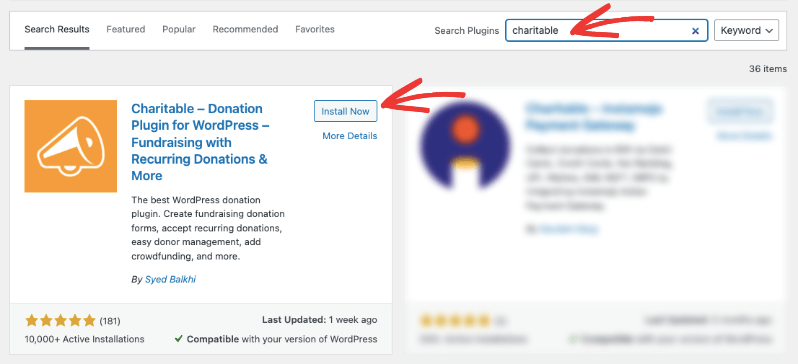
If you’ve bought a paid plan, you can download the Charitable Pro plugin from your account and upload it from the same screen.
Step 2. Connect Your Payment Gateway
Next, go to Charitable » Settings » Payment Gateways. Turn on Stripe, PayPal, Square or Offline with the toggle in the Status column, then click Settings to connect your account.
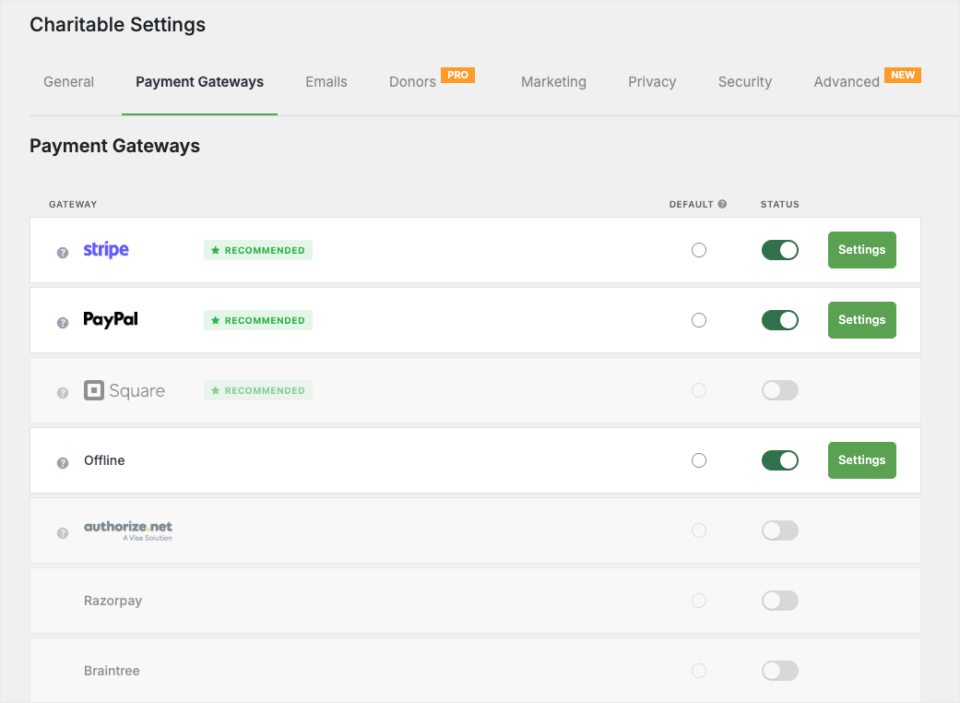
This is where your payouts are set. Gifts will go from this gateway straight to your account.
Step 3. Send Donors to Your Email Tool
On the Plus plan and higher, start by installing the Newsletter Connect addon from Charitable » Addons. Then open Charitable » Settings » Marketing and choose the Newsletters tab.
Next, click Configure next to Mailchimp, Constant Contact, Brevo or another provider. Paste your API key, click Save Changes, then pick the list new donors should join under Default List.
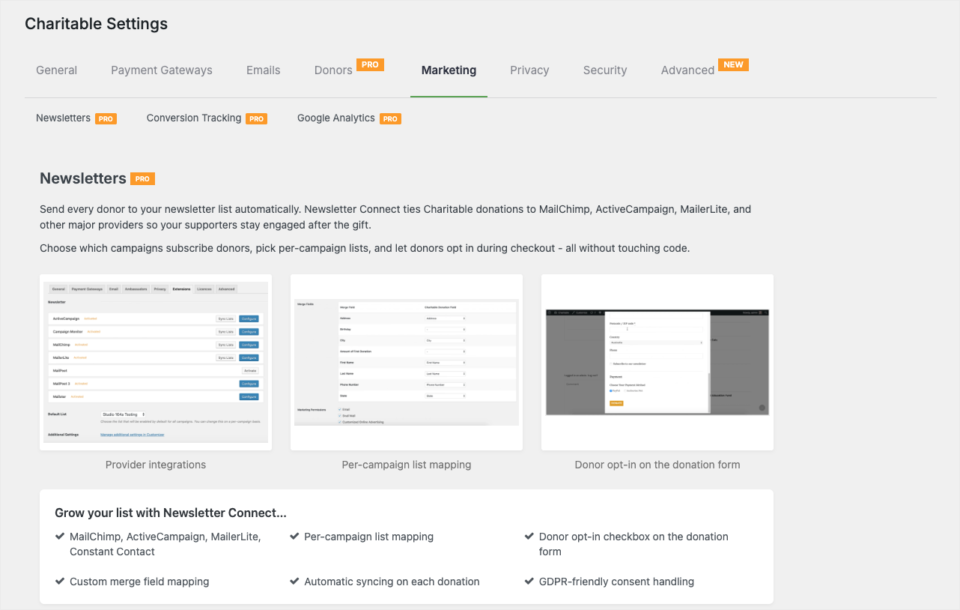
To add only donors who say yes, set Default Opt-in Mode to one of the checkbox options and write your wording under Default Opt-in Label. Each campaign can use its own setting if you need it.
Step 4. Link Your Other Tools With Zapier
On the Pro plan and higher, start by installing the Automation Connect addon from Charitable » Addons. Then go to Charitable » Automations, open the API Keys tab and click Generate Key.
In Zapier, choose the Charitable app, enter your site URL and API key, and pick the New Donation trigger. From there, you can send each gift to QuickBooks, Xero, Salesforce, Slack or Google Sheets.
Start with one Zap for the job that takes your team the most time. For most nonprofits, that’s entering gifts into the accounting tool.
Step 5. Export Your Data Whenever You Need It
Finally, it’s good to know you can take your data out at any time. In Charitable » Donors, click Export. Choose a date range or campaign if you want to, then click Export again to download your donor list as a CSV file.
You can use that file for your board, your accountant or a new tool. Your data stays yours, whatever tools you use next year.
Final Recommendation
If you’re starting from scratch, begin with 3 tools. Set up WordPress, add Charitable for your fundraising and apply for Google Workspace for Nonprofits. Together, they cost little more than your hosting.
Then add one tool at a time, only when a job is taking real hours each week. An email tool usually comes next, then accounting, then automation. Your set of tools will grow with your nonprofit, and every new tool will plug into the same hub.
Ready to build yours? You can start with Charitable Lite today, or get a paid plan, 14 days risk-free »
FAQs on Nonprofit Software
What is the best nonprofit software for a small nonprofit?
For most small nonprofits, I recommend WordPress with Charitable for fundraising, plus Google Workspace for Nonprofits for email and documents. All 3 can be set up for little more than the cost of hosting.
Is there free software for nonprofits?
Yes. Google Workspace for Nonprofits, Canva for Nonprofits and the free versions of Charitable, HubSpot CRM and Mailchimp all cost nothing to start. Many of them ask for proof of your nonprofit status first.
Do I need a separate CRM if I use Charitable?
Not at first. Charitable keeps a profile and giving history for every donor. Add a separate CRM like HubSpot or Salesforce when you need to track grants, volunteers or other relationships beyond donations.
What is nonprofit technology?
Nonprofit technology is the software and hardware a nonprofit uses to run its work. It covers fundraising, donor records, email, accounting, events and team tools.
How do I get nonprofit discounts on software?
Most vendors ask you to apply with proof of your status, such as a 501(c)(3) letter in the US or a charity number elsewhere. Some programs, like QuickBooks Online, go through TechSoup instead.
Can my nonprofit software tools share data?
Yes, if you choose tools that connect. Charitable has built-in integrations with email tools, and Zapier links it to CRM, accounting, chat and spreadsheet apps.
Can I use AI to manage my donation website?
Yes. With the free WPVibe plugin and the Charitable Pro plugin, assistants like ChatGPT and Claude can draft campaigns, record offline gifts, look up donors and pull reports. Your assistant can’t change anything until you turn on write access.
Charitable Has 1.2+ Million Downloads!
Trusted by millions to power successful fundraising campaigns. Try Charitable risk-free today.
✅ 14-day money-back guarantee
✅ Transparent pricing
✅ Code-free setup
Stay Connected for More Nonprofit Resources
For more tutorials and videos tailored to nonprofits, subscribe to our YouTube channel. We regularly publish expert tips, step-by-step guides on online donations, fundraising strategies, and practical resources to help your organization succeed.
🗞️ Get weekly tips and exclusive guides in your inbox
Join our newsletter →
🎥 Watch step-by-step tutorials and success stories
Subscribe to our YouTube channel →
👩🏽💻 Connect with our community and get daily nonprofit insights
Follow us on LinkedIn →
🥳 Fun reels and non-profit insights
Follow us on Instagram →
👀 Insightful & fun videos to help you grow your cause
Follow us on TikTok→
🌎 Subscribe and follow for general fundraiser tips
Get Fundraiser Tips on TikTok →
Powerful Fundraising Resources
🤖 Use Charitable with Your AI Assistant
⬇️ Download proven strategies, campaign ideas, and expert tools
Get the Fundraising Kit →
💸 Get Free Fundraising Resources
Head to the Charitable Fundraising Hub →
🤔 Got questions about Charitable?
Charitable FAQs →
🏎️ Take Charitable for a spin
Create your Charitable Demo →
Understand non-profit terms and jargon
Non-Profit Glossary →
% Looking for non-profit deals and discounts?
Best Non-Profit Deals and Discounts →








Leave a Reply