
Do you want to be able to rerun campaigns without having to start from scratch each time?
Sometimes the same campaign comes around every season – spring walkathons, winter clothes drives, Giving Tuesday, Christmas campaigns, and so on.
Most campaigns are not one-time events. They happen again and again, year after year.
The trouble is that “coming back” has always meant starting over. You rebuild the campaign from scratch. You have to ask last year’s fundraisers to join again as if they had never helped before. And you quietly lose the monthly donors who gave through pages that no longer exist.
Charitable already makes it easy to rerun your regular campaigns. But now, we’ve brought that ease to peer-to-peer campaigns as well!
Meet Ambassador Seasons!
This lets you re-run the same campaign year after year while keeping everything you already built. When a season ends, your returning fundraisers and teams continue into the new season in one click.
Their page carries forward, their web address stays the same, their recurring donors move with them, and last year’s page is archived read-only so its history is never lost. 🔁
Seasons is available now in Charitable Ambassadors 3.4.0.
Here’s What Ambassador Seasons Looks Like
Before we get into how this works, here’s the short version. A returning fundraiser is simply someone who ran a peer-to-peer campaign for you before and is coming back to do it again. Seasons gives them an easy way back in, and it gives you control over what happens to everyone who doesn’t return.
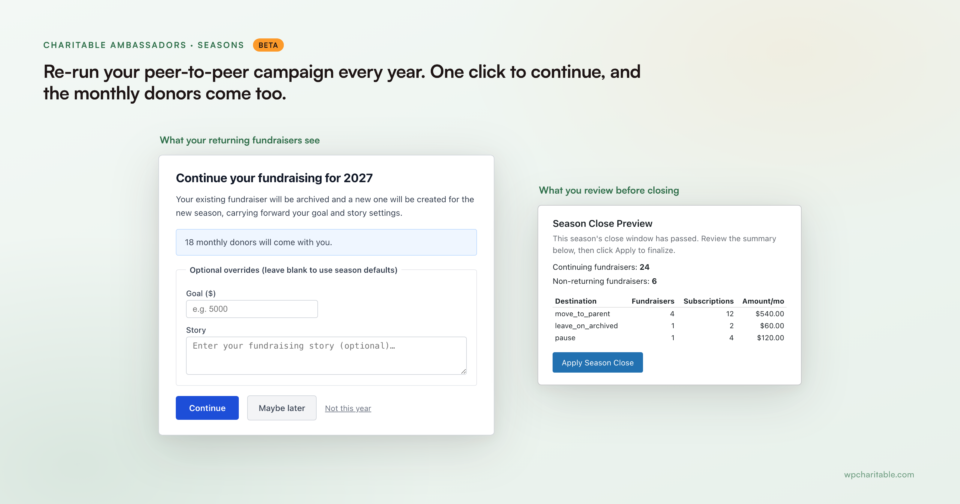
On the left, a returning fundraiser sees a continue screen that already knows 18 of their monthly donors are coming with them.
On the right, they see a preview before a season closes, showing exactly how many fundraisers are continuing, how many aren’t, and how much recurring revenue is affected either way.
Why Keeping Last Year’s Fundraisers Changes Everything
The best way to grow peer-to-peer fundraising isn’t finding new fundraisers. It’s keeping the ones you already have. A fundraiser who ran a campaign for you last year already knows your cause. They already have people who are ready to give. And they already raised money once before.
Getting one fundraiser back is easier than finding several new ones, and it costs you almost nothing. That’s what a good donor engagement strategy is really about.
But this is exactly where most programs lose people. We’ve built Ambassador Seasons to bring these supporters back, so they can quickly run their peer-to-peer campaigns again with ease!
When You’ll Feel the Difference
Seasons works for any peer-to-peer program that happens more than once, not just one big yearly event. Here are a few examples:
🚶 Walkathons and run/walk events that come back every spring with mostly the same team captains.
🎗️ Annual galas and dinners with the same host committee fundraising on your behalf each year.
🎁 December giving-day pushes that lean on the same handful of top fundraisers every time.
🏫 School-based peer-to-peer drives where the grades change but the parent volunteers don’t.
🏢 Corporate team challenges where the same company groups compete against each other year after year.
One-Click Continue, for Fundraisers and Teams
When a new season opens, every returning peer-to-peer supporter gets a personal continue invitation, which opens the confirmation screen below.
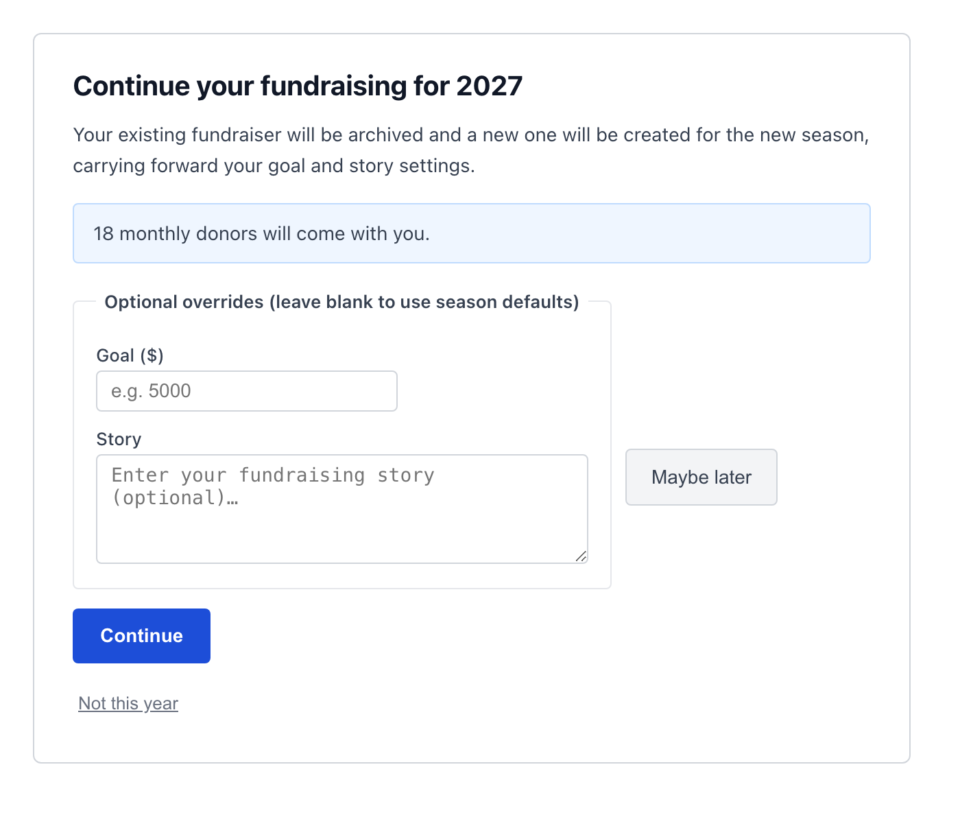
They’ll see their goal and story are already filled in from the previous campaign, and the screen tells them up front how many of their monthly donors are coming along, so they know exactly what continuing means for them. They can change the goal or rewrite the story if they want a fresh start, or leave both alone and click Continue.
So they’ll have a new fundraiser page up and running in no time, at the same link they shared last year, ready to accept donations again.
Instead of starting over with a new list of members, their teams are carried forward too. Company teams, school grades, and chapter groups all continue into the new season. Added to that, a reminder email goes out as the deadline approaches, and they can still decline with “Not this year” if this isn’t their season to come back.
Your Monthly Donors Move With the Campaign
When a supporter sets up a recurring gift through a fundraiser’s page, that relationship matters, and it’s easy to break. If the page disappears at the end of the season, the gift stops working, and you lose a donor you worked hard to win.
This is the exact problem donation recovery is built to solve. Seasons protects your recurring donors when a season changes.
When a fundraiser continues, their monthly donors move to the new season’s page automatically, the same way you saw in the screen above.
For fundraisers who don’t come back, you decide ahead of time what happens to their recurring gifts, so nothing gets lost by mistake.
There are 3 policies to choose from. You can move future gifts to the parent campaign, leave them on the archived page as it is, or pause the subscription until someone starts it again.
You Review Every Season Close Before It Happens
A season doesn’t end on its own. From the season’s campaign, you open a Season Close Preview that shows exactly what will happen before it happens.
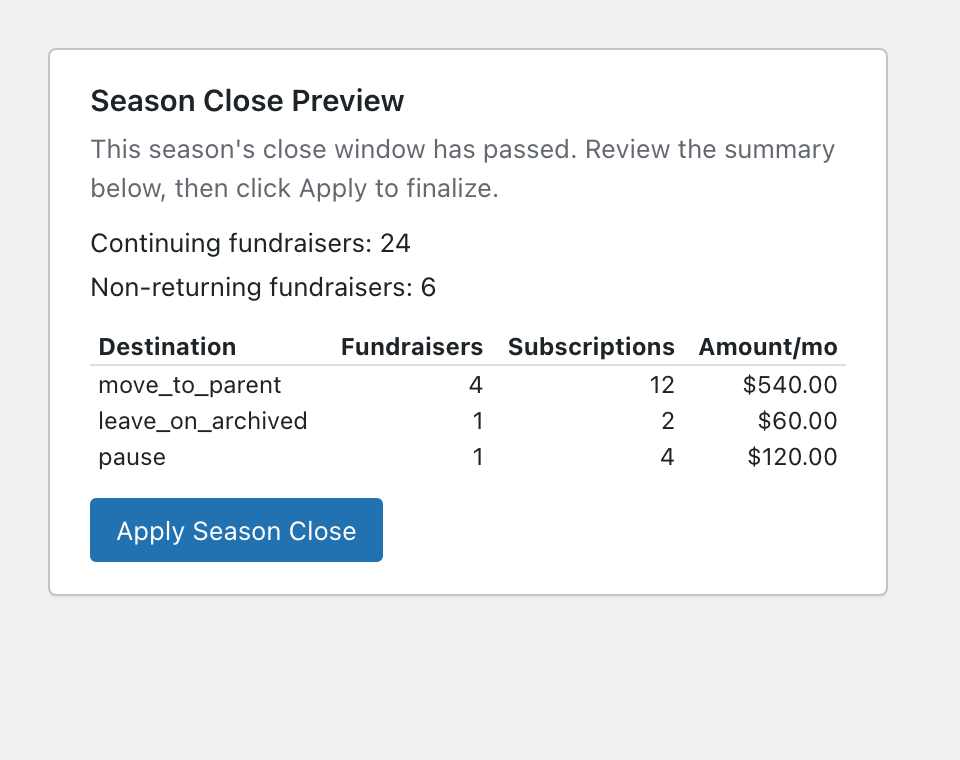
In the example above, 24 fundraisers are continuing and 6 aren’t. The preview shows exactly what will happen to their $720 a month in combined recurring gifts. Some move to the parent campaign, some stay on the archived page, and some get paused.
Normally, you would have to put this information together yourself from a general donations report. You review it, then click Apply Season Close when the numbers look right.
Up to 4 emails keep everyone informed along the way, covering the continue confirmation, a reminder before the deadline, a notice to affected recurring donors, and an admin close summary.
You can turn each one on or off, so you decide who hears from you. If you want these emails to reliably reach an inbox instead of a spam folder, a plugin like WP Mail SMTP can help. Pages that don’t continue stay online as read-only instead of disappearing, so last year’s history is not lost, and you have a list of people to contact again next year.
Set Up Your First Season in a Few Minutes
You can connect next year’s season to last year’s in a few clicks. Here’s exactly what that looks like, step by step.
Step 1: Turn On Seasons and Set Your Defaults
To get started, head over to Charitable » Ambassadors » Other » Seasons in wp-admin and enable the feature. While you’re there, set your Rollover Defaults (Story, Photo, Goal) and your Non-Returning Donors policy once, before the season opens instead of during it.
Step 2: Point Next Year’s Campaign at Last Year’s
To create next year’s campaign, use the same campaign builder you already use, then open its Season box and set Predecessor Campaign to last year’s. Give it a Season Label and, if you want them, optional open and close dates.
Step 3: Open the Season
Returning fundraisers get the continue invitation you saw earlier, and reminders go out on their own as the deadline approaches. You don’t have to contact anyone yourself.
Step 4: Review the Close and Apply It
When the event ends, open the Season Close Preview, confirm the numbers match what you expect, and apply the close. Continuing pages and their monthly donors carry forward, and last year’s campaign stays archived without any problems.
That’s the whole process. Want every setting explained in more depth, screenshots included?
Read the Full Ambassador Seasons Setup Tutorial →
For Agencies and Developers
Hooks for the Full Season Lifecycle
Extend Seasons with actions that fire at each step, the same pattern Automation Connect 2.0 uses elsewhere in Charitable. These include charitable_ambassadors_season_closed, charitable_ambassadors_fundraiser_continued, charitable_ambassadors_fundraiser_declined, charitable_ambassadors_team_continued, and charitable_ambassadors_recurring_moved.
Filters, Notifications, and Template Overrides
Tune close batch size with charitable_ambassadors_season_close_chunk_size, gate notifications with charitable_ambassadors_notifications_enabled, and set the donor-facing recurring URL with charitable_recurring_donations_page_url. Override any of the 4 season emails, season_continue, season_reminder, season_donor_notice, and season_admin_summary, from your-theme/charitable/emails/.
FAQs on Ambassador Seasons
Does this require the Charitable Pro plugin? Yes. Ambassador Seasons is included in Charitable Ambassadors 3.4.0, and it also needs the Charitable Pro plugin, version 1.8.16 or later, installed.
Do I have to turn Seasons on? No. It’s opt-in and currently in beta. Your existing peer-to-peer campaigns keep working exactly as they do now until you enable it.
What happens to a fundraiser who doesn’t continue? Their page archives read-only at its existing web address, and whatever you’ve set as your Non-Returning Donors policy, move to the parent campaign, leave on the archived page, or pause, decides what happens to their recurring gifts.
Do old fundraiser links break when a season closes? No. Continuing pages keep the exact same web address, and archived pages stay live at their original address too, just read-only.
Can I run more than one recurring program with Seasons? Yes. Each season chain is just a campaign pointed at a Predecessor Campaign, so a spring walkathon and a fall gala can each run their own independent season cycle side by side.
Get Started With Ambassador Seasons
Ambassador Seasons is available now in Charitable Ambassadors 3.4.0. Open Ambassadors » Other » Seasons, turn it on, and point next year’s campaign at this year’s. Your returning fundraisers will thank you for not making them start over.
Read the Ambassador Seasons Documentation →
Not Yet a Charitable Pro User?
Charitable Has 1.2+ Million Downloads!
Trusted by millions to power successful fundraising campaigns. Try Charitable risk-free today.
✅ 14-day money-back
✅ Transparent pricing
✅ Code-free setup
What’s New in Charitable
We also launched several powerful features and improvements recently:
🧩
Build donation campaigns visually in Elementor, WPBakery, or Divi, no shortcodes required.
🔆
A full-width hero template that puts your goal and donation widget above the fold.
👤
Give every fundraiser a shareable public page with their own avatar, bio, and campaigns.
📱
Donors on mobile check out instantly with Apple Pay or Google Pay through Mollie.
We add new features and improvements to Charitable all the time, all designed to help you raise more and serve your donors better. See everything we’ve released at the Charitable Changelog.
Not yet a Charitable Pro user? Sign up today and get up to 50% off on your plan. We’re confident you’ll love raising funds with Charitable. If, for any reason, Charitable is not the right fit for you, we’ll refund your purchase with our 14-day money-back guarantee. Get Charitable Pro Now »
If you have any questions or want help setting Seasons up for your program, our support team is ready to lend a hand.
Stay Connected for More Nonprofit Resources
For more tutorials and videos tailored to nonprofits, subscribe to our YouTube channel. We regularly publish expert tips, step-by-step guides on online donations, fundraising strategies, and practical resources to help your organization succeed.
🗞️ Get weekly tips and exclusive guides in your inbox
Join our newsletter →
🎥 Watch step-by-step tutorials and success stories
Subscribe to our YouTube channel →
👩🏽💻 Connect with our community and get daily nonprofit insights
Follow us on LinkedIn →
🥳 Fun reels and non-profit insights
Follow us on Instagram →
👀 Insightful & fun videos to help you grow your cause
Follow us on TikTok→
🌎 Subscribe and follow for general fundraiser tips
Get Fundraiser Tips on TikTok →
Powerful Fundraising Resources
🤖 Use Charitable with Your AI Assistant
⬇️ Download proven strategies, campaign ideas, and expert tools
Get the Fundraising Kit →
💸 Get Free Fundraising Resources
Head to the Charitable Fundraising Hub →
🤔 Got questions about Charitable?
Charitable FAQs →
🏎️ Take Charitable for a spin
Create your Charitable Demo →
Understand non-profit terms and jargon
Non-Profit Glossary →
% Looking for non-profit deals and discounts?
Best Non-Profit Deals and Discounts →









Leave a Reply