

Some of the most meaningful gifts your nonprofit will ever receive are made in someone’s name. A donor gives in memory of a parent, in honor of a friend’s recovery, or on behalf of a couple celebrating a milestone.
For years, most donation plugins, ours included, treated that as a single line in a note field, if they captured it at all. That never sat right with me.
A gift given in someone’s name deserves to be remembered as more than a stray sentence buried in a spreadsheet.
✨ Say hello to Charitable Tributes ✨ – a new addon that captures the intention behind a gift, then does something most donation plugins can’t.
It remembers the person being honored, keeps every gift given in their name together in one place, and turns a one-time donation into a lasting record instead of a line item.
Here’s What a Tribute Page Looks Like
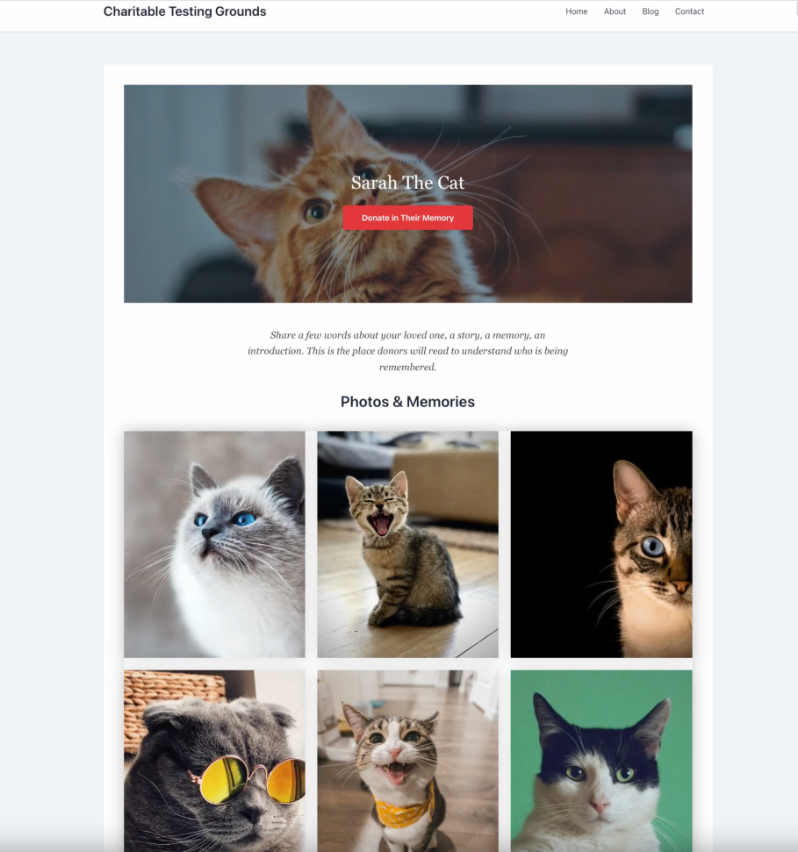
Before we walk through how any of this works, take a look at what a finished tribute page actually looks like. This is a real page, built entirely from a template and the blocks that ship with Tributes. No custom code, no designer, no extra plugin.
That ☝🏼 one page is doing a lot of work: it names who the gift honors, tracks progress toward a goal, holds a gallery of photos and memories, and collects messages from everyone who gives.
And this is just one example, using one template, with its default styling left untouched. Every tribute page can be recolored, rearranged, and rewritten to fit the moment.
A birthday tribute looks nothing like a memorial, and a pet memorial (yes, that’s a real template, more on that below) looks nothing like either one. Whatever you end up building starts from something at least this good, and it only gets more personal from there.
Why Tribute Giving Deserves More Than a Checkbox
A tribute gift is personal, and it often brings a whole circle of people to your cause at once. When 10 people give in memory of the same person, that’s ten new relationships and one story worth honoring.
Treat those gifts as anonymous, disconnected donations, and you lose the chance to thank the family, steward the donors, and see the full impact of a single life remembered.
Charitable Tributes keeps all of it together, inside the WordPress dashboard you already use, with no separate subscription and no per-donation fees.
See It In Action
If you’d rather watch than read, here’s the 2-minute version of everything below.
When Should You Use a Tribute Campaign?
Tribute giving isn’t limited to memorials, though that’s where most people’s minds go first. Here’s when we’ve seen it used well:
🕯️ In loving memory: a family asks for donations instead of flowers after a loss.
🎉 Celebrations: a birthday, wedding, or retirement where guests would rather give than gift.
🐾 Pet memorials: yes, this is its own template. Grief for a pet is real, and donors show up for it.
🤝 Support funds: an ongoing fund tied to a specific person, for a recovery, a scholarship, or a cause close to them.
🎨 Something else entirely: a custom template with your own tribute type and fields, for whatever doesn’t fit the list above.
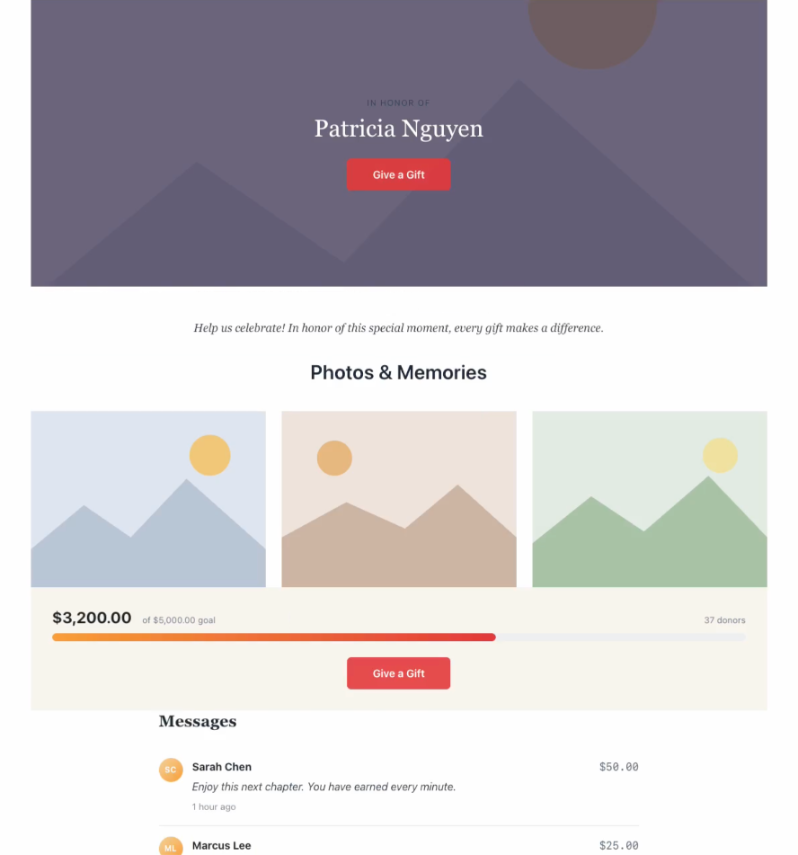
Nine templates ship with Tributes out of the box, and each one comes with its own defaults already configured: which tribute type it uses, whether the page is public or requires family approval, which honoree fields it asks for, and whether annual giving is suggested. You can see the full breakdown, and change any of it, from Tributes → Templates.
Here’s a sample of a Tributes template:
How Easy It Is To Create Tribute Pages With Charitable
Everything above lives in one place: a Tributes menu right inside your WordPress dashboard, alongside the campaigns, donations, and donors you already manage in Charitable.
No separate login, no separate billing, no extra plugin to keep updated on its own schedule.
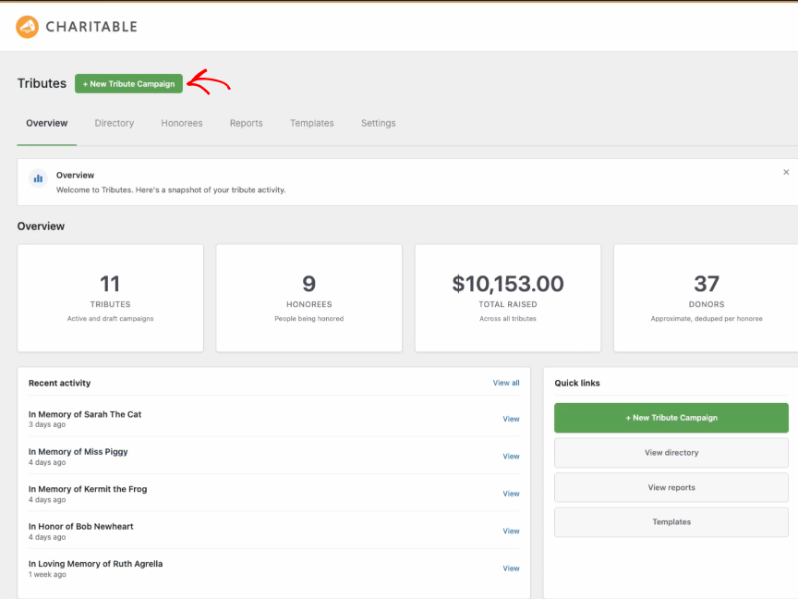
That’s the whole dashboard: how many tributes you’re running, how many honorees, how much has been raised across all of them, and a shortcut to start a new one. Let’s use that button.
Build Your First Tribute Page in Under 2 Minutes
I timed myself building the tribute page you saw earlier, and it came in just under 2 minutes, goal amount and all. Here’s exactly what that looks like, step by step.
Step 1: Pick a Template
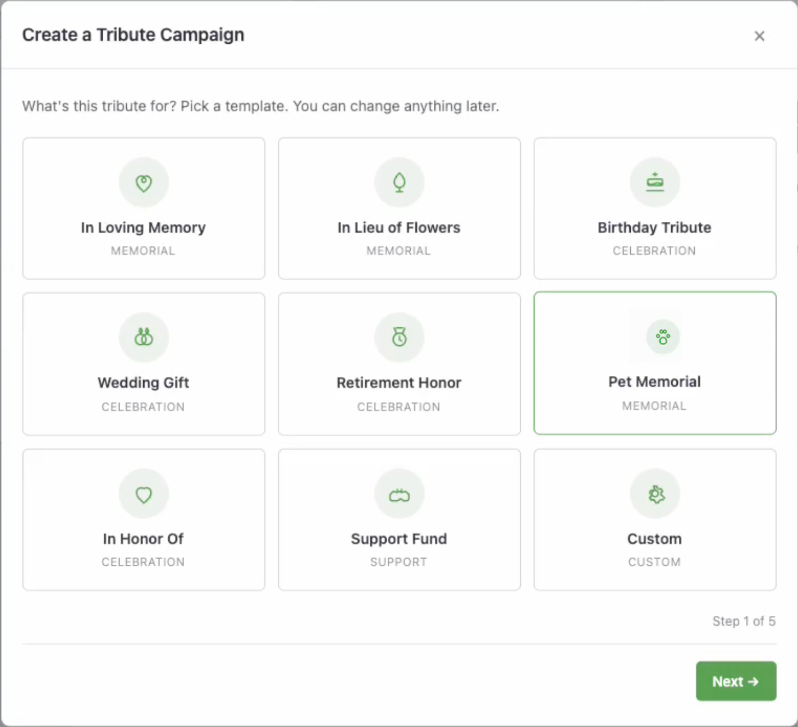
Click + New Tribute Campaign and you land on a template picker, not a blank page. Pick whichever one is closest to what you need. Everything it sets is editable later, so don’t overthink this step.
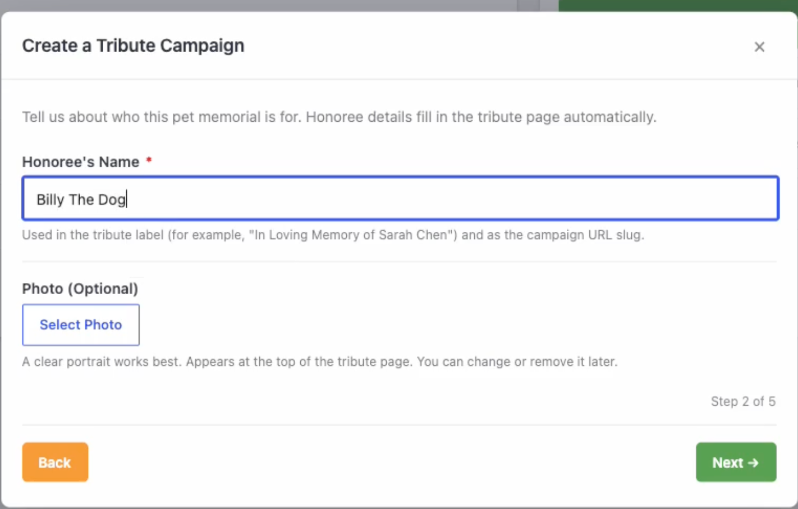
Step 2: Name the Honoree
Name the person, pet, or cause being honored, and optionally add a photo. It’s the only field in the whole wizard that’s actually required.
Step 3: Choose Privacy and Giving Options
Decide whether donors can send an eCard, whether to suggest annual giving, and who’s allowed to see the page: anyone, members only, private link only, or only after a family member approves it.
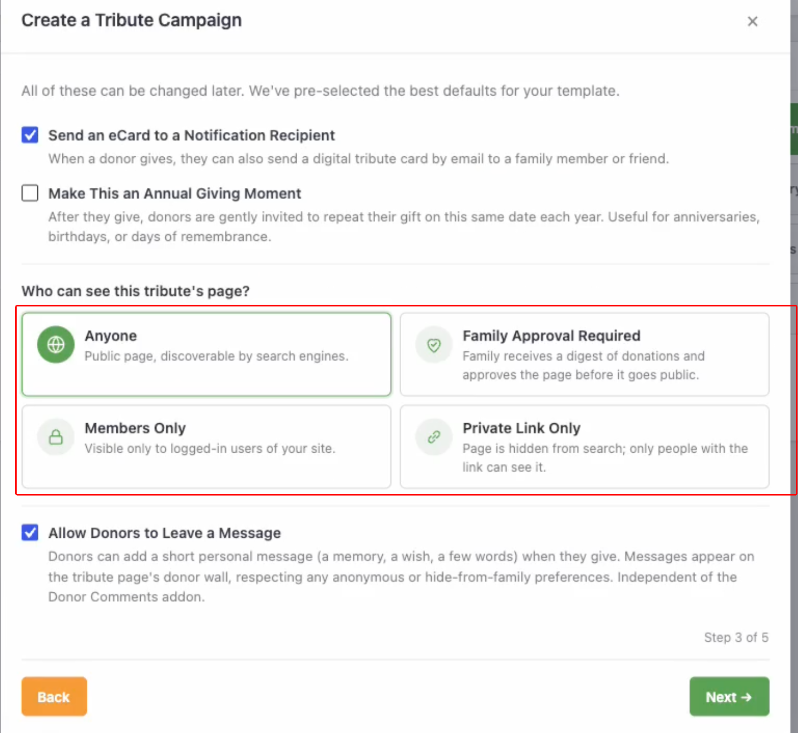
You can also turn donor messages on or off here. This lets donors add a short personal message along with their contribution. These messages will be displayed on the donor wall of this Tribute’s page.
If the donor has chosen to remain anonymous, their message will appear without their name.
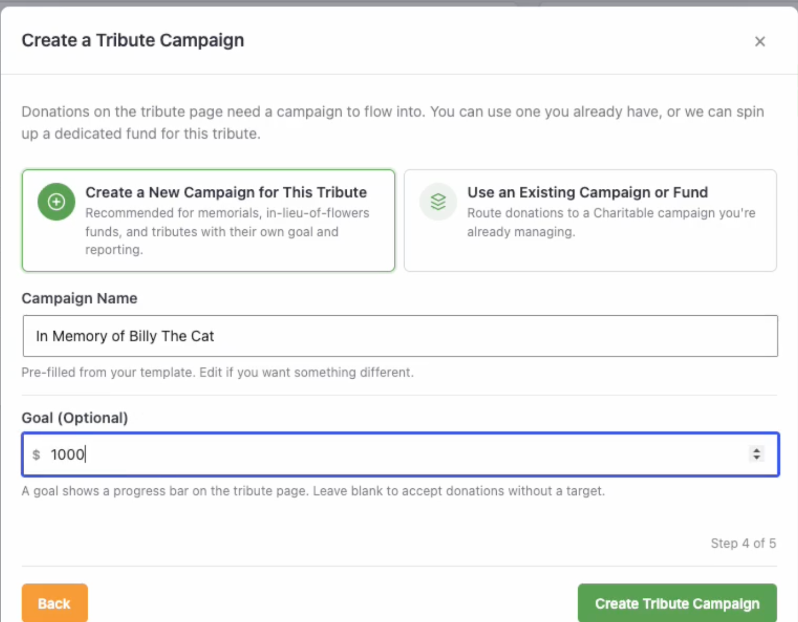
Step 4: Connect It to a Campaign and Set a Goal
Every tribute needs somewhere for the money to go. Spin up a dedicated campaign for this tribute, the usual choice for memorials and funds, or route it into a campaign you’re already running.
Add a goal if you want a progress bar on the page, or skip it if you’d rather just accept gifts with no target.
Step 5: Share the Link
That’s it. The page is live, with a shareable link ready to send to family or post on social, and a shortcode if you’d rather embed it somewhere instead.
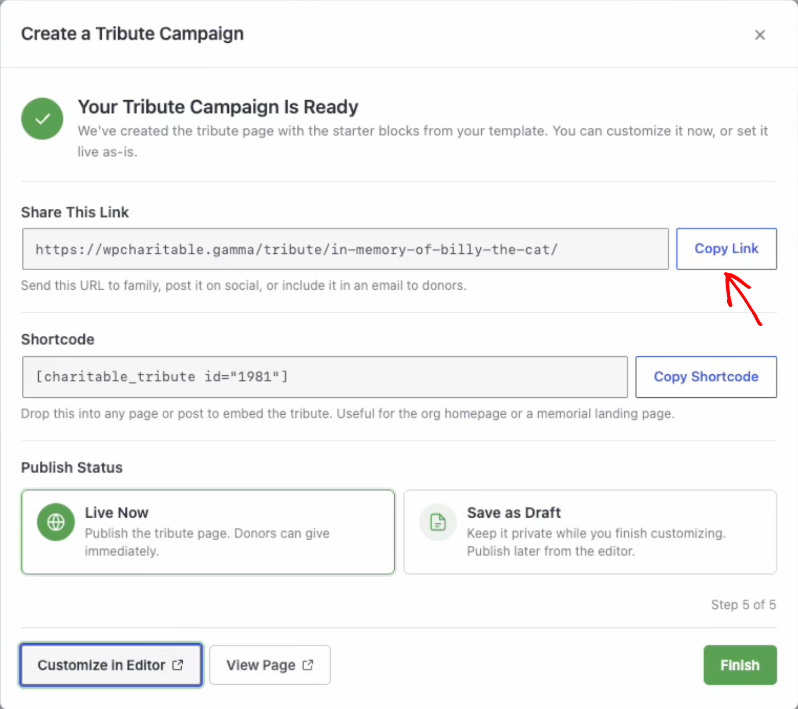
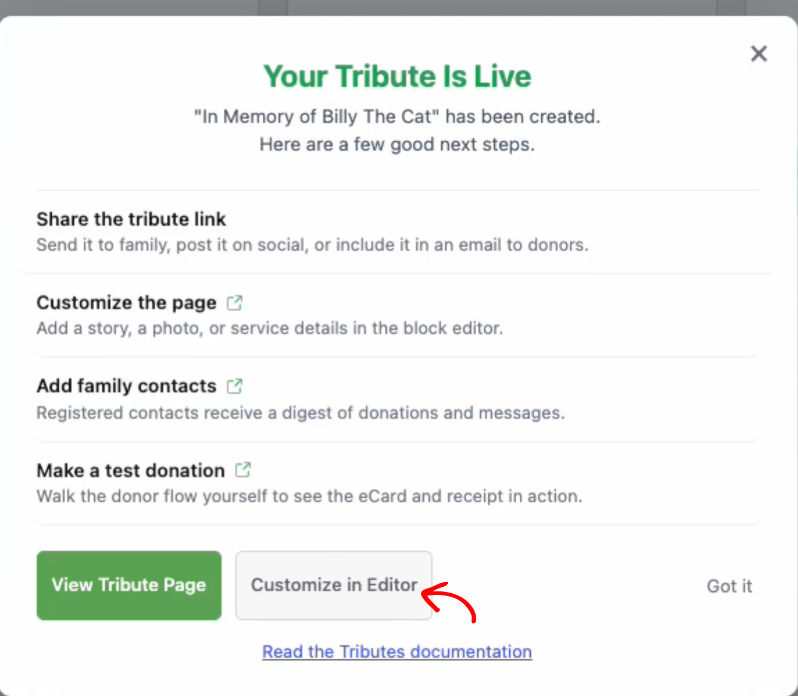
Close the wizard and you’ll see a short list of good next steps: share the link, customize the page, add family contacts, or make a test donation to see the eCard and receipt for yourself.
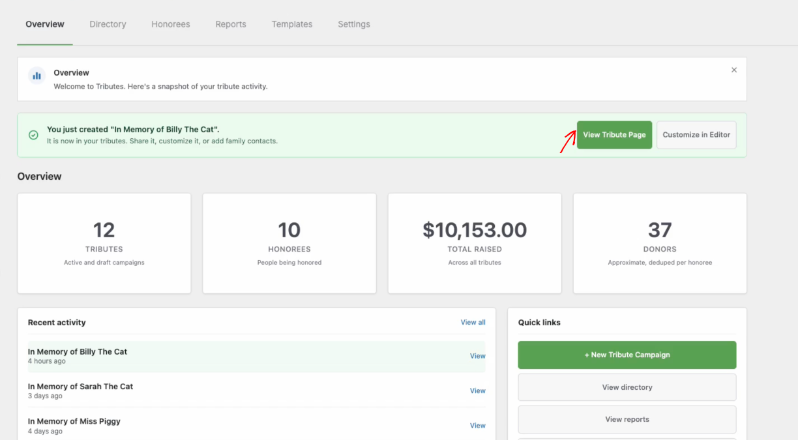
Back on the dashboard, the new tribute shows up right away, with a direct link to view the live page.
That’s the whole flow. Want every option explained in more detail, screenshots included, plus what to do if a family wants edits after the page is already public?
Read the Full Charitable Tributes Setup Tutorial →
Beyond the Wizard
The wizard gets a page live fast, but it’s only the entry point. Here’s the rest of what Tributes does once a page is up and gifts start coming in.
A Tribute Option, Right on the Donation Form
Tribute giving doesn’t have to start with the wizard at all. Add a tribute option to any campaign and donors can dedicate their gift, pick a tribute type, name the person being honored, and leave a personal message, all without leaving the donation form.
Nothing changes for donors who just want to give normally, because the tribute fields only appear when a donor opts in.
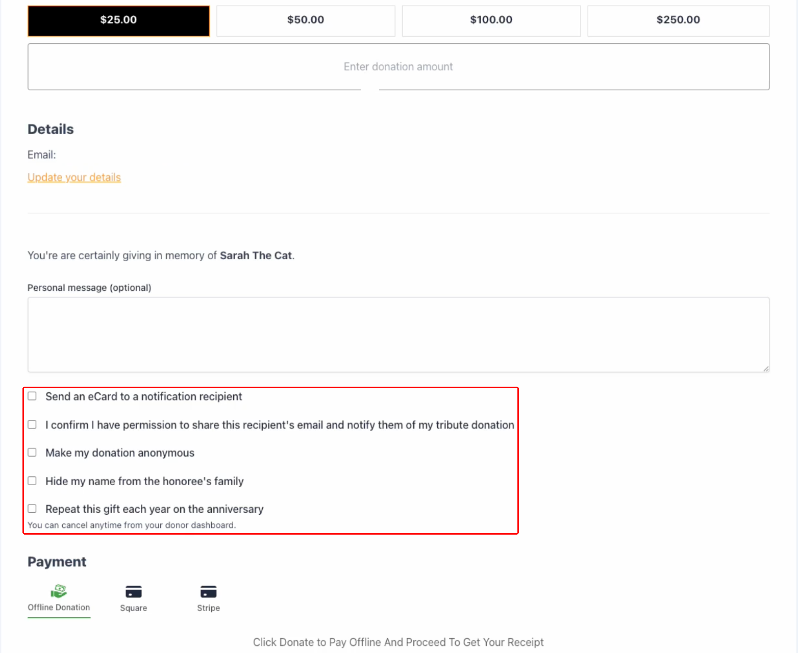
🕊️ Three tribute types built in: in memory of, in honor of, and on behalf of, plus your own custom types.
💬 A personal message the donor can write to the honoree or their family.
🙈 Privacy on the donor’s terms: give anonymously, or keep details family-only.
Honorees Become Real Records, Not Just a Form Field
This is what sets Charitable Tributes apart. When a donor honors someone, Tributes creates a lasting honoree record in your dashboard. Each honoree has running totals, the list of donors who gave in their name, the messages left for them, and the family contacts you choose to keep. So you see one honoree with the full picture, not a scattered pile of gifts.
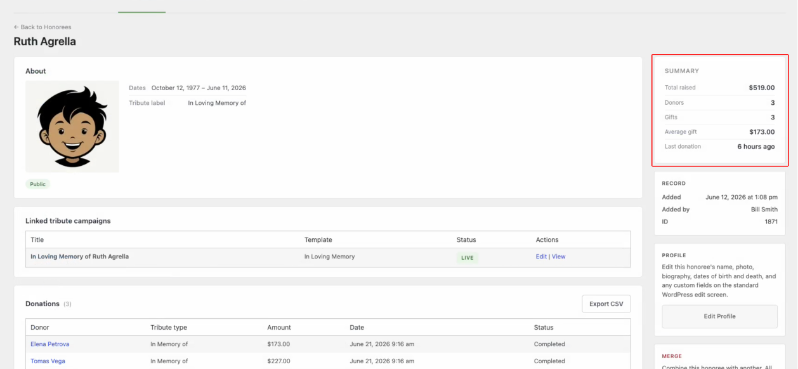
👤 A record per honoree, with photo, dates, and relationship to your cause.
📈 Live totals for amount raised, number of gifts, and number of donors.
👪 Family contacts kept separately from donors, so you can reach loved ones directly.
Tell the Family a Gift Was Made
A tribute gift means more when the family knows about it. Tributes can automatically send a notification eCard to the recipient the donor names, sharing that a gift was made, who it was from, and the personal message. You control the wording for each tribute type, so memorial gifts read with care and celebration gifts feel joyful.
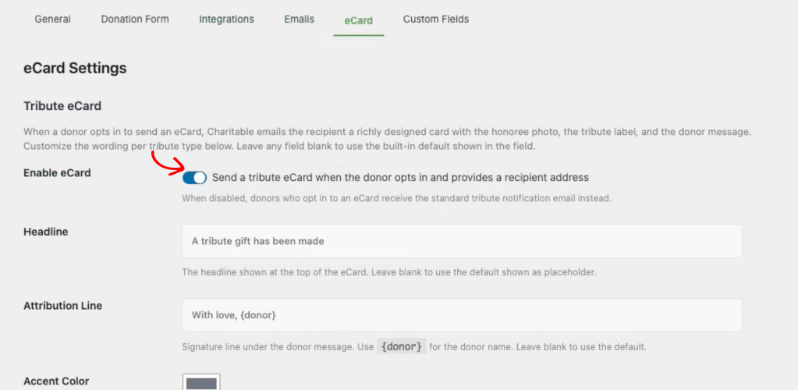
✉️ Automatic notification sent when the tribute gift completes.
✍️ Per-tribute-type wording for subject, headline, and closing, set once in settings.
🔁 A test send and resend option, so your team can preview before any family does.
Build Beautiful Pages with 6 Dedicated Blocks
Every tribute campaign comes with its own page in the WordPress block editor, built from 6 dedicated blocks:
- Honoree Card
- Goal Meter
- Donor Wall
- Personal Message
- Service Details
- Donate Button
You can rearrange them, restyle them, or drop in your own blocks alongside them, all without touching code.
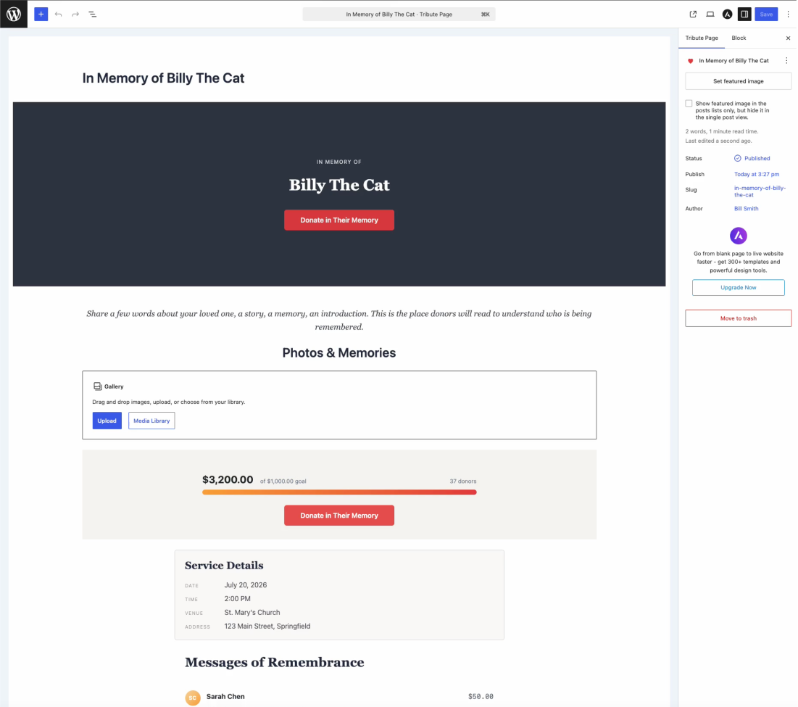
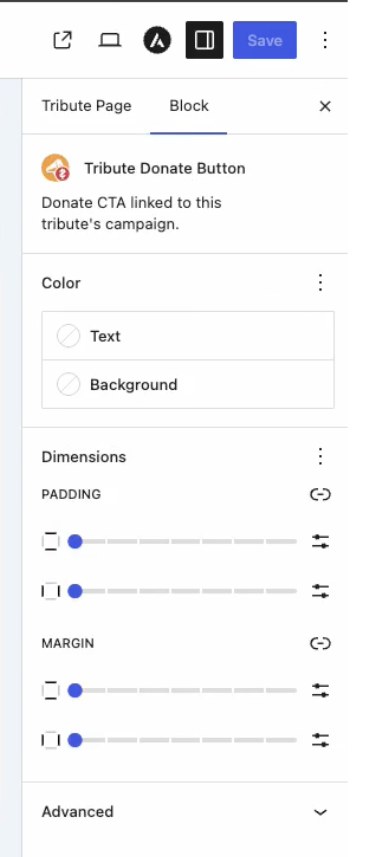
Each block has its own settings panel in the sidebar. The Donate Button block lets you set its own text and background color so it can match your brand instead of a default theme:
And the Donor Wall block has its own privacy and family-hide controls, so a donor’s “hide my name from the family” choice on the donation form is actually respected on the page.
The Goal Meter block goes a step further, with dedicated color swatches for the bar fill and track, so the progress bar can match the rest of the page exactly instead of settling for whatever color shipped by default:
🧱 Six tribute blocks, each with its own settings panel, no theme editing required.
🎨 Per-block color controls, so a tribute page can match your brand instead of a default template.
🗓️ Annual tributes that turn a one-time gift into a recurring gift on a date the donor chooses, with the Recurring Donations addon.
See Who’s Being Honored, and Track Every Gift
Every tribute you create feeds a set of admin views that update as gifts come in, so you’re never digging through a general donations report to answer a simple question like “who’s raised the most this month.”
The Honoree Leaderboard ranks every honoree by total raised, with donor and gift counts alongside.
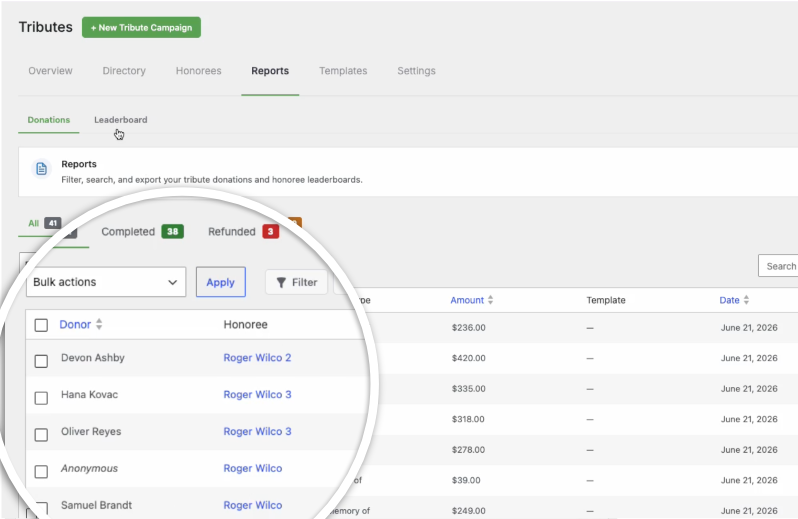
Reports lists every tribute donation in one exportable table, filterable by completed, refunded, or pending:
Directory lists every tribute campaign you’ve built, active, draft, or archived, with totals at a glance:
And Honorees lists every person, pet, or cause anyone has ever honored, whether or not they’ve received a gift yet, so a record created ahead of time doesn’t just disappear until money shows up:
Make It Match Your Organization
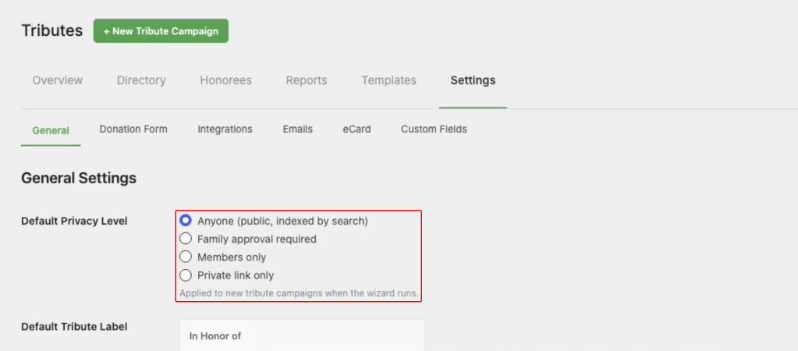
A few settings apply across every tribute you create, not just the one you’re building at the moment. Set a default privacy level and a default tribute label from Tributes → Settings → General, so new tributes start with your organization’s preferred defaults instead of ours.
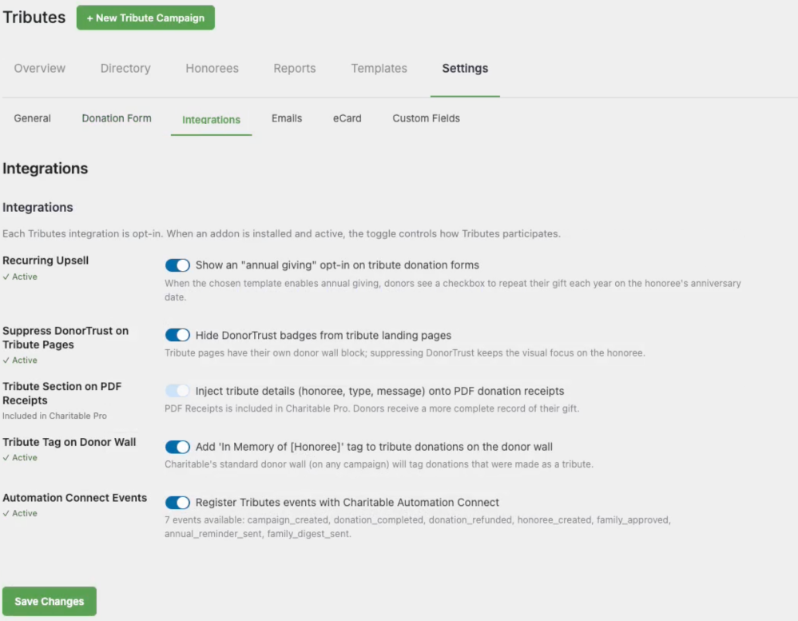
Tributes also doesn’t operate in a bubble.
Recurring Upsell, DonorTrust popups, PDF Receipts, and the standard Charitable donor wall all have dedicated toggles here, so Tributes fits into the rest of your Charitable setup instead of working around it.
For Agencies and Developers
Hooks, Filters, and Full Customization
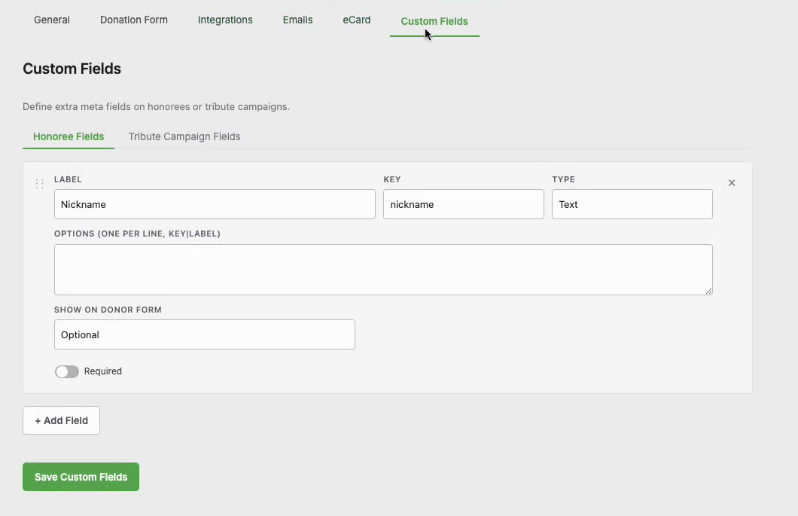
Not every customization needs code. You can add your own fields to an honoree or a tribute campaign right from Settings → Custom Fields, no filter required, which covers most of the one-off requests a client actually asks for.
For everything else, Tributes is built to be extended. Register your own tribute templates, adjust the available tribute types, and shape the tribute sections on receipt emails and PDFs with dedicated filters. Honoree retrieval, donor-list queries, and cached totals all expose filters, so you can tailor behavior to a client’s exact workflow without forking core code.
Connect It to Anything
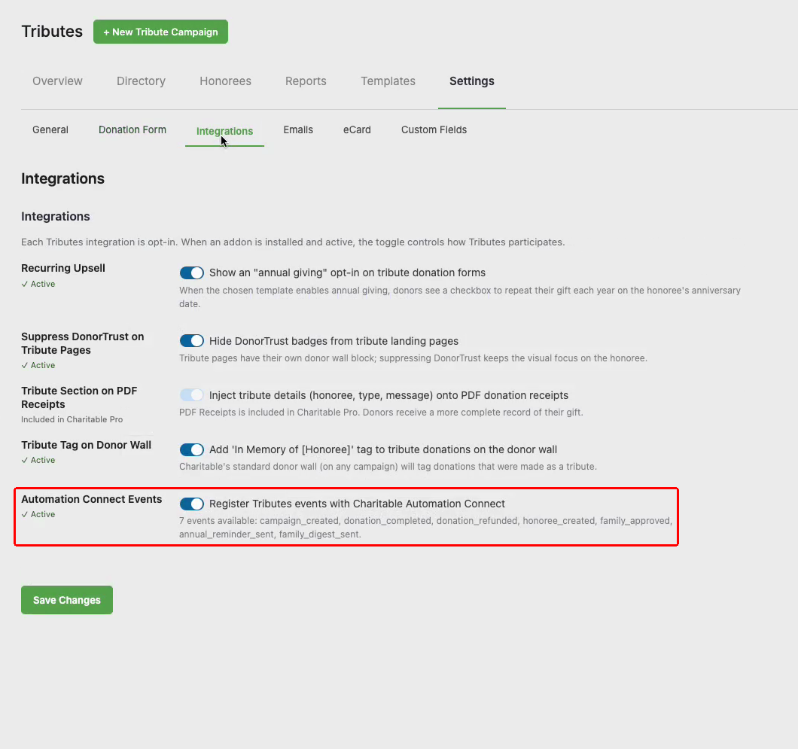
Tributes registers seven events with Automation Connect: campaign created, donation completed, donation refunded, honoree created, family approved, annual reminder sent, and family digest sent.
Turn it on from Settings → Integrations and route any of them into a CRM, a spreadsheet, or wherever your automations already live.
It also exposes read-only REST endpoints for honorees, tribute donations, and tribute campaigns, so you can sync into an external reporting stack without touching Automation Connect at all.
Get Started with Charitable Tributes
Charitable Tributes is available now in the Charitable Pro plugin (in the Plus plan or higher).
Update to the latest version of Charitable.
Activate the addon, turn on the tribute option for a campaign, or run the wizard to spin up a dedicated tribute page.
However you start, every gift is remembered, not just recorded.
Read the Charitable Tributes Documentation →
Not Yet a Charitable Pro User?
Charitable powers fundraising for organizations around the world, with more than a million downloads and no per-donation fees ever. Charitable Pro unlocks Tributes along with the full library of addons, so you can build exactly the giving experience your cause deserves.
Charitable Has 1.2+ Million Downloads!
Trusted by millions to power successful fundraising campaigns. Try Charitable risk-free today.
✅ 14-day money-back guarantee
✅ Transparent pricing
✅ Code-free setup
What’s New in Charitable
We also launched several powerful features and improvements recently:
📱
Apple Pay and Google Pay in Mollie
Donors can check out with one tap using Apple Pay or Google Pay through Mollie.
🤝
New moderation and directory screens let you manage every campaign creator and ambassador in one place.
⚡
Accept donations in India via UPI, QR codes, and major international currencies.
🔔
Built-in push notifications for donation thank-yous, campaign launches, and goal milestones.
🛡️
Real-time bot detection that flags attacks and blocks bad actors before they hit your donation forms.
🧤
White Glove Migration for GiveWP
Charitable’s team handles your full migration from GiveWP, data and all.
We’ve been adding to Charitable constantly, features and improvements designed to help you raise more and serve your donors better. See everything we’ve shipped at the Charitable Changelog.
Stay Connected for More Nonprofit Resources
For more tutorials and videos tailored to nonprofits, subscribe to our YouTube channel. We regularly publish expert tips, step-by-step guides on online donations, fundraising strategies, and practical resources to help your organization succeed.
🗞️ Get weekly tips and exclusive guides in your inbox
Join our newsletter →
🎥 Watch step-by-step tutorials and success stories
Subscribe to our YouTube channel →
👩🏽💻 Connect with our community and get daily nonprofit insights
Follow us on LinkedIn →
🥳 Fun reels and non-profit insights
Follow us on Instagram →
👀 Insightful & fun videos to help you grow your cause
Follow us on TikTok→
🌎 Subscribe and follow for general fundraiser tips
Get Fundraiser Tips on TikTok →
Powerful Fundraising Resources
🤖 Use Charitable with Your AI Assistant
⬇️ Download proven strategies, campaign ideas, and expert tools
Get the Fundraising Kit →
💸 Get Free Fundraising Resources
Head to the Charitable Fundraising Hub →
🤔 Got questions about Charitable?
Charitable FAQs →
🏎️ Take Charitable for a spin
Create your Charitable Demo →
Understand non-profit terms and jargon
Non-Profit Glossary →
% Looking for non-profit deals and discounts?
Best Non-Profit Deals and Discounts →









Leave a Reply