
I spent three years running my non-profit’s website, and looking back, I did so many things wrong.
Our website had pages. It had a blog. We had written content about our programs, our impact, and the community we served. But none of it was showing up in search. Nobody was searching for us or keywords related to us. We were available online but completely invisible.
Those searches were happening every day, hundreds of them, and we were invisible. The organizations ranking at the top weren’t necessarily doing better work than ours. They just understood something we didn’t: search is not a lottery. It’s a skill you can learn and apply.
That realization changed how I thought about digital strategy entirely. SEO, search engine optimization, isn’t a technical art or a luxury reserved for brands with dedicated marketing departments. For a nonprofit operating on constrained resources, it may be the single highest-ROI investment you can make in your online presence.
You build it once, and it keeps delivering. A page that ranks well on Google doesn’t need to be “boosted” every week. It doesn’t need a media budget. It shows up, it earns trust, and it works while you sleep.
This guide is built for non-profits that want to build real, durable visibility in search, including the new AI-powered search landscape of 2026.
And I want to be upfront: the landscape has shifted meaningfully in the last two years. Google’s AI Overviews now appear on more than 13% of all searches.
Over half of Google searches in the United States end without a click. AI tools are changing how nonprofits create content, research keywords, and measure performance. The way people find information is evolving, and your SEO strategy needs to account for that.
The good news is that these changes largely favor organizations with genuine expertise and authentic voices, which describes most nonprofits better than it describes most commercial content operations.
We’ll start with the AI shift, because understanding the new context makes everything else in this guide land differently. Then we’ll move through the complete nonprofit SEO playbook: keyword research, on-page optimization, technical health, local search, content strategy, link building, Google Ad Grants, and how to measure what’s working.
By the end, you’ll have a clear picture and a concrete action plan. Let’s get into it.
Table of Contents
- How AI Is Changing the SEO Landscape (And Why It Can Work in Your Favor)
- Why SEO Is the Budget-Conscious Nonprofit’s Most Powerful Tool
- The SEO Basics Every Nonprofit Needs to Know
- Keyword Research for Nonprofits: Finding the Terms That Drive Real Results
- On-Page SEO: Optimizing Every Page That Matters
- Technical SEO for Nonprofits (Without a Tech Team)
- Local SEO: How Nonprofits Get Found in Their Communities
- Content Strategy That Builds Organic Traffic Over Time
- Optimizing Your Donation Pages for Both SEO and Conversions
- Link Building Strategies Nonprofits Can Actually Use
- Google Ad Grants: $10,000/Month in Free Advertising
- How to Measure Your SEO Progress
- The Best SEO Tools for Nonprofits (And Why WordPress Is the Smarter Path)
- How Charitable Helps Nonprofits Win at SEO
- Your Nonprofit SEO Quick-Start Action Plan
- Frequently Asked Questions
How AI Is Changing the SEO Landscape (And Why It Can Work in Your Favor)
If you’ve been following SEO news at all in the past two years, you’ve encountered a lot of noise about AI, some of it alarming, some of it overhyped, most of it not quite landing for the people actually doing communications work at nonprofits. Here’s what’s actually changed, what it means for your organization, and why small nonprofits are often better positioned than the coverage suggests.
Worried about using AI? Check out Should Non-Profits Use AI?
Google’s AI Overviews: The Biggest Shift in Search Since Mobile
In 2024, Google rolled out AI Overviews, AI-generated summary boxes that appear at the very top of search results for a growing number of queries.
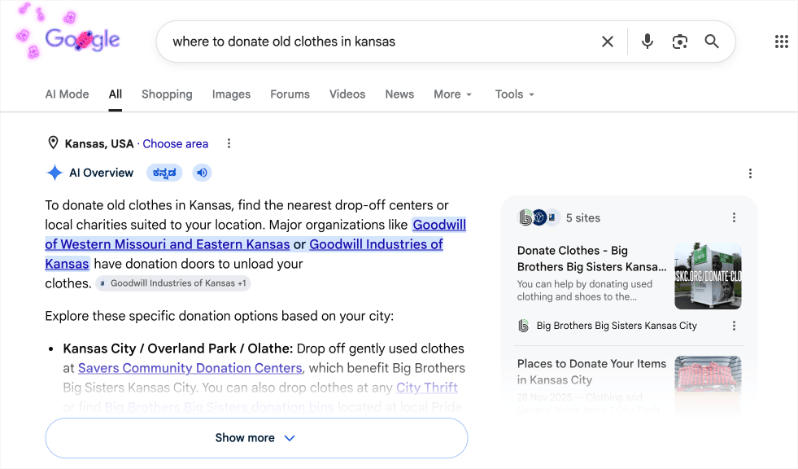
As of early 2026, AI Overviews now appear on more than 13% of all Google searches, nearly double the rate from six months prior.
When a search triggers an AI Overview, Google synthesizes answers from multiple sources into a single generated response, and the majority of users read that summary and never click through to any of the underlying websites.
This directly connects to a statistic that should recalibrate how you think about SEO: 58.5% of Google searches in the United States now end without a single click.
More than half of the people who search for something on Google never visit a website at all. They get their answer from the results page itself, from featured snippets, knowledge panels, map packs, and increasingly from AI Overviews.
Traditional “page one ranking” is no longer sufficient as a goal if the person reading page one never clicks.
What this means is that visibility in search, being cited, summarized, or surfaced as a source, matters as much as ranking. The question is no longer just “does my page rank for this query?”
It’s also “does Google’s AI understand my organization well enough to cite us when it answers related questions?”
GEO: The New Layer on Top of Traditional SEO
SEO professionals have coined a new term for optimizing content to be selected and surfaced by AI-powered search: Generative Engine Optimization, or GEO. The ranking signals that have always mattered, relevance, authority, technical performance, still apply.
GEO adds to that a set of content quality signals that make your content easy for AI systems to extract, summarize, and cite accurately.
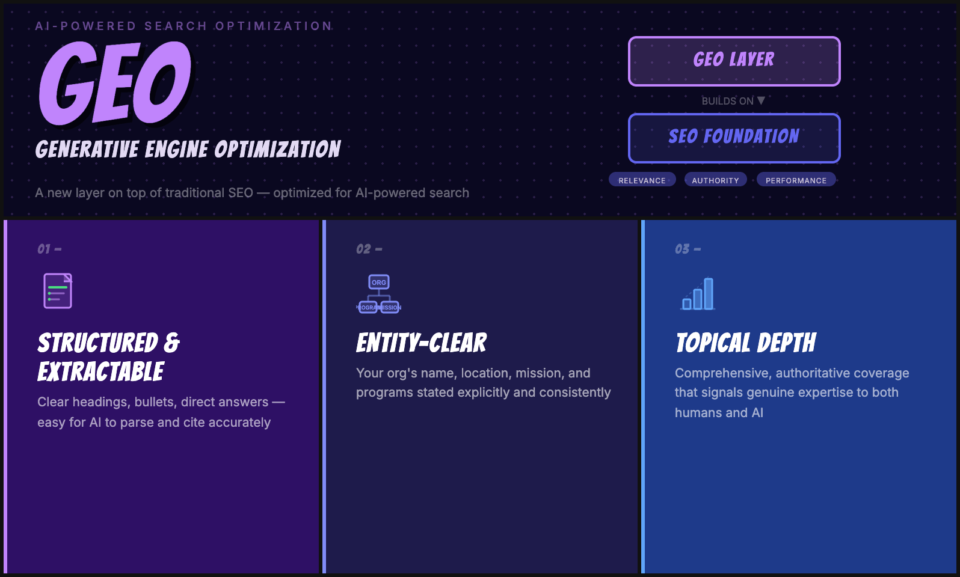
GEO-friendly content is structured and extractable: clear headings, bullet points where appropriate, direct answers to specific questions rather than long preambles.
It’s entity-clear: your organization’s name, location, mission, and programs are stated explicitly and consistently across your site. And it demonstrates genuine topical depth, the kind of comprehensive, authoritative coverage of a subject that signals to both human readers and AI systems that your organization is a real expert on what you’re talking about, not a content farm filling space.
Why This Actually Favors Authentic Nonprofits
Most of the “AI is destroying SEO” coverage misses something: the shift toward AI-powered search disproportionately rewards exactly the qualities that make most nonprofits’ content better than average. Google’s quality standards, captured in the E-E-A-T framework (Experience, Expertise, Authoritativeness, Trustworthiness), are precisely what AI search systems are trying to identify and surface. Generic content written at scale by people with no real knowledge of a topic is what these systems are designed to filter out.
A nonprofit that has been running a food pantry in Cleveland for 12years, serving 400 families a week, writing about food insecurity from genuine firsthand experience, that organization has something no AI-generated content competitor can replicate. That depth of real-world expertise, expressed clearly and consistently, is the signal that AI search systems are explicitly designed to find and amplify. You have a structural content advantage. The work is making sure it shows up in how you write, how you structure your pages, and how your organization is represented across the web.
See How AI is changing SEO for non-profits – what we’re observing and what to do about it »
The rest of this guide covers how to put that advantage to work across your SEO strategy.
Why SEO Is the Budget-Conscious Nonprofit’s Most Powerful Tool
The fundamental difference between social media and search is intent. Social media users didn’t ask for your content; they’re scrolling and you’re hoping to get lucky. Someone typing a query into Google has already decided they want something. Your job is just to be the right answer when that search happens.
The ROI case for SEO is especially strong for nonprofits, for three reasons.
First, your competition is using paid ads you can’t match on budget. For-profit companies competing for the same attention as your organization, whether that’s corporate social responsibility messaging, cause-adjacent brands, or paid crowdfunding platforms, have advertising budgets that dwarf yours. SEO is the channel where quality and relevance beat budget. A well-optimized nonprofit website can outrank deep-pocketed competitors if the content genuinely serves the searcher better.
Second, the search volume for nonprofit-adjacent terms is enormous and largely uncontested. Terms like “how to donate food locally,” “nonprofit grants for youth programs,” and “volunteer opportunities near me” receive millions of searches per month. Most of those results are dominated by generic directories or national organizations, leaving significant room for well-optimized local and mission-specific nonprofits to capture highly relevant traffic.
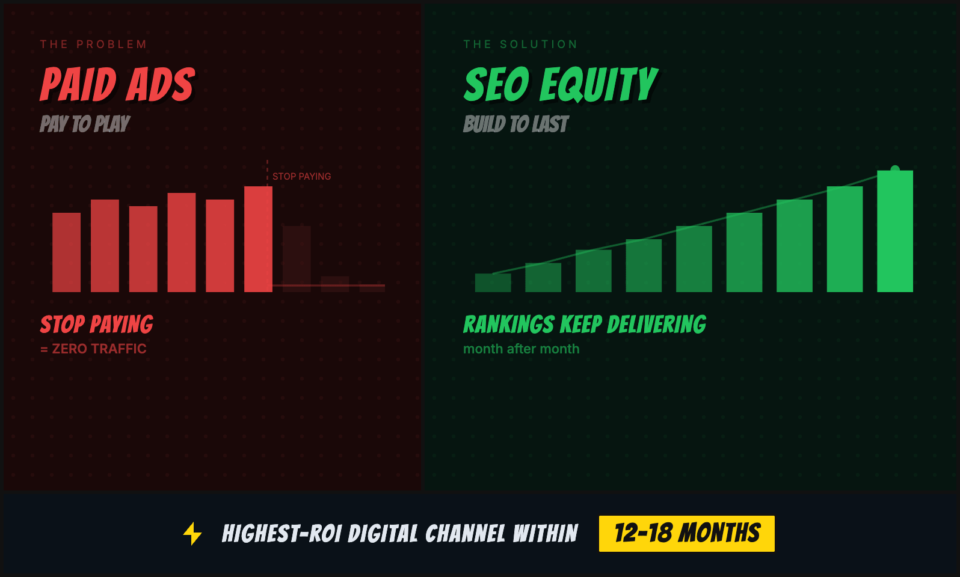
Third, SEO compounds over time. Unlike paid ads, which stop the moment you stop paying, organic search rankings represent equity in your digital presence. A page that achieves a strong ranking keeps delivering traffic month after month. Organizations that invest in SEO consistently report it as their highest-ROI digital channel within 12 to 18 months, and the returns only grow as the authority of their domain builds.
None of this means SEO is easy or instant. It takes work and patience. But the fundamentals are learnable by anyone, regardless of technical expertise or budget.
The SEO Basics Every Nonprofit Needs to Know
SEO, search engine optimization, is the practice of improving your website so that search engines like Google rank it higher in results pages when people search for topics relevant to your organization. At its core, it’s about making your site easier for search engines to understand and making your content genuinely valuable to the people those search engines are trying to serve.
Google’s algorithm processes hundreds of signals to decide which pages deserve top rankings. The full algorithm is proprietary and constantly evolving, but the factors that matter most fall into three categories.
Relevance
Does your page answer the searcher’s question? Google has become extraordinarily good at understanding the intent behind a search, not just the words used, but what the person actually wants to accomplish. A page that uses the right keywords but fails to deliver genuinely helpful, complete information will not rank well against pages that do. Relevance is about content quality, comprehensiveness, and alignment with what your target audience is actually looking for.
Authority
Does Google trust your website as a credible source? Authority is built primarily through backlinks, other websites linking to yours, but also through signals like how long your domain has been active, how your content is shared and cited, and whether your organization has a credible presence across the web. A new nonprofit website starts with low authority and builds it over time. There’s no shortcut here, but there are proven strategies for accelerating the process (more on those in the link-building section).
Technical Performance
Can Google crawl, index, and load your site properly? Technical SEO is the plumbing of your web presence. It includes things like site speed, mobile optimization, secure HTTPS connections, clean URL structures, and proper use of structured data. Technical problems don’t just hurt your rankings, they create friction that drives visitors away before they ever see your content. Most technical SEO issues are fixable without writing a line of code.
Everything in this guide builds on these three foundations.
Keyword Research for Nonprofits: Finding the Terms That Drive Real Results
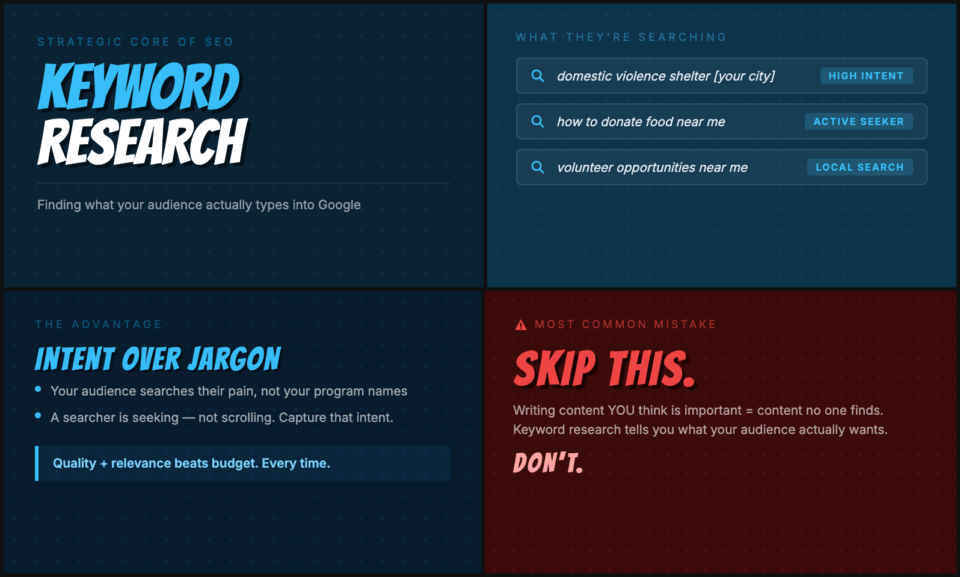
Keyword research is the strategic core of SEO. It’s how you figure out what your audience is actually typing into Google, and how you decide where to focus your content and optimization efforts. Skipping keyword research and just writing content you think is important is one of the most common mistakes I see nonprofits make. You can create excellent content that nobody reads because it’s optimized for terms nobody searches for.
For nonprofits, keyword research needs to account for at least three distinct audiences: the people you serve, the donors who fund your work, and the community members who might become volunteers or advocates. Each audience uses different language, has different search intent, and lands on different pages. A single keyword strategy can’t serve all three, you need to map your keyword research to the people you actually want to reach.
Mission-Based Keywords
Mission-based keywords describe what your organization does and who it serves. These are the terms people in your community use when they need the services you provide. A food pantry might target “free groceries near me,” “food assistance [city],” or “emergency food help.” A legal aid organization might target “free legal help for tenants” or “eviction assistance nonprofit.” A youth mentorship program might target “mentorship programs for at-risk youth” or “after-school programs [neighborhood].”
The key to finding good mission-based keywords is thinking like the person who needs your help, not like an insider who already knows your organization’s name. If someone doesn’t know you exist, what would they search to find what you offer? Start there.
Donor-Intent Keywords
Donor-intent keywords are searches made by people who are actively considering giving. These are high-value targets because the person searching has already moved past awareness into consideration or decision. Examples include: “donate to food bank [city],” “best homeless charities to donate to,” “how to help domestic violence survivors,” “recurring donation for animal rescue,” and “tax-deductible donation [cause].” These searches have high commercial intent in SEO terms, they signal someone ready to act, not just browse.
Your donation pages and campaign landing pages are the natural homes for donor-intent keyword optimization. Most nonprofits treat these pages as purely functional, a form on a page, and miss the opportunity to rank for the terms that bring in donors who were never going to find you through your regular content.
Local Keywords
Forty-six percent of all Google searches include local intent. For most nonprofits, geography is central to the work, you serve a specific community, recruit volunteers from a specific area, and want donors who feel connected to a place. Local keywords are enormously valuable and often easier to rank for than broad national terms, because the competition is typically local organizations rather than nationally-funded content marketers.
Every program page, every donation page, and every event page on your site should include geographic qualifiers where relevant. “[City] food bank,” “[County] domestic violence shelter,” “[Neighborhood] youth programs”, these are exactly what people type when they’re looking for local organizations to support or access. Use them deliberately.
Free and Low-Cost Keyword Tools
You don’t need an expensive subscription to do solid keyword research.
- Google Search Console (free): If you have it set up, it shows you exactly what terms people are already using to find your site. This is the highest-signal data you can access because it’s based on your actual audience. If you’re not using it yet, set it up today, it’s free and requires no technical expertise.
- Google’s “People Also Ask” and autosuggest (free): Type your core topic into Google and watch what autofills. Scroll to the bottom of the results page for related searches. Click into the “People Also Ask” box. These features show you in real time what questions and variations your audience is asking. It’s quick, free, and always current.
- Google Keyword Planner (free with a Google account): Designed for advertisers but freely usable for SEO research. Enter a seed topic and it returns related keyword ideas with rough search volume ranges. It won’t give you the precision of paid tools, but it’s enough to identify high-volume opportunities you should be targeting.
- Ubersuggest (limited free tier): Provides keyword volume, difficulty scores, and content ideas. The free tier allows a limited number of searches per day, which is often enough for the scale of keyword research a typical nonprofit needs to do.
- AnswerThePublic (limited free tier): Visualizes the questions people ask about any topic. Excellent for surfacing long-tail question-format keywords that work well for FAQ pages and comprehensive guides.
A practical starting point: identify five to ten core topics that define your mission and programs, then use these tools to build out a list of twenty to forty specific keyword phrases, a mix of high-volume broad terms and lower-volume, higher-intent long-tail phrases. That list becomes your content and optimization roadmap.
On-Page SEO: Optimizing Every Page That Matters
On-page SEO is the practice of optimizing individual pages to rank for specific keywords. It’s the most direct lever you have over your rankings, entirely within your control, requiring no technical expertise for most elements, and with results that can appear within days to weeks rather than the months that link-building authority takes to build.
Every page on your site that you want to rank for something needs to be optimized.
Title Tags: Your First and Most Important Signal
The title tag is the clickable headline that appears in Google search results. It’s typically the single strongest on-page signal for what a page is about. Each page on your site needs a unique title tag that includes the primary keyword you’re targeting and compels a click.
Best practices: keep title tags between 50 and 60 characters (longer ones get truncated in search results), put the most important keyword near the front, and make it descriptive enough that someone scanning a results page understands exactly what they’ll find. “Donate to DoGood Foundation” is a missed opportunity. “Help Feed Families in Austin, Donate to DoGood Foundation Today” is specific, keyword-rich, and compelling.
Meta Descriptions: Your Search Ad Copy
Meta descriptions don’t directly influence rankings, but they dramatically influence click-through rates, which do influence rankings over time. Your meta description is essentially a 150-to-160-character ad for your page. It appears below your title tag in search results, and it’s often the deciding factor between a click and a skip.
Write meta descriptions that describe what the page delivers and include a clear reason to click. For a donation page: “Your donation to DoGood Foundation feeds 47 families a week in New York. 100% goes to the program. Quick, secure, tax-deductible.” Specific, benefit-driven, and with a clear call to action embedded in the description.
Header Structure: Organize for Readers and Robots
Your page’s heading hierarchy, H1, H2, H3, tells both human readers and search engines how your content is organized. Every page should have exactly one H1 (the main title), and it should include your primary keyword. Subsequent H2s structure your main sections, and H3s break down sub-topics within those sections.
Don’t just think about keywords in your headings, think about how a reader scanning your page would use them as navigation. Someone landing on your volunteer page should be able to skim the H2s and immediately understand that they’ll find information about available roles, time commitments, and how to sign up. Clear heading structure reduces bounce rates (people leaving quickly), which signals to Google that your content is satisfying searchers’ needs.
Image Optimization: The Easiest Wins Most People Miss
Every image on your site should have a descriptive file name and an alt text attribute. Alt text is what screen readers use to describe images to visually impaired users, which makes it an accessibility requirement as well as an SEO signal. An image file named “IMG_4582.jpg” with no alt text tells Google nothing. The same image named “food-bank-volunteer-austin-texas.jpg” with alt text “Volunteers sorting canned goods at DoGood Foundation food bank in Austin, Texas” provides multiple relevant signals.
Also compress your images before uploading. Uncompressed images are among the most common causes of slow page load times, which directly hurts both your rankings and your user experience. Tools like Squoosh (free, browser-based) can reduce image file sizes by 60 to 80 percent with no visible quality loss.
Content Quality: The Standard Google Actually Measures You Against
Google’s quality raters use a framework called E-E-A-T: Experience, Expertise, Authoritativeness, and Trustworthiness. For nonprofits, this framework plays naturally to your strengths, you have lived experience with your cause, genuine expertise in your programs, and community trust that most commercial organizations can’t replicate. The goal of your content is to demonstrate those qualities explicitly, not just imply them.
In practice, that means citing specific data and statistics, naming real programs and outcomes, including staff credentials and author bylines, and writing with the depth that only comes from actual experience. A page on your website about youth mentorship should read like it was written by someone who has run a youth mentorship program, because it should be.
Technical SEO for Nonprofits (Without a Tech Team)
Technical SEO sounds intimidating, and some of it genuinely requires developer expertise. But the foundational elements, the ones with the biggest impact on whether Google can find and rank your pages, are well within reach for most nonprofit communications staff.
HTTPS: Non-Negotiable Since 2018
If your website URL starts with “http” instead of “https,” you have a problem. Google flags non-HTTPS sites as “Not Secure” in Chrome, which damages visitor trust and has been a ranking signal since Google made the announcement in 2014. For a nonprofit asking for donations, an unsecured site can single-handedly kill your conversion rate. Your web host almost certainly offers free SSL certificates through Let’s Encrypt, if you haven’t enabled HTTPS yet, this is your most urgent technical fix.
Mobile-First Indexing: Your Phone Visitors Are the Majority
Google now indexes and ranks the mobile version of your website first. If your site looks great on a desktop but breaks on a phone, text that’s too small, buttons that are too close together, donation forms that don’t work on a touchscreen, you’re being penalized in rankings and losing visitors at the same time. Test your site on multiple devices. Use Google’s Mobile-Friendly Test (free tool) to get a quick assessment and specific recommendations.
Core Web Vitals: Google’s Speed and Experience Metrics
Since 2021, Google has incorporated Core Web Vitals into its ranking algorithm, three metrics that measure how fast and stable your pages feel to users. Largest Contentful Paint (LCP) measures loading speed; First Input Delay (FID) measures interactivity; Cumulative Layout Shift (CLS) measures visual stability. Poor scores on these metrics don’t just hurt rankings, they create a visitor experience that drives people away before they can donate or take any action.
You can check your Core Web Vitals scores for free in Google Search Console under the “Core Web Vitals” report, or using Google’s PageSpeed Insights tool. The most common culprits for poor scores are uncompressed images (fix with image compression), unused JavaScript (fix by removing unnecessary plugins or page builders), and poorly configured hosting (fix by upgrading to quality managed WordPress hosting if you’re on a budget shared hosting plan).
XML Sitemaps and Robots.txt
An XML sitemap is a file that lists all the pages on your site and helps search engines discover and index them. Most WordPress SEO plugins (Yoast SEO, Rank Math, and All in One SEO are the most widely used) generate and update your sitemap automatically. Once generated, submit your sitemap to Google Search Console so Google knows it exists.
Your robots.txt file tells search engine crawlers which pages to index and which to ignore. The most important thing here is making sure you haven’t accidentally blocked important pages from being crawled, a surprisingly common mistake that can wipe pages from Google’s index entirely. Check Google Search Console’s Coverage report for any pages blocked by robots.txt that shouldn’t be.
Structured Data: Helping Google Understand Your Content
Structured data is a standardized format for providing information about your page to search engines. For nonprofits, the most relevant schema types are Organization (your org’s basic information), LocalBusiness (for location-based service nonprofits), Event (for fundraising events and volunteer drives), and DonateAction (for donation pages). Adding structured data can unlock rich results in Google, enhanced search listings that show additional information like your address, phone number, event dates, or donation amounts, which dramatically increase click-through rates.
If you’re running WordPress, structured data can be added without coding using plugins like Yoast SEO (paid features), Schema Pro, or Rank Math. If you have a developer on your team or as a volunteer, implementing JSON-LD structured data directly is the most flexible and future-proof approach.
Local SEO: How Nonprofits Get Found in Their Communities
For most nonprofits, local search is where the highest-value opportunities live. The person searching “food pantry near me” from three miles away is a more qualified prospect, both as someone who needs your services and potentially as a donor or volunteer, than someone in another state who stumbles across your blog post. Local SEO is the set of practices that put you in front of that nearby searcher first.
Google Business Profile: Your Most Important Free Listing
If you only implement one recommendation from this entire guide, make it this one: claim and fully optimize your Google Business Profile. This free listing controls what appears in the “local pack”, the map and business listing block that appears at the top of local search results, and it powers how your organization appears on Google Maps.
A complete Google Business Profile should include: your accurate name, address, and phone number; your website URL; your category (search for “nonprofit organization” or your specific sector); your hours; a detailed description that includes your primary keywords naturally; high-quality photos of your facility, programs, and team; and your service areas if you serve a geographic region rather than a single address. Nonprofits with complete, active profiles appear in local pack results far more often than those with sparse or incomplete listings.
Once your profile is set up, keep it active. Post updates about events, campaigns, and impact stories. Respond to every review, positive and negative. Ask supporters, volunteers, and community members to leave reviews. The recency and volume of reviews are significant local ranking signals, and they build social proof for anyone who finds you in local search.
NAP Consistency: The Foundation of Local Trust
NAP stands for Name, Address, and Phone Number, and consistency of this information across the web is a foundational local SEO signal. Google cross-references your organization’s information across dozens of directories and citation sources to verify that you are who you say you are and that you’re located where you claim to be. Inconsistencies, a slightly different address format here, a missing suite number there, an old phone number on an outdated listing, create doubt in Google’s algorithm and can actively suppress your local rankings.
Audit your NAP consistency using a free tool like Moz Local or BrightLocal’s free citation finder. Identify directories where your information is incorrect or missing, then systematically update them. Priority directories for nonprofits include: Google Business Profile, Yelp, Facebook, the IRS’s Tax Exempt Organization Search, GuideStar (Candid), Charity Navigator, and your local Chamber of Commerce directory. A few hours of NAP cleanup can meaningfully improve your local pack rankings within weeks.
Local Link Building: Your Community Is Your Backlink Profile
For local SEO specifically, links from other local organizations and institutions carry significant weight. A link from your city’s Chamber of Commerce website, your local newspaper’s community organizations page, a partner nonprofit’s website, or the city government’s resources page tells Google that you’re a recognized, trusted part of the local community, which is exactly the signal that drives local pack rankings.
Pursue these links deliberately. Add your organization to every relevant local resource directory. Reach out to your partner organizations and ask them to add you to their partner/resource pages (offering to reciprocate). Participate in local business associations. When you get press coverage, make sure the article links to your website, and follow up if it doesn’t. These local links are often more accessible and more impactful for local rankings than high-domain-authority national links.
Content Strategy That Builds Organic Traffic Over Time
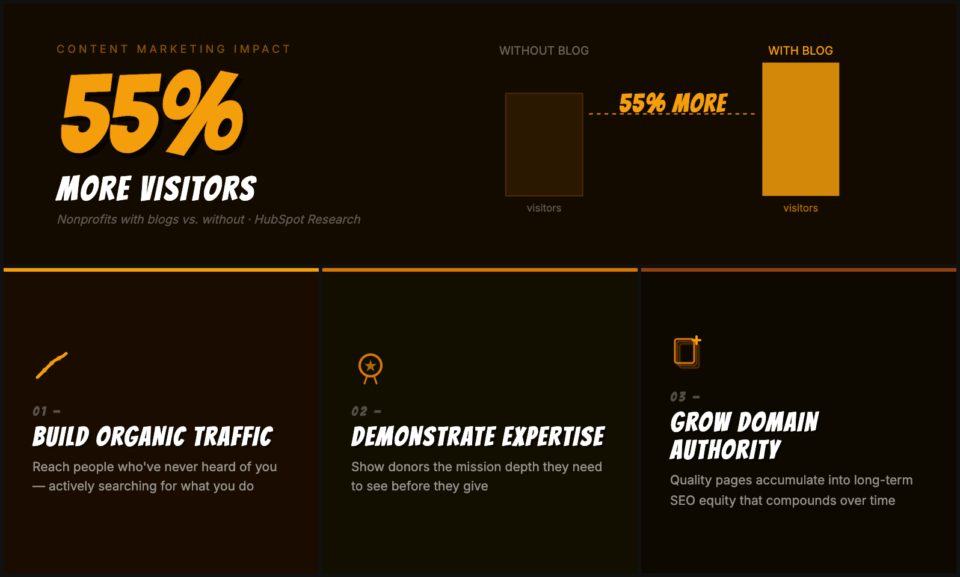
Keyword research tells you what people are searching for. Content strategy is how you systematically create the pages and posts that answer those searches. A well-executed content strategy does three things at once: it builds organic traffic from people who’ve never heard of you, it demonstrates the expertise and mission-depth that donors want to see before they give, and it provides the inventory of quality pages that accumulates into long-term domain authority.
Nonprofits with blogs receive, on average, 55% more website visitors than those without, a rough number from HubSpot’s research, and one that probably understates the impact for organizations in information-rich niches like health, education, social services, and advocacy. Your mission may have given you genuine expertise in an area where people have real, urgent questions. Most nonprofits haven’t fully tapped that.
Build a Topic Cluster Structure
Rather than publishing individual disconnected posts, the most effective content strategy for SEO is a topic cluster model. Pick three to five broad topic areas that represent the core of your mission, let’s say a homelessness nonprofit chooses “housing resources,” “mental health support,” “employment assistance,” “family services,” and “volunteer opportunities.” Then, for each topic, create a comprehensive “pillar page” that covers the topic broadly and links to a cluster of more specific supporting posts.
The pillar page on “housing resources,” for example, might overview your city’s housing assistance landscape, who qualifies for what, how to apply, and what to do in an emergency. The supporting cluster might include posts on: how to apply for Section 8 housing in LA, emergency shelter options for families, transitional housing programs in USA, and tenant rights for people facing eviction. Each supporting post links back to the pillar page and to each other, creating a dense web of topically related content that signals to Google that your site is a genuine authority on this topic.
Build a Realistic Publishing Calendar
Consistency matters more than frequency for content strategy. A nonprofit that publishes two high-quality, well-optimized posts per month, every month, will outperform one that publishes eight posts in January and then goes dark for three months. Google’s algorithm rewards consistent signals of activity and freshness; more importantly, your audience needs to know they can count on you.
Set a schedule your team can actually sustain. One post per month beats an ambitious calendar that falls apart by February. Two posts per month is a strong, sustainable pace for most small to mid-sized nonprofits with a communications person on staff (even part-time). Plan around your organizational calendar: Giving Tuesday content planned for October publication, year-end giving guides for November, program impact stories timed to your annual report release.
Content Types That Work Best for Nonprofits
Not all content formats perform equally for nonprofit SEO. The following types consistently deliver strong organic traffic for mission-driven organizations.
- Ultimate guides and comprehensive resources: Long-form, comprehensive coverage of a topic relevant to your community. This type of content captures a wide range of keyword variations and naturally earns backlinks because it becomes the go-to reference people cite and share.
- Local resource lists and directories: “10 Free Mental Health Resources in London” “Where to Donate Food in London This Month.” These pages rank for high-intent local searches and attract links from other local organizations, community boards, and media outlets.
- Impact stories and case studies: Real stories about the people you’ve helped (with appropriate permissions). These serve double duty: they demonstrate the impact that converts first-time visitors into donors, and they contain naturally keyword-rich content about real programs and outcomes.
- FAQ pages: Content built around the specific questions your audience asks. FAQ pages rank well for voice search, appear frequently in Google’s “People Also Ask” feature, and address the exact concerns that stand between a potential donor or volunteer and a decision to engage.
- Timely seasonal content: Giving Tuesday, year-end tax deduction deadlines, National Volunteer Month, relevant awareness months (Mental Health Awareness Month, Hunger Action Month, etc.). These posts ride predictable traffic spikes and can be refreshed and re-promoted each year, compounding their value over time.
Optimizing Your Donation Pages for Both SEO and Conversions
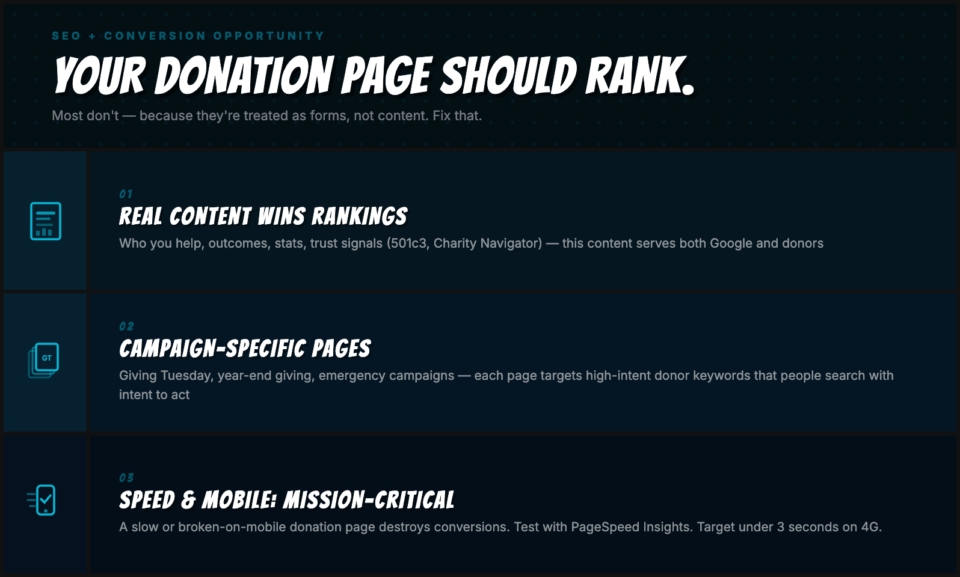
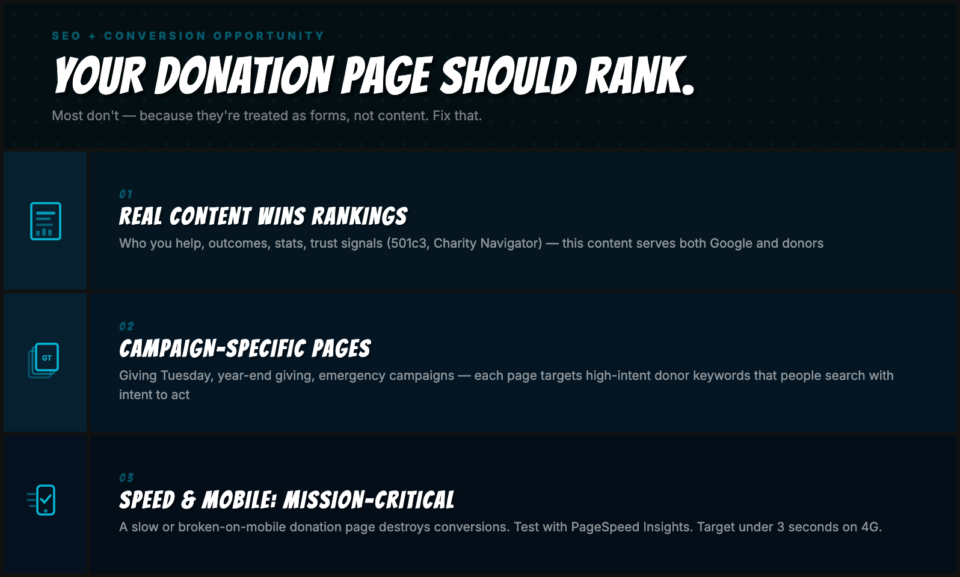
This is the section most nonprofit SEO guides skip entirely, which is why it represents one of the largest untapped opportunities in nonprofit digital marketing. Your donation pages can and should rank in organic search. Most don’t, because they’re treated as forms rather than content. Changing that one thing can put your donation pages in front of thousands of people every month who are actively searching for exactly what they contain: a way to give to a cause like yours.
Your Donation Page Needs Real Content
A page that consists of a headline, two sentences, and a form has nothing for Google to rank. Your donation page needs enough substantive content to compete for the keywords you want to rank for, which also happens to be exactly the content that converts skeptical visitors into actual donors. This includes: a compelling description of who you help and how, specific program outcomes and statistics, information about how donations are used (cost per meal served, cost per family housed, etc.), trust signals like your 501(c)(3) status, ratings from Charity Navigator or GuideStar, and testimonials from people your work has helped. This content serves both the SEO goal (give Google something to rank) and the conversion goal (give donors a reason to give).
Create Campaign-Specific Donation Landing Pages
Rather than routing all donors to a single generic donation page, create dedicated landing pages for your major campaigns. A Giving Tuesday campaign page, a year-end giving page, an emergency response campaign page, each of these can be optimized for specific high-intent keywords. “Giving Tuesday DoGood Foundation donation,” “year-end tax-deductible donation Houston,” “donate to help the homeless community this holiday season” are all terms people search with intent to act. Campaign-specific pages that include a compelling story, clear impact metrics, and a donation form can rank for these terms and convert traffic that otherwise would never reach you.
Speed and Mobile Optimization Are Conversion-Critical
A donation page that loads slowly or breaks on mobile doesn’t just hurt your SEO, it destroys your conversion rate. Research from Google consistently shows that for every additional second of page load time, conversion rates drop significantly. For a page whose entire purpose is to receive a donation, technical performance is not a secondary concern, it’s mission-critical. Test your donation pages specifically (not just your homepage) using PageSpeed Insights. Make sure every element of the donation form is touch-friendly on mobile. Keep the page load under three seconds on a typical 4G connection.
If you’re running your donation platform through Charitable on WordPress, your donation pages live on your own domain and benefit from all the technical SEO work you do site-wide, unlike hosted donation platforms that put your donation page on a third-party domain where you get none of the SEO equity from the traffic you send there. More on that in the Charitable section below.
Link Building Strategies Nonprofits Can Actually Use
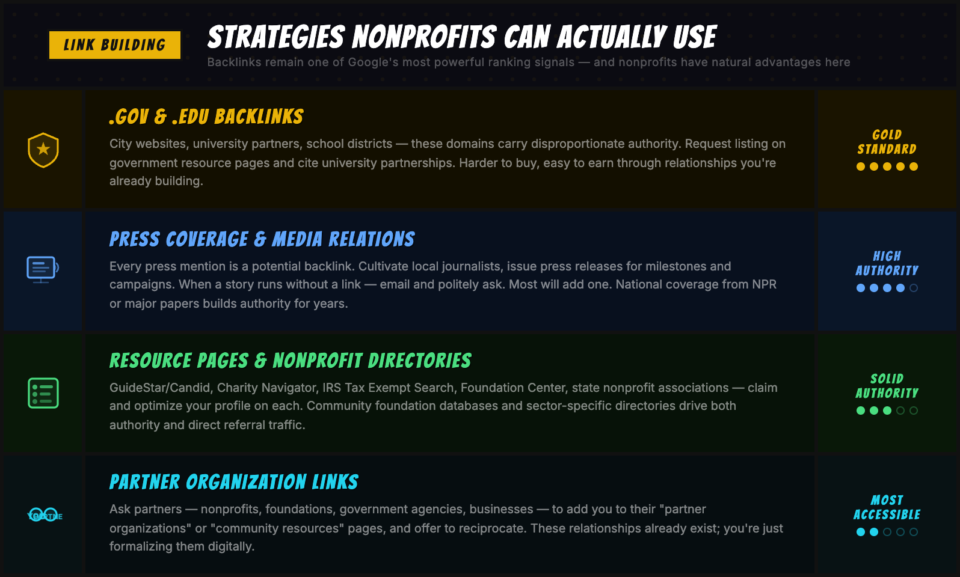
Backlinks, links from other websites to yours, remain one of the most powerful ranking signals in Google’s algorithm. A page with strong, relevant backlinks from authoritative sources will consistently outrank a page with better content but few backlinks. Building a strong backlink profile is the part of SEO that requires the most patience, but for nonprofits, several natural advantages make it more accessible than it is for commercial businesses.
Press Coverage and Media Relations
Every press mention of your organization is a potential backlink. Local newspapers, community news sites, and regional media frequently cover nonprofit stories, and when they do, a link back to your website is a high-authority backlink that can meaningfully boost your domain authority. Cultivate relationships with local journalists who cover your beat. Issue press releases for significant milestones, campaigns, and events. When a story runs without a link, email the journalist and politely ask them to add one. Most will oblige, they’re not aware of the SEO implications, but they’re usually happy to add a link when asked nicely.
National media coverage and links from outlets like The New York Times, NPR, or major regional papers carry even more authority. These are harder to earn but not impossible, especially for nonprofits working on issues of broad public interest. A well-crafted data story, a compelling impact narrative, or a timely expert comment during a relevant news cycle can generate the kind of coverage that builds domain authority for years.
.Gov and .Edu Backlinks: The Gold Standard
Links from government (.gov) and educational institution (.edu) domains carry disproportionate authority because these domains are inherently trusted. For nonprofits, these links are more accessible than they are for commercial businesses. City and county government websites often maintain resource pages listing local nonprofits that provide social services, request to be listed. University extension programs and research departments frequently partner with nonprofits for community projects and cite those partners online. Local school district resource pages often link to community organizations providing programs for youth and families. These links are hard to buy but relatively easy to earn through the relationships you’re probably already building.
Resource Pages and Nonprofit Directories
Hundreds of resource pages and nonprofit directories exist specifically to list organizations in your sector. Many of these carry strong domain authority because they’re well-established reference sites. GuideStar/Candid, Charity Navigator, the IRS Tax Exempt Organization Search, the Foundation Center, and sector-specific directories are all worth claiming and optimizing your profile on. Community foundation websites often maintain searchable databases of local nonprofits, make sure you’re listed. State nonprofit associations typically maintain member directories with backlinks. Each of these represents a relatively low-effort, high-value link that also drives direct referral traffic.
Partner Organization Links
If you partner with other nonprofits, foundations, government agencies, or businesses, those partnership relationships can yield backlinks. Ask your key partners to add you to their “partner organizations” or “community resources” pages, and offer to do the same for them on your site. These relationships already exist, you’re just formalizing them digitally. A formal memorandum of understanding with another organization is a natural prompt to request a link on their site.
Google Ad Grants: $10,000/Month in Free Advertising
This section technically goes beyond organic SEO, but it’s too significant to leave out of any comprehensive guide for nonprofits. Google Ad Grants is a program that gives eligible 501(c)(3) nonprofits $10,000 per month in free Google Search advertising. That’s $120,000 in annual advertising budget, at no cost, from the company that owns the world’s dominant search engine. If you’re not using this program, you need to be.
Who Qualifies and How to Apply
Most 501(c)(3) nonprofit organizations in the United States are eligible for Google Ad Grants. Exceptions include governmental entities, hospitals and healthcare organizations, and schools (K-12 academic institutions, universities may qualify through a separate program). If you have your IRS determination letter and a functional website, you’re almost certainly eligible.
The application process runs through Google for Nonprofits. You apply for a Google for Nonprofits account first, which typically requires verification through TechSoup (a nonprofit tech resource organization that partners with Google for validation). Once approved, which typically takes one to two weeks, you apply for Ad Grants specifically. The full process from start to approved grants account usually takes two to four weeks. Go to google.com/nonprofits to start.
How to Make Ad Grants Actually Work
Many nonprofits apply for Ad Grants, get approved, and then fail to use the budget effectively, leaving tens of thousands of dollars unused because the campaigns aren’t set up well. The most common failure points:
- Your landing pages must be optimized. Google evaluates the quality of the pages your ads point to. Sending Ad Grants traffic to a slow, thin, or irrelevant page will result in poor Quality Scores and ads that rarely win auctions. Apply everything from the on-page SEO and donation page sections of this guide to your Ad Grants landing pages specifically.
- Target your highest-intent keywords. Ad Grants traffic converts best when it’s directed at people who are already considering taking action, donating, volunteering, signing up for services, or attending an event. Use your donor-intent keywords and your mission-based service keywords as the core of your Ad Grants campaigns.
- Maintain compliance with Google’s policies. Ad Grants accounts that fall below a 5% click-through rate for two consecutive months are paused. Campaigns need active management, check in at least monthly to pause underperforming keywords, add negative keywords, and test new ad copy. If your account gets suspended for inactivity or policy violations, it can usually be reinstated, but it takes time and effort.
- Integrate with your organic strategy. The ideal approach is to use Ad Grants to complement your organic SEO, running ads on keywords you’re not yet ranking for organically while your content strategy builds toward those positions. As your organic rankings improve, shift ad spend toward newer keywords you’re still building authority for.
Used well, Google Ad Grants can be the single most impactful free tool available to nonprofits. At $10,000 per month, even a modest 0.5% conversion rate on targeted traffic represents dozens of new donors every month at zero cost.
How to Measure Your SEO Progress
SEO is a long-term investment, and progress is not always linear. Knowing how to measure it correctly is what keeps you from abandoning a strategy that’s working before it matures, or doubling down on one that genuinely isn’t moving.
Google Search Console: The Non-Negotiable Starting Point
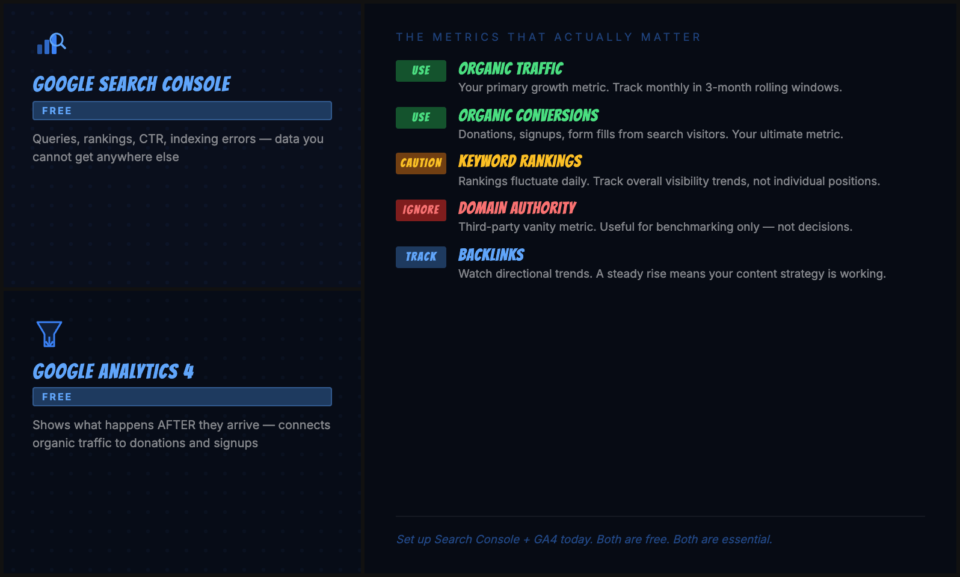
Google Search Console is free, requires only a Google account and verification of your website ownership, and provides data you cannot get anywhere else: the exact searches that bring visitors to your site, your average position in results for those searches, your click-through rate from impressions to clicks, and information about any technical issues preventing Google from indexing your pages. If you’re not using it yet, set it up today. It’s the single most important tool in your SEO toolkit, and it costs nothing.
In Search Console, monitor these reports regularly: the Performance report (shows your queries, impressions, clicks, and average position, your primary ranking data), the Coverage report (shows indexing errors that may be hiding pages from search), and the Core Web Vitals report (shows technical performance issues). Set up email alerts for any significant changes in coverage or manual actions.
Google Analytics 4: Connecting Traffic to Outcomes
While Search Console shows what happens in Google before someone reaches your site, Google Analytics 4 (GA4) shows what happens after they arrive. For nonprofits, the most important thing GA4 can tell you is whether your SEO traffic is converting, are people who find you through organic search actually donating, signing up to volunteer, or taking whatever action represents a meaningful outcome for your mission? If you’re on WordPress, a plugin like MonsterInsights makes it easy to install GA4 and view your analytics data directly inside your WordPress dashboard without touching any code.
Set up conversion tracking in GA4 for your key actions: donation form submissions, volunteer sign-up form completions, newsletter subscriptions, and contact form submissions. Then segment your conversion data by traffic source. If your organic search visitors are converting at a higher rate than other channels, which is common because search intent self-selects for motivated visitors, that’s the data that justifies continued SEO investment to leadership and funders who ask about ROI.
The Metrics That Actually Matter
Not all SEO metrics are equally meaningful. Here’s how to think about the ones that get tracked most.
- Organic traffic (use this): The number of visitors arriving from unpaid search results. This is your primary growth metric. Track it monthly, look for trends over three-month rolling windows rather than week-to-week, and segment by page to understand which content is driving growth.
- Keyword rankings (use cautiously): Your position in Google for specific keywords. Rankings fluctuate daily and vary by location, device, and browsing history. A single ranking position matters less than whether your overall visibility (total impressions × click-through rate) is growing over time.
- Organic conversions (your ultimate metric): How many donations, sign-ups, or other meaningful actions come from organic search visitors. This is what connects your SEO investment directly to your mission outcomes.
- Domain authority scores (vanity metric, ignore for decision-making): Third-party scores from tools like Moz Domain Authority or Ahrefs Domain Rating are useful for benchmarking against competitors but shouldn’t drive investment decisions. These are proxy metrics, not Google metrics.
- Backlinks (track directionally): The total number and quality of sites linking to you. Steady growth in quality backlinks over time is a strong indicator that your content strategy is working. A sudden drop can indicate a penalty or technical problem worth investigating.
Set a monthly 30-minute SEO review for yourself: check organic traffic trends in GA4, review top-performing pages and queries in Search Console, check for new technical issues, and note any ranking movements for your priority keywords. That discipline, maintained consistently over 12 to 18 months, will give you a comprehensive picture of your trajectory and the data to make smart investment decisions.
The Best SEO Tools for Nonprofits (And Why WordPress Is the Smarter Path)
Most SEO software is priced for marketing agencies and enterprise brands. Monthly plans at Semrush, Ahrefs, or Moz run $100 to $400 per month, which is a real line item for an organization running lean. Nonprofits have better options, and the platform decision you make for your website will determine which tools you can actually use effectively.
Before we get into specific tools, there’s a platform choice worth discussing directly: WordPress with the right plugins is, by a significant margin, the most flexible and SEO-capable platform available to nonprofits. Unlike hosted website builders that lock core SEO settings behind paywalls or restrict what you can customize, WordPress gives you full control over every technical SEO element, every page’s metadata, your site’s structure, your schema markup, and your performance optimization. The entire ecosystem of SEO plugins, caching tools, and optimization utilities exists for WordPress first. If you’re evaluating platforms or considering a migration, the SEO flexibility alone makes WordPress the right choice for any nonprofit serious about organic visibility. If you’re new to WordPress, WPBeginner offers a free library of beginner tutorials that cover setup, plugins, and configuration without any technical background required.
For discounts on tools and software available to nonprofits, check out Charitable’s curated list of nonprofit deals and discounts, which covers a range of tech tools with nonprofit pricing or free tiers.
AIOSEO: The Best SEO Plugin for Nonprofits on WordPress
All in One SEO (AIOSEO) is the SEO plugin we recommend for nonprofits running WordPress. It handles everything you need in a single, well-maintained tool: title tag and meta description management for every page, automatic XML sitemap generation, schema markup for organizations, events, and donation actions, redirect management, on-page SEO analysis with actionable recommendations, and internal link suggestions. The 2025 and 2026 versions include built-in AI features for generating meta descriptions, analyzing content gaps, and optimizing page titles, which means you get AI-assisted SEO without needing a separate subscription to an AI content tool.
The reason AIOSEO is the right choice for most nonprofits specifically comes down to two things: it’s comprehensive enough to cover every technical SEO need without requiring additional plugins, and it’s affordable relative to the enterprise tools that dominate the SEO software market. The Basic plan runs $49.60 per year, which covers a single site with all the core features. Most nonprofits running a WordPress site will find that AIOSEO plus Google Search Console (free) handles the majority of their SEO workflow without any other paid tools.
AIOSEO integrates directly with Charitable, which means your donation campaign pages, peer-to-peer fundraiser pages, and donation forms inherit the same SEO configuration as the rest of your site. Title tags, meta descriptions, and schema markup apply consistently across your entire WordPress installation, including your fundraising infrastructure.
Other Tools Worth Knowing About (With Honest Notes on Cost)
Beyond AIOSEO, there are a handful of other tools that provide genuine value for nonprofits, particularly for keyword research and competitive analysis. Most are expensive at full price, which is why we recommend checking the deals page linked above for nonprofit discounts before purchasing anything.
- Google Search Console (free): The single most important SEO tool available, regardless of budget. Shows you exactly which queries bring visitors to your site, your click-through rates, your average ranking positions, and any technical indexing issues. Set this up before everything else, and check it monthly at minimum.
- Google Keyword Planner (free): Designed for advertisers but useful for keyword research. Enter your mission topics and get search volume data and related keyword ideas. Enough to build a solid keyword strategy without a paid subscription.
- Semrush (freemium, $117/month paid): The most comprehensive SEO platform available. Excellent for competitive analysis, backlink research, and keyword tracking. The free tier allows limited daily searches and is useful for occasional research. The paid plans are genuinely expensive for nonprofits, so use the free tier strategically and upgrade only if you’re running consistent SEO campaigns that require daily monitoring.
- Ahrefs (paid, $99/month minimum): Widely considered the best tool for backlink analysis and keyword difficulty scoring. The backlink database is unmatched. No meaningful free tier. Worth considering for larger nonprofits with dedicated digital staff running active link-building programs, but too expensive for most small to mid-sized organizations.
- Ubersuggest ($12/month or one-time purchase): A more affordable SEO research tool with keyword data, site audits, and backlink analysis. The one-time lifetime purchase option makes it one of the most cost-effective full-featured SEO tools available. A reasonable alternative for nonprofits who want more than the free Google tools offer but can’t justify a Semrush subscription.
The practical recommendation: start with Google Search Console and AIOSEO. That combination covers your technical SEO implementation, on-page optimization, and performance monitoring. Add a keyword research tool (Keyword Planner at minimum, Ubersuggest or Semrush free tier when you need more depth) as your content strategy matures. Avoid committing to expensive monthly subscriptions before you have the fundamentals in place.
How Charitable Helps Nonprofits Win at SEO
The platform you use to host your donation pages has significant SEO implications, and most nonprofits don’t think about this until they’ve already made a choice they can’t easily reverse. When you run your fundraising through a hosted third-party platform, GoFundMe, Classy, Fundly, or similar services, your donation page lives on that platform’s domain. Every bit of traffic you send there, every link you earn, every campaign you run builds SEO equity for that platform’s domain, not yours. When you run your fundraising through Charitable on your own WordPress website, that equity stays with you.
That’s the foundational SEO case for owning your donation infrastructure.
Your Donation Pages Live on Your Domain
With Charitable, every campaign page, every donation form, and every fundraiser’s peer-to-peer page lives on your website, under your domain. When those pages rank in search, for “[cause] donation page [city],” for “donate to help [community],” for any donor-intent keyword you optimize them for, the traffic goes directly to you. No platform intermediary. No redirects. No revenue share. When you optimize those pages for SEO (as described in the donation pages section above), you’re building an asset you own.
More than 10,000 nonprofits and organizations use Charitable, and it has over 1 million downloads on WordPress.org. The reason so many organizations trust it isn’t just the feature set, it’s the fundamental ownership model. Your donor data stays on your server. Your campaign pages build your domain authority. Your SEO investment compounds into your own equity, not someone else’s.
WordPress + Charitable = Full SEO Control
Because Charitable runs on WordPress, you have access to the full ecosystem of WordPress SEO tools. Yoast SEO and Rank Math, the two most widely used SEO plugins in the world, integrate directly with WordPress and apply to all your Charitable campaign pages along with your regular site content. You can set custom title tags and meta descriptions for individual campaign pages, automatically generate sitemaps that include your donation pages, add structured data for donation actions, and monitor your technical SEO health across your entire site, including your fundraising pages, from a single dashboard.
Peer-to-Peer Fundraising Pages as an SEO Asset
Charitable’s Peer-to-Peer Fundraising feature (available on the Pro plan) creates individual campaign pages for every fundraiser in your peer-to-peer campaigns. Each of those pages is an indexed, linkable page on your domain, and when fundraisers share their personal pages on social media and via email, every link and every visit builds your domain’s authority. A successful peer-to-peer campaign with 50 active fundraisers is also 50 additional indexed pages that can surface in search for variations of your campaign keywords. This is a compounding SEO asset that most organizations running peer-to-peer campaigns through third-party platforms never capture.
Google Analytics Integration
Charitable integrates with Google Analytics through your WordPress setup, meaning your donation events, campaign page views, and form completion data flow directly into your GA4 property alongside your regular site analytics. This gives you the unified view of how SEO traffic converts to donations that we covered in the measuring section: you can see, in one dashboard, that a visitor from an organic search for “donate food Bangalore” landed on your campaign page, viewed it for four minutes, and completed a donation. That attribution is what makes SEO ROI visible to leadership and funders.
Start With Charitable Lite (Free)
If you’re just getting started, Charitable Lite is completely free on WordPress.org. It gives you unlimited campaigns, full donor data ownership, payment gateway support for Stripe, PayPal, Square, and offline methods, and a donor management dashboard, all on your own domain, with full SEO control. That’s everything you need to start building SEO equity through your fundraising pages without spending a dollar on software.
When you’re ready for advanced features, recurring donations, email marketing integrations with Mailchimp and ActiveCampaign, fee relief options that keep more money in your campaigns, peer-to-peer fundraising, and advanced reporting, Charitable’s paid plans start at $69/year for the Basic plan, with the Plus plan at $99/year and the Pro plan at $199/year. Every plan comes with a 14-day money-back guarantee.
✅ 14-day money-back guarantee
✅ Transparent pricing
✅ Donation pages on your domain
See the difference between Charitable Pro and Lite »
Frequently Asked Questions
How long does SEO take to show results for a nonprofit?
Three to twelve months for meaningful organic traffic growth, though that range hides a lot. Local SEO quick wins, Google Business Profile, NAP cleanup, can show up in weeks. Content-driven rankings for competitive keywords typically take closer to six to twelve months. The tradeoff is that once you get there, you don’t lose the ranking when you stop paying. A page that ranks today can still be pulling traffic three years from now. Measure over rolling 90-day windows, not week-to-week.
Does my nonprofit need to hire an SEO agency?
Probably not right away. The foundational work, keyword research, on-page optimization, Google Business Profile, content strategy, and basic technical fixes, is learnable by a communications or marketing staff member without specialized training. This guide covers enough to run a serious program.
Agencies earn their fees on more advanced link building, technical audits of large sites, competitive analysis, and consistent optimization at scale. If you do go that route, look for someone with actual nonprofit experience, reporting that includes organic conversions (not just ranking positions), and a working relationship where your team builds capability rather than permanent dependency.
What is the most important SEO factor for nonprofits?
Content quality. Not keywords, not backlinks. The depth and specificity of what you actually publish. Google has gotten very good at distinguishing expert-level content from thin coverage that skims a topic. For nonprofits, that’s an advantage: genuine firsthand knowledge of your cause area is hard to fake and hard for generic content operations to replicate. Write from that knowledge: real program outcomes, real statistics, real staff expertise. Build everything else around that foundation.
How should a nonprofit use keywords without sounding robotic?
Write for humans first, then check. The goal isn’t keyword density; it’s semantic richness. If you’re writing authentically about food bank services in Austin, you’ll naturally use phrases like “food assistance,” “hunger relief,” “Austin food pantry,” “emergency food resources” because those are the actual vocabulary of the topic. After drafting, do a quick Ctrl+F check to confirm your primary keyword appears in the title tag, H1, first paragraph, and at least one subheading. That’s it. Anything more is counterproductive.
Can small nonprofits compete with large organizations in search rankings?
Yes, especially in local search. Large national organizations rank well for broad terms like “how to donate to charity” or “volunteering near me,” but they rarely bother with hyper-local queries. A Sacramento animal shelter isn’t competing with the ASPCA for “Sacramento dog rescue adoption.” They’re playing in a completely different competitive landscape. Go specific. Your mission and geography are an edge, not a limitation.
How does Google Ad Grants interact with organic SEO?
They’re complementary. Ad Grants give you immediate visibility for keywords you haven’t yet ranked for organically, especially high-intent donor and volunteer terms. As your organic rankings improve for a given keyword, shift your Ad Grants budget toward newer terms you’re still building toward. The two strategies feed each other rather than compete.
Should my nonprofit’s donation page be on my website or on a platform like GoFundMe?
Your website. Every link your donation page earns, every click it gets, every bit of search visibility it builds belongs to the platform it lives on, and if that’s GoFundMe, you’re building their authority, not yours. Beyond SEO, your own domain means you control the design, the donor data, and the payment relationships. Tools like Charitable make running professional donation pages directly on WordPress straightforward, with full payment gateway support and no platform transaction fees.
Ready to Own Your Search Rankings?
SEO rewards organizations that show up consistently. The fundamentals, quality content, technical health, local presence, earned links, and owned infrastructure, don’t shift much even as the platforms do. What you build this year is still working for you in 2028.
The first step is getting the right tools in place on a platform that gives you full control. If you’re running WordPress, install AIOSEO and connect Google Search Console today. That single afternoon of setup gives you the full technical SEO foundation this guide is built around.
Not set up on WordPress yet? This step-by-step video walks you through getting your nonprofit’s WordPress site live from scratch: Watch the WordPress Setup Tutorial. Once your site is running, AIOSEO installs in minutes and the SEO work in this guide becomes immediately actionable.
From there, build your fundraising infrastructure on your own domain. Charitable is trusted by 10,000+ nonprofits and has been downloaded over 1 million times on WordPress.org because it was built for exactly this kind of organization: mission-driven, budget-conscious, and committed to owning its donor relationships without paying platform fees to a third party.
Charitable Has 1.2+ Million Downloads!
Trusted by millions to power successful fundraising campaigns. Try Charitable risk-free today.
✅ 14-day money-back guarantee
✅ Transparent pricing
✅ Code-free setup
Stay Connected for More Nonprofit Resources
For more tutorials and videos tailored to nonprofits, subscribe to our YouTube channel. We regularly publish expert tips, step-by-step guides on online donations, fundraising strategies, and practical resources to help your organization succeed.
🗞️ Get weekly tips and exclusive guides in your inbox
Join our newsletter →
🎥 Watch step-by-step tutorials and success stories
Subscribe to our YouTube channel →
👩🏽💻 Connect with our community and get daily nonprofit insights
Follow us on LinkedIn →
🥳 Fun reels and non-profit insights
Follow us on Instagram →
👀 Insightful & fun videos to help you grow your cause
Follow us on TikTok→
🌎 Subscribe and follow for general fundraiser tips
Get Fundraiser Tips on TikTok →
Powerful Fundraising Resources
🤖 Use Charitable with Your AI Assistant
⬇️ Download proven strategies, campaign ideas, and expert tools
Get the Fundraising Kit →
💸 Get Free Fundraising Resources
Head to the Charitable Fundraising Hub →
🤔 Got questions about Charitable?
Charitable FAQs →
🏎️ Take Charitable for a spin
Create your Charitable Demo →
Understand non-profit terms and jargon
Non-Profit Glossary →
% Looking for non-profit deals and discounts?
Best Non-Profit Deals and Discounts →







Leave a Reply