
Running a nonprofit is a constant balancing act. You need resources to do the work, but getting those resources costs money. Here is the reality: most organizations hemorrhage thousands of dollars every year to payment processing fees – money that should have gone to programs, staff, or the people you serve.
While you can’t get rid of fees entirely (banks need to get paid), you can certainly shrink them. The trick is knowing the difference between the unavoidable costs of moving money and the “junk fees” software companies tack on because they think you won’t notice.
This guide breaks down how payment processing actually works, compares the real costs of the big platforms, and looks at strategies to keep more of your funding. We will also look at how using a self-hosted tool like Charitable can wipe out platform fees entirely.
⚡️Quick Answer: How Much Do Donation Platforms Actually Cost?
For every $10,000 raised online, donation platform fees can cost your nonprofit anywhere from $199 to over $2,300 per year – depending entirely on which platform you use.
What are donation platform fees? An extra percentage that fundraising software charges on top of stand ard payment processor fees. Payment processor fees, charged by Stripe, PayPal, and similar services, are unavoidable and typically run between 2.2% and 2.9% plus $0.30 per transaction. Platform fees – the extra percentage charged by fundraising software on top of that – are not.
Can you avoid them? Yes – Charitable Pro charges zero platform fees, with a flat annual cost starting at just $69 per year regardless of how much you raise.
How much can you save? A nonprofit raising $25,000/month could save upto $11,651 per year by switching from Donorbox to Charitable Pro.
What’s the cheapest option? Charitable Pro at $69-$199/year, with zero platform fees at every fundraising level.
The True Cost of Online Fundraising
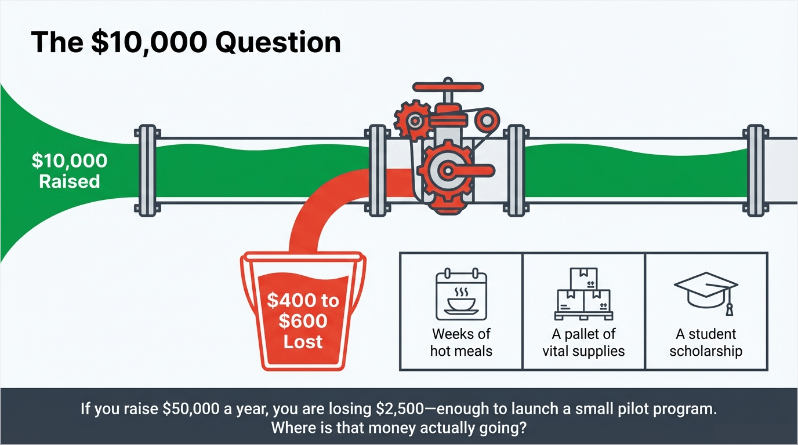
For every $10,000 you raise online, fees can easily eat up $400 to $600. That might not look like a disaster on paper, but translate it into impact. $500 is weeks of meals, a pallet of supplies, or a scholarship. If you are raising $50,000 a year, you could be losing $2,500 to fees – enough to launch a small pilot program.
The issue is that “processing fees” is a catch-all term for several different hands dipping into the pot. Most people don’t know who is taking what or how to find the best payment gateways for nonprofits.
- Payment Processor Fees: This is the cut taken by Stripe, PayPal, or Square. They move the money from the donor’s bank to yours. It usually costs around 2.2% to 2.9% plus $0.30 per transaction. This pays the banks and card networks (Visa/Mastercard). You basically have to pay this.
- Platform Fees: This is the extra percentage fundraising software takes. Platforms like Donorbox charge 1.5% on top of the processor fees. Others, like GoFundMe, push for “tips” that can equal 10-15%. This money doesn’t go to the bank; it goes to the software company.
- Hidden Fees: Monthly subscriptions, withdrawal fees, and compliance costs that don’t show up until you read the fine print.
This is where the math changes with Charitable Pro. Because it lives on your WordPress site rather than a third-party server, there is no “platform fee” layer. You pay the bank (Stripe/PayPal) and that’s it.
Payment Processor vs. Platform Fees
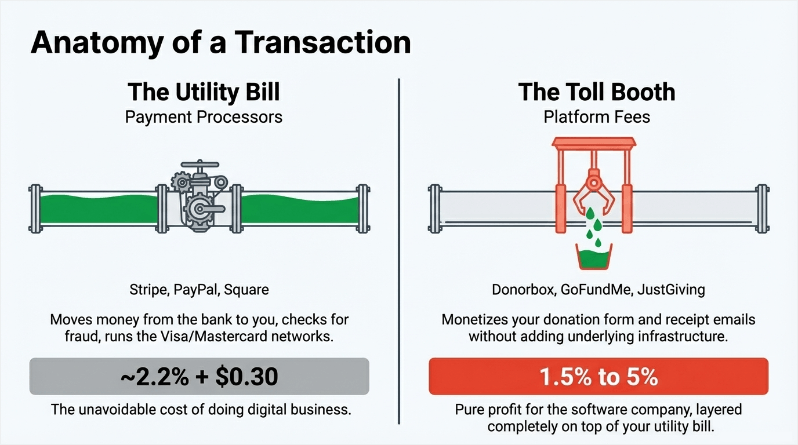
You need to understand this distinction because one is a utility bill and the other is a toll booth.
Payment Processor Fees
This cover the infrastructure of moving digital money. When a donor types in their card number, the processor talks to the bank, checks for fraud, and moves the cash.
Stripe, PayPal, and Authorize.net handle this. Standard rates are around 2.9% + $0.30, but organizations should consult a guide to PayPal for nonprofits to see specific discount eligibility.
If you are a 501(c)(3), you usually get a discount. Stripe and PayPal drop their rates to roughly 2.2% + $0.30 for qualified nonprofits. These fees go to the financial networks. They are the cost of doing business.
Platform Fees
This fee is different. This is money charged by the fundraising software just for the privilege of using their tool. Donorbox takes between 1.75% and 3.95%.
JustGiving mentions that they have a 0% platform fee. But hidden in their terms and conditions – they charge between 1.9% to 5% per transaction. This is a blended fee of the payment processor’s fee and their fee.
Choosing Between The Two
You can’t avoid payment processing fees. These are charged by Stripe, PayPal, etc, to use their service. They provide the technical infrastructure, security, and other things that are essential to online payments. You don’t have to worry about any of that when you use their service.
When it comes to platform fees, I suggest avoiding it and paying a flat fee instead. It works out cheaper in the long run. You can opt for platform fees if you’re just starting out and don’t have any budget to invest in a software subscription.
What Charitable Pro Offers
When you use any payment gateway, they levy a transaction fee for their service. For example, Stripe usually charges 2.9% + $0.30 per transaction. You will incur these charges regardless of which platform you use. The fee is applied by the payment gateway, and it goes directly to them.
On the Charitable Pro plugin, you buy the software license (or use the free version), and the software company stays out of your transactions. Whether you raise $500 or $5 million, the software cost is flat. You only pay the unavoidable processor fees.
For a nonprofit raising $200,000 a year, you pay betwen $69 to $299 based on the Charitable pricing plan you choose.
If you raised the same $200,000 with a 1.5% platform fee – that is $3,000. So it’s a no brainer.
Master Fee Comparison: Top Nonprofit Processors Ranked
Let’s look at the math for processing $10,000 in donations using popular fundraising solutions. This will give you a clear picture of how much you’ll pay in processing fee, platform fee, and software costs.
Charitable + Stripe (Nonprofit Rate)
Note: All calculations use the standard Stripe rate of 2.9% plus 0.30 per transaction. Qualifying 501(c)(3) organizations can apply for Stripe’s nonprofit rate of 2.2% plus 0.30, which would reduce these costs further.
Charitable Pro – Plus Plan
Charitable Pro starts at just $69 per year for the Basic plan. For this calculation, I’ve taken the Plus plan at $99 per year because it has all the features you’ll need for effective fundraising.
Year One
- Payment Processor Fee: $320 (2.9% plus $0.30 per transaction x 100 transactions)
- Charitable Platform Fee: $0
- Annual Software Cost: $99
Total First Year Cost: $419
Year Two Onward
- Payment Processor Fee: $320
- Charitable Platform Fee: 0
- Annual Software Cost: $199
Total Ongoing Cost: $519
If you’re taking the basic plan, it works out to much lesser – $389 for the first year and $469 from the second year.
The Plus plan gives you everything you need to run a serious fundraising operation – recurring donations, fee relief, and full data ownership – with no platform fee ever touching your transactions.
The first year discount exists specifically to help organizations get started without a large upfront commitment. By year two, the ongoing cost of $199 is easily offset by what you are saving compared to hosted platforms. At $120,000 per year in donations, you are paying $199 in software costs versus potentially thousands in platform fees elsewhere. The math favors Charitable at almost every level of donation volume.
This is usually the cheapest route. You get the professional forms and automation, but you strip out the middleman fees.
Donorbox + Stripe
Free Plan
- Payment Processor Fee: $320 (2.9% + $0.30 per transaction x 100 transactions)
- Platform Fee: $295 to $395 (2.95% to 3.95%)
- Annual Software Cost: $0
Total Cost: $615 to $715
Paid Plan
- Payment Processor Fee: $320 (2.9% + $0.30 per transaction x 100 transactions)
- Platform Fee: $175 to $200 (1.75% to 2%)
- Annual Software Cost: $1,800 (150/month)
Total Cost: $2,295 to $2,320
A few things to note here. The free plan looks affordable at first glance, but the platform fees are steep – you are paying Donorbox nearly as much as you are paying Stripe just for the privilege of using their form.
The paid plan is a more complicated story. The lower platform fee is real, but the $1,800 annual cost dominates the math on smaller donation volumes. At $10,000 in donations, the effective rate looks alarming. However, this is somewhat misleading in isolation – the paid plan only starts making financial sense at higher volumes. At $120,000 per year in donations, the math looks like this:
- Platform fees at 1.75% to 2%: $2,100 to $2,400 per year
- Software cost: $1,800 per year
- Total platform-related cost: $3,900 to $4,200 per year
- Versus the free plan platform fees at the same volume: $3,540 to $4,740 per year
At that volume the paid plan becomes roughly comparable to or cheaper than the free plan, while also unlocking recurring donations – a feature most serious nonprofits cannot do without. Below that volume, the free plan likely costs less in total, but you are giving up significant functionality.
GiveWP + Stripe
Free Plan
- Payment Processor Fee: $320 (2.9% plus 0.30 per transaction x 100 transactions)
- GiveWP Platform Fee: $200 (2%)
- Annual Software Cost: $0
Total Cost: $520
The free plan is functional but the 2% GiveWP fee adds up quickly. At $120,000 per year in donations, that is $2,400 going to GiveWP on top of your Stripe fees.
More importantly, the free plan lacks the core features most nonprofits need to run a serious fundraising operation, making the Plus plan a practical necessity for most organizations.
GiveWP Plus Plan
- Payment Processor Fee: $320 (2.9% plus $0.30 per transaction x 100 transactions)
- GiveWP Platform Fee: 0
- Annual Software Cost: $349
Total Cost: $669
The Plus plan eliminates the platform fee, which is the right move at higher donation volumes. However, at $349 per year the software cost is significantly higher than comparable options.
The break-even point versus the free plan comes at around $17,450 in annual donations – below that volume, the free plan actually costs less despite the 2% fee.
Above that volume, the Plus plan makes financial sense, but the software cost remains the highest of the options reviewed here.
GiveWP is a solid tool and doesn’t charge platform fees. However, many users searching for the best GiveWP alternatives find that they lock key features like Recurring Donations and Fee Recovery behind high-tier plans. You have to spend significantly more upfront to get the same feature set.
PayPal Donation Button
- Payment Processor Fee: $398 (3.49% + $0.49 per transaction x 100 transactions)
- Platform Fee: $0
- Software Cost: $0
Total Cost: $398
The naked PayPal button is the cheapest option on paper. In reality, it costs you in donor experience. You lose branding, you lose data ownership, and you send donors away from your site to finish the transaction. It works, but it’s not a fundraising strategy.
See indepth comparison to get a clearer picture:
How Much Do Donation Platform Fees Cost at Different Fundraising Levels?
Percentages are abstract. Let’s look at what this means for your budget in real world scenarios.
Scenario A: Starter Nonprofit (raising $1,000/month)
Monthly Fees on $1,000/month in Donations
| Platform | Platform Fee | Software Fee | Total Monthly |
|---|---|---|---|
| Donorbox Free | $1,000 × 2.95%–3.95% | $0 | $29.50–$39.50 |
| Donorbox Pro | $1,000 × 1.75%–2% | $150 | $167.50–$170 |
| Charitable Pro | $1,000 × 0% | 199/yr÷12=$16.58 | $16.58 |
Annual Fees on $12,000/year in Donations
| Platform | Platform Fee | Software Fee | Total Annual |
|---|---|---|---|
| Donorbox Free | $12,000 × 2.95%–3.95% | $0 | $354–$474 |
| Donorbox Pro | $12,000 × 1.75%–2% | $1,800 | $2,010–$2,040 |
| Charitable Pro | $12,000 × 0% | $199 | $199 |
Scenario A: Small Nonprofit ($5,000/month)
If your nonprofit is raising $5,000 a month, you might assume platform fees are a small concern – something to revisit when you’re bigger. But the numbers tell a different story. Here’s exactly what each platform would take from your donations every month, and every year.
Monthly Fees on $5,000/month in Donations
| Platform | Platform Fee | Software Fee | Total Monthly |
|---|---|---|---|
| Donorbox Free | $5,000 × 2.95%–3.95% | $0 | $147.50–$197.50 |
| Donorbox Pro | $5,000 × 1.75%–2% | $150 | $237.50–$250 |
| Charitable Pro | $5,000 × 0% | 199/yr÷12=$16.58 | $16.58 |
Annual Fees on $60,000/year in Donations
| Platform | Platform Fee | Software Fee | Total Annual |
|---|---|---|---|
| Donorbox Free | $60,000 × 2.95%–3.95% | $0 | $1,770–$2,370 |
| Donorbox Pro | $60,000 × 1.75%–2% | $1,800 | $2,850–$3,000 |
| Charitable Pro | $60,000 × 0% | $199 | $199 |
Scenario B: Growing Nonprofit ($25,000/month)
When you’re raising $25,000 a month, platform fees aren’t a small line item – they’re a significant cost that compounds every single month. Here’s exactly what each platform would cost a nonprofit at that level, software subscriptions included.
Monthly Fees on $25,000/month in Donations
| Platform | Platform Fee | Software Fee | Total Monthly |
|---|---|---|---|
| Donorbox Free | $25,000 × 2.95%–3.95% | $0 | $737.50–$987.50 |
| Donorbox Pro | $25,000 × 1.75%–2% | $150 | $587.50–$650 |
| Charitable Pro | $25,000 × 0% | 199/yr÷12=$16.58 | $16.58 |
Annual Fees on $300,000/year in Donations
| Platform | Platform Fee | Software Fee | Total Annual |
|---|---|---|---|
| Donorbox Free | $300,000 × 2.95%–3.95% | $0 | $8,850–$11,850 |
| Donorbox Pro | $300,000 × 1.75%–2% | $1,800 | $7,050–$7,800 |
| Charitable Pro | $300,000 × 0% | $199 | $199 |
Scenario D: Established Organizations ($100,000/month)
At $100,000 a month, the stakes are higher and so are the fees. The percentage points that seemed small at lower volumes now represent tens of thousands of dollars leaving your organization every single year. Here’s what each platform costs at this level.
Monthly Fees on $100,000/month in Donations
| Platform | Platform Fee | Software Fee | Total Monthly |
|---|---|---|---|
| Donorbox Free | $100,000 × 2.95%–3.95% | $0 | $2,950–$3,950 |
| Donorbox Pro | $100,000 × 1.75%–2% | $150 | $1,900–$2,150 |
| Charitable Pro | $100,000 × 0% | 199/yr÷12=$16.58 | $16.58 |
Annual Fees on $1,200,000/year in Donations
| Platform | Platform Fee | Software Fee | Total Annual |
|---|---|---|---|
| Donorbox Free | $1,200,000 × 2.95%–3.95% | $0 | $35,400–$47,400 |
| Donorbox Pro | $1,200,000 × 1.75%–2% | $1,800 | $22,800–$25,800 |
| Charitable Pro | $1,200,000 × 0% | $199 | $199 |
The numbers speak for themselves. Whether you’re raising $1,000 a month or $100,000 a month, Charitable Pro consistently comes out as the lowest cost option – and it isn’t close.
At just $199 a year with zero platform fees, it’s the only option on this list that doesn’t take a percentage of every dollar your donors give.
Every other platform charges you more as you grow. Charitable Pro doesn’t. That’s not a small distinction – it’s the difference between a platform that scales with your mission and one that quietly profits from it.
What Hidden Fees Do Donation Platforms Charge Nonprofits?
Charitable Pro is completely transparent in its pricing. You only pay the annual subscription fee that starts at $69 to $299 per year.
But there are many platforms and processors out there that love to hide costs. Keep an eye out for these:
- Monthly Gateway Fees: Some “nonprofit specialist” processors charge $15-$50 a month just to keep the account open. Major players like Stripe don’t do this.
- Withdrawal Fees: Common in crowdfunding. If you want to move your money to your bank, they charge a fee. Charitable avoids this because the money goes straight to your Stripe/PayPal account, not a holding tank.
- PCI Compliance Fees: Some merchant accounts charge $50-$200 a year to certify that you are secure. Modern processors like Stripe handle this natively without the extra fee.
- Chargeback Fees: If a donor disputes a charge, you get hit with a $15-$25 fine. Clear receipts and good communication reduce this risk significantly.
How to Reduce Payment Processing Fees for Your Nonprofit (4 Strategies)
You don’t have to just accept the fees they give you. Here is how to fight back.
1. Get the Nonprofit Rate (You Have to Ask)
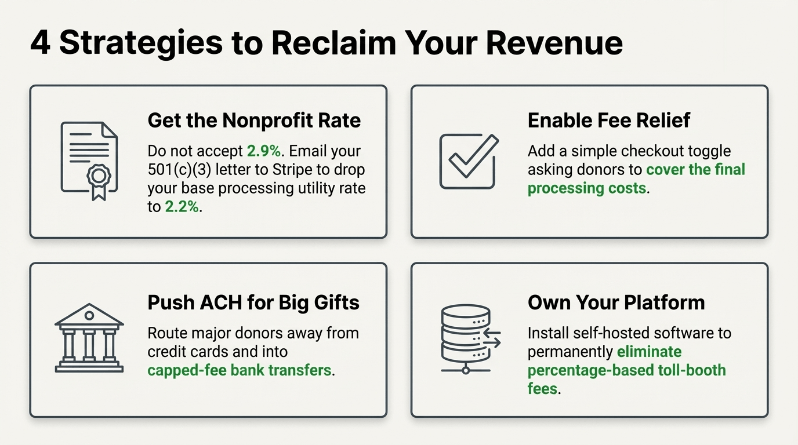
Stripe and PayPal offer a discount (usually 2.2% instead of 2.9%), but they don’t give it to you automatically.
For Stripe, email them your 501(c)(3) letter. For PayPal, verify through TechSoup. It takes about an hour of paperwork and saves you roughly $70 for every $10,000 you raise. Do this immediately.
2. Enable Fee Relief (Ask Donors to Pay the Bill)
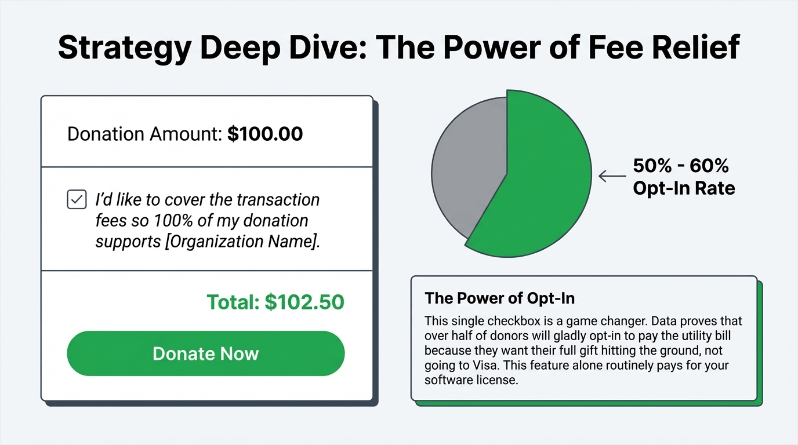
“Donor Covers Fees” is a game changer. You add a checkbox asking the donor to add 3% to cover the processing costs.
Data shows that 50-60% of donors will say yes. They want their full $100 to go to the cause, not to Visa. You can boost your donations with fee relief easily by enabling this feature in your settings.
3. Push ACH for Big Gifts
Credit cards cost ~2.2%. Bank transfers (ACH) cost significantly less – often capped at $5.00 total.
If someone donates $5,000 via credit card, you lose over $100 in fees. If they do it via ACH, you lose $5.
Encourage your major donors and monthly subscribers to use bank transfers. It’s a slightly clunkier setup for them, but the savings for the mission are huge.
4. Own Your Platform
Rent is expensive. When you use a hosted platform like GoFundMe or Classy, you are renting their tech.
When you use Charitable on WordPress, you own the system. Your costs are fixed. Your data is yours. If you switch processors, you don’t lose your donor history. It requires a little more setup than a hosted page, but the financial freedom is worth it.
At a Glance: Total Cost on $10,000 in Donations
| Platform | Plan | Processor Fee | Platform Fee | Software Cost | Total Cost | Effective Rate |
|---|---|---|---|---|---|---|
| Donorbox | Free | $320 | $295 to $395 | 0 | $615 to $715 | 6.15% to 7.15% |
| GiveWP | Free | $320 | $200 | 0 | $520 | 5.20% |
| PayPal | Button | $398 | $0 | 0 | $398 | 3.98% |
All calculations assume 100 transactions at an average gift of 100. Qualifying 501(c)(3) organizations can apply for Stripe’s nonprofit rate of 2.2% plus 0.30, which would reduce processor fees further. PayPal uses its standard rate of 3.49% plus 0.49 per transaction.
Pro and Paid Plans: Total Cost on 10,000 in Donations
| Platform | Plan | Processor Fee | Platform Fee | Software Cost | Total Cost | Effective Rate |
|---|---|---|---|---|---|---|
| Charitable Pro | Basic | $320 | $0 | $69 | $389 | 3.89% |
| Charitable Pro | Plus | $320 | $0 | $99 | $419 | 4.19% |
| Donorbox | Paid | $320 | $175 to $200 | $1,800 | $2,295 to $2,320 | 22.95% to 23.20% |
| GiveWP | Plus | $320 | $0 | $349 | $669 | 6.69% |
All calculations assume 100 transactions at an average gift of 100. Qualifying 501(c)(3) organizations can apply for Stripe’s nonprofit rate of 2.2% plus 0.30, which would reduce processor fees further. The Donorbox paid plan’s effective rate is high at this donation volume because the 1,800 annual software cost dominates. This plan becomes more cost-effective at higher donation volumes.
The Smarter Choice Isn’t Just Cheaper – It’s Better
The numbers we’ve walked through tell a clear story. Across every fundraising level – from $1,000 a month to $100,000 a month – Charitable Pro consistently costs less than every alternative. But here’s the thing: price alone isn’t why Charitable is the right choice. It’s what you get for that price.
Charitable Pro isn’t a stripped-down tool that saves you money by cutting corners. It’s a complete, feature-rich fundraising platform built specifically for WordPress – and it has everything your nonprofit needs to raise more, retain more donors, and grow with confidence.
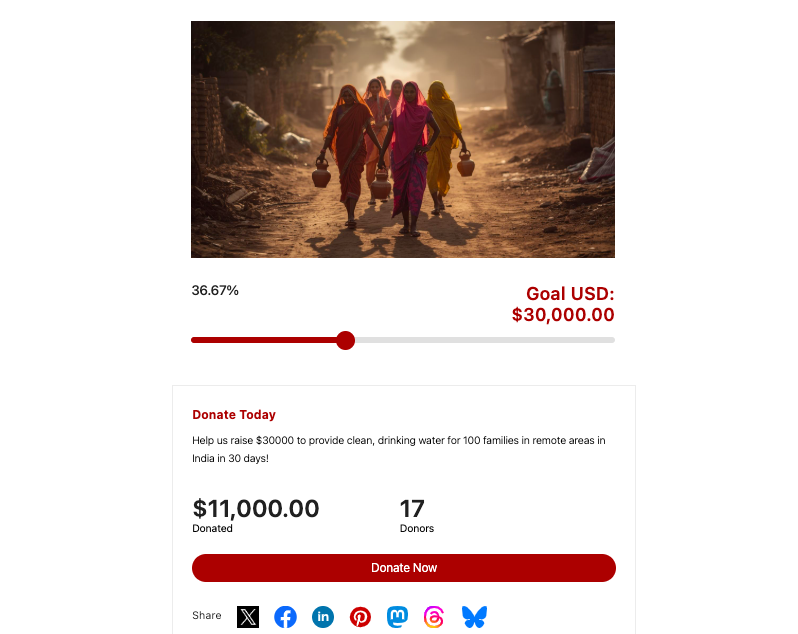
Here’s a campaign I set up in under 5 minutes:
Everything You Need, Right Out of the Box
From the moment you get started, Charitable gives you powerful tools that would cost significantly more on any other platform:
On every plan, you get:
- Unlimited campaigns and unlimited donors with zero transaction fees
- Beautifully customizable donation forms with a visual builder – no developer needed
- Full donation management and indepth reporting
- A donor dashboard so your supporters can manage their own giving
- Donor leaderboards to spark friendly competition and boost giving
- PDF receipts, customizable emails, and donor updates
- Privacy compliance built in
- Payment processing through Stripe, Square, PayPal, Authorize.net, and 7 other gateways
Step up to Plus and add:
- Recurring donations – one of the most powerful tools for long-term nonprofit sustainability
- Fee relief, so more of every donation reaches your mission
- Gift Aid support for UK-based donors
- DonorTrust, the real-time social proof popup tool that shows live donation notifications to your website visitors as they happen
- Email marketing integrations with Mailchimp, ActiveCampaign, MailerLite, Campaign Monitor, MailPoet, and more
At the Pro level, unlock:
- Peer-to-peer fundraising and crowdfunding – let your donors fundraise on your behalf and multiply your reach
- Ambassadors and donation teams to mobilize your most passionate supporters
- Stripe Connect for seamless multi-campaign payment handling
- Google Analytics integration
- Campaign updates to keep donors informed and engaged
- Smart workflows, Zapier, Webhooks, Zoho Flow, and Automate.io for powerful fundraising automation
- Priority support when you need it most
Getting Started Is Simple
You don’t need a developer. You don’t need to learn to code. Charitable is built for WordPress and designed to get you up and running fast. Drop the donation form block onto any page, connect your payment gateway, and you’re ready to accept donations.
Everything is configurable from the WordPress editor – forms, campaigns, emails, receipts, donor dashboards, and more. Guide to getting started »
The Bottom Line
Other platforms charge you a percentage of every dollar your donors give – and that cost compounds every single month, every single year. Charitable doesn’t. At $69, $99, or $199 a year – depending on the plan you choose, you get a complete fundraising platform with no transaction fees, no percentage taken from your donations, and no ceiling on what you can raise.
Your donors give because they believe in your mission. Every dollar they give should go there.
Ready to make the switch? Get started with Charitable today – and keep more of every dollar you raise.
And if you’re not sure it’s right for you, every plan comes with a 14-day money back guarantee. No questions asked.
Frequently Asked Questions
Do nonprofits pay credit card fees?
Yes. Everyone pays them. However, you should be paying the discounted “nonprofit rate” (around 2.2%), not the standard retail rate.
Is PayPal free for nonprofits?
No. They give you a discount on the transaction fee, but they still take a cut of every dollar.
How does Charitable Pro make money?
We sell software licenses. We don’t touch your donations. You pay a flat fee for the Charitable Pro tool, and we provide support and updates.
Is Charitable Pro worth it?
Yes – because it’s not just affordable, it’s also packed with all the features you need to effectively raise funds online. At $69 to $199 per year with zero platform fees, Charitable Pro pays for itself quickly. A nonprofit raising $5,000 per month on Donorbox pays up to $3,000 per year in platform and software fees.
What is the difference between platform and processing fees?
Processing fees pay the bank to move the money. Platform fees pay the software company to let you use their form. You can’t avoid the bank, but you can avoid the platform tax.
Can I negotiate better rates with payment processors?
Only if you are huge. If you are processing over $100k/month, call Stripe or PayPal sales. Otherwise, the standard nonprofit rate is likely the best you will get. Focus instead on enabling fee relief and switching to a zero-platform-fee tool – those two changes will have a bigger impact for most nonprofits.
What is fee relief for nonprofits?
Fee relief, sometimes called donor covers fees, is a feature that adds a small optional surcharge to a donation – typically around 3% – and asks the donor if they’d like to cover the processing cost themselves. Data shows that 50-60% of donors say yes, effectively eliminating processing fees for those transactions. Charitable Pro includes fee relief on its Plus plan and above.
Do fees apply to recurring donations?
Yes, every single month. This is why platform fees are deadly for recurring giving programs. That 1.5% adds up fast over the life of a donor. Eliminating platform fees with Charitable Pro protects the long-term value of every recurring gift.
What happens to my data if I switch?
Charitable lets you import your data in CSV format from any platform. We also offer automated data migration for popular platforms.
Final Thoughts: Stop the Bleeding
Payment processing fees are a necessary evil; platform fees are just a leak in the bucket. The difference between paying 2.2% and 3.7% might seem like pennies on a single transaction, but over a year, it’s a staff member’s salary or a new program launch.
The fix is straightforward:
- Get your nonprofit status verified with Stripe/PayPal.
- Switch to a robust platform that’s priced fair like Charitable
- Turn on Fee Relief so donors can help.
- Stop renting your fundraising platform.
By hosting your own forms with Charitable, you cap your costs. You pay the bank what they are owed, and you keep the rest for your mission.
A small nonprofit saves $1,200 a year switching from Donorbox. A growing one saves $3,400. That is real money that belongs in your programs, not in a software company’s bank account.
Your donors gave that money to change the world, not to pay overhead. Respect their gift by ensuring as much of it as possible hits the ground running.
You can download Charitable for free and start today. If you want the advanced features like Fee Relief and recurring giving, the Plus plan is $99/year. It usually pays for itself in the first few months just in saved fees.
Make the switch. Your budget will thank you.
Learn how to optimize your donation pages here »
And you may also want to read:
- Donor Engagement Strategy: Choosing the Right Methods & Tools for Your Nonprofit
- The 10+ Best Charity Campaigns (Real-Life Examples)
- Should Your Nonprofit Use AI? Here’s What History Teaches Us
Charitable Has 1+ Million Downloads!
Trusted by millions to power successful fundraising campaigns. Try Charitable risk-free today.
✅ 14-day money-back guarantee
✅ Transparent pricing
✅ Code-free setup
Stay Connected for More Nonprofit Resources
For more tutorials and videos tailored to nonprofits, subscribe to our YouTube channel. We regularly publish expert tips, step-by-step guides on online donations, fundraising strategies, and practical resources to help your organization succeed.
🗞️ Get weekly tips and exclusive guides in your inbox
Join our newsletter →
🎥 Watch step-by-step tutorials and success stories
Subscribe to our YouTube channel →
👩🏽💻 Connect with our community and get daily nonprofit insights
Follow us on LinkedIn →
🥳 Fun reels and non-profit insights
Follow us on Instagram →
👀 Insightful & fun videos to help you grow your cause
Follow us on TikTok→
🌎 Subscribe and follow for general fundraiser tips
Get Fundraiser Tips on TikTok →
Powerful Fundraising Resources
🤖 Use Charitable with Your AI Assistant
⬇️ Download proven strategies, campaign ideas, and expert tools
Get the Fundraising Kit →
💸 Get Free Fundraising Resources
Head to the Charitable Fundraising Hub →
🤔 Got questions about Charitable?
Charitable FAQs →
🏎️ Take Charitable for a spin
Create your Charitable Demo →
Understand non-profit terms and jargon
Non-Profit Glossary →
% Looking for non-profit deals and discounts?
Best Non-Profit Deals and Discounts →







Leave a Reply