
Tired of manually updating spreadsheets, triggering emails, and pinging your team every time a donation comes in?
If you’ve ever wished you could set all these tasks on auto-pilot, today’s update is for you!
🎉 Charitable is now on Zapier!
That means every donation, donor signup, recurring subscription, and campaign milestone in Charitable can trigger an automation.
You can connect your Charitable campaigns to any of Zapier’s 7,000+ connected apps. This includes Google Sheets, Gmail, Mailchimp, Notion, Airtable, HubSpot, QuickBooks, Slack, Discord, WhatsApp – to name a few! If it’s on Zapier, your Charitable site can talk to it.
We’re launching this in Beta today, which means it’s fully functional and ready to use – we just want a few weeks of real-world traffic before we declare it Public. If you’ve been waiting for a no-code way to plug Charitable into the rest of your nonprofit’s stack, the wait is over.
Zapier is available with our Automation Connect feature in the Charitable Pro plugin (Pro and Elite plan). Not yet using the Charitable Pro plugin?
Sign up today and grab up to 50% off on your plan. We want to ensure that you get access to the features you need to fundraise online! Every purchase comes with a 14-day money-back guarantee, so you can try Charitable Pro risk free today.
What The New Zapier Integration Unlocks
With Zapier, you can put many of your tasks on auto-pilot. Set it up once and then it runs on it own. We recommend that you keep an eye on it and check your workflows regularly to ensure everything is going smoothly.
To give you an idea of what you can do with this, here are a few tasks you can automate, without writing a single line of code:
- Log every donation to a Google Sheet for accounting, board reports, or donor CRM
- Welcome first-time donors with a personalized Gmail message that mentions their name and gift amount
- Notify your team in Slack or Discord when a major donation lands
- Add donors to a Mailchimp, ConvertKit, or HubSpot list automatically
- Get an email summary when a campaign ends with totals, donor count, and goal status
- Create a Notion or Airtable record for every recurring donor so your stewardship team can follow up
- Pause a Mailchimp segment when a recurring donation is cancelled, so you don’t email lapsed donors
These are just the obvious ones. Once you start mapping Charitable triggers to Zapier actions, the use cases multiply quickly.
Two Zap Templates To Get You Started
To make it dead simple to try, we’ve published two pre-built Zap templates. One click and you’re up and running:
Click any “Use this Zap” button above. Zapier will walk you through connecting both apps – Charitable on one side, your Google or Gmail account on the other – and you’ll be running automations in about three minutes.
Watch It In action
Here’s the Google Sheets template running on a live Charitable site – a real donation comes in, and within a couple of seconds a new row appears in the spreadsheet:
That’s the whole loop. No webhooks, no PHP, no curl commands. Just Charitable → Zapier → wherever you need the data to go.
How To Set Up You Own Zaps Using Zapier and Charitable
If you’d rather build your own Zap from scratch instead of using a template, here’s the four-step setup:
1. Make sure you’re running Charitable Pro 1.8.13 or newer, with Automation Connect 2.1 installed and activated.
The Zapier integration runs on top of our Automation Connect addon’s webhook engine, which has been quietly powering custom webhooks since version 2.0. Charitable Pro license required.
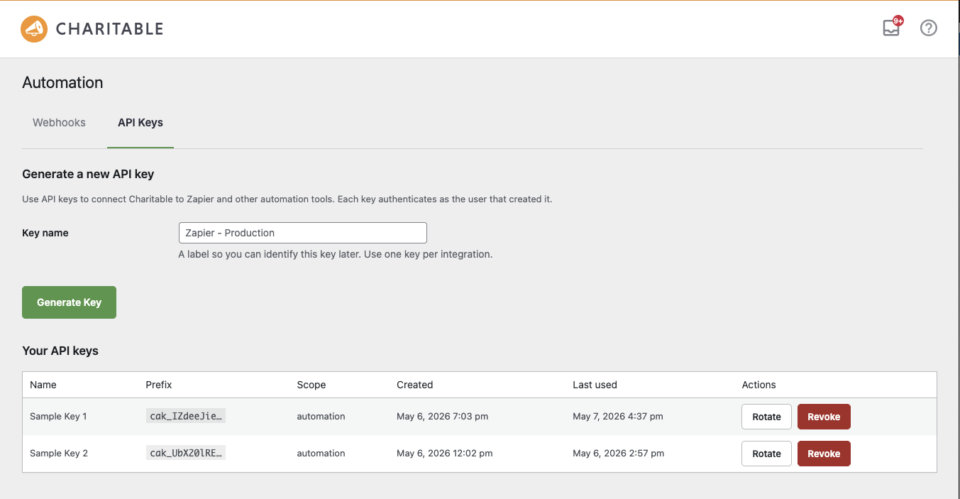
2. Generate an API key in your Charitable admin.
Navigate to Charitable » Automation » API Keys and click Generate Key. Copy the full string starting with cak_ – you’ll only see it once, so paste it somewhere safe like a password manager.
3. In Zapier, search for “Charitable” and connect your site.
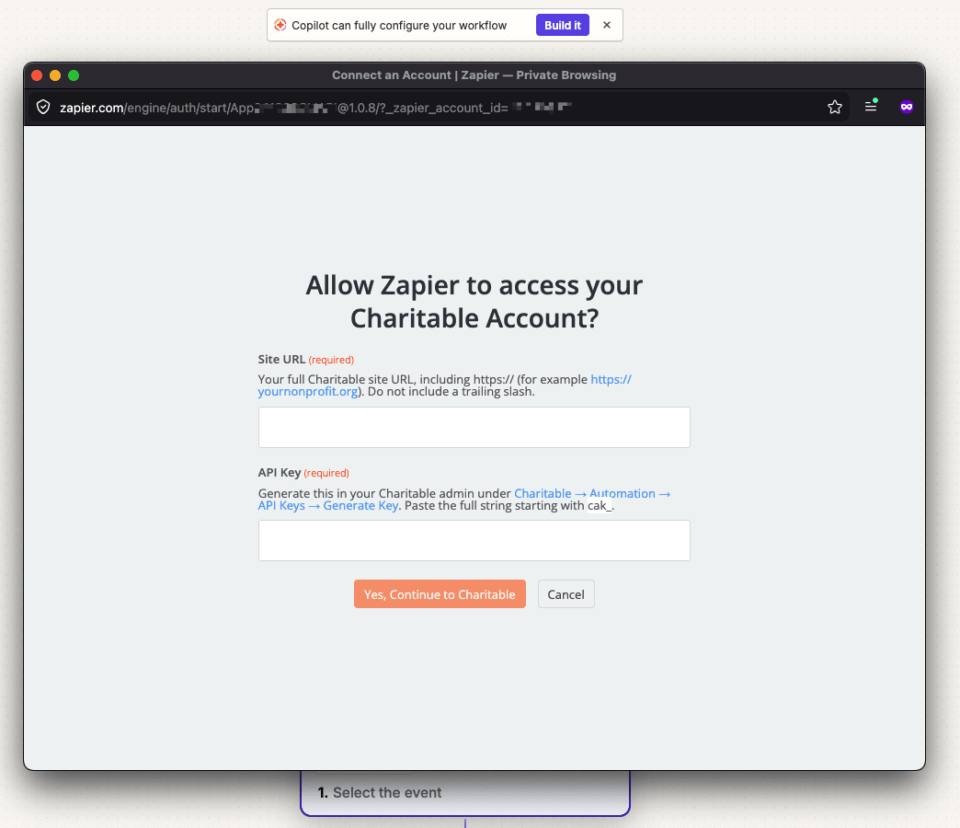
Zapier will ask for two things: your site URL (the address of your Charitable WordPress site) and the API key from step 2.
4. Pick a trigger, pick an action, and turn it on.
Charitable contributes 12 triggers covering every meaningful event in the donation lifecycle:
- New Donation
- Donation Completed
- Donation Refunded
- New Donor (first-time donor)
- New Recurring Subscription
- Recurring Donation Renewed
- Recurring Subscription Cancelled
- Recurring Payment Failed
- Campaign Created
- Campaign Ended
- Campaign Goal Reached
- Plus generic donation/campaign created/updated events
Pair any of those with any Zapier action and you have an automation.
Zapier is in Beta: What This Means For You
Here’s what you need to know about our beta launch:
- It’s fully functional. Everything works. We’ve tested every trigger end-to-end and there are no known bugs.
- You won’t find it in Zapier’s search results yet. During Beta, the integration is invite-only via direct link. Use the templates above (or this invite link to the integration) to install it.
- It’s free to use during Beta. Standard Zapier task pricing applies on Zapier’s side; nothing extra on the Charitable side. The integration is bundled with your Automation Connect license – no add-on charge.
- We’re listening. If you find something rough, please email us or open a thread in our support area. Feedback during Beta directly shapes what ships in Public.
What’s Next?
A few things on the near-term roadmap:
- Actions and Searches: Right now, Charitable contributes triggers (events that fire automations). Coming soon: actions (so a Zap can create a donor in Charitable) and searches (find a campaign by slug, find a donor by email).
- More Zap templates: We’ll publish more starter templates as we see what people are actually building. If you build something cool, tell us. We’d love to feature it as an official template.
- Native Workflow Element in the Charitable admin: Soon you’ll be able to browse, install, and manage Zaps directly inside your Charitable Automation Connect dashboard, without ever leaving your WordPress site.
Try It Now
If you’re already running Charitable Pro + Automation Connect, you’re three minutes away from your first automation. Click any of the templates above, or open the integration in Zapier to start from a blank Zap.
If you’re not on Pro yet, Automation Connect is included with every Pro plan, alongside payment gateways, peer-to-peer fundraising, and everything else that ships in the suite.
Questions, ideas, or just want to show off the Zap you built? Connect with our Support. We read every message.
Happy automating.
Charitable Has 1+ Million Downloads!
Trusted by millions to power successful fundraising campaigns. Try Charitable risk-free today.
✅ 14-day money-back guarantee
✅ Transparent pricing
✅ Code-free setup








Leave a Reply