
When fundraising, clear goals paired with a real deadline create powerful motivation.
I’ve seen firsthand how campaigns that set specific targets and time limits grab attention and inspire donors to act quickly.
Urgency turns passive supporters into active givers and helps campaigns reach their full potential faster.
It’s easy to build these focused, goal-driven campaigns in just minutes. I’ll show you how to do that in this guide.
What’s in This Guide?
Do you prefer to learn through video tutorials? Watch the video below to set up a goal based campaign:
What Are Time-Sensitive and Goal-Based Campaigns?
Time-sensitive campaigns have a fixed deadline by which donations must be made, creating a sense of urgency among supporters.
Goal-based campaigns set a clear fundraising target that motivates donors to help reach or exceed it.
Both types of campaigns focus attention, encourage immediate action, and provide measurable milestones that keep donors engaged.
For example, a nonprofit might run a “Clean Water for 100 Families” campaign aiming to raise $10,000 in 30 days. The combination of a clear goal and deadline helps build excitement and urgency that can boost donations faster than open-ended campaigns.
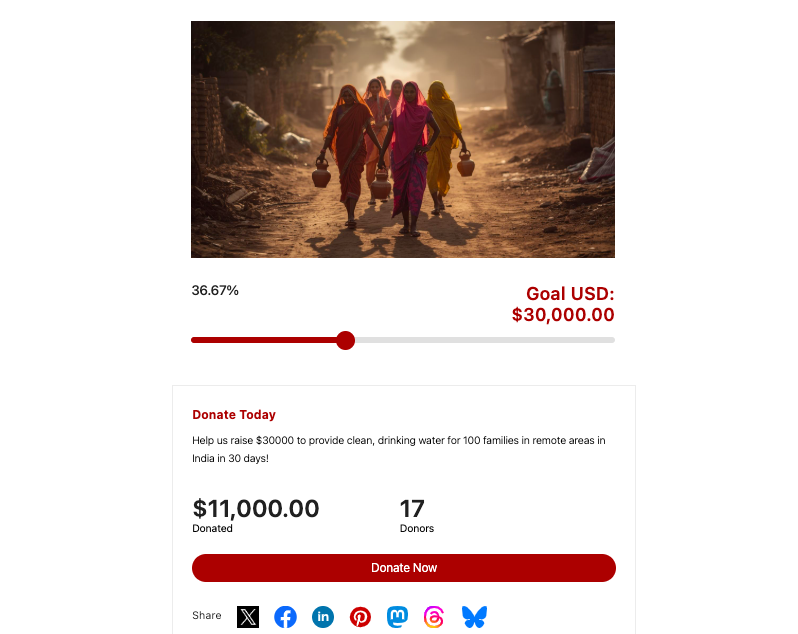
These campaigns are also perfect for special occasions and the holiday season fundraising. You can run Black Friday fundraisers, Giving Tuesday campaigns, and so on.
Now most non-profits don’t venture into these kinds of campaigns because it seems complicated to set up. But it’s much easier than you think.
There are tools available that help you do this in a few clicks. You don’t need any coding or tech knowledge.
If you have your own website, you can use Charitable, the best donation plugin out there that serves as an all-in-one fundraising solution. You can easily set up goals and deadlines and Charitable will handle the rest. Your campaign automatically closes when goals are met or deadlines pass—letting you focus on promoting and engaging your supporters.
Why Use Charitable for Time-Sensitive and Goal-Based Campaigns?
Charitable is built to make launching time-sensitive and goal-based campaigns fast and hassle-free. Its user-friendly interface lets you create professional fundraising pages without any coding or technical skills.
You can set donation goals and campaign deadlines like so:
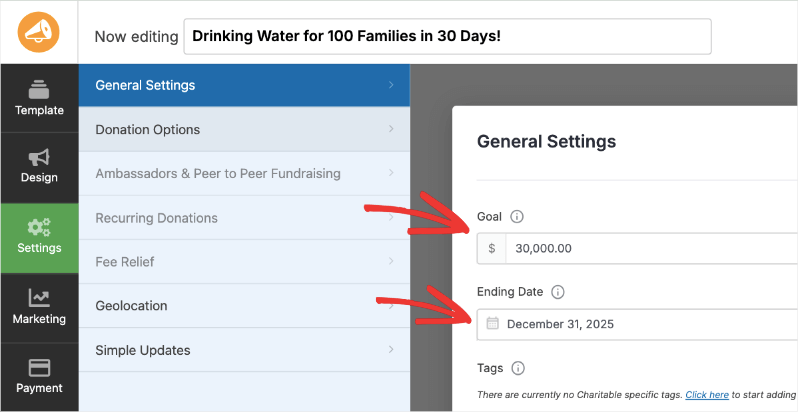
That’s all there is to it. Charitable will automatically display the goals and progress of your campaign.
You don’t have to manually update anything. The fundraiser will close according to the deadline you’ve set.
The best part? You can add updates to live campaigns. This lets you display messages to your audience to encourage new donors to contribute so that you reach your goal.
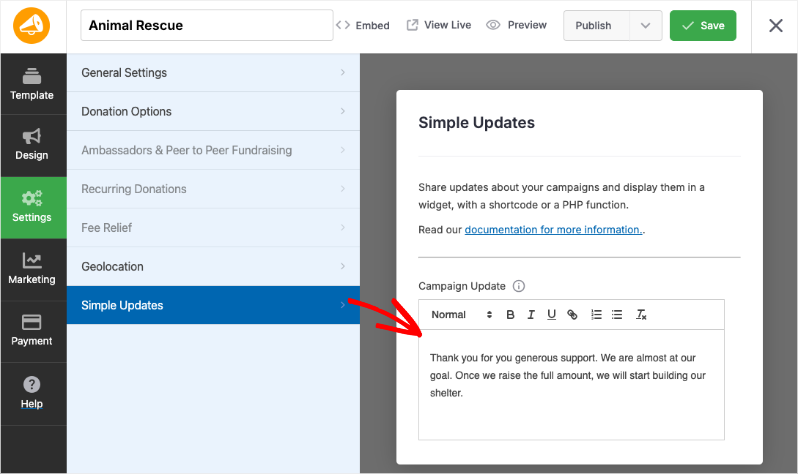
Added to that, Charitable’s powerful reporting tools give you real-time insights into how your campaign is performing, so you can adjust your outreach and messaging.
Plus, Charitable supports multiple payment gateways and donation options, including recurring gifts, making it easier for your supporters to give what they want in the way they prefer.
Key Features and Highlights of Charitable
- Easy Campaign Creation: Intuitive interface for building professional donation pages quickly without coding.
- Set Fundraising Goals: Clearly define your target amount to motivate donors.
- Campaign Deadlines: Add end dates to create sense of urgency and automatically close campaigns.
- Automatic Campaign Closure: Campaigns end when goals are met or deadlines pass, no manual work required.
- Multiple Payment Gateways: Supports Stripe, PayPal, Authorize.net, and more, making giving easy.
- Recurring Donations: Enable monthly or regular giving to build sustainable donor relationships.
- Real-Time Reports and Analytics: Track campaign progress live and see donation trends instantly.
- Customizable Donation Forms: Tailor donation amounts, form fields, and calls-to-action to fit your campaign.
- Progress Bars and Thermometers: Visual tools to inspire donors by showing progress toward goals.
- Mobile-Optimized: Donation pages look great and work smoothly on any device.
- Donor Management: Keep track of donor information and donation history for better engagement.
- Social Sharing Tools: Easily share campaigns on Facebook, Twitter, Instagram, and more to boost reach.
- Add-Ons for Extended Functionality: Peer-to-peer fundraising, email marketing integrations, and more.
All of these features combine to save you time and help you focus on what matters most: inspiring donors and driving meaningful results.
Now I’ll show you how easy it is to create a campaign with goals and deadlines.
How to Create a Time-Sensitive, Goal-Based Campaign with Charitable
For this tutorial, you need a WordPress site and the Charitable plugin installed. Not sure how to set that up? Watch our complete video tutorial on that:
If you already have a WordPress website, open up our WordPress dashboard and follow these steps:
Step 1: Install Charitable
Charitable has a free and pro version. For the pro version, head to the Charitable website, choose a plan, and create an account.
You’ll get a plugin file to download and a license key to copy.
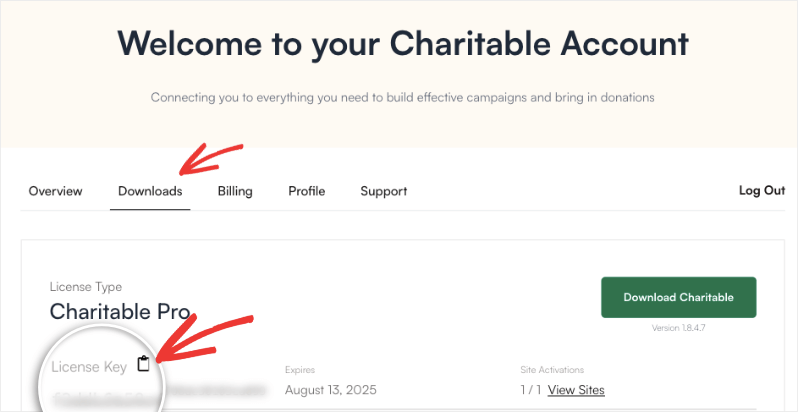
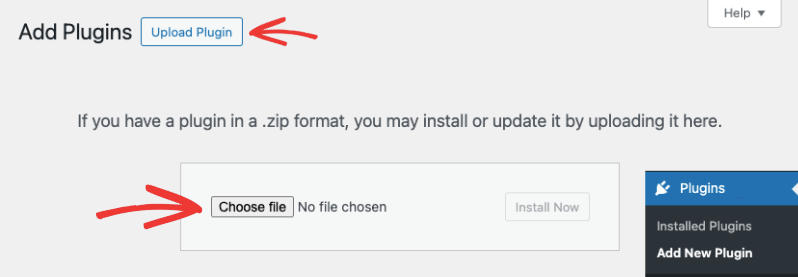
Head to your WordPress site, and upload the plugin file under Plugins » Add New » Upload page.
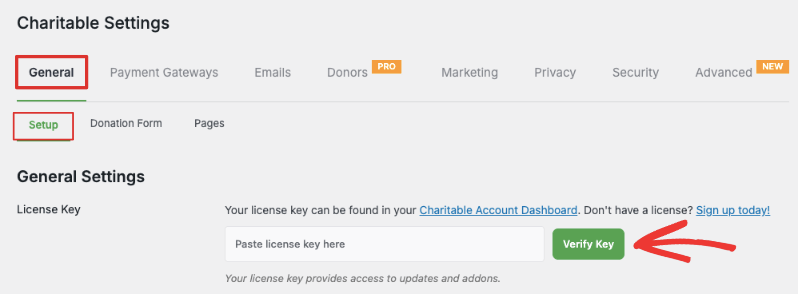
You can paste the license key in the Charitable » Settings page to activate your license and start using all the features available to you.
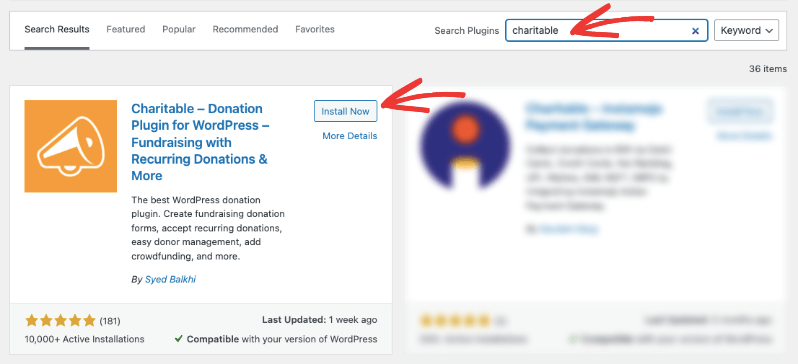
For the lite version, go to Plugins » Add New, search for “WP Charitable” and install and activate it.
You’re ready to use Charitable to create a goal-based campaign.
Step 2: Create a New Campaign
Navigate to Charitable in the left menu, then click Add New to start a new campaign. You’ll be taken to a template library where you can choose from premade designs and layouts.
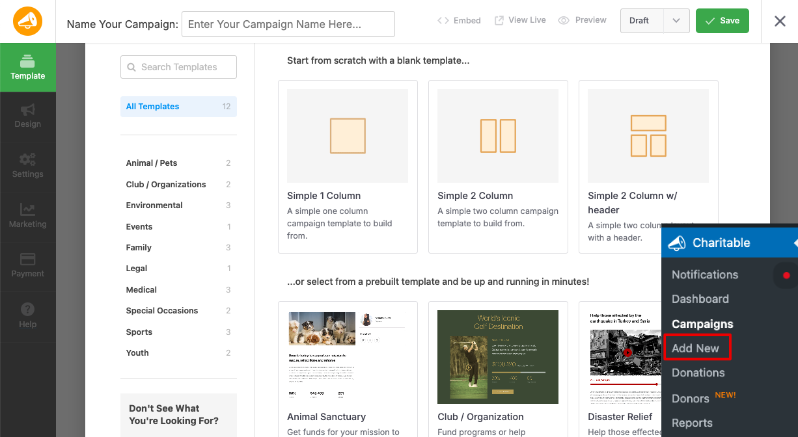
Give your campaign a clear, compelling title that reflects your cause.
Once you choose a template, the drag drop builder will open, where you can customize it.
Step 3: Customize your Campaign
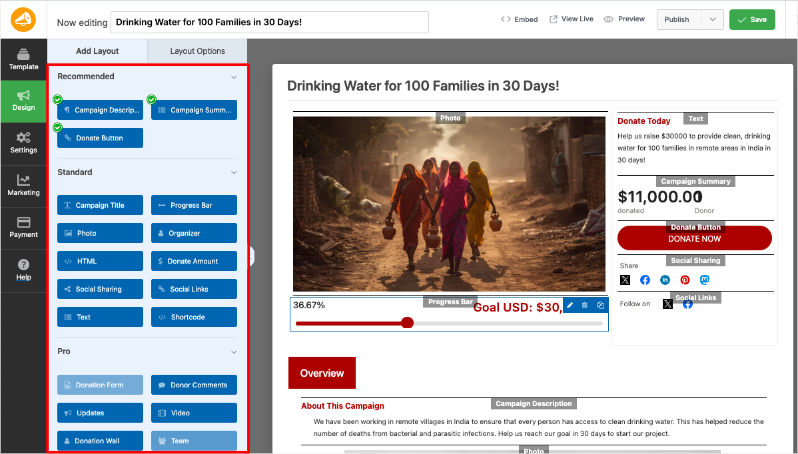
In the visual builder, you’ll see a taskbar on the left and a live preview of your campaign on the right. This lets you make changes and see those edits as they would appear when your campaign is live. You won’t have to switch between code and previews.
If you want to add a new field, simply select it and drag and drop it into the campaign where you want it to appear.
You can add titles, progress bars, checkboxes, social links, custom text fields, and so much more. Want to edit text? Click on the text and an option to edit it will appear in the left taskbar.
Let’s change the image to suit the campaign we’re creating. Select the image in the campaign and you’ll see options appear in the left taskbar to upload a new image or add a URL. This helps visually connect with your audience and make your campaign page more engaging.
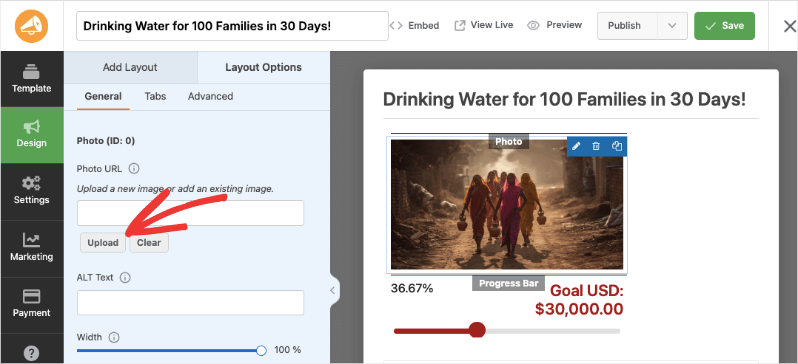
Like this, I encourage you to explore the builder. It’s really easy to use and self explanatory. If you ever find yourself stuck, you can browse through Charitable documentation or YouTube tutorials »
Now it’s time for the most important part of this tutorial – setting goals!
Step 4: Set Your Fundraising Goal
Head to the Settings tab in the far-left menu. Under the General Settings tab, you can enter the total amount you want to raise (e.g., $10,000). This gives donors a clear target to work toward.
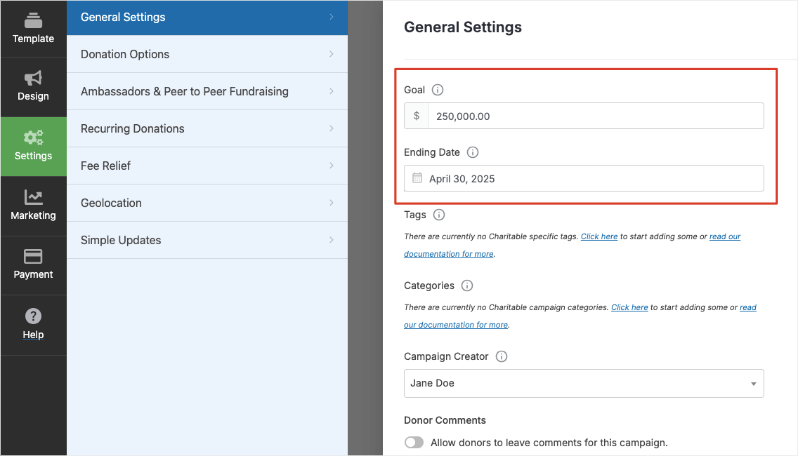
Below the goal field, there’s an Ending Date option. Choose the date and time by which you want the campaign to end, creating urgency for supporters to donate promptly.
Now there are a few more things I want to show you to optimize your campaign and workflow.
Step 5: Optimize your Campaign
In the Settings » Donation Options tab, set suggested donation amounts to guide supporters.
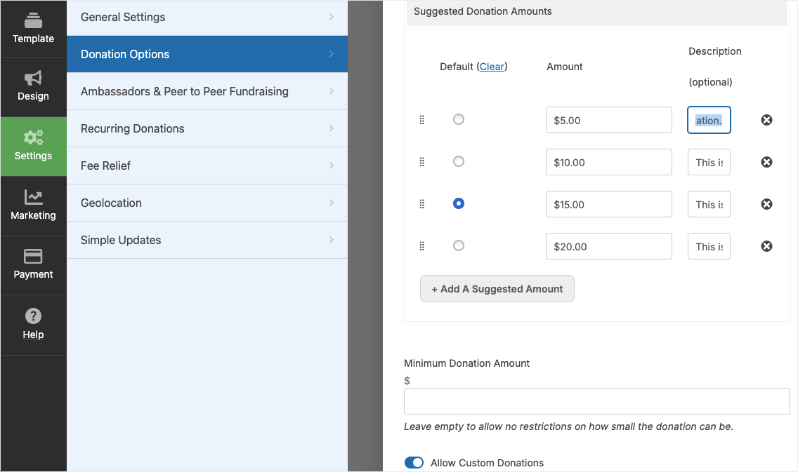
There are also add ons you can enable such as:
- Recurring Donations: Prompt donors to make their donations a regular contribution either weekly, monthly, quarterly, or annually.
- Peer to Peer Fundraising: Allow supporters to launch their own campaigns to raise funds for your cause.
- Simple Updates: Add live updates to your campaign so that you can keep your donors informed.
- Geolocation: Geotag your campaigns and display a Google Map with all your campaigns.
- Fee Relief: Request donors to cover any transaction fees so that the full donation amount reaches you.
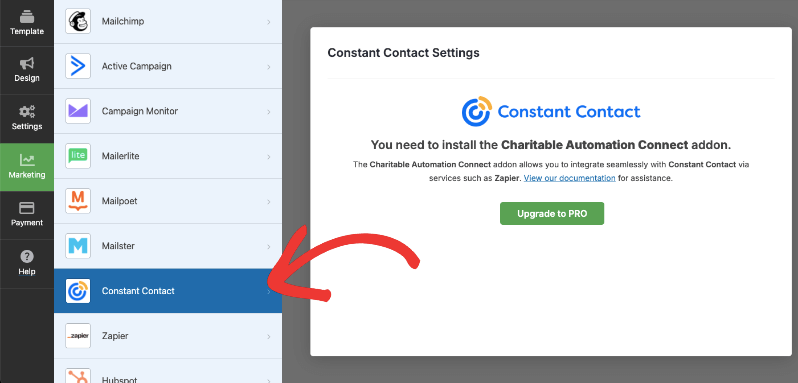
In the Marketing tab, you can connect your campaign to your favorite email marketing service such as Constant Contact and Mailchimp.
In the Payment tab, you can decide which payment provider you want to use.
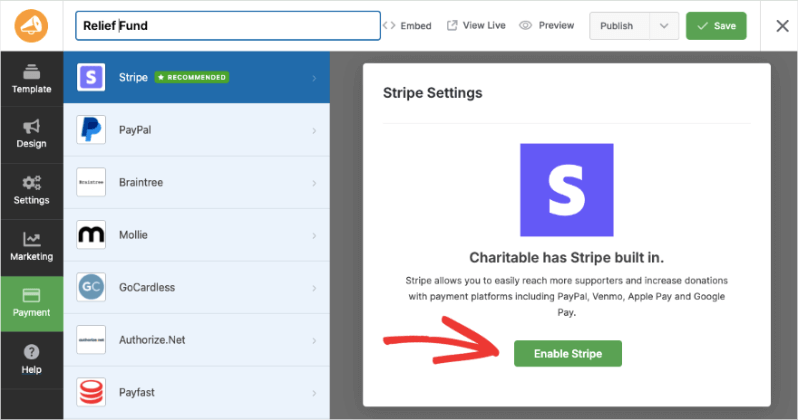
Learn how to integrate your payment gateway here »
That’s it. You’re now ready to launch your campaign.
Step 6: Publish Your Campaign
When you’re ready, at the top-right corner of the builder, save your changes, use the dropdown menu to select “Publish” button and save it again.
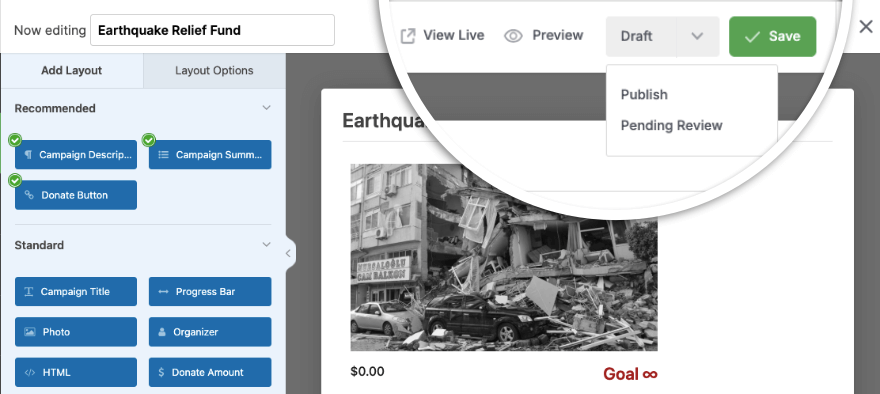
Your campaign is now live and ready to receive donations. You can add your campaign to any page or post using the readymade blocks available in the Gutenberg or block editor. You can also use campaign shortcodes to embed the campaign anywhere you need.
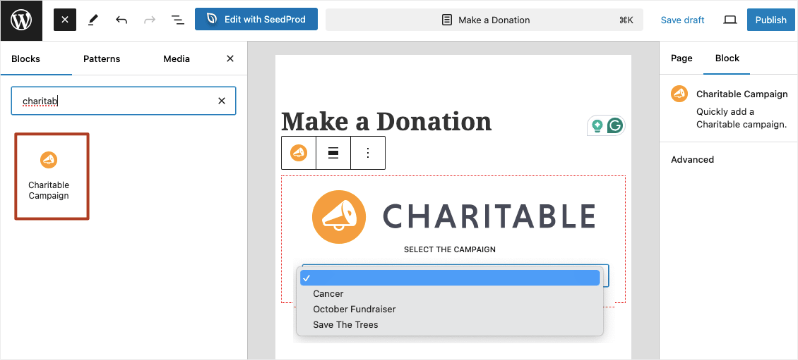
That’s it! Now that your campaign is live, you can start receiving donations. Charitable will automatically track donations toward your goal and close the campaign once the deadline passes or the goal is met (depending on your settings), helping you manage your campaign effortlessly.
Tips to Promote Your Campaign and Maximize Donations
- Craft Urgent, Clear Messaging: Use your campaign title, description, and outreach messages to emphasize the deadline and fundraising goal. Phrases like “Help us reach $10,000 by October 31” create urgency.
- Leverage Progress Bars and Visuals: Display Charitable’s progress bars and thermometers prominently on your campaign page and marketing materials to show how close you are to the goal.
- Email Your Supporters Often: Send regular campaign updates reminding your supporters about the deadline and current progress. Personalize emails to connect emotionally.
- Use Social Media Strategically: Post frequent updates on platforms like Facebook, Twitter, Instagram, and LinkedIn. Include calls-to-action, eye-catching images or videos, and your campaign link.
- Create Countdown Reminders: As the deadline approaches, increase the frequency of your “countdown” messages across email and social media to boost last-minute donations.
- Invite Top Donors to Share: Encourage your most engaged supporters to share your campaign within their networks for wider reach.
- Show Transparency and Impact: Share stories, testimonials, or photos related to your cause so donors can see the difference their contributions make.
- Thank Donors Promptly: Use Charitable’s automated thank-you emails to acknowledge gifts quickly and encourage repeat donations.
These tips will help you build momentum, keep donors engaged, and hit your fundraising goals faster. I hope you found this guide helpful.
Next, I’ll answer questions our users often ask.
Frequently Asked Questions
How do I create a fundraising campaign with Charitable?
From your WordPress dashboard, go to Charitable » Add New. Enter your campaign title, description, set a fundraising goal and deadline, customize donation options, then publish your campaign. It’s designed to be quick and beginner-friendly. See the full tutorial here »
Can I set a deadline for my campaign to create urgency?
Yes! Charitable lets you set an end date for your campaign, helping you create time-sensitive fundraising drives that close automatically once the deadline passes.
Does Charitable allow setting donation goals?
Absolutely. You can define a specific fundraising goal to show progress and motivate donors to help you reach that target.
Can donors make recurring donations?
Yes, Charitable supports recurring donations (monthly/annual) via its Pro version and add-ons, allowing you to build sustainable supporter relationships.
What payment methods does Charitable support?
Charitable integrates with multiple gateways including Stripe, PayPal, Authorize.net, Apple Pay, Google Pay, and more for seamless donor experiences. See all gateways available here »
Is Charitable mobile-friendly?
Yes, all Charitable donation forms and campaigns are fully responsive and optimized for mobile devices.
Does Charitable provide reports or analytics?
Charitable offers real-time reporting tools to help you track donations, campaign progress, and donor activity.
Can I customize my donation forms?
Yes, with Charitable’s drag-and-drop builder and templates, you can customize donation amounts, form fields, button styles, and display options without coding.
Is there support for peer-to-peer fundraising?
Yes, peer-to-peer fundraising is available through Charitable’s premium add-ons, allowing supporters to create personal campaigns on your behalf.
That’s it!
If you like this guide, stay connected with us for more tips, tutorials, and updates:
- Join our newsletter – Get weekly tips and exclusive guides in your inbox
- Subscribe to our YouTube channel – Watch step-by-step tutorials and success stories
- Follow us on LinkedIn – Connect with our community and get daily nonprofit insights
- Follow us on Instagram – Fun reels and non-profit insights
- Follow us on TikTok – Insightful & fun videos to help you grow your cause
- Get Fundraiser Tips on TikTok – Subscribe and followan for general fundraiser tips.
Ready to maximize your fundraising?







Leave a Reply