Charitable Blog

Everything you need to know about Charitable and our team.

Introducing Donor Referrals: See Which Donors Bring New Supporters to Your Cause

Introducing Donor Referrals: See Which Donors Bring New Supporters to Your Cause

Last updated on

  • By

Your best donors already talk about you. They tell a sister about the food drive, or they mention your shelter to a coworker, and a week later a new gift arrives.

Until now, you had no way to know who sent that new donor. So the person who did the asking never got a thank you.

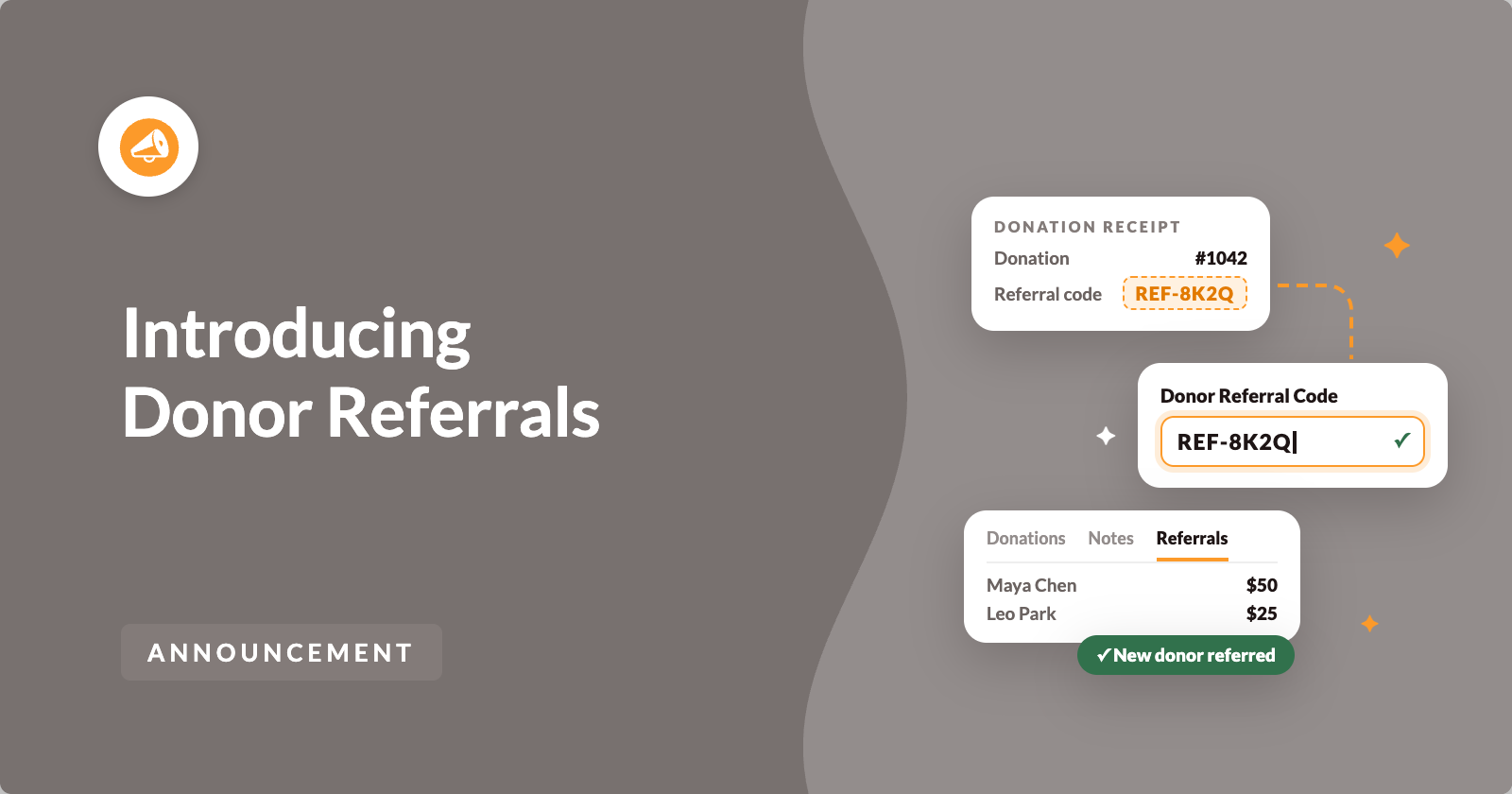
We built Donor Referrals to fix that. Every donor gets their own referral code, new donors enter it when they give, and you can see exactly who brought in whom. 🤝

Here’s What Donor Referrals Looks Like

Before we walk through the setup, here’s what a new donor sees on your donation form once Donor Referrals is on.
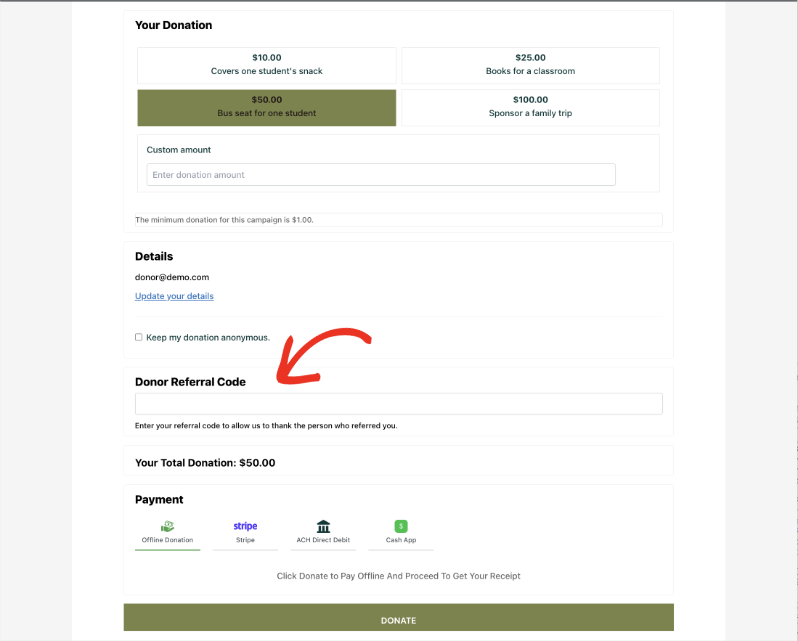
Donation form with  selected for a student bus seat; a red arrow highlights the Donor Referral Code field.

It’s one short field called Donor Referral Code. The note under it tells the donor why you’re asking, so they can thank the person who sent them.

The field is optional. A donor who wasn’t referred by anyone can skip it and give as usual.

Why Word of Mouth Deserves a Thank You

When a friend asks someone to give, the ask comes from a person they already trust. That friend knows your work and has already given, so their word carries weight.

Those supporters are doing real fundraising work for you, for free. When you can see who they are, you can thank them by name, invite them to an event, or ask them to become a peer-to-peer fundraiser.

And the new donor gets something too. They know their gift counted for the friend who told them about you.

When You’ll Use Donor Referrals

Here are a few places referral codes fit naturally.

  • 💌 Thank-you notes that name names. Send a personal note to every donor who brought in a new supporter this year.
  • 🏆 A friendly referral challenge. Ask your board or volunteers to share their codes during a campaign, then celebrate whoever brought in the most new donors.
  • 🎟️ Event invitations. Invite the donors who refer others to a special supporter evening or a site visit.
  • ⛪ Churches and small communities. Members who invite friends to give can be thanked from the pulpit or in your newsletter.
  • 🌱 Finding future fundraisers. A donor who refers 3 friends without being asked is a great person to invite to run their own fundraiser.

How Donor Referrals Works

Once you turn the feature on, Charitable gives each donor a unique referral code. The code appears on their donation receipt, both on the screen after they give and in the receipt email.

A Charitable donation receipt showing the donor's referral code beside the donation number, date, total and payment method

Your donor shares that code with friends and family, in a message, a social post or over coffee. When a friend gives to any of your campaigns, they type the code into the Donor Referral Code field on the form.

Charitable then links the new donation to the donor who shared the code. You don’t have to match anything up by hand.

See Every Referral on the Donor’s Profile

Each donor’s profile in Charitable » Donors now has a Referrals tab, next to their donations, campaigns, comments, logs and notes.

The Referrals tab on a Charitable donor profile, with a Generate Code button

The tab shows the donor’s referral code at the top, followed by every donation made with it. From there you can open and edit each donation record or download its PDF receipt.

If a donor doesn’t have a code yet, click Generate Code on the same tab. That’s handy for a long-time supporter who gave before you turned the feature on and wants to start sharing right away.

How to Set Up Donor Referrals

Donor Referrals is built into the Charitable Pro plugin, so there’s nothing extra to install. Setup takes about a minute.

Step 1: Turn On Donor Referrals

To get started, head over to Charitable » Settings » Donors » Donor Referrals. Switch on the Donor Referrals setting.
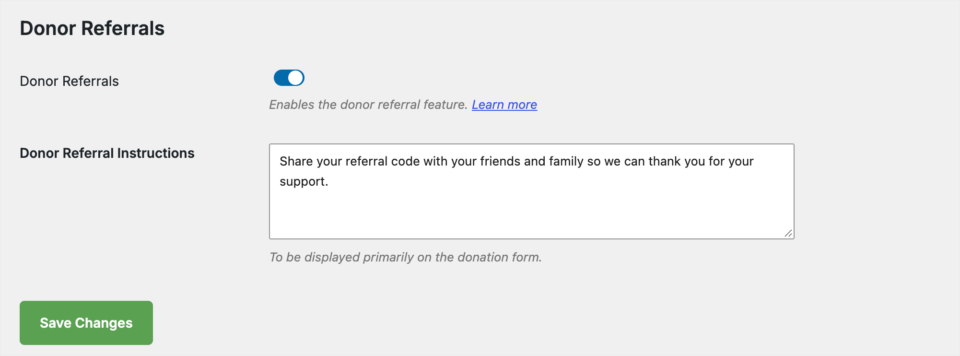
The Donor Referrals settings in Charitable with the feature switched on and the Donor Referral Instructions box below it

Step 2: Write Your Referral Instructions

A new Donor Referral Instructions box appears once the feature is on. It comes filled in with “Share your referral code with your friends and family so we can thank you for your support.”

You can keep that text or write your own, in your organization’s voice. Then click Save Changes.

Step 3: Let Your Donors Share Their Codes

That’s all the setup there is! From the next donation on, each donor finds their code on their receipt, and the Donor Referral Code field shows on your donation forms.

If you ever need to reset codes, turn on Charitable’s debug mode. A Maintenance Actions menu then appears on the same settings screen, where you can add codes for all donors or remove them.

Read the Full Donor Referrals Setup Tutorial →

FAQs on Donor Referrals

Which plan do I need for Donor Referrals?

Donor Referrals is in the Charitable Pro plugin, on every paid plan. It’s built in, so there’s nothing extra to install.

Do my existing donors get a referral code?

Yes. You can create a code for any donor with the Generate Code button on their Referrals tab, or add codes for everyone at once from Maintenance Actions in debug mode.

Does a new donor have to enter a code?

No. The Donor Referral Code field is optional, so anyone who wasn’t referred can leave it empty.

Where do donors find their referral code?

It’s on their donation receipt. They see it on the screen right after they give, and again in the receipt email Charitable sends them.

Does a referral code work on every campaign?

Yes. A new donor can enter a referral code on the donation form of any of your campaigns.

Get Started With Donor Referrals

Donor Referrals is ready now in the Charitable Pro plugin. Switch it on under Charitable » Settings » Donors, and the next time a donor tells a friend about you, you’ll know who to thank!

Read the Donor Referrals Documentation →

Not Yet on a Charitable Paid Plan?

What’s New in Charitable

Here’s what else we’ve launched in Charitable recently.

🤖

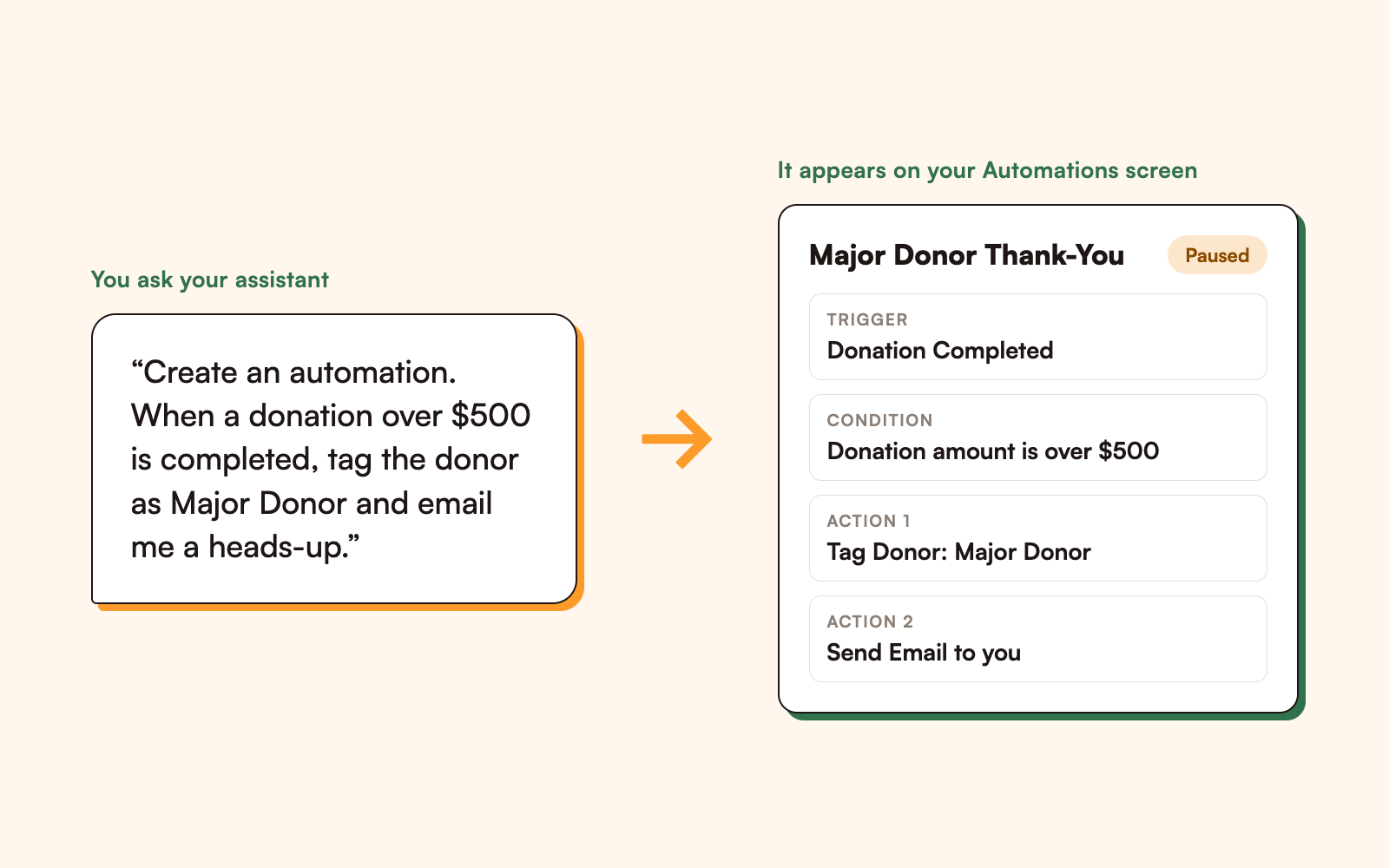
AI-Built Automations

Describe the automation you want in plain words, and your AI assistant builds it for you.

Learn More →

👥

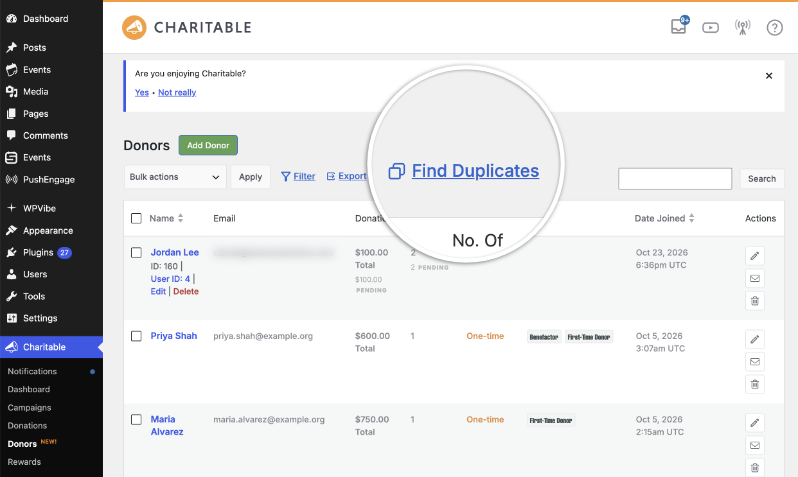
Duplicate Donor Merging

Find supporters who appear twice in your donor list and merge them into one record.

Learn More →

🔑

Passwordless Fundraisers

Supporters sign up to fundraise with just an email address, no password needed.

Learn More →

🏃

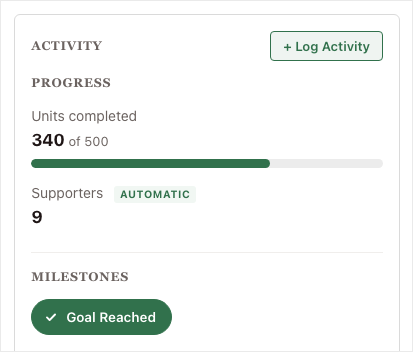
Activity Tracking

Show progress on minutes read, miles walked or meals packed beside the money raised.

Learn More →

🖨️

Fliers and Posters

Fundraisers print a flier with a QR code that takes people straight to their page.

Learn More →

💸

Tiered Rates for Fee Relief

Set a different fee rate for different gift sizes, so the ask fits the gift.

Learn More →

We add new features to Charitable all the time to help you raise more and look after your donors. See everything we’ve launched in the Charitable Changelog.

Stay Connected for More Nonprofit Resources

For more tutorials and videos tailored to nonprofits, subscribe to our YouTube channel. We regularly publish expert tips, step-by-step guides on online donations, fundraising strategies, and practical resources to help your organization succeed.

🗞️ Get weekly tips and exclusive guides in your inbox
Join our newsletter →  

🎥 Watch step-by-step tutorials and success stories
Subscribe to our YouTube channel →  

👩🏽‍💻 Connect with our community and get daily nonprofit insights
Follow us on LinkedIn →

🥳 Fun reels and non-profit insights
Follow us on Instagram → 

👀 Insightful & fun videos to help you grow your cause
Follow us on TikTok→  

🌎 Subscribe and follow for general fundraiser tips
Get Fundraiser Tips on TikTok → 

Powerful Fundraising Resources

🤖 Use Charitable with Your AI Assistant

See Charitable + AI →

⬇️ Download proven strategies, campaign ideas, and expert tools
Get the Fundraising Kit →  

💸 Get Free Fundraising Resources
Head to the Charitable Fundraising Hub →

🤔 Got questions about Charitable?
Charitable FAQs →

🏎️ Take Charitable for a spin
Create your Charitable Demo →

Understand non-profit terms and jargon
Non-Profit Glossary →

% Looking for non-profit deals and discounts?
Best Non-Profit Deals and Discounts →

author avatar
Melinda Bartley
I’m the senior writer at Charitable, with over 15 years of experience in content creation, digital marketing, and SEO. Beyond my professional role, I’m the co-founder and trustee of a non-profit organization committed to animal rescue and welfare. Throughout my career, I’ve helped build 17+ blogs – many from the ground up, transforming them into successful marketing platforms that drive traffic, boost brand visibility, and generate revenue.

Disclosure: Our content is reader-supported. This means if you click on some of our links, then we may earn a commission. We only recommend products that we believe will add value to our readers.

Leave a Reply

Your email address will not be published. Required fields are marked *

Get free tips and resources right in your inbox, along with 60,000+ others

Join our Newsletter

We won’t spam you. We only send an email when we think it will genuinely help you. Unsubscribe at any time!

Featured Video:

Watch more videos on our YouTube channel.

What's New In Charitable

View The Latest Updates
🔔 Subscribe to get our latest updates
📧 Subscribe to Emails

Email Subscription

Join our Newsletter

We won’t spam you. We only send an email when we think it will genuinely help you. Unsubscribe at any time!

automation New

🤖 Introducing AI-Built Automations: Just Describe What You Want!

Describe the automation you want in one sentence and your AI assistant builds it, with Automation Connect 2.x on Charitable Pro 1.8.19 or later. Why this is important:

  • 🧩 Built in one sentence: Say what you want and it gets built, instead of adding it card by card.
  • 🎯 Changed by asking again: Narrow it to one campaign or reorder its actions without opening the editor.
  • 🔍 Checked before it goes live: See what it would do against a real recent gift, with nothing actually sent.
  • 🛡️ Off until you turn it on: Three separate switches, all off by default, and reading works without any of them.
  • 📜 Nothing happens unseen: Every read and every change is logged, so you always know what the AI did.

Check out our announcement here.

author avatar
Melinda Bartley
I'm the senior writer at Charitable, with over 15 years of experience in content creation, digital marketing, and SEO. Beyond my professional role, I'm the co-founder and trustee of a non-profit organization committed to animal rescue and welfare. Throughout my career, I've helped build 17+ blogs - many from the ground up, transforming them into successful marketing platforms that drive traffic, boost brand visibility, and generate revenue.
Donations New

👥 Introducing Donor Merging: Two Records, One Supporter!

Somewhere in your donor list is a supporter who appears twice, because they gave from a work address one year and a personal one the next. Every donation is still recorded and every receipt still went out, but a loyal supporter who has given for years can look like two people who gave half as much. From the Charitable Pro plugin 1.8.19.1 you can find those records and merge them from the Donors screen. Why this is important:

  • 🔍 A Find Duplicates link where you already work: Head to Charitable » Donors and it sits next to Filter and Export, then tells you how many groups of possible duplicates it found.
  • 🧩 Grouped by name, not by email: Charitable compares the first and last name together and ignores capital letters, spacing and punctuation, which is what catches the same person under two different addresses.
  • 📊 A preview before anything changes: Each group shows every record with its email address, its donation count and its lifetime total, and the preview shows you the combined totals and the email that will be added.
  • ↩️ Every merge can be undone: Nothing is merged until you choose to merge it, and you can reverse any merge afterwards, so a wrong guess costs you nothing.
  • 📥 Built for the week after an import: Moving donors over from another plugin is where most duplicates come from, and it is also when they are hardest to spot, because every record is new to you.

Check out our announcement here.

author avatar
Melinda Bartley
I'm the senior writer at Charitable, with over 15 years of experience in content creation, digital marketing, and SEO. Beyond my professional role, I'm the co-founder and trustee of a non-profit organization committed to animal rescue and welfare. Throughout my career, I've helped build 17+ blogs - many from the ground up, transforming them into successful marketing platforms that drive traffic, boost brand visibility, and generate revenue.
ambassadors New

🔑 Introducing Passwordless Fundraisers: Sign Up With Just an Email!

Supporters arrive wanting to help, and then the form asks them to invent a password for a website they may only visit twice. A lot of them stop right there. Passwordless Fundraiser Accounts, new in Charitable Ambassadors 3.5.0, let a supporter start a peer to peer fundraiser with nothing but an email address. Why this is important:

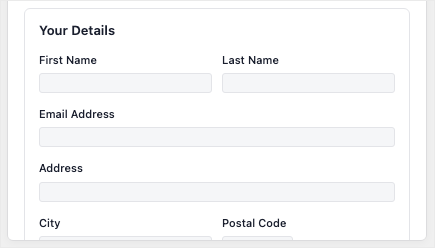
  • 🔑 No password step to lose them at: Switch it on in Charitable » Ambassadors » Templates » Submit Form and the create-fundraiser form asks only for a name, an email address and a page title.
  • 👤 Still a real WordPress account: One click in one email confirms the address, signs them in and creates the account, so they can come back later to edit their story, change their photo and see who has donated.
  • 🎚️ Your call on every campaign: Each peer to peer campaign can follow the site default or override it, which matters when a campaign pays fundraisers through Stripe Connect and those people do need a password.
  • 📋 See who has not clicked yet: The Charitable » Ambassadors » Directory » Awaiting Sign-In tab lists everyone still waiting, with the campaign they joined and a Resend button, so a typo or a spam folder is something you can spot and fix.
  • 🛡️ Links a scanner cannot use up: Opening the link only shows a page, and your fundraiser is signed in when they press the button on it, so corporate email scanners never burn the link. Each one works once, expires on its own and is stored only as a hash.

Check out our announcement here.

author avatar
Melinda Bartley
I'm the senior writer at Charitable, with over 15 years of experience in content creation, digital marketing, and SEO. Beyond my professional role, I'm the co-founder and trustee of a non-profit organization committed to animal rescue and welfare. Throughout my career, I've helped build 17+ blogs - many from the ground up, transforming them into successful marketing platforms that drive traffic, boost brand visibility, and generate revenue.
ambassadors New

🏃 Introducing Activity: Show Progress on More Than Money!

Most peer-to-peer fundraisers are about more than the money. A read-a-thon is about minutes read, a walkathon is about miles walked, and a food drive is about meals packed. Activity for Charitable Ambassadors lets your fundraisers show that effort right beside the dollars they raise. Why this is important:

  • 🎯 Progress on what you actually count: A progress bar shows each thing you count against its own target, sitting right beside the money raised.
  • 🏅 Milestones for the yes or no things: A milestone badge marks the efforts that are simply done or not done, with no number to chase.
  • ✍️ Fundraisers log their own numbers: Your supporters enter their totals from their own pages, so the effort stops living in a spreadsheet, a comment, or nowhere at all.
  • 🤖 Some numbers count themselves: An AUTOMATIC tag appears wherever the site worked the figure out from completed donations, so you can see at a glance what nobody typed in.
  • 🧩 Set it up once, use it anywhere: You decide what gets counted one time, then choose which campaigns count it. Available now in Charitable Ambassadors 3.4.7, with no new plugin and no developer.

Check out our announcement here.

author avatar
Melinda Bartley
I'm the senior writer at Charitable, with over 15 years of experience in content creation, digital marketing, and SEO. Beyond my professional role, I'm the co-founder and trustee of a non-profit organization committed to animal rescue and welfare. Throughout my career, I've helped build 17+ blogs - many from the ground up, transforming them into successful marketing platforms that drive traffic, boost brand visibility, and generate revenue.
ambassadors New

🖨️ Introducing Fliers and Posters: Raise Money Away From the Screen!

A lot of peer-to-peer fundraising happens away from a screen: at the finish line of a 5K, on a school noticeboard, in an office kitchen. Charitable Ambassadors 3.4.7 adds 2 printables, a fundraiser flier carrying each fundraiser’s own story and QR code, and a recruitment poster that signs new fundraisers up. Both open as a normal web page and print straight from the browser. Why this is important:

  • 🏁 A flier for every fundraiser: Each one carries that fundraiser’s own photo, story and goal, with a QR code that opens their page rather than your main campaign.
  • 📌 A poster that recruits: It shows “Now Recruiting” above your campaign name with a large QR code that opens your sign-up form, so someone can start fundraising without waiting on a link from you.
  • 🪄 No design tool needed: Both printables render as a normal web page and print from the browser, with no PDF plugin and no designer.
  • 📄 2 flier layouts: Hand out carries the full story for giving to friends and family, and Post up carries a short hook with 5 tear-off tabs for a noticeboard.
  • 🛡️ Off until you switch it on: Fliers stay off after the update until you enable them under Charitable » Ambassadors » Other » Fliers, and only the owner or an administrator can open one.

Check out our announcement here.

author avatar
Melinda Bartley
I'm the senior writer at Charitable, with over 15 years of experience in content creation, digital marketing, and SEO. Beyond my professional role, I'm the co-founder and trustee of a non-profit organization committed to animal rescue and welfare. Throughout my career, I've helped build 17+ blogs - many from the ground up, transforming them into successful marketing platforms that drive traffic, boost brand visibility, and generate revenue.