
Charitable Documentation

Learn how to make the most of Charitable with clear, step-by-step instructions.

How to Enable Donor Referrals

Donor referrals help expand your fundraising reach by allowing supporters to share their giving with friends and family. This document will guide you on how to set up and manage donor referrals in Charitable.

Table of Contents

Enabling Donor Referrals

Charitable offers a quick and easy way to enable donor referrals. The feature is built into the Chartiable plugin so you don’t need to install any addons.

In your WordPress admin panel, go to the Charitable » Settings page. Open the Donors tab and then choose Donor Referrals from the submenu.

On this page, there is a toggle switch to enable Donor Referrals. Simply click this switch to turn on the Donor Referral feature.
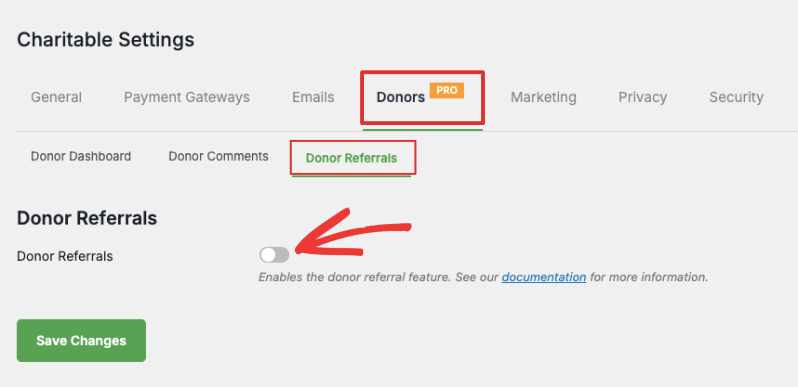
Enable donor referrals

Once enabled, new settings will appear.

Configuring Donor Referral Settings

Charitable lets you customize the Donor Referral Message that contains instructions for your donors.

There is a default message added in for you. You can edit it as you need.
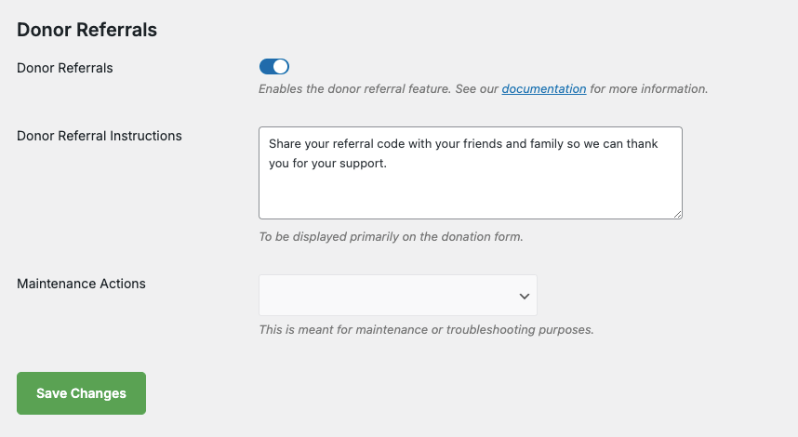
Donor referrals settings

This field will appear in the donation receipt along with their unique referral code.

Make sure you save your changes.

Troubleshooting Donor Referrals

In the same Settings page, you’ll see an option called Maintenance Actions. This dropdown enables you to remove codes for all donors and add codes for all donors.

Add remove donor referral codes

If you need to troubleshoot errors or reset the referral codes, this feature allows you to do that. You must enable Charitable Debug mode to see this menu.

Where Donors Will Find Their Referral Code

When a donor makes a contribution, a receipt will be automatically generated and displayed onscreen right after their payment is successful. The receipt contains details of their donation, such as donation number, date, total amount, and payment method. It will also contain the referral code.
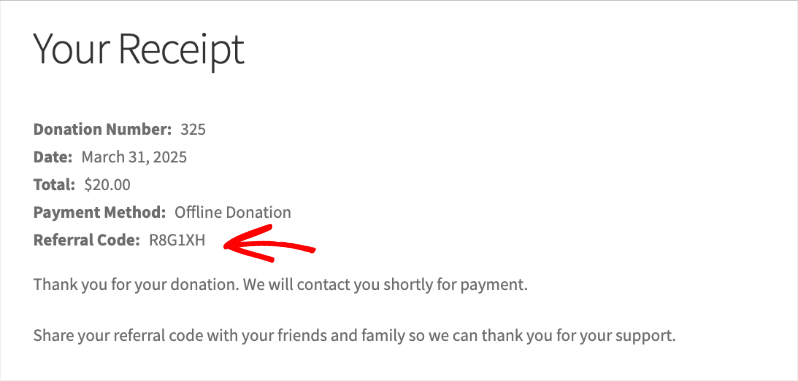
Referral code in receipt

This receipt will also be sent to the email address they entered in the donation form.

They can share this referral code with friends and family to get more donations for your cause.

How New Donors Add The Referral Code

A referred donor can choose the campaign they want to donate to.

When they proceed to make a donation, in the donation form that appears, they will see a field where they can enter the referral code of their friends or family who referred them to this campaign.
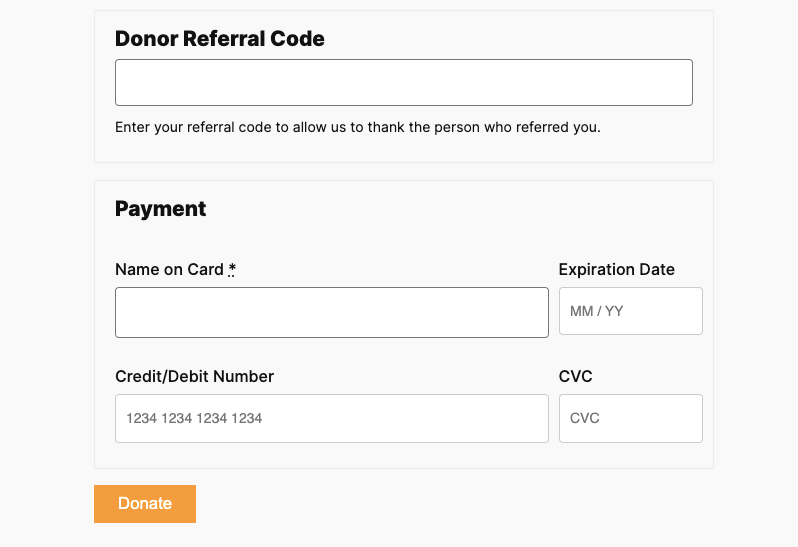
Donor referral code in donation form

All they have to do is enter the referral code and complete their donation.

Viewing Donor Referrals Made

Go to the Charitable » Donors page in your WordPress dashboard. Open any donor profile here and scroll down to the section where you can see tabs such as Donations, Campaigns, Comments, Social, Logs, Notes, and Referrals.

Open the Referrals tab, you’ll see the donor’s referral code at the top of this page. You’ll also see any referred donations listed here.
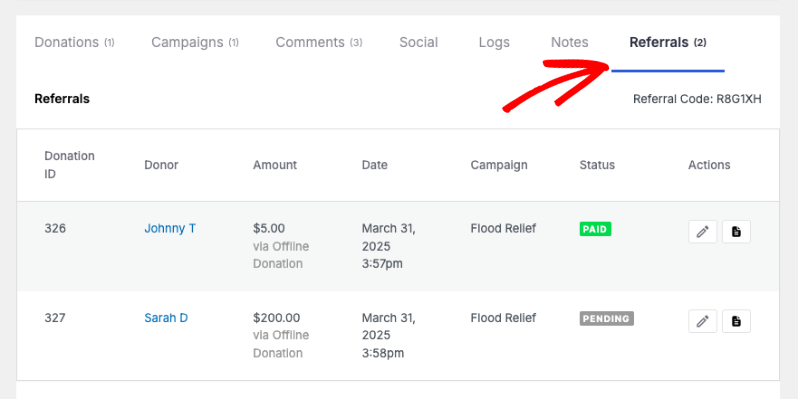
Donor referrals in admins

You can edit the donation records or download the PDF receipt.

Now you know how to use the Donor Referrals feature. Explore Charitable’s Donor Management System here »


Still have questions? We’re here to help!

Last Modified:

What's New In Charitable

View The Latest Updates
🔔 Subscribe to get our latest updates
📧 Subscribe to Emails

Email Subscription

Join our Newsletter

We won’t spam you. We only send an email when we think it will genuinely help you. Unsubscribe at any time!

Improvement Migrations

↔️ Importing From GiveWP, Donorbox, GiveButter… even CSV!

Whether you’re migrating from another platform or consolidating your records, moving your data to Charitable is now faster and more flexible than ever. We’ve streamlined the process so you can bring over your entire fundraising history in just a few clicks.

🔄 Native GiveWP, Donorbox, & GiveButter Support: Switching from a major platform? Our dedicated migration tools handle the heavy lifting, automatically mapping your donors and donations directly into Charitable—no technical skills required.

📂 Universal CSV Import: Moving from a custom system or a specialized CRM? If you can export it to a CSV, you can import it here. Our smart mapping tool lets you align your columns to Charitable fields like names, emails, phone numbers, and addresses in seconds.

Instant Donor Profiles & Custom Tags: Automatically create rich donor profiles and bring in custom tags to keep your data organized. Segment and engage your supporters from day one with a clean, professional database structure.


Ready to make the switch?

Check out our GiveWP Migration Guide

Learn more about our Import Tools

Improvement Payments

💳 New Braintree Features For Your European Donors

With the release of Braintree addon version 1.3.0, you can now empower your European donors with the payment methods they trust and prefer, making giving seamless for international supporters.

🌍 Six New European Payment Methods: Support popular local options like iDEAL (Netherlands), Bancontact (Belgium), BLIK (Poland), and more to meet donors where they are.

⚡ Frictionless Donor Experience: These bank-based methods allow donors to authenticate directly with their own bank in a secure popup… no credit card numbers required.

⚙️ Automatic Currency Sync: No complex setup needed. The builder automatically displays the correct payment buttons based on your site’s currency (EUR or PLN), ensuring a relevant experience for every visitor.

Campaigns New

🖼️ Campaign Featured Images: Pro-Level Visuals Made Simple

With the new Campaign Featured Image setting in our visual builder, you now have a single, dedicated place to manage how your fundraisers look across your entire site and beyond.

🖼️ One Image, Everywhere: Set a primary thumbnail that automatically syncs to campaign grids, lists, and shortcodes—no more relying on layout order.

📱 Social Sharing Optimized: Easily upload images at the perfect size to ensure your campaigns look stunning and professional when shared on social media.

🔍 SEO & Accessibility Ready: Add custom alt text directly within the builder to improve search rankings and ensure your mission is accessible to every supporter.

Improvement receipts

🗓️ Annual Receipts 2.0: Send Year-End Receipts to Every Donor in Minutes

You can now send annual receipts in minutes with a few clicks to all your donors.

📧 One-Click Bulk Send Wizard that guides you to sending to hundreds of donors simultaneously directly from your WordPress dashboard.

🔍 Smart “Dry Run” Mode: See exactly who will receive a receipt and who will be skipped (and why) before a single email leaves your server.

🛡️ SMTP-Aware & Limit Protection: Charitable now detects your email setup and automatically adjusts batch sizes and pauses for daily limits to ensure your emails land in inboxes.

✅ Complete Audit Trail: Dedicated system log and on the individual donor’s profile, giving you a clear history for every fiscal year.

Stop dreading tax season and start spending that time on your mission. Update to Annual Receipts 2.0 and automate your year-end reporting today.

Addon Donations Improvement

🎈Recurring Donations 2.0: Smarter Automation, Better Recovery, and More Control

We’ve completely rebuilt our Recurring Donations system to help you grow your reliable income stream while giving you (and your donors) more powerful tools than ever before.

What’s New:

🔒 Recurring-Only Campaigns: You can toggle “Recurring Only” mode in the campaign builder to hide the one-time option entirely, ensuring your supporters stay focused on long-term commitment.

📧 Automatic Payment Recovery: Our new Payment Failed Email fires automatically the moment a subscription fails.

🛠️ Self-Service Donor Control:The new Cancel Subscription Button appears directly in the donor dashboard, allowing supporters to pause or end their recurring gifts on their own terms—reducing your admin burden and payment disputes.

📊 Real-Time Revenue Insights: Track your growth, monitor active subscriptions, and see exactly how much predictable support is coming in each month at a glance.

Our new Recurring Donations addon gives you the professional-grade tools you need to grow your mission.


