
Requires: Charitable Pro 1.8.16+
Charitable Ambassadors 3.0.0+
Managing a peer-to-peer fundraising program means staying on top of a lot of people. The Directory is where all of them live.
Every person who has submitted at least one fundraiser shows up here. From one screen you can see who’s verified, who’s most active, who’s gone quiet, and which causes each ambassador is fundraising for. You can verify someone with one click, send them a personal email, add a brand-new ambassador without waiting for a submission, or export the whole list to a spreadsheet for your CRM.
If the Overview answers “how is the program going overall?”, the Directory answers “who are the people running it?”
When You’d Use It
The Directory is the screen you’ll come back to again and again throughout the life of your program. Here are the most common reasons:
- Onboarding new ambassadors: someone just signed up. Search their name, verify their account, send the welcome email.
- Spotting champions: sort by Raised descending to surface your top performers for personal recognition.
- Re-engaging the quiet ones: filter to Inactive and send a personal nudge.
- Spring-cleaning: bulk-delete and anonymize accounts that never produced a real fundraiser.
- Feeding your CRM: export selected rows or the whole list as a CSV.
How to Get There
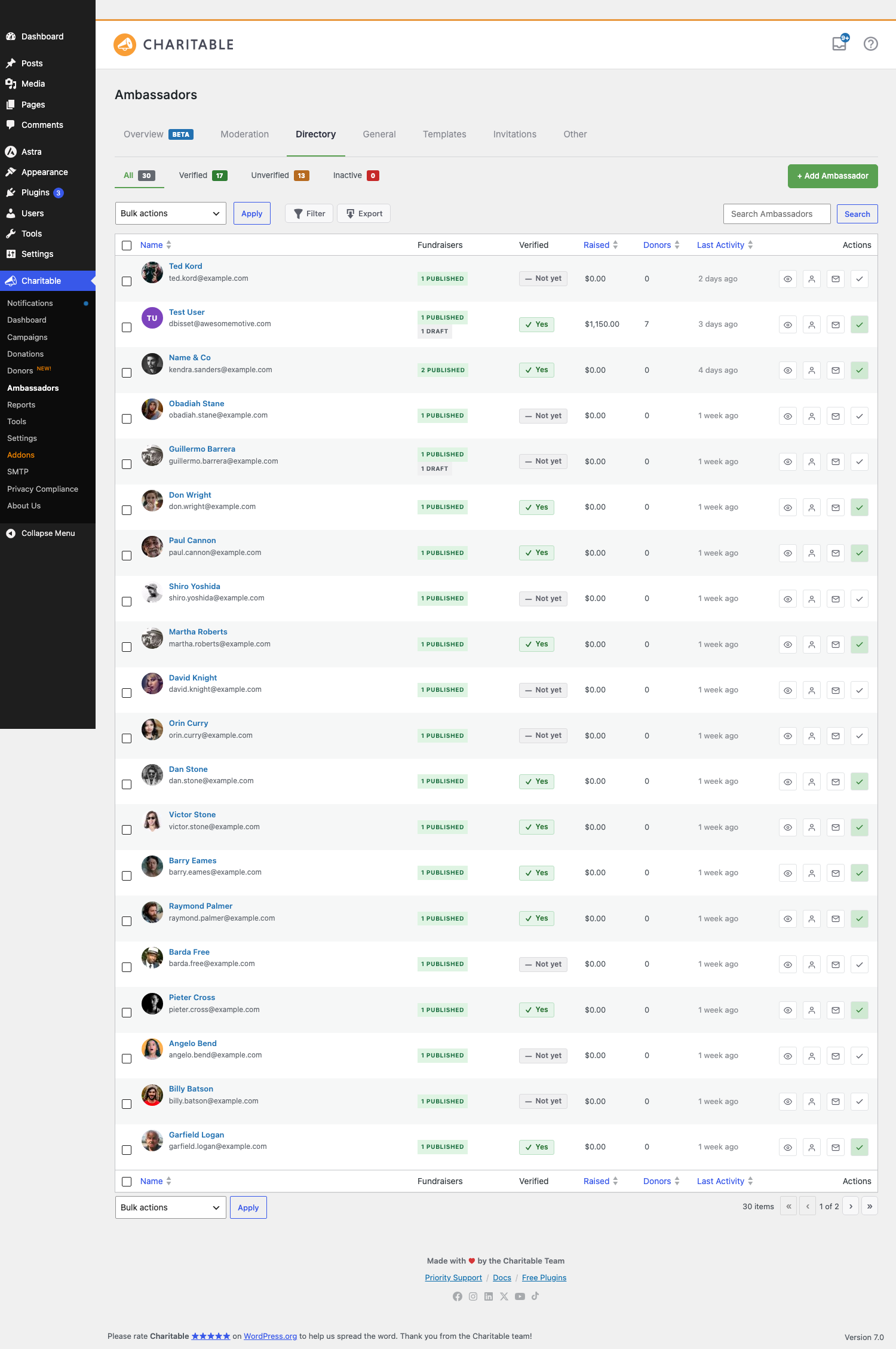
Go to Charitable » Ambassadors » Directory. The page opens with every ambassador on your site listed in newest-active-first order. The column headers for Raised, Donors, and Last Activity are clickable to sort the list.
The Four List Views
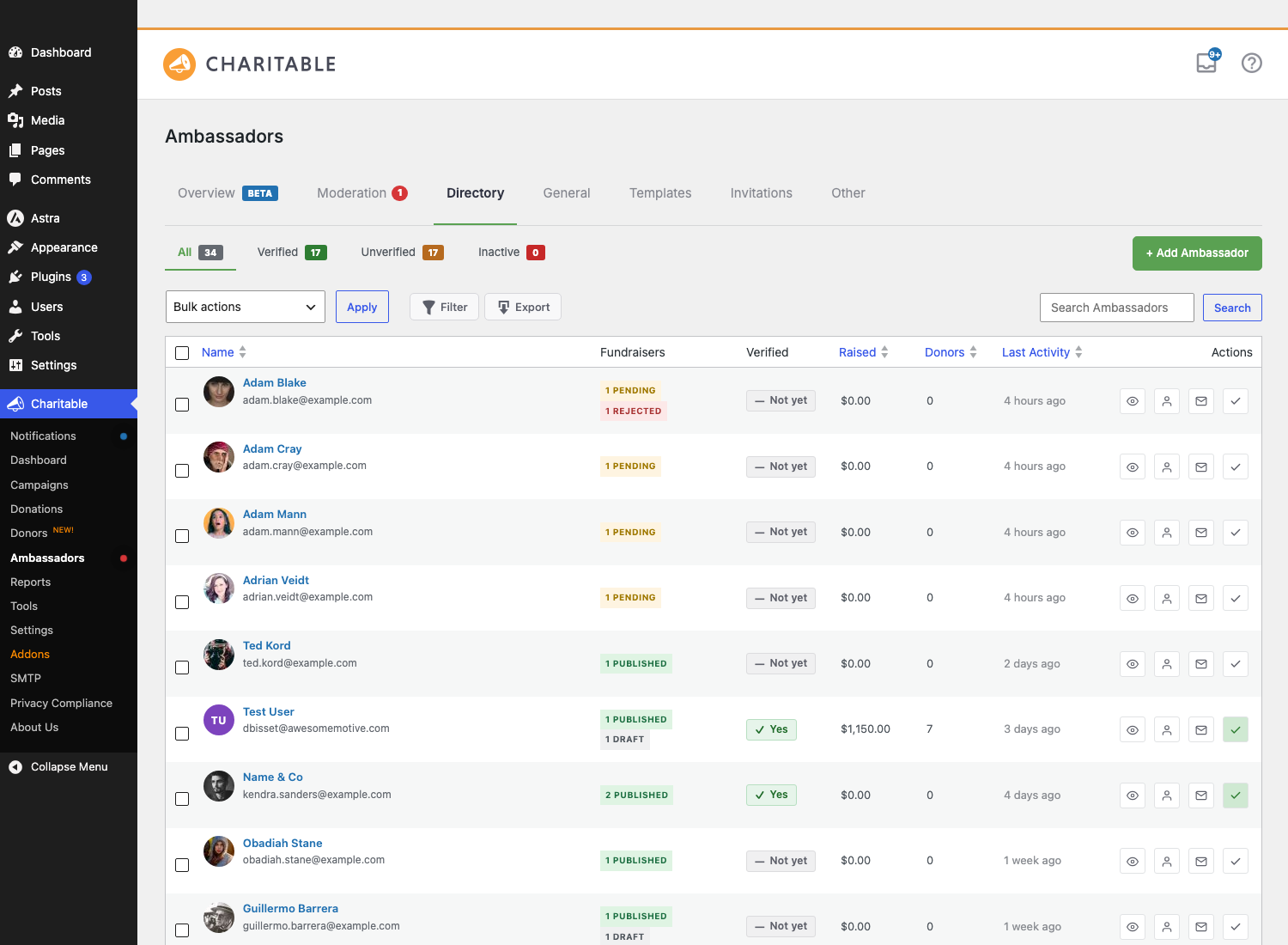
A sub-nav above the table splits the ambassador list into four scopes, each with its own count badge so you can see at a glance how many people are in each group.

| View | Who’s in it |
|---|---|
| All | Every ambassador, regardless of state. The default view. |
| Verified | Ambassadors you’ve explicitly marked as verified. The badge shows on their public-facing pages too. |
| Unverified | Ambassadors who haven’t been verified yet, which is the default state for new sign-ups. |
| Inactive | Ambassadors with no fundraising activity in the threshold window (90 days by default). Useful for finding people to re-engage. |
The Columns
Every row in the list shows the same eight columns, giving you enough context to act without having to open each profile individually.
| Column | What it shows |
|---|---|
| Checkbox | For bulk-selecting rows. |
| Name | Avatar (real Gravatar if registered, colored initials otherwise), display name, and email. |
| Fundraisers | How many fundraisers they’ve submitted, broken out by status (e.g. “3 published, 1 pending”). |
| Verified | A green check if they’re verified, dash otherwise. |
| Raised | Lifetime dollars raised across all their fundraisers. |
| Donors | Unique donor count across all their fundraisers. |
| Last Activity | Most recent ambassador action (submission, donation received, etc.). |
| Actions | Inline buttons: View Profile, Email, View As, and more. |
Searching and Filtering
The search box above the table runs a simple text search across display name, email, and user_login. Below it is a row of filters you can stack together to find exactly the group you’re looking for.

| Filter | What it does |
|---|---|
| Status mix | Filter to “has published fundraisers,” “has pending submissions,” or “has no fundraisers at all.” Useful for cleanup work. |
| Recruited | Filter to ambassadors who came in through an invite link, or those who self-signed-up. |
| Joined from / to | Date-range filter on the WP user’s user_registered date. |
| Parent campaign | Show only ambassadors who fundraised for a specific cause. Pre-fills when you click into a campaign’s Recruits sub-view from elsewhere. |
Filters stack, so you can combine Verified, Recruited, and a joined date range to find exactly the cohort you need. For example, “all ambassadors who came in through Invitations this year and have already been verified.”
Acting on a Row
Each row has inline action buttons in the Actions column so you can take care of the most common tasks without opening a profile first.
| Action | What it does |
|---|---|
| Profile | Opens the full ambassador profile page. |
| Verify / Unverify | One-click toggle. The badge appears immediately on their public-facing pages. |
| Send Email | Opens a modal where you can write a one-off email with smart-tag substitution. |
| Welcome Email | Resends the welcome email with a one-time magic-link auto-login. |
| View As | One-click login as that user so you can see what they see on /my-campaigns/ or any front-end page. Sets a return cookie so you can switch back to your admin session. |
The Full Ambassador Profile
Click an ambassador’s name or the Profile action button to open their full profile. The profile is a multi-tab dashboard for a single ambassador, giving you a much deeper view than the list alone.
- Overview – the at-a-glance card with lifetime raised, year-to-date, donor count, donation count, verified state, and recruit count.
- Campaigns – every fundraiser this person has submitted, with status, raised, and goal.
- Donations – every donation received across all their fundraisers, with date, donor, amount, and the specific fundraiser it went to.
- Form Data – what they filled out on the submission form (name, location, bio, etc.), useful when you need to check a detail without having to ask them.
Two more tabs, Logs and Notes, ship in a future version. The partials are already on disk and can be enabled via the charitable_ambassadors_directory_profile_tabs filter. See Directory Profile Tabs for a full walkthrough of each tab.
Bulk Actions
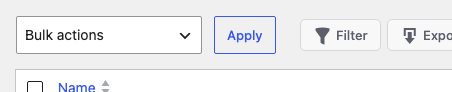
Tick the checkboxes on multiple rows and pick a Bulk Action from the dropdown above the table to act on everyone at once. Bulk actions are capped at 50 rows per call by default to keep things fast, so for larger jobs work in batches.
| Action | Use it when |
|---|---|
| Verify / Unverify | Onboarding a known batch of ambassadors at once. |
| Resend Welcome Email | A handful of ambassadors didn’t receive the original email, which is common after switching SMTP providers. |
| Export Selected to CSV | Feed your CRM, build a custom report, or hand off a roster to a marketing team. |
| Delete & Anonymize | GDPR-style account removal. Replaces the user’s identifying fields with anonymized data so historical donations stay attributable but their personal info is gone. |
Adding an Ambassador Manually
Sometimes you want to add an ambassador without waiting for them to submit a fundraiser: migrating from another platform, honoring a personal request from a major donor who wants to fundraise, or setting up a test account. Click Add Ambassador at the top right of the page.
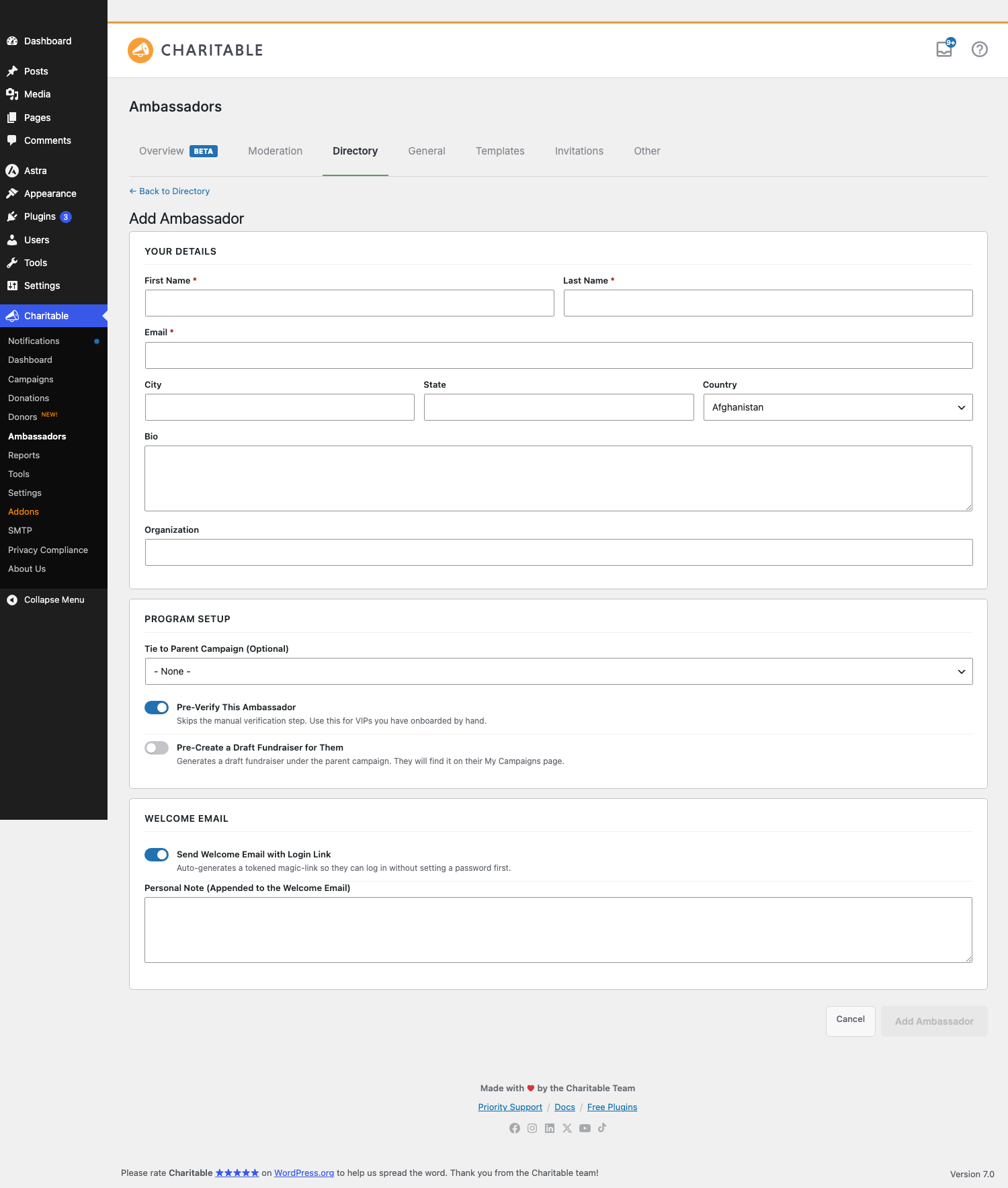
The form takes the same fields as the public submission form. Save, and an account is created. Tick Send welcome email to fire off the same welcome message a self-signup receives, including a magic link that logs them straight into /my-campaigns/ so they don’t have to set a password first.
Exporting
The Export CSV button at the top of the page exports the currently filtered view, whichever rows you’ve narrowed to with whichever sort order is active. If you’ve filtered to “all unverified ambassadors who joined this quarter,” that’s exactly what gets exported. For a full breakdown of what’s in each column, see CSV Exports.
Deleting and Anonymizing
There are two ways to remove an ambassador from your program, depending on whether you need to preserve the historical data or wipe it entirely.
| Path | What happens |
|---|---|
| Anonymize (recommended, GDPR-friendly) | The user’s login, email, display name, first and last name, and known PII metadata are replaced with anonymized values. Their fundraisers and donation history stay intact, but the person is no longer identifiable. |
| Hard Delete | The WP user is deleted. Their fundraisers are re-assigned to a sentinel user named “Anonymous Ambassador” so historical donations don’t lose their parent record. |
Both paths go through Charitable_Ambassadors_Directory_Delete. The sentinel user’s name and email can be customized via the charitable_ambassadors_directory_sentinel_email and charitable_ambassadors_directory_sentinel_display_name filters.
Tips Worth Keeping in Mind
A few habits that make managing the Directory a lot smoother once your program is running.
- Run a monthly cleanup pass. Filter to Inactive with zero fundraisers, then bulk-delete and anonymize. It keeps the list accurate and your data tidy.
- Treat the Verified badge as something that means something. Don’t auto-verify every signup. Reserve the badge for ambassadors you’ve actually vetted: real human, real cause, real intent to fundraise. It carries more weight when it’s used carefully.
- Use View As before replying to support requests. When an ambassador reports a confusing screen, click View As to see exactly what they’re seeing. It beats five minutes of “what does your screen show?” back-and-forth every time.
- If stats look stale, recalculate them. The Recalculate Stats action in the row menu re-runs the lifetime aggregates for a single user. There’s also a site-wide recalc button on the tools page. Both are useful after a bulk donation import.
Developer Reference
The rest of this page is for developers customizing the Directory.
Storage
Ambassador rows are standard WordPress users. The Directory adds no custom tables. The “is an ambassador” criterion is “has at least one published fundraiser, OR has the _charitable_ambassadors_directory_added_manually user-meta flag set by the Add form.”
Per-user stats (lifetime raised, donor count, last activity) are computed on the fly from donation and campaign tables, with results cached briefly per request.
Verified Flag
user_meta key: _charitable_ambassadors_verified
value:        '1' = verified, '' (empty) = not verified
Constant: Charitable_Ambassadors_Directory_Data::VERIFIED_META.
Filters
| Filter | Default | Purpose |
|---|---|---|
charitable_ambassadors_directory_list_columns | array of 8 columns | Add or remove columns from the list table. |
charitable_ambassadors_directory_bulk_actions | array of 5 actions | Add or remove bulk actions from the dropdown. |
charitable_ambassadors_directory_row_actions | array of row metas | Modify the inline row-action links. Receives $row_meta, $user_id. |
charitable_ambassadors_directory_action_buttons | array of action buttons | Modify the Actions column buttons. Receives $buttons, $user_id. |
charitable_ambassadors_directory_user_query_args | computed | Modify the WP_User_Query args before the list runs. Useful for excluding specific roles. |
charitable_ambassadors_directory_profile_tabs | array of 4 tabs | Add or remove profile tabs. The Logs and Notes partials exist but are not enabled by default. |
charitable_ambassadors_directory_form_data_extra_fields | [] | Add extra fields to the Form Data profile tab. Receives [], $user_id. |
charitable_ambassadors_directory_bulk_row_cap | 50 | Max rows per bulk action call. |
charitable_ambassadors_directory_inactive_threshold_days | 90 | Days of inactivity before a user appears in the Inactive view. |
charitable_ambassadors_directory_welcome_ttl | 24 * HOUR_IN_SECONDS | Magic-link lifetime for the welcome email auto-login. |
charitable_ambassadors_directory_sentinel_email | anonymous@… | Sentinel email used when a hard-delete reassigns a deleted user’s fundraisers. |
charitable_ambassadors_directory_sentinel_display_name | Anonymous Ambassador | Sentinel display name. |
charitable_ambassadors_directory_anonymize_display_name | Anonymous Ambassador | Display name an anonymized user receives. |
charitable_ambassadors_directory_anonymize_email_pattern | anonymous-%[email protected] | Email pattern (sprintf with user ID) for anonymized users. |
charitable_ambassadors_directory_anonymize_meta_keys | array of PII keys | User-meta keys cleared on anonymize. |
charitable_ambassadors_directory_csv_max_rows | 10000 | Cap on CSV export rows. |
charitable_ambassadors_directory_csv_cell | '' | Provide a custom value for an unknown column key during CSV export. Receives ('', $col, $user). |
charitable_ambassadors_directory_send_email_smart_tags | array of tags | Add smart-tag substitutions to the Send Email modal. |
charitable_ambassadors_directory_send_email_max_per_hour | 100 | Throttle on Send Email per moderator per hour. |
charitable_ambassadors_directory_add_fields | computed | Modify fields shown on the Add Ambassador form. |
Actions
| Action | Args | Fires when |
|---|---|---|
charitable_ambassadors_directory_verification_changed | $user_id, $is_verified, $moderator_id | A verify or unverify call commits. |
charitable_ambassadors_directory_email_sent | $user_id, $subject, $body, $moderator_id | A Send Email modal submit lands. |
charitable_ambassadors_directory_ambassador_added | $user_id, $post_data | The Add Ambassador form submit lands. |
charitable_ambassadors_directory_before_anonymize | $user_id | Just before anonymization runs. |
charitable_ambassadors_directory_after_anonymize | $user_id | Just after anonymization completes. |
charitable_ambassadors_directory_before_hard_delete | $user_id | Just before hard delete runs. |
charitable_ambassadors_directory_after_hard_delete | $user_id, $sentinel_id | After hard delete and post reassignment. |
AJAX Endpoints
All on wp_ajax_ only, nonce action charitable_ambassadors_directory, capability manage_charitable_settings:
| Action | Purpose |
|---|---|
charitable_ambassadors_directory_verify_toggle | Toggle a user’s verified flag. |
charitable_ambassadors_directory_send_welcome | Re-send the welcome email with a fresh magic link. |
charitable_ambassadors_directory_send_email | Send a one-off email with smart-tag substitution. |
charitable_ambassadors_directory_recalc_stats | Re-run lifetime aggregates for a single user. |
Form-POST Handlers
| URL | Purpose |
|---|---|
admin-post.php?action=charitable_ambassadors_directory_bulk | Bulk Actions handler. |
admin-post.php?action=charitable_ambassadors_directory_add_submit | Add Ambassador form submit. |
admin-post.php?action=charitable_ambassadors_directory_manual_recalc | Site-wide recalc-stats button. |
Magic-Link Auto-Login
The welcome email contains a one-time magic link consumed on init priority 5 via Charitable_Ambassadors_Directory::maybe_consume_magic_link(). Default lifetime is 24 hours, filterable via charitable_ambassadors_directory_welcome_ttl.
View As
The View As action signs the moderator out and signs in as the target user, with a return cookie that lets them switch back to their original session with one click. Powered by the User Switching plugin when installed. The Directory wires the View As button through to its switch_to_user_url() helper.
Capabilities
manage_charitable_settings is required for all admin operations and is granted to Administrators by default.
Customization Examples
Add a “Phone” column to the Directory list:
add_filter( 'charitable_ambassadors_directory_list_columns', function ( $cols ) {
    $cols['phone'] = __( 'Phone', 'your-textdomain' );
    return $cols;
} );
Lower the inactive threshold to 30 days:
add_filter( 'charitable_ambassadors_directory_inactive_threshold_days', function () {
    return 30;
} );
Re-enable the Logs and Notes profile tabs:
add_filter( 'charitable_ambassadors_directory_profile_tabs', function ( $tabs, $user_id ) {
    $tabs['logs']  = [ 'label' => 'Logs',  'count' => null ];
    $tabs['notes'] = [ 'label' => 'Notes', 'count' => null ];
    return $tabs;
}, 10, 2 );
Webhook your CRM whenever an ambassador is verified:
add_action( 'charitable_ambassadors_directory_verification_changed', function ( $user_id, $is_verified, $moderator_id ) {
    if ( ! $is_verified ) {
        return;
    }
    wp_remote_post( 'https://crm.example.com/hook', [
        'body' => [
            'user_id'      => $user_id,
            'verified_at'  => time(),
            'verified_by'  => $moderator_id,
        ],
    ] );
}, 10, 3 );
Extend the welcome email magic-link lifetime to 7 days:
add_filter( 'charitable_ambassadors_directory_welcome_ttl', function () {
    return 7 * DAY_IN_SECONDS;
} );
Wrapping Up
That covers everything the Directory can do for you. Whether you’re onboarding a new batch of ambassadors, tracking down someone who needs a nudge, preparing a CRM export, or doing a quarterly cleanup pass, the Directory is your go-to screen for managing the people in your program.
If you have questions or run into anything that isn’t covered here, our support team is happy to help.
You May Also Want to Read
These are the Ambassadors docs most closely connected to the Directory. Bookmark the ones relevant to how you manage your program.
- Directory Profile Tabs – a deep dive into the four tabs inside each ambassador’s profile page.
- CSV Exports – the full column dictionary for every export point, including the Directory list export.
- Invitations – understand which ambassadors came in through which invite link.
- Overview Dashboard – the Top Ambassadors widget pulls from the same underlying data.
- Hooks & filters in Ambassadors – the full developer reference.
Helpful Links
🤝 Get help when you need it
Connect with Customer Support →
📑 Find the guide you need
Browse the Documentation Hub →
⬇️ Download proven strategies, campaign ideas, and expert tools
🔗 Let your AI Assistant do the fundraising work for you.
Connect Charitable to your AI assistant →
💸 Get Free Fundraising Resources
Head to the Charitable Fundraising Hub →
🤔 Got questions about Charitable?
Charitable FAQs →
Need help understanding non-profit terms and jargon?
See our Non-Profit Glossary →





