
Charitable macht es einfach, Offline-Spenden – wie Schecks, Bargeld oder Banküberweisungen – direkt neben Ihren regulären Online-Spenden anzunehmen und zu verwalten. So zählt jeder Beitrag zu Ihren Spendenkampagnenzielen und Ihre Aufzeichnungen bleiben vollständig und transparent.
In diesem Leitfaden erfahren Sie, wie Sie Offline-Spenden mit Charitable aktivieren und nutzen.
Offline-Spenden aktivieren
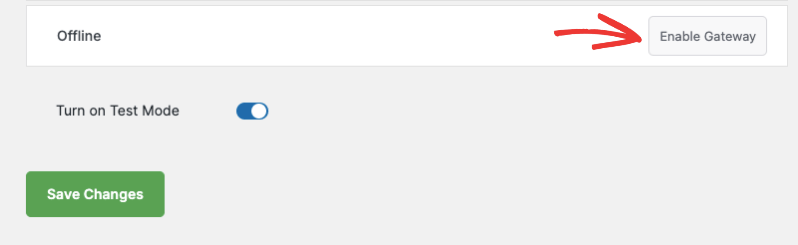
Gehen Sie in Ihrem WordPress-Dashboard zu Charitable » Einstellungen » Zahlungs-Gateways. Suchen Sie in der Liste nach Offline-Spenden und klicken Sie darauf, um sie zu aktivieren.
Anweisungen für Offline-Spenden anpassen
Nach der Aktivierung klicken Sie auf die Schaltfläche Gateway-Einstellungen, um die Konfigurationsseite für Offline-Spenden zu öffnen.
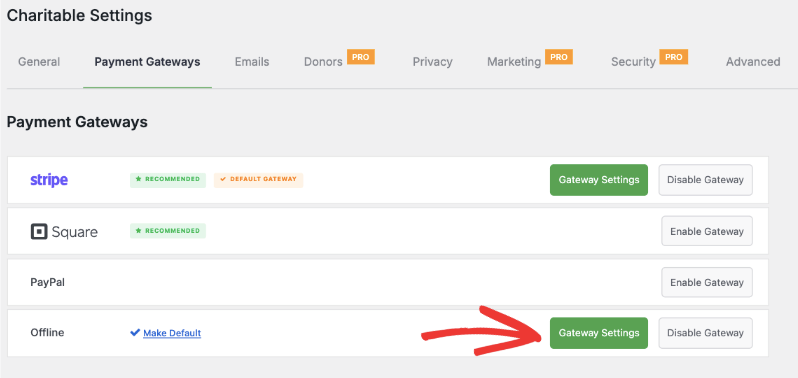
Hier können Sie Spendern direkt auf Ihrem Spendenformular klar erklären, wie sie offline spenden können. Sie können zum Beispiel Anweisungen für Scheckzahlungen oder Banküberweisungen geben, einschließlich:
- An wen Schecks ausgestellt werden sollen
- Die Postanschrift Ihrer Organisation für Schecks
- Bankdaten für Überweisungen (Bankname, Kontonummer, Referenzinformationen usw.)
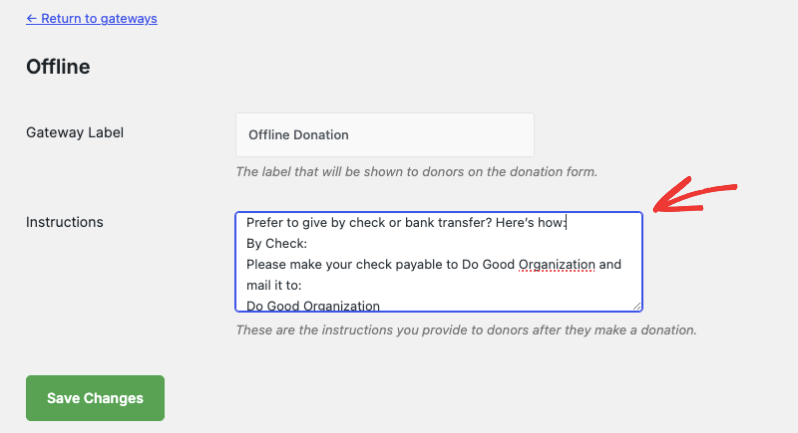
Hier sind Beispielanweisungen. Passen Sie diese Informationen gerne an die Bedürfnisse Ihrer Organisation an.
Per Scheck:
Stellen Sie Schecks aus auf Do Good Organization und senden Sie diese an:
Do Good Organization
123 Kindness Ave
Suite 400
New York, NY 10001
USA
Per Banküberweisung:
Bank: Community Trust Bank
Kontoinhaber: Do Good Organization
Kontonummer: 987654321
Bankleitzahl: 021000021
Verwendungszweck: [Ihr Name oder Kampagnenname]
Profi-Tipp:
Geben Sie auf Ihren Formularen immer klare, einfache Anweisungen für Offline-Spenden und erwägen Sie, sich für jede erhaltene Offline-Spende persönlich zu bedanken.
Stellen Sie sicher, dass Sie Ihre Änderungen im Tab „Zahlungs-Gateways“ speichern.
Aufzeichnungen von Offline-Spenden verwalten
Wenn ein Spender die Option „Offline-Spende“ wählt, wird diese automatisch unter Charitable » Spenden aufgezeichnet. In der Spalte „Gespendeter Betrag“ sehen Sie, ob die Spende über die Option „Offline-Spende“ getätigt wurde.
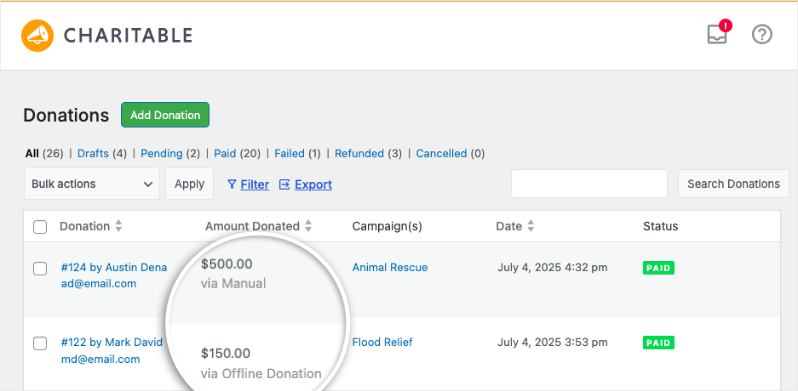
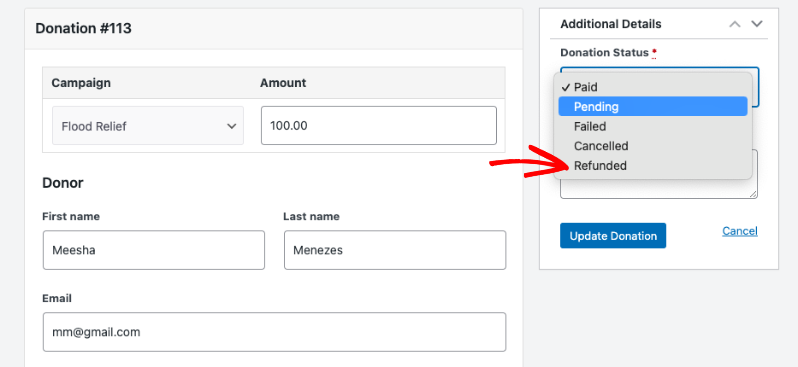
Sie können diese Aufzeichnungen manuell bearbeiten, um den Status auf ausstehend, bezahlt, fehlgeschlagen, storniert oder erstattet zu ändern.
Wenn Sie Spenden außerhalb von Charitable erhalten haben, können Sie auch manuell neue Spendenaufzeichnungen dafür erstellen.
Gehen Sie in Ihrem WordPress-Dashboard zu Charitable » Spenden und klicken Sie auf die Schaltfläche Spende hinzufügen.

Wählen Sie auf der Seite der Spendenaufzeichnung die Kampagne und den erhaltenen Betrag aus. Anschließend können Sie entweder neue Spenderinformationen manuell ausfüllen oder einen bestehenden Spender auswählen, der in der Vergangenheit gespendet hat.
Wenn Sie eine Offline-Spende aufzeichnen, kann Charitable eine personalisierte E-Mail-Quittung senden (genau wie bei Online-Spenden), damit sich jeder Unterstützer wertgeschätzt fühlt.
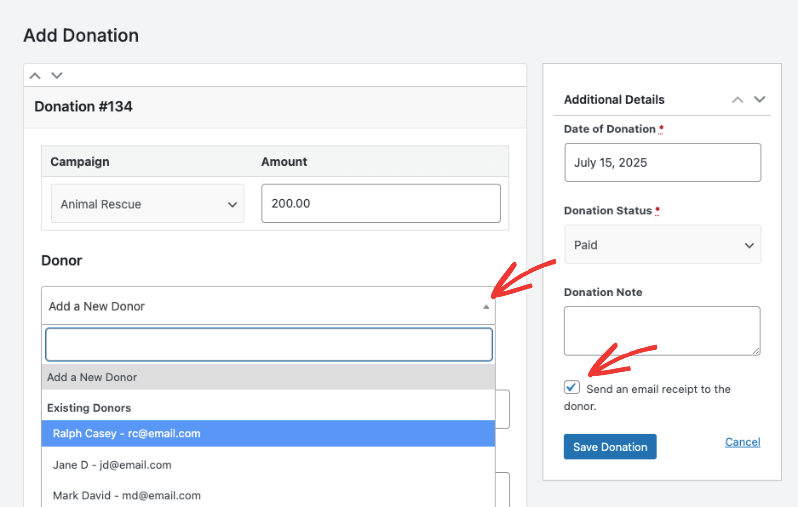
Klicken Sie auf die Schaltfläche Spende speichern, um Ihre Änderungen zu sichern.
Berichterstattung über Offline-Spenden
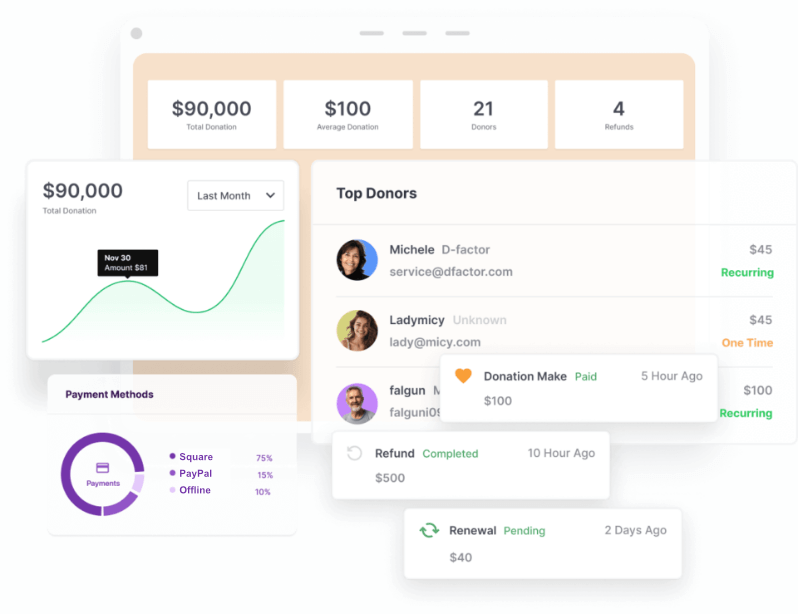
Alle Ihre Spenden – online und offline – sind in Ihren Charitable-Berichten enthalten. Dies gibt Ihnen einen vollständigen und genauen Überblick über Ihren Spendenfortschritt, die Spenderaktivität und die Kampagnenleistung.
Sie können diese Berichte unter dem Tab Charitable » Berichte in Ihrem WordPress-Menü aufrufen.
Andere in Charitable verfügbare Zahlungs-Gateways
Charitable erleichtert die Annahme von Spenden über eine Vielzahl von Zahlungs-Gateways und gibt Ihren Unterstützern die Flexibilität, mit ihrer bevorzugten Methode zu spenden.
Charitable bietet drei Zahlungs-Gateways direkt einsatzbereit:
Weitere Gateway-Optionen sind im Charitable Pro Plugin verfügbar, darunter Authorize.net, Mollie, GoCardless und mehr.
Erfahren Sie mehr über Charitable Pro »
Sehen Sie sich auch den Unterschied zwischen Charitable Pro und Lite » an.
Jetzt können Sie Zahlungsgateways verwalten und konfigurieren, indem Sie in Ihrem WordPress-Dashboard zu Charitable » Einstellungen » Zahlungsgateways navigieren.
Detaillierte Einrichtungsanweisungen finden Sie unter Zahlungs-Gateways einrichten »
Wir haben auch Gateway-spezifische Dokumentationen erstellt, die Details zur Einrichtung Ihrer ausgewählten Gateways enthalten. Wählen Sie Ihr Gateway aus der folgenden Liste aus:
- PayPal
- Square
- Stripe
- Authorize.Net
- GoCardless
- Braintree
- Windcave
- Payfast
- PayUMoney
- Payrexx
- Paystack
- Mollie
Das Akzeptieren von Offline-Spenden mit Charitable ist unkompliziert und stellt sicher, dass jeder Beitrag – ob online oder offline getätigt – in Ihren Spendenbemühungen erfasst wird.
Indem Sie Offline-Spenden aktivieren, klare Anweisungen geben und Ihre Aufzeichnungen auf dem neuesten Stand halten, bieten Sie jedem Unterstützer ein reibungsloses Spenden-Erlebnis und behalten einen vollständigen Überblick über Ihre Wirkung.
Profi-Tipp:
Das Anbieten mehrerer Zahlungsoptionen kann Ihre Konversionsrate erhöhen und Ihnen helfen, weltweit mehr Spender zu erreichen.
Wenn Sie eine Videoanleitung wünschen, sehen Sie sich unser Tutorial unten an, das Schritt-für-Schritt-Details von der Einrichtung einer Kampagne bis zum Empfang von Zahlungen behandelt.
Weitere Informationen erhalten
Hier sind einige der beliebtesten Anleitungen und Hilfsartikel für Sie:
- Spenden im WordPress-Dashboard erstellen und bearbeiten
- Verwendung des Spenderverwaltungssystems
- Verbindung mit Google Analytics herstellen
- Probleme mit nicht gesendeten Spenden-E-Mails
- Widgets und Shortcodes verwenden
Mehr Tipps zum Fundraising und Ratschläge für gemeinnützige Organisationen?
Wir teilen regelmäßig praktische Anleitungen, bewährte Strategien und Insider-Tipps, um Ihnen zu helfen, mehr Spenden zu sammeln und stärkere Spenderbeziehungen aufzubauen. Schließen Sie sich Tausenden von gemeinnützigen Organisationen an, die unsere besten Inhalte direkt erhalten:
- Abonnieren Sie unseren Newsletter – Erhalten Sie wöchentliche Tipps und exklusive Anleitungen in Ihrem Posteingang
- Abonnieren Sie unseren YouTube-Kanal – Sehen Sie sich Schritt-für-Schritt-Tutorials und Erfolgsgeschichten an
- Folgen Sie uns auf LinkedIn – Vernetzen Sie sich mit unserer Community und erhalten Sie tägliche Einblicke in Non-Profit-Organisationen
- Folgen Sie uns auf TikTok – Aufschlussreiche & unterhaltsame Videos, die Ihnen helfen, Ihre Sache voranzubringen
Kein Schnickschnack, nur umsetzbare Ratschläge von Menschen, die die Herausforderungen verstehen, denen Sie täglich gegenüberstehen.
Häufig gestellte Fragen (FAQ)
Kann ich die Anweisungen für Offline-Spenden anpassen?
Ja! Sie können die Anweisungen, die für Offline-Spenden angezeigt werden – wie Ihre Postanschrift für Schecks, Banküberweisungsdetails und andere spezielle Hinweise – vollständig anpassen, indem Sie die Gateway-Einstellungen für Offline-Spenden verwenden.
Wie werden Offline-Spenden in Berichten erfasst?
Offline-Spenden werden zusammen mit Online-Spenden erfasst. Sie erscheinen in Ihrer Charitable-Spendenliste und in den Berichten, sodass Ihre Spendenbeträge immer alle Beiträge widerspiegeln, unabhängig davon, wie der Spender gespendet hat.
Kann Charitable Spendenquittungen für Offline-Spenden versenden?
Absolut. Charitable versendet personalisierte E-Mail-Quittungen für Offline-Spenden, genau wie für Online-Spenden. So bleiben alle Ihre Spender informiert und wertgeschätzt.
Kann ich Offline-Spenden hinzufügen, die ich außerhalb von Charitable erhalten habe?
Ja! Sie können Spendenaufzeichnungen für alle erhaltenen Offline-Spenden manuell hinzufügen. Gehen Sie einfach zu Charitable » Spenden und klicken Sie auf Spende hinzufügen, um die Details einzugeben.
Kann ich anonyme Spenden bei Offline-Spenden zulassen?
Ja. Wenn Anonymität für einen bestimmten Spender wichtig ist, geben Sie dies einfach in dessen Spenderdatensatz ein, wenn Sie ihn manuell eingeben.
Wie ändere ich den Status einer Offline-Spende?
Gehen Sie in Ihrem Dashboard zu Charitable » Spenden, suchen Sie die zu aktualisierende Spende und bearbeiten Sie jederzeit deren Status (ausstehend, bezahlt, storniert, erstattet usw.).
Gibt es eine Möglichkeit, Bardenspenden anzunehmen?
Ja! Listen Sie Ihre Anweisungen für Bardenspenden mit Ihren Anweisungen für Offline-Zahlungen auf. Wenn Sie eine Bardenspende erhalten, erfassen Sie diese manuell in Charitable, damit sie in Ihren Summen und Berichten berücksichtigt wird.
Wer kann zusätzliche Zahlungs-Gateways mit Charitable nutzen?
Die Lite-Version bietet standardmäßig Stripe, Square, PayPal und Offline-Spenden. Für weitere Gateway-Optionen (wie Authorize.net, Mollie, GoCardless, Braintree und andere) müssen Sie auf Charitable Pro upgraden.
Wo finde ich detaillierte Einrichtungsanleitungen für jedes Zahlungs-Gateway?
Besuchen Sie unsere Dokumentation zum Einrichten von Zahlungs-Gateways und wählen Sie Ihr gewünschtes Gateway aus der Liste aus.
Benötige ich Charitable Pro, um Offline-Spenden anzunehmen?
Nein. Offline-Spenden sind sowohl in der Lite- als auch in der Pro-Version von WP Charitable verfügbar, sodass Sie auch mit dem kostenlosen Plan Schecks, Bargeld oder Banküberweisungen annehmen können.
Werden Offline-Spenden auf dem Fortschrittsbalken meiner Spendenkampagne angezeigt?
Ja. Sobald Sie eine Offline-Spende erfasst und ihren Status auf „Bezahlt“ gesetzt haben, wird sie für Ihr Kampagnenziel gezählt und der Fortschrittsbalken automatisch aktualisiert.
Kann ich eine Offline-Spende nach der Erfassung bearbeiten oder löschen?
Absolut. Sie können jede Spende – online oder offline – jederzeit im Bereich Charitable » Spenden bearbeiten oder löschen. So bleiben Ihre Aufzeichnungen korrekt und aktuell.
Wie sende ich eine Spendenquittung für eine Offline-Spende erneut?
Wenn ein Spender seine Quittung verlegt, bearbeiten Sie seinen Spenden-Datensatz. Unter „Spendenaktionen“ können Sie die E-Mail „Spender: Spendenquittung“ auswählen. Klicken Sie dann auf die Schaltfläche „E-Mail erneut senden“. Sie können auch die PDF-Quittung herunterladen und sie ihm per E-Mail zusenden. Sehen Sie sich unseren Leitfaden an: Spenden-E-Mails vom Dashboard erneut senden
Außerdem können Spender, wenn das Spender-Dashboard aktiviert ist, sich in ihre eigenen Konten einloggen und ihre Quittungen jederzeit herunterladen.
Können Spender ihre Offline-Spenden in einem Spender-Dashboard sehen?
Ja. Wenn ein Spender während des Spendenprozesses ein Konto erstellt oder dieselbe E-Mail-Adresse für mehrere Spenden verwendet, werden sowohl seine Online- als auch seine Offline-Geschenke in seinem Spender-Dashboard angezeigt (sofern Ihre Website diese Funktion aktiviert hat).
Kann ich eine Genehmigung verlangen, bevor eine Offline-Spende als bezahlt angezeigt wird?
Ja. Standardmäßig sind neue Offline-Spenden auf „Ausstehend“ gesetzt. Ändern Sie den Status erst auf „Bezahlt“, nachdem Sie die Spende erhalten und bestätigt haben (Scheck, Bareinzahlung usw.).
Wie stelle ich sicher, dass Offline-Spenden keine sofortigen Quittungen auslösen, bevor die Zahlung bestätigt wird?
Charitable sendet eine Quittung erst, nachdem Sie die Offline-Spende als „Bezahlt“ markiert haben. Dies stellt sicher, dass Spender die Bestätigung erst erhalten, nachdem ihre Spende eingegangen ist.
Können benutzerdefinierte Informationen von Offline-Spendern gesammelt werden (z. B. Adressen, Widmungen)?
Ja! Sie können benutzerdefinierte Felder zu Ihren Spendenformularen hinzufügen (in Charitable Pro), und alle gesammelten Informationen werden auch an Offline-Spenden angehängt, die über den Standardprozess erfasst werden.
Können Spender beim Bezahlvorgang „Offline-Spende“ wählen und dann ihre Meinung ändern und online bezahlen?
Nicht automatisch – wenn ein Spender „Offline“ wählt, aber stattdessen eine Online-Methode verwenden möchte, muss er eine neue Spende über sein bevorzugtes Gateway einreichen. Sie können dies in Ihren Anweisungen erläutern.
Muss ich für Offline-Spenden Unterlagen aufbewahren?
Es ist bewährte Praxis, Kopien (gescannt oder physisch) von Schecks und Korrespondenz im Zusammenhang mit Offline-Geschenken aufzubewahren, insbesondere für Ihre eigene Buchhaltung und im Falle von Prüfungen. Charitable ermöglicht es Ihnen, Ihre manuellen und Offline-Spendendatensätze zu filtern und zu exportieren.
Wo kann ich eine Zusammenfassung aller auf meiner Website verwendeten Spendenmethoden sehen?
Gehen Sie zu Charitable » Berichte, um Spendenaufschlüsselungen nach Zahlungsmethode anzuzeigen – einschließlich Stripe, PayPal, Square, Authorize.net und Offline.
Können Offline-Spenden in Charitable zurückerstattet oder als fehlgeschlagen markiert werden?
Ja – bearbeiten Sie einfach den Spenden-Datensatz und legen Sie den entsprechenden Status fest (zurückerstattet, fehlgeschlagen usw.), damit Ihre Datensätze und Berichte korrekt bleiben.
Benötigen Spender ein Konto, um offline zu spenden?
Nein, Spender können offline spenden, ohne ein Konto zu erstellen. Wenn Sie jedoch ein Spender-Dashboard anbieten oder ihnen ermöglichen möchten, ihre Spendenhistorie einzusehen, hilft es, wenn sie für jede Spende dieselbe E-Mail-Adresse verwenden, um ihre Geschenke zu verknüpfen.
Wenn Sie weitere Fragen haben oder Hilfe bei einem bestimmten Szenario benötigen, besuchen Sie unser Dokumentations-Hub »
Wenn Sie ein Lite-Benutzer sind, können Sie auch Hilfe im WordPress-Supportforum erhalten.
Wenn Sie das Charitable Pro Plugin abonniert haben, können Sie uns für bevorzugten Support kontaktieren.


